GBS-210 - Sicherheitskamera Jablotron - Kostenlose Bedienungsanleitung
Finden Sie kostenlos die Bedienungsanleitung des Geräts GBS-210 Jablotron als PDF.


| Produkttyp | Sicherheitskamera |
| Marke | Joblotron |
| Modell | GBS-210 |
| Abmessungen (B x H x T) | 12 x 8 x 6 cm |
| Gewicht | 350 g |
| Stromversorgung | 5V DC, 1A (USB-Netzteil) |
| Stromverbrauch | ca. 2,5 W |
| Bildsensor | CMOS, 1920 x 1080 Pixel |
| Nachtsicht | Infrarot-LEDs, Reichweite bis 10 m |
| Bewegungserkennung | Ja, einstellbare Empfindlichkeit |
| Blickwinkel | 110 Grad |
| Speicher | MicroSD-Karte (max. 128 GB) oder Cloud |
| Konnektivität | WLAN 2,4 GHz, RJ45-Ethernet |
| Protokoll | RTSP, ONVIF-kompatibel |
| Audio | Eingebautes Mikrofon und Lautsprecher |
| Schutzart | IP65 (wetterfest) |
| Betriebstemperatur | -20 °C bis +50 °C |
| Montage | Wand- oder Deckenmontage, inkl. Halterung |
| Fernzugriff | Über App (iOS/Android) und Webbrowser |
| Reinigung | Gehäuse mit weichem, trockenem Tuch abwischen |
| Ersatzteile | Netzteil, Kabel und Halterung separat erhältlich |
| Zubehör im Lieferumfang | Netzteil, USB-Kabel, Montageset, Kurzanleitung |
Häufig gestellte Fragen - GBS-210 Jablotron
Benutzerfragen zu GBS-210 Jablotron
0 Frage zu diesem Gerät. Beantworten Sie die, die Sie kennen, oder stellen Sie Ihre eigene.
Eine neue Frage zu diesem Gerät stellen
Laden Sie die Anleitung für Ihr Sicherheitskamera kostenlos im PDF-Format! Finden Sie Ihr Handbuch GBS-210 - Jablotron und nehmen Sie Ihr elektronisches Gerät wieder in die Hand. Auf dieser Seite sind alle Dokumente veröffentlicht, die für die Verwendung Ihres Geräts notwendig sind. GBS-210 von der Marke Jablotron.
BEDIENUNGSANLEITUNG GBS-210 Jablotron
GBS-210 “VIVO” glass break detector
The GBS-210 glass break detector detects the breaking of glass windows. A dual technology detection method (air pressure and sound analysis) is used. Used processing guarantees high sensitivity to the breaking of all types of glass. The sensitivity can be adjusted to compensate for various window sizes and mounting distances. The GBS-210 distinguishes itself with outstanding RF immunity. A built in LED indicator allows for easy testing and it also provides an optional alarm memory feature.
Installation
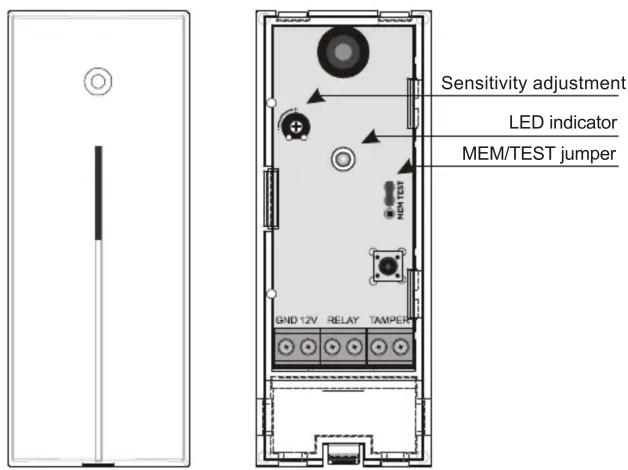
The Vivo is designed for indoor applications. It should be mounted on a flat wall. The unit must have an unobstructed view of the protected glass (in the case of heavy curtains, mount the detector on the window frame behind the curtains). Do not place the detector close to any apparatuses that can generate air pressure changes, low frequency noise or vibrations.
- Open the cover of the detector (press in the plastic tab on the bottom with a screwdriver).
- Remove the PCB by pressing the flexible tab.
- Punch through the pre-formed holes for cables and screws.
- Attach the rear housing section to the wall.
- Return the PCB into the housing and connect wires to the terminals.
- Close the cover.
Note: To avoid damaging the microphone when closing the cover, ensure that the front housing is properly aligned before snapping shut!
Terminals
+12V, GND power supply
TAMPER tamper output (normally closed)
RELAY alarm output (normally closed)
Jumpers
MEM/TEST jumper controls the red LED function in the following way:
TEST red LED confirms detector's triggering
MEM red LED indicates an alarm memory (it can be erased by temporarily switching off the power supply or disconnecting the jumper).
If the jumper is removed, the red LED will remain off.
Testing and adjusting the detector
Place the MEM/TEST jumper to the TEST position (red LED will indicate triggering).
- Strike carefully the glass with a cushioned instrument. Attention, do not break the glass!
- The red LED will flash shortly after a strike if the air pressure sensor sensitivity is suitably set.
- The sensitivity can be adjusted with the variable resistor. Note: Too high sensitivity can be a source of false alarms.
- For complete testing of the detector it is recommended to use the GBT-212 glass break simulator. The red LED will light for 2 seconds if glass breaking is detected.
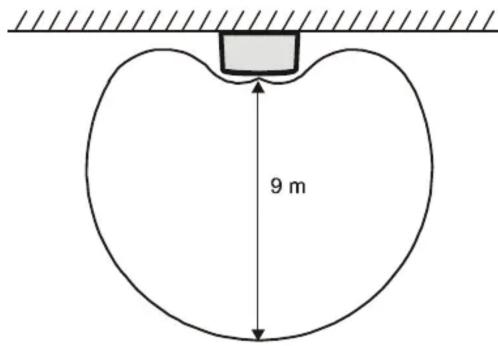
GBS-210 "VIVO" working range diagram
Notes:
The memory function can be used to determine the source of an alarm in the system. If several detectors are used in one zone, you can set the MEM/TEST jumper into the MEM position. Then, if this detector triggers an alarm, the red LED will remain on until the power supply is switched off or the MEM/TEST jumper is disconnected. The detector operates as usual even while the memory of alarm is indicated.
A glass break detector located at the entrance can trigger a false alarm when opening the door (air pressure change combined with keys clinking on glass or a door's squeaking can simulate the glass break noise). Therefore it is recommended to connect the glass break detector into the delay zone of a control panel.
If there is any device in the protected area which can generate a loud noise (air conditioning, heating or cooling systems etc.), ensure that this noise does not trigger the glass break alarm. If it does, it is necessary to relocate the detector or assure that these devices will not be on when the security system is armed.
Specification
| Power supply: | 12 V DC ± 25% |
| Power consumption (LED off): | max.10 mA |
| Maximum consumption (LED on): | max. 35 mA |
| Terminals size: | 1 mm2 |
| Alarm output: | normally closed, max. 60V / 50 mA,internal resistance max.16 Ohm |
| Tamper output: | normally closed, max. 60 V / 50 mA,internal resistance max.16 Ohm |
| Detection range: | max. 9 m |
| Minimum glass dimensions: | 0.6 x 0.6 m |
| Initialization: | max. 60 s |
| Security level - EN 50131-1, CLC/TS 50 131-2-7-1 | grade 2, |
| Environment - class | II. – general indoor, (EN 50131-1) |
| Operating temperatures | -10 to +40 °C |
| EMC | EN50130-4,EN 55022 |


JABLOTRON ALARMS a.s. hereby declares that the GBS-210 is in compliance with the essential requirements and other relevant provisions of Directive 2004/108/EC. The original of the conformity assessment can be found on the web site www.jablotron.com, Technical Support section.
Note: Although this product does not contain any harmful materials we suggest you return the product to the dealer or directly to the manufacturer after use.
JABLOTRON
JABLOTRON ALARMS a.s.
Pod Skalkou 4567/33
46601 Jablonec nad Nisou
Czech Republic
Tel.: +420 483 559 911
Fax: +420 483 559 993
Internet: www.jablotron.com
Marke : Jablotron
Modell : GBS-210
Kategorie : Sicherheitskamera