JA-80N - Sicherheitskamera Jablotron - Kostenlose Bedienungsanleitung
Finden Sie kostenlos die Bedienungsanleitung des Geräts JA-80N Jablotron als PDF.


| Produkttyp | Außenliegender RFID-Kartenleser |
| Modell | JA-80N |
| Marke | Joblotron (Jablotron) |
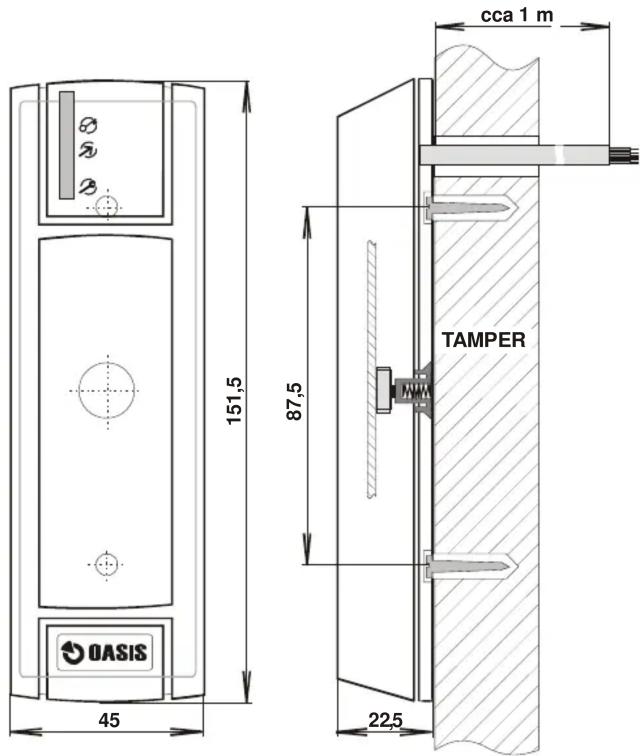
| Abmessungen (B x H x T) | 46 x 150,5 x 22,5 mm |
| Gewicht | ca. 150 g (geschätzt) |
| Gehäuseschutzart | IP65 (staubdicht, Strahlwasserschutz) |
| Stoßfestigkeit | IK08 (5 Joule Schlagfestigkeit) |
| Umgebungsklasse | Klasse IV – Außenbereich (nach EN 50131-1) |
| Betriebstemperaturbereich | -25 °C bis +60 °C |
| Stromversorgung | 10–16 V DC, typ. 60 mA Standby |
| Ausgangssignal | Wiegand 26b (D0, D1) |
| RFID-Technologie | 125 kHz EM Unique (kompatibel mit PC-01/PC-02) |
| Kabellänge | ca. 1 m |
| Zertifizierungen | CE, FCC ID VL6JA80N |
| Einbruchmeldegrad | Grad 2 (EN 50131-1, TS 50131-3) |
| Anschlussmöglichkeit | Oasis 80 Zentrale über WJ-80, oder AS-80 |
| Funktionen | Zugangskontrolle (Türöffner), Alarmanlagensteuerung, Sabotagekontakt (TMP) |
| LED-Anzeigen | Rote LED (Betrieb), orange LED (Kartenbestätigung) |
| Wartung und Reinigung | Mit weichem, trockenem Tuch reinigen; keine aggressiven Reinigungsmittel verwenden |
| Reparatur und Ersatzteile | Keine vom Hersteller angegeben; Reparatur nur durch autorisierten Fachhändler |
| Umwelthinweis | Rückgabe an Händler oder Hersteller nach Gebrauch |
Häufig gestellte Fragen - JA-80N Jablotron
Benutzerfragen zu JA-80N Jablotron
0 Frage zu diesem Gerät. Beantworten Sie die, die Sie kennen, oder stellen Sie Ihre eigene.
Eine neue Frage zu diesem Gerät stellen
Laden Sie die Anleitung für Ihr Sicherheitskamera kostenlos im PDF-Format! Finden Sie Ihr Handbuch JA-80N - Jablotron und nehmen Sie Ihr elektronisches Gerät wieder in die Hand. Auf dieser Seite sind alle Dokumente veröffentlicht, die für die Verwendung Ihres Geräts notwendig sind. JA-80N von der Marke Jablotron.
BEDIENUNGSANLEITUNG JA-80N Jablotron
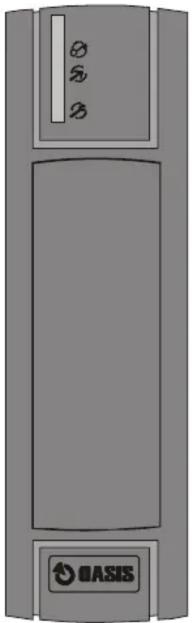
The JA-80N outdoor RFID card reader
natural_image
Illustration of a gray industrial device casing with no visible text or symbols on the body (pure technical diagram)The JA-80N is a component of Jablotron's Oasis 80 alarm system. It is designed to control access (door lock) or to control a security system and connects to the Oasis control panel via a WJ-80 interface.
Alternatively it can be connected to an AS-80 unit as a part of a stand-alone access system.
The keypad sends data in Wiegand 26b format.
Installation
Installation shall only be undertaken by technicians holding a certificate issued by an authorized distributor. It is usually placed near an entrance door (equipped with an electronic lock). The reader can be used outdoors (conforms to IP-65).
- Open the rear cover by unscrewing the screw
- Prepare a hole in the wall for the reader cable to pass through, where the reader will be located.
- Attach the rear cover to the desired location (the tamper spring must be properly pressed)
- Pull the reader cable through the wall hole and to the interface unit's box (WJ-80, AS-80)
- Attach the reader to the rear cover and secure it using the screw
- Connecting and setting up the reader is described in the WJ-80 or AS-80 manuals.
Cabling
wire signal
red +12V (power supply, 60mA)
green D0 (Wiegand 26b data output)
brown D1 (Wiegand 26b data output)
white TMP (normally closed tamper contact)
grey TMP (normally closed tamper contact)
yellow BZR (input controlling reader's sound – connecting to GND generates a beep on the reader)
blue GND (common ground)
pink not connected
Configuring the reader for operation with the WJ-80
If the JA-80N reader is connected to an Oasis control panel and it does not work as described in the manual, then it is not set to the correct (factory default) operational mode. In such a case:
- Switch the Oasis control panel to service mode
- Disconnect the power from the control panel (mains and battery)
- Get an RFID card ready (PC-01 or PC-02)
- Disconnect the yellow and brown wires from the WJ-80 interface terminals and connect the wires together
- Power-up the control panel (reader starts beeping)
- Disconnect the yellow and brown wires from each other (beeping will terminate)
- Use the RFID card 4 times (put it close to the reader and after a short beep take it away) – then wait a moment until a few beeps sound (by this procedure you enter "4" without pressing a key, as there are no keys to press)
- Now use the RFID card 3 times (put it close to the reader and after a short beep take it away) – then wait a moment until a few beeps sound (by this procedure you enter "3" without pressing a key, as there are no keys to press)
- Disconnect the power from the control panel, connect the yellow and brown wires back up, power-up the control panel and check the proper functioning of the JA-80H keypad
Note: The red LED is lit in normal operating mode. Using a card is confirmed by a flash from the orange LED.
How to set up the JA-80N reader for the AS-80 access system is described in the AS-80 manual.
Technical specifications
| Power supply | 10 to 16V DC |
| Stand-by consumption | typically 60mA |
| Enclosure protection (EN 60529) | IP65 |
| Mechanical endurance (EN 50102) | IK08 |
| Environmental (EN 50131-1) | class IV – outdoor general |
| Operational temperature range | -25 to +60°C |
| RFID card | Jablotron PC-01 or PC-02 (EM UNIQUE 125 kHz) |
| Dimensions | 46 x 150.5 x 22.5mm |
| Length of the connection cable | 1m |
| Complies with grade 2 (EN 50131-1, TS 50131-3) | |
| Can be operated according to ERC REC 70-03 |
FCC ID VL6JA80N
CE Jablotron Ltd. hereby declares that the JA-80N is in compliance with the essential requirements and other relevant provisions of Directive 1999/5/EC and complies with part 15 of the FCC rules. Operation is subject to the following two conditions: 1. This device may not cause harmful interference, and 2. This device must accept any interference received, including interference that may cause undesired operation.
CAUTION: Changes or modifications no expressly approved by Jablotron could void the user's authority to operate the equipment. The original of the conformity assessment can be found at www.jablotron.com, Technical Support section.

Note: Although this product does not contain any harmful materials we suggest you return the product to the dealer or directly to the producer after use.

Jablotron Ltd., Pod Skalkou 33 466 01 Jablonec nad Nisou
Czech Republic
Tel.: +420 483 559 911
fax: +420 483 559 993
Internet: www.jablotron.com
Marke : Jablotron
Modell : JA-80N
Kategorie : Sicherheitskamera