JA-80W - Sicherheitskamera Jablotron - Kostenlose Bedienungsanleitung
Finden Sie kostenlos die Bedienungsanleitung des Geräts JA-80W Jablotron als PDF.


| Produkttyp | Sicherheitskamera |
| Marke | Joblotron |
| Modell | JA-80W |
| Abmessungen (ca.) | 10 x 8 x 6 cm |
| Gewicht (ca.) | 200 g |
| Stromversorgung | 5V DC, USB oder PoE (mit Adapter) |
| Leistungsaufnahme | max. 5 W |
| Bildsensor | 1/2,7″ CMOS, 2 Megapixel |
| Auflösung | 1920 x 1080 (Full HD) |
| Nachtsicht | IR-LEDs, Reichweite bis zu 10 m |
| Blickwinkel | 110° (horizontal) |
| Bewegungserkennung | Ja, mit Push-Benachrichtigung |
| Konnektivität | WLAN (2,4 GHz) |
| Audio | Integriertes Mikrofon und Lautsprecher (Gegensprechen) |
| Speicher | microSD-Karte (max. 128 GB) oder Cloud |
| Wetterbeständigkeit | IP65 (staub- und spritzwassergeschützt) |
| Betriebstemperatur | -20 °C bis +50 °C |
| Montage | Wand- oder Deckenmontage mit mitgeliefertem Zubehör |
| App-Unterstützung | Für iOS und Android |
| Garantie | 2 Jahre |
| Pflege und Reinigung | Mit einem trockenen, weichen Tuch abwischen; keine aggressiven Reinigungsmittel verwenden |
| Sicherheitshinweise | Nur in Innenräumen oder geschützten Außenbereichen verwenden; elektrische Sicherheit beachten |
| Ersatzteile | Netzteil und Montageteile separat erhältlich; keine kundenwarbaren Teile im Inneren |
| Reparatur | Bei Defekt nur durch autorisiertes Fachpersonal öffnen; Kundendienst kontaktieren |
| Sprache der Anleitung | Deutsch |
Häufig gestellte Fragen - JA-80W Jablotron
Benutzerfragen zu JA-80W Jablotron
0 Frage zu diesem Gerät. Beantworten Sie die, die Sie kennen, oder stellen Sie Ihre eigene.
Eine neue Frage zu diesem Gerät stellen
Laden Sie die Anleitung für Ihr Sicherheitskamera kostenlos im PDF-Format! Finden Sie Ihr Handbuch JA-80W - Jablotron und nehmen Sie Ihr elektronisches Gerät wieder in die Hand. Auf dieser Seite sind alle Dokumente veröffentlicht, die für die Verwendung Ihres Geräts notwendig sind. JA-80W von der Marke Jablotron.
BEDIENUNGSANLEITUNG JA-80W Jablotron
JA-80W wireless combined PIR + MW detector
The JA-80W is a component of Jablotron's Oasis alarm system. It is designed to detect human body movement inside buildings. A high immunity to false alarms is reached thanks to the combination of PIR and microwave (MW) detection. The PIR part, if triggered, starts the MW detection to confirm PIR activation. Only then is the triggering transmitted.
Installation
Installation shall only be undertaken by technicians holding a certificate issued by an authorized distributor. There should be no obstacles blocking the detector's "view" of the protected area. Keep the detector away from metal objects which could interfere with radio communication and the MW field.

Description: 1. DIP-switch; 2. MW part connector; 3.PCB tab; 4. tamper-switch; 5. PIR sensor; 6. front cover tab; 7. MW sensitivity setting; 8. MW detector
- Open the detector cover by pressing the tab (6) and remove the PCB which is held by an internal tab (3) Avoid touching the internal PIR element or damaging the antenna.
- Punch screw holes through the rear plastic cover according to the installation point, either for a corner or for a flat wall. At least one screw should penetrate the tamper-sensitive section.
- Screw the rear cover to the wall, about 2.5 meters above the floor (vertically, with the tab down).
- Return the PCB to its original place till the tab (3) clicks.
-
Leave the battery disconnected and the cover open and then follow the control panel or receiver manual. The basics of enrollment are:
-
Enter enrollment mode on the control panel by keying in "1" in Service mode.
• Install a battery into the detector to activate enrollment. -
Exit enrollment mode by pressing “#”
-
Close the detector cover till the tab clicks. The supplied screw can secure the tab.
-
After installing a battery into the detector, allow three minutes for stabilization. During this period the LED is continuously lit.
Notes:
To enroll a detector after having already connected a battery, first disconnect the battery, and press and release the tamper switch to discharge any remaining charge to get the device ready for enrollment.
The detector can also be enrolled by entering the serial number – the last eights numbers of the barcode, which is placed inside the detector.
To follow the EN 50131-2-4 the tab must be secured by the supplied screw.
DIP switch Setting
Switch no.1: DEL / INS: OFF (DEL) provides entrance & exit delays for detectors installed in a building entrance route. The ON (INS) allows the detector to instantly trigger alarm activation if the control panel is armed.
DIP switch no.1 only has an effect if the detector has a natural reaction assigned to it in the OASiS control panel. It also has no effect when used with a UC-8x or AC-8x receiver.
Switch no.2: PIR NORM / HIGH: selection of immunity to false alarms. The OFF (NORM) position combines very good immunity with fast sensor reactions. The ON (HIGH) position gives increased immunity with a slower reaction time and is only used for problematic installations.
Switch no.3: MW NORM / HIGH sets the time period after PIR detection in which the MW detection is active. The position OFF - 1 s, ON - 2 s
Switch no.4: MW NORM / TEST. The position OFF is for the standard function of the detector. The MW detection is triggered by the PIR detection part for one or two seconds according to switch no.3. The position ON - MW detection works continuously for testing purposes (walk test).
Testing the detector
15 minutes after closing the detector cover, the LED indicators show detector activation. A short flash of the red light indicates PIR detection and a long flash (2 sec) indicates MW confirmation of the movement.
For the proper functioning of the detector, it is essential to set the MW detection field according to the place which should be monitored. For setting up, switch the fourth DIP switch to the TEST position. Sensitivity (monitoring range) can be adjusted by a potentiometer on the MW detection part located inside the front cover of the detector. Turning clockwise increases the sensitivity (range). Avoid selecting too high a sensitivity as the detection can cover e.g. nearby rooms. Generally the MW detection field should be the same as the PIR detection one. After setting up, switch the DIP switch back to NORM position.
To save battery energy, the PIR detector switches to battery-save mode 15 minutes after the cover is closed. During battery-save mode the PIR sensor still always watches out for movement. The first movement detected and consecutively confirmed by the MW part is then signaled to the control panel instantly, and for the next 5 minutes the PIR sensor ignores any further movement. After these 5 minutes, the PIR sensor then returns to watching out for movement until re-triggered.
Battery replacement
The detector regularly checks its battery conditions. If battery voltage is too low, then the report is sent to the control panel to inform the user or installer. The detector continues to work and each detected movement is confirmed by a brief LED flash. The battery should be replaced within two weeks by a qualified technician in SERVICE mode.
After battery replacement, test the functioning of the detector. Expired batteries should not be thrown into the garbage, but disposed of according to local regulations.
Removing the detector from the system
If a detector is removed, the control panel reports the removal. The detector has to be deleted from its address in the control panel before intentional removal.
Detection characteristics
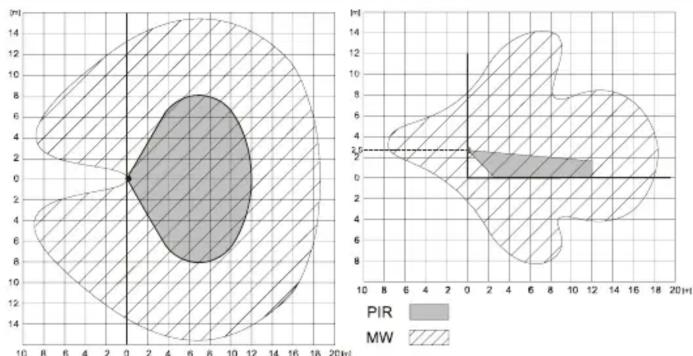
contour
| Angle (°) | PIR Value | MW Value | |-----------|-----------|----------| | 0 | 2 | 3 | | 2 | 3 | 4 | | 4 | 4 | 5 | | 6 | 5 | 6 | | 8 | 6 | 7 | | 10 | 7 | 8 | | 12 | 8 | 9 | | 14 | 9 | 10 | | 16 | 10 | 11 | | 18 | 11 | 12 | | 20 | 12 | 13 |Technical parameters
Power supply: Lithium battery type LS(T)14500 (3.6V / 2,4 Ah AA)
Typical battery lifetime: approx. 2 years (DIP switch 3: NORM) Communication band: 868 MHz, Oasis Protocol
Communication range: approx. 300m (open area) Recommended installation height: 2.0 to 2.5 m above floor level PIR detection angle/detection range: 110° / 12 m (with basic lens)
MW detection range / frequency 0.5 to 20 m / 9.35 GHz Operational environment according to EN 50131-1 II. indoor general
Operational temperature range -10 to +40 °C EN 50131-1, EN 50131-2-4, EN 50131-5-3 classification: grade 2
Dimensions, weight 110 x 60 x 55 mm, 140 g Complies with ETSI EN 300220, ETSI EN 300 440-1, EN 50130-4, EN 55022, EN 60950-1
Can be operated according to ERC REC 70-03 Operation requires notification national telecommunication offices of Finland, France, Italy, Serbia and Montenegro, Spain, Sweden, UK


JABLOTRON ALARMS a.s. hereby declares that the JA-80W is in compliance with the essential requirements and other relevant provisions of Directive 99/5/EC. The original of the conformity assessment can be found at www.jablotron.com, Technical Support section
Note: Although this product does not contain any harmful materials we suggest you return the product to the dealer or directly to the producer after use.
JABLOTRON
CREATING ALARMS
JABLOTRON ALARMS a.s.
Pod Skalkou 4567/33
46601 Jablonec nad Nisou
Greek Republic
Czech Republic Tel: +120 483 559 811
Tel.: +420 483 559 911
Fax: +420 483 559 993
Internet: www.jablotron.com
Marke : Jablotron
Modell : JA-80W
Kategorie : Sicherheitskamera