SL6.0B - Heimtrainer Horizon Fitness - Kostenlose Bedienungsanleitung
Finden Sie kostenlos die Bedienungsanleitung des Geräts SL6.0B Horizon Fitness als PDF.


Benutzerfragen zu SL6.0B Horizon Fitness
0 Frage zu diesem Gerät. Beantworten Sie die, die Sie kennen, oder stellen Sie Ihre eigene.
Eine neue Frage zu diesem Gerät stellen
Laden Sie die Anleitung für Ihr Heimtrainer kostenlos im PDF-Format! Finden Sie Ihr Handbuch SL6.0B - Horizon Fitness und nehmen Sie Ihr elektronisches Gerät wieder in die Hand. Auf dieser Seite sind alle Dokumente veröffentlicht, die für die Verwendung Ihres Geräts notwendig sind. SL6.0B von der Marke Horizon Fitness.
BEDIENUNGSANLEITUNG SL6.0B Horizon Fitness

text_image
HORIZON FITNESSSL6.0B ERGOMETER
UPRIGHT
Owner's Guide
natural_image
Line drawing of a handheld electronic device with a screen and antenna (no text or symbols)
natural_image
Line drawing of a stationary exercise bike with head-mounted device and water-filled base (no text or symbols)TABLE OF CONTENTS
SAFETY INSTRUCTIONS 2
GETTING STARTED/POWER 5
MOVING/FOOT POSITION 6
KNOW YOUR UPRIGHT BIKE 7
QUICK START UP 8
PROGRAMMING 9
DISPLAY 10
PROGRAM PROFILES 11
USING YOUR HRC PROGRAM 14
USING YOUR FIT-TEST PROGRAM 15
USING YOUR STEP-TEST PROGRAM....16
USING YOUR WATTS CONTROL PROGRAM 17
USING YOUR CUSTOM PROGRAM 18
MONITORING YOUR HEART RATE 19
TARGET HEART RATE ZONE 20
TROUBLESHOOTING 21
COMMON PRODUCT QUESTIONS 23
EXERCISE GUIDELINES 24
ROUTINE MAINTENANCE 25
DEVELOPING A FITNESS PROGRAM &
WARM UP & COOL DOWN 27
FITNESS GOALS 28
WEEKLY LOG SHEETS 29
MONTHLY LOG SHEETS 30
HOME USE WARRANTYS 31

CAUTION
Read all precautions and instructions in this manual before using this equipment.
Save this manual for future reference.
IMPORTANT SAFETY INSTRUCTIONS
SAVE THESE INSTRUCTIONS
When using an electrical product, basic precautions should always be followed. Read all instructions before using this exercise product.
WARNING!
To reduce the risk of burns, fire, electrical shock or injury to persons:
- Use this exercise product for its intended use as described in this Owner's guide. Do not use attachments not recommended by the manufacture.
- Never drop or insert any object into any opening.
- Do not remove the upright bike's side covers. Service should be per formed only by an authorized Horizon Fitness service provider.
- Never operate this upright bike if it has a damaged cord or plug, if it is not working properly, if it has been damaged, or immersed in water.
• K eep the cord away from heated surfaces.
- Do not use outdoors.
- Only use the power cord provided with your Horizon Fitness upright bike.
- Never place the power cord under carpeting or place any object on top of the power cord, which may pinch or damage it.
- Unplug your Horizon Fitness upright bike before moving it.
OTHER SAFETY TIPS FOR YOUR HORIZON FITNESS UPRIGHT BIKE
CAUTION!
- If you experience chest pains, nausea, dizziness or shortness of breath, stop exercising immediately and consult your physician before continuing.
- Do not turn pedal arms by hand.
- Do not wear clothing that might catch on any part of the upright bike.
- Make sure handlebars are secure before each use.
- Read the owner's guide before operating this semi-recumbent bike.
- Maintain a comfortable pace. Do not 'sprint' above 140 rpms on this machine.
- T o maintain balance it is recommended to keep a grip on the handlebars while exercising, mounting or dismounting the machine.
OPERATION
It is essential that your upright bike is used only indoors, in a climate controlled room. If your upright bike has been exposed to colder temperatures or high moisture climates, it is strongly recommended that the upright bike is warmed up to room temperature before first time use. Failure to do so may cause premature electronic failure.
CHILDREN
• K eep children off of your upright bike at all times.
- When the upright bike is in use, young children and pets should be kept at least 10 feet away.
CLEANING
- Clean with soap and slightly damp cloth only. Never use solvents.
CONGRATULATIONS! on choosing a Horizon Fitness upright bike.
You've taken an important step in developing and sustaining an exercise program! Your Horizon Fitness upright bike is a tremendously effective tool for achieving your personal fitness goals. Regular use of your Horizon Fitness upright bike can improve the quality of your life in so many ways.
Here are just a few of the health benefits of aerobic exercise:
• W eight Loss
• A Healthier Heart
- Imporved Muscle Tone
- Increased Daily Energy Levels
- Reduced Stress
• Help in Countering Anxiety and Depression
• An Improved Self Image
The key to reaping these benefits is to develop the exercise habit. Your new Horizon Fitness upright bike will help you eliminate the obstacles that prevent you from getting in your exercise time. Inclement weather and darkness won't interfere with your workout when you use your Horizon Fitness upright bike in the comfort of your home. This manual provides you with basic information for using and enjoying your new machine. A more complete knowledge of your new Horizon Fitness upright bike will assist you in realizing your goal of a healthy lifestyle.
CAUTION: BEFORE BEGINNING ANY EXERCISE PROGRAM, ALWAYS CONSULT YOUR PHYSICIAN. IF YOU EXPERIENCE CHEST PAINS, NAUSEA, DIZZINESS OR SHORTNESS OF BREATH, STOP EXERCISING AND CONSULT YOUR PHYSICIAN BEFORE CONTINUING.
IMPORTANT: PLEASE READ BEFORE USE!
ASSEMBLY
CAUTION! There are several areas during the assembly process of a Horizon Fitness upright bike that special attention must be paid. It is very important to follow the assembly instructions correctly and to make sure all parts are firmly tightened. If the assembly instructions are not followed correctly, the upright bike could have frame parts that are not tightened and will seem loose and may cause irritating noisers. To prevent damage to the upright bike, the assembly instructions must be reviewed and corrective actions should be taken.
GETTING STARTED
POWER
Your SL 6.0B Ergometer upright bike is self-powered.
MOVING
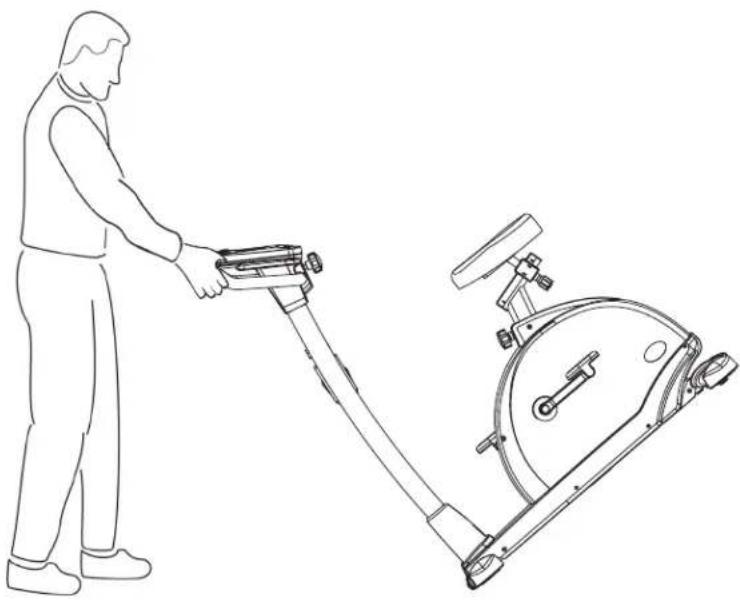
Your Horizon Fitness upright bike has a pair of transport wheels built into the front of the frame. To move, firmly grasp the vertical seat post and one of the handlebars. Carefully lift and roll.
natural_image
Line drawing of a person using an exercise bike next to a stationary exercise machine (no text or symbols)CAUTION! Our upright bikes are well built and heavy, weighing up to 90lbs. Use care and additional help if necessary when moving.
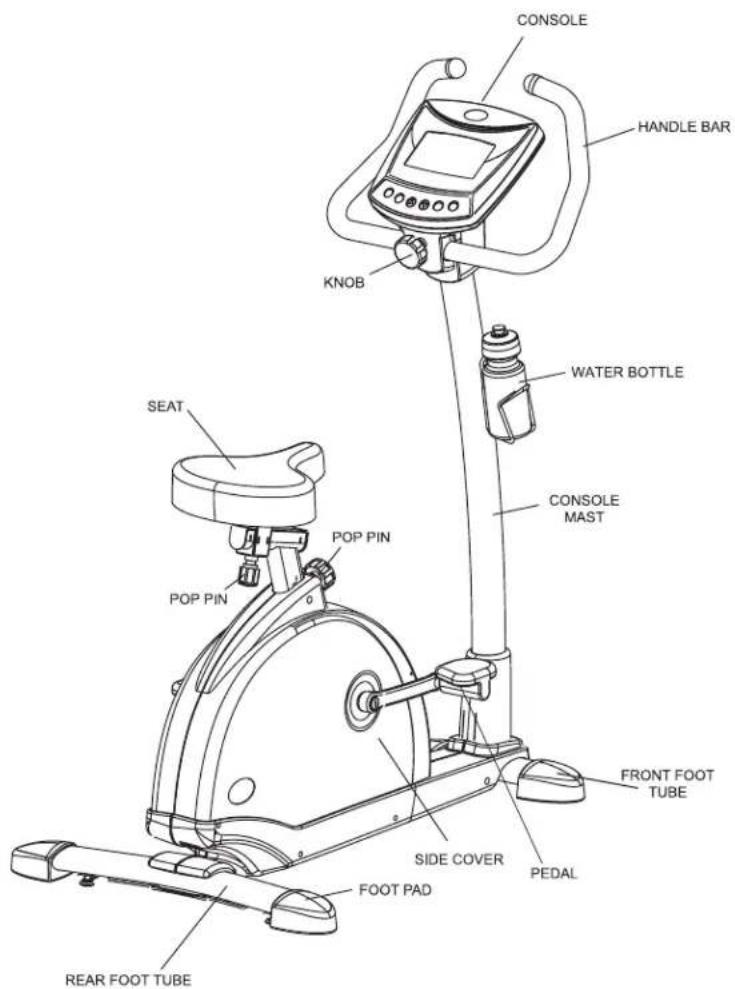
KNOW YOUR UPRIGHT BIKE
text_image
CONSOLE HANDLE BAR KNOB WATER BOTTLE CONSOLE MAST SEAT POP PIN POP PIN FRONT FOOT TUBE SIDE COVER PEDAL FOOT PAD REAR FOOT TUBEQUICK START UP
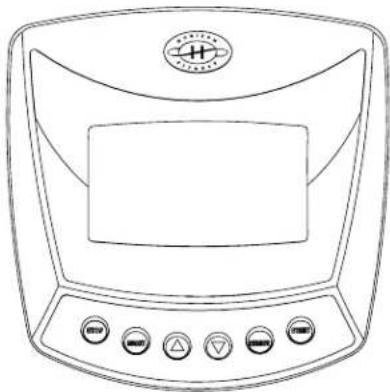
Your upright bike is self-power
- Sit down and place your feet on the pedals, adjust the pedal straps.
- Press the start button to beginning exercising.
To set the time to count up as you exercise.
Push and hold the Reset button to clear any existing data.
To count up from zero simply start pedaling. Note: if you stop pedaling your data will be retained even if the console shuts down after a period of time unless you push the Reset button.
To set the timer for fixed period of time to exercise.
Push and hold the button to scroll the minutes up to your desired length of time. Releasing the button will start the count down.
- Begin moving your feet. Gradually increase your pace to your target heart rate or per ceived exertion level. Warning! Try not to exceed 140 rpms on this machine. The amount of watts can be adjusted by press ▲ or ▼. (easiest #25w through hardest #400w, 5w up or down/click)
natural_image
Line drawing of a medical device with control buttons and a central screen (no text or symbols)PROGRAMMING
STARTING YOUR WORKOUT
Press the ' START ' button to begin exercising
FINISHING YOUR WORKOUT
Remember to gradually slow down your pace before stopping your workout. After you have finished your workout, the console will 'beep' several times to let you know your workout is finished.
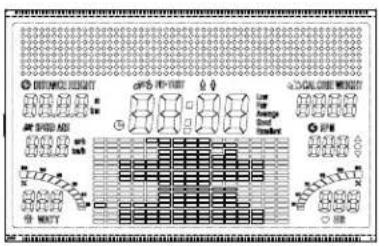
DISPLAY
text_image
① 水相流体结构 ② 水相流体结构 ③ 水相流体结构 ④ 水相流体结构 ⑤ 水相流体结构 ⑥ 水相流体结构 ⑦ 水相流体结构 ⑧ 水相流体结构 ⑨ 水相流体结构 ⑩ 水相流体结构 ⑪ 水相流体结构 ⑫ 水相流体结构 ⑬ 水相流体结构 ⑭ 水相流体结构 ⑮ 水相流体结构 ⑯ 水相流体结构 ⑰ 水相流体结构 ⑱ 水相流体结构 ⑲ 水相流体结构 ⑳ 水相流体结构 ㉑ 水相流体结构 ㉒ 水相流体结构 ㉓ 水相流体结构 ㉔ 水相流体结构 ㉕ 水相流体结构 ㉖ 水相流体结构 ㉗ 水相流体结构 ㉘ 水相流体结构 ㉙ 水相流体结构 ㉚ 水相流体结构 ㉛ 水相流体结构 ㉜ 水相流体结构 ㉝ 水相流体结构 ㉞ 水相流体结构 ㉟ 水相流体结构 ㉳ 水相流体结构 ㉟ 水相流体结构 ㉟ 水相流体结构 ㉟ 水相流体结构 ㉟ 水相流体结构 ㉟ 水相流体结构 ㉟ 水相流体结构 ㉟ 水相流体结构 ㉟ 水相流体结构 ㉟ 水相流体结构 ㉟ 水相流体结构 ㉞ 水相流体结构 ㉞ 水相流体结构 ㉞ 水相流体结构 ㉞ 水相流体结构 ㉞ 水相流体结构 ㉞ 水相流体结构 ㉞ 水相流体结构 ㉞ 水相流体结构 ㉞ 水相流体结构 ㉞ 水相流体结构 ㉟ 水相流体结构 ㉟ 水相流体结构 ㉟ 水相流体结构 ㉟ 水相流体结构 ㉟ 水相流体结构 ㉟ 水相流体结构 ㉟ 水相流体结构 ㉟ 水相流体结构 ㉟ 水相流体结构 ㉢ 水相流体结构 ㉢ 水相流体结构 ㉢ 水相流体结构 ㉢ 水相流体结构 ㉢ 水相流体结构 ㉢ 水相流体结构 ㉢ 水相流体结构 ㉢ 水相流体结构 ㉢ 水相流体结构 ㉢ 水相流体结构 ㉣ 水相流体结构 ㉣ 水相流体结构 ㉣ 水相流体结构 ㉣ 水相流体结构 ㉣ 水相流体结构 ㉣ 水相流体结构 ㉣ 水相流体结构 ㉣ 水相流体结构 ㉣ 水相流体结构 ㉣ 水相流体结构 ㉑ 水相流体结构 ㉑ 水相流体结构 ㉑ 水相流体结构 ㉑ 水相流体结构 ㉑ 水相流体结构 ㉑ 水相流体结构 ㉑ 水相流体结构 ㉑ 水相流体结构 ㉑ 水相流体结构 ㉑ 水相流体结构 ㉒ 水相流体结构 ㉒ 水相流体结构 ㉒ 水相流体结构 ㉒ 水相流体结构 ㉒ 水相流体结构 ㉒ 水相流体结构 ㉒ 水相流体结构 ㉒ 水相流体结构 ㉒ 水相流体结构 ㉒ S-10000000000000000000000000000000000000000000000000000000000000000000000000000000000000000000000000000RPM
Shown as your rotational speed per minute
TIME
Shown as Minutes: Seconds. View the time remaining or the time elapsed in your workout.
DISTANCE
Shown as Miles. View the accumulated distance during your workout.
SPEED
Shown as your speed in miles or Km per hour.
CALORIES
Shown as total accumulated calories burned during your workout.
PULSE
Shown as Beats Per Minute. Used to monitor your heart rate during your workout.
WATTS
A measurement of your expending energy. May be used to evaluate and quantify your fitness progress over time.
PROGRAM PROFILES
Watts Control
Exercise at a set work level. As you increase your pedal rate(RPM), your resistance will decrease; if you decrease your pedal rate(RPM), your resistance will increase.
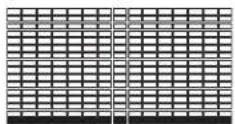
Intervals
Improves your strength, speed, and endurance by raising and lowering the resistance levels throughout your workout to involve both your heart and muscles.
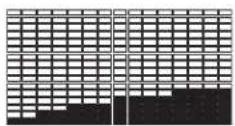
Rolling
Maintains weight by gradually raising and lowering the resistance level to gradually raise and lower your heart rate.
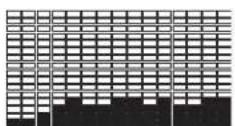
Weight loss
Promotes weight loss by raising and lowering the resistance level, while keeping you in your fat burning zone.
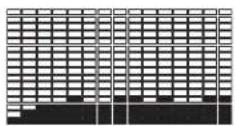
Foot
Improve heart and lung capacity by continuing exercise.
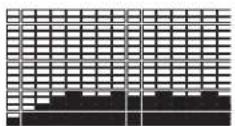
Mountain
Improves performance and stamina by raising the resistance level to high peaks to simulate the most difficult outdoor terrains.

After Burner
Promotes weight loss by raising and lowering the resistance level, while keeping you in fat burning zone.
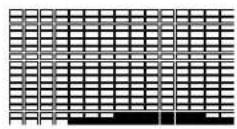
HRC 1
Benefits weight loss by maintaining an optimum exercise level to burn fat, while adjusting the resistance to keep you in you r target heart rate zone. Time defaults to 20 minutes
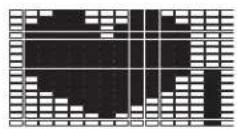
HRC 2
Benefits weight loss by maintaining an optimum exercise level to burn fat, while adjusting the resistance to keep you in you r target heart rate zone. Time defaults to 30 minutes
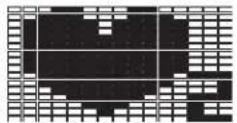
Fit-Test
Test your current level of physical fitness. At completion of the program, it will provide feedback regarding your fitness level for you to monitor your progress.
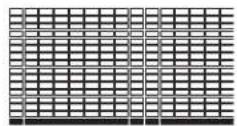
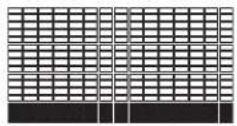
Step test
Short Description for Step-Test Improves your endurance by raising the wattage. Workout time is 30 minutes.

CUSTOME 1
Customized workout, time defaults to 15 minutes.
USING YOUR HRC PROGRAM
Once the HRC quick program key is selected, wait for 5 seconds and you will see the target heart rate flashing in the Heart Rate window. Using the chart on page 23, determine your target heart rate. Your target heart rate should be set at a number that you will be able to exercise at throughout the majority of your workout. To adjust the target heart rate, Press the plus ⊕ or minus ▼ buttons.
Once you have chosen your target heart rate, wait for five seconds and you will see the time flashing in the Time window. Press the plus △ or minus ▼ buttons to adjust your time. Once you choose your time, Press the 'Start' button and begin your workout.
The HRC program will have a 5 minute warm up time before it will get you in your 'target heart rate zone'.
After the 5 minute warm up period, the resistance level will increase gradually to get the user to the entered 'target heart rate zone'. Once the user is at the 'target heart rate zone', plus or minus 5 beats, the resistance level will remain at the current resistance level.
The last 5 minutes of the program will begin the cool down period. At this time, the program will gradually decrease the resistance level to give the user a smooth cool down.
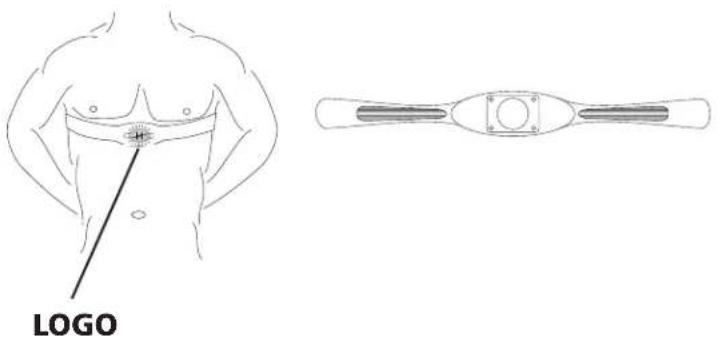
Note: The Chest Strap Transmitter is required to use the HRC Program.
CHEST STRAP TRANSMITTER PLACEMENT AND MOISTENING THE ELECTRODES
text_image
LOGOUSING YOUR FIT-TEST PROGRAM
Your Fit-Test Program is designed for you to test your current level of physical fitness. At completion of the program, it will provide feedback regarding your fitness level for you to monitor your progress. To use your Fit-Test Program, follow these instructions:
1) Choose the "Fit-Test" program using the ▽ or △ keys, then press "Select".
2) Use the ∅ or ▲ keys to choose the desired Watts set up. The default Watts set up is 25W, and the Watts range is 25 \~ 400W. Next, please press the "Select" key to confirm the Watts setting.
3) Use the ▽ or ⊕ keys to choose your Sex, Men or Women. Next, please press the "Select" key to confirm.
4) Use the ▼ or ▲ keys to choose your Age. The default Age is 30, and the age range is 20 \~ 70 years old. Next, please press the "Select" key to confirm the your Age.
5) Use the ▼ or ▲ keys to choose the desired Time set up. The default Time set is 10 minutes, and the time range is 5 \~ 15 minutes. For an optimum Fit-Test, the recommended program Time setup is 10 minutes. Next, please press the "Select" key to confirm the Time setting.
6) Use the ▽ or ⊕ keys to choose your Weight. The default Weight set up is 75kg/165lbs, and the weight range is 25 \~ 150kg / 55 \~ 330lbs. Next, please press the "Select" key to confirm your Weight.
7) Press the "Start" key to begin your Fit-Test Program.
8) After the Fit-Test Program is over the screen will show feedback regarding your level of physical fitness, which are Low, Fair, Average, Good, or Excellent.
9) Reminder: You are unable to adjust the Resistance Level when using the Fit-Test Program.
USING YOUR STEP-TEST PROGRAM
USING YOUR STEP-TEST PROGRAM
- Choose the Step - Test program using the - or + keys, then press select.
- Use the - or + keys to choose the desired Starts-Watts set up. The Start-Watt values are 25, 50, 75, 100W. Next, please press Select key to confirm the Watts setting.
- Use the - or + keys to choose your Weight. The default Weight set up is 75kg/150lbs, and the Weight range is 25-150kg/50-400lbs.
- Next, please press Start key to start the Step Test
- The wattage will increase all 3 minutes by 25 Watt.
Choose the Start-Watts values:
- 25 Watt Beginning
- 50 Watt Intermediate
- 75 Watt Advanced
- 100 Watt Athlete
The default time is 30 minutes. Stop your workout if you do not feel good. Try to develop your endurance by the next workout. You get information about your training performance.
USING YOUR WATTS CONTROL PROGRAM
Your Watts Control Program is designed for you to exercise at a set work level. The resistance level will increase or decrease according to the pedal rate (RPM) in order to achieve your desired Watts set. To use your Watts Control Program, follow these instructions:
1) Choose the "Watts Control" program using the ▽ or △ keys, then press "Select".
2) Use the ∇ or ⊕ keys to choose the desired Watts set up. The default Watts set up is 25W, and the Watts range is 25 \~ 400W. Next, please press the "Select" key to confirm the Watts setting.
3) Use the ▼ or ▲ keys to choose the desired Time set up. The default Time set up is 30 minutes, and the time range is 5 \~ 99 minutes. Next, please press the "Select" key to confirm the Time setting.
4) Use the ▼ or ⊕ keys to choose your Weight. The default Weight set up is 75kg/165lbs, and the weight range is 25 \~ 150kg / 55 \~ 330lbs. Next, please press the "Select" key to confirm your Weight.
5) Press the "Start" key to begin your Watts Control Program.
USING YOUR CUSTOM PROGRAMS
Your Custom Program is designed to allow you to create your own programming, with the ability to save your program settings for future workouts. To use your Custom Program, follow these instructions:
1) Once the Custom Programs has been selected, press 'SELECT'
2) Choose your desired time using the △ or △ keys and press 'SELECT'
3) Choose your desired watt level using the + or - keys and press 'SELECT'. You will need to select a watt level for all 15 segments, pressing 'SELEC' after each segment.
4) Once all 15 watt level segments have been chosen, you will need to input your name, choose your desired letter using + and keys and press 'SELECT'. Once you have chosen your desired name which is no more than 9 letters, press 'STOP' to begin your program. At this time, your program has been successfully saved into memory, and can be used for future workouts.
5) To reset your program information and delete it from memory, press and hold the 'SELECT' button for 5 seconds once you have selected the Custom Program in the start menu.
6) While using your saved program in the Custom Program, you are able to adjust the watt level, but any changes will not be saved.
MONITORING YOUR HEART RATE
Feedback
Your Horizon Fitness Upright bike offers two heart rate feedback options. You may choose to use the heart rate handlebars, or the chest transmitter for a hands free workout.
Heart Rate Handlebar
Place the palm of your hands directly on the heart rate handlebars. Both hands must grip the bars for your heart rate to register. When griping the handlebars, do not grip tightly. Holding the grips tightly may elevate your blood pressure. Try to maintain moderate pressure while holding onto the heart rate handlebars. It is recommended that you hold the handlebars only long enough to see your heart rate readout on the console. You may experience an erratic readout if consistently holding the handlebars.
Telemetric Chest Transmitter
Prior to wearing the chest transmitter on your chest, moisten the two rubber electrodes with water. Center the chest strap just below the breast or pectoral muscles, directly over your sternum, with the Horizon Fitness logo facing out.
Note: The chest strap must be tight and properly placed to receive an accurate and consistent readout. If the chest strap is too loose, or positioned improperly, you may receive an erratic or inconsistent heart rate readout.
If you have any problems with the heart rate function please refer to pages 21 in the troubleshooting section.
Warning!
The heart rate function is not a medical device. Various factors may affect the accuracy of your heart rate reading. The heart rate reading is intended only as an exercise aid.
TARGET HEART RATE ZONE
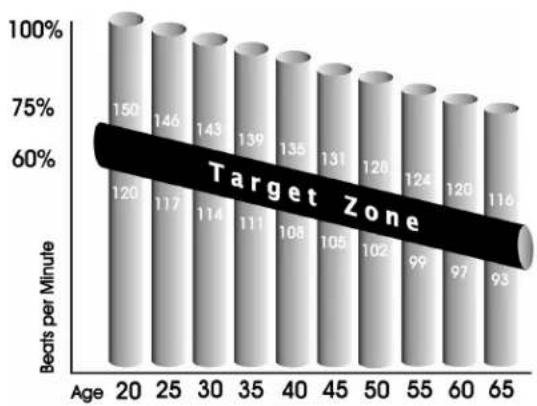
Your 'Target Heart Rate Zone' is a percentage of your maximum heart rate. Target Zones will vary for each individual, depending on age, current level of conditioning, and personal fitness goals. The American Heart Association recommends working-out at a 'Target Heart Rate Zone' of between 60% and 75% of your maximum heart rate. See the chart below for convenient reference. example for a 42-year old user: find age along the bottom of the chart (round to 40), follow age column up to the target zone bar. results: 60% of maximum Hear Rate = 108 Beats Per Minute, 75% of maximum Heart Rate = 135 Beat Per Minute.
bar
| Age | Beats per Minute | |---|---| | 20 | 150 | | 25 | 146 | | 30 | 143 | | 35 | 139 | | 40 | 135 | | 45 | 131 | | 50 | 128 | | 55 | 124 | | 60 | 120 | | 65 | 116 | Target Zone Age: 20 Beats per Minute: 120 Beats per Minute: 117 Beats per Minute: 114 Beats per Minute: 111 Beats per Minute: 108 Beats per Minute: 105 Beats per Minute: 102 Beats per Minute: 99 Beats per Minute: 97 Beats per Minute: 93Heart Rate Chart
TROUBLESHOOTING YOUR UPRIGHT BIKE
Your Horizon Fitness upright bike is designed to be reliable and maintenance free. However, if you do experience problems with your upright bike, please reference the troubleshooting guide listed below.
PROBLEM: There is no display on the console.
SOLUTION: Remove the console and verify that the console cable is attached properly, making sure that the calbe is securely inserted into the console.
PROBLEM: The upright bike makes a squeaking or chirping noise.
SOLUTION: Loosen all bolts attached during the assembly process grease the threads and tighten again.
PROBLEM: The resistance levels seem to be incorrect, seeming too hard or too easy.
SOLUTION: Reset the console and allow the resistance to reset to the default position, Restart the console and retry the resistance levels.
HEART RATE TROUBLESHOOTING
PROBLEM: Erratic or inconsistent Readout.
Check your exercise environment for sources of interference such as high power lines, large motors, etc.
You may experience an erratic readout under the following conditions:
-Gripping the heart rate handlebars too tight. Try to maintain moderate pressure while holding onto the heart rate handlebars.
-Constant movement and vibration due to constantly holding the heart rate grips while exercising.
-When you are breathing heavily during a workout.
-When you hands are constricted by wearing a ring.
-When you hands are dry or cold. Try moistening your palms or rubbing them together to warm.
-Anyone with heavy arrhythmia.
-Anyone with arteriosclerosis or peripheral circulation disorder.
-Anyone whose skin on the measuring palms is especially thick.
Note: Outside interference sources such as computers, motors and fluorescent lights may cause the heart rate reading to be erratic.
If the above troubleshooting section does not remedy the problem, discontinue use and turn the power off.
Please contact your local dealer for further assistance.
COMMON PRODUCT QUESTIONS
ARE THE SOUNDS MY UPRIGHT BIKE MAKES NORMAL?
Our upright bikes are some of the quietest available because they use belt drives and friction free magnetic resistance. We use the highest grade bearings and belts to minimize noise. However, because the resistance system itself is so quiet, you will occasionally hear other slight mechanical noise. Unlike older, louder technologies, there are no fans, friction belts, or alternator noises to mask these sounds on our upright bikes. These mechanical noises, which may or may not be intermittent, are normal and are caused by the transfer of significant amounts of energy to a rapidly spinning flywheel. All bearings, belts and other rotating parts will generate some noise which will transmit through the casing and frame. It is also normal for these sounds to change slightly during a workout and over time because of thermal expansion of the parts.
WHY IS THE UPRIGHT BIKE I HAD DELIVERED LOUDER THAN THE ONE AT THE STORE?
All fitness products seem quieter in a large store showroom because there is generally more background noise than in your home. Also, there will be less reverberation on a carpeted concrete floor than on a wood overlay floor. Sometimes a heavy rubber mat will help reduce reverberation through the flow. If a fitness product is placed close to a wall, there will be more reflected noise.
HOW LONG WILL THE DRIVE BELT LAST?
The computer modeling we have done indicated virtually thousands of maintenance free hours. Belts are now commonly used in far more demanding applications such as motorcycle drives.
CAN I MOVE THE UPRIGHT BIKE EAISER ONCE IT IS ASSEMBLED?
Your Horizon Fitness upright bike has a pair of transport wheels built into the front foot. It is easy to move your upright bike by rolling it on the front transport wheels.
It is important that you place your Horizon Fitness upright bike in a comfortable and inviting room. Your upright bike is designed to use minimal floor space. Many people will place their upright bikes facing the TV or a picture window. If at all possible, avoid putting your upright bike in a unfinished basement. To make exercise a desirable daily activity for you, the upright bike should be in a attractive setting.
EXERCISE GUIDELINES
Always consult your physician before beginning an exercise program.
HOW OFTEN?
The American Heart Association recommends that you exercise at least 3 to 4 days per week to maintain cardiovascular fitness. If you have other goals such as weight or fat loss, you will achieve your goal faster with more frequent exercise. Whether it's 3 days or 6 days, remember that your ultimate goal should be to make exercise a lifetime habit. Many people are successful staying with a fitness program if they set aside a specific time of day to exercise. It doesn't matter whether it's in the morning before your shower, during lunch hour or while watching the evening news. What's more important is that it's a time that allows you to keep a schedule, and a time when won't be interrupted. If you are to be successful with your fitness program, you have to make it a priority in your life. So decide on a time, pull out your day planner and pencil in your exercise times for the next month!
HOW LONG?
For aerobic exercise benefits, it's recommended that you exercise from between 24 and 32 minutes per session. But start slowly and gradually increase your exercise times. If you've been sedentary during the past year, it may be a good idea to keep your exercise times to as little as five minutes initially. You body will need time to adjust to the new activity. If your goal is weight loss, a longer exercise session at lower intensities has been found to be most effective. A workout time of 48 minutes or more is recommended for best weight loss results.
ROUTINE MAINTENANCE
WHAT KIND OF ROUTINE MAINTENANCE IS REQUIRED?
We use sealed bearings throughout our upright bike so lubrication is not needed. The most important maintenance step is to simply wipe your perspiration off the trainer after each use.
HOW DO I CLEAN MY HORIZON FITNESS UPRIGHT BIKE?
Clean with soap and water cleaners only. Never use solvents on plastic parts. Cleanliness of your Horizon Fitness upright bike and its operating environment will keep maintenance problems and service calls to a minimum. For this reason, Horizon Fitness recommends that the following preventive maintenance schedule be followed.
AFTER EACH USE (DAILY)
Turn off the upright bike with the on/off switch, and unplug the power cord from the wall outlet.
WARNING!
Toremove power from the upright bike, the power cord must be disconnected from the wall outlet.
- Wipe down the upright bike with a damp cloth. Never use solvents, as they can cause damage to the upright bike.
- Inspect the power cord. If the power cord is damaged contact Horizon Fitness.
- Make sure the power cord is not underneath the upright bike or in any other area where it can become pinched or cut.
EVERY WEEK
Clean underneath the upright bike, following these steps:
• T urn off the upright bike with the on/off switch.
- Then unplug the power cord at the wall outlet.
- Move the upright bike to a remote location.
- Wipe or vacuum any dust particles or other objects that may have accumulated underneath the upright bike.
- Return the upright bike to its previous position.
EVERY MONTH
- Inspect all assembly bolts and pedals on the machine for proper tightness.
HOW HARD?
How hard you workout is also determined by your goals. If you use your Horizon Fitness Upright Bike to prepare for a 5K run, you will probably work out at a higher intensity than if your goal is general fitness. Regardless of your long term goals, always begin an exercise program at low intensity. Aerobic exercise does not have to be painful to be beneficial! There are two ways to measure your exercise intensity. The first is by monitoring your heart rate (see page 21), and the second is by evaluating your perceived exertion level (this is simpler than it sounds!).
Note: Always consult your physician before beginning an exercise program.
PERCEIVED EXERTION LEVEL
The second and simpler way to gauge your exercise intensity is to evaluate your perceived exertion level. While exercising if you are too winded to maintain a conversation without gasping, you are working out too hard. A good rule of thumb is to work to the point of exhilaration, not exhaustion. If you cannot catch your breath, it's time to slow down. Always be aware of other warning signs of overexertion.
DEVELOPING A FITNESS PROGRAM
STRETCH FIRST
Before using your Horizon Fitness product, it is best to take a few minutes doing a few gentle stretching exercises. Stretching prior to exercise will improve flexibility and reduce chances of exercise related injury. Ease into each of these stretches with a slow gentle motion. Do not stretch to the point of pain. Make sure not to bounce while doing these stretches.
WALL PUSH
Stand near a wall with the toes of one foot about 18" from the wall, and the other foot about 12" behind the other foot. Lean forward, pushing against the wall with your palms. Keep your heels flat and hold this position for a count of 15 seconds.
Make sure that you do not bounce while stretching. Alternate positions of your feet and repeat for a total of 8 repetitions.
STANDING QUADRICEPS STRETCH
Using a wall to provide balance, grasp your left ankle with your left hand and hold your foot against the back of your thigh for a count of 15 seconds. Repeat with your right ankle and hand, and continue alternating for a total of 8 repetitions.
SEATED TOE TOUCH
Sit on the flow with your legs together and straight out in front of you. Do not lock your knees. Extend your fingers towards your toes and hold for a count of 15 seconds. Make sure that you do not bounce while stretching. Sit upright again. Repeat for a total of 8 repetitions.
THE IMPORTANCE OF WARM UP AND COOL DOWN
WARM UP
The first 2 to 5 minutes of a workout should be devoted to warming up. The warm-up will limber your muscles and prepare them for more strenuous exercise. Make sure that you warm-up on your Horizon Fitness product at a slow pace.
COOL DOWN
Never stop exercising suddenly! A cool-down period allows your heart to readjust to the decreased demand. Make sure that your cool down period consists of a very slow pace to allow your heart rate to lower. After the cool-down, repeat the stretching exercises to loosen and relax your muscles.
ACHIEVING YOUR FITNESS GOALS
An important step in developing a long term fitness program is to determine your goals. Is your primary goal for exercising on your Horizon Fitness upright bike to lose weight! Improve muscle! Burn Stress! Prepare for the spring racing schedule! Knowing what your goals are will help you develop a more successful exercise program. Below are some common exercise goals:
-Weight Loss
-Improve Body Shape and Tone
-Increased Energy Level
-Improved Sports Performance
-Improved Cardiovascular Endurance
-Weight Maintenance
-Strengthen Leg Muscles
-Improved Sleep Patterns
-Stress Reduction
If possible try to define your personal goals in precise, measurable terms, and then put your goals in writing. The more specific you can be, the easier it will be to track your progress. If your goals are long term, divide them up into monthly and weekly segments. Longer term goals are easier to achieve. Your Horizon Fitness upright bike console provides you with several readouts that can be used to record your progress.
You can track Distance. Calories or Time. Time is the most important and useful of test functions.
KEEPING AN EXERCISE DIARY
Photocopy the weekly and monthly log sheets on the following pages to make your personal exercise log book. As time goes by you'll be able to look back with pride at the work you've done. As your fitness improves, you can look back and see how far you've come.
WEEKLY LOG SHEET
| WEEK# ____ WEEKLY GOAL: ____ | |||||
| DAY | DATE | DISTANCE | CALORIES | TIME | COMMENTS |
| SUN | |||||
| MON | |||||
| TUES | |||||
| WED | |||||
| THUR | |||||
| FRI | |||||
| SAT | |||||
| WEEKLY TOTALS | |||||
| WEEK# ____ WEEKLY GOAL: ____ | |||||
| DAY | DATE | DISTANCE | CALORIES | TIME | COMMENTS |
| SUN | |||||
| MON | |||||
| TUES | |||||
| WED | |||||
| THUR | |||||
| FRI | |||||
| SAT | |||||
| WEEKLY TOTALS | |||||
MONTHLY LOG SHEET
| MONTH____ MONTHLY GOAL:____ | |||
| WEEK# | DISTANCE | CALORIES | TIME |
| MONTHLY TOTALS | |||
| MONTH____ MONTHLY GOAL:____ | |||
| WEEK# | DISTANCE | CALORIES | TIME |
| MONTHLY TOTALS | |||
LIMITED HOME USE WARRANTY
FRAME-LIFETIME
Horizon Fitness warrants the frame against defects in workmanship and materials for the lifetime of the original owner.
ELECTRONICS & PARTS
Horizon Fitness warrants the electronic components and all original parts for a period from the date of original pruchase, so long as the device remains in the possession of the original owner.
LABOR
Horizon Fitness shall cover the labor cost for the repair of the device for a period from the date of the original purchase, so long as the device remains in the possession of the original owner.
EXCLUSIONS AND LIMITATIONS
This warranty applies only to the original owner and is not transferable. This warranty is expressly limited to the repair of replacement of a defective frame, electronic component, or defective part and is the sole remedy of the warranty. The warranty does not cover normal wear and tear, improper assembly or maintenance, or installation of parts or accessories not originally intended or compatible with the elliptical trainer as sold. The warranty does not apply to damage or failure due to accident, abuse, corrosion, discoloration of paint or plastic, or neglect. Horizon Fitness shall not be responsible for incidental or consequential damages. All returns must be pre-authorized by Horizon Fitness. Horizon Fitness' obligation under this warranty is limited to replacing or repairing, at Horizon Fitness' option, the product at one of its authorized service centers. An Horizon Fitness authorized service center must receive all products for which a warranty claim is made. These products must be received with all freight and other transportation charges prepaid, accompanied by sufficient proof of purchase. Parts and electronic components reconditioned to As New Condition by Horizon Fitness or its vendors may sometimes be supplied as warranty replacement parts and constitute fulfillment of warranty terms. This warranty gives you specific legal rights, and your rights may vary from state to state.
Please consult your local dealer for more warranty details.

text_image
HORIZON FITNESSHorizon Fitness