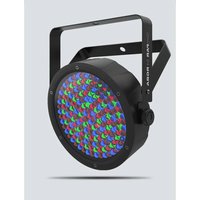
BEDIENUNGSANLEITUNG SlimPAR 64 RGBA Chauvet
SlimPAR 64 RGBA
Quick Reference Guide
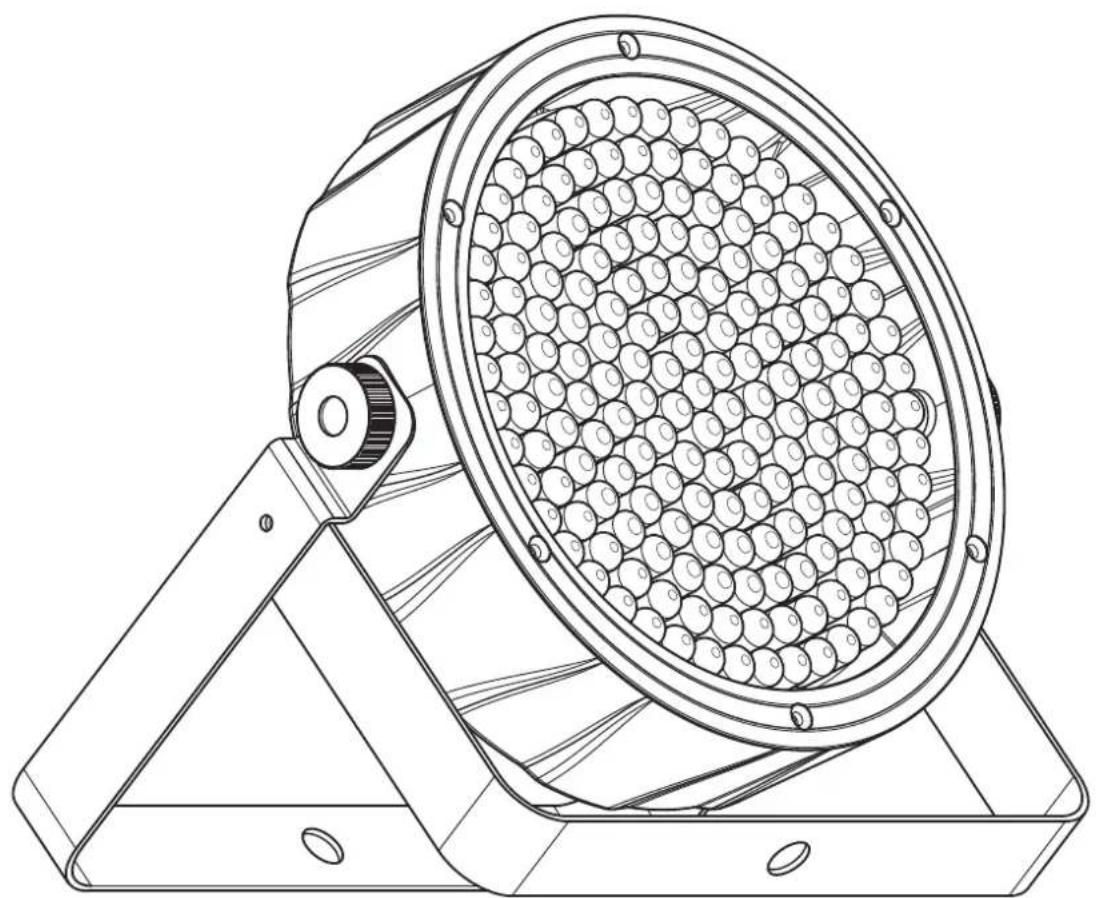
natural_image
Technical line drawing of a mechanical device with circular components and a base plate (no text or symbols)

natural_image
Abstract geometric pattern with black dots forming a triangular shape (no text or symbols)
CHAUVET3
About This Guide
The SlimPAR 64 RGBA Quick Reference Guide (QRG) has basic product information such as mounting, menu options, and DMX values. Download the User Manual from www.chauvetdj.com for more details.
Disclaimer
The information and specifications contained in this QRG are subject to change without notice.
LIMITED WARRANTY
FOR WARRANTY REGISTRATION AND COMPLETE TERMS AND CONDITIONS PLEASE VISIT OUR WEBSITE.
For Customers in the United States and Mexico: www.chauvetlighting.com/warranty-registration.
For Customers in the United Kingdom, Republic of Ireland, Belgium, the Netherlands, Luxembourg, France, and Germany: www.chauvetlighting.eu/warranty-registration.
Chauvet warrants that this product shall be free from defects in material and workmanship under normal use, for the period specified in, and subject to the exclusions and limitations set forth in the full limited warranty on our website. This warranty extends only to the original purchaser of the product and is not transferable. To exercise rights under this warranty, you must provide proof of purchase in the form of an original sales receipt from an authorized dealer that shows the product name and date of purchase. THERE ARE NO OTHER EXPRESS OR IMPLIED WARRANTIES. This warranty gives you specific legal rights. You may also have other rights that vary from state to state and country to country. This warranty is valid only in the United States, United Kingdom, Republic of Ireland, Belgium, the Netherlands, Luxembourg, France, Germany and Mexico. For warranty terms in other countries, please consult your local distributor.
Safety Notes
These Safety Notes include important information about installation, use, and maintenance.

- ONLY connect this product to a grounded and protected circuit.
- DISCONNECT from power before cleaning or replacing the fuse.
- DO NOT look at the light source when the product is on.
- Make sure the power cord is not crimped or damaged.
- Never disconnect this product from power by pulling on the cord.
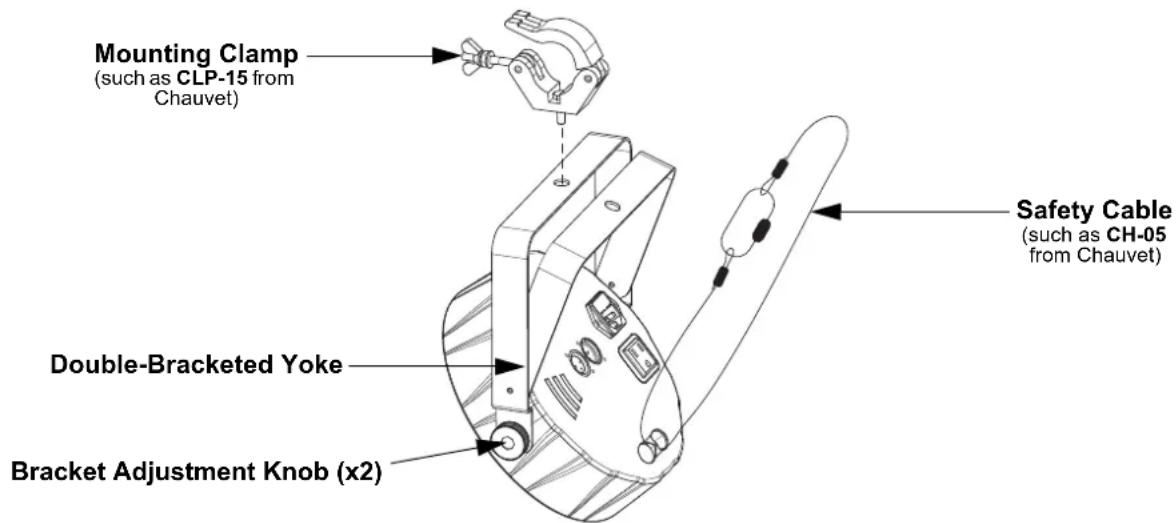
- When mounting this product overhead, ALWAYS use a safety cable.
• DO NOT allow flammable materials close to the product when it is operating.
- DO NOT touch the product's housing when it is on because it will be hot.
- The voltage of the outlet to which you are connecting this product must be within the range stated on the decal or rear panel of the product.
- This product is for indoor use only! (IP20) To prevent risk of fire or shock, do not expose this product to rain or moisture.
• Always mount this product in a location with adequate ventilation, at least 20 in (50 cm) from adjacent surfaces.
- Be sure that no ventilation slots on the unit's housing are blocked.
- Never connect this product to a dimmer or rheostat.
- Replace the fuse with the same type and rating.
• Never carry the product by the power cord. Use only the hanging bracket or handle to carry this product.
• The maximum ambient temperature is 104 °F ( 40 °C ). Do not operate this product at higher temperatures.
- In the event of a serious operating problem, stop using immediately.
• DO NOT open this product. It contains no user-serviceable parts.
- To eliminate unnecessary wear and improve its lifespan, during periods of non-use completely disconnect the product from power via breaker or by unplugging it.

Outside the U.S., United Kingdom, Ireland, Benelux, France, Germany, or Mexico, contact your distributor to request support or return a product. Refer to Contact Us at the end of this QRG for contact information.
What is Included
- SlimPAR 64 RGBA
- Power Cord
- Quick Reference Guide
To Begin
Unpack your SlimPAR 64 RGBA and make sure you have received all parts in good condition. If the box or contents appear damaged, notify the carrier immediately, not Chauvet.
AC Power
This product has an auto-ranging power supply that works with an input voltage range of 100 to 240 VAC, 50/60 Hz.

To eliminate wear and improve its lifespan, during periods of non-use completely disconnect the product from power via breaker or by unplugging it.
Power Linking
For the maximum number of SlimPAR 64 RGBA products that you can power link at each voltage, see the User Manual or the sticker on the product.
Fuse Replacement
- Disconnect the product from power.
- Wedge the tip of a flat-head screwdriver into the slot of the fuse holder.
- Pry the safety cap out of the housing.
- Remove the blown fuse from the clip on the front of the safety cap and replace with a fuse of the exact same type and rating.
- Re-insert the fuse holder and reconnect power.
Mounting
Before mounting this product, read the Safety Notes.
Mounting Diagram
Control Panel Description
| Button Function |
| Exits from the current menu or function |
| Navigates upwards through the menu list and increases the numeric value when in a function |
| Navigates downwards through the menu list and decreases the numeric value when in a function |
| Enables the currently displayed menu or sets the currently selected value into the selected function |
Menu Map
| Mode Programming Levels Description | |
| DMX Mode | 4-CH d 1–509 4-channel DMX mode | |
| 8-CH d 1–505 8-channel DMX mode | |
| Static Colors | C-- C 1–15 Static colors | |
| Programs P-- | P 1–4 | Automatic programs |
| P 5–6 | Sound-active programs |
| Auto Speed | S-- | S 1–100 | Program speed for P 1–4 |
| Sensitivity | SEnS | U 1–100 | Sound sensitivity for P 5–6 |
| Custom Color Mixing | U-- | r 0–255 | Custom static colorsCombine red, green, blue, and amber |
| g 0–255 |
| b 0–255 |
| A 0–255 |
DMX Linking
The SlimPAR 64 RGBA can work with a DMX controller. Instructions for connecting and configuring this product for DMX operation are in the User Manual. If you are not familiar with DMX, download the DMX Primer from www.chauvetdj.com.
Starting Address
To ensure full access to all channels available in each DMX mode, the highest recommended DMX address is 505.
Master/Slave Connection
The SlimPAR 64 RGBA uses the DMX data connection for its Master/Slave mode. Information about configuring the SlimPAR 64 RGBA for Master/Slave operation is in the User Manual, which is available from the Chauvet website.
DMX Values
8-CH
| Channel Function Value Percent/Setting | | |
| 1 Red 000 ⇔ 255 0–100% | | |
| 2 Green 000 ⇔ 255 0–100% | | |
| 3 | B l u e | 0 | 0 0 ⇔ 255 0–100% |
| 4 Amber 000 ⇔ 255 0–100% | | |
| 5 Color | Macros | 000 ⇔ 015 No function |
| 016 ⇔ 255 Color macros |
| 6 | Strobe (when Ch. 7 is 000 ⇔ 031) | 000 ⇔ 015 No function |
| 016 ⇔ 255 Strobe, slow to fast |
| Auto Speed (when Ch. 7 is 032 ⇔ 223) | 000 ⇔ 255 | Auto program speed, slow to fast |
| Sound Sensitivity (when Ch. 7 is 224 ⇔ 255) | 000 ⇔ 010 Sound sensitivity Off |
| 011 ⇔ 255 | Sound sensitivity, low to high |
| 7 | Automatic Programs/ Sound-Active Mode | 000 ⇔ 031 No function |
| 032 ⇔ 063 Pulse effect, 0–100% |
| 064 ⇔ 095 Pulse effect, 100–0% |
| 096 ⇔ 127 Pulse effect, 0–100–0% |
| 128 ⇔ 159 Auto fade transition |
| 160 ⇔ 191 Auto snap transition (4-color) |
| 192 ⇔ 223 Auto snap transition (15-color) |
| 224 ⇔ 255 Sound-active mode |
| 8 | Dimmer | 000 ⇔ 255 | 0–100% |
4-CH
| Channel Function Value Percent/Setting |
| 1 Red 000 ⇔ 255 0–100% |
| 2 Green 000 ⇔ 255 0–100% |
| 3 | B | l | u | e | 0 | 0 0 ⇔ 255 0–100% |
| 4 Amber 000 ⇔ 255 0–100% |
Acerca de esta guía
La Guía de referencia rápida (GRR) del SlimPAR 64 RGBA contiene información básica sobre el producto, como montaje, opciones de menú y valores DMX. Descargue el manual de usuario de www.chauvetdj.com para una información más detallada.
Exención de responsabilidad
La información y especificaciones contenidas en esta GRR están sujetas a cambio sin previo aviso.
GARANTÍA LIMITADA
PARA VER EL REGISTRO DE GARANTÍA Y LOS TÉRMINOS Y CONDICIONES COMPLETOS, VISITE NUESTRO SITIO WEB.
Para clientes en los Estados Unidos y México: www.chauvetlighting.com/warranty-registration.
Para clientes en Reino Unido, República de Irlanda, Bélgica, Países Bajos, Luxemburgo, Francia y Alemania: www.chauvetlighting.eu/warranty-registration.
Chauvet garantiza que este producto estará libre de defectos de material y mano de obra en condiciones de uso normales, durante el periodo especificado, sujeto siempre a las exclusiones y limitaciones establecidas en la garantía limitada completa de nuestro sitio web. Esta garantía se concede únicamente al comprador original del producto y no es transferible. Para ejercer los derechos que otorga esta garantía, usted debe proporcionar una prueba de compra en forma de un recibo de compra original, expedido por un distribuidor autorizado, donde figure el nombre del producto y la fecha de compra. NO EXISTEN OTRAS GARANTÍAS EXPRESAS NI IMPLÍCITAS. Esta garantía le otorga derechos legales específicos. Es posible que a usted le asistan otros derechos, que variarán dependiendo del estado o del país. Esta garantía solamente es válida en los Estados Unidos, Reino Unido, República de Irlanda, Bélgica, Países Bajos, Luxemburgo, Francia, Alemania y México. Para conocer los términos de garantía en otros países, consulte a su distribuidor local.
Notas de seguridad
Estas notas de seguridad incluyen información importante sobre el montaje, uso y mantenimiento.

- Conecte este producto SOLO a un circuito con toma de tierra y protegido.
- Desconecte siempre de la alimentación antes de la limpieza o sustitución del fusible.
- NO mire a la fuente de luz cuando el producto esté encendido.
- Asegúrese de que el cable de alimentación no está retorcido ni estropeado.
- Nunca desconecte este producto de la alimentación tirando del cable.
- Cuando monte este producto en alto, use un cable de seguridad.
• NO permita la presencia de materiales inflamables cerca de la unidad cuando esté en funcionamiento.
• NO toque este producto cuando esté en funcionamiento, pues podría estar caliente.
- La tensión del enchufe al que conecte este producto ha de estar en el rango establecido en el grabado o en el panel posterior del producto.
- ¡Este producto es para uso en interiores solamente! (IP20) Para evitar riesgos de incendio o descarga, no exponga este producto a la lluvia o la humedad.
- Monte siempre este producto en una ubicación con ventilación adecuada, al menos a 20 in (50 cm) de superficies adyacentes.

- Asegúrese de que ninguna ranura de ventilación en la carcasa de la unidad queda bloqueada.
- Nunca conecte este producto a un atenuador o reostato.
- Sustituya el fusible con uno del mismo tipo y categoría.
- Use SOLAMENTE los soportes de colgar/montar o el listón para mover este producto.
- La temperatura ambiente máxima es de 104 °F (40 °C). No haga funcionar este producto a temperaturas más altas.
- En caso de un problema grave de funcionamiento, deje de usarlo inmediatamente.
• NO abra este producto. No contiene piezas reparables por el usuario.
- Para evitar un desgaste innecesario y alargar su vida útil, desconecte completamente el producto mediante el interruptor o desenchufándolo durante periodos en que no se use.
Fuera de EE. UU., Reino Unido, Irlanda, Benelux, Francia, Alemania o México póngase en contacto con su distribuidor para solicitar asistencia o devolver un producto. Consulte Contact Us al final de este GRR para información de contacto.
Qué va incluido
- SlimPAR 64 RGBA
- Cable de alimentación
- Guía de referencia rápida
Para empezar
Desembale su SlimPAR 64 RGBA y asegúrese de que ha recibido todas las partes en buen estado. Si la caja o los componentes parecen dañados, notifíqueselo inmediatamente al transportista, no a Chauvet.
Corriente alterna
Este producto tiene una fuente de alimentación con detección automática que puede funcionar con un rango de tensión de entrada de 100–240 VCA, 50/60 Hz.

Para evitar un desgaste innecesario y alargar su vida útil, desconecte completamente el producto mediante el interruptor o desenchufándolo durante periodos en que no se use.
Alimentación en cadena
Para ver el máximo número de SlimPAR 64 RGBA que se pueden alimentar en cadena a 120 V o a 240 V, consulte el Manual de usuario o la etiqueta del producto.
Sustitución del fusible
- Desconecte el producto de la alimentación.
- Haga cuña con la punta de un destornillador plano en la ranura del portafusibles.
- Saque la tapa de seguridad de la carcasa.
- Quite el fusible fundido de la sujeción en la parte frontal de la tapa de seguridad y sustituya el fusible con otro del mismo tipo y categoría.
- Vuelva a insertar el portafusibles y conecte de nuevo la alimentación.
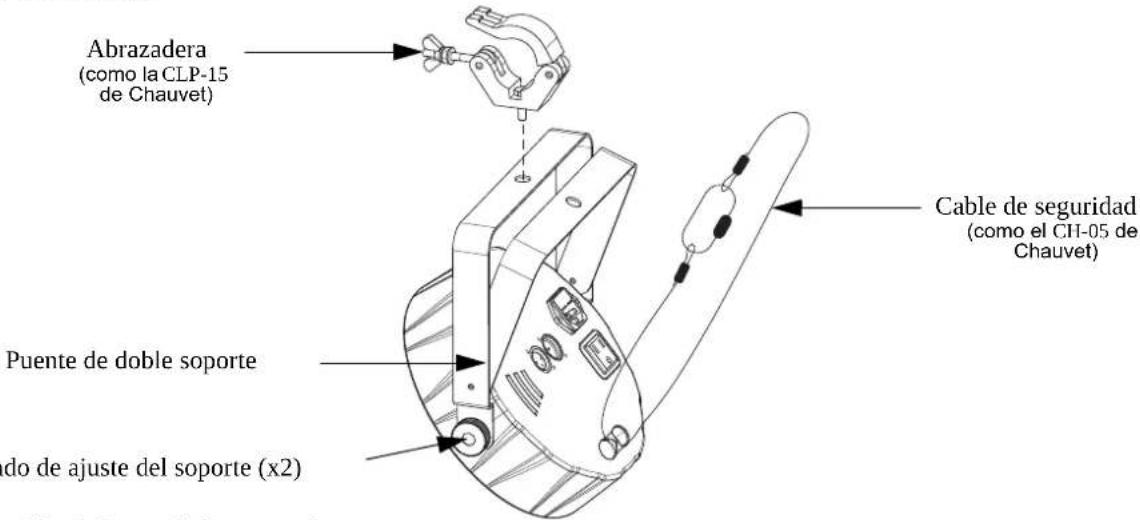
Montaje
Antes de montar este producto, lea las Notas de seguridad.
Diagrama de montaje
Descripción del panel de control
Botón Función