VHR-797EV - Videorekorder SANYO - Kostenlose Bedienungsanleitung
Finden Sie kostenlos die Bedienungsanleitung des Geräts VHR-797EV SANYO als PDF.


| Marke | SANYO |
| Modell | VHR-797EV |
| Produkttyp | Videorekorder (VHS) |
| Abmessungen (B x H x T) | ca. 430 x 85 x 280 mm |
| Gewicht | ca. 3,5 kg |
| Stromversorgung | 220-240 V, 50 Hz |
| Leistungsaufnahme | ca. 25 W |
| Bandformat | VHS |
| Wiedergabe-/Aufnahmemodi | LP, SP |
| Timeraufnahme | Ja |
| Anschlüsse | HF-Antenneneingang, HF-Ausgang, SCART (RGB), Cinch (Audio/Video) |
| Kopfanzahl | 4 (rotierend) |
| Fernbedienung | Ja, infrarot |
| Besondere Funktionen | Suchlauf, Standbild, Zeitlupe, automatischer Kanal-Suchlauf |
| Reinigung & Pflege | Köpfe regelmäßig mit handelsüblicher Reinigungskassette reinigen; Gehäuse mit trockenem, weichem Tuch abwischen |
| Sicherheitshinweise | Vor Feuchtigkeit schützen; Netzstecker ziehen bei Gewitter oder längerem Nichtgebrauch; keine Fremdkörper einführen |
| Ersatzteile/Reparierbarkeit | Ersatzteile über den SANYO-Kundendienst beziehbar; Reparaturen nur durch Fachpersonal |
Häufig gestellte Fragen - VHR-797EV SANYO
Benutzerfragen zu VHR-797EV SANYO
0 Frage zu diesem Gerät. Beantworten Sie die, die Sie kennen, oder stellen Sie Ihre eigene.
Eine neue Frage zu diesem Gerät stellen
Laden Sie die Anleitung für Ihr Videorekorder kostenlos im PDF-Format! Finden Sie Ihr Handbuch VHR-797EV - SANYO und nehmen Sie Ihr elektronisches Gerät wieder in die Hand. Auf dieser Seite sind alle Dokumente veröffentlicht, die für die Verwendung Ihres Geräts notwendig sind. VHR-797EV von der Marke SANYO.
BEDIENUNGSANLEITUNG VHR-797EV SANYO
INSTRUCTION MANUAL
VHR-797E
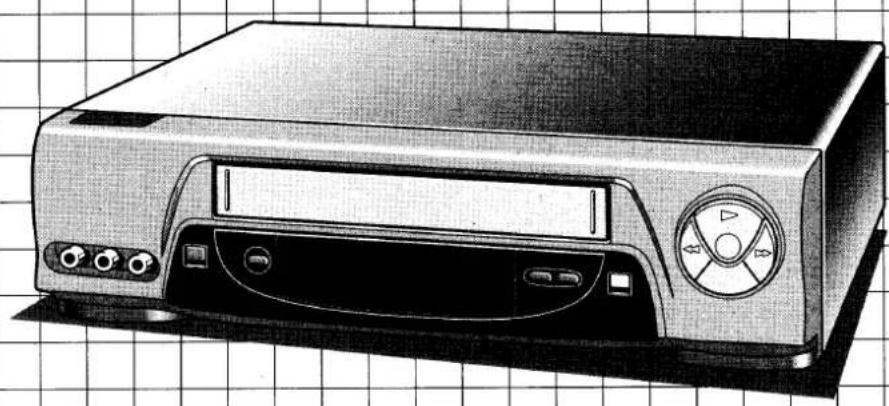
Video cassette recorder
natural_image
Illustration of a CD-ROM device with front panel and control buttons on a grid background (no text or symbols)CONNECTIONS
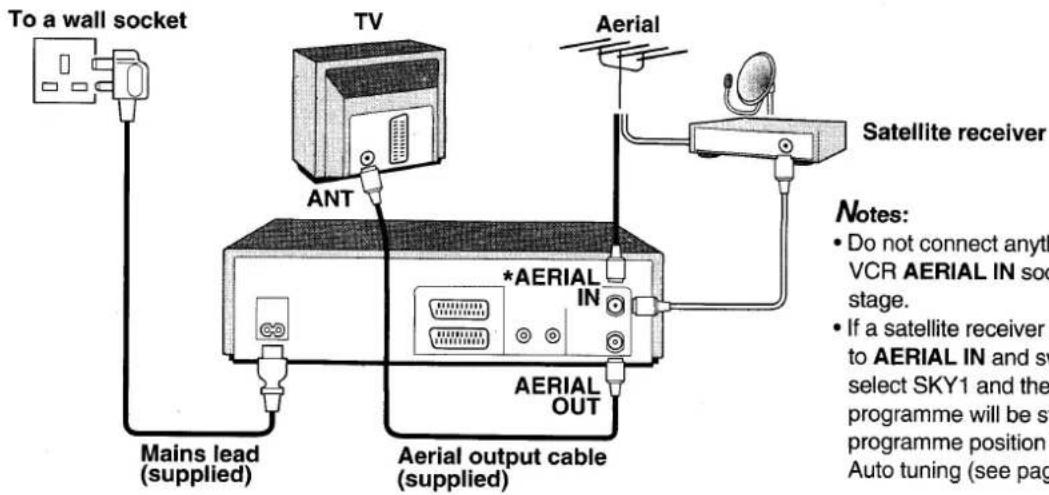
Connect as indicated below.
VCR PRESETTING
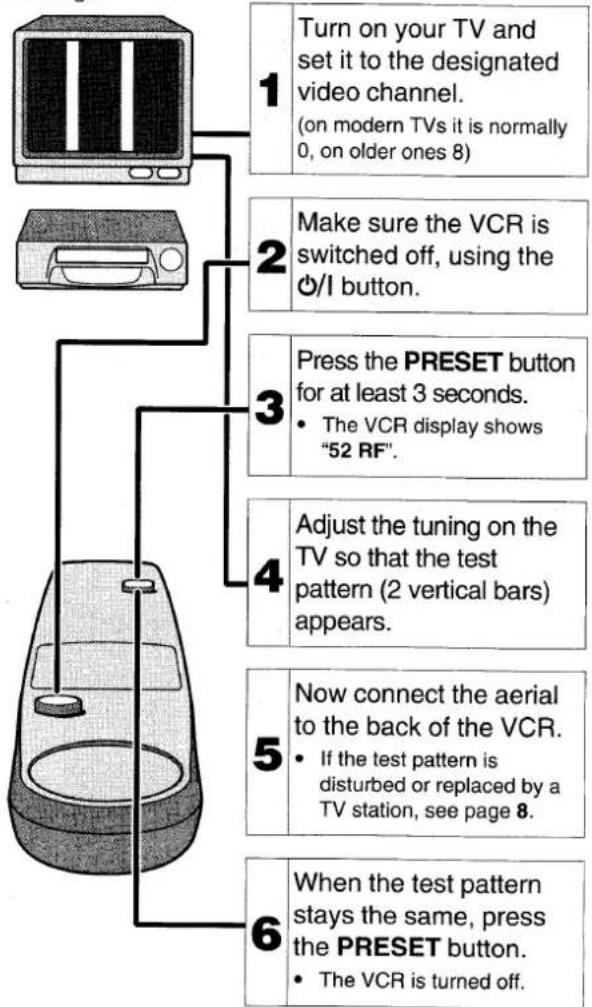
SETUP1 Setting the TV to the video channel
\* IMPORTANT
Make sure the VCR is connected to the TV as shown above, but that the aerial is not connected to the VCR at this stage.
flowchart
graph TD
A["1: Turn on your TV and set it to the designated video channel.<br>(on modern TVs it is normally 0, on older ones 8)"] --> B["2: Make sure the VCR is switched off, using the ⏰/І button."]
B --> C["3: Press the PRESET button for at least 3 seconds.<br>• The VCR display shows "52 RF"."]
C --> D["4: Adjust the tuning on the TV so that the test pattern (2 vertical bars) appears."]
D --> E["5: Now connect the aerial to the back of the VCR.<br>• If the test pattern is disturbed or replaced by a TV station, see page 8."]
E --> F["6: When the test pattern stays the same, press the PRESET button.<br>• The VCR is turned off."]
This completes the video channel setting. Now go to SETUP2.
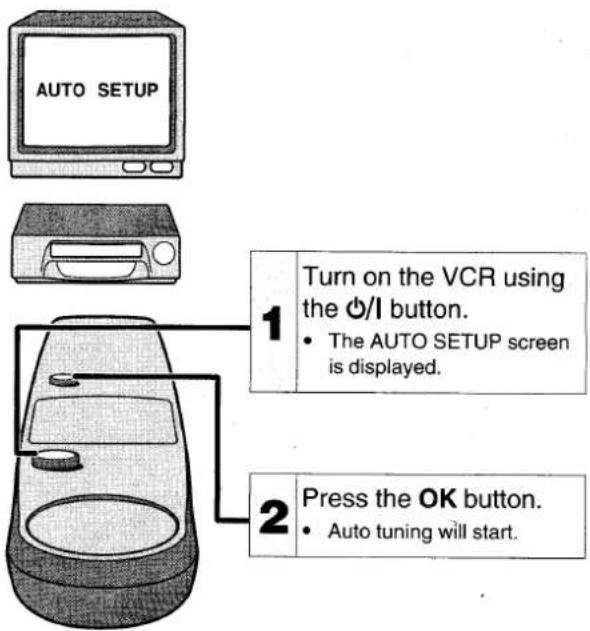
SETUP2 Auto setup (Tuning and clock setting)
Auto tuning
The TV stations available in your area will be automatically preset in order starting from programme position number "1", as follows:
| Programme position | "1" | "2" | "3" | "4" | "5" | "6" |
| TV station | BBC1 | BBC2 | ITV | C4 | *CH5 | *1or*SKY1 |
*CH5, *1, *SKY1: See page 8 for details.
Auto clock setting
The date and time will be set automatically.
ON-SCREEN MENUS AND
BASIC CONTROL
The VCR can easily be programmed by using the menus displayed on-screen.
The menus are controlled from the remote control.
If you memorize the basic operations, each setting can easily be made by following the steps of the menu concerned.
Turn on the TV, then set it to the preset video channel.
- If a wrong sub-menu has been selected, press the MENU/TV button to return to the main menu, and start again.
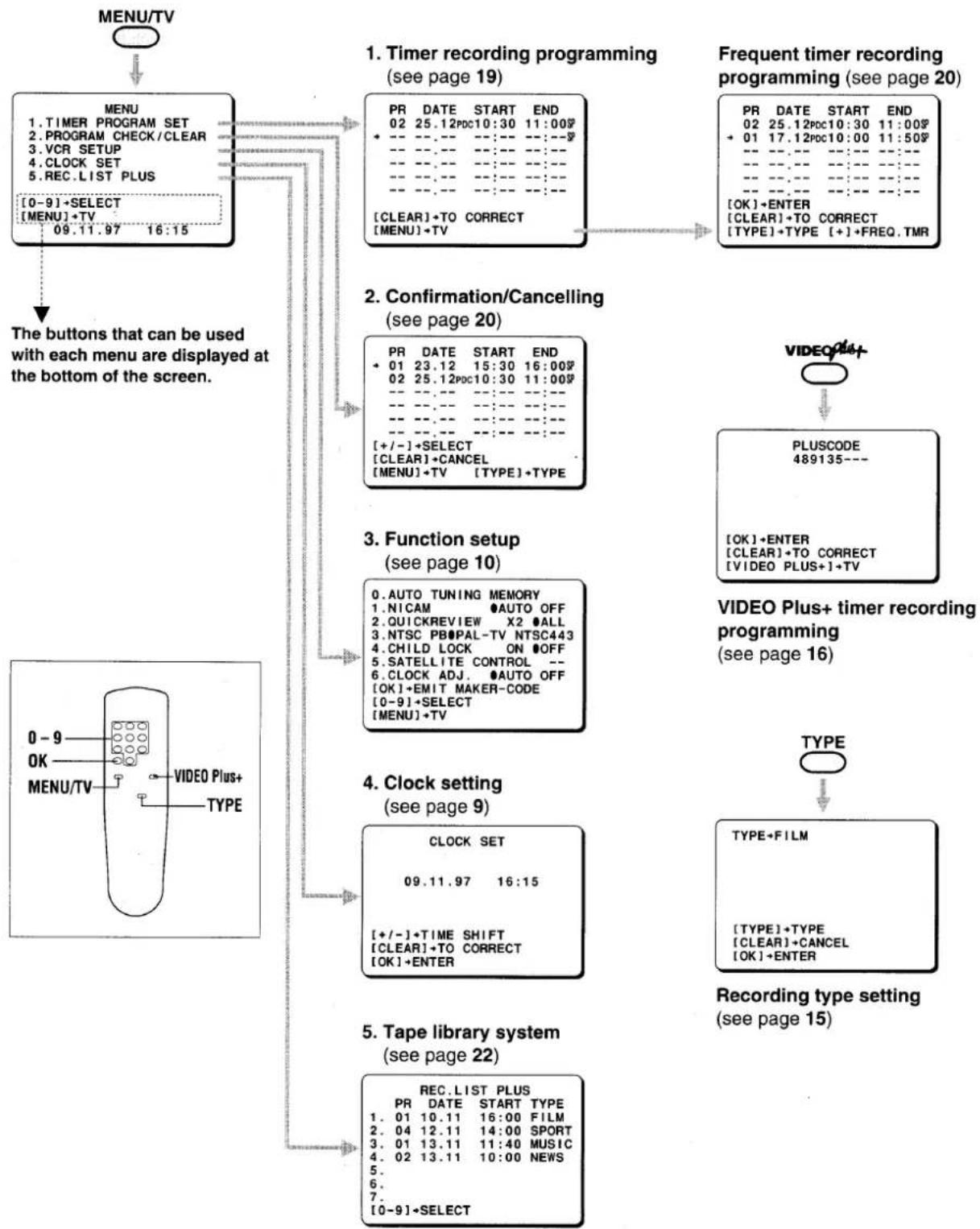
flowchart
graph TD
    A["MENU/TV"] --> B["MENU"]
    B --> C{1. Timer recording programming (see page 19)}
    C --> D["PR DATE START END 02 25.12PDC10:30 11:00$"]
    C --> E["+ CLEAR+ TO CORRECT [MENU"]+TV]
    D --> F["Frequent timer recording programming (see page 20)"]
    E --> F
    F --> G["PR DATE START END 02 25.12PDC10:30 11:00$"]
    F --> H["+ 01 17.12PDC10:00 11:50$"]
    G --> I["OK"]+ENTER["OK"]+ENTER["OK"]+ENTER["OK"]+ENTER["OK"]+ENTER["OK"]+ENTER["OK"]+ENTER["OK"]+ENTER["OK"]+ENTER["OK"]+ENTER["OK"]+ENTER["OK"]+ENTER["OK"]+ENTER["OK"]+ENTER["OK"]+ENTER["OK"]+ENTER["OK"]+ENTER["OK"]+ENTER["OK"]+ENTER["OK"]+ENTER["OK"]+ENTER["OK"]+ENTER["OK"]+ENTER["OK"]+ENTER["OK"]+ENTER["OK"]+ENTER<nl>
    B --> J["The buttons that can be used with each menu are displayed at the bottom of the screen."]
    J --> K["0-9 OK MENU/TV VIDEO Plus+ TYPE"]
    K --> L["VIDEO Plus+ TYPE"]
    L --> M["4. Clock setting (see page 9)"]
    M --> N["CLOCK SET 09.11.97 16:15 + +/-+TIME SHIFT [CLEAR"]+TO_CORRECT["OK"]+ENTER]
    N --> O["5. Tape library system (see page 22)"]
    O --> P["REC.LIST PLUS PR DATE START TYPE 01 10.11 16:00 FILM 2. 04 12.11 14:00 SPORT 3. 01 13.11 11:40 MUSIC 4. 02 13.11 10:00 NEWS 5. 6. 7. [0-9"]+SELECT]
    P --> Q["TYPE ↔ TYPE ↔ TYPE ↔ TYPE ↔ TYPE ↔ TYPE ↔ TYPE ↔ TYPE ↔ TYPE ↔ TYPE ↔ TYPE ↔ TYPE ↔ TYPE ↔ TYPE ↔ TYPE ↔ TYPE ↔ TYPE ↔ TYPE ↔ TYPE ↔ TYPE ↔ TYPE ↔ TYPE ↔ TYPE ↔ TYPE ↔ TYPE ↔ TYPE ↔ TYPE ↔ TYPE ↔ TYPE ↔ TYPE ↔ TYPE ↔ TYPE ↔ TYPE ↔ TYPE ↔ TYPE ↔ TYPE ↔ TYPE ↔ TYPE ↔ TYPE ↔ TYPE ↔ TYPE ↔ TYPE ↔ TYPE ↔ TYPE ↔ TYPE ↔ TYPE ↔ TYPE ↔ TYPE ↔ TYPE ↔ TYPE ↔ TYPE ↔ Type"]
CONTENTS
GB
Make sure these settings are done before operating the VCR.
QUICK SETUP GUIDE 1
ON-SCREEN MENUS AND BASIC CONTROL.... 2
1
INTRODUCTION
PRECAUTIONS.... 4
CONTROLS 5
2
PREPARATION
CONNECTIONS 6
Accessories 6
Remote control batteries insertion 6
Satellite receiver and VCR setup 7
VCR PRESETTING 8
SETUP1 Setting the TV to the video channel.... 8
SETUP2 Auto setup (Tuning and clock setting) 8
VCR SETUP 10
Function setup.... 10
Satellite receiver maker code setup.... 11
Hi-Fi Stereo/Bilingual programmes sound selection ..... 11
3
BASIC OPERATION
PLAYBACK 12
Variable playback modes.... 12
Super QuickReview 12
Shuttle dial operation 13
Playback of a NTSC tape 13
Index search.... 13
Counter memory 13
Endless play 14
Picture adjustments 14
RECORDING TV PROGRAMMES 15
Setting the recording type 15
Quick Start Recording timer 15
4
ON-SCREEN
OPERATION
VIDEO PLUS+ TIMER RECORDING PROGRAMMING 16
On-screen programming 16
Programming on the VCR display 17
SATELLITE BROADCASTS TIMER RECORDING
PROGRAMMING.... 18
ON-SCREEN TIMER RECORDING PROGRAMMING ..... 19
Frequent timer recording programming 20
Confirmation/Cancelling 20
PDC function 21
Notes on timer recording 21
TAPE LIBRARY SYSTEM 22
5
ADVANCED
OPERATION
EDITING 23
Tape copy 23
Audio dubbing 23
6
TROUBLESHOOTING.... 24
SPECIFICATIONS 25
GUARANTEE TO CUSTOMER ....Back cover
Safety precautions
DANGER:
This VCR contains live parts. Do not remove the cabinet.

WARNING:
To prevent fire or shock hazard, do not expose this product to rain or moisture.
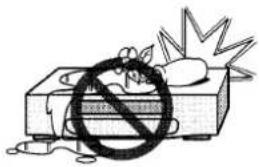
natural_image
Illustration of a device with a large 'no' symbol crossed out, next to a broken-out explosion (no text or symbols)CAUTION:
Do not put your hand or other objects in the cassette loading slot because of the risk of injury or an accident. Be sure to keep small children away from the VCR.
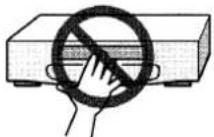
Caution concerning condensation
Be careful of condensation
Condensation can form inside a VCR when it is suddenly moved from a cold place to a warm, humid one, or when a heater has been turned on to quickly heat the room.
Do not insert a video cassette if you use this VCR in areas subject to condensation. Wait for 112 to 2 hours to completely eliminate condensation before using the VCR.
Operating precautions
- Place the VCR on a flat, stable, level surface. Never subject it to violent shaking or any other shock or impact.
- Do not expose the unit to high temperatures. Excessive heat (heat sources such as heaters, ovens, closed car on hot days, etc.) may damage the unit.
- Be sure to use this VCR only in a temperature range of 5°C to 40°C (41°F to 105°F) and at less than 80% humidity.
-
Do not use the unit under the following conditions:
-
in locations with high humidity
– in presence of excessive dirt or dust
– in areas subject to strong vibrations -
near strong magnetic fields (e.g. transmitting antennas, motors, fluorescent lights, etc.)
-
Do not stack anything on top of your VCR, or block the air vents, to prevent damaging or overheating.
- Do not place anything, except VHS video cassette tapes, in the unit.
- Do not allow rain, steam, dew, salt water, sand, oily smoke, metal objects, etc. to enter the unit.
- Clean with a dry and soft cloth, or soft cloth slightly moistened with a mild detergent solution.
- Do not use any type of solvent, such as alcohol or benzine.
Power on/standby mode
Power is switched on/off by pressing the Ⓗ/1 button.
VCR display
Standby mode (⏻)
Power on mode (1)
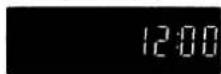
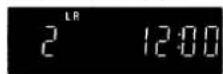
"Standby mode" is the condition in which only the time is displayed.
- Do not forget that even in the power off state there is an electrical voltage inside the VCR as long as it is connected to a wall socket.
- Disconnect the mains lead from the wall socket if the VCR is not to be used for a long time.
Only cassettes marked VHS can be used with this VCR.
Note:
If the unit does not operate properly, switch it off, refer to "TROUBLESHOOTING" (see page 24) or contact your Sanyo authorized service agent.
Function indicator
TV screen
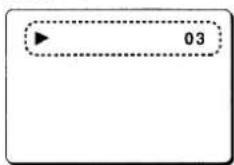
| Mode | Display |
| Playback | ▶ |
| Fast-forward | ▶▶ |
| Rewind | ◀◀ |
| Record | ● |
| Record pause | ●II |
| Programme position number | 01-44 |
| External input (EURO-AV1) | L1 |
| External input (EURO-AV2) | L2 |
| External input (front AV INPUT) | L3 |
(for 2 seconds)
VCR display

| Mode | Display |
| Cassette in | |
| Playback | |
| Double speed playback | |
| Forward search | |
| Slow motion | |
| Fast-forward | |
| Rewind | |
| Reverse search | |
| Still picture | - - |
| Record | REC |
| Record pause | REC - - |
| Audio dubbing | REC |
(※: Flashing)
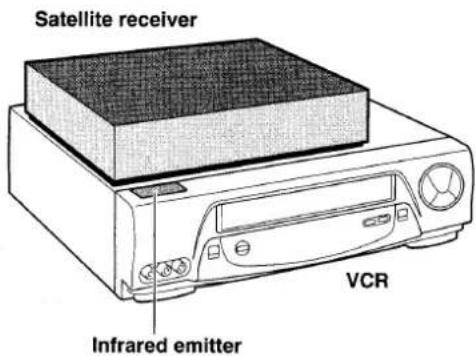
Infrared emitter for satellite receiver control
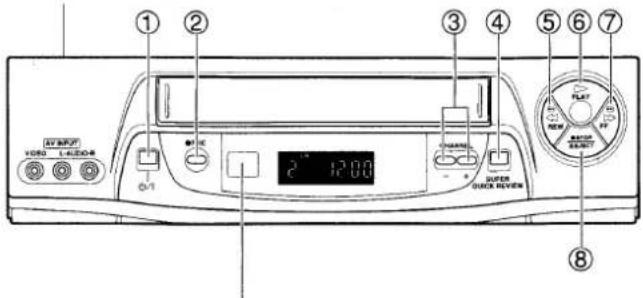
Remote control sensor
Operate the remote control unit within a range of approx. 30° and approx. 6m (20 ft.) from the front of the VCR.
| Indication | Function | Page | |
| 1 | ∅/I | Power on/standby mode | 4 |
| 2 | REC | Recording | 15, 23 |
| 3 | CHANNEL-, + | Programme selection | 8 |
| 4 | SUPER QUICK REVIEW | Double speed playback | 12 |
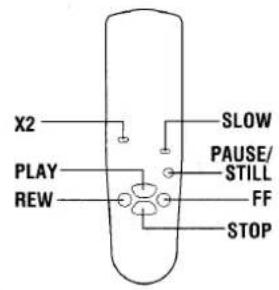
| 5 | REW | Rewind, reverse search during playback | 12 – 14 |
| 6 | PLAY | Playback | 12 – 14 |
| 7 | FF | Fast-forward, forward search during playback | 12 – 14 |
| 8 | STOP/EJECT | Tape stop, cassette ejection (VCR only) | 12 |
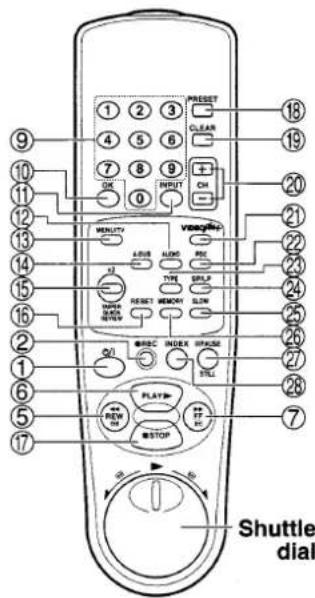
(On the remote control only)
| 9 | 0 – 9 | Direct programme selection, for various input | 10, 16 – 19 |
| 10 | OK | Data/settings entry | 8, 16 – 19 |
| 11 | INPUT | External input mode selection | 19, 23 |
| 12 | AUDIO | Sound track selection | 11, 23 |
| 13 | MENU/TV | On-screen operation | 2 |
| 14 | A-DUB | Audio dubbing | 23 |
| 15 | X2 | Double speed playback | 12 |
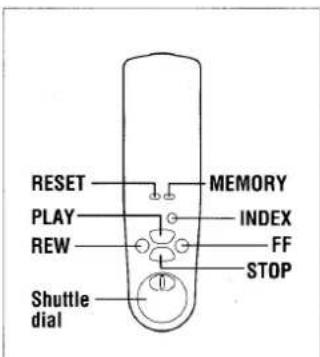
| 16 | RESET | Counter reset | 13 |
| 17 | STOP | Tape stop | 12 |
| 18 | PRESET | Tuner preset | 8, 9 |
| 19 | CLEAR | Clears data | 20 |
| 20 | CH +, - | Tuning, programme selection, tracking adjustment | 9, 14, 15 |
| 21 | VIDEO Plus+ | VIDEO Plus+ timer programme set | 16, 17 |
| 22 | PDC | PDC function on/off | 16, 17, 19, 21 |
| 23 | TYPE | Recording type set | 15 |
| 24 | SP/LP | Recording tape speed selection | 15 |
| 25 | SLOW | Slow motion | 12 |
| 26 | MEMORY | Counter “0:00:00” position memory | 13 |
| 27 | PAUSE/STILL | Pause during recording, still picture during playback | 12, 15 |
| 28 | INDEX | Index search | 13 |
Aerial/RF connection
Set one of the channels on the TV as a video channel specifically for the signals from the VCR. See "Setting the TV to the video channel" on page 8.
Note:
Stereo sound can only be enjoyed when the VCR is connected to a stereo monitor/TV or stereo audio system using an AV or Hi-Fi audio connection.
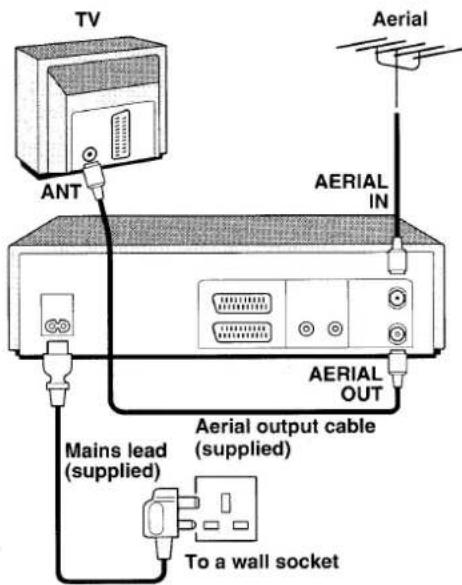
Additional connections
AV connection
If your TV has an AV terminal, the following AV connections are also possible.
- The advantage of this connection is a higher quality of picture and sound during playback.
- When the PLAY or VIDEO Plus+ button is pressed, the TV is automatically switched to the AV mode.
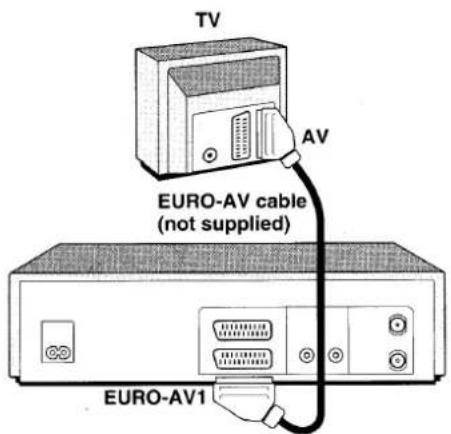
Hi-Fi audio connection
You can obtain a dynamic sound output through your Hi-Fi system when you playback a tape recorded in Hi-Fi stereo on this VCR.
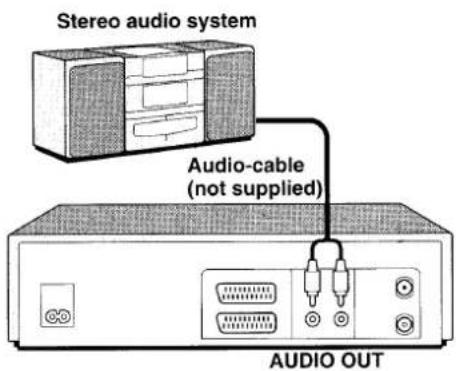
Mains lead connections
- If the plug supplied with this appliance is not suitable for the wall socket in your home, it should be cut off and the correct type fitted.
The wires in the mains lead are coloured according to the following code:
Blue: Neutral
Brown: Live
If the colours of the wires in the mains lead of this apparatus do not correspond with the colour markings identifying the terminals in your plug, proceed as follows:
- The wire which is coloured blue must be connected to the terminal which is marked with the letter N or coloured blue or black.
- The wire which is coloured brown must be connected to the terminal which is marked with the letter L or coloured brown or red.
- Do not connect either wire to the Earth terminal.
Disposal of plug
If the non rewireable plug is to be cut off, the removed plug should be disposed of carefully as there is a shock hazard should the plug be inserted into a live socket.
Replacing the fuse
The detachable fuse cover must be replaced after changing the fuse. Only a 3A fuse should be used, it should comply with BS1362, and should carry the ASTA mark.
Accessories
Is everything in the box?
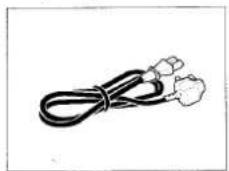
Mains lead
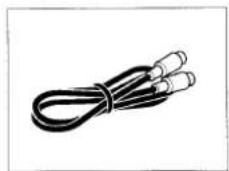
Aerial output cable
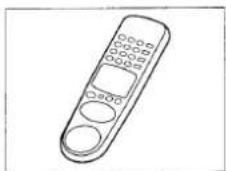
Remote control unit
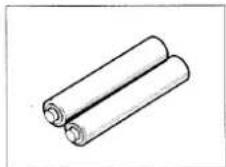
2 "AA (IEC R6)" size, 1.5-volt batteries
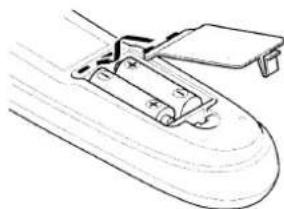
Remote control batteries insertion
1 Open the lid.
2 Insert 2 "AA (IEC R6)" 1.5 volt batteries (supplied) according to the ⊕ and ⊖ signs.
3 Replace the lid.
natural_image
Line drawing of a mechanical component with a handle and base, no text or symbols presentEURO-AV2
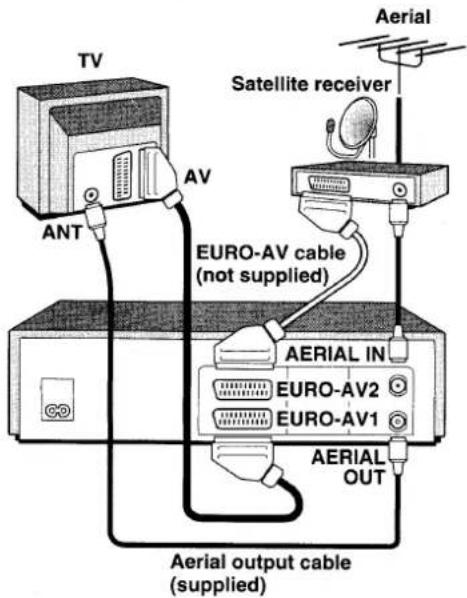
The EURO-AV2 terminal is used for signal input only. It is used to connect a satellite receiver or decoder or when recording from an external video source.
Note:
It is recommended to connect the satellite receiver to the
EURO-AV2, however it can also be connected to the EURO-AV1 connector.
When using a satellite receiver, select the input mode corresponding to the receiver connection using the INPUT button on the remote control.
EURO-AV1: "L1"
EURO-AV2: "L2"
RF connection: Programme position "6"
Satellite receiver and VCR setup
Connection
By connecting a satellite receiver to your VCR, you can receive and record satellite broadcasts.
If a satellite receiver is connected at RF and switched on, select SKY1 and the satellite programme will be stored in programme position "6" during Auto tuning (see page 8).
For detailed information, please refer to the instruction manual accompanying your satellite receiver.
- The timer recording programming function can be used to record satellite broadcasts. (See page 18.)
The satellite receiver will be controlled through signals generated according to the programmed timer recordings.
Note:
The EURO-AV2 terminal is used for signal input only.
Installation for proper signal transmission
- Place the satellite receiver on top of the VCR, placing it as much as possible to the left, and being careful not to obstruct the infrared emitter.
Setup for satellite receiver use
- In the VCR SETUP menu, at the "5. SATELLITE CONTROL" line, set the maker code of your satellite receiver. (“Satellite receiver maker code setup” see page 11.)
After all the connections are completed, please follow steps SETUP1 and SETUP2 before using the VCR.
If the VCR has been connected to the TV using the "AV connection", simply set the TV to the AV mode.
Go to "SETUP2 Auto setup (Tuning and clock setting)".
SETUP1
Setting the TV to the video channel
IMPORTANT
Make sure the VCR is connected to the TV as shown "Aerial/RF connection" on page 6, but that the aerial is not connected to the VCR at this stage.
1 Turn on your TV and set it to the designated video channel (on modern TVs it is normally 0, on older ones 8).
2 Make sure the VCR is switched off, using the Ⓗ/I button.
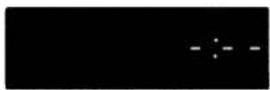
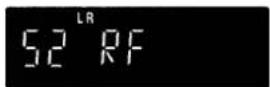
3 Press the PRESET button for at least 3 seconds.
- The VCR display shows "52 RF".
4 Adjust the tuning on the TV so that the test pattern (below) appears. (TV screen)
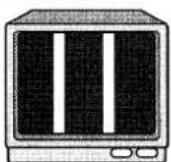
5 Now connect the aerial to the back of the VCR.
If the test pattern is disturbed or replaced by a TV station, go to step 6.
If the test pattern stays the same, press the PRESET button. The VCR is turned off.
This completes the video channel setting. Now go to SETUP2.
6 Disconnect the aerial from the back of the VCR.
7 Using the CH (+ or -) button on the VCR remote control, change the number on the VCR display to a vacant channel number applicable to your area.
8 Adjust the tuning on the TV so that the test pattern appears.
9 Reconnect the aerial to the back of the VCR.
If the test pattern is disturbed or replaced by a TV station, go back to step 6 and repeat the procedure.
If the test pattern stays the same, press the PRESET button. The VCR is turned off.
This completes the video channel setting. Now go to SETUP2.
SETUP2
Auto setup (Tuning and clock setting)
Ensure the aerial has been connected (see page 6).
1 Turn on the VCR using the ⏻/I button.
• The AUTO SETUP screen is displayed.
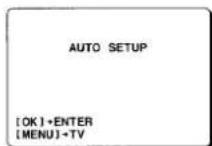
If not, press both CHANNEL (− and +) buttons on the VCR for at least 3 seconds.
- The AUTO SETUP screen is displayed.
2 Press the OK button.
- Auto tuning will start.
Notes:
- During the auto tuning operation, please do not press any of the buttons or controls on the VCR or remote control.
- Auto tuning is not possible if the VCR is set to AV input mode.
Auto tuning
This VCR has a built-in tuner capable of tuning up to 44 TV stations.
The TV stations available in your area will be automatically preset in order starting from programme position "1". Refer to the sorting table.
Notes:
- The skip function will be automatically set for all position numbers where no TV station has been preset. Please refer to "Skip function" on next page.
- Due to possible changes by broadcasters, TV stations may not always be sorted in the correct order (e.g. BBC 1 may be set to programme position 7 or higher). If this happens please refer to "Sorting the TV stations" on next page.
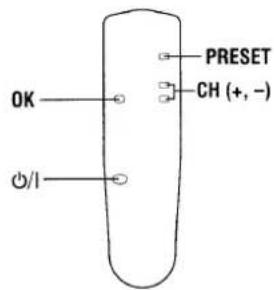
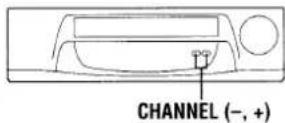
If a TV station is preset to channel position 0 or 8 on your TV, select another channel position where no TV station is received.
(For more details, please refer to your TV instruction manual.)
Sorting table
| Programme position | TV station |
| “1” | BBC 1 |
| “2” | BBC 2 |
| “3” | ITV |
| “4” | C4 |
| “5” | *CH5 |
| “6” | *1 or *SKY1 |
\*CH5
Programme position "5" is reserved for TV station CH5 to be available in the spring of 1997.
\*1
For areas where there is a satellite broadcasting service, the TV station with the lowest frequency will be preset to this programme position number. (Select SKY 1 on the cable box.)
\*SKY 1
During AUTO SETUP and when the satellite receiver is connected at RF, ensure the satellite receiver is switched on and SKY 1 selected. The satellite programme will be stored in programme position "6".
Power interruption
If the power to the VCR has failed or has been disconnected for more than 1 hour, the date, time, function setup memory and any recording information regarding future recordings should be reset. However, the Auto clock set function will reset the date and time when the power is restored to the unit.
The tuner preset memory will not be erased.
So there is no need to retune the VCR stations.
For VCR presetting, refer to "ON-SCREEN MENUS AND BASIC CONTROL" (easy process) on page 2.
Auto clock setting and adjustment
The date and time will be set according to the PDC signal. Every Sunday, at 3 AM or 6 AM, the clock setting is adjusted and the summer time/ standard time setting is not necessary.
Manual clock adjustment
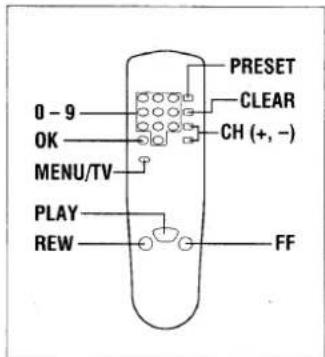
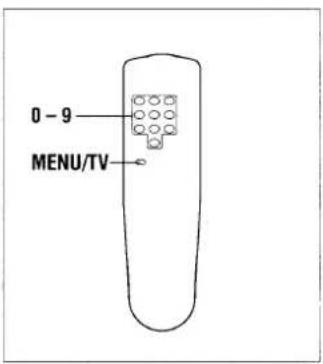
1 Press the MENU/TV button.
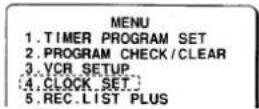
2 Press the numeric 4 button.
3 Using the CLEAR button, delete the incorrect numbers.
4 Enter the correct setting, using the numeric (0 - 9) buttons on the handset.
Manual setting of summer time/standard time setting
Press CH (+ or -) button to advance or retard the clock by one hour.
5 Press the OK button to complete the sequence.
- Seconds will start counting from "00" as the OK button is pressed. The normal TV broadcast screen will return.
Additional tuning controls
Sorting the TV stations
Example: To change BBC 2 from programme position "2" to programme position "3".
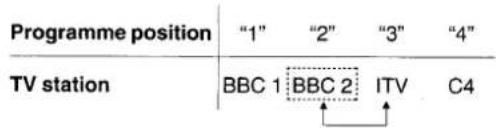
1 Press the PRESET button.
2 Using the CH (+ or −) button select the desired TV station (e.g. BBC 2).
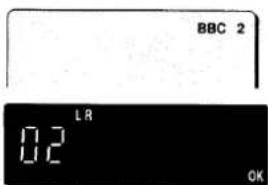
3 Using the numeric buttons (0 - 9), enter the target programme position number (e.g. "03").
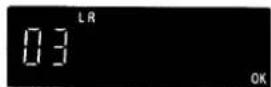
4 Press the OK button.
Repeat steps 2 to 4 to change another TV station programme position number.
5 When finished, press the PRESET button.
Fine tuning
If the tuning is not optimum, it can be improved by manual fine tuning.
1 Press the PRESET button.
2 Press the FF or REW button to obtain the best possible picture and sound.
3 Press the OK button.
4 When finished, press the PRESET button.
Skip function
If only programme position numbers 1 to 30 have been preset, you can set the skip function for programme position numbers 31 to 44, so that only the preset TV stations will appear when pressing the CH (+ or -) button.
1 Press the PRESET button.
2 Using the numeric buttons or the CH (+ or -) button, select the programme position number to skip.
3 Press the CLEAR button.
- The "S" indicator will light.
To cancel the skip function, press the CLEAR button again to erase the "S" indicator.
4 Press the OK button.
Repeat steps 2 to 4 for every programme position number to skip.
5 When finished, press the PRESET button.
Manual tuning
This tuning mode can be used to modify the settings entered by the Auto tuning function, or to manually preset the TV stations to particular programme position numbers.
1 Press the PRESET button.
2 Using the CH (+ or -) button, select the desired programme position number.
3 Press the PLAY button.
If the search stops on a broadcast other than the one desired, press the PLAY button again until the broadcast from the desired TV station appears on the TV screen.
4 Press the OK button when the desired TV station appears on the TV screen.
Repeat steps 2 to 4 to preset another TV station to another programme position number.
5 When finished, press the PRESET button.
Turn on the TV, then set it to the preset video channel or AV mode (if connected by a EURO-AV cable).
Function setup
1 Press the MENU/TV button, then press the numeric 3 button.
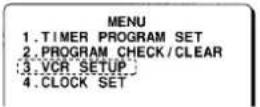
2 Press the numeric button corresponding to the item to set, until the "●" symbol is displayed to the left of the desired mode. (The settings indicated by the "●" symbols are the factory default settings.)
0. AUTO TUNING MEMORY
Auto tuning
The Auto tuning function will start, and all programme positions will be automatically reprogrammed.
Note:
Be careful not to press the numeric button 0 if you do not wish to reprogramme all programme positions.
1. NICAM AUTO OFF
NICAM broadcasts setting
AUTO: To record NICAM stereo broadcasts and bilingual broadcasts.
OFF: To record the normal sound (FM mono).
2. QUICKREVIEW X2 ●ALL
QuickReview sound selection
X2: The sound will be heard only during double speed forward or reverse playback
ALL: The sound will be heard during the forward search, reverse search or still picture modes.
3.NTSC PBOPAL-TV NTSC443
NTSC playback system
PAL-TV: When using a PAL system TV.
NTSC443: When using a NTSC4.43 system TV. (Please use the EURO-AV1 terminal.)
4. CHILD LOCK ON OFF
Child lock function
ON: "BLOCKED" is displayed on the TV screen and the sound is muted.
OFF: The child lock function is not engaged.
5.SATELLITE CONTROL --
Satellite receiver maker code setup
Refer to "Satellite receiver maker code setup" on next page.
6. CLOCK ADJ. ●AUTO OFF
Auto clock adjustment
AUTO: The clock is automatically adjusted every Sunday at 3 AM or 6 AM.
OFF: The clock is not adjusted automatically.
When finished, press the MENU/TV button.
Maker code list
| Satellite receiver | Maker code |
| — | 00 |
| GRUNDIG (GRD250) | 01 |
| AMSTRAD (SRD545) | 02 |
| MASPRO (ST-8MK2) | 03 |
| FERGUSON (SRD-6) | 04 |
| NOKIA (SAT-800) | 05 |
| ECHOSTAR (LT-730 plus) | 06 |
| ALBA (ISR-7000) | 07 or 08 |
| PACE (MSS series) | 09 |
| BT (SVS-250) | 10 |
Satellite receiver maker code setup
1 Turn on the satellite receiver.
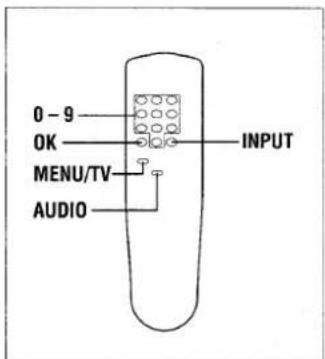
2 Using the INPUT button, be sure to select on the VCR display the appropriate input mode, corresponding to the connection of the satellite receiver.
EURO-AV1: Select "L1".
EURO-AV2: Select "L2".
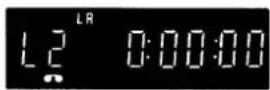
If using the "RF connection", select the programme position "6".
- When doing a programmed timer recording of a satellite broadcast, this mode will be selected automatically.
3 Press the MENU/TV button, then press the numeric 3 button.
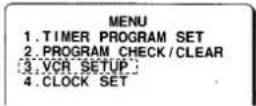
4 Press the numeric 5 button repeatedly to set the appropriate maker code for the satellite receiver used. Refer to the maker code list on the left.
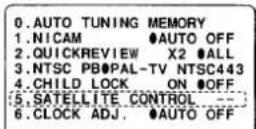
5 Press the OK button, to enter the setting.
Checking the infrared signal transmission
If when the OK button was pressed, channel 7 is set on the satellite receiver, the infrared signals are correctly transmitted.
If channel 7 is not set...
- Check that the connections are correct and that the correct maker code is entered, and press the OK button again.
- Try shifting the receiver position (see page 7), and press the OK button again.
Note:
If the satellite receiver or connection is changed, the maker code must be reset to “—” and set again, even if using a receiver from the same maker.
When finished, press the MENU/TV button.
Hi-Fi Stereo/Bilingual programmes sound selection
Using the AUDIO button, select the desired sound required.
Stereo sound selection
When a stereo broadcast is received, the stereo indicator "ST" illuminates on the VCR display.
| VCR display | Selected sound |
| “LR” | Left and Right tracks |
| “L” | Left track |
| “R” | Right track |
| No indicator | Monaural |
Bilingual sound selection
When a bilingual broadcast is received, the bilingual indicator "BIL" illuminates on the VCR display.
| VCR display | Selected sound |
| “LR” | Main and Sub |
| “L ” | Main |
| “ R” | Sub |
| No indicator | Main |
Turn on the TV. If using the "RF connection", set it to the preset video channel.
1 Insert a recorded video cassette.
Cassette loading Gently push the centre of the cassette until it is loaded automatically.
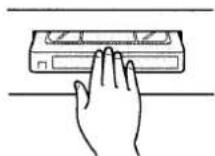
2 Press the PLAY button.
Stop
Press the STOP button.
Eject the cassette
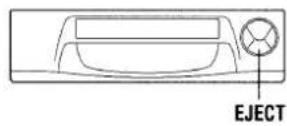
Press the EJECT button on the VCR.
Rewind
Press the REW button during stop or reverse search operation.
Fast-forward
Press the FF button during stop or forward search operation.
Variable playback modes
Double speed playback
Press the X2 button during normal playback operation.
- The SUPER QUICK REVIEW button on the VCR will illuminate.
Forward search
Press the FF button during playback or fast-forward operation.
Reverse search
Press the REW button during playback or rewind operation.
Still picture
Press the PAUSE/ STILL button during normal playback.
Frame advance
Press the PAUSE/ STILL button during still picture.
Slow motion
Press the SLOW button during normal playback or during still picture. The tape speed can be set at 1/5 or 1/30 of normal speed by pressing the SLOW button.
Note:
During double speed playback, in order to minimize sound loss, the sound playback speed is accelerated, resulting in a slightly faster than normal beat or tempo for music or speech.
Super QuickReview
Using the Super QuickReview function you can enjoy listening to the sound while using the variable playback modes.
About the Super QuickReview sound
- The Super QuickReview function will only playback the sound from certain sections of the recording on the tape and therefore the whole sound cannot be heard.
The sound is played back as indicated below:
- The sound corresponding to frames A, C and E is heard.
- The sound corresponding to frames B and D will not be heard.
Normal audio track
| A | B | C | D | E |
- When using the Super QuickReview function, only mono sound is heard.
Variable playback modes available with the Super QuickReview function
Double speed playback
When viewing the recording of a sports meeting, a car race or any long recording, you can use this function to view it at double speed playback in half the normal time.
Double speed reverse playback (only available when using the shuttle dial)
Double speed reverse playback is possible while listening to the recorded sound.
Forward search, Reverse search
To look for a certain scene or section of the recording while looking at the image and listening to the sound.
Still picture
The sound from about the 3 seconds preceding the still picture is heard repeatedly.
- When switching from slow motion to still picture mode, the sound will not be heard.
When using the Super QuickReview function, you can select to play back or mute the sound during the variable playback modes (“Function setup” see page 10).
To satellite receiver users
If you record a programme with a bilingual sound track and do not preselect which sound track to record, the VCR will record both sound tracks. If you then try to use the QuickReview function with that recording, you will hear sampled sound from both sound tracks.
To avoid this, please select the sound track you want to record on the satellite receiver before you set the VCR timer.
(Please refer to your satellite receiver manual for sound track selection.)
Modes and buttons illumination
| Stop | |
| Play | |
| Forward search | |
| Reverse search | |
| Fast-forward | |
| Rewind | |
| Record | All buttons off |
Auto power on
The power is automatically switched on as a cassette is inserted while the VCR is in the standby mode.
Auto play
The VCR will play back a tape automatically when a video cassette is inserted whose erasure-prevention tab has been removed.
Auto eject
When a video cassette without an erasure-prevention tab is played to the end of the tape, the tape will be automatically rewound and then the cassette will be ejected.
Power off eject
The video cassette will be ejected when the EJECT button is pressed, even when the VCR is in standby mode.
Shuttle dial operation
From normal playback, double speed playback or stop mode, turn the shuttle dial clockwise or counterclockwise to select a mode as indicated below.
The speed will vary according to the angle the dial is turned.
1 Turn the shuttle dial in either direction, and hold it where the desired mode is selected.
2 To return to the original mode, release the shuttle dial.
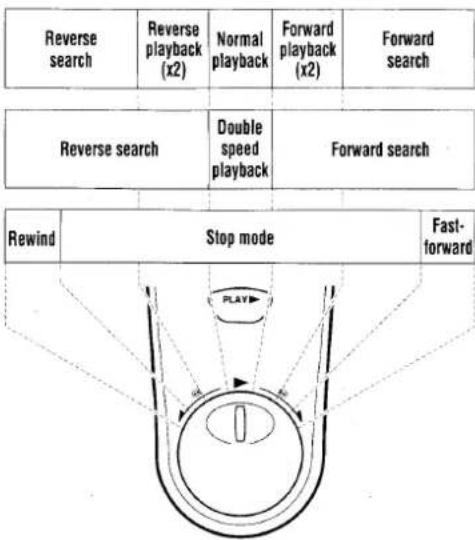
flowchart
graph TD
    A["Reverse search"] --> B["Reverse playback (x2)"]
    B --> C["Normal playback"]
    C --> D["Forward playback (x2)"]
    D --> E["Forward search"]

    F["Reverse search"] --> G["Double speed playback"]
    G --> H["Forward search"]

    I["Rewind"] --> J["Stop mode"]
    J --> K["Fast-forward"]
Playback of a NTSC tape
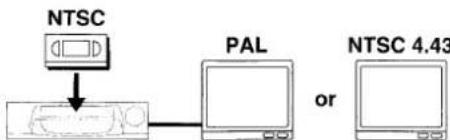
This VCR can playback a NTSC tape on a PAL (I) or NTSC 4.43 system TV.
flowchart
graph TD
    A["NTSC"] --> B["Device"]
    C["PAL"] --> B
    D["NTSC 4.43"] --> E["Computer"]
When you playback a NTSC tape on a PAL TV,
- If the image is unstable, rolling vertically, use the TV vertical hold button to stabilize the image.
- The image may shrink vertically and a black band may appear at the top and bottom of the screen.
Notes about NTSC tape
- A NTSC tape cannot be copied normally.
● Picture quality of NTSC tapes cannot be guaranteed with this VCR. - When a NTSC Hi-Fi tape is played back, the monaural sound only will be heard.
Index search
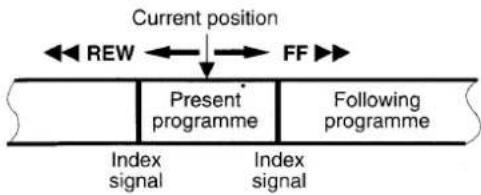
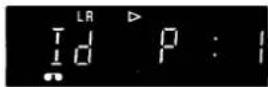
An index signal is automatically placed at the beginning of each recording made on this VCR. This index can be used to search for the next (or present) recording.
flowchart
graph LR
    A["Current position"] --> B["REW"]
    B --> C["FF"]
    C --> D["Present programme"]
    D --> E["Following programme"]
    E --> F["Index signal"]
    E --> G["Index signal"]
Notes:
● Make sure that indexes are at least five minutes apart from each other.
- Index signals are not recorded after a recording pause.
1 Press the INDEX button while in the stop or playback mode.
To cancel the index search mode, press the INDEX button again.
2 Press the FF or REW button.
To stop the search function, press the STOP button.
- Playback will start automatically when an index is found.
Counter memory
This convenient feature for finding the beginning of a specific recording etc., is made possible by the "Linear Time counter" that indicates the tape run time in hours, minutes and seconds.
1 Press the RESET then the MEMORY button before starting recording or playback.
- The zero point of the counter is now memorized and the memory indicator "M" will illuminate.
2 Press the REW button at the end of the recording or playback, the tape will be rewound and stop automatically at the memorized position.
Notes:
- Whenever you load a cassette tape, the counter is reset to "0:00:00".
- If you play back a blank tape or a blank portion of tape, the counter will not operate.
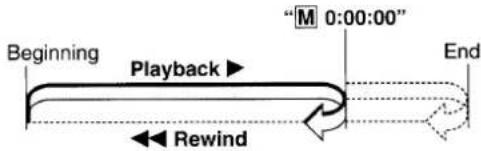
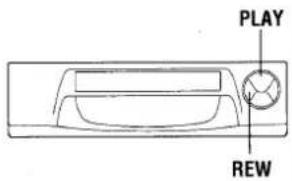
Endless play
This function will play back a tape to the end, rewind it then replay it again, and again until you stop it.
1 In the stop or playback mode, first press the PLAY button then while holding it down press the REW button on the VCR.
2 To cancel the endless play, press the STOP button.
- If the counter memory function is used in combination with endless play, the VCR will play back the tape to the counter reading "M 0:00:00" then start again from the beginning.
flowchart
graph LR
    A["Beginning"] --> B["Playback"]
    B --> C["M 0:00:00"]
    C --> D["End"]
    B --> E["Rewind"]
Note:
During endless play, please do not press FF, REW or PAUSE/STILL button because the endless play will be cancelled.
Picture adjustments
Tracking adjustment
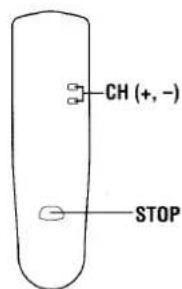
This VCR is equipped with an auto tracking function. During playback this function will adjust the tracking to the best possible image. If noise appears in the playback picture, press the CH (+ or -) button, to reduce the noise interference in the image.
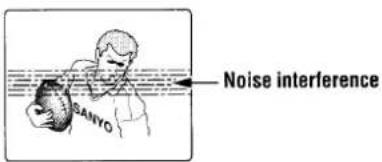
Note:
Depending on the cassette tape, you may find that some noise interference cannot be completely corrected using the tracking controls.
If noise interference (bars) appears during double speed playback
Use the CH (+ or -) button, to correct.
If noise interference (bars) appears during still picture, frame advance or slow motion modes
From still picture or frame advance go into slow motion mode, then use the CH (+ or -) button, to correct.
If the still picture moves up and down
Use the CH (+ or -) button, to correct.
Once the cassette tape is unloaded, the VCR is reset and the next time the VCR is used you may need to do the corrections again.

Notes:
- During variable playback modes the picture may contain some noise or vibration that cannot be corrected. This is not a malfunction.
- If still picture or slow motion playback is continued for about five minutes, the VCR will automatically change to stop mode in order to prevent the tape from being damaged.
- This VCR will not guarantee the variable playback modes picture quality of tapes recorded in LP mode.
For Endless play
Recording tape speed
| SP | Best image and sound quality.No display. |
| LP | Recording or playback times are double the SP mode.LP |
| EP | NTSC playback onlyEP |
Mis-erasure prevention eject
The cassette will automatically be ejected if recording is attempted on a video cassette without an erasure-prevention tab.
Auto rewind
The VCR automatically rewinds the tape when it reaches the end. This function does not operate with timer recording or Quick Start Recording timer.
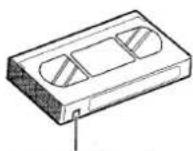
Erasure-prevention tab

To prevent accidental erasure, remove the tab after recording. To record again, cover the hole with vinyl tape.
RECORDING TV PROGRAMMES
Turn on the TV, then set it to the preset video channel or AV mode (if connected by a EURO-AV cable).
Insert a video cassette with erasure-prevention tab.
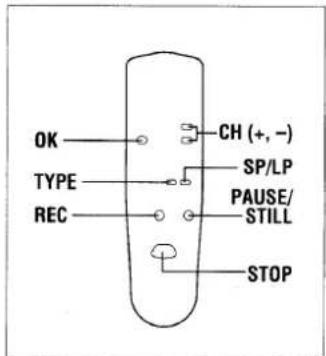
1 Press the numeric buttons, or the CH (+ or -) button, to select the TV station to be recorded.
2 Press the SP/LP button repeatedly, to select the desired tape speed.
3 If necessary, press the TYPE button to set the recording type. Please refer to "Setting the recording type" below.
4 Press the REC button.
5 To stop the recording, press the STOP button.
Setting the recording type
If a recording type is selected, it will be displayed and make programme selection easier when listing the tape recordings data. It can be used to easily find a desired recording. (Refer to "TAPE LIBRARY SYSTEM" on page 22.)
1 Press the TYPE button repeatedly until the desired type is displayed.
2 When the desired type has been selected, press the OK button.
![TYPE→FILM (F) SPORT (S): Sports DRAMA (d): Drama MUSIC (M): Music NEWS (n): News ANIME (A): Animation, cartoon EDUC. (E): Educational programme The letter in brackets (e.g. (F)) shows the display on the VCR display. (Tape library system) REC. LIST PLUS PR DATE START TYPE 1. 02 25.12 18:00 SPORT 2. 08 25.12 20:00 MUSIC 3. 12 26.12 14:00 NEWS 4. 02 26.12 18:00 FILM 5. 6. 7. [0-9]+SELECT FILM (F): Film ↓ ↓ ↓ ↓ ↓ ↓ ↓ ↓](/content/2026/05/1036587/images/e8b6789c02b9c5b36eff8236e90eb6874aeefcc3c15fadc5649d3c73917ec420.jpg)
Note:
The selected recording type is cancelled if the VCR is turned off (standby mode) or if the cassette tape is ejected.
If you wish to avoid recording unwanted material
1 Press the PAUSE/ STILL button.
2 To continue recording, press the PAUSE/STILL button or REC button.
Note:
If the record pause mode continues for about five minutes, the VCR will automatically go into the stop mode in order to prevent damage to the tape.
Recording one programme while watching another
1 Start recording the desired TV station programme selected on the VCR.
2 Select on the TV receiver the TV station you want to watch.
If using the "AV connection", set the TV to the TV mode.
Quick Start Recording timer
Timer recording is simple.
You can start a recording and then programme when the VCR will automatically stop recording and go into standby mode.
1 Press the REC button twice.
2 Set the recording end time by using REC and CH (+ or -) buttons.
| REC | Units of 30 minutes |
| CH (+, -) | Units of 1 minute |
- The timer indicator (☐) will light after the recording end time is set.

To stop the recording at any time, press the STOP button.
Checking/Changing
When the REC button is pressed during Quick Start Recording, the recording end time will blink.
The recording end time can be changed by pressing REC and CH (+ or -) buttons.
There are two ways of programming VIDEO Plus+ timer recordings.
One is using the on-screen display and the other one is using the VCR display.
- You can set up to 6 programmes to be recorded upon a period of up to 1 year.
On-screen programming

Turn on the TV. If using the "RF connection" set it to the preset video channel.
1
Press the VIDEO Plus+ button.
PLUSCODE
■■■■■■■■■
2
Using the numeric buttons, enter the PlusCode number for the programme you want to record. (e.g. 489135)
PLUSCODE
489135---
If you entered a wrong number, press the CLEAR button to delete it, then enter the correct number.
3
Press the OK button.
PLUSCODE
489135---
PR DATE START END
- 01 25.12PDC15:00 16:009
4
When all the settings are as desired, press the OK button.
You can programme another recording by repeating steps 2 to 4.
#
Insert a video cassette with erasure-prevention tab.
Make sure the tape is longer than the total recording time.
5
Press the VIDEO Plus+ button.
- The timer indicator (☐) will light on the VCR display and the VCR goes into timer recording standby mode.
At step 3,
If the programme position number (PR) displays “--”
Enter the programme position number the TV station has been preset to.
- That setting will be memorized and set the next time the same TV station is selected.
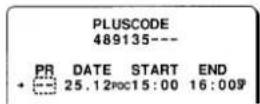
Additional settings
After pressing the OK button in step 3.
Daily/Weekly recording
Press the MENU/TV button repeatedly to select:
| PR DATE_START+01 25.12###15:00 | for daily recording(Monday through Friday) |
| PR DATE_START+01 25.12###15:00 | for weekly recording (thesame programme everyweek) |
Notes:
● Daily recording starting on a Saturday or Sunday is not possible.
● Daily or weekly recording using the PDC function is not possible.
PDC recording
Press the PDC button repeatedly.
- When the "PDC" indicator appears, the PDC function is set.
(See page 21 for more information on PDC.)
Changing the end time
Each press of the CH (+ or -) button will change the recording end time by units of 10 minutes.
Recording tape speed setting
Press the SP/LP button repeatedly to display the desired tape speed.
Setting the recording type
Press the TYPE button repeatedly until the desired type is displayed.
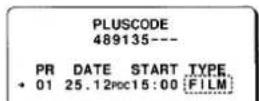
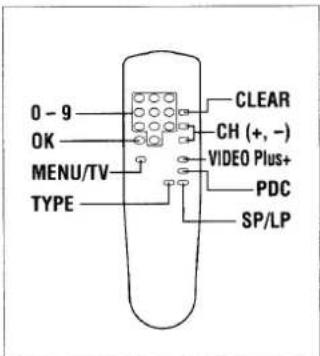
This VCR has a built-in VIDEO Plus+ system. Programming timer recordings is now as simple as entering a PlusCode number (1 to 9 digits) listed next to each programme in your local TV guide or newspaper TV programme listing.
VIDEO Plus+ and PlusCode are
trademarks of Gemstar
Development Corp.
VIDEO Plus+ system is
manufactured under license from
Gemstar Development
Corporation.
Newspaper or TV guide
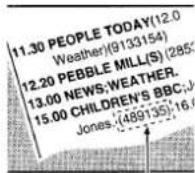
PlusCode
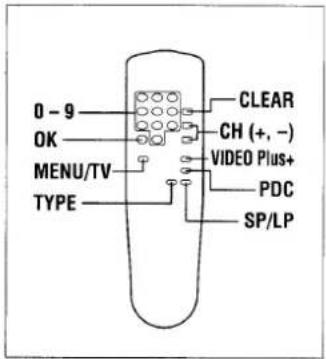
Easy process
1 Press the VIDEO Plus+ button.
↓
2 Enter the PlusCode number.
↓
3 Press the OK button.
Additional settings
↓
4 Press the OK button.
↓
5 Press the VIDEO Plus+ button.
VIDEO PLUS+ TIMER RECORDING PROGRAMMING
Programming on the VCR display
You can programme or confirm a VIDEO Plus+ timer recording on the VCR display even if the TV is turned off.
1 Press the VIDEO Plus+ button.
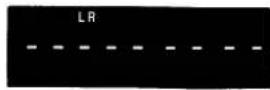
2 Using the numeric buttons, enter the Plus Code number for the programme you want to record. (e.g. 489135)
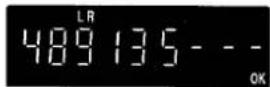
If you entered a wrong number, press the CLEAR button to delete it, then enter the correct number.
3 Press the OK button.
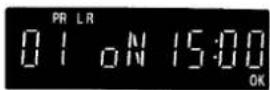
Note:
If the programme position number (PR) displays “—”, please refer to page 16.
4 When all the settings are as desired, press the OK button.
You can programme another recording by repeating steps 2 to 4.
Insert a video cassette with erasure-prevention tab. Make sure the tape is longer than the total recording time.
5 Press the VIDEO Plus+ button.
- The timer indicator (☐) will light on the VCR display and the VCR goes into timer recording standby mode.
Additional settings
After pressing the OK button in step 3.
Daily/Weekly recording
Press the MENU/TV button repeatedly to select:
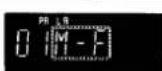
for daily recording (Monday through Friday)
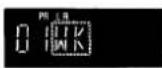
for weekly recording (the same programme every week)
Notes:
● Daily recording starting on a Saturday or Sunday is not possible.
● Daily or weekly recording using the PDC function is not possible.
PDC recording
Press the PDC button repeatedly.
- When the "PDC" indicator appears, the PDC function is set. (See page 21 for more information on PDC.)
Changing the off time
Each press of the CH (+ or -) button will change the recording off time by units of 10 minutes.
Recording tape speed setting
Press the SP/LP button repeatedly to display the desired tape speed.
Setting the recording type
Press the TYPE button repeatedly until the desired type is displayed.
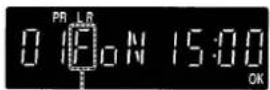
F: Film
S: Sports
d: Drama
M: Music
n: News
A: Animation, cartoon
E: Educational programme
SATELLITE BROADCASTS TIMER RECORRDING PROGRAMMING
Make sure the satellite receiver is setup as described on pages 7 and 11.
Example: Programme position... 110
Date... December 25
Start time... 21:30
End time... 23:15
Turn on the TV and the satellite receiver, then set the TV to the preset video channel or AV mode (if connected by a EURO-AV cable).
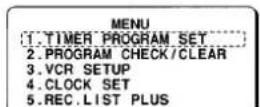
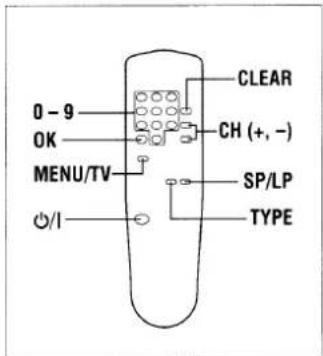
1 Press the MENU/TV button, then press the numeric 1 button.
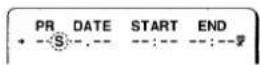
2 Press the CH (−) button.
- "S" will be displayed to the right of the programme position display.
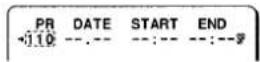
3 Using the numeric buttons, set the programme position number assigned to your satellite receiver (e.g. 110).
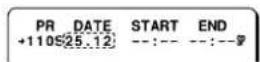
4 Using the numeric buttons, set the date (e.g. 25 12)
If you entered a wrong number, press the CLEAR button to delete it, then enter the correct number.
5 Set the recording start and end times (e.g. 21 30 23 15).
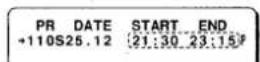
6 When all the settings are as desired, press the OK button.
You can programme another recording by repeating steps 2 to 6.
Insert a video cassette with erasure-prevention tab.
Make sure the tape is longer than the total recording time.
7 Press the ⏻/I button.
- The timer indicator (☐) will light on the VCR display and the VCR goes into timer recording standby mode.
Additional settings
After step 4,
Daily/Weekly recording
Press the CH (+) button repeatedly to select:
| PR DATE_START+110S25.12WK15:00 | for daily recording(Monday through Friday) |
| PR DATE_START+110S25.12WK15:00 | for weekly recording (thesame programme everyweek) |
Note:
Daily recording starting on a Saturday or Sunday will not be possible.
Recording tape speed setting
Press the SP/LP button repeatedly to display the desired tape speed.
After step 5,
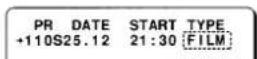
Setting the recording type
Press the TYPE button repeatedly until the desired type is displayed.
To record from an external source
At step 2,
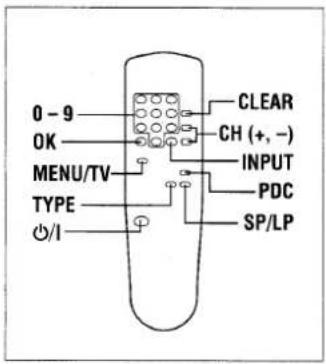
Press the INPUT button to select the terminal used.
The setting under "PR"
(programme position) will change to "L1" or "L2".
EURO-AV1: select "L1"
EURO-AV2: select "L2"
If a programme position number is already displayed, first press the CLEAR button.
Ensure the external source e.g. satellite receiver is switched on and the correct programme has been selected.
Example: Programme position... 02
Date... 25 December
Start time... 21:30
End time... 23:15
Turn on the TV then set it to the preset video channel or AV mode (if connected by a EURO-AV cable).
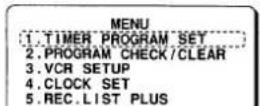
1 Press the MENU/TV button, then press the numeric 1 button.
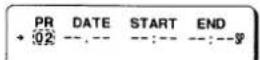
2 Using the numeric buttons, set the programme position number (e.g. "02").
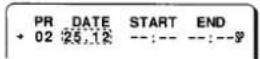
3 Using the numeric buttons, set the date (e.g. 25 12).
If you entered a wrong number, press the CLEAR button to delete it, then enter the correct number.
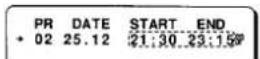
4 Set the recording start and end times (e.g. 21 30 23 15).
5 When all the settings are as desired, press the OK button.
You can programme another recording by repeating steps 2 to 5.
Insert a video cassette with erasure-prevention tab.
Make sure the tape is longer than the total recording time.
6 Press the ⏻/I button.
- The timer indicator (☐) will light on the VCR display and the VCR goes into timer recording standby mode.
Additional settings
After step 3,
Daily/Weekly recording
Press the CH (+) button repeatedly to select:
| PR DATE_START+ 02 25.12WK15:00 | for daily recording(Monday through Friday) |
| PR DATE_START+ 02 25.12WK15:00 | for weekly recording (thesame programme everyweek) |
Notes:
● Daily recording starting on a Saturday or Sunday is not possible.
● Daily or weekly recording using the PDC function is not possible.
PDC recording
Press the PDC button repeatedly.
- When the "PDC" indicator appears, the PDC function is set. (See page 21 for more information on PDC.)
Recording tape speed setting
Press the SP/LP button repeatedly to display the desired tape speed.
After step 4,
Setting the recording type
Press the TYPE button repeatedly until the desired type is displayed.
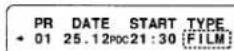
Frequent timer recording programming
This VCR memorizes the settings of the 5 previous timer recordings.
Using these settings, you can now easily set a timer recording for a programme on the same day of the week and at the same hour as that of a programme previously recorded.
1 Press the MENU/TV button, then press the numeric 1 button.
![MENU [1.TIMER PROGRAM SET] 2.PROGRAM CHECK/CLEAR 3.VCR SETUP 4.CLOCK SET 5.REC.LIST PLUS [0-9]+SELECT [MENU]+TV 09.11.97 16:15](/content/2026/05/1036587/images/4721b26ede5e6c2da92bbdc3aa7291d08a8b79533bd4adbaeb60c6258406085b.jpg)
2 Every time the CH (+) button is pressed, using one of the 5 memorized recordings data, a programmed timer recording will be set for the same day of the following week.
Memorized recordings data
![PR DATE START END 01 10:12 10:00 11:50P PR DATE START END 01 17:12 10:00 11:50P [OK]→ENTER [CLEAR]→TO CORRECT [MENU]→TV [+]→FREQ.TMR](/content/2026/05/1036587/images/88a5d0afed4a87543e73b143c768ec8c297d80b430c3c4aff1311cf8a4bc4437.jpg)
When using memorized recording data, the recording type will not be set. If necessary, press the TYPE button to set the recording type.
3 Press the OK button.
Notes:
- If a previous timer recording was set for daily (Monday through Friday) or weekly recording, the settings are not memorized.
- If the power to the VCR is interrupted for more than 1 hour, the frequent timer memory will be erased.
Confirmation/Cancelling
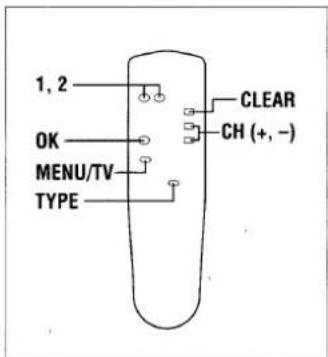
1 Press the MENU/TV button, then press the numeric 2 button.
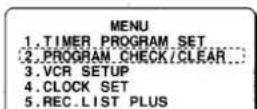
- Programmed timer recordings are listed.
![PR DATE START END + 01 23.12 15:30 16:00 02 25.12PDC10:30 11:00 -- --,-- --;---;---;---; -- --,-- --;---;---;---; [+/−]+SELECT [CLEAR]+CANCEL [MENU]+TV [TYPE]+TYPE](/content/2026/05/1036587/images/096457e653bc745f1dc4eb6bd9b1fcecdc8f0664d9fc2b174da4c2a34e7b44ef.jpg)
Recording type confirmation
Press the TYPE button and the "TYPE" column will be displayed instead of the "END" time column.
Press the TYPE button again to return to the "END" time column display.
![PR DATE START TYPE + 01 23.12 15:30 FILM 02 25.12POC 10:30 DRAMA [+/-]•SELECT [CLEAR]+CANCEL [MENU]+TV [TYPE]*TYPE](/content/2026/05/1036587/images/120556d356f7b5e654352750c09512d538c3be8419af643aa1f5dbae63f43e65.jpg)
- To correct a programmed timer recording, first cancel it, then reprogramme it as desired.
- To cancel a programmed timer recording, continue with step 2.
- To return to the normal TV broadcast screen, press the MENU/TV button.
2 Using the CH (+ or -) button, select the programme to cancel.
![PR DATE START END 01 23.12 15:30 16:00# + 02 25.12PDC10:30 11:00# --- --- --- --- --- --- --- --- --- --- --- --- [+/-]•SELECT [CLEAR]+CANCEL [MENU]+TV [TYPE]+TYPE](/content/2026/05/1036587/images/71aad65e5bb3fadb1c05c29089e4c0ec8d537b02288a7466b966d15ab323e085.jpg)
3 Press the CLEAR button.
4 When finished, press the MENU/TV button.
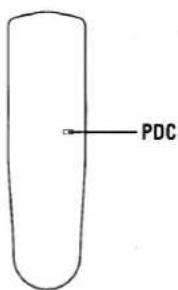
PDC function
The PDC function ensures that the recording is made according to the recording on and off time control signals broadcasted by the TV station. Therefore, if the recording start (on) and/or end (off) time are changed, the VCR is informed of the altered times and recording is changed, whether it is at an earlier or later time.
Also, if the programme being recorded is interrupted (for example by a news special, etc.) and the PDC function is on, recording will be automatically interrupted and will automatically resume when the programme starts again.
Notes:
- Set the recording times and date exactly as advertised. If the start (on) time is different from advertised, the PDC function will not work.
- Not all TV stations transmit PDC signals. Check in your region to find out which stations transmit PDC signals.
- If the station does not transmit PDC signals or if the PDC function is not set, the recording will be done at the programmed times.
PDC standby period
When programming with the PDC function, the recording can be done anytime in the standby period if the start (on) time differs from the scheduled one.
The PDC standby period is from 20:00 (the previous day) to 4:00 (the following day).
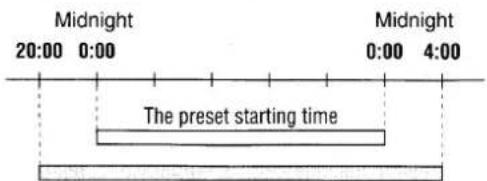
The PDC stand-by period
Notes on timer recording
- The (☐) indicator will flash if no video cassette is loaded when going into timer standby mode.
- The (☐) indicator will flash and the video cassette is ejected if a video cassette with no erasure-prevention tab is loaded.
Programme priority
- If several timer recordings have overlapping recording time, the recording with the earliest start time will be recorded first, until the end.
- Recordings programmed with PDC always have priority.
- If two PDC-programmed recordings overlap, the recording that starts first will have priority.
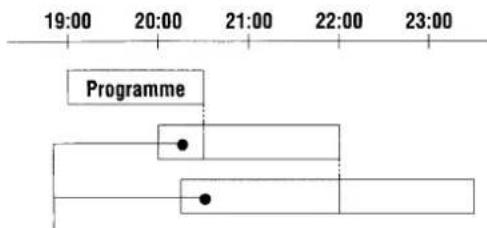
flowchart
graph TD
    A["Programme"] --> B["Start"]
    B --> C["Branch 1"]
    B --> D["Branch 2"]
    C --> E["End"]
    D --> F["End"]
These portions will not be recorded
This function will list the tape recordings data (Programme position number, date, recording start time, type). It can be used to easily find a desired recording.
The recording type is only displayed if it has been set before recording the programme.
Insert a cassette tape recorded on this VCR.
1 Press the MENU/TV button, then press the numeric 5 button to select "5. REC. LIST PLUS".
![MENU 1. TIMER PROGRAM SET 2. PROGRAM CHECK/CLEAR 3. VCR SETUP 4. CLOCK SET 5. REC. LIST PLUS [0-9]+SELECT [MENU]+TV 09.11.97 16:15](/content/2026/05/1036587/images/411b09e63ada894ef54f21b133578745d05ac4c778460c5c53e6865f6979da0b.jpg)
- If the tape recordings data has already been read, it will be displayed.
![REC. LIST PLUS PR DATE START TYPE 1. 2. 3. 4. 5. 6. 7. [OK]+START](/content/2026/05/1036587/images/682a0bd3952aa9b021b1e190873898e26a02203c4f0fb44caefc86c3cd735f1b.jpg)
2 Press the OK button.
- The tape is rewound to the beginning and the recording data is read. Every time a set of recording data is read it is displayed on-screen.
![REC.LIST PLUS PR DATE START TYPE 1. 02 17.10 12:00 FILM 2. 3. 4. 5. 6. 7. [0-9]*SELECT](/content/2026/05/1036587/images/e6acd9e987eb1248e5d65ab962b90749d3f66892774bbb61724cff6efea7d4cf.jpg)
- Up to 7 sets of recording data can be displayed on-screen at the same time. If 8 or more sets of recording data are read, the last 7 sets only are displayed.
To cancel the operation, press the STOP button.
3 When the data for the desired recording is displayed, press the corresponding numeric button (1 - 7).
![REC. LIST PLUS PR DATE START TYPE 1. 02 17.10 12:00 FILM 2. 01 17.10 18:30 SPORT 3. 04 17.10 20:30 DRAMA 4. 02 18.10 12:00 MUSIC 5. -- --.-- --:---- 6. 01 18.10 22:00 NEWS 7. 05 19.10 22:00 ANIME [0-9]*SELECT](/content/2026/05/1036587/images/cdd3acea55fddb7847c3757c08ac97ad0b60131ddd89e945b9bc444bbb134695.jpg)
- "SEARCHING" will be flashing on-screen while the tape is rewound to the beginning, then fast-forwarded to the beginning of the desired recording. Playback will then start automatically.
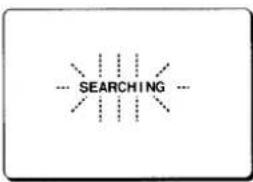
flowchart
graph TD
    A["SEARCHING"] --> B["---"]
    A --> C["---"]
    A --> D["---"]
    A --> E["---"]
Notes:
- This function can only be used with tapes recorded by this VCR.
- If a recording data cannot be read, “—” will be displayed.
- If a type has not been selected before recording, “----” will be displayed.
● Recording data of recordings shorter than 5 minutes may not be displayed. - If the tape is unloaded or rerecorded, the data will be canceled.
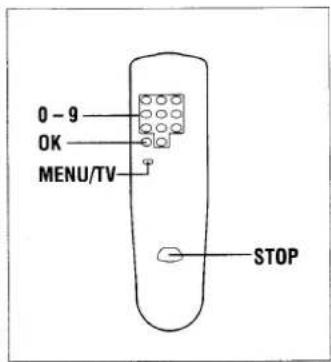
GB
CAUTION:
The unauthorized recording of television programmes, video tapes, films and other such material may infringe upon copyright or the rights of third parties.
Notes:
- If you are using a tape with a monaural only original sound recording, the audio dubbing will erase the original sound. Audio dubbing is only possible on a tape with Hi-Fi original sound.
- After an audio dubbing, to listen to the Hi-Fi sound, press the AUDIO button to display the "L" and "R" indicators on the VCR display.
To listen to the dubbed sound, press the AUDIO button to erase the "L" and "R" indicators from the VCR display.
Audio dubbing
| Mode | Display |
| Standby | |
| Dubbing |
(※: Flashing)
Tape copy
Copying (dubbing) a tape can be done using two video recorders, a playback VCR (e.g. a camcorder) and a recording VCR.
Recording VCR
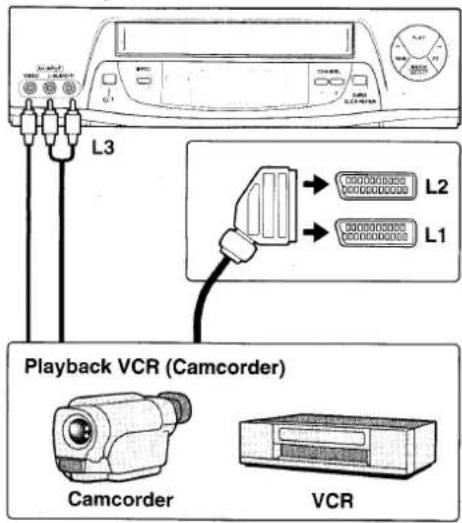
RECORDING VCR
Insert a video cassette with erasure-prevention tab.
1 Press the INPUT button to select the external input mode.
- "L1", "L2" or "L3" is displayed instead of the programme position number.
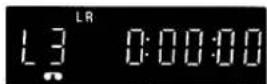
"L1": EURO-AV1
"L2": EURO-AV2
"L3": AV INPUT (Front)
2 Press the SP/LP button repeatedly to select the desired tape speed.
3 Set to the record pause mode. The record pause mode is set by pressing the REC button then the PAUSE/STILL button.
PLAYBACK VCR (Camcorder)
Insert the recorded video cassette.
4 Start playback.
RECORDING VCR
5 When the desired starting position is reached, start recording by pressing the PAUSE/ STILL button or the REC button.
6 When finished, press the STOP button on the RECORDING VCR then on the PLAYBACK VCR.
Audio dubbing
Using this function, you can add a voice over or background music to the image recorded on a tape.
To perform an audio dubbing on a tape recorded with a camcorder, you will have to first make a Hi-Fi copy of the camcorder tape to a VHS format video cassette using this VCR.
You can then add a voice over or background music to the copy you have made.
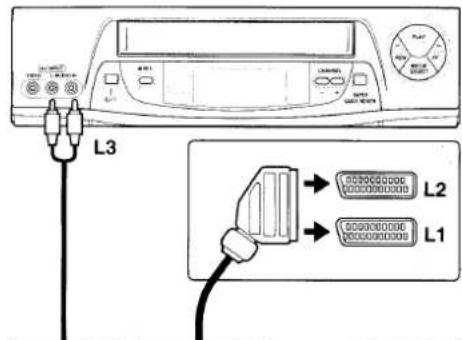
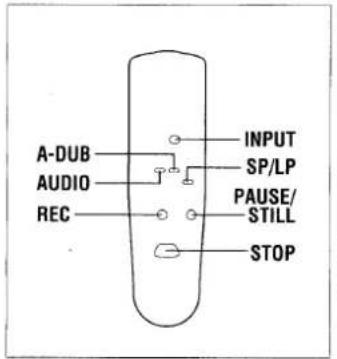
Audio source
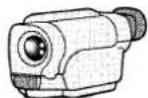
Camcorder
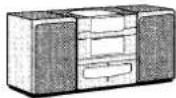
Audio system
Insert a video cassette tape with erasure-prevention tab.
- Make sure the recorded sound (original sound) is Hi-Fi.
1 Playback the tape to select the audio dubbing start point.
2 Press the PAUSE/STILL button at the audio dubbing start point.
3 Press the A-DUB button.
- The VCR goes into audio dubbing standby mode. The "L" and "R" indicators will go off. If monitoring the external sound, the sound will be heard.
4 Press the A-DUB button again to start the audio dubbing.
5 When finished, press the STOP button.
| Symptom | Check points |
POWER TROUBLE
| No power | The mains lead is disconnected. |
| The remote control unit doesn't operate | The batteries are low. |
RECEIVER TROUBLE
| No TV programmes received | Are the connections between your VCR and TV correct?Was tuning correctly preset? |
| Reception is poor when TV is on video channel | The video channel setting of the TV does not correspond to the video channel presetting of the VCR. |
PLAYBACK TROUBLE
| Playback picture does not appear | The video channel setting of the TV does not correspond to the video channel presetting of the VCR. |
| Interference in playback picture | Adjust the tracking control.Dust or dirt on video heads. Contact your Sanyo authorized service agent. |
RECORDING TROUBLE
| No recording | The erasure-prevention tab on the cassette has been removed. |
| VIDEO Plus+ or timer recording is not possible(Satellite programmes) | The starting day and time have not been set correctly.The clock day and time are not set correctly.There has been a power interruption of more than one hour.The maker code is not set.The VCR and receiver setup is not correct.The VCR input mode is not correctly set. |
Hi-Fi TROUBLE
| Sound of a Hi-Fi recorded tape drops out | The tape might be defective.Use a new video cassette tape. |
TV station/VCR output interference
In extreme cases there may be interference between the VCR output and TV stations that can not be solved by following the SETUP1 procedure on page 8.
This can be overcome by turning off the VCR RF output as follows:-
1 Make sure the VCR is switched off using the ⏻/I button.
2 Press the PRESET button on the remote control for at least 3 seconds.
3 Make a note of the number that appears on the VCR display.
4 Press the numeric 0 button twice.
5 Press the PRESET button.
- If not, try the same procedure as above again.
To turn the RF output back on:-
Follow the same procedure as above, but at step 4 enter the number noted at step 3.
Note:
When the RF output is turned off the VCR can only be used to play back tapes or watch a TV station programme tuned on the VCR tuner using the EURO-AV connector.
General
| Video format: | VHS PAL/NTSC 4.43 |
| Television system: | CCIR: 625 lines, PAL colour signals |
| Video heads: | 4 heads |
| Tape speed: | PALSP: 23.39 mm/secLP: 11.70 mm/secNTSC (Playback only)SP: 33.35 mm/secLP: 16.67 mm/secEP: 11.12 mm/sec |
| RF converter: | Built-in UHF converter |
| Converter output: | On channel 22 - 69 |
| Timer indication: | 24-hour indication |
| Power failure backup: | Approx. one hour |
| Timer recording: | 1 year 6 programmes with daily (Monday through Friday) and weekly recording function |
| Power requirement: | 220-240 V AC, 50Hz |
| Dimensions (W x H x D): | 360 x 97 x 300 mm |
| Weight: | Approx. 3.8 kg |
| Power consumption: | 22 W (in operation)less than 6 W (standby mode) |
| rical characteristics. | |
| Video input: | 0.5 - 2.0Vp-p, 75 ± 5 ohms |
| Video output: | 1.0 ± 0.2Vp-p, 75 ± 5 ohms |
| Audio input: | -3.8 dBs, more than 10 kohms |
| Audio output: | -3.8 dBs, less than 1 kohm |
| Video S/N: | More than 43 dB |
| Horizontal resolution: | More than 240 lines |
| audio | |
| Audio recording system: | VHS Hi-Fi system (2 tracks),(Normal audio track is monaural) |
| Frequency response: | 20 Hz - 20,000 Hz |
| Dynamic range: | More than 90 dB |
| Wow and flutter: | Less than 0.005% (WRMS) |
| Channel separation: | More than 60 dB |
Appearance and specifications are subject to change without notice.
Automatic head-cleaning system
This VCR is equipped with an automatic head-cleaning system which automatically cleans the heads every time a cassette is loaded or unloaded. However if during playback noise appears in the picture, it is recommended to use commercially available head-cleaning cassettes to completely clean the VCR heads.
Repairs
This VCR is a precision instrument and, if treated with care, will provide years of satisfactory performance. However, in the event of difficulty, the owner is advised not to attempt to make repairs or open the cabinet. Servicing should always be referred to your Sanyo authorized service agent.
GUARANTEE TO CUSTOMER
Sanyo U.K. Sales Ltd. (the Company) guarantees to the initial retail purchaser that if this equipment is or becomes defective and that, in the opinion of the Company, the defect is due to faulty material or workmanship the Company will, for a period of 12 calendar months from the date of sale to the original purchaser repair or replace, at its sole option, free of charge, any such defective component part of the equipment, always provided that:-
- The equipment has at all times been used in accordance with the operating instructions issued by the Company, and has not been connected to an electrical mains supply for which it has not been adjusted.
- Accidental damage, or damage caused by negligence or misuse by the user, including leakage from exhausted batteries, is specifically excluded.
- Unauthorised repairs, or any modification to the equipment which has not been expressly approved by the Company, shall render this guarantee null and void.
- Failure due to fair wear and tear of any item, such as batteries, record playing styli, and tape recording, playback and erase heads and head cleaning is specifically excluded.
This guarantee is not transferable and is only applicable within the United Kingdom (and the Republic of Ireland). Nothing in this express guarantee affects the statutory rights available to the purchaser of this equipment.
DearCustomer
Thank you for buying Sanyo. This equipment should give you many years of pleasure and faithful service but in the event that a fault occurs, the following notes for your guidance may be helpful:-
- PLEASE RETAIN YOUR PURCHASE RECEIPT WHICH WILL BE REQUIRED FOR SERVICE DURING GUARANTEE.
- If your Sanyo equipment proves faulty during the period of guarantee, take it or send it back to the dealer who originally supplied it together with this guarantee and the proof of purchase. We have made arrangements with our approved dealers under which they will carry out in guarantee service repairs on our behalf. In this way, we hope to reduce to a minimum the amount of time you will be without your equipment.
- If for some reason it is impossible to return the equipment to the original supplier, please contact our Service Administration Department at the address below for further advice.
- Should the equipment require servicing after the expiry of the guarantee period, take or send it to the original supplier or any other Sanyo dealer. He will be pleased to give you a quotation for the repair. If you are in any doubt about what to do, write to us at the address below or telephone:
Sanyo U.K. Sales Ltd.
Sanyo House Otterspool Way, Watford, Hertfordshire WD2 8JX Tel: Watford 246363