VHR-310 - Videorekorder SANYO - Kostenlose Bedienungsanleitung
Finden Sie kostenlos die Bedienungsanleitung des Geräts VHR-310 SANYO als PDF.


| Produkttyp | Videorekorder (VHS) |
| Marke | SANYO |
| Modell | VHR-310 |
| Abmessungen (B × H × T) | 430 mm × 95 mm × 280 mm |
| Gewicht | ca. 4,5 kg |
| Stromversorgung | 220–240 V AC, 50 Hz |
| Leistungsaufnahme | ca. 20 W (Betrieb), < 5 W (Standby) |
| Videoaufnahmesystem | VHS (625/50 PAL) |
| Anzahl der Videoköpfe | 4-Kopf-System |
| Aufnahmegeschwindigkeiten | SP (Standard), LP (Langspiel) |
| Anschlüsse | SCART (21-polig), HF-Antenneneingang, HF-Ausgang, Cinch-Ausgang (Audio/Video) |
| Timer-Funktion | Ja, mit programmierbaren Aufnahmezeiten (bis zu 1 Monat voraus) |
| Suchlauf | Ja, automatischer Sendersuchlauf |
| Bandlängenanzeige | 6-stellige Digitalanzeige |
| Fernbedienung | Infrarot-Fernbedienung enthalten |
| Stromverbrauch im Standby | ca. 3 W |
| Reinigung der Videoköpfe | Nur mit trockenem Videokopf-Reinigungsband; keine Flüssigkeiten verwenden |
| Sicherheitshinweise | Nicht öffnen, keine Feuchtigkeit, kein Kontakt mit Magneten |
| Reparatur und Ersatzteile | Ersatzteile wie Riemen, Köpfe online erhältlich; Reparatur nur durch Fachpersonal |
Häufig gestellte Fragen - VHR-310 SANYO
Benutzerfragen zu VHR-310 SANYO
0 Frage zu diesem Gerät. Beantworten Sie die, die Sie kennen, oder stellen Sie Ihre eigene.
Eine neue Frage zu diesem Gerät stellen
Laden Sie die Anleitung für Ihr Videorekorder kostenlos im PDF-Format! Finden Sie Ihr Handbuch VHR-310 - SANYO und nehmen Sie Ihr elektronisches Gerät wieder in die Hand. Auf dieser Seite sind alle Dokumente veröffentlicht, die für die Verwendung Ihres Geräts notwendig sind. VHR-310 von der Marke SANYO.
BEDIENUNGSANLEITUNG VHR-310 SANYO
Instruction Manual
Video cassette recorder
VHR-244E
VHR-310E
VHR-315E
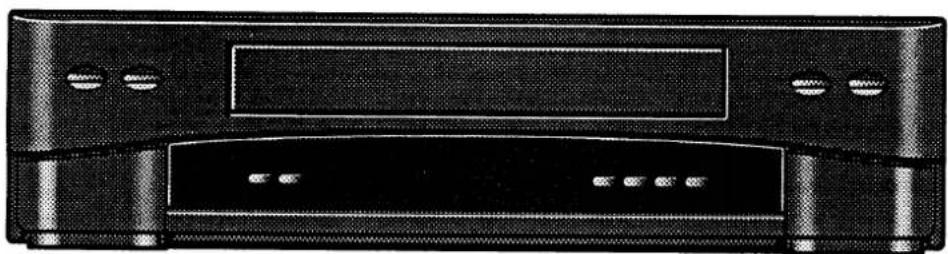
natural_image
Front view of a black electronic device with ventilation slots and a central screen (no visible text or symbols)VHR-244E
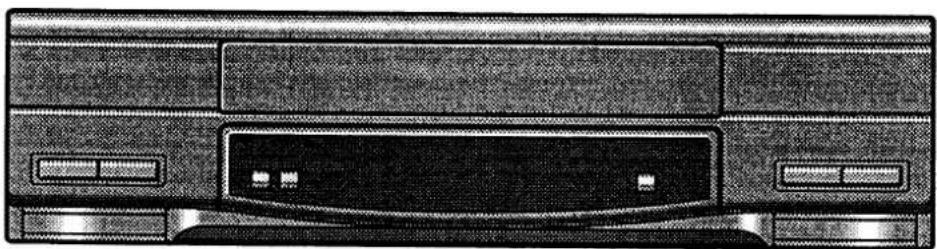
natural_image
Front view of a computer monitor with drive bays and a central CD (no visible text or symbols)VHR-310E, VHR-315E

☐ This VCR is based on a VHS-PAL signal system. Only video cassettes bearing the VHS symbol can be used.
☐ Video cassette recorders bearing the HQ mark incorporate VHS high picture quality technology. Note that there is interchangeability with former VHS video cassette recorders.
Safety precautions
DANGER: This VCR contains live parts. Do not remove the cabinet.
WARNING: TO PREVENT FIRE OR SHOCK HAZARD, DO NOT EXPOSE THIS PRODUCT TO RAIN OR MOISTURE.
IMPORTANT
If the plug supplied with this appliance is not suitable for the socket outlets in your home, it should be cut off and the correct type fitted.
Disposal of plug
If the non-rewireable plug is to be cut off, the removed plug should be disposed of carefully as there is a shock hazard should the plug be inserted into a live socket.
Replacing the fuse
The detachable fuse cover must be replaced after changing the fuse.
Only a 3A fuse should be used, it should comply with BS1362, and should carry the ASTA mark.
Mains lead connections
The wires in the mains lead are coloured according to the following code:

Blue: Neutral Brown: Live
If the colours of the wires in the mains lead of this apparatus do not correspond with the colour markings identifying the terminals in your plug, proceed as follows:
- The wire which is coloured blue must be connected to the terminal which is marked with the letter N or coloured blue or black.
- The wire which is coloured brown must be connected to the terminal which is marked with the letter L or coloured brown or red.
- Do not connect either wire to the Earth terminal.
Operating precautions
☐ The unauthorized recording of television programmes, video tapes, films and other such material may infringe upon copyright or the rights of third parties.
☐ Be sure to use this VCR only in a temperature range of 5^ C to 40^ C and at less than 85% humidity.
☐ Do not place anything, except VHS video cassette tapes, in the unit.
☐ Do not allow rain, steam, dew, salt water, sand, oily smoke, metal objects, etc. to get into the unit.
☐ Place the VCR on a flat, stable, level surface. Never subject it to violent shaking or any other shock or impact.
☐ Do not expose the unit to high temperatures. Excessive heat (heat sources such as heaters, ovens, closed car on hot days, etc.) may damage the unit.
☐ Do not stack anything on top of your VCR, or block the air vents, to prevent damaging or overheating.
☐ Do not use the unit under the following conditions:
• in locations with high humidity
• in presence of excessive dirt or dust
• in areas subject to strong vibrations
- near strong magnetic fields (e.g. transmitting antennas, motors, fluorescent lights, etc.)
☐ If the unit does not operate properly, switch it off, refer to the "TROUBLESHOOTING" or consult a dealer or a service center.
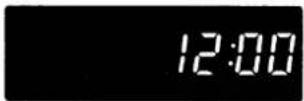
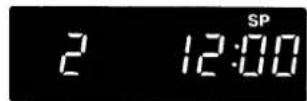
The POWER button of this VCR is a secondary circuit, and does not disconnect the unit from the AC power source, even if the VCR is in stand-by, as long as the mains lead is connected to an AC electrical outlet.
Note: Stand-by is the condition in which only the time is displayed.
Stand-by display
Power on display
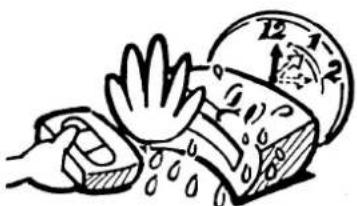
Caution concerning condensation
Be careful of condensation
Condensation is the moisture that forms on the outside of a glass when you fill it with cold water. Condensation can also form inside a VCR when it is suddenly moved from a cold place to a warm, humid one, or when a heater has been turned on to quickly heat the room.
Particular care must be taken with your VCR because water particles that form on the video head drum, which is the main VCR mechanism, can cause the video tape to stick to the drum. This prevents proper tape travel and may damage both tape and mechanism.
Follow the procedures below the first time you use the VCR, and whenever you use it in places which are subject to condensation:
① Connect the aerial cable and make all other necessary connections.
② Plug the mains lead into a wall socket.
3 Turn on the VCR power to warm it up and speed up the drying of any water particles that may have formed on the video head drum.
④ Do not insert a video cassette.
It takes about 1-1/2 to 2 hours to completely eliminate condensation. Wait at least this long before using the VCR.
natural_image
Illustration of a hand washing a soap block with a clock showing 12 o'clock (no text or symbols)BEFORE USE
After all connections have been made, insert the remote control batteries then follow steps 1 to 3 to preset the VCR.

Video channel setting
1
5 Insert the plug of the mains lead into the wall socket.
① Unplug the aerial cable from your TV receiver and reconnect it to the terminal marked AERIAL IN on the VCR.
Note: If your TV receiver has an AV terminal, AV connections are also possible.
AV connections give a better quality of
sound and picture.
For details, please refer to the Instruction
Manual under "AV connection".
① Turn on the VCR and the TV.
Set your TV receiver to "VCR", "AV" or the position designed for AV equipment input. (For more
details, please refer to your TV receiver instruction manual.)
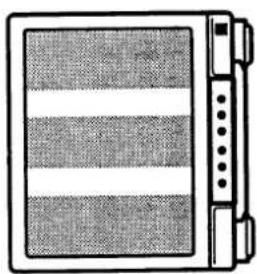
Fine tune your TV receiver until the test pattern (2 vertical bars) appears clear on the TV screen.
This is your video channel.

natural_image
Line drawing of a flat-screen TV with three vertical stripes and control buttons (no text or symbols)Note: If the clock setting and/or the tuning control
adjustments are completed before setting the video channel, the test pattern will not appear on
the TV screen.
In that case, unplug the VCR power cord for about one minute to erase all previous settings.
Then, start again from step 1.
2
Clock setting
3
A
You can select any position from 1 to 44 to preset the channels that can be received in your area. Set the TV receiver channel to the preset video channel or to the AV mode.
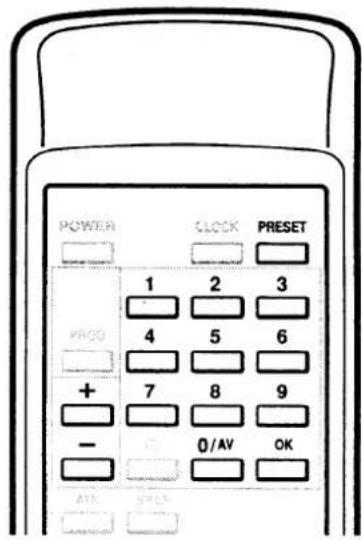
① Press the PRESET button.
2
2
Select the desired channel position number (Example: "1") by pressing the channel (+ or -) button or the numeric buttons. Then, press the OK button.
3
广力云智慧零售收银系统
The channel (+) button will access the following broadcast.
The channel (−) button will access the previous broadcast. The picture from the selected channel will appear on the screen.
4
(Example: BBC 1) is received, press the OK button.
To assign a channel to another position number, repeat steps ② to ④.
Press the PRESET button.
[Non-Text]
The VCR clock setting is made using the buttons on the remote control unit. ① Press the CLOCK button to activate the clock setting function.
② Set the date using the numeric buttons. If you entered a wrong number, press the erase it, then enter the correct number.
③ Set the time using the numeric buttons.
4 Press the OK button.
Seconds will start counting from "00" as the OK button is pressed.
PRECAUTIONS 1
INSTALLATION
CONNECTIONS
Aerial/RF connection....3
AV connection 3
Remote control batteries insertion....3
VCR PRESETTING
Make sure to follow steps 1 to 3 before using the VCR.
1 Video channel setting 4
2 Clock setting 5
3 Tuning control adjustments 6
Fine tuning....6
BUTTONS AND DISPLAYS....7
PLAYBACK
CASSETTE LOADING AND UNLOADING....8
PLAYBACK 8
Tracking adjustment....8
SPECIAL PLAYBACK 9
Forward search....9
Reverse search....9
Still picture....9
Frame advance 9
COUNTER MEMORY 9
IMMEDIATE RECORDING
RECORDING TELEVISION BROADCASTS....10
Recording duration....10
Quick Start Recording (QSR) timer....10
Other recording possibilities....10
TIMER RECORDING
TIMER RECORDING PROGRAMMING....11
Confirmation 11
Erasing a programmed timer recording 11
Notes on timer recording setting 12
COPYING A TAPE 12
TROUBLESHOOTING 13
REPAIRS 13
SPECIFICATIONS....13
GUARANTEE TO CUSTOMER....14
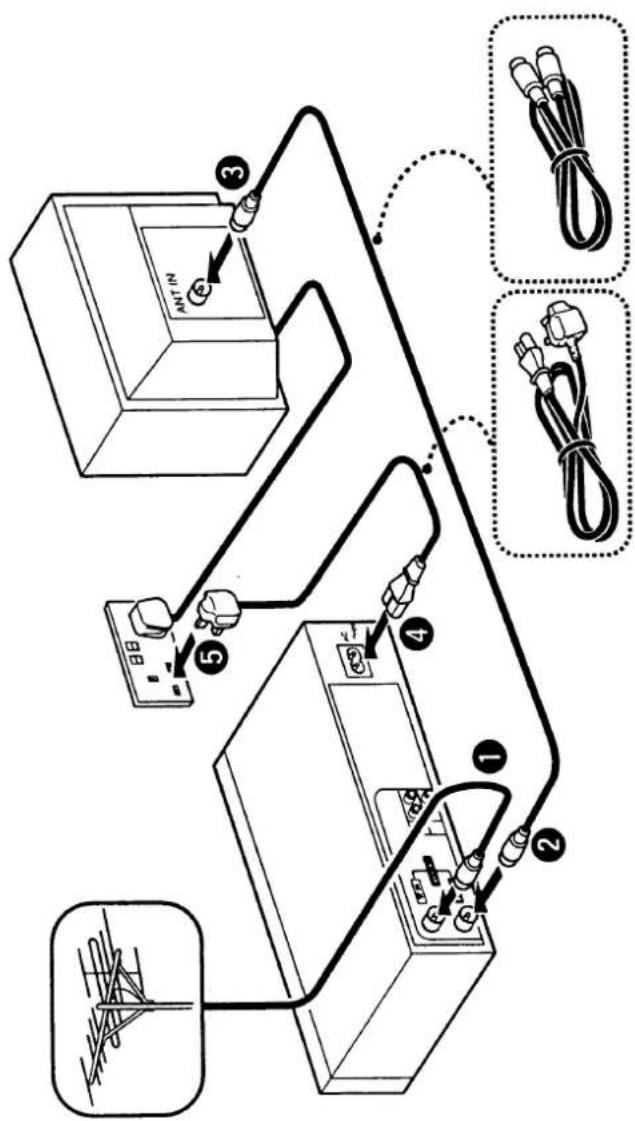
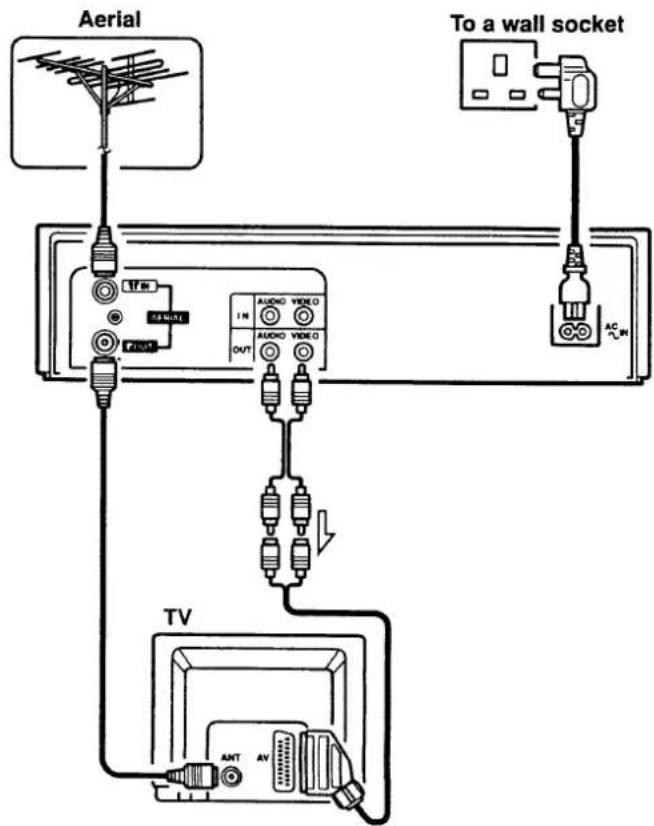
Aerial/RF connection
① Unplug the aerial cable from your TV receiver and reconnect it to the terminal marked AERIAL IN on the VCR.
② Connect the aerial output cable supplied as an accessory with the VCR to the AERIAL OUT terminal on the VCR.
③ Connect the other end of this aerial output cable to the TV receiver.
4 Plug the mains lead into the VCR power socket before using the unit. Insert the plug straight and firmly.
⑤ Insert the plug of the mains lead into the wall socket. Both video and audio (monaural) signals are fed to the TV receiver and can be viewed by setting the TV receiver to your preset video channel. (See page 4)
AV connection
If your TV receiver has video/audio input terminals, the following AV connections are also possible. The cable is sold separately.
- Connect the AUDIO/VIDEO OUT terminals on the VCR to the video/audio terminals on the TV receiver.
- Both video and audio signals are fed to the TV receiver.
- The advantage of this connection is a higher quality of picture and sound during playback.
- If you play back a tape, set to the TV receiver to the AV mode.
Note: To switch the TV input mode, refer to the instruction manual of the TV.
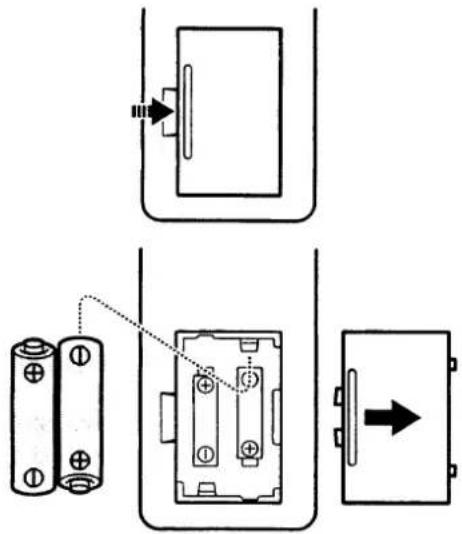
Remote control batteries insertion
① Open the lid.
② Insert 2 "AA (IEC R6)" 1.5 volts batteries according to the ⊕ and ⊖ signs on the battery compartment.
③ Replace the lid.
Notes:
- Operate the remote control unit within a range of approx. 30° from the front of the VCR.
- Operate the unit within approx. 6 m (20 ft) from the front of the VCR.
- The battery life under normal operating conditions is about six months. If the batteries become weak, the operating distance will decrease; when this occurs, replace both batteries.
- If the remote control unit is not to be used for a long period of time, remove the batteries.
After all connections have been made, insert the remote control batteries then follow steps 1 to 3 to preset the VCR.

Video channel setting

The following setting is only necessary when no AV connection to the TV was made.
When using the "RF connection" described in "CONNECTIONS", the signals from the VCR are converted to a radio frequency (RF) for viewing on an ordinary TV receiver.
The output channel of the VCR (video channel) is preset at the factory to be received by your TV receiver on UHF channel 36. On modern TVs this is normally 0, on older TVs 8.
① Turn on the VCR and the TV.
② Set your TV receiver to "VCR", "AV" or the position designed for AV equipment input. (For more details, please refer to your TV receiver instruction manual.)
About the AV equipment position on your TV receiver
- This position is specially provided for best playback picture quality when a VCR is connected to the TV via an RF connection.
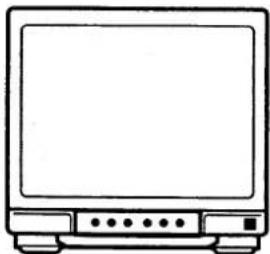
③ Fine tune your TV receiver until the test pattern (2 vertical bars) appears clear on the TV screen.
natural_image
Line drawing of a flat-screen television with buttons and indicator lights (no text or symbols)This is your video channel.
To view a tape playback or to watch a TV broadcast tuned on the VCR tuner, set the TV to the video channel.
Note: If the clock setting and/or the tuning control adjustments are completed before setting the video channel, the test pattern will not appear on the TV screen. In that case, unplug the VCR power cord for about one minute to erase all previous settings. Then, start again from step 1.
☐ If your TV receiver does not have a position designed for AV equipment input, select a position not being used by a broadcaster, then adjust the tuning on the TV (UHF channel 36) so that the test pattern (2 vertical bars) is clear.
☐ If the test pattern does not appear, set the video channel using a prerecorded VHS video cassette.
- Play back the tape.
-
Tune the TV receiver to obtain clear pictures and sound while monitoring playback on the TV screen.
☐ If in your area, the output channel of the VCR (UHF channel 36) is used by a broadcaster, the test pattern may be unstable or interference may appear in the picture. Follow the steps below to set the output to a different channel. -
Select on the TV receiver an available UHF channel between channel 32 and 41.
- Using a small screwdriver, slowly turn the video channel adjustment screw (CH) on the back of the VCR, to the right for a higher channel than 36 and to the left for a channel lower than 36, until the test pattern (or the video picture) is clear on the TV screen.
Adjust the tuning on the TV, if necessary, so that the test pattern is clear.

Clock setting

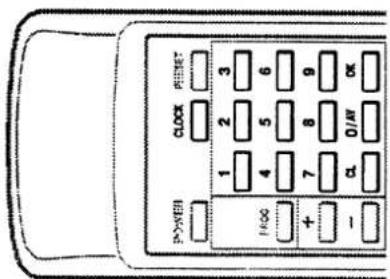
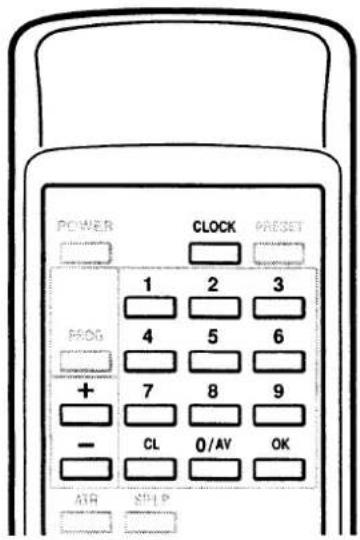
The VCR clock setting is made using the buttons on the remote control unit.
When a single digit number is going to be set, press the "0/AV" button first, then the desired number.
(ex.: In case of "9": Press "0/AV", then "9".)
Example: To set December 10, 1994, 9:30.
① Press the CLOCK button to activate the clock setting function.
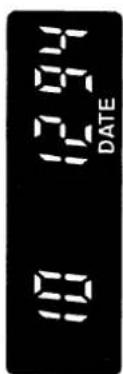
② Set the date using the numeric buttons.
Example: December 10, 1994
Enter 10 - 12 - 94
If you entered a wrong number, press the CL button to erase it, then enter the correct number.
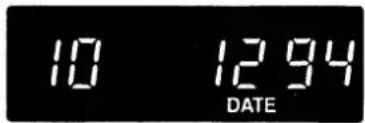
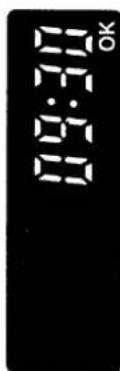
③ Set the time using the numeric buttons.
Example: 9:30
Enter 09 - 30
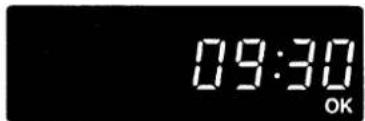
4 Press the OK button.
Seconds will start counting from "00" as the OK button is pressed.
Time shifting adjustment (Summer time/Standard time)
① Press the CLOCK button.
② Each press of the channel (− or +) button, will advance or retard the clock by 1 hour.
When the settings are completed...
③ Press the OK button.
Seconds will start counting from "00" as the OK button is pressed.
Changing the time/date
① Press the CLOCK button.
Changing the time
② Each press of the CL button will erase a digit, then enter the new setting using the numeric buttons.
Changing the date
③ Each press of the CL button will erase a digit, when all digits for the time setting have been erased the date will be displayed.
Continue pressing the CL button to erase the digits to correct, then enter the new settings for the date, then for the time, using the numeric buttons.
When the changes are completed...
4 Press the OK button.
Seconds will start counting from "00" as the OK button is pressed.

Tuning control adjustments
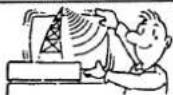
This VCR has a built-in tuner capable of memorizing up to 44 television channels.
You can select any position from 1 to 44 to preset the channels that can be received in your area.
Before starting
Set the TV receiver channel to the preset video channel or to the AV mode.
Example: To preset BBC 1 to channel position "1".
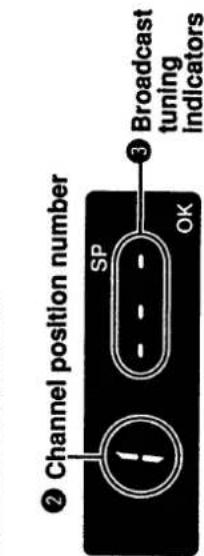
① Press the PRESET button.
This will activate the channel preset mode and the position number will start to blink.
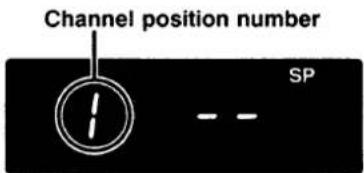
② Select the desired channel position number (Example: "1") by pressing the channel (+ or -) button or the numeric buttons.
Then, press the OK button.
③ Press the channel (+ or -) button to tune the broadcast (Example: BBC 1) you want to assign to that position number.
The channel (+) button will access the following broadcast. The channel (−) button will access the previous broadcast. The picture from the selected channel will appear on the screen.
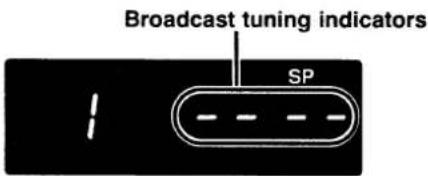
Please note that, in general, broadcasts will not be found in the order BBC 1, BBC 2, ITV, C4 as BBC 1 is not always broadcast on the lowest frequency number.
e.g. in the London area the details are
BBC 1: Channel 26 BBC 2: Channel 33
ITV: Channel 23 C4: Channel 30
Note: Do not confuse channel position numbers with channel numbers. For example, channel position number "1" will be BBC 1 which is broadcast on channel 26.
4 When the broadcast from the desired channel (Example: BBC 1) is received, press the OK button.
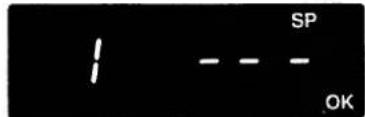
BBC 1 has been preset to channel position number "1". At that time the channel position number will change from "1" to "2".
To assign a channel to another position number, repeat steps ② to ④.
⑤ Press the PRESET button.
Fine tuning
If the tuning of a channel is not optimum, it can be improved by manual fine tuning.
① Select the channel with the unsatisfactory broadcast.
② Press the PRESET button twice.
③ Press the channel (+ or -) button to obtain the best picture and sound.
4 When the best picture and sound are obtained press the OK button.
The function of each button is described below.
The indications displayed on the VCR digital display are also shown.
| Button | Function | VCR digital display |
| Cassette inserted | ||
| CHANNEL (-, +) | Channel selection down/upTracking adjustment during playbackVertical lock adjustment during still pictureFine tuning adjustment | 1-44T-:-- |
| ▲EJECT | Unload the cassette tape | |
| POWER | Power on | |
| PLAY▶ | Playback | ▶ |
| ●REC | Immediate recordingIf pressed during normal recording, easy programmed recording (QSR) is possible | RECOFF--:-- |
| ■STOP | Stop tape travel | |
| ◀◀REW/◀◀ | RewindReverse search during playback | ◀(Blinking)◀ |
| ▶▶/FF▶▶ | Fast-forwardForward search during playback | ▶(Blinking)▶ |
| II PAUSE/STILL | Still picture during playbackRecording pause | ▶IIRECII |
| 1...0 | Numeric buttons for channel direct access | 1-44 |
| CLOCK | Clock set | DATE |
| PRESET | To preset the TV programmes to channel position numbers | 1 -- |
| PROG | To programme timer recordings | PR |
| CL | To cancel a worng number or a programmed timer recording | |
| 0/AV | External input mode (AV mode) select button | AV |
| OK | To confirm entered data | |
| ATR | Auto-tracking adjustment | T--:-- |
| SP/LP | To select the recording tape speed | SP or LP |
| RESET | Counter reset | 0:00:00 |
| MEMORY | Counter memory | M |
CASSETTE LOADING AND UNLOADING
Loading
When a video cassette is inserted, it will be loaded automatically and the cassette-in (●●) indicator will illuminate.
Auto power on
The power is automatically switched on as a cassette is inserted while the VCR is in the stand-by condition.
Unloading
Power off eject
The video cassette will be ejected when the ▲EJECT button is pressed, even when the VCR is in stand-by condition.
CAUTION: Do not put your hand or other objects in the cassette loading slot because of the risk of injury or an accident.
Be sure to keep small children away from the VCR.
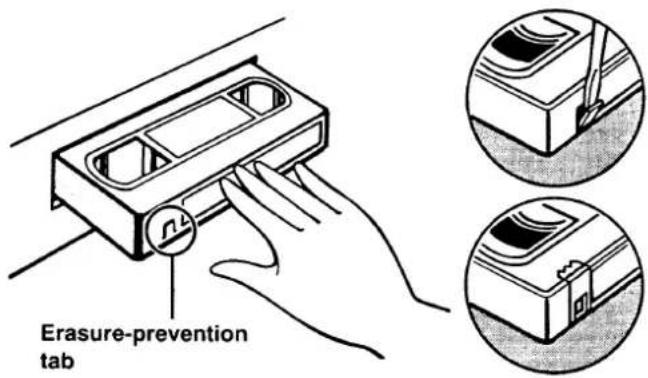
Erasure-prevention tab
If the erasure-prevention tab on the back of the video cassette is removed, the cassette cannot be recorded on.
This tab is designed to prevent the accidental erasure of recorded material.
Note: The tab should be snapped off at its base, and removed completely.
To record onto the same cassette again, place two layers of adhesive tape over the space where the tab was, so as to cover the space completely.
PLAYBACK
1 Insert the video cassette.
2 Press the PLAY▶ button.
Auto play
The VCR will play back a tape automatically when a video cassette is inserted whose erasure-prevention tab has been removed.
3 To stop the playback, press the ■STOP button.
• To rewind the tape, press the ◀REW button.
- To advance (fast-forward) the tape, press the FF▶ button.
Auto eject
When a video cassette without an erasure-prevention tab is played to the end of the tape, the tape will be automatically rewound and then the cassette will be ejected.
Tracking adjustment
① Auto-tracking adjustment
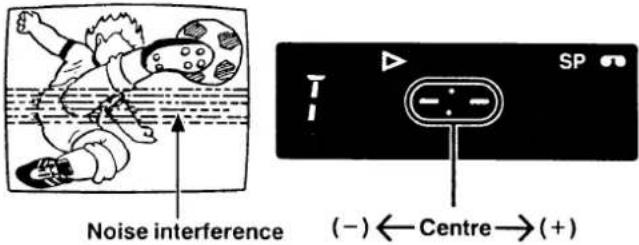
If the playback picture is disturbed by noise interference press the ATR button, adjustment to the optimum point will occur automatically.
② Manual tracking adjustment
If the playback picture still shows interference, manually adjust it with the CHANNEL (−, +) buttons, to minimize the noise.
Note: If you wish to return the tracking adjustment to its original "centre position" after having changed it, press both CHANNEL (- and +) buttons on the VCR simultaneously.
Forward search
☐ Press the FF▶ button during playback or fast-forward operation. The picture can be viewed while the tape is advanced at a fast speed.
☐ Normal playback will resume as the PLAY▶ button is pressed.
Reverse search
☐ Press the ◀REW button during playback or rewind operation. The picture can be viewed while the tape is rewound at a fast speed.
☐ Normal playback will resume when the PLAY▶ button is pressed.
Note: To search for a particular scene you can switch from fast forward to forward search and vice versa by simply pressing the FF▶ button, or from rewind to reverse search by simply pressing the ◀REW button.
Still picture
☐ Press the IIPAUSE/ STILL button during playback. A still picture can be viewed.
☐ Normal playback will resume when the PLAY▶ button is pressed.
Still vertical lock adjustment
☐ If the still picture moves up and down, press the CHANNEL (-, +) buttons to adjust the still picture.
COUNTER MEMORY
This convenient feature for finding the beginning of a specific recording etc., is made possible by the "Linear Time
Counter" that indicates the tape run time in hours, minutes and seconds.
- Whenever you load a cassette tape, the counter will be reset to "0:00:00".
- The counter operates using control signals which are recorded on the tape, hence if you play back a tape or portion of tape which has nothing recorded on it, the counter will not operate.
Notes:
- When rewinding further back from position "0:00:00", the counter shows figures beginning with “—”.
- The tape stops at the memorized position even when using fast forward when the counter reading begins with “—”.
Frame advance
☐ Press the IIPAUSE/STILL button during still playback to advance the picture frame by frame. Each press advances one frame.
☐ Normal playback will resume when the PLAY▶ button is pressed.
Notes:
- This VCR will not guarantee the picture quality of special playback.
- During special playback modes, the picture does not appear. But this is not a malfunction.
- If still picture playback or frame advance is continued for about five minutes, the VCR will automatically change to stop mode in order to prevent the tape from being damaged.

Press the RESET then the MEMORY button before starting recording or playback. The zero point of the counter is now memorized and the memory indicator "M" will illuminate.
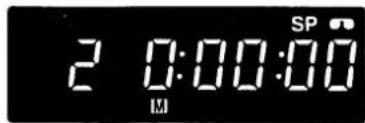

When the ◀REW button is pressed at the end of recording, or playback, the tape will be rewound automatically to the memorized position and then stop.
1 Insert a video cassette.
☐ Select the desired tape speed using the SP/LP button.
2 Press the numeric buttons or the CHANNEL (- or +) button to select the channel to be recorded. Example: Position number "2"
3 Press the ●REC buttons. Video recording starts. This is the normal video recording procedure.
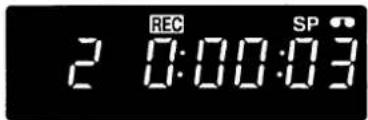
Mis-erasure prevention eject
The cassette will automatically be ejected if recording is attempted on a video cassette without an erasure-prevention tab.
4 To stop the recording, press the ■ STOP button.
Auto rewind
The VCR automatically rewinds the tape when it reaches the end. This function does not operate with timer recording or QSR timer recording.
Recording duration
It is possible to select the recording tape speed by pressing the SP/LP button.
SP mode: for the best image and sound quality LP mode: for the longest recording duration
| Cassette | SP mode | LP mode |
| E-30 | 30 min. | 60 min. |
| E-60 | 60 min. | 120 min. |
| E-90 | 90 min. | 180 min. |
| E-120 | 120 min. | 240 min. |
| E-150 | 150 min. | 300 min. |
| E-180 | 180 min. | 360 min. |
| E-195 | 195 min. | 390 min. |
| E-210 | 210 min. | 420 min. |
| E-240 | 240 min. | 480 min. |
Quick Start Recording (QSR) timer
Timer recording is simple.
You can start a recording and then programme when the VCR is to stop recording and go to stand-by mode automatically.
① Press the ●REC buttons to start recording.
② Press the ●REC buttons again and the "OFF - - : - " indication will start flashing on the VCR display.
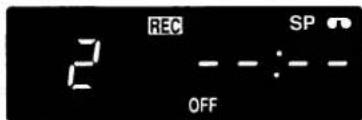
Within 10 seconds, set the recording end time by using the
● REC and CHANNEL (− or +) buttons. The timer indicator (☐) will light after the recording end time is set.
☐ Each press of the ●REC buttons will advance the recording end time by units of 30 minutes.
☐ Each press of the + button will advance the recording end time by units of 1 minute.
☐ Each press of the – button will retard the recording end time by units of 1 minute.
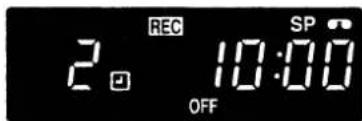
☐ To stop the recording at any time, press the ■STOP button.
Checking/Changing
When the ●REC buttons are pressed during QSR recording, the recording end time will blink for 10 seconds.
The recording end time can be changed by pressing the ● REC and CHANNEL (− or +) buttons during this 10-second period.
Other recording possibilities
If you wish to avoid recording unwanted material
① During recording, press the IIPAUSE/STILL button. The TV picture and sound will not be recorded.
② Press the IIPAUSE/STILL button or ●REC buttons, and the recording will resume.
Note: If the record pause mode continues for about five minutes, the VCR will automatically go into the stop mode in order to prevent damage to the tape.
Recording one programme while watching another
① Start recording the desired TV programme selected on the VCR.
② Select on the TV receiver the programme you want to watch.
TIMER RECORDING PROGRAMMING
☐ Timer recording enables you to set up to 6 recordings upon a period of up to 1 year.
□ Daily recordings (Monday through Friday) are possible.
☐ Before setting the timer recordings, be sure that the preset displayed time is correct.
Example: To record a programme on channel position number "5" from 21:30 to 23:15 on December 26.
1 Press the PROG button.
The timer recording setting mode is then activated, to return to the normal mode press the PROG button again.
2 Set the channel position number using the numeric buttons, for single channel number (Example: "5"), press the 0/AV button first.
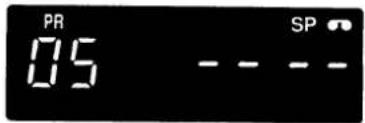
When recording from an external source, press the 0/AV button twice. The indicator "AV" will light. If you entered a wrong number, press the CL button to erase it then enter the correct number.
3 Set the date on which the recording has to take place.
Example: For December 26 (26/12)
Enter 26 - 12
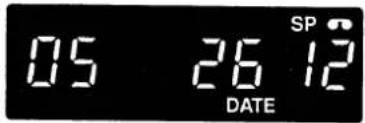
When recording in the everyday (Monday through Friday) mode, press the channel (+) button. The indicator "E" will light. The selected channel will be recorded everyday at the same time.
4 Set the time at which the recording has to start (ON-time).
Example: For 21:30
Enter 21 - 30
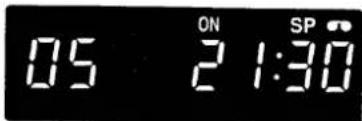
5 Set the time at which the recording has to end (OFF-time).
Example: For 23:15
Enter 23 - 15
☐ Select the desired tape speed using the SP/LP button.
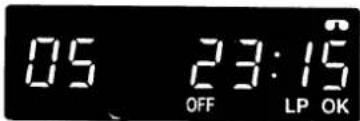
6 Press the OK button.
This completes the setting of timer controlled recording and the VCR will automatically go into timer stand-by mode. The timer indicator (☐) will light.
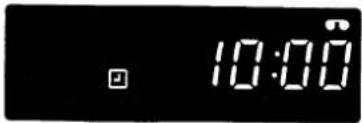
Note: If no video cassette is loaded when going into timer stand-by mode, the timer indicator (☐) will flash.
☐ By repeating steps 1 to 6, up to 6 different timer recordings can be preset.
Confirmation
① Press the PROG button, if less than 6 recordings have been preset, “-- --:--” will be displayed first, press the PROG button repeatedly and the settings (channel position and date) for the recordings are displayed in sequence.
② By pressing the channel (+ or -) button, the date display will change to the ON-time and OFF-time setting for settings confirmation.
Erasing a programmed timer recording
① Display the recording you want to erase by pressing the PROG button repeatedly.
② When the desired setting is displayed, press the CL button.
COPYING A TAPE
Notes on timer recording setting
The timer recording will not operate if...
- A cassette with no erasure-prevention tab is loaded. The (☐) indicator will flash and the cassette will be ejected.
Programme priority
- If several timer recordings have overlapping recording times, the recording with the earliest start time will be recorded first, until the end.
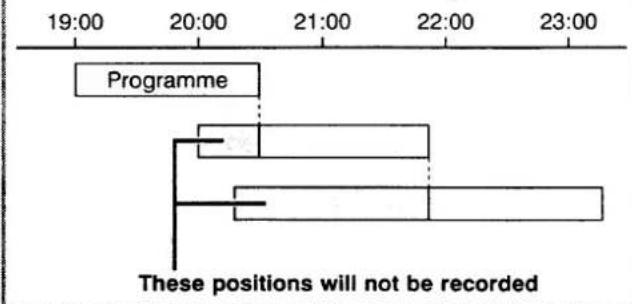
Notes:
• To stop a timer recording, press the ■STOP button.
- If 6 timer recordings have been set, you will first have to erase one of the programmed timer recordings (see page 11) before you can set a new timer recording.
Copying (dubbing) a tape can be done using two video recorders, a playback VCR and a recording VCR.
VCR A
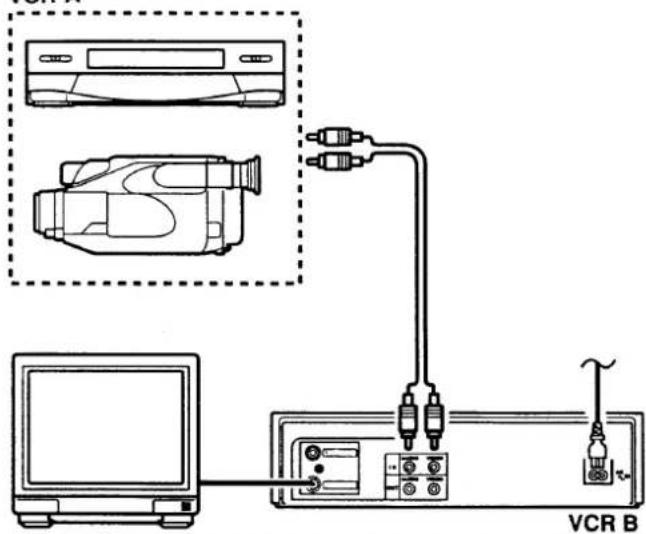
1 Connect VCR A (or Camcorder) and VCR B.
2 Insert the pre-recorded tape into VCR A (playback VCR).
3 Insert the blank video cassette into VCR B (recording VCR).
4 Set the VCR B to the "AV" mode.
☐ Press the 0/AV button once to display "AV" instead of a channel position number or,
☐ Press the CHANNEL (− or +) button to display "AV" instead of a channel position number.
5 Set VCR B to record pause mode. (The record pause mode is set by pressing the ●REC button then the II PAUSE/ STILL button.)
6 Start playback on VCR A by pressing the PLAY▶ button.
7 When the desired starting position is reached on VCR A, start recording on VCR B by pressing the II PAUSE/ STILL button or the ● REC button.
8 When the copy is completed, press the ■ STOP button on VCR B then on VCR A.
TROUBLESHOOTING
This VCR is highly sophisticated. It is shipped from the factory after having been checked and adjusted under the most rigid quality control and inspection system. Should problems occur, check the following points.
| Symptom | Check points |
| No power | The mains lead is disconnected. |
| The remote control unit doesn't operate | The batteries are low. |
| No TV programmes received | Are the connections between your VCR and TV correct?Was tuning correctly preset? |
| Off the air reception on the VCR is poor | The video channel setting of the TV receiver does not correspond to the video channel presetting of the VCR. |
| Playback picture does not appear | The video channel setting of the TV receiver does not correspond to the video channel presetting of the VCR. |
| Interference in playback picture | Adjust the tracking control.Dust or dirt on video heads.Take the VCR to an Authorized Service Station or dealer. |
| Special playback picture does not appear | This is not a malfunction.This VCR will not guarantee the picture quality of special playback. |
| No recording | The erasure-prevention tab on the cassette has been removed. |
| Timer recording is not possible | The starting day and time have not been set correctly.The clock time is not set correctly.There has been a power interruption. |
REPAIRS
This VCR is a precision instrument and, if treated with care, will provide years of satisfactory performance. However, in the event of difficulty, the owner is advised not to attempt to make repairs or open the cabinet. Servicing should always be referred to your servicing dealer or Authorized Warranty Station.
SPECIFICATIONS
General
Format:
VHS PAL
Video signal:
CCIR: 625 lines, PAL colour signals
Video heads:
2 heads
Tape speed:
SP: 23.39 mm/sec
LP: 11.70 mm/sec
Tuner input:
UHF: 21 - 69
RF converter:
Built-in UHF converter
Converter output:
On channel 32 - 41
Timer indication:
24-hour indication
Timer recording:
1 year 6 programmes with every day recording function
Power requirement:
220 - 240 V AC, 50 Hz
Dimensions
(W × H × D):
360 × 89 × 290 mm
Weight:
Approx. 4 kg
Power consumption:
22 W
Electrical characteristics
Video input level:
0.5 - 2.0 Vp-p, 75 ± 5 ohms
Video output level:
1.0 ± 0.2 Vp-p, 75±5 ohms
Audio input level:
-8.0 dBs, more than 50 kohms
Audio output level:
-8.0 dBs, less than 10 kohms
Video S/N:
More than 43 dB
Horizontal resolution:
More than 240 lines
Accessories
Instruction manual 1
Mains lead....1
Aerial output cable....1
Remote control unit 1
"AA (IEC R6)" size, 1.5-volt battery....2
Appearance and specifications are subject to change without notice.
This unit conforms with EEC standard 87/308.
GUARANTEE TO CUSTOMER
Sanyo U.K. Sales Ltd. (the Company) guarantees to the initial retail purchaser that if this equipment is or becomes defective and that, in the opinion of the Company, the defect is due to faulty material or workmanship the Company will, for a period of 12 calendar months from the date of sale to the original purchaser repair or replace, at its sole option, free of charge, any such defective component part of the equipment, always provided that:-
- The equipment has at all times been used in accordance with the operating instructions issued by the Company, and has not been connected to an electrical mains supply for which it has not been adjusted.
- Accidental damage, or damage caused by negligence of misuse by the user, including leakage from exhausted batteries, is specifically excluded.
- Unauthorised repairs, or any modification to the equipment which has not been expressly approved by the Company, shall render this guarantee null and void.
- Failure due to fair wear and tear of any item, such as batteries, record playing styli, and tape recording, playback and erase heads and head cleaning is specifically excluded.
This guarantee is not transferable and is only applicable within the United Kingdom (and the Republic of Ireland). Nothing in this express guarantee affects the statutory rights available to the purchaser of this equipment.
DearCustomer
Thank you for buying Sanyo. This equipment should give you many years of pleasure and faithful service but in the event that a fault occurs, the following notes for your guidance may be helpful:-
- PLEASE RETAIN YOUR PURCHASE RECEIPT WHICH WILL BE REQUIRED FOR SERVICE DURING GUARANTEE.
- If your Sanyo equipment proves faulty during the period of guarantee, take it or send it back to the dealer who originally supplied it together with this guarantee and the proof of purchase. We have made arrangements with our approved dealers under which they will carry out in guarantee service repairs on our behalf. In this way, we hope to reduce to a minimum the amount of time you will be without your equipment.
- If for some reason it is impossible to return the equipment to the original supplier, please contact our Service Administration Department at the address below for further advice.
- Should the equipment require servicing after the expiry of the guarantee period, take or send it to the original supplier or any other Sanyo dealer. He will be pleased to give you a quotation for the repair. If you are in any doubt about what to do, write to us at the address below or telephone:
Sanyo U.K. Sales Ltd.
Sanyo House Otterspool way, Watford, Hertfordshire WD2 8JX Tel: Watford 246363