XC6210 - Empfänger CLARION - Kostenlose Bedienungsanleitung
Finden Sie kostenlos die Bedienungsanleitung des Geräts XC6210 CLARION als PDF.


| Produkttyp | Autoradio / Empfänger |
| Marke | Clarion |
| Modell | XC6210 |
| Einbauformat | 1-DIN |
| Abmessungen (B x H x T) | ca. 178 x 50 x 160 mm |
| Gewicht | ca. 1,2 kg |
| Stromversorgung | 12 V Gleichstrom (Fahrzeugbatterie) |
| Maximale Ausgangsleistung | 4 x 50 Watt |
| RMS-Leistung | 4 x 22 Watt |
| Radioempfang | AM / FM mit RDS |
| CD-Wiedergabe | Ja, CD / CD-R / CD-RW |
| AUX-Eingang | 3,5 mm Klinke vorne |
| Equalizer | 3-Band (Höhen, Mitten, Tiefen) |
| Display | LCD mit Hintergrundbeleuchtung |
| Bedienung | Tasten und Drehregler |
| Entfernungssicherung | Abnehmbare Frontblende |
| Reinigung | Mit weichem, trockenem Tuch; keine Flüssigkeiten |
| Sicherheitshinweise | Vor Einbau Batterie abklemmen; nur in 12V-Fahrzeugen verwenden |
| Ersatzteile / Reparatur | Über Fachhändler oder Clarion-Service |
| Garantie | In der Regel 1 Jahr (abhängig vom Händler) |
| Zubehör im Lieferumfang | Einbaurahmen, Bedienungsanleitung, Kabelbaum |
Häufig gestellte Fragen - XC6210 CLARION
Benutzerfragen zu XC6210 CLARION
0 Frage zu diesem Gerät. Beantworten Sie die, die Sie kennen, oder stellen Sie Ihre eigene.
Eine neue Frage zu diesem Gerät stellen
Laden Sie die Anleitung für Ihr Empfänger kostenlos im PDF-Format! Finden Sie Ihr Handbuch XC6210 - CLARION und nehmen Sie Ihr elektronisches Gerät wieder in die Hand. Auf dieser Seite sind alle Dokumente veröffentlicht, die für die Verwendung Ihres Geräts notwendig sind. XC6210 von der Marke CLARION.
BEDIENUNGSANLEITUNG XC6210 CLARION
clarion®
Owner's manual & Installation manual Mode d'emploi et manuel d'installation Manual de instrucciones y de instalación
XC6210
XC6410
XC AMPLIFIERS
AMPLIFICATEURS XC
AMPLIFICADORES XC
INTRODUCTION
The Clarion XC6210 (two-channel amplifier) and XC6410 (four-channel amplifier) incorporate the following features:
- Conformal Coated PC Board that resists mold, mildew and moisture damage.
- Pulse-Width Modulated (PWM) MOSFET power supply for maximum performance with minimal distortion.
- Remote turn-on with "soft start" muting to prevent turn-on "thump".
- Variable high-pass/low-pass electronic crossover with a 12dB per octave slope (adjustable range: 50Hz to 500Hz, 500Hz to 5kHz - x10).
• Variable bass boost circuit to reinforce low frequency signals. - Adjustable input gain level controls with ground loop isolation to minimize noise and distortion.
• 2-ohm stereo stable, 4-ohm bridged stable.
• Corrosion resistant power, speaker and RCA connections. - Speaker level input. (High-level speaker output to RCA input adapters included).
- Low profile construction with non-corrosive aluminum heat sink for efficient heat dissipation.
ABOUT THE MANUAL AND WARRANTY
This manual describes the basic requirements to install the Clarion XC6210 and XC6410 amplifiers. The installation of this amplifier can be quite complex to install. If you do not possess the necessary knowledge and tools to perform this installation, please contact your local Clarion audio dealer.
Keep all instructions and sales receipt for future reference and warranty information.
TABLE OF CONTENTS
Description 3
Input Connections and Audio Controls 3
Installation 7
Mounting Precautions 7
Wiring Precautions 7
XC6410 Wiring and Applications 8
XC6210 Wiring and Applications 12
Adjusting the Input Gain Control 14
Setting the Crossover 14
Setting the Bass Boost 14
Final System Check 14
Troubleshooting 15
Product Specifications 17
DESCRIPTION
The XC6210 and XC6410 use a PWM regulated power supply for superior sound and output wattage. All of the connections and controls for the XC6210 and XC6410 are conveniently labeled and located on one side of the amplifier. To ensure the best possible electrical connections, the power, speaker and RCA inputs are corrosion resistant. An additional benefit of the XC6410 is the ability to create a 2, 3, or 4 configuration. In the event of component failure or a short circuit, the XC6210 and XC6410 incorporate protection circuits and ATC fuse protection to prevent damage to the amplifier.
INPUT CONNECTIONS AND AUDIO CONTROLS
The front panel of the XC6410 and XC6210 contain both connections for RCA and speaker level inputs, along with the audio controls as shown below.
Fig. 1
XC6410
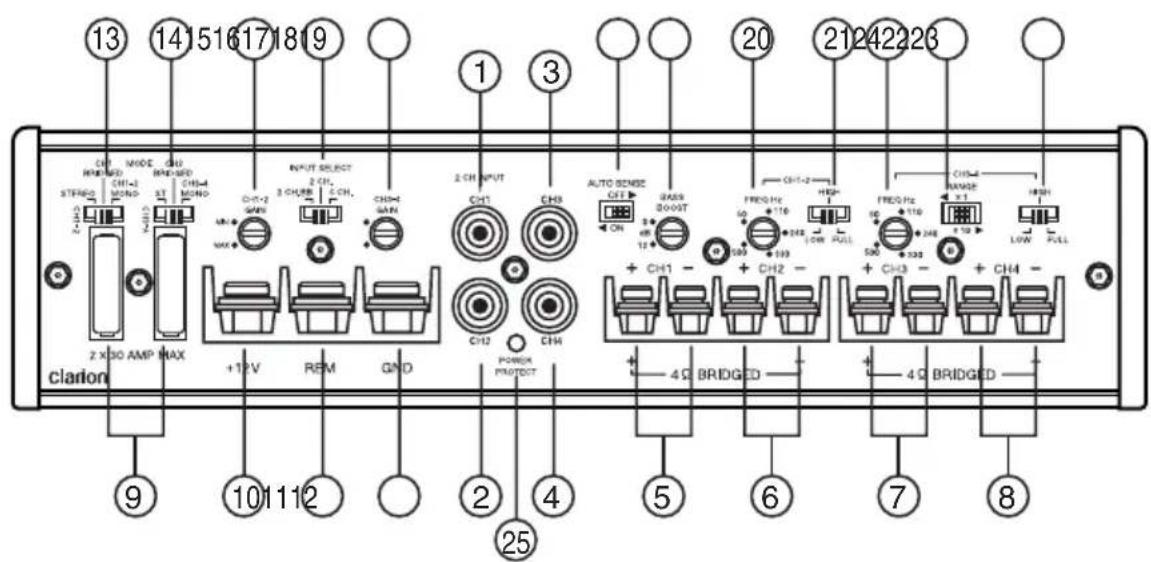
- CH1 RCA Input
- CH2 RCA Input
- CH3 RCA Input
- CH4 RCA Input
- CH1 Speaker Output
- CH2 Speaker Output
- CH3 Speaker Output
- CH4 Speaker Output
- 30 Amp ATC Fuse (Q'ty - 2)
- +12VDC Input Battery
- Remote Turn-on Input
- Ground (Chassis Ground)
- Output Mode Selector Switch (STEREO/CH1 Bridged/CH1-2 MONO)
- Output Mode Selector Switch (ST/CH2 Bridged/CH3-4 MONO)
- CH1/CH2 Input Gain Control
-
Input Select (2CH BB, 2CH, 4CH)
-
CH3/CH4 Input Gain Control
- Auto Sense (Automatic Power ON/OFF)
- Bass Boost
- CH1/2 Crossover Frequency Selector (50Hz\~500Hz)
- CH1/2 Crossover Mode Selection (Low Pass, High Pass, Full Range)
- CH3/4 Crossover Frequency Selector (50Hz\~500Hz), if x10 range selected (500Hz\~5kHz)
- CH3/4 Crossover Range Selection (x1 or x10) multiplier
- CH3/4 Crossover Mode Selection (Low Pass, High Pass, Full Range)
- Power Protect (Status LED)
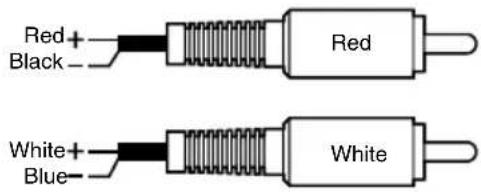
Speaker level adaptor cable RCA inputs are fully balanced and can accept RCA pre amp levels. With speaker level adaptor cable the inputs will accept speaker levels. (High Level RCA Speaker Adapter Included)
XC6210
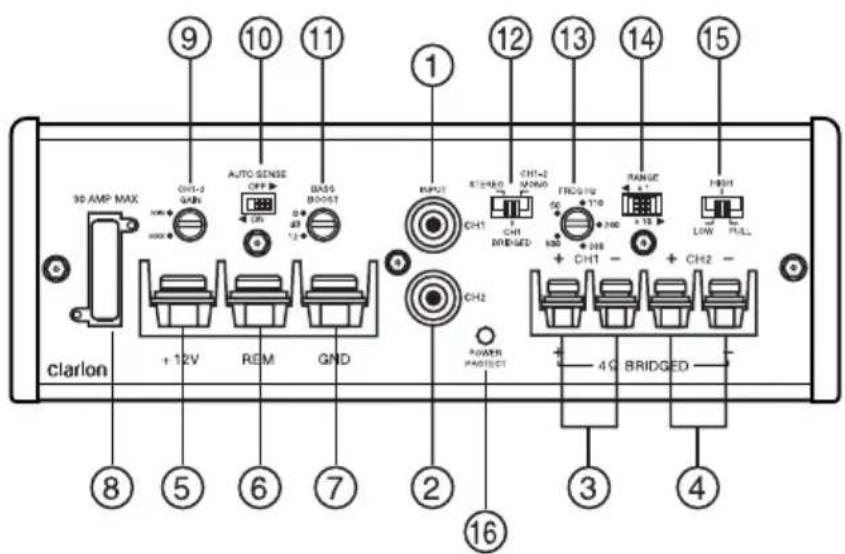
- CH1 RCA Input
- CH2 RCA Input
- CH1 Speaker Output
- CH2 Speaker Output
- +12VDC Input Battery
- Remote Turn-on Input
- Ground (Chassis Ground)
- 30 Amp ATC Fuse
- CH1/CH2 Input Gain Control
- Auto Sense (Automatic Power-on/off)
-
Bass Boost
-
Output Mode Selector Switch (STEREO/CH1 Bridged/CH1-2 MONO)
- CH1/CH2 Crossover Frequency Selector (50Hz\~500Hz), if x10 Range Selected (500Hz\~5kHz)
- Crossover Range Selection (x1 or x10) multiplier
- CH1/2 Crossover Mode Selection (Low Pass, High Pass, Full Range)
- Power Protect (Status LED)
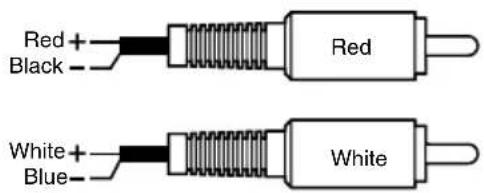
Speaker level adaptor cable RCA inputs are fully balanced and can accept RCA pre amp levels. With speaker level adaptor cable the inputs will accept speaker levels. (High Level RCA Speaker Adapter Included)
The RCA connections are corrosion resistant for optimum performance and low signal loss. The RCA connectors are labeled CH1, CH2 [for XC6410: CH3, and CH4]. In applications where RCA signals are not present, the speaker level output from the head unit can be used. (High-level speaker output to RCA input adapters included).
- Input Gain Controls: Allow you to match the source unit's output voltage to achieve maximum output from the amplifier. The amplifier can accommodate input levels from virtually any head unit with an input range of 200mV to 6.0V. Regarding high-level input: Please use included high-level to RCA adapters.
- Bass Boost: The added boost produces rich, low bass frequencies that are usually difficult to reproduce in the vehicle/marine audio environment. Bass boost frequency (50Hz, 0\~12dB). NOTE: XC6410 – If 2CH or 4CH input is selected, bass boost only affects CH1/CH2. If 2CH BB input is selected, bass boost will affect CH1/CH2/CH3/CH4.
- Input Select (XC6410 Only) [2CH BB/2CH/4CH]:
2CH BB: Uses CH1/2 inputs and has output from all 4 channels with Bass Boost.
2CH: Uses CH1/2 inputs and has output from all 4 channels. The Bass Boost will work only on CH1/2.
4CH: Uses all 4 channel inputs and has output from all 4 channels. The Bass Boost will work only on CH1/2.
• Output Mode Selector Switch:
XC6210
STEREO: (Common applications) Input of RCA into CH1/CH2 will result in speaker output of CH1/CH2.
CH1 BRIDGED: (Limited/Special applications) Input of RCA into CH1 will result in speaker output of CH1/CH2.
CH1-2 Mono: (Subwoofer applications) Summed input of RCA into CH1/CH2 will result in speaker output of CH1/CH2 or CH1+ and CH2-.
XC6410 CH1-2
STEREO: (Common applications) Input of RCA into CH1/CH2/CH3/CH4 will result in speaker output of CH1/CH2/CH3/CH4.
CH1 BRIDGED: (Limited/Special applications) Input of RCA into CH1 will result in speaker output of CH1/CH2.
CH1-2 Mono: (Subwoofer applications) Summed input of RCA into CH1/CH2 will result in speaker output of CH1/CH2 or CH1+ and CH2-.
(XC6410) CH3-4
STEREO: (Common applications) Input of RCA into CH1/CH2/CH3/CH4 will result in speaker output of CH1/CH2/CH3/CH4.
CH2 BRIDGED: (Limited/Special applications) Input of RCA into CH2 will result in speaker output of CH3/CH4.
CH3-4 Mono: (Subwoofer applications) Summed input of RCA into CH3/CH4 will result in speaker output of CH3/CH4 or CH3+ and CH4-.
• Auto Sense (ON/OFF)
OFF: (common application) When source unit remote turn-on wire available.
ON: (factory radio application) Must use included RCA input adapters.
Note: In this setting; do not connect anything to REM terminal.
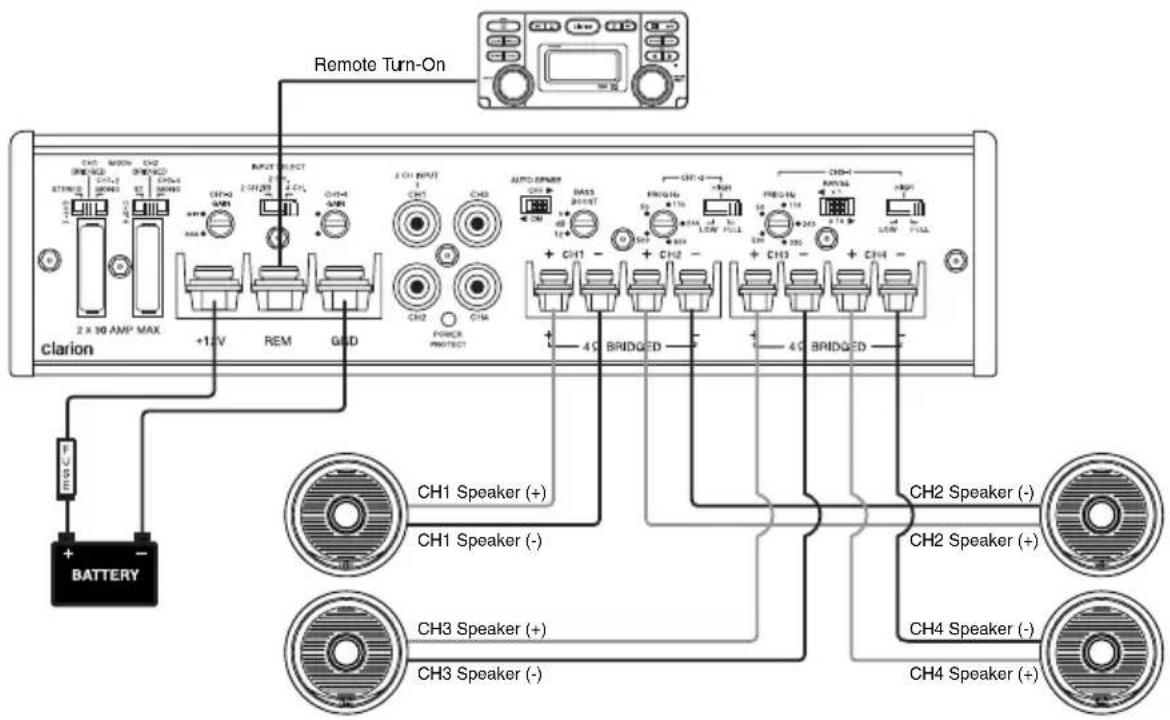
XC6210 - Electrical Connection
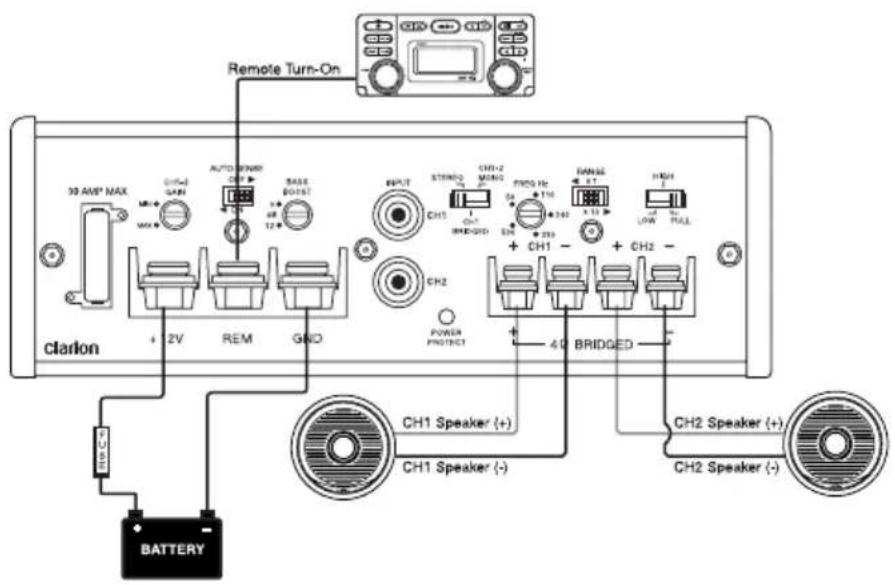
INSTALLATION
This section suggests Mounting and Wiring Precautions for installing the Clarion XC6210 or XC6410. If you do not possess the necessary tools and installation experience, do not attempt to install these amplifiers. Instead, contact your local Clarion audio dealer to perform the installation.
MOUNTING PRECAUTIONS
Prior to mounting the amplifier, make sure it is safe to mount the amplifier in desired location. Failure to do so can result in serious damage to the vehicle/ boat. Extra care and attention is necessary in marine installations due to the uncertainty of water conditions environment. Stainless steel hardware is recommended for marine applications.
Additional precautions and suggestions:
- For the most efficient cooling, mount the amplifier so cool air runs along the length of the heat sink, rather than across them. To increase air movement and circulation, a cooling fan can be installed.
- Mount the amplifier on a rigid surface; avoid mounting to subwoofer enclosures or areas prone to vibration.
- Prior to drilling and mounting, make sure the proposed mounting holes will not cut into the fuel tank, fuel lines, brake lines, electrical wiring, or the body of vehicle or boat.
- Do not mount the amplifier where it is susceptible to water.
WIRING PRECAUTIONS
Read all of the wiring precautions prior to making any connections. If you are unsure and/or don't have the necessary installation hardware, contact your local Clarion audio dealer to perform the installation.
- Before you begin the installation, make sure the vehicle is not running and is in the OFF position.
- Disconnect the negative (-) lead of the battery (or batteries) before making any power connections.
- When making connections, be sure that each connection is clean and secure. Insulate final connections with electrical tape or heat shrink tubing. Failure to do so may damage your equipment.
- A good ground is critical for the performance of the amplifier. A ground wire should be run directly from the battery to the amplifier (marine application). Use black insulated 10-gauge or larger wire for the amplifier's ground (-) power lead.
- Add a fuse holder and fuse at the positive (+) terminal of the battery. The fuse rating should equal the total current consumption at full output of the amplifier(s). Use red insulated 10-gauge or larger wire for the amplifier's positive (+) power lead. Do not install the fuse until the complete installation has been performed.
-
When replacing the amplifier's fuse, always use one having the same amperage rating. Substituting a higher rated fuse or a slow-blow type can result in serious damage to the amplifier.
-
When creating passage holes for power cables, RCA's cables, and speaker wires, use grommets to eliminate any sharp edges created during drilling. This will protect the wire from being damaged and prevent a short circuit.
- Extra cable can cause signal loss and act as an "antenna" for noise. Use only high-quality RCA cables that are no longer than necessary.
- In multiple amplifier systems, it is recommended to use a relay on the remote turn-on lead of the radio.
XC6410 WIRING AND APPLICATIONS
The Clarion XC6410 4-channel audio amplifier can be used in a variety of system applications. Here are a few examples to help plan your own installation.
Fig. 4 4-Channel Full Range Stereo System
In this application, the XC6410 is used as a 4-channel amplifier to drive four full range speakers in stereo. Note the switch settings.

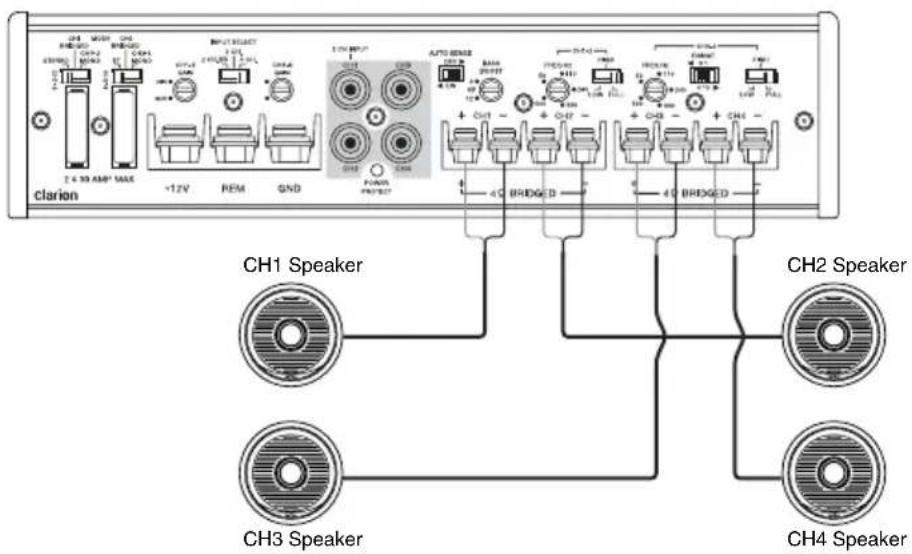
Fig. 5 2-Channel High-Pass, 2-Channel Low-Pass
In this 4-channel system, the XC6410 drives a pair of component speakers and a pair of subwoofers. Note the switch settings.

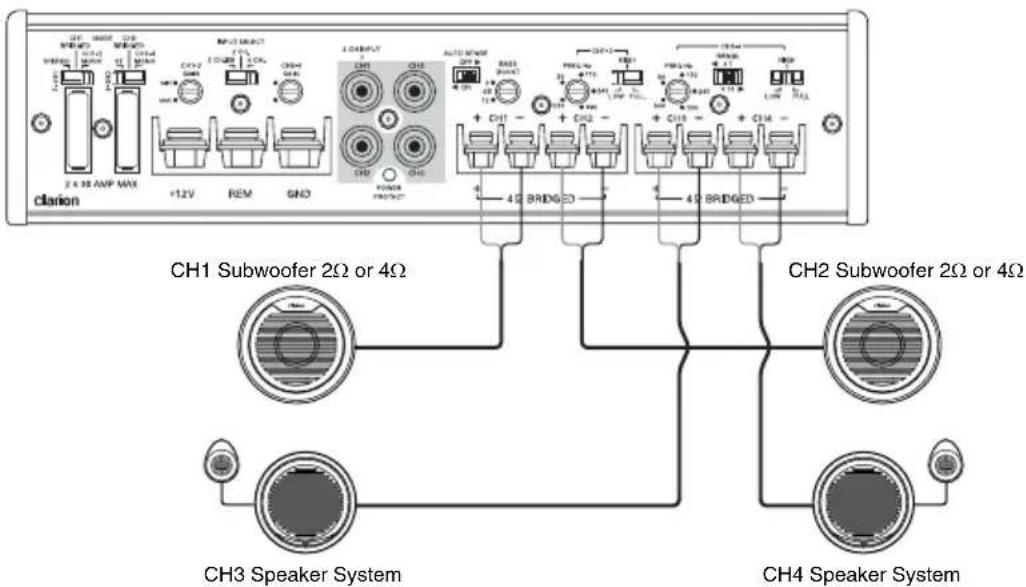
Fig. 6 2-Channel Stereo System with Low-Pass Bridged Mono Channel
The XC6410 can also be used to drive a pair of component speakers and a single mono subwoofer using one set of RCA's. Note the switch settings.
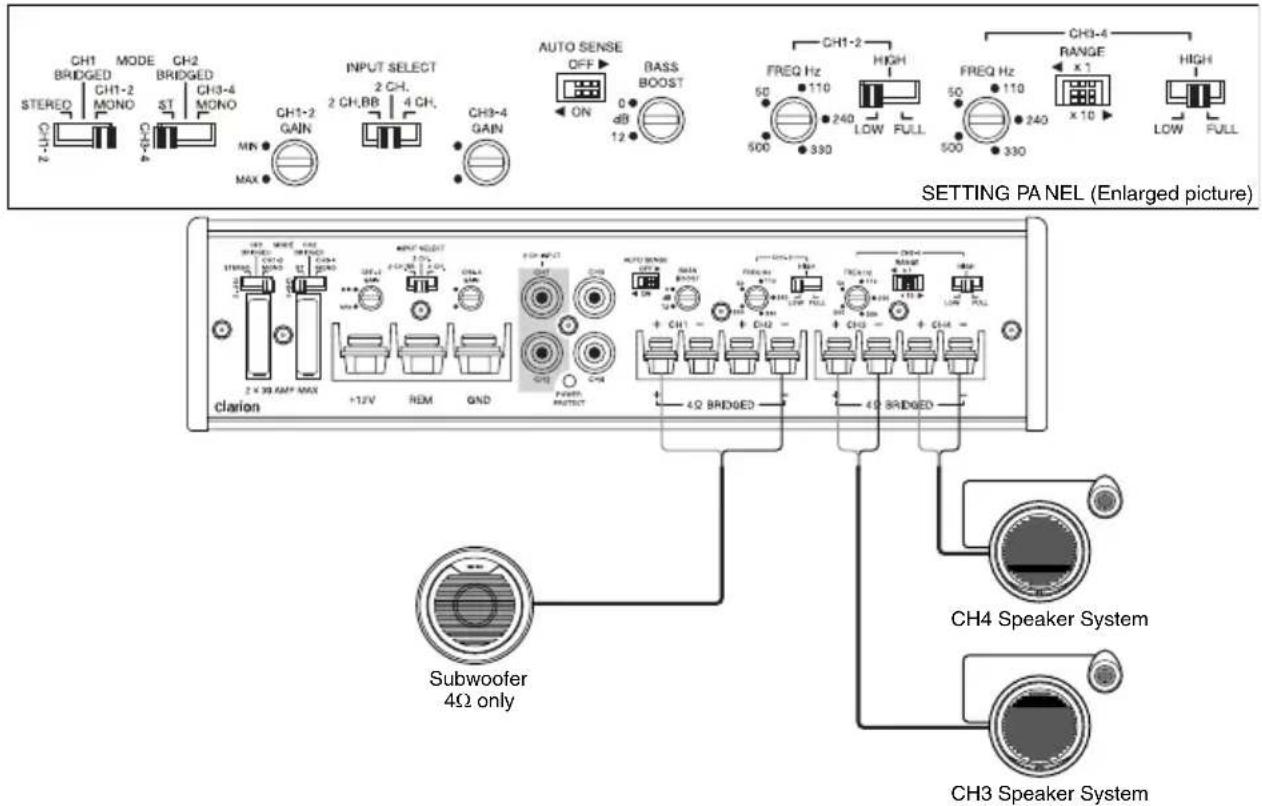
Fig. 7 2-Channel High Power System Speakers
The XC6410 can be set up as a 2-channel high power amplifier to drive a pair of speakers (stereo). Note the switch settings.

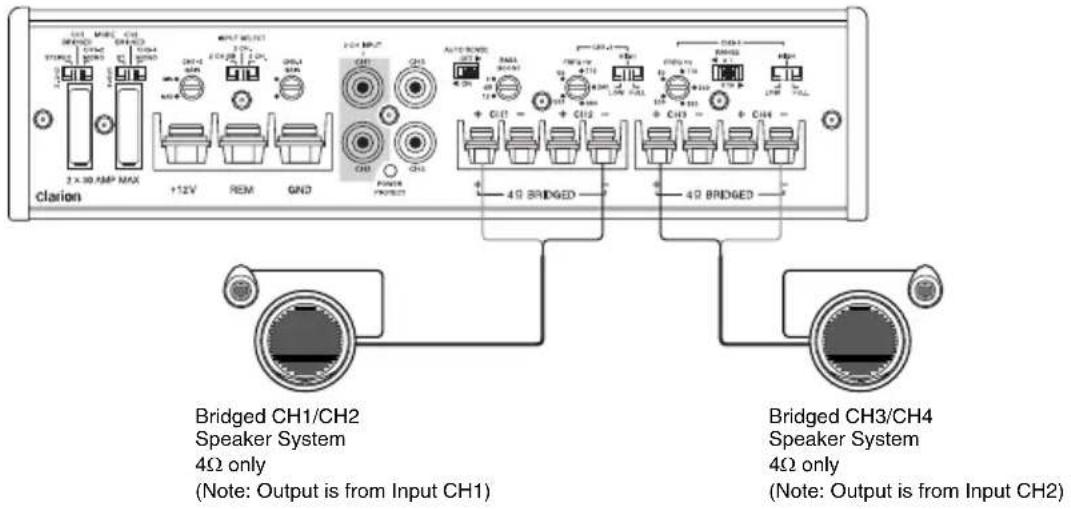
XC6210 WIRING AND APPLICATIONS
The Clarion XC6210 2-channel audio amplifier can be used in a variety of system applications. Here are a few examples to help plan your own installation.
Fig. 8 2-Channel Full-Range Stereo System
In this application, the amplifier is used in stereo and drives two full-range speakers. Note the switch settings.
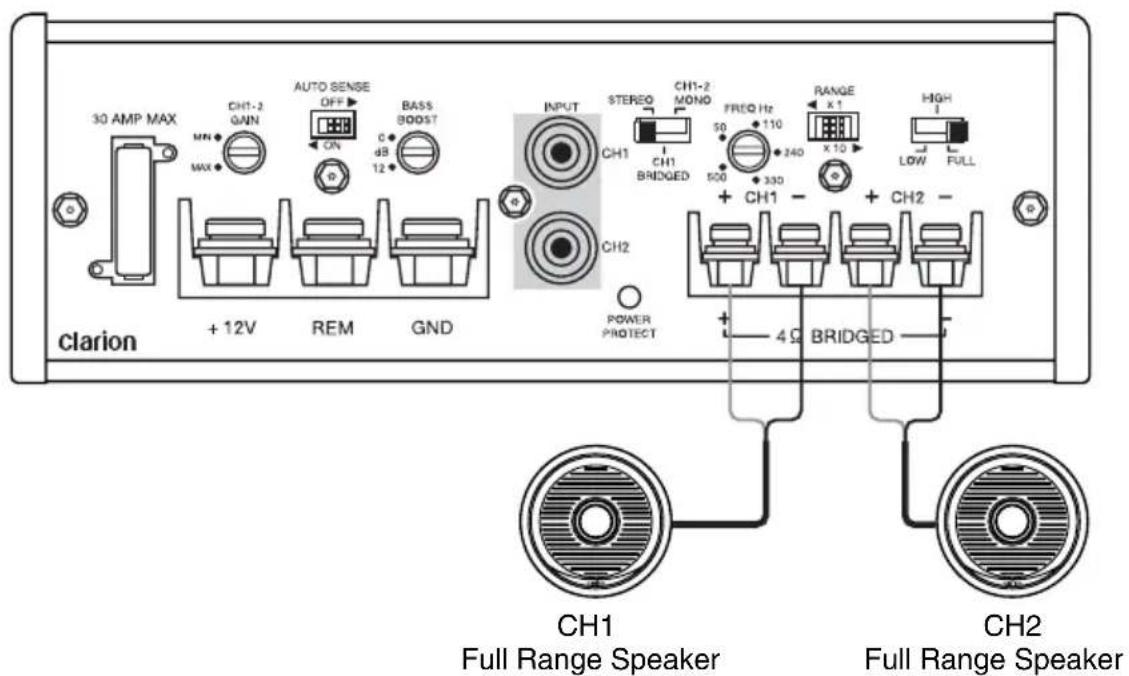
Fig. 9 Subwoofer Stereo System
In this application, the amplifier is used to drive two subwoofers.
Note the switch settings.
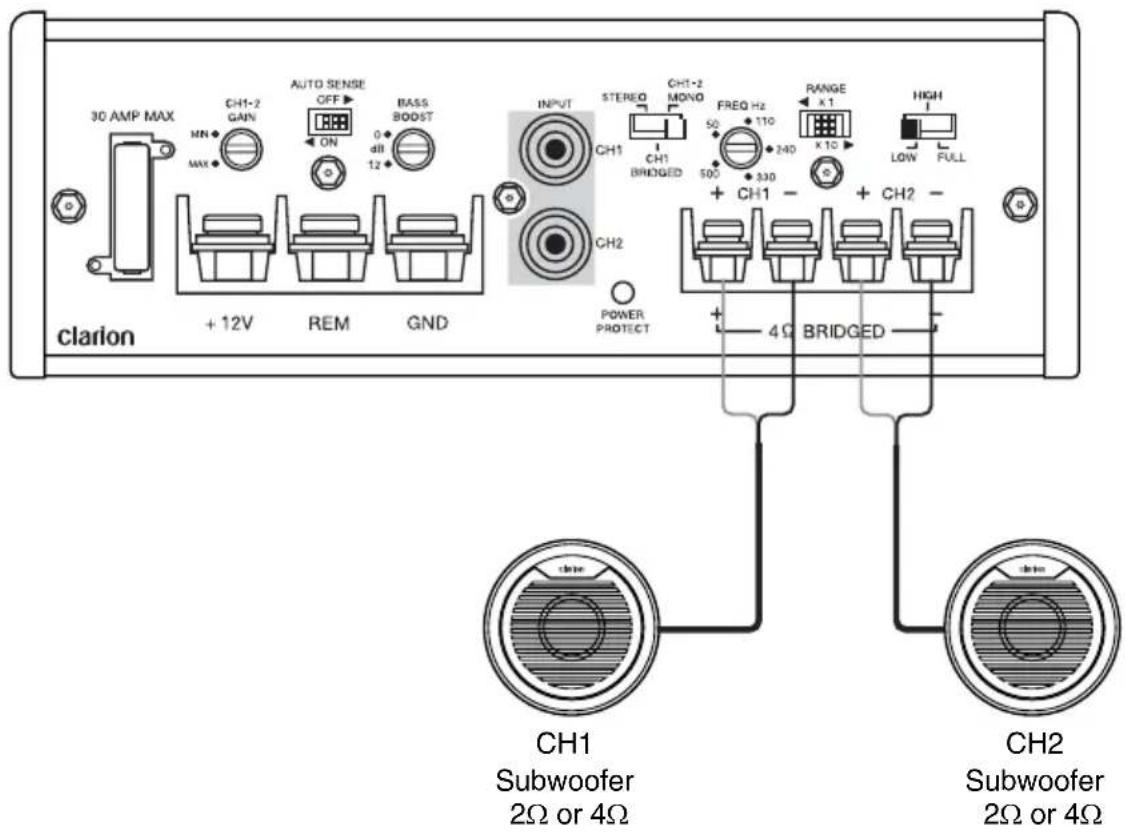
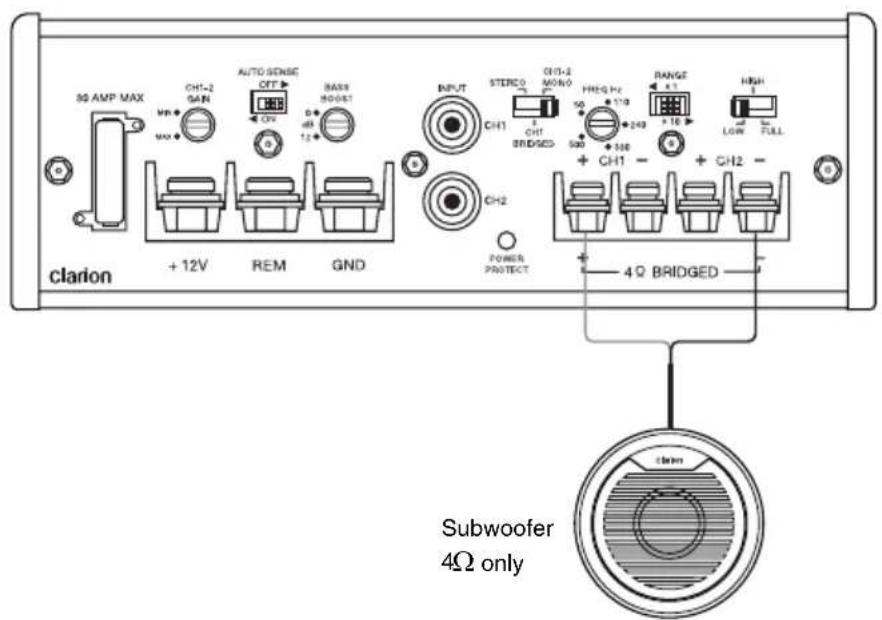
Fig. 10 Bridged - Mono Subwoofer System
In this application the amplifier is bridged for mono operation to drive a subwoofer. Note the switch settings.
ADJUSTING THE INPUT GAIN CONTROL
After completing the installation, follow these steps to set the Input Gain Control.
- Set Input Gain Control to MIN (counterclockwise).
- Power on source. Set all Tone or Equalization Controls to "flat" positions and set Loudness off.
- Play a CD, set the Source Volume Control to 75% of max level.
- Slowly adjust the Input Gain Control of amplifier. Stop when you hear a slight distortion of audio.
NOTE: If the audio system uses an equalizer, set its frequency controls to "flat" positions.
SETTING THE CROSSOVER
The Clarion XC6210 and XC6410 feature fully adjustable high and low pass crossovers. To set the crossover, follow these steps.
- Using the Crossover Mode Switch, select the desired mode: LOW for Low Pass, HIGH for High Pass or FULL for Full Range.
- Using the FREQ (Hz) Selection Control, select the desired frequency. If the desired frequency exceeds the range of the FREQ (Hz) Selection Control, slide the Crossover Frequency Multiplier Switch to x10.
- For example, 50Hz × 10 = 500Hz or 500Hz × 10 = 5kHz
NOTE: x10 Multiplier is available on XC6210 and XC6410 (only on CH3/CH4)
SETTING THE BASS BOOST
- Set Bass Boost to 0dB (counterclockwise).
- Listen to a variety of music styles (e.g. Rock, Rap, etc.) and slowly adjust the Bass Boost control (clockwise) to realize the best bass response.
FINAL SYSTEM CHECK
-
Power on the source unit. Slowly increase the Volume Control and listen to the audio. If there is no audio or if you hear any static, distortion, please check the connections and refer to the Troubleshooting section. Depending on your system design, the levels may become quite loud even at low Volume Control settings. Until you get an “audio feel” of the system’s power, use care when adjusting controls.
-
Check "Source" Balance (Left and Right) and Fader (Front and Rear) to ensure proper installation.
-
Increase the volume and verify that the amplifier reproduces audio (at full frequencies) without distortion. If you hear distortion, check the connections and verify that the Input Gain Control is set properly.
TROUBLESHOOTING
Problem
No Audio. Amplifier not powering on. (LED turned off)
Solution
Remote turn-on voltage. Check remote connections at amplifier and source unit.
Blown amplifier fuse. Replace with new fuse (same rating).
Power wires not connected. Check power and ground wiring at amplifier and at battery.
Speaker leads shorted. Check speaker continuity to ground, it should not show a common ground.
Speakers not connected or are blown. Check speaker connections at amplifier, measure coil impedance.
Problem
Audio cycles on and off.
Solution
Thermal protection circuits are shutting amplifier off. Check location for adequate ventilation; consult an authorized Clarion audio dealer.
Problem
Distorted audio.
Solution
Input Gain is not set properly, or damaged speaker cones. Review Setting Gain; inspect each speaker. (i.e. check connection, speaker impedance, etc.)
Problem
Audio lacks punch.
Solution
Speakers wired incorrectly, which causes cancellation of bass frequencies. Check polarity of wires from amplifier to each speaker as defined by the system design.
Problem
Amplifier fuse keeps blowing.
Solution
Incorrect wiring or short circuit. Review installation and check all wiring connections.
Problem
Whining or ticking noise in the audio with engine on.
Solution
Amplifier is picking up alternator noise or radiated noise. Lower input gain; move audio cables away from power wires. Check power and ground connections on amplifier; check alternator and/or voltage regulator; test for weak battery, check power and ground connections of battery.
PRODUCT SPECIFICATIONS
XC6410
Frequency Response 20Hz \~ 20kHz
Crossover Frequency (Low, High, Full) Variable 50Hz \~ 500Hz, *(x10, 500Hz \~ 5kHz)
Low Level Input Sensitivity 200mV \~ 6.0V
Max. Power Output @4Ω 600W (300W x 2)
RMS Power Output @4Ω 85W x 4 @1.0% THD
RMS Power Output @2Ω 125W x 4 @1.0% THD
RMS Bridged Power Output @4Ω 250W x 2 @1.0% THD
Fuse 30A x 2
Dimensions (WxHxD) 222 mm x 55 mm x 174.2 mm
8.74 in x 2.17 in x 6.86 in
Power Output: 85W x 4RMS [4Ω @14.4V 1% THD+N]
Signal to Noise Ratio: 80dB (Reference: 1W into 4Ω)

XC6210
Frequency Response 20Hz \~ 20kHz
Crossover Frequency (Low, High, Full) Variable 50Hz \~ 500Hz, *(x10, 500Hz \~ 5kHz)
Low Level Input Sensitivity 200mV \~ 6.0V
Max. Power Output @4Ω 350W (350W x 1)
RMS Power Output @4Ω 85W x 2 @1.0% THD
RMS Power Output @2Ω 125W x 2 @1.0% THD
RMS Bridged Power Output @4Ω 250W x 1 @1.0% THD
Fuse 30A x 1
Dimensions (WxHxD) 161.2 mm x 55 mm x 174.2 mm
6.35 in x 2.17 in x 6.86 in
Power Output: 85W x 2RMS [4Ω @14.4V 1% THD+N]
Signal to Noise Ratio: 80dB (Reference: 1W into 4Ω)

*: x10 Multiplier is available on XC6210 and XC6410 (only on CH3/CH4)
Clarion Corporation of America
All Rights Reserved. Copyright © 2012 Clarion Corporation of America Printed in China / Imprime au Chiné / Impreso en China