Saturn SL-125 - Laminiergerät FELLOWES - Kostenlose Bedienungsanleitung
Finden Sie kostenlos die Bedienungsanleitung des Geräts Saturn SL-125 FELLOWES als PDF.


Benutzerfragen zu Saturn SL-125 FELLOWES
0 Frage zu diesem Gerät. Beantworten Sie die, die Sie kennen, oder stellen Sie Ihre eigene.
Eine neue Frage zu diesem Gerät stellen
Laden Sie die Anleitung für Ihr Laminiergerät kostenlos im PDF-Format! Finden Sie Ihr Handbuch Saturn SL-125 - FELLOWES und nehmen Sie Ihr elektronisches Gerät wieder in die Hand. Auf dieser Seite sind alle Dokumente veröffentlicht, die für die Verwendung Ihres Geräts notwendig sind. Saturn SL-125 von der Marke FELLOWES.
BEDIENUNGSANLEITUNG Saturn SL-125 FELLOWES
Fellowes

natural_image
Two modern electric washing machines, one with a logo and the other with a black stripe (no visible text or symbols on the devices themselves)SATURN™
SL 95/SL 125
Please read these instructions before use. Veuillez lire ces instructions avant utilisation. Lea estas instrucciones antes del uso.
ENGLISH

text_image
Indicator Light Key Stand-by Light (Do Not laminate) 3mil 5mil miI pouch Off miI pouch Ready Light Carry Handle - for easy portability and tray support Ready Light (green) Stand-by Light (red) On/Off/Pouch Thickness selector Pouch/Document Entry Followes Cord Wrap/Feet - for optimal cord management and storage Dual-Purpose Tray - serves as guide and protective dust cover Anti-Jamming Release LeverCAPABILITIES
| SL 95 | SL 125 | SL 95 | SL 125 | ||
| Maximum Pouch Thickness | 5 mil | 5 mil | Maximum Width | 9.5" (220 mm) | 12.5" (330 mm) |
| Estimated Heat-Up Time | 6 Minutes | 6 Minutes | Voltage | 120V~ | 120V~ |
| Approximate Cool-Down Time | 90 Minutes | 90 Minutes | Frequency | 60 Hz | 60 Hz |
| Lamination Speed | 12" (30 cm)/Minute | 12" (30 cm)/Minute |
IMPORTANT SAFETY INSTRUCTIONS — Read Before Using!
WARNING
- The socket-outlet shall be installed near the equipment and shall be easily accessible.
- To prevent electrical shock, do NOT use laminator close to water and do NOT spill water on laminator, electric cord, or wall socket.
- Do not leave electric cord in contact with a warm surface.
- Do not leave electric cord hanging from a cupboard or shelf.
- Do not use laminator if electric cord is damaged.
- Do not laminate metal objects.

TIPS
• Always put item in a pouch. Never laminate an empty pouch.
- Trim excess pouch material from around your item after laminating and cooling.
- Before laminating valuable items, do a test run with an item similar in size and thickness.
CAUTION
- Only use pouches specifically designed for the lamination setting you intend to use.
• Always supervise children during laminator operation. - Keep pets away from laminator while in use.
- Switch off and unplug laminator when not in use.
-
Do not open or attempt to repair the laminator yourself, as this could result in electric shock and will void your warranty. Contact Customer Service if you have questions. Please note the warranty does not apply in cases of abuse, mishandling or unauthorized repair.
• Always wrap cord around feet while carrying or in storage. -
When not in use, wrap cord around feet for portable ease and optimal storage.
- Do not laminate heat-sensitive documents (i.e., tickets, ultrasounds, etc.)
- Use a dry-erase marker for writing on laminated pouches.
BEFORE YOU LAMINATE
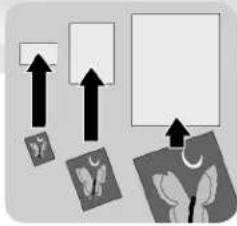
Use Fellowes® brand pouches for best results. Select correct pouch size for laminated item.
natural_image
Abstract diagram with arrows pointing to shapes and a blank rectangle, no text or symbols present- Plug laminator into power outlet.
- Position laminator so you have enough space to allow items to pass freely through the machine.

natural_image
Illustration of a printer with a paper and a small electrical outlet (no text or symbols visible)LAMINATION STEPS
text_image
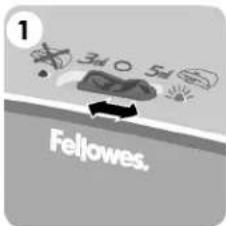
1 3d 5d Fellowes.Slide On/Off/Pouch Thickness selector to 3 or 5 mil setting to match pouch thickness and wait for green Ready Light.

natural_image
Simple line drawing of a stack of papers with one paper corner and a small inset image (no text or symbols)Place item inside pouch against the sealed edge. To prevent jamming, use a carrier when item is smaller than the pouch.

natural_image
Illustration of a printer with an arrow indicating print or download (no text or symbols present)Place pouch, sealed edge first, into laminator entry. Keep pouch straight and use the edge guide to center it.
natural_image
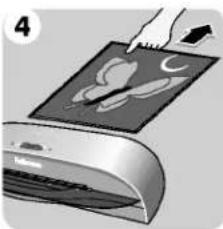
Illustration of a hand pressing down on a printed device with abstract graphics (no text or symbols visible)To prevent jamming, immediately remove laminated item from back of machine. Let item cool on flat surface for several seconds.

natural_image
Illustration of a printer emitting a paper with an arrow indicating print (no text or symbols present)Before switching off laminator, feed empty cleaning/carrier sheet through machine to clean unit.
TROUBLESHOOTING
| Problem | Cause | Solution |
| Ready Light does not go on after extended time | Laminator is in a hot, humid area. | Move laminator to a cool dry area. |
| Pouch did not completely adhere to item. | Laminated item may be too thick. | Pass through laminator a second time. |
| Jamming | Laminated item was not immediately removed from machine or small items were laminated without a carrier.Pouch was not used.Pouch was not centered or straight when fed through Pouch/Document Entry. | Press release lever, in back of laminator, to gently pull pouch out of machine. Use cleaning sheet before laminating.Always put item in a pouch.Aligna sealed edge with Pouch/Document Entry. Use guide to center. |
Need Help?
Customer Service: US: 1-800-945-4545
Canada: 1-800-665-4339
México: 1-800-234-1185
www.fellowes.com
Let our experts help you with a solution. Always call us first before contacting your place of purchase.
WARRANTY
Fellowes warrants all parts of the laminator to be free of defects in material and workmanship for 2 years from the date of purchase by the original consumer. If any part is found to be defective during the warranty period, your sole and exclusive remedy will be repair or replacement, at Fellowes' option and expense, of the defective part. This warranty does not apply in cases of abuse, mishandling or unauthorized repair. ANY IMPLIED WARRANTY, INCLUDING THAT OF MERCHANTABILITY OR FITNESS FOR A PARTICULAR PURPOSE, IS HEREBY LIMITED IN DURATION
TO THE APPROPRIATE WARRANTY PERIOD SET FORTH ABOVE. IN NO EVENT SHALL FELLLOWES BE LIABLE FOR ANY CONSEQUENTIAL OR INCIDENTAL DAMAGES ATTRIBUTABLE TO THIS PRODUCT. This warranty gives you specific legal rights. You may have other legal rights that vary from this warranty. The duration, terms and conditions of this warranty are valid world-wide, except where different limitations, restrictions or conditions may be required by local law. For more details or to obtain services under this warranty, please contact us or your dealer.
Help Line
| Australia | + 1-800-33-11-77 |
| Canada | + 1-800-665-4339 |
| México | + 1-800-234-1185 |
| United States | + 1-800-955-0959 |
Fellowes
| Australia | + 61-3-8336-9700 |
| Benelux | + 31-(0)-76-523-2090 |
| Canada | + 1-905-475-6320 |
| Deutschland | + 49-(0)-5131-49770 |
| España | + 34-91-748-05-01 |
| France | + 33-(0)-1-30-06-86-80 |
| Italia | + 39-071-730041 |
| Japan | + 81-(0)-3-5496-2401 |
| Korea | + 82-(0)-2-3462-2884 |
| Malaysia | + 60-(0)-35122-1231 |
| Polska | + 48-(22)-771-47-40 |
| Singapore | + 65-6221-3811 |
| United Kingdom | + 44-(0)-1302-836836 |
| United States | + 1-630-893-1600 |
www.fellowes.com
Fellowes
1789 Norwood Avenue, Itasca, Illinois 60143-1095 • USA• 630-893-1600
http://www.fellowes.com
| Australia Benelux | Canada China | Deutschland España | France Italia | Japan Korea | Polska Singapore | United Kingdom United States |