S530 - Telefon Bintec-elmeg - Kostenlose Bedienungsanleitung
Finden Sie kostenlos die Bedienungsanleitung des Geräts S530 Bintec-elmeg als PDF.


Benutzerfragen zu S530 Bintec-elmeg
0 Frage zu diesem Gerät. Beantworten Sie die, die Sie kennen, oder stellen Sie Ihre eigene.
Eine neue Frage zu diesem Gerät stellen
Laden Sie die Anleitung für Ihr Telefon kostenlos im PDF-Format! Finden Sie Ihr Handbuch S530 - Bintec-elmeg und nehmen Sie Ihr elektronisches Gerät wieder in die Hand. Auf dieser Seite sind alle Dokumente veröffentlicht, die für die Verwendung Ihres Geräts notwendig sind. S530 von der Marke Bintec-elmeg.
BEDIENUNGSANLEITUNG S530 Bintec-elmeg
elmeg S560 / S530 System Telephone - Installation
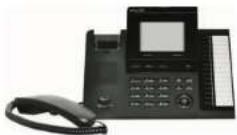
olmeg \$530 has a 4-line graphic display with LED backlight.
Mount and connect
The system is possible that he used so a desk or wall unit. An assembly sit (not supplied) is required to attach it to a and
in order to operate your system telephone, you must insert the cards for the telephone connector and the receiver.
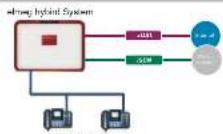
Connect your telephone to the oimeg hybrid system's 50 or UpC connector
Label strips: Two hooks are used to put the cover into the holder for label strips, and a magnet is used to secure it on the underside.
Headset: You can connect a headset to the system telephone (not supplied). Connect the headset to the headset socket on the system telephone. Then insert the headset cable into the cable guide and secure it beneath the cable rotators.
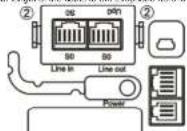
Connection sockets for 50 / Up0: The socket for selecting the connection is located on the undercircle of the system telephone. Here you can see between the 50 and Up0 connection. To do this, you press the module's two (2) chips together, take the module out and, depending on the connection type, turn it round and put it back in.
The picture shows the connector for 50
The salemal 5G connector is connected to the aLine ina socket.
Another ISDN system telephone or ISON telephone can be connected to the "link card" app
The maximum length of the table to the televisions has a 10 ms/second
Safety Information
- Note the ambient temperature for storing and operating the device in the specifications. The device must only be connected once the permissible ambient operating temperature is reached.
- Please note that condensation may form on or within the device during transitions from cold to warm temperatures. Only remove the device from the packaging when the permissible ambient operating temperature has been reached.
- During a storm, you should not connect or disconnect any cables and do not make any calls.
- Only contact the cards in the capacitor's provided
- Position the cards where they will not cause accidents
- Avoid the following influencing factors:
Direct sunlight
Host sources (e.g. heating elements)
Electronic devices (e.g. sound systems, office equipment or microwaves)
Penetration of humidity or liquids
Cormative Liquids or Repairs
High levels of dust
- Do not use the device in humid or expensive areas.
- Only open those parts of the unit which are shown in the assembly/operating instructions
- Do not touch the plug contacts with stereo, made in lamp objects
• Вели дникам я кот римпинейну импятие, разълки для приваты от них ежелемого по с тарь-йно шибина»
Outward the
- City change in the city with the city's name, sign, and name.
• Сан жаркотин земельное шу.
- City Schumka Pad Line 241 V (subly works the change) similar to my ETS. 2000/7 may be promoted to the decision. Provee, on of common immalls overdays
with this directive.
Plug power supply unit
- Only use the plug power supply unit which is available as an accessory.
- Do not use any plug power supply units that show signs of damage (breaks or cracks)
in the case.
Electrostatic charges (ESD protection)
The ESD protection that the supplied system telephone has against the effects of electrostatic charges is greater than certification values. Nonetheless, you should avoid excessive static charges. Various causes can result in the electrostatic charge achieving values that far exceed the permissible values required and that exceed the system telephone is interference immunity. Such causes or circumstances, such as low humidity and carpets, must be eliminated. The manufacturer of the system telephone accepts no liability for damages resulting from these causes.
System telephone
simeg 5580 / elimeg 5530
Available connections
- Line in connection socket: Ether 50 or UpD
- Line out connection socket: 50 in every mode
• Mini USB connection (latest release)
• Recognize part [hardart]
• Headset correction
Scorrel for the plug power supply unit (accessory) Required for the 1st and subsequent 1500 key extension on the elmog SS30 / elmog SS60 and for installations for which the existing power supply is insufficient.
Wall mounting
- The connectors for the receiver and the headset must be inserted prior to fixing the wall bracket.
• Fix the unit to a flat wall, it is important that you get the distance between the dot
Notes absolutely accurate
- The wall brackets are screwed on underneath, at the back of the system telephone.
• The system telephone is supplied without the receiver brackets for wall mounting.
• To mount the system telephone on the wall, the receiver bracket needs to be
replaced by the receiver bracket from the assembly kit. To change it over, it can
be pulled gently up with me out.
Refer to the manual for information on insolvation.
Contact
Manual, software and workshops:
You will find the latest manual, the Dime Manager and additional information on our website at www.bimc.com
- 何向勇:
Contact:
If you have any questions about your new product, or if you require further information, the brief elmog GmbH Support Centre can be reached Monday to Friday, between the hours of 3 am and 5 pm at
Telephone: 149911 98730
Fax: 149 911 896 0725
For detailed information about our support and service offers please visit our website at www. pylero-eging.com.
Scope of supply
- celmog 5600 / 5630 system telephone
• Receiver with cord
-Base
- One connector card with RJ45 plugs
- Installation instructions
- /antistatic cloth
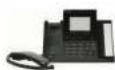

Assembly kit (not supplied)
• 10 mm thickness
+5. ремоне / искими
• 20 screws for connecting the
system telephone to the wall brackets
• 10 wood reserve 3a20
- 10 downers for 5 mm holes
- 1 entering templates

Receiver bracket
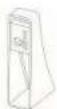
Wall bracket
Functions
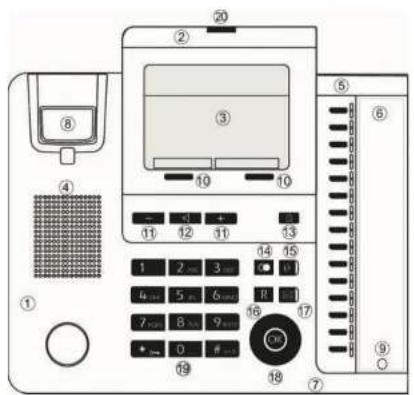
Lift receiver, turn on Hands-free, turn on headset, or start preparatory claring.
Replace receiver, turn off hands-free or turn off headset. The system telephone is in idle status
A cell is signified. The cell melody sounds
You see in a call.
A conference call is initiated.
You hear the positive or negative sentiment scores.
Key 0-9, * or t: Cheese call number, codo, character or text.
Көүү Көүү
When you enter a number to dial via an BIP provider, the output is only claked around 5 seconds after opening the last digit if you end the call number with the hash key, the system dials automatically. The terminal must be able to dial the hash key in to the telephone system.
* You can use this key to protect the system telephone from certain types of use.
Salknys. The salknys' observable functions are shown in the bottom row in the display.
You can access the Navigator to navigate in the display
OK The OK key is used to confirm and save inputs. From the idle menu, pressing twice opens the phone book.
R You can use the hold key to go from a call to a hold for enquiry. Pressing the key again terminates the hold and you are once more connected with the person you were first speaking to.
| Use the Home key to go back to the idle menu.When idle, the device info is displayed. |
| When the receiver is hung upUse the Redial Last Number key to dir the last number dated again.When the receiver is off the bookUse the Redial Last Number key to display the last 30 numbers dated |
| Use the Mail key to query the system's voicebox.When the key's blue LED frames, it means there are new messages. |
| The Headset key is used to switch the headset on and off. |
| These keys are used to adjust the volume and the display. |
| The Loadspeaker key is used to switch the hands tree or loudspeaker on and off. |
Important menu settings
| Entering settings | |
| The receiver is hung up or offuse. | |
| Select "Menu" with the softlay. | |
| Select "Settings" with the Navigator. | |
| Use the "Right" Navigator to display the next menu for the selected row. | |
| Cell members | |
| Select "Cell numbers" with the Navigator. | |
| Use the "Right" Navigator to display the next menu for the selected row. | |
| Enter cell member 1 | |
| Use the Navigator to select the number of your system telephone which you wish to view. | |
| Use the "Right" Navigator to display the next menu for the selected row. | |
| Use the Navigator to select the row you wish to view. | |
| Use the "Right" Navigator to display the next menu for the selected row. | |
| Name | |
| Use the calling keys to enter the name for the system telephone's internal number. | |
| OK | The OK key is used to save the name, and you go back to the "1st call number" menu. |
| How the call number | |
| Use the calling keys to enter the system telephone's internal number. | |
| OK | The OK key is asked to save the number, and you go back to the "1st call number" menu. |
| Nobody | |
| Use the Navigator to select the entry you wish to add. Ring love internal / outer. Sound volume internal? Sound volume external. | |
| Use the "Right" Navigator to display the next menu for the selected now. | |
| Use the "Back" socketkey or the "Left" Navigator to return to the "1st call number" menu. | |
| Big time internet | |
| Select the melody you want (1 - 20) using the 1+ keys. The melody you should be shown, as a number on the right. | |
| Use the "Back" socketkey or the "Left" Navigator to return to the "Nobody" menu. | |
| Sound volume internet | |
| + - | Press the 1-2 keys to sell the desired volume. The settings range from 1 - 10. |
| OK | The OK key is used to save the volume, and you go back to the "Moody" menu. |
| Ring home extern | |
| + - | Select the melody you want (1 - 20) using the + - keys. The melody you set is strain, as a number, on the right. |
| - | Use the "Back" setting or the "Left" Navigator to return to the "Moody" menu. |
| Sound volume extern | |
| + - | Press the + - keys to set the desired volume. The settings range from 1 - 10. |
| OK | The OK key is used to save the volume, and you go back to the "Moody" menu. |
| Call waiting | |
| Select "Call waiting" with the Navigator. | |
| Use the "Right" Navigator to display the next menu for the selected row. | |
| Use the Navigator to select the function you wish to edit internal calls, external calls, repeat. | |
| Use the "Right" Navigator to display the next menu for the selected row. | |
| Call waiting (Internal call) / Potential call | |
| Use the Navigator to select the function you wish to switch on call. The tick at the one of the row indicates when function is enabled. | |
| OK | The OK key is used to save the function, and you go back to the "Call waiting" menu. |
| Repeat | |
| Use the Navigator to select the function you wish to switch on On: The call waiting tone sounds far any call for the duration of the call. Off: This call waiting is separated once. The tick at the end of the row indicates which function is enabled. | |
| OK | The OK key is used to save the function, and you go back to the "Call waiting" menu. |
| Suppose net number | |
| Select "Suppose net number" with the Navigator | |
| Use the "Right" Navigator to display the next menu for the selected now. | |
| Select "Only" or "Off" with the Navigator. The tick at the end of the row indicates when function is enabled. | |
| OK | The OK key is used to save the setting and your go back to the "Settings" menu. Before the row with your Telephone's name, you will use the symbol for the suppressed number (the number combination "123", crossed out). |
| Navigation Use the "Big" and "Cation" Navigator to select a row in the display. This row is highlighted. |
| Select the highlighted row If there is a log to the exit of the row, the next menu for the selected row will appear if you press the "Big" Navigator. |
| Return to the previous menu Use the Left Navigator or the "Back" setkey to stop back to the previous display. If you press the "Home" key you return to the initial menu (this system telephone's idle status). Any existing function is absorbed. |
| Delete contents You can use the Navigator to select a row in the display. Use the "Delete" setkey to delete the content of the selected row and return to the previous display. |
| View options Use the "Options" setkey to go in the next menu. Special functions or information items are provided here. |

Status LED
If the two blue LEDs in the status display are flashing fast data is being secret in the system telephone or shared with the elmen hybrid.
While this is happening, it is important that the news supply
to the system telephone is not out off.
| Inspector | |
| Select 'Headset' with the Navigator. | |
| Use the "Right" Navigator to display the next menu for the selected row. | |
| Navigator | |
| Use the Navigator to cover the navigator you wish to use: No headset, Standlist Headset, DISHD/HS headset. The tick at the end of the row indicates which function is enacted. | |
| OK | The OK key is used to save the function, and you go back to the "Headset" menu. |
| Use automatically | |
| If you have connected a header to your system telephone, you can use Auto Answer so that the headset is automatically used for certain operations. Off: The connection via the headset is not automatically accepted, only after the headset has been switched on. On: The connection via the headset is accepted immediately. Delayed: The connection via the headset is accepted after the time specification. | |
| Quick-Off | |
| Select "Quick-Diet" with the Navigator. | |
| Use the "Right" Navigator to display the next menu for the selected row. | |
| Select On or Off with the Navigator. The tick at the one of the row indicates which setting is enacted. | |
| OK | The OK key is used to save the function, and you go back to the "Rotations" menu. |
| Acknowledges tone | |
| Select "Acknowledge tone" with the Navigator. | |
| Use the "Right" Navigator to display the next menu for the selected row. | |
| Use the Navigator to select the now you wish to sell. On: The acknowledge tone is always switched on. Off: The acknowledge tone is switched off. From base only. The knowledge tone is normally switched on for morement entire. The ask at the end of the row indicates which setting is switched. | |
| OK | The OK key is used to save the setting, and you go back to the "Settings" menu. |
| Auto answer | |
| Select "Auto answer" with the Navigator. | |
| Use the "Right" Navigator to display the next menu for the selected row. | |
| Use the Navigator to select the row you wish to add. Off: Auto answer is switched off. On: The call is immediately accepted. Delay: Your order will not to manage the call immediately, but rather after a little time. | |
| + - | Press the + - keys to specify the delay you want in 6 second and increase to. The value is displayed to the right in the row. The settings range from 8 - 29. |
| OK | The OK key is used to save the setting, and your go back to the "Auto answer" menu. |
| OK | The OK key is used to save the setting, and your go back to the "Settings" menu. |