XT - Support voiture JAM - Kostenlose Bedienungsanleitung
Finden Sie kostenlos die Bedienungsanleitung des Geräts XT JAM als PDF.


| Produkttyp | Kfz-Halterung |
| Marke | Jam |
| Modell | XT |
| Kompatible Geräte | Smartphones bis 6 Zoll |
| Befestigungsmethode | Lüftungsgitterclip |
| Material | Kunststoff und Silikon |
| Farbe | Schwarz |
| Abmessungen (H x B x T) | 100 x 60 x 40 mm |
| Gewicht | 80 g |
| Drehwinkel | 360 Grad |
| Neigungsverstellung | Ja, über Kugelkopf |
| Ausziehbarer Arm | Nein |
| Besondere Merkmale | Rutschfeste Polsterung, schnelle Montage |
| Lieferumfang | 1 Halterung, 1 Lüftungsclip |
| Montage | Clip an Lüftungsgitter |
| Reinigung | Mit feuchtem Tuch abwischen |
| Sicherheitshinweise | Nicht vor Airbags montieren, während der Fahrt nicht bedienen |
| Garantie | 2 Jahre |
| Hersteller | Jam |
| Ursprungsland | China |
Häufig gestellte Fragen - XT JAM
Benutzerfragen zu XT JAM
0 Frage zu diesem Gerät. Beantworten Sie die, die Sie kennen, oder stellen Sie Ihre eigene.
Eine neue Frage zu diesem Gerät stellen
Laden Sie die Anleitung für Ihr Support voiture kostenlos im PDF-Format! Finden Sie Ihr Handbuch XT - JAM und nehmen Sie Ihr elektronisches Gerät wieder in die Hand. Auf dieser Seite sind alle Dokumente veröffentlicht, die für die Verwendung Ihres Geräts notwendig sind. XT von der Marke JAM.
BEDIENUNGSANLEITUNG XT JAM

1 year limited warranty

Instruction Manual and Warranty Information
FX-P430
Por manual de instrucciones e información de garantía en español visitenos en www.hmdxaudio.com
Thank you for spreading the Jam and purchasing the HMDX JAM XT Extreme Wireless Speaker. Be sure to check out the entire JAM product line on our website: www.hmdxaudio.com — Where there's a Jam there's a party!
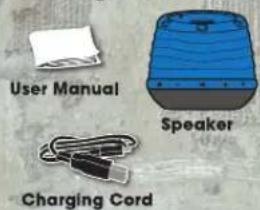
Package Contents
Charging the Unit
natural_image
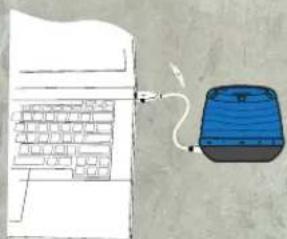
Illustration of a blue laptop connected to a cable with a plug, shown in line style (no text or symbols)Approximately 3 hours required for full charge. Can be charged by using the USB to Micro USB cord (included) through computer or AC adapter with USB jack (not included). Note: Battery will last up to 4 hours when connected wirelessly and up to 12 hours when connected through Line-In Audio Jack.
Controls
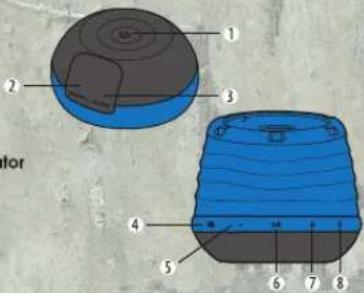
1 Power Button
2 Charging Port
3 Line-In Audio Jack
4 Battery Status Indicator
5 Volume Down
6 Play/Pause Button
7 Volume Up
8 Bluetooth Indicator
Indicators
| Battery Indicator | Status |
| Flashing GREEN | Charging |
| Solid GREEN | Power ON and Fully Charged (light will only show when unit is plugged in) |
| Bluetooth Indicator | Status |
| Quickly Flash BLUE | Pairing Mode |
| Slowly Flash BLUE | Paired |
| RED | Line-In Mode |
Listening to your device wirelessly over Bluetooth®
To listen to your music over Bluetooth® wireless connection, you need to pair your device with Jam XT:
- Make sure your device has Bluetooth capability and is enabled
- Press and hold power button for 5 seconds; indicator will begin to flash.
- Follow the instructions of your device to pair the unit.
- Pair your device with the Jam XT by selecting Jam XT from your Bluetooth listings on your device or selecting YES.
- Press play on your device and use controls on the unit to adjust desired volume.
NOTE:
- Once you have successfully paired your device, you typically will not need to repeat the above steps. Please ensure the AUX cable is unplugged and your device has been Bluetooth enabled.
- When pairing with a computer, please consult your computer manufacturer for Bluetooth pairing instructions and/or the latest Bluetooth Drivers if you encounter any issues.
• A pairing code is not required.
Listening to your device through the Auxiliary Line-In Audio Jack
- Connect Aux-in cable to the headphone or line-out jack of an audio device and plug the other end of the cable into the Line-In Audio Jack on the back of the unit.
- Press and hold the power buttons to turn on the unit.
- Press PLAY on the device and use controls on the unit to adjust desired volume.
NOTE: Play/pause controls on the unit will not work when using Line-In Audio Jack.
IP64 Rating
The JAM XT is splash and dust resistant, but cannot be submerged in water or dirt or be subject to constant flow of water or dirt. In order to ensure the product is splash/dirt resistant, close the rubber flap on the side of the JAM XT. To properly close flap fully insert the flap until it is flush with the product.
Maintenance
Only use a soft dry cloth to clean the enclosure of the unit. NEVER use liquids or abrasive cleaner to clean.
FCC Disclaimer:
Note: This device complies with Part 15 of the FCC Rules. Operation is subject to the following two conditions: (1) this device may not cause harmful interference, and (2) this device must accept any interference received, including interference that may cause undesired operation.
Note: The manufacturer is not responsible for any radio or TV interference caused by unauthorized modifications to this equipment. Such modifications could void the user authority to operate the equipment.
Note: This equipment has been tested and found to comply with the limits for a Class B digital device, pursuant to Part 15 of the FCC Rules. These limits are designed to provide reasonable protection against harmful interference in a residential installation. This equipment generates, uses, and can radiate radio frequency energy and, if not installed and used in accordance with the instructions, may cause harmful interference to radio communications. However, there is no guarantee that interference will not occur in a particular installation. If this equipment does cause harmful interference to radio or television reception, which can be determined by turning the equipment off and on, the user is encouraged to try to correct the interference by one or more of the following measures:
• Reorient or relocate the receiving antenna.
• Increase the separation between the equipment and receiver.
- Connect the equipment into an outlet on a circuit different from that to which the receiver is connected.
- Consult the dealer or an experienced radio/TV technician for help. This device complies with Part 15 of the FCC Rules and Industry Canada licence-exempt RSS standard(s). Operation is subject to the following two conditions: (1) this device may not cause harmful interference, and (2) this device must accept any interference received, including interference that may cause undesired operation. The manufacturer is not responsible for any radio or TV interference caused by unauthorized modifications to this equipment. Such modifications could void the user's authority to operate the equipment. Under Industry Canada regulations, this radio transmitter may only operate using an antenna of a type and maximum (or lesser) gain approved for the transmitter by industry Canada. To reduce potential radio interference to other users, the antenna type and its gain should be so chosen that the equivalent isotropically radiated power (e.l.r.p.) is not more than that necessary for successful communication.
One Year Limited Warranty:
For detailed Warranty Instructions and Information visit: http://www.hmdxaudio.com/products/jam-wireless-portable-speaker.html To obtain warranty service on your HMDX product, contact a Consumer Relations Representative by telephone at 1-800-466-3342 or email cservice@hmdxaudio.com for assistance. Please make sure to have the model number of the product available. Representatives are available 8:30am - 7:00pm EST Monday-Friday.
IMPORTANT SAFEGUARDS:
When using an electrical product, basic precautions should always be followed, including the following:
READ ALL INSTRUCTIONS BEFORE USING
- WARNING: Do not place speakers too close to ears. May cause damage to ear drums, especially in young children.
- Use this product only for its intended use as described in this manual. Do not use attachments not recommended by HMDX.
- HMDX is not liable for any damage caused to Smartphones, iPod/MP3 player or any other device.
- Do not place or store this product where it can fall or be dropped into a tub or sink.
- Do not place or drop into water or any other liquid.
- Not for use by children. THIS IS NOT A TOY.
- Never operate this product if it has a damaged cord, plug, cable or housing.
- Keep away from heated surfaces.
- Only set on dry surfaces. Do not place on surface wet from water or cleaning solvents.
Por manual de instrucciones e información de garantía en español visitenos en www.hmdxaudio.com
HMDX Jam and HMDX are trademarks of HMDX.
©2013 HMDX. All Rights Reserved.
IB-HXP430