ESPRIMO P7936 - Desktop-Computer FUJITSU - Kostenlose Bedienungsanleitung
Finden Sie kostenlos die Bedienungsanleitung des Geräts ESPRIMO P7936 FUJITSU als PDF.


| Produkttyp | Desktop-Computer |
| Modell | ESPRIMO P7936 |
| Marke | Fujitsu |
| Abmessungen (B x H x T) | ca. 180 x 450 x 420 mm |
| Gewicht | ca. 10 kg |
| Stromversorgung | Netzteil 300 W |
| Prozessor | Intel Core i5 (4. Generation) |
| Arbeitsspeicher | 8 GB DDR3 RAM |
| Festplatte | 500 GB SATA HDD |
| Optisches Laufwerk | DVD±RW |
| Grafikkarte | Integrierte Intel HD Graphics |
| Anschlüsse | USB 3.0, USB 2.0, HDMI, VGA, Ethernet, Audio |
| Betriebssystem | Windows 10 Pro (vorinstalliert) |
| Wartung und Reinigung | Staub mit trockenem Tuch entfernen; Gerät vom Netz trennen |
| Sicherheitshinweise | Nur vom Fachmann öffnen; Netzstecker ziehen bei Gewitter |
| Ersatzteile und Reparierbarkeit | Ersatzteile über Fujitsu Service; Reparatur durch autorisierte Stellen |
| Garantie | 2 Jahre (je nach Land) |
Häufig gestellte Fragen - ESPRIMO P7936 FUJITSU
Benutzerfragen zu ESPRIMO P7936 FUJITSU
0 Frage zu diesem Gerät. Beantworten Sie die, die Sie kennen, oder stellen Sie Ihre eigene.
Eine neue Frage zu diesem Gerät stellen
Laden Sie die Anleitung für Ihr Desktop-Computer kostenlos im PDF-Format! Finden Sie Ihr Handbuch ESPRIMO P7936 - FUJITSU und nehmen Sie Ihr elektronisches Gerät wieder in die Hand. Auf dieser Seite sind alle Dokumente veröffentlicht, die für die Verwendung Ihres Geräts notwendig sind. ESPRIMO P7936 von der Marke FUJITSU.
BEDIENUNGSANLEITUNG ESPRIMO P7936 FUJITSU
Windows®. Life without Walls™.
Fujitsu recommends Windows 7.
DATASHEET
FUJITSU ESPRIMO P7936 E-STAR 5.0 DESKTOP PC
THE EXPANDABLE BUSINESS WORKHORSE
ESPRIMO P7936 E-STAR 5.0
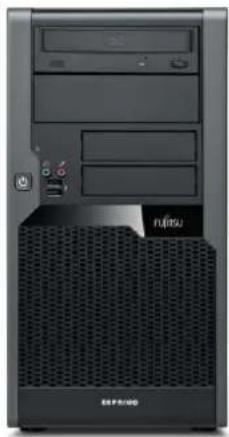
The ESPRIMO P7936 E-Star 5.0 equipped with state-of-the-art Intel ^® chip and processor technology is the ideal partner for all your demanding business applications. Produced with selected material and equipped with comprehensive powersave options and energy-saving management, the ESPRIMO microtower PC today already meets the environment requirements of tomorrow. With extended system management functions, intelligent hardware design, extensive tests and a lifecycle of up to 18 months, the high performance levels of this PC meet every requirement. Furthermore, this microtower, equipped with a power supply with up to 87% efficiency, meets ENERGY STAR ^® 5.0 certification requirements.
MICROTOWER
Maximum performance and optimal extendability
■ Top-quality, high-value microtower, 6 drive bays, 4 PCI/PCI express interfaces
ENVIRONMENTALLY COMPATIBLE PRODUCT
Your contribution to environmental protection for the continued existence of our planet
■ Halogen-free mainboard, sophisticated product concept for the entire lifecycle
SILENT OPERATION
Pleasant working environment due to an extremely quiet system
Innovative hardware design, optimized fan concept
SYSTEM MANAGEMENT
Easy system administration for complex IT infrastructure
Intel®vPro™ technology
ENERGY STAR® 5.0
Low power consumption and low costs, without any loss in performance.
Power supply with up to 87% efficiency
natural_image
Front view of a black desktop computer tower with ventilation grille and drive buttons (no visible text or symbols)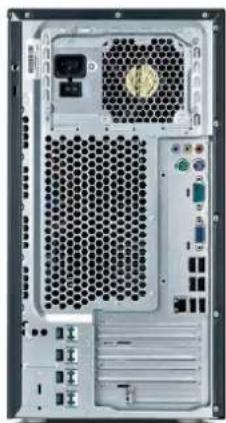
natural_image
Back view of a server rack with hexagonal ventilation slots and drive indicators (no visible text or labels)







COMPONENTS
| PROCESSOR Intel | ^® CoreTM2 Quad processor Q9650 (4 Cores / 4 Threads, 3.0 GHz, 12 MB, 1333 MHz) |
| Intel ^® CoreTM2 Quad processor Q9550 (4 Cores / 4 Threads, 2.83 GHz, 12 MB, 1333 MHz) | |
| Intel ^® CoreTM2 Quad processor Q9505 (4 Cores / 4 Threads, 2.83 GHz, 6 MB, 1333 MHz) | |
| Intel ^® CoreTM2 Quad processor Q8300 (4 Cores / 4 Threads, 2.5 GHz, 4 MB, 1333 MHz) | |
| Intel ^® CoreTM2 Duo processor E8600 (2 Cores / 2 Threads, 3.33 GHz, 6 MB, 1333 MHz) | |
| Intel ^® CoreTM2 Duo processor E8500 (2 Cores / 2 Threads, 3.16 GHz, 6 MB, 1333 MHz) | |
| Intel ^® CoreTM2 Duo processor E8400 (2 Cores / 2 Threads, 3.0 GHz, 6 MB, 1333 MHz) | |
| Intel ^® CoreTM2 Duo processor E7600 (2 Cores / 2 Threads, 3.06 GHz, 3 MB, 1066 MHz) | |
| Intel ^® CoreTM2 Duo processor E7500 (2 Cores / 2 Threads, 2.93 GHz, 3 MB, 1066 MHz) | |
| Intel ^® Pentium ^® processor E6600 (2 Cores / 2 Threads, 3.06 GHz, 2 MB, 1066 MHz) | |
| Intel ^® Pentium ^® processor E6300 (2 Cores / 2 Threads, 2.8 GHz, 2 MB, 1066 MHz) | |
| Intel ^® Pentium ^® processor E5500 (2 Cores / 2 Threads, 2.8 GHz, 2 MB, 1066 MHz) | |
| Intel ^® Pentium ^® processor E5400 (2 Cores / 2 Threads, 2.7 GHz, 2 MB, 800 MHz) | |
| Intel ^® Celeron ^® processor E3200 (2 Cores / 2 Threads, 2.4 GHz, 1 MB, 800 MHz) |
OPERATING SYSTEM
| Operating system optional preinstalled | Microsoft® Windows® 7 Home Premium |
| Microsoft® Windows® 7 Professional | |
| TwinLoad Microsoft® Windows® XP Professional (DVD) | |
| Operating system compatible Linux | |
| Microsoft® Windows® XP Professional x64 Edition | |
| Microsoft® Windows® Vista® | |
| Operating system notes Dependent on configuration Windows 7 versions are: | |
| Office 2007 ready | |
| Office 2010 Starter preloaded. Purchase a Product Key to activate a full Microsoft Office 2010 suite. | |
| Limited Windows XP support. Microsoft discontinued Windows XP certification on system level. | |
| MEMORY MODULES 1 GB (1 module(s) 1 GB) DDR3, unbuffered, non-ECC, 1066 MHz, PC3-8500, DIMM | |
| 2 GB (1 module(s) 2 GB) DDR3, unbuffered, non-ECC, 1066 MHz, PC3-8500, DIMM | |
| 4 GB (1 module(s) 4 GB) DDR3, unbuffered, non-ECC, 1066 MHz, PC3-8500, DIMM | |
| HARD DISK DRIVES (INTERNAL) SSD SATA, 128 GB, 2.5-inch | |
| SATA II, 7200 rpm, 1000 GB, 3.5-inch, S.M.A.R.T. | |
| SATA II, 7200 rpm, 500 GB, 3.5-inch, S.M.A.R.T. business critical | |
| SATA II, 7200 rpm, 500 GB, 3.5-inch, S.M.A.R.T. | |
| SATA II, 7200 rpm, 320 GB, 3.5-inch, S.M.A.R.T. | |
| SATA II, 7200 rpm, 250 GB, 3.5-inch, S.M.A.R.T. | |
| SATA II, 7200 rpm, 160 GB, 3.5-inch, S.M.A.R.T. | |
| SATA II, 7200 rpm, 160 GB, 2.5-inch, S.M.A.R.T. | |
Hard disk notes Supporting NCQ and 3 GBit
| GRAPHICS ADD ON CARDS (OPTIONAL) ATI Radeon ^ HD 3450, 256 MB |
| ATI Radeon ^ HD 5450, 512 MB (GDDR3 VRAM) |
| DP to DVI-D (single link) Adapter Cable |
| DVI-D + DisplayPort Extension Adapter |
| DVI Extension Adapter |
| NVIDIA ^ GeForce ^ 9300GE, 256 MB |
| NVIDIA ^ GeForce ^ 9300GE, 512 MB |
| NVIDIA ^ GeForce ^ 9300GE display port low profile, 512 MB |
| NVIDIA ^ GeForce ^ 9500GS, 512 MB |
| NVIDIA ^ Quadro ^ NVS 290, 256 MB |
DRIVES (OPTIONAL) 1.44 MB Floppy
| Blu-ray DiscTM Triple Writer |
| DVD-ROM |
| DVD Super Multi |
| MultiCard Reader 20in1, 3.5-Inch |
INTERFACE ADD ON CARDS/COMPONENTS (OPTIONAL)
| USB 3.0 PCIe x1 |
| Parallel Interface |
| FireWire PCI-Card IEEE1394 |
| eSATA Interface |
| Dual serial card PCI |
| Dual serial card, PCI, EX-43092 |
Base unit ESPRIMO P7936 E-Star5
MAINBOARD
| Mainboard type D3012 | |
| Formfactor μBTX | |
| Chipset Intel | ® Q45 |
Processor socket LGA 775
Processor quantity maximum 1
System bus (FSB / HT / QPI) up to 1333 MHz
Memory slots 4 DIMM (DDR3)
Supported capacity RAM (max.) 16 GB
Memory frequency 1066 MHz
Memory notes Dual channel support.
| For dual channel performance, identical memory modules in each channel are necessary (minimum 2 modules). | |
| LAN | 10/100/1000 MBit/s Intel® 82567 LM |
| BIOS version | Phoenix 6.0 |
| BIOS features | BIOS Flash EPROM update by softwareRecovery BIOS |
| Audio codec | Realtek ALC663 |
| Audio features | Internal speaker supports audio playback, High Definition audio, 5.1 surround sound |
I/O CONTROLLER ON BOARD
| Serial ATA total | 4 |
| thereof eSATA | 2 (optional) |
| Controller functions | Serial ATA IINCQ and 3 GBitAHCIRaid 1/0 |
INTERFACES
| Audio: line-in | 1 |
| Audio: line-in / microphone | 1 |
| Audio: line-out | 1 |
| Front audio: microphone | 1 |
| Front audio: headphone | 1 |
| USB 2.0 total | 12 |
| USB front | 2 |
| USB rear | 6 |
| USB internal | 4, thereof 2 optional rear |
| VGA | 1 |
| DisplayPort | 1 (optional) |
| DVI | 1 (optional) |
| Serial (RS-232) | 1 (9pin, 16 byte FIFO, 16550 compatible) |
INTERFACES
Mouse / Keyboard (PS/2) 2
Ethernet (RJ-45) 1
Parallel 1 (optional) (25pin with EPP and ECP)
Interface Module notes Anytime USB charge functionality
INPUT DEVICE / COMPONENTS
Optical USB tilt wheel mouse
Input devices (optional) Optical USB/PS2 tilt wheel mouse
DRIVE BAYS
Drive bays total 6
3.5-inch internal bays 2
3.5-inch external bays 2
5.25-inch external bays 2
SLOTS
PCI-Express 2.0 x16 1 x (230 mm) FlexySlot
PCI-Express x4 (mech. x8) 1 x (230 mm) full height
PCI (32-bit / 33 MHz) 2 x (170 / 315 mm) full height
GRAPHICS ON BOARD
Graphics brand name Intel © GMA 4500
Shared video memory up to 1759 MB
Refresh rate 1024 x 768 85 Hz / -
(recommended / max.)
Refresh rate 1280 x 1024 85 Hz / -
(recommended / max.)
Refresh rate 1600 x 1200 85 Hz / -
(recommended / max.)
TFT resolution (VGA) 1360 x 768 pixel
| 1440 x 900 pixel |
| 1600 x 900 pixel |
| 1680 x 1050 pixel |
| 1920 x 1080 pixel |
| 1920 x 1200 pixel |
TFT resolution (DVI) 1360 x 768 pixel
| 1440 x 900 pixel |
| 1600 x 900 pixel |
| 1680 x 1050 pixel |
| 1920 x 1080 pixel |
| 1920 x 1200 pixel |
TFT resolution (DisplayPort) 1360 x 768 pixel
| 1440 x 900 pixel |
| 1600 x 900 pixel |
| 1680 x 1050 pixel |
| 1920 x 1080 pixel |
| 1920 x 1200 pixel |
| 2560 x 1440 pixel |
| 2560 x 1600 pixel |
Graphics features DirectX 10
| HDCP support | |
| OpenGL® 2.0 |
Graphics notes Tested resolutions, depending on display type additional resolutions and frequencies possible
| Shared memory depending on main memory size and operating system | |
| Resolution (color depth up to 32 Bit/pixel) | |
| For TFT we recommend using 60Hz |
ELECTRICAL VALUES
| Power efficiency note | power supply efficiency (at 230V; 20% / 50% / 100% load) : 85% / 87% / 85% |
| 0-Watt mode with hard-off switch | |
| Rated voltage range | 100 - 240 V |
ELECTRICAL VALUES
Rated frequency range 50 - 60 Hz
Operating voltage range 90 - 264 V
Operating line frequency range 47 - 63 Hz
Max. output of single power supply 300 W
Power factor correction/active power active
Monitor outlet No
POWER CONSUMPTION
Power consumption note See white paper Energy Consumption
0-Watt mode with hard-off switch
Link to Energy White Paper http://docs.ts.fujitsu.com/dl.aspx?id=c18b455f-125e-417c-b047-9baab36629be
HEAT DISSIPATION
Heat dissipation notes See white paper Energy Consumption
NOISE FOR STANDARD CONFIGURATION (HDD, ODD, FDD)
Noise emission According to ISO9296
Related Processors for noise Intel ^® Core ^TM 2 Duo E8600
Noise Operation mode 1: ODD load 4.3 B / 28 dB(A)
(Blue angel requirement)
Noise Operation mode 2: HDD load 3.5 B / 18 dB(A)
(Blue angel requirement)
Noise Operation mode 3: CPU 90% load 3.4 B / 17 dB(A)
(Blue angel requirement)
Noise Operation mode 4: High load 3.5 B / 18 dB(A)
Noise Operation mode 5: Office 3.5 B / 18 dB(A)
applications
Idle mode (Blue Angel requirement) 3.4 B / 17 dB(A)
Noise notes / description A weighted sound power level Lwad (in B) / workplace related A-weighted sound pressure level LpAm (in dB(A)), Bystander position
DIMENSIONS / WEIGHT / ENVIRONMENTAL
Dimensions (W x D x H) 203 x 390 x 392 mm
Operating position Vertical
Weight approx. 12 kg
Weight notes Actual weight may vary depending on configuration
Operating ambient temperature 10 - 35°C
COMPLIANCE
Product ESPRIMO P7936
Model MI3W-D3012
Germany Blauer Engel / Blue Angel
GS optional
Europe CE
Nordic Swan
USA/Canada FCC Class B
cCSAus
Global RoHS (Restriction of hazardous substances)
WEEE (Waste electrical and electronical equipment)
Microsoft Operating Systems (HCT / HCL entry / WHQL)
ENERGY STAR® 5.0
EPEAT® Silver
Compliance link https://sp.ts.fujitsu.com/sites/certificates/default.aspx
ADDITIONAL SOFTWARE
Additional software (preinstalled) Nero Essentials S (burning software)
Additional software (optional) Recovery DVD for Windows®
Drivers & Utilities DVD (DUDVD)
CyberLink PowerDVD BD (playback software for Blu-ray Disc™, only with Blu-ray Disc™ drive)
MISCELLANEOUS
| Keyboard on (Fujitsu keyboard required)Thermal management | |
| COMPATIBILITY (REFERENCES) | |
| DMI 2.0PC 2001WMI 1.5USB 2.0 | |
MANAGEABILITY
| Manageability features ASF 2.0 (Alert Standard Format) | |
| DeskUpdate Driver management | |
| PXE 2.1 Boot code | |
| BootP Boot Code including Bootmanage Administrator Software (tested) | |
| Wake up from S5 (off mode) | |
| Intrusion switch (optional) | |
| iAMT 5.0 | |
| Manageability type DeskView 10.x client management including: | |
| DeskView features On/Offline remote client management | |
| Detailed system inventory management and reports | |
| BIOS Management | |
| Remote power management | |
| System notifications | |
| Advanced alerts (ASF implementation) | |
| Security Remote Control | |
| DeskView Helpdesk Integration | |
| WoL (Wake on LAN) | |
SECURITY
| Physical security Kensington Lock support | |
| Eye for padlockOptional: Integrated cabinet lock | |
| System security Boot sector virus protection | |
| Write protect option for the Flash EPROMEmbedded security (TPM 1.2)Control of all USB interfacesExternal USB ports can be disabled separatelyBoot protection for floppy disk / CD drive and write protection for floppy disk driveControl of external interfaces | |
| User security User and supervisor BIOS password | |
| SystemLock 2 BIOS SmartCard SecurityHard disk passwordOptional: Access protection via external SmartCard readerOptional: Access protection via internal SmartCard reader | |
SERVICEABILITY
| FlexySlot |
| EasyFix |
| EasyChange for HDD |
| EasyChange for optical drives |
PACKAGING INFORMATION
| Packaging dimension 500x290x540 mm |
| Max. quantity / pallet 24 |
| Material - Weight (g) Carton 1270 g |
| Material - Weight (g) EPS / PS 210 g |
| Material - Weight (g) PE appr. 60 g |
| Packaging notes printed user documentation is bleached in chlorine free process |
WARRANTY
| Standard Warranty 3 years | |
| Service level | Bring-In / On-Site Service (depending on country) |
| MAINTENANCE AND SUPPORT SERVICES - THE PERFECT EXTENSION | |
WARRANTY
Recommended Service 5x9, Response Time: Next Business Day
Spare Parts availability 5 years
Service Weblink http://ts.fujitsu.com/Supportservice
FUJITSU PLATFORM SOLUTIONS
In addition to Fujitsu ESPRIMO P7936 E-Star 5.0, Fujitsu provides a range of platform solutions. They combine reliable Fujitsu products with the best in services, know-how and worldwide partnerships.
Dynamic Infrastructures
With the Fujitsu Dynamic Infrastructures approach, Fujitsu offers a full portfolio of IT products, solutions and services, ranging from clients to datacenter solutions, Managed Infrastructure and Infrastructure as-a-Service. How much you benefit from Fujitsu technologies and services depends on the level of cooperation you choose. This takes IT flexibility and efficiency to the next level.
Computing Products
www.fujitsu.com/global/services/computing/
Software
www.fujitsu.com/software/
MORE INFORMATION
Learn more about Fujitsu ESPRIMO P7936 E-Star 5.0, please contact your Fujitsu sales representative or Fujitsu Business partner, or visit our website. http://ts.fujitsu.com/ESPRIMO
FUJITSU GREEN POLICY INNOVATION
Fujitsu Green Policy Innovation is our worldwide project for reducing burdens on the environment. Using our global know-how, we aim to resolve issues of environmental energy efficiency through IT. Please find further information at http://www.fujitsu.com/global/about/environment/

Green Policy Innovation
COPYRIGHTS
All rights reserved, including intellectual property rights. Changes to technical data reserved. Delivery subject to availability. Any liability that the data and illustrations are complete, actual or correct is excluded.
Designations may be trademarks and/or copyrights of the respective manufacturer, the use of which by third parties for their own purposes may infringe the rights of such owner. For further information see http://ts.fujitsu.com/terms_of_use.html
Copyright © Fujitsu Technology Solutions
DISCLAIMER
Technical data are subject to modification and delivery subject to availability. Any liability that the data and illustrations are complete, actual or correct is excluded. Designations may be trademarks and/or copyrights of the respective manufacturer, the use of which by third parties for their own purposes may infringe the rights of such owner
