ACPR - Fernbedienung APART - Kostenlose Bedienungsanleitung
Finden Sie kostenlos die Bedienungsanleitung des Geräts ACPR APART als PDF.


| Produkttyp | Fernbedienung |
| Marke | APart |
| Modell | ACPR |
| Abmessungen (HxBxT) | ca. 15 x 5 x 2 cm |
| Gewicht | ca. 120 g (mit Batterien) |
| Stromversorgung | 2 x AAA-Batterien (1,5 V) |
| Reichweite | bis zu 10 Meter |
| Übertragungstechnologie | Infrarot (IR) |
| Hauptfunktionen | Ein/Aus, Lautstärkeregelung, Quellenwahl, Menünavigation |
| Kompatible Geräte | APart Audiogeräte (Verstärker, Vorverstärker, Receiver) |
| Anzahl der Tasten | ca. 30 Tasten |
| Gehäusematerial | Kunststoff, matt |
| Farbe | Schwarz oder Silber (je nach Version) |
| Batterielebensdauer | ca. 6–12 Monate bei normaler Nutzung |
| Programmierbar | Nein, feste Codes |
| Lernfähig | Nein |
| Empfänger | IR-Sensor am Gerät |
| Reinigung | Mit weichem, trockenem Tuch abwischen; keine aggressiven Reiniger |
| Sicherheitshinweise | Nicht fallen lassen; vor Feuchtigkeit schützen; Batterien nicht kurzschließen |
| Ersatzteile / Reparatur | Batterien (Standard); keine vom Benutzer reparierbaren Teile |
| Hersteller | APart, Belgien |
Häufig gestellte Fragen - ACPR APART
Benutzerfragen zu ACPR APART
0 Frage zu diesem Gerät. Beantworten Sie die, die Sie kennen, oder stellen Sie Ihre eigene.
Eine neue Frage zu diesem Gerät stellen
Laden Sie die Anleitung für Ihr Fernbedienung kostenlos im PDF-Format! Finden Sie Ihr Handbuch ACPR - APART und nehmen Sie Ihr elektronisches Gerät wieder in die Hand. Auf dieser Seite sind alle Dokumente veröffentlicht, die für die Verwendung Ihres Geräts notwendig sind. ACPR von der Marke APART.
BEDIENUNGSANLEITUNG ACPR APART

ACP - ACPL - ACPR User manual
The main features.
- In well mountable remote control for APort active speakers to control the speakers in your meeting room, this case is:
- Brushed aluminium front.
• The ACF, ACPL and ACPR do not require an
• The ACP allows remote power on/off, Volume control and direct driving. - The ACPL has the same features as the ACP plus a selectable microphone or stereo line signal.
- The ACPR has the same features as ACP plus offers
line inputs. One or the front on minipack, and one on earblock at the back. When a jack is plugged in the front input, the near input is automatically disabled. - The stereo line inputs on the ACPL and ACPR panel have an increased input security and are compatible with the headphone outputs of most projectile music leaders.
- The panels have a power indication on LED allowing the user to visually see the power status of their APort active speakers.
- Easy mounting in most popular in-wall mounting box
such as the APart E MODIN.
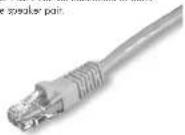
- Connection between the panels and the active speaker is done by a standard Co-5 cable.
Connecting the ACP or ACPL panel
- Switch of the power of your APort active speaker.
- Connect the ACP or ACPL unit to your active speaker through CAT5 cable max 100 meters, maximum wire length depends on multiple factors such as cable quality and external influence from high power lines etc.
- Only are ACP or ACP can be connected to each each APort active speaker pair.
Using the ACP|L|(R) panel
After installing and connecting the ACP[UR] panel to your APart online speakers, you can switch on the power switch of your APart at two sponsors (low: low power switch at the backside of the speaker set).
With the "Power" button on your ACP[1][R] you can now put your active speakers in either "on" mode or "standby" mode.
With the "level" buttons you can control the volume of your APan Active speakers through the ACP. Note that the maximum selectable volume level needs to be selected at the least side of your APan active speaker.
When double clicking the "level down" button, you will mute the system. Turning the level up button once disables the mode function.
Using the local inputs of the ACPL / ACPR
Before you are able to use the inputs from the ACPL or ACPR, you recall to select this on a source of your APand online smokers. For example, let SDC5PIR, you can select the input through the IR remote control.
You can connect a Dimeric microphone to the ACP by using the "microphones" track 6.3 and balances mono input.
You can connect an MP3 player to the ACPL or ACPR by using the "Stereo Uno" jack, 3.2 mm stereo mini-jock (urbalanced stereo input).
With the button "input switch" you can select the ACPL input you want to leave unit or slot line.
The ACPR panel has a line input at the rear on euro-block connectors and one 3.2 mm stereo jack input on the front panel. This rear line input is in use where no jack is inserted in the front panel jack connector. Inserting a jack automatically disables the rear line input.
* Note the selection of the audio input is only selectable for the input from the panel itself. It can use control input from any connected directly in your image active equation.
Technical data ACP
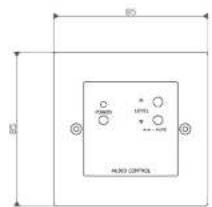
Dimensions: 85×85×31mm (0 x = x < 0) Weight: 70g
Technical data ACPL
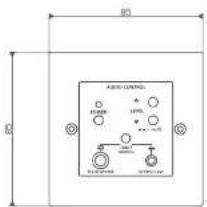
Dimensions: 85 x 85 x 28mm (h x w x v) Weight: 90g Input sensitivity stereo line: 300mV Input sensitivity microphone: 7mV
Technical data ACPR
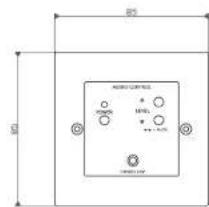
Dimensions: 85 x 85 x 35mm (h x w x t) Weight: 75g Input sensitivity stereo line: 500cmV
Warranty information
APart Audio warrants this product to be free of defects in material and workmanship for a period of one year for parts and for a period of one year for labor from the date of original end-user purchase. This warranty is valid only for the original enduser and cannot be transferred.
During the warranty period APart Audio or one of its authorized service partners shall either repair or replace any product, free of change, that proves to be defective on inspection by APart Audio or its authorized service representative.
This warranty does not include damages or product faults due to abuse, misuse or faulty installation.