
SRP4004WM - Fernbedienung PHILIPS - Kostenlose Bedienungsanleitung
Finden Sie kostenlos die Bedienungsanleitung des Geräts SRP4004WM PHILIPS als PDF.


| Produkttyp | Universal-Fernbedienung |
| Marke | Philips |
| Modell | SRP4004WM |
| Geräteunterstützung | TV, DVD, CBL/SAT, VCR (bis zu 4 Geräte) |
| Batterietyp | 2 x AAA (nicht im Lieferumfang) |
| Reichweite | ca. 10 Meter |
| Leuchttasten | Ja (VOL+, CH+, Zifferntasten, ENTER u.a.) |
| Einrichtungsmethode | Simple Setup mit Codeeingabe oder automatischer Suche |
| Speicher bei Batteriewechsel | Einstellungen bleiben 5 Minuten erhalten |
| Abmessungen (ca.) | 20 x 5 x 2 cm |
| Gewicht (ca.) | 100 g |
| Farbe | Schwarz |
| Kompatibilität | Über 1.000 Marken (siehe Markenliste) |
| Besondere Funktionen | Glow-Buttons, Tastenverbesserung, Tastenrücksetzung |
| Entsorgung | Elektrogerät, nicht im Hausmüll (WEEE) |
| Zubehör | Bedienungsanleitung |
Häufig gestellte Fragen - SRP4004WM PHILIPS
Benutzerfragen zu SRP4004WM PHILIPS
0 Frage zu diesem Gerät. Beantworten Sie die, die Sie kennen, oder stellen Sie Ihre eigene.
Eine neue Frage zu diesem Gerät stellen
Laden Sie die Anleitung für Ihr Fernbedienung kostenlos im PDF-Format! Finden Sie Ihr Handbuch SRP4004WM - PHILIPS und nehmen Sie Ihr elektronisches Gerät wieder in die Hand. Auf dieser Seite sind alle Dokumente veröffentlicht, die für die Verwendung Ihres Geräts notwendig sind. SRP4004WM von der Marke PHILIPS.
BEDIENUNGSANLEITUNG SRP4004WM PHILIPS
Register your product
and get support at
www.philips.com/welcome
SRP4004/27
EN User Manual

Table of contents
1 Your SRP4004 ....3
2 Getting started 4-
2.1 Inserting the batteries ....4
2.2 Setting up the universal remote control ....4-8
3 Using the universal remote control .....8-10
3.1 Buttons and functions 8-10
3.2 Resetting a button to its original function 10
4 Service and support 11-14
Service and support 11-14
4.1 Frequently asked questions .....11-13
4.2 Need help? 13
FCC Compliancy 13-14
Notice for Canada 14
Helpline 15
Brand list 16-28
Information to the consumer ....29
Compliance with EMF 29
Recycling and disposal 29
1 Your SRP4004
Congratulations on your purchase of the Philips SRP4004 universal remote control. After setting up the remote control you can operate up to 4 different devices with it.
Simple Setup
Improved with Philips patented (pending) Simple Setup technology, the SRP4004 can be set up easily for TV, DVD player / recorder, VCR and all common Cable, Satellite and other set top boxes, such as DirecTV, Comcast, AT&T, Verizon, Time Warner, Scientific Atlanta, Tivo and many more.
Simply follow the instructions in chapter 2.2 to set up the remote control for your devices.
Glow buttons
The remote control glow buttons (- VOL +, - CH +, ENTER, (-) and the numeric buttons) light up in the dark, enabling easy use of the remote control, even in a dimly lit room
To fully benefit from the support that Philips offers, register your product at: www.philips.com/welcome.
2 Getting started
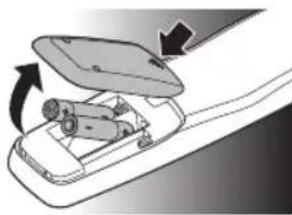
2.1 Inserting the batteries
- Insert 2 AAA type batteries, noting the + and - configuration in the battery compartment.
natural_image
Diagram of a car's seatbelt mechanism with directional arrows indicating motion (no text or symbols)
Note
When replacing the batteries, all user settings will be retained in the remote control memory for 5 minutes.
2.2 Setting up the universal remote control
The example below instructs you how to set up your universal remote controls for your TV. You can repeat the same steps for other devices (DVD player/recorder, Cable/Satellite box and VCR) which you want to operate, using the SRP4004.
The remote control can be set up to operate any 4 of the following devices:
| Device name | Description |
| TV Traditional TV, flat screen | |
| DVD | DVD player / recorder (DVDR), DVD / Hard Disk Drive combination (DVDR-HDD), Blu-Ray player, High Definition DVD player (HD-DVD), DVD part of TV / DVD, TV /VCR / DVD and VCR / DVD combos |
| CBL/SAT | Cable box, satellite receiver, Internet Protocol TV (IPTV), Free To AirTV, High Definition Television decoder (HDTV) and Tivo |
| VCR | Video cassette player / recorder, Personal video recorder (PVR), VCR part of TV/VCR, TV/VCR/DVD and VCR/DVD combos |
Example: setting up the universal remote control to operate your TV:
1 Switch ON the TV manually or use the original remote control for this. Tune to channel 1.
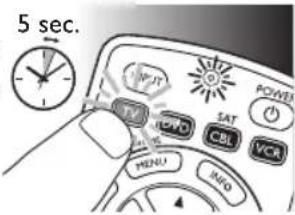
2 Press and hold the TV device selection button for 5 seconds until the red Setup light Ⓞ remains lit.
• The remote control is now in setup mode.
3 Look up the 4-digit code for your brand in the brand list at the back of this user manual.
A 4-digit code is shown for each brand. Use the digit buttons to enter the code for your brand.
• If the red Setup light ☑ turns off, an invalid code was entered. In t
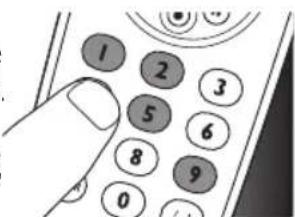
4 Aim the remote control at the TV. Press and hold the button. Release it immediately release it as soon the TV switches off.
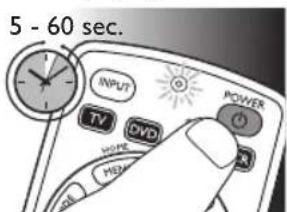
• This step normally takes between 5 and 60 seconds. In extreme circumstances this step can take up to 15 minutes.
5 Switch ON the TV.
Try out the buttons you need for operating it. Try, for example, if the
- CH + and digit
buttons function properly.
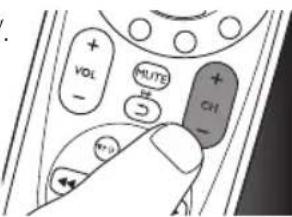
- If a button does not work as expected, press and hold that button. Release it immediately as soon as it works. For more information, see chapter 2.2.2.
6 Press the TV device selection button twice to finish setup.
• When no button is pressed for 5
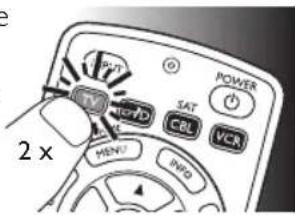
minutes or more, the remote control will exit setup mode, automatically saving all your settings.

Important
If you made a mistake:
- Press the device selection button twice to exit setup. The red Setup light ☺ turns off.
- Restart from the beginning.
- If the device does not respond at all or not to all of the button commands or if you cannot find the code for your brand, enter '9, 9, 9, 9' in step 3 and continue with step 4. The remote control will now search its full database for a code that works with your TV. Full database search may take up to 15 minutes.
2.2.1 Setting up the remote control for other devices (DVD player/recorder, Cable/Satellite box and VCR)
1 Make sure the device is switched on and operational. E.g. insert a disc in the DVD player / recorder or a video cassette in the VCR.
2 Then follow steps 2 to 6 of 'Setting up the remote control for your TV'. Make sure to use the correct device selection button: 📄, 📃 or 📊.
2.2.2 Improving buttons
When correctly set up, the remote control should be able to operate all your devices. However, when using the remote control for the first time it might occur that some buttons do not yet function as expected. In this case you can have the remote control search for alternatives.

Note
Improving buttons is not possible when the code was found during full database search (with code '9, 9, 9, 9').
During initial setup
1 Make sure the receiving device is able to respond. E.g. when you try to repair the Play button for your DVD player, make sure to insert a DVD into the DVD player otherwise the Play button is not able to function.
2 Press the button that does not function, keep it pressed and immediately release it when the device responds. Repeat this for every button that does not function.
- If the button still does not function as expected, try pressing it again for a longer period of time.
After initial setup
1 Make sure the receiving device is able to respond.
E.g. when you try to repair the Play button for your DVD player, make sure to insert a DVD into the DVD player otherwise the Play button is not able to function.
2 Select the device that you wish to operate (e.g. DVD).
Press the DVD device selection button to select DVD.
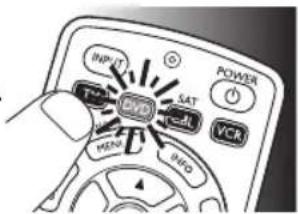
3 Keep buttons ^① and ④ pressed simultaneously for 5 seconds.
• The red Setup light ◎ lights
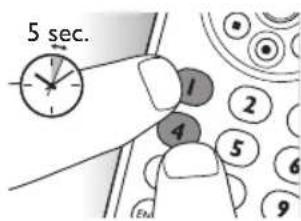
up. The remote control is now in setup mode.
4 Press and hold the button that does not function and immediately release it when the device responds.
- If the button still does not function as expected, try pressing it again for a longer period of time.
5 Press the device selection button twice to save your settings and exit setup mode. When no
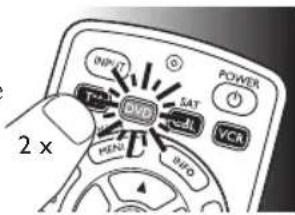
button is pressed for 5 minutes or more, the remote control will exit setup mode, automatically saving all your settings.
3 Using the universal remote control
3.1 Buttons and functions
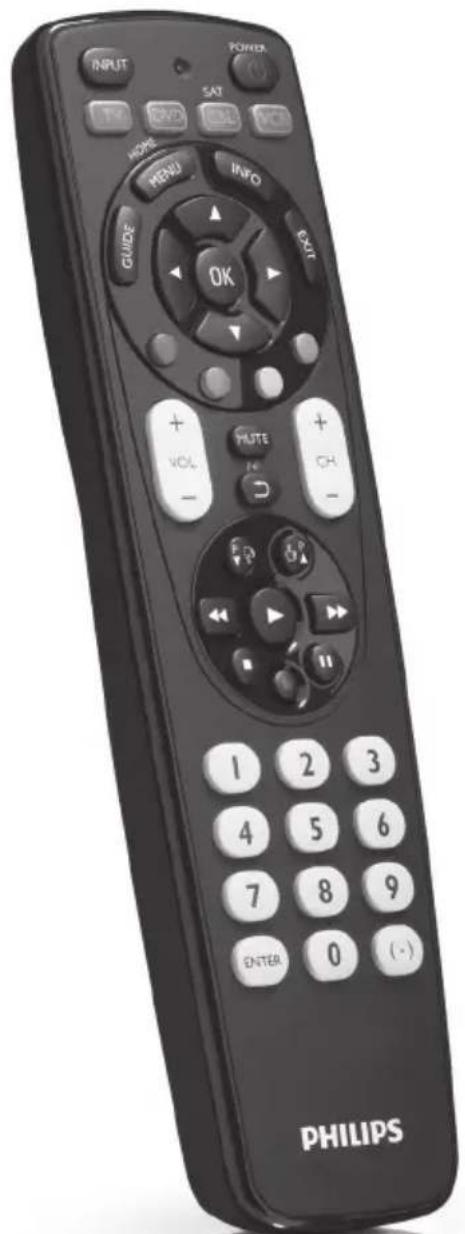
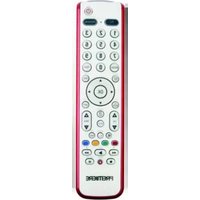
The illustration on page 2 gives an overview of all buttons on the remote control. Try out the buttons you need for operating your devices.

Notes
- Buttons having the same functions as the buttons on your original remote control may have different namings on the SRP4004 (e.g. Info / Display).
- Only functions that are available on your original remote control can be used for operating your devices with the SRP4004.
1 Setup light. Lights up red when the remote control is in setup mode.
2 INPUT selects available source inputs (antenna, cable, etc.).
3 TV IOND CBL VCA ...... device selection buttons.
- select the device to be operated.
• light up when a remote control command is
8 EN 9EN
being sent.
4
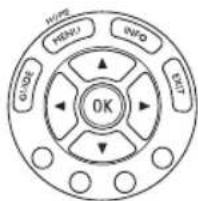
GUIDE...... electronic program guide.
MENU / HOME... menu on / off.
INFO...... on-screen channel information.
EXIT...... exits / clears on-screen menu displays.
▲ ▼ ◀ ▶ cursor up, down, left, right in a menu.
OK...... confirms your selection.
Colored buttons. Content sensitive buttons.
5
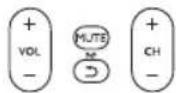
+VOL -.....adjusts TV volume.
MUTE ...... mutes TV sound.
⑤......previous program / Last.
+ CH -......previous / next channel.
6
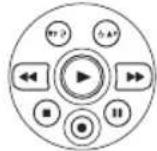
▼P ▲P......previous (▼P) / next (▲P) page / track in various modes.
♀ / ♀ ...... set your Thumb ratings.
◀......rewind.
play.
▶ fast forward.
stop.
record.
II....pause.
7
ENTER ....used after direct channel selection. Some devices require ENTER to be pressed after channel selection.
(--)...... selects between one and two-figure channel numbers.
8 1....2 digit buttons for direct 4 5 6 channel / track selection. 7 8 9 0
9 ...... switches the selected device on / off.

Note
For some TV brands / types, this button will only turn off the TV. You will have to press a digit button (direct channel selection) to turn on the TV again.
3.2 Resetting a button to its original function
If an improved button (see chapter 2.2.2) still does not function as expected, you can always reset the button to its original function.
1 In the current device mode, keep digit buttons ⏻ and
pressed simultaneously for
5 seconds, until the red Setup light ⓞ lights up.
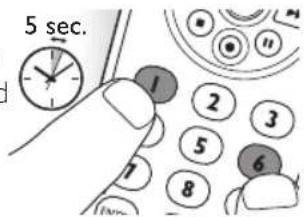
• The remote control is now in setup mode.
2 Press digit buttons ⏻, ⏻, and ⏻, in that order.
• After each button press the device
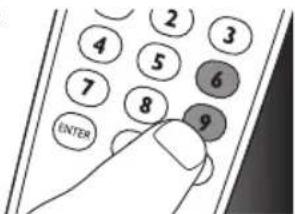
selection button blinks once.
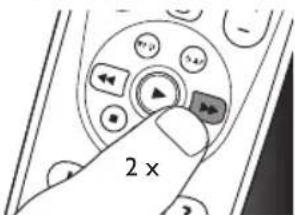
3 Press the button that you wish to reset twice. E.g. the
button.
• After each button press
the device selection button blinks once.
- The device selection button will blink one more time to confirm that the button was successfully reset to its original function.
4 Service and support
4.1 Frequently asked questions
In this chapter you will find answers to the most frequently asked questions about your universal remote control.
4.1.1 Setup
I cannot enter setup mode.
Battery level too low or battery lifetime came to an end.
- Replace the batteries. See chapter 2.1. After replacing the batteries, test if the remote control still operates your devices. If it does not, you have to set up the remote control again. For this refer to chapter 2.2.
The brand code for my device is missing in the 'Shortlist of brands' in the Quick Start Guide.
The 'Shortlist of brands' only mentions the most common TV, DVD, CBL/SAT and VCR brands.
• You will find a complete brand list on page 16-28 of this user manual.
- Use '9999' as 4-digit code in case you cannot find your brand in the complete brand list. Note that using '9999' may result in a long setup (up to 15 minutes).
My TV switches OFF in step 4 but does not switch ON again in step 5.
TVs of some brands (e.g. Panasonic) only switch ON after a long press on one of the digit buttons. After a long button press in setup mode the remote control will start trying to improve the button (see chapter 2.2.2) instead of switching ON the TV.
- In this case, switch ON the TV manually or use the original remote control for this. Continue with step 6. After successfully completing setup, the remote control will switch ON the TV with a long button press on one of the digit buttons, just as your original remote control.
After setup, not all buttons work as expected.
• Try improving thebutton(s). See chapter 2.2.2.
How do I set the remote control for combo devices (TV / VCR, TV / DVD, DVD / VCR, etc)?
Some combo devices require you to set up two different source selection buttons to control both parts of the combo device. For example, if you have a TV / DVD combo, you might need to set up the remote control for both TV and DVD to operate your TV / DVD combo.
4.1.2 Operation
The remote control does not wake up anymore.
Battery level too low or battery lifetime came to an end.
- Replace the batteries. See chapter 2.1. After replacing the batteries, test if the remote control still operates your devices. If it does not, you have to set up the remote control again. For this refer to chapter 2.2.
The device I want to operate does not respond at all / does not respond to all of the button commands.
- Check if the buttons you press are available on the original remote control of the device.
• Try improving buttons. See chapter 2.2.2.
Wrong code selected during setup.
- Set up the remote control again for the device. Always test if the device responds, before leaving setup mode.
It may be that the buttons that you are trying to use have a different naming on the original remote control.
- Try out all buttons to find the one(s) you need.
4.1.3 Batteries
Will my settings be deleted when I replace the batteries?
No. All user settings will be retained in the remote control memory for 5 minutes.

Warning
The batteries should not be exposed to excessive heat such as sunshine, fire or the like.
4.2 Need help?
We advise you to first read this user manual carefully. It is provided to help you set up and use the remote control.
If, however, you require extra information or have additional questions about setup, usage, spare parts, warranty, etc. of the SRP4004, you can always contact us.
When calling our helpline, make sure to have the SRP4004 at hand when you call, so that our operators can help you determine whether the SRP4004 is working properly.
You will find our contact details at the end of this user manual.
The model number of your Philips universal remote control is SRP4004/27.
Date of purchase:
...../ ...../ .....
(day/month/year)
For online support go to: www.philips.com/welcome.
- Click 'Support' and follow the on-screen instructions.
FCC Compliancy
This device complies with Part 15 of the FCC Rules. Operation is subject to the following two conditions:
• This device may not cause harmful interference.
- This device must accept any interference received, including interference that may cause undesired operation.

Note
This equipment has been tested and found to comply with the limits for a Class B digital device, pursuant to part 15 of the FCC Rules.
These limits are designed to provide reasonable protection against harmful interference in a residential installation.
This equipment generates, uses and can radiate radio frequency energy and, if not installed and used in accordance with the instructions, may cause harmful interference to radio communications.
However, there is no guarantee that interference will not occur in a particular installation.
If this equipment does cause harmful interference to radio or television reception, which can be determined by turning the equipment off and on, the user is encouraged to try to correct the interference by one or more of the following measures:
• Reorient or relocate the receiving antenna.
- Increase the separation between the equipment and receiver.
- Connect the equipment into an outlet on a circuit different from that to which the receiver is connected.
- Consult the dealer or an experienced radio/TV technician for help.

Caution
User changes or modifications not expressly approved by the party responsible for compliance could void the user's authority to operate the equipment.
Notice for Canada
This class B digital apparatus complies with Canadian ICES-003.

Helpline
Country Phone number
United States of America / Canada 001-888-744-5477
888 0006 ^(DB1)
A
A.R. Systems .0012
ABC 0013
Abex 0014
ABS 0016
Accele Vision 4194
Access HD....3554
Accurian .....0022
Acer 0028
Acura 0036
ADC 0040(DB1)
Addison .....0043
Adelphia .....4195
Admiral .....0046
Advent .....0054
Adventura .....0055
Adyson .....0058
Agashi 0063
Agazi ....3522 ^(DB1)
AGB 0064
Aiko 0069
Aim 0070
Aiwa 0072
Akai 0074
Akiba 0078
Akira 0079 (DB1)
Akito......0082
Akura 0083
Alaron 0085
Alba 0086
Albatron .....0087
Alco 0092
Alienware .....0099
Allegro .....0103
Alleron .....0104
Allorgan .....0105
Allstar 0108
Alpha Digital 4014
AlphaStar .....0113
Alpine 0114
America Action 0123
American High 0125
Americast .....0127
Amphion Media Works......0135
Amplivision ...0138
Ampro 0139
Amstrad .....0140
AMTC 4015 (DB1)
Amtron .....0141
AMW......0143
Anam 0146
Anam National 0147
Anglo 0151
Anitech .....0154
Ansonic .....0156
Antronix .....0159
AOC 0165
Aolinpiya .....4089 ^(DB1)
Apache ......0169
Apex 3691
Apex Digital .0170
Apple 0172
Arcam 0179
Archer .....0180
Archos .....0181
Ardem 0184
Aristona .....0192
Arrgo 0197
Arris 4931 (DB1)
Artec 4016
Asberg .....0205
Asha 0209
Aspire 4233
Astar 0218
Asuka 0227
AT&T 3453
Atlantic 0233
Atori 0237
Audio Dynamics
0248
Audiosonic ....0264
Audioton .....0266
Audiovox .....0268
Autovox ......0280
Aventura .....0287
Awa 0296
Axion .....0299
B
Baihua ....4092 (DB1)
Baird 0311
Bang & Olufsen 0314
Baohuashi .....0316 ^(DB1)
Basic Line .....0325
Bastide .....0327
Baur 0331
Bazin 0335
BBT 0338
Beaumark .....0340
Beijing 0345
Beko 0346
Belcor 0348
BELL 4376 (DB1)
Bell & Howell 0350
Bell ExpressVu 0352 (DB1)
Bell South .....0353
BenQ 0359
Beon 0361
Best 0364
Bestar 0368
Bestar-Daewoo 0369
Binatone .....0378
Black Star .....0386
Blacktron .....3526
Blackway .....0388
Blaupunkt .....0390
Blue Parade ..0394
Blue Sky .....0395
Blue Star .....0396
Bondstec .....0403
Boots 0405
BOSS 4197
BPL 0413
Bradford .....0414
Brandt 0416
Brillian .....0422
Brinkmann .....0423
Brionvega .....0424
Britannia .....0425
Brockwood ...0430
Broksonic .....0432
BskyB 0436
BTC 0439
Bush 0445
Byd:sign .....0448
C
Cable Star.....0454
Cabletenna ....0456
Cableview.....0458
Cablevision ....4238
Caihong .....0462
Caixing .....4093 (DB1)
California Audio
Labs 0467
Calix 0468
Candle .....0480
Canon 0481
Capsonic .....0486 (DB1)
Captive Works 0487
Carad 0488
Carena......0489
Carnivale .....0491
Carrefour .....0492
Carver 0494
Cascade .....0496
Casio 0499
Catha 4094
Cathay 0501
CCE 0504
Celebrity .....0509
Celera 0510
Centurion .....0520
Century .....0521
CGE 0523
Changcheng ..0526
Changfei .....0527
Changfeng .....0528 (DB1)
Changhai .....0529
Changhong ....0530
Channel Master 0531
Chaparral .....0533
Ching Tai .....0541
Chun Yun .....0545
Chunfeng .....0546
Chung Hsin....0547
Chunlan .....4097 (DB1)
Chunsun .....0549
Cimline 0552
CineVision .....0562
Citizen .....0567
City 0569
Clarion .....0575
Clarivox .....0576
Clatronic .....0581
Clearmaster .0583
ClearMax .....0584
CMS 0590
CMS Hightec 0591
Coby......0597
Colortyme .....0601
Colour Voice .0602
Colt 0603
Comcast ......3456
Commercial
Solutions .....0615
Comtronics ...0623
Concerto .....0625
Concorde .....0626
Condor .....0627
Conrowa .....0634
Contec .....0635
Contec/Cony 4199
Coolmax .....0642
Coolsat .....0643
Coship ......0646
Cosmel.....0647
COX 4200
Craig 0650
Crosley .....0655
Crossdigital ....0656
Crown 0658
CS Electronics 0663
CTC 0664
CTX 0665
Curtis Mathes 0667
CXC 0670
CyberHome ..0672
Cybernex.....0673
CyberPower ..0674
Cybertron .....0675
Cytron 0680
D
Daeryung .....0691
Daewoo .....0692
Danichi ......3914
Dansai 0699
Dantax 0702
Davidson .....4202
Dawa 0707
Daytron .....0710
DBX 0712
Decca......0718
Deitron .....0722
Dell....0725
Denon .....0731
Denver 0733
Desay 0737
Desmet .....0738
Diamant .....0746
Diamond .....0747
Diamond Vision 0748
Digatron .....0751
Digi 0754
Digiline .....0759
Digital Stream 3809
Dimensia .....3569
Director .....0793
DirecTV .....0794
Dish Network System .....0799
Dishpro .....0800
Disney 0803
Dixi....0807
Dongda .....0820
Donghai .....0821
Drake 0825
Drean 0832
DSE 0833
DTS 0837
Dual 0838
Dual-Tec .....3528
Dumont .....0840
Durabrand .....0842
Dux 0843
DVD2000 .....0844
D-Vision .....0684
Dwin....0848
Dynatech .....0854
Dynatron .....0855
Dynex 3476
E
Eastern .....0859
ECHOSPHERE 4396 (DB1)
Echostar .....0866
Eclipse .....0867
Eiki 0874
Elbe 0880
Elbe-Sharp .....3529
Elcit 0883
Electroband ...0888
Electrograph .0889
Electrohome.0890
Electrophonic 0893
Elektra 0896
Element .....3477
ELG 0900
Elin 0902
Elite 0903
Elmak....0907 (DB1)
Elta 0910
Emerson .....0917
Emperor .....0921
Emprex .....0922
Enterprise .....0931
Envision .....0933
Epson 0937
Erres 0942
ESA 0943
ESC 0945
Ether 0948
Etron 0949
Eurofeel .....0954
EuroLine .....0955 ^(DB1)
Euroman.....0956
Europa .....0957
Europhon .....0959
Everquest .....0971
Expressvu .....0977
Exquisit .....0978
F
Fagor Life .....4102
Feilang 0990
Feilu 0991
Feiyan 0992(DB1)
Feiyue 0993
Fenmenti .....4103
Fenner .....0994
Ferguson .....0996
Fidelity .....0998
Filsai 1000
Finlandia .....1003
Finlux 1004
Firstar ......1007
Firstline .....1008
Fisher 1009
Flint .....1014
FNR 1016
Focus 1017
Formenti .....1023
Formenti-Phoenix 1024
Fraba .....1030
Friac 1040
Frontech .....1042
Fuji 1047
Fujitsu 1052
Fujitsu General 1053
Funai 1056
Furi 1057
FUTEC .....3960 (DB1)
Futuretech .....1064
G
Galaxi 1068
Galaxis .....1069
Garrard ......1075
Gateway .....1076
GBC 1078
GC Electronics 1080
GE 1081
GEC 1083
Gehua .....1086
Geloso .....1087
Gemini.....1089
General Instrument 1093
General Technic 1095
Genexxa .....1097
GFM 3820
Giant......1113
Gibraltar ......1114
Go Video.....1126
GOI 1130
GoldHand .....1136
Goldline .....1138
GoldStar .....1140
Goodmans .....1142
Goodmind .....1143
GPM 1149
Gradiente .....1151
Graetz .....1152
Granada .....1154
Grandin.....1156
Greenhill .....1157
Gronic .....1160
Grundig .....1162
Grunpy ......1165
H
Haier .....1175
Haihong .....1176
Haiyan.....1177 (DB1)
Halifax ......1179
Hallmark .....1180
Hamlin .....1182
Hampton .....1183
Hankook .....1188
Hanseatic .....1190
Hantarex .....1192
Hantor .....1193
Harley Davidson 1197
Harman/Kardon 1198
Harvard ......1202
Harwood .....1204
Hauppauge ....1206
Havermy......1208
HCM 1210
Headquarter .1214
Hello Kitty .....1221
Hema .....1222
Hemmermann 1223
Hewlett Packard 1229
Higashi ......1234
Highline .....1236
Hikona .....1237
HiLine ......3533
Hinari ......1243
Hisawa .....1247
Hisense .....1249
Hitachi ......1251
Hitachi Fujian 1252
Hiteker ......1255
Hitsu 1257
Hoeher .....1262
Hongmei .....1272
Hongyan .....1274(DB1)
Hornyphon ....1277
Hoshai .....1278
Howard
Computers ....1281
HP 1283
HTS 1285
Huafa......1287
Huanghaimei.1288
Huanghe .....1289
Huanglong .....1290
Huangshan .....1291
Huanyu ......1292
Huaqiang .....1293 ^(DB1)
Huari ......1294
Hughes .....4205
Hughes Network
Systems .....1296
Humax .....1298
Hush 1304
Hygashi .....1308
Hyper 1309
Hypson .....1312
Hytex ......1314
Hyundai .....1315
|
Iberia .....1320
iBUYPOWER
1322
ICE 1324
ICeS 1325
Illico 4206
iLo 1341
iLuv 4234
Ima 1342
Imperial .....1346
Imperial Crown
1347 (DB1)
Indiana .....1350
Infinity ......1352
InFocus .....1353
Ingelen .....1354
Ingersol .....1355
Initial 1356
Inno Hit .....1358
Innova .....1359
Innovation .....1360
Insignia .....1368
Instant Replay 3580
Integra .....1370
Inteq 1373
Interbuy ......1376
Interfunk ......1377
Internal .....1379
International ..1380
Intervision.....1386
IR 4110
Irradio .....1396
Isukai 1402
iSymphony .....3755
ITC 1404
ITS 1405
ITT 1406
ITV 1408
J
Janeil 1414
Jasco....1415
JBL 1420
JC Penney .....4208
JCB....1421
JCL 4209
Jean 1424
Jensen 1429
Jerrold ......1431
Jiahua ....1435(DB1)
JiaLiCai ....1436 ^(DB1)
Jinque .....1440 ^(DB1)
Jinta 1441 (DB1)
Jinxing 1442
Juhua ....1461 ^(DB1)
JVC 1464
jWin 1465
K
Kaige ....1470 ^(DB1)
Kaisui .....1471
Kamp 1475
Kanghua .....1477
Kangli 1478 (DB1)
Kangyi.....1479 (DB1)
Karcher......1484
Kawa 1487
Kawasaki .....1488
Kawasho .....1489
Kaypani .....1490
KEC 1496
Kendo .....1500
Kenwood .....1507
KIC....1512
Kingsley .....1520
Kioto 1523
Kiton 1525
KLH 1529
Kloss Novabeam
4210
Kneissel .....1535
Kodak 1540
Kolin 1541
Kolster .....1543
Kongque .....1545 ^(DB1)
Konig .....1547
Konka .....1548
Korpel .....1552
Korting .....1554
Kosmos .....1557
Koss 1558
KTV 1572
Kuaile.....1573 (DB1)
Kunlun .....1578 (DB1)
Kyoshu .....1583
Kyoto 1585
L
L&S Electronic
1588
Landel .....1593
Lasonic .....1600
Layco 4117
Lecson .....1606
Lenco 1615
Lenoir .....1617
Lenoxx .....1618
Lesa 1622
Lexicon .....1625
Leyco .....1627
LG 1628
LG/Goldstar ..3536 ^(DB1)
Liesenk ......3537 ^(DB1)
Liesenk & Tter 1630
Liesenkotter ..1631
Life 3538(DB1)
Lifetec .....1633
Linksys ......1640
Linsay ......1642
Liquid Video ..1644
LiteOn .....1645
Lloyd's 1648
Local India TV 1653
Loewe......1660
Loewe Opta .3540
Logik ......1661
Longjiang .....1664 ^(DB1)
Luma .....1674
Lumatron .....1676
Lux May ......1680
Luxman .....1682
Luxor .....1683
LXI 1686
M
M & S ......1687
Madison .....1698
Magnadyne ....1702
Magnafon .....1703
Magnasonic ....1704
Magnavox .....1706
Magnin .....1708
Magnum .....1709
Majestic .....1713
Mandor .....1717 ^(DB1)
Manesth .....1718
Manhattan .....1719
Marantz .....1724
Mark .....1731
Marta .....1735
Masuda .....1744
Matsui .....1750
Matsushita .....1751
Maxent .....1757
Media Center PC 1777
Mediator .....1784
Medion .....1787
Medison .....1788
MegaCable .....4211
Megapower ...1791
Megatron .....1795
MEI 1796
Meile .....1797 ^(DB1)
MeiShi ....4118 ^(DB1)
Melectronic ...3654
Memorex .....1800
Memphis .....1802
Mercury .....1804
Metz 1810
MGA 1811
MGN Technology
1812
MicroGEM.....4024
Micromaxx .....1822
Microsoft .....1826
Microstar .....1827 ^(DB1)
Midland .....1831
Minato .....1835
Mind 1837
Minerva .....1838
Minoka .....1840
Minolta .....1841
Mintek .....1845
Minutz .....1847
Mitsubishi .....1855
Mivar 1857
MoDeng .....4120 ^(DB1)
Monivision .....1872
Montgomery
Ward 4212
Morgans .....3970
Motorola .....1878
Movie Time ....1880
MTC 1889
MTlogic .....1892
Mudan .....1896 ^(DB1)
Multistandard
1904
Multisystem ...4121 (DB1)
Multitec .....1906
Multitech .....1907
MultiVision .....1909
Murphy .....1911
Musikland .....1915
N
NAD .....1926
Naiko ....1930
Nakamichi .....1932
Nakimura .....1933
Nanbao ......1934 ^(DB1)
Nansheng .....1935 ^(DB1)
National Panasonic 4661
NEC 1950
Neckermann .1951
NEI 1952
Nesa 1959
Nesco .....1960
Net Brazil .....1962
Netsat .....1966
NetTV ......1967
Neufunk .....1970
New Tech .....1979
New World ...1980
Newave .....1981
Next Base .....1983
Next Level .....1984
Nexus .....1989
NexxTech .....1990
Nicamagic .....1994
Nikkai ....1998
Nikko 2000
Niveus Media 2012
Noblex ......2013
Nobliko ......2014
Nokia ......2017
Norcent ......2020
Nordic ......2021
Nordmende ..2022
Nordvision .....3543 ^(DB1)
Normerel .....2024
Northgate .....2027
Noshi 2030
Nova Vision ...2032
Novaplex .....2034
Novatronic .....2035
NSC 2042
NTC 2045
O
Oak 2059
Okana 4122
Okano ......2065
Olevia .....2067
Olympus......2071
Onimax ......2082
Onkyo ......2085
Onwa 2087
Opera ......2090
Oppo ......2092
Optimus .....2095
Optoma .....2097
Optonica .....2099
Orbit ......2103
Orion ......2111
Oritron .....2112
Orline 2113
Ormond .....2114 (DB1)
Orsowe .....2116
Osaki 2118
Osio 2121
Oso 2122
Osume 2123
Otto Versand 2126
P
Pace 2134
Pacific 2135
Pael 2140
Palladium .....2145
Palsonic .....2147
Panama .....2149
Panasonic .....2153
Panavision .....2154
Panda 2155
Pansat .....2158
Panther......2160
Paragon .....2161
Pathe Cinema 2168
Pausa 2171
Paysat ......2173
PCT 4213
Penney 2182
Pentax 2183
Perdio ......2185
Perfekt ......2186
Philco .....2192
Philharmonic 2194
Philips ......2195
Philips Magnavox 3715
Phoenix ......2199
Phonola.....2201
Phonotrend ...2202
Pilot 2207
Pioneer .....2212
Pionier .....2213
Plantron .....2219
Plasmsync .....4230
Playsonic .....2224
Polaroid.....2230
Polk Audio .....2232
Poppy ......2236
Popular Mechanics 2237
Portland .....2238
Powerpoint ....2241
Prandoni Prince 4125
Precision .....2244
Prelude ......2247
Priceclub .....2252
Prima .....2253
Primestar.....2257
Princeton .....2258
Prinz 2260
Prism 2261
Proceed .....2267
Profekt .....4126
Profex ......2269
Profilo .....2272 ^(DB1)
Profitronic .....2273
Proline .....2274
Proscan .....2279
Prosonic .....2282
Protech .....2284
Proton .....2288
Protron .....2289
Proview .....2290
ProVision .....2291
Pulsar.....2296
Pye 2302
Pymi 2304
Q
Qingdao .....2308 (DB1)
Quarter .....2318
Quartz ......2319
Quasar .....2320
Quelle ......2322
Questa .....2324
Qwestar .....2326
R
Radialva .....2329
Radio 4128
Radio Shack/
Realistic .....4214
Radiola .....2330
Radiomarelli ..2331
RadioShack ....2333
Radiotone .....2334
Radix 2335
Randex .....2343
RCA 2351
Realistic .....2354
Recor ......2359
Recoton .....2361
Rectiligne .....2362
Redstar .....2366
Reflex 2368
Regal 2370
Regency ......2371
Regent ......2372
Rembrandt.....2375
Reoc .....2379
ReplayTV .....2380
Revox ......2383
Rex 2385
RFT 2386
Rhapsody .....2387
Ricavision .....2388
Rio 2393
R-Line 2327
Roadstar ......2398
Rogers .....4215
Rotel 2414
Rowa 2416
Runco .....2423
S
Saba 2429
SageTV ....4981(DB1)
Saisho 2437
Saivod .....2439
Salora 2443
Sambers .....2445
Sampo 2446
Samsung .....2448
Sandra .....2454
Sanjian 2455 (DB1)
Sanky 2456
Sansui 2458
Sanyo 2462
Sanyuan .....2464
SBR 2492
Sceptre .....2498
Schaub Lorenz .....2500
Schneider .....2501
Scientific Atlanta 2503
Scimitsu ......2505
Scotch .....2506
Scott 2508
Sears 2514
SEG 2522
SEI 2524
Sei-Sinudyne .2525
Seleco .....2528
Sencora.....2531
Sensory Science 2533
Sentra 2534
Serino 2539
Shancha .....2546 ^(DB1)
Shanghai .....2547
Shaofeng .....2549
Sharp 2550
Sharper Image 2551
Shen Ying .....2552
Shencai ......2553
Sheng Chai .....3922
Shenyang .....2555
Sherwood .....2557
Shinco 2560
Shinsonic .....2562
Shintoshi .....2564
Shivaki ......2567
Shogun .....2568
Siam 2572
Siarem .....2573
Siemens .....2574
Siera 2576
Sierra 3549 (DB1)
Sigma Designs 2579
Signal 2581
Signature .....2582
Silva 2591
Silva Schneider 2592
Silver 2594
Simpson .....2598
Sindyne .....4510
Singer 2599
Sinudyne .....2601 (DB1)
SKY 2610
Skygiant ......2618
Skyworth .....2631 (DB1)
SL Marx .....2633
Sogera .....2649
Solavox......2654
Sonawa .....2663
Sonic Blue.....2667
Sonicview .....3954
Soniko 2669
Sonitron .....2671
Sonneclair .....2673
Sonoko ......2675
Sontec .....2677
Sony 2679
Sound & Vision 2680
Soundesign ....2684
Soundwave ....2689
Sowa.....2691
Squareview ....2703
Srypton .....4138
SSS 2708
Stack 4218
Standard .....2713
Standard
Components 2714
Star Choice....2716
Starcom .....2722
Stargate.....2723
| Starlite ......2728 | TCM ......2857(DB1) |
| Starquest ......2732 | Teac ......2860 |
| StarSight ......2734 | Teachimagen .4140 |
| Stenway ......2739 | Tec ......2861 |
| Strato ......2745 | Tech Line ......2863 |
| STS ......2749 | Technema ......2866 |
| STS1 ......4219 | Technica ......2868 |
| STS2 ......4220 | Technics ......2869 |
| STS3 ......4221 | Technika......2870 |
| STS4 ......4222 | Techview ......2883 |
| Studio Experience ......2750 | Techwood ......2884 |
| Stylandia ......2752 | Teco ......2886 |
| Sungale ......2761 | Tedex ......2889 |
| Sunkai ......2762 | Teknika ......2895 |
| Sunstar ......2768 | TeleCaption ...2902 |
| Sunwood ......2772 | Telecor ......2910 |
| Supercable ......2778 | Telefunken ......2914 |
| Superla ......2782 | Telefusion......2915 |
| Supermax ......2783 | Telegazi ......2917 |
| Superscan ......2786 | Telemeister ....2924 |
| SuperTech ......2789 | Telesonic ......2930 |
| Supervision ......2791 | Telestar......2931 |
| Supra ......2792 | Teletech ......2934 |
| Supre-Macy ...2794 | Teleton ......2935 |
| Supreme ......2795 | Televideon ......2938 |
| Sutron ......2798 | Teleview ......2939 |
| SVA ......2800 | Tennessee ......2952 |
| Sydney ......2808 | Tensai ......2954 |
| Sylvania ......2809 | Tenson ......2955 |
| Symphonic ....2810 | Terapin ......2958 |
| Synco ......2811 | Tevion ......2962 |
| Syntax ......2814 | Texet ......2963 |
| Syntax-Brillian ......4231 | Texscan ......2965 |
| Sysline ......2815 | TFC ......2967 |
| Systemax ......2817 | Theta Digital .2970 |
| Sytong ......2820 | Thomas ......2971 |
| Thomson ......2972 | |
| Thom ......2974 |
T
Tacico 2823
Tagar Systems 2831
Tai Wah .....4139DB1)
Taishan 2835
Tandy 2843
Tashiko .....2850
Tatung .....2852
TCL 2856(DB1)
Thom-Ferguson 2976 (DB1)
Time Warner 3518
Timeless .....2985
Tivax 3956
Tivo 2991
TMK 2994
TNCi 2996
Tobo 2999(DB1)
Tocom ....3000
Tokai 3001
Tokyo 3004
Tomashi .....3006
Tongguang .....3008(DB1)
Torx 3020
Toshiba 3021
Totevision .....3024
Touch 3025
Towada .....3028
Toyoda....3030
Trakton .....3036
Trans Continens 3037
Trans PX .....3038
Transfec .....4143
Transonic .....3041
Transtec .....3042
Tredex 3045
Trident .....3054
Tristar 3057
Triumph .....3058
TruTech ....3467
TS 3063
Tuntex ....3069
Tusa 3073
TV86 3076
TView 3079
TVS 3081
U
Uher 3089
UltimateTV ....3091
Ultravox......3095
Unic Line .....3100
Uniden 3101
Unika 3102
Unitech ....3105
United 3106
United Artists 3107
United Cable 3108
Universal .....3113
Universum .....3115
Univox ....3116
Urban Concepts 3121
US Digital .....3122
US Electronics 3123
US Logic ......3124
V
V2 3128
Vector 3136
Vector Research 3137
Venturer .....3143
Verizon .....3146
Vestel 3148
Vexa 3149
Victor 3155
Video Concepts 3157
Videologic.....3165
Videologique 3166
Videosonic .....3171
VideoSystem .3172
Videotechnic .3173
Videotron .....3175
Vidikron .....3178
Vidtech ....3179
Viewmaster ...3182
ViewSat ....3185
Viewsonic .....3186
Viewstar .....3187
Viking 3188
Villain 3189
Viore 3192
Visco 4232
Visiola....3197
Vision 3198
Vizio 3211
Vocopro .....3213
Voodoo .....3215
Voom 3216
Vortec .....3217
Vortex View ..3218
Voxson .....3220
W
Waltham .....3230
Wards ....3231
Watson .....3233
Watt Radio ....3234
Waycon .....3237
Wega 3238
Wegavox .....3239
Weltblick .....3245
Westinghouse 3249
Wharfedale ....3255
White Westinghouse 3258
Windstar .....3266
Winegard .....3268
x
Xbox 3295
Xiahua ....3299
Xiangyang .....3301 ^(DB1)
Xiangyu .....3302
Xihu 3303(DB1)
Xinaghai ....3304(DB1)
Xingfu 3305
Xinghai ....3306
XR-1000 .....3316
Xrypton .....3317
Xuelian ....3320 ^(DB1)
Y
Yamaha ......3326
Yamishi 3328
Yapshe .....3329
Yokan 3335
Yoko 3336
Yorx 3340
Yuhang 3345
Z
Zanussi .....3349
Zenith 3356
Zentech .....4031
Zentek ......3361
ZhuHai ....3364
ZT Group .....3370
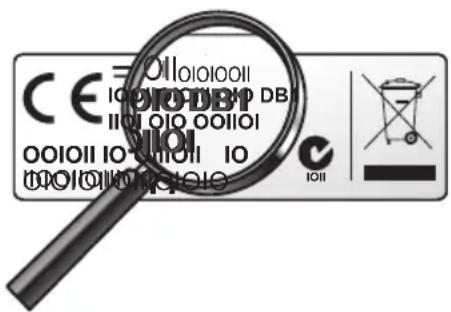
(DB1) Brands only available from version DB1 onwards. You can find the DB version on the sticker inside the battery compartment.
EN Information to the consumer
Compliance with EMF
Koninklijke Philips Electronics N.V. manufactures and sells many products targeted at consumers, which, like any electronic apparatus, in general have the ability to emit and receive electromagnetic signals.
One of Philips' leading Business Principles is to take all necessary health and safety measures for our products, to comply with all applicable legal requirements and to stay well within the EMF standards applicable at the time of producing the products.
Philips is committed to develop, produce and market products that cause no adverse health effects. Philips confirms that if its products are handled properly for their intended use, they are safe to use according to scientific evidence available today.
Philips plays an active role in the development of international EMF and safety standards, enabling Philips to anticipate further developments in standardization for early integration in its products.
Recycling and disposal
Your product is designed and manufactured with high quality materials and components, which can be recycled and reused.

When this crossed-out wheeled bin symbol is attached to a product it means the product is covered by the European Directive 2002/96/EC:
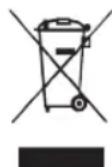
Never dispose of your product with other household waste. Please inform yourself about the local separate collection system for electrical and electronic products. Please act according to your local rules and do not dispose of your old products with your normal household waste. The correct disposal of your old product will help prevent potential negative consequences for the environment and human health.

© 2011 Koninklijke Philips Electronics N.V.
All rights reserved. Reproduction in whole or in part is prohibited without the prior written consent of the copyright owner.
The information presented in this document does not form part of any quotation or contract, is believed to be accurate and reliable and may be changed without notice. No liability will be accepted by the publisher for any consequence of its use. Publication there of does not convey nor imply any license under patent- or other industrial or intellectual property rights.
Document order number: 3139 235 5265 4
November 2011
www.philips.com
RTP/4811




- Table of contents
- Your SRP4004
- Simple Setup
- Glow buttons
- Getting started
- Inserting the batteries
- Note
- Setting up the universal remote control
- Example: setting up the universal remote control to operate your TV:
- Important
- Improving buttons
- During initial setup
- After initial setup
- Using the universal remote control
- Buttons and functions
- Notes
- Resetting a button to its original function
- Service and support
- Frequently asked questions
- Setup
- I cannot enter setup mode.
- The brand code for my device is missing in the 'Shortlist of brands' in the Quick Start Guide.
- My TV switches OFF in step 4 but does not switch ON again in step 5.
- After setup, not all buttons work as expected.
- Operation
- The remote control does not wake up anymore.
- The device I want to operate does not respond at all / does not respond to all of the button commands.
- Batteries
- Will my settings be deleted when I replace the batteries?
- Warning
- Need help?
- FCC Compliancy
- Caution
- Notice for Canada
- Helpline
- A
- B
- C
- D
- E
- F
- G
- H
- |
- J
- K
- L
- M
- N
- O
- P
- Q
- R
- S
- T
- U
- V
- W
- x
- Y
- Z
- EN Information to the consumer
- Compliance with EMF
- Recycling and disposal
Marke : PHILIPS
Modell : SRP4004WM
Kategorie : Fernbedienung