
SF600 - Kopfhörer MOTOROLA - Kostenlose Bedienungsanleitung
Finden Sie kostenlos die Bedienungsanleitung des Geräts SF600 MOTOROLA als PDF.


| Produkttyp | Kopfhörer (Over-Ear) |
| Marke | Motorola |
| Modell | SF600 |
| Abmessungen | ca. 18 x 15 x 8 cm |
| Gewicht | ca. 200 g |
| Akku-Typ | Lithium-Ionen, 3,7 V, 400 mAh |
| Betriebszeit | bis zu 20 Stunden |
| Ladezeit | ca. 2 Stunden |
| Bluetooth-Version | 5.0 |
| Kabelanschluss | 3,5 mm Klinke |
| Treiberdurchmesser | 40 mm |
| Frequenzbereich | 20 Hz - 20 kHz |
| Impedanz | 32 Ohm |
| Empfindlichkeit | 100 dB |
| Mikrofon | integriert |
| Funktionen | Lautstärkeregelung, Anrufannahme, Musiksteuerung |
| Lieferumfang | Kopfhörer, USB-Ladekabel, Audiokabel, Bedienungsanleitung |
| Pflegehinweise | Mit einem trockenen Tuch reinigen; nicht nass machen |
| Sicherheitshinweise | Nicht bei hoher Lautstärke verwenden; Gehörschäden vermeiden |
| Ersatzteile und Reparatur | Ersatzteile über Motorala erhältlich; Reparatur durch Fachpersonal |
Häufig gestellte Fragen - SF600 MOTOROLA
Benutzerfragen zu SF600 MOTOROLA
0 Frage zu diesem Gerät. Beantworten Sie die, die Sie kennen, oder stellen Sie Ihre eigene.
Eine neue Frage zu diesem Gerät stellen
Laden Sie die Anleitung für Ihr Kopfhörer kostenlos im PDF-Format! Finden Sie Ihr Handbuch SF600 - MOTOROLA und nehmen Sie Ihr elektronisches Gerät wieder in die Hand. Auf dieser Seite sind alle Dokumente veröffentlicht, die für die Verwendung Ihres Geräts notwendig sind. SF600 von der Marke MOTOROLA.
BEDIENUNGSANLEITUNG SF600 MOTOROLA
Benötigen Sie weitere Hilfe?
Weitere Einzelheiten finden Sie im SF600 Kurzanleitung oder besuchen Sie: www.motorola.com/Bluetoothsupport
Bei Fragen oder weiterer Unterstützung wenden Sie sich an 1-877-MOTOBLU
68016556003
MOTOROLA und das stilisierte M Largo sind Marken oder eingetragene Marken der Motorola Trademark Holdings, LLC. Alle anderen Produkt- und Dienstleistungsnamen sind Eigentum ihrer jeweiligen Inhaber. © 2011 Motorola Mobility, Inc. Alle Rechte vorbehalten.
68016556003

0359850 REY NOW/11
Gedruckt in Mexiko
MOTOROLA
MOTOROLA
ERLEBNISLEITFADEN
FÜR SF600 KOPFHÖRER
Innen finden Sie Anweisungen zur Optimierung Ihres Erlebnisses mit den SF600 Sport-Kopfhörern... Viel Spaß!
Befolgen Sie diese Schritte, um die Passform und das Erlebnis mit den SF600 Kopfhörern zu optimieren:
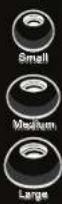
WÄHLEN SIE DIE GRÖSSE FÜR KOMFORT
Probieren Sie die verschiedenen Größen aus, um die bequemste Passform zu finden. Jede Ohrform und -größe ist anders. Beginnen Sie daher mit der größten Größe, da größere Ohrpolster eine bessere Audioleistung erzielen.
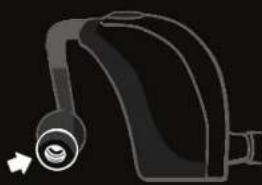
FÜR OPTIMALEN KLANG OPTIMIEREN
Probieren Sie die beiden verschiedenen Designs aus und wählen Sie das beste für Ihr Training und Ihr Hörerlebnis. Das gerillte Design lässt einige Umgebungs- oder Außengeräusche durch und reduziert Trainingsgeräusche durch Kabel oder Körperbewegungen. Das glatte Design sorgt für einen reicheren, tieferen Bass.


FÜR STABILITÄT PERSONALISIEREN
Verwenden Sie während des Trainings verschiedene Ohrpolster-Designs, um sicherzustellen, dass Sie den stabilsten Sitz erhalten.


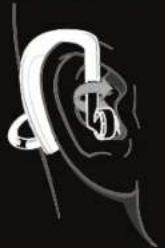
Tipp: Drehen Sie den Ohrhörer, um das Ohrpolster sicher im Ohr zu fixieren. Dies verbessert Komfort, Stabilität und das gesamte Hörerlebnis.
BRINGEN SIE IHRE MUSIK ZUM LAUFEN
- Laden Sie das Produkt vor jedem Gebrauch vollständig auf.
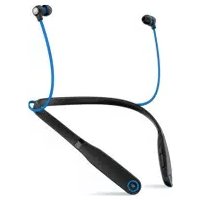
- Setzen Sie die Kopfhörer auf, indem Sie die Ohrbügel über Ihre Ohren legen, damit sie stabil und bequem sitzen. Drehen Sie die Ohrstiele, um die beste Passform zu finden.
- Drücken Sie die Einschalttaste am linken Modul und folgen Sie den Sprachansagen, um zu starten.
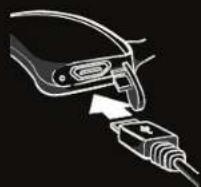
Tipp: Achten Sie darauf, die USB-Ladeabdeckung vollständig zu schließen, um sie vor Wasser- oder Schweißschäden zu schützen.
Tipps für die Verwendung im Freien:
Wenn Sie sich im Freien befinden, kann Ihr Bluetooth-Signal durch Ihre Umgebung beeinträchtigt werden – offene Flächen und der Ort, an dem Sie Ihr Musikgerät aufbewahren.
- Verbessern Sie Ihr Outdoor-Erlebnis, indem Sie Ihr Musikgerät über Ihrer Hüfte platzieren.
- Wenn Sie abgehacktes oder verzerrtes Audio erleben, versuchen Sie, Ihr Musikgerät an einen anderen Ort zu bewegen, um zu verhindern, dass das Signal durch Ihren Körper oder andere Objekte blockiert wird.


Marke : MOTOROLA
Modell : SF600
Kategorie : Kopfhörer