
Walkman D-FJ003 - CD-afspiller SONY - Gratis brugsanvisning og manual
Find enhedens vejledning gratis Walkman D-FJ003 SONY i PDF-format.


Brugerspørgsmål om Walkman D-FJ003 SONY
0 spørgsmål om dette apparat. Besvar dem du kender, eller stil dit eget.
Stil et nyt spørgsmål om dette apparat
Download vejledningen til din CD-afspiller i PDF-format gratis! Find din vejledning Walkman D-FJ003 - SONY og tag din elektroniske enhed tilbage i hånden. På denne side er alle dokumenter nødvendige for brugen af din enhed offentliggjort. Walkman D-FJ003 af mærket SONY.
BRUGSANVISNING Walkman D-FJ003 SONY
Precautions
On safety
- Should any solid objects or liquid fall into the CD player,
unplug it and have it checked by qualified personnel before operating it any further.
• Do not put any foreign objects
(external power input) jack.
On power sources
- When you are not using the CD player for a long time, I cannot use any service from the CD player.
disconnect all power sources from the CD player
On the AC power adaptor
- Use only the AC power adaptor supplied.
If your player is not supplied with an AC power adaptor, use an AC-E45HG. Polarity of the plug
AC power adaptor, use an AC-L451H AC power adaptor*. Do not use any
other AC power adaptor. It may cause
malfunction.
* Not available in Australia and some other regions. Ask
your dealer for detailed information • Do not touch the AG power adopter n
- Do not touch the AC power adaptor with wet hands. - Connect the AC power adaptor to an easily accessible
outlet. Should you notice an abnormality in the AC power
adaptor, disconnect it from the AC outlet immediately.
On dry batteries
- Do not throw the batteries into fire.
- Do not carry the batteries with coins or other metallic objects. It can generate heat if the positive and negative
objects. It can generate heat in the positive and negative terminals of the battery are accidentally contacted by a
metallic object.
- Do not mix new batteries with old ones. - Do not use different types of batteries to
- Do not use different types of batteries together - When the batteries are not to be used for a long
remove them.
- If battery leakage occurs, wipe off any deposit in the battery compartment, and install new batteries. In our
battery compartment, and install new batteries. In case the deposit adheres to you, wash it off thoroughly.
On the CD player
- Keep the lens on the CD player clean and do not touch it.
If you do so, the lens may be damaged and the CD player will not operate properly.
• Do not put any heavy object on top of
CD player and the CD may be damaged.
- Do not leave the CD player in a location near heat sources, or in a place subject to direct sunlight, excessive dust or
or in a place subject to direct sunlight, excessive dust or sand, moisture, rain, mechanical shock, unleveled surface.
or in a car with its windows closed.
- If the CD player causes interference to the radio or television reception, turn off the CD player or may
television reception, turn off the CD player or move it away from the radio or television.
• Discs with non-standard shapes (e
cannot be played on this CD player. Attempting to do so
may damage the CD player. Do not use such discs.
On headphones
Road safety
Do not use headphones while driving, cycling, or operating
any motorized vehicle. It may create a traffic hazard and is illegal in some areas. It can also be potentially dangerous to
Illegal in some areas. It can also be potentially dangerous to play your headsets at high volume while walking, especially
at pedestrian crossings. You should exercise extreme caution
or discontinue use in potentially hazardous situations.
Preventing hearing damage
Avoid using headphones at high volume. Hearing experts advise against continuous, loud and extended play. If
advice against continuous, loud and extended play. If you experience a ringing in your ears, reduce volume or
disco
Consideration for others
Keep the volume at a moderate level. This will allow you
to hear outside sounds and to be considerate to the people
To clean the plugs
If the plugs become dirty, there is no audio or noise is heard.
Clean them with a dry soft cloth periodically.
Troubleshooting
Should any problem persist after you have made these
checks, consult your nearest Sony dealer
"Hold" appears in the display when you press a button, and the CD does not play.
button, and the CD does not play. → The buttons are locked. Slide HOI
The volume does not increase even if you press VOL
+ repeatedly.
→ Press and hold SOUND/AVLS until "AVLS" flashes once
so that you can cancel the AVLS function.
The CD player does not operate properly.
→ Moisture condensation has occurred. Leave the player aside for several hours until the moisture evaporates.
Specifications
CD player
System: Compact disc digital audio system
Laser diode properties:
Emission duration: Continuous
Laser output: Less than 44.6 μW (This output is the value
measured at a distance of 200 mm from the objective lens surface on the optical pick-up block with 7 mm aperture.)
Surface on the optical pick-up block with 7 in
Radio
Frequency range
• USA/Latin American models
9 kHz step: EM: 87.5
FM: 87.5 - 108.0 MHz AM: 531 - 1710 kHz
AM. 531-10 kHz step
FM: 87.5 - 108.0 MHz
AM: 530 - 1710 kHz
- Other models
9 kHz step: FM 07.5
FM: 87.5 - 108.0 MHz AM: 531 - 1602 kHz
10 kHz step:
FM: 87.5 - 108.0 MHz
AM. 556
Antennas EM: Head
AM: Built-in ferrite bar antenna
General
Power requirements:
• Two LR6 (size AA) batteries: 1.5 V DC × 2
• AC power adaptor (DC IN 4.5 V jack): 220 V, 50 Hz (Model for China)
220 V, 50 Hz (Model for China) 120 V, 60 Hz (Model for Mexico)
Dimensions (w/h/d) (without projecting parts and controls):
Approx. 139.8 × 27.9 × 139.8 ~mm ( 558 × 118 × 558 in.)
Mass (excluding accessories): Approx. 207 g (7.4
Operating temperature: 5°C - 35°C (41°F - 95°F)
Design and specifications are subject to change without
notice.
Supplied accessories
Headphones (1) AC power adapt
AC power adaptor (1) (Aslan models only)
SONY®
2-631-685-13 (1)
FM/AM
Portable CD Player
Operating Instructions
"WALKMAN" is a registered trademark of Sony Corporation to represent Headphone Stereo products.
W. WALKMAN is a trademark of Sony Corporation.
D-FJ003
D-FJ0030
D-FJ003FP
©2005 Sony Corporation Printed in China

Printed on 100 % recycled paper using VOC (Volatile Organic Compound)-free vegetable oil based ink.
http://www.sony.net/
WARNING
To prevent fire or shock hazard, do not expose the unit to
rain or moisture
Do not install the appliance in a confined space, such as a
bookcase or built-in cabinet.
To prevent fire, do not cover the ventilation of the apparatus
with newspapers, tablecloths, curtains, etc. And don't place lighted candles on the apparatus.
Figure 3.1.1. The application
To prevent fire or shock hazard, do not place objects filled with liquids, such as vases, on the apparatus.
CAUTION
The use of optical instruments with this product will
increase eye hazard.
Certain countries may regulate disposal of the battery used to power this product. Please consult with your local authority.
For the customers who purchased this
product in the USA
Note: This equipment has been tested and found to comply with the limits for a Class B digital device, pursuant to Part 15 of the FCC Rules. These limits are designed to provide reasonable protection against harmful interference in a residential installation. This equipment generates, uses, and can radiate radio frequency energy and, if not installed and used in accordance with the instructions, may cause harmful interference to radio communications. However, there is no guarantee that interference will not occur in a particular installation. If this equipment does cause harmful interference to radio or television reception, which can be determined by turning the equipment off and on, the user is encouraged to try to correct the interference by one or more of the following measures:
– Reorient or relocate the receiving antenna.
– Increase the separation between the equipment and receivers.
- Connect
- Connect the equipment into an outlet on a circuit different from that to which the receiver is connected.
- Consult the dealer or an experienced radio/TV technician
for help.
You are cautioned that any changes or modifications not expressly approved in this manual could void your authority to operate this equipment.
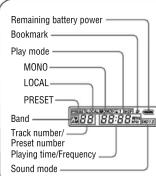
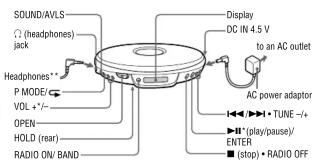
* The button has a tactile dot.
** The plug shape of the headphones supplied varies depending on the model you purchased.
Power Sources
To use the batteries (not supplied)
1 Slide OPEN to open the player lid and open the battery compartment lid inside the CD players.
compartment did inside the CD player.
2 Insert two LR6 (size AA) alkaline batteries by matching the ⊕ to the diagram inside the CD player and close the
the ⊙ to the diagram inside the CD player and close the lid until it clicks into place. Insert the ⊖ end first (for
both batteries).
Battery life\* (approx. hours)
(When the CD player is used on a flat and stable place.)
Playing time varies depending on how the CD player is used
G-PROTECTION G-on G-off RADIO
ON
Two Sony alkaline batteries LR6 16.11.35
(SG) (produced in Japan)
* Measured value by the standard of JEITA (Japan
Electronics and Information Technology Industries
Association).
• The indicator sections of strongly show the remaining battery power. One section does
remaining battery power. One section does not always indicate one-fourth of the battery power.
■ 10
To use the AC power adaptor
Connect the AC power adaptor as illustrated.
Playing a CD
1 Slide OPEN to open the lid and fit the CD to the pivot,
2. Bees ▶
To play from the first track, press ▶II for 2 seconds or
more while the CD player is stopped.
• This CD player can play CD-Rs/CD-RWs recorded in the Compact Disc Digital Audio (Audio CD) format.
but playback capability may vary depending on the
quality of the disc and the condition of the recording
device.
• This product is designed to play back discs that conform to the Compact Disc (CD) standard.
comfort to the Compact Disc (CD) standard. Recently, various music discs are coded with copyright
Recently, various music discs checked with copyright protection technologies are marketed by some record
companies. Please be aware that among those discs,
there are some that do not conform to the CD standard
and may not be
Note on DualDiscs
A DualDisc is a two-sided disc product which mates DVD
recorded material on one side with digital audio material on the other side. However, since the audio material side does
the other side. However, since the audio material side does not conform to the Compact Disc (CD) standard, playback
on this product is not
Digital MEGA BASS function
During play, press SOUND/AVLS repeatedly to select
"SND 1" or "SND 2
If the sound is distorted, turn down the volume.
While listening to the radio, this function is disabled.
AVLS\* function
\*Automatic Volume Limiter System
Press and hold SOUND/AVLS.
If "AVLS" flashes three times, the function is enabled.
If "AVLS" flashes once, the function is disabled.
You can also use this function while listening to the radio.
AMS\* / search function
*Automatic Music Sensor
To find the beginning of the previous/current/next/
succeeding track(s): Press ◀◀/▶▶ repeatedly
To go backward/forward quickly: Press and hold 📄/▶.
Play mode function
During play, press P MODE/ repeatedly
No indication (normal play) → "1"(single track play) →
“SHUF”(shuffle play) →
To repeat the play mode you selected, press and hold
P MODE/ until ^4 appears.
G-PROTECTION function
The function provides protection against sound skipping
during many active uses.
The default setting is "G-on." To select "G-off," press
while you keep pressing ▶ during stop. To enjoy high quality CD sound, select "G-off"
* Sound may skip: if the CD player receives stronger
continuous shock than expected / if a dirty or scratched
CD is played / when using poor-quality CD-Rs/CD-RWs
or if there is a problem with the recording device or application software.
4.1.2019
Bookmark play
If you add Bookmarks to your favorite tracks, you can listen
to these tracks only from the track with the lowest number
1 During playback of the track where you want to add a
Bookmark, press and hold ▶ll until “(Bookmark)
flashes on the display
2 Repeat step 1 to add Bookmarks to the tracks you want
3 Press P MODE/ repeatedly until “” flashes.
4 Press ▶II
To remove the Bookmarks
During playback of the track with a Bookmark, press and
hold ▶II until “” disappears from the display
If you change CDs and start playing, all the P
If you change CDs and start playing, all the Bookmarks added for the previous CD will be erased.
added for the previous CAD will be closed.
Listening to the Radio
1 Press RADIO ON/BAND to turn on the radio.
If "PRESET" appears on the display, press P MODE/
to make "PRESET" disappear from the display.
2 Press RADIO ON/BAND until the band you wa
appears.
Each time you press the button, the display changes as
follows:
→FM→AM
[EMPTY]
3 Press TUNE + or - to tune in the station you want and
adjust the volume.
Turning off the radio
Press ■• RADIO OFF.
1.2.2.3 陈建平 陈建平
Tuning in the station quickly
Press and hold TUNE + or - in step 3 until the frequency
digits begin to change on the display. The CD player
automatically scans the radio frequencies and stops when it
finds a clear station
Improving broadcast reception
For FM, extend the headphones cord.

For AM, reorient the CD players itself
For AM, I corent the CD player itself.

Note
Keep the headphones connected to the Ⓞ jack of the CD
player. The headphones cord works as the FM antenna.
If it is hard to bear the EM broadcast due to
If it is hard to hear the FM broadcast of interference from strong radio waves.
interference from strong radio waves
1 While listening to the FM broadcast, press SOUND/
AVLS.
"LOCAL" flashes
2 Press ▶II/ENTER within 10 seconds after you finished
the previous operation.*
"LOCAL" stops flashing.
* If "LOCAL" disappears from the display, start from
Step 1
To cancel the LOCAL setting, press SOUND/AVLS, and
then press ▶II/ENTER so that “LOCAL” disappears from
the display
If it is hard to hear the FM broadcast due to
poor reception
-
While listening to the EM broadcast press SOUND/
-
While listening to the FM broadcast, press SOUNDS AVLS.
"LOCAL
- Press SOUND/A
"MONO" flushes
MONO HASICS. 3. Pass ▶HENTE
3 Press ▶bENTER within 10 seconds after you finished the previous operation *
the previous operation. "MONG" is a floating
“MONO” stops flashing. * If “MONO” diagnosis
* If MONO disappears from the display, start from Step 1.
To cancel the MONO setting, press SOUND/AVLS twice
and then press ▶II/ENTER so that “MONO” disappears
from the c
Presetting Radio Stations
You can preset up to 30 stations: 20 for FM and 10 for AM.
1 While listening to the radio, press P MODE/ center
the preset mode.
"PRESET" appears on the display.
- Press TUNE + or - repeatedly until the preset number
you want appears on the display.
- Press and hold P MODE/ until "PRESET" flashes on
the display
From this step on, start the next operation within 30
seconds after you finished the previous operation. If
"PRESET" stops flashing, start from step 3.
4 Press TUNE + or - repeatedly to tune in the station you
want.
5 Press ▶I/ENTER.
To cancel all preset stations
1 While the radio is turned off and CD play is stopped,
press RADIO ON/BAND while you are pressing
“CLEAR” flashes.
2 Press ▶//ENTER.
Playing Preset Radio
Stations
- Press RADIO ON/BAND to select the band.
2 When "PRESET" does not appear on the display, press
P MODE/ enter the preset mode.
"PRESET" appears on the display.
- Press TUNE + or - to tune in a sb
- Press TONE + 01 = to tune in a stored station.
Changing the Tuning
Interval
When using the CD player abroad, change the AM tuning
interval, if necessary.
9 kHz area: Asia and Europe
10 kHz area: the U.S.A. Canada and Latin America
- RATE rate (5.75%); Bond yield 2
1 While the radio is turned off and CD play is stopped,
press RADIO ON/BAND while you are pressing ▶▶▶.
If the current setting is "9 kHz," "10 kHz" flashes on the
display.
If the current setting is “10 kHz,” “9 kHz” flashes on the
display.
2 Press ▶I/ENTER.
Note
After changing the tuning interval, you need to preset radio
stations again.
- Precautions
- On safety
- On power sources
- On the AC power adaptor
- On dry batteries
- On the CD player
- On headphones
- Road safety
- Preventing hearing damage
- Consideration for others
- To clean the plugs
- Troubleshooting
- "Hold" appears in the display when you press a button, and the CD does not play.
- The CD player does not operate properly.
- Specifications
- CD player
- Radio
- Frequency range
- - Other models
- Power requirements:
- Supplied accessories
- SONY®
- FM/AM
- Portable CD Player
- D-FJ003
- D-FJ0030
- D-FJ003FP
- WARNING
- CAUTION
- For the customers who purchased this
- product in the USA
- Power Sources
- To use the batteries (not supplied)
- Battery life\* (approx. hours)
- G-PROTECTION G-on G-off RADIO
- ON
- ■ 10
- Playing a CD
- Bees ▶
- and may not be
- Note on DualDiscs
- on this product is not
- Digital MEGA BASS function
- AVLS\* function
- \*Automatic Volume Limiter System
- AMS\* / search function
- Play mode function
- P MODE/ until 4 appears.
- G-PROTECTION function
- 4.1.2019
- Bookmark play
- Press ▶II
- To remove the Bookmarks
- Listening to the Radio
- Turning off the radio
- Tuning in the station quickly
- Improving broadcast reception
- Note
- If it is hard to hear the FM broadcast due to
- poor reception
- Presetting Radio Stations
- To cancel all preset stations
- Playing Preset Radio
- Stations
- Changing the Tuning
- Interval
Mærke : SONY
Model : Walkman D-FJ003
Kategori : CD-afspiller