
Discman D-142CK - CD-afspiller SONY - Gratis brugsanvisning og manual
Find enhedens vejledning gratis Discman D-142CK SONY i PDF-format.


Brugerspørgsmål om Discman D-142CK SONY
0 spørgsmål om dette apparat. Besvar dem du kender, eller stil dit eget.
Stil et nyt spørgsmål om dette apparat
Download vejledningen til din CD-afspiller i PDF-format gratis! Find din vejledning Discman D-142CK - SONY og tag din elektroniske enhed tilbage i hånden. På denne side er alle dokumenter nødvendige for brugen af din enhed offentliggjort. Discman D-142CK af mærket SONY.
BRUGSANVISNING Discman D-142CK SONY
SONY.
3-798-069-22 (1)
Compact Disc Compact Player
Operating Instructions
Discman
disc
D-140
D-141
D-141CK
D-142CK
D-142SC
D-143
Sony Corporation ©1994 Printed in Malaysia
Welcome!
Thank you for purchasing the Sony Compact Disc Compact Player. Before operating your Discman, please read this manual and retain it for future reference. For the accessories supplied with your Discman, check your model number and refer to "Supplied Accessories" towards the end of this manual.
Owner's Record
The model and the serial numbers are located at the bottom. Record these numbers in the spaces provided below. Refer to them whenever you call upon your Sony dealer regarding this product.
Model No. Serial No.
WARNING
To prevent fire or shock hazard, do not expose the unit to rain or moisture.
To avoid electrical shock, do not open the cabinet. Refer servicing to qualified personnel only.
CAUTION
The use of optical instruments with this product will increase eye hazard.
INFORMATION
For the customers in the USA
This equipment has been tested and found to comply with the limits for a Class B digital device, pursuant to Part 15 of the FCC Rules.
11
These limits are designed to provide reasonable protection against harmful interference in a residential installation. This equipment generates, uses, and can radiate radio frequency energy and, if not installed and used in accordance with the instructions, may cause harmful interference to radio communications. However, there is no guarantee that interference will not occur in a particular installation. If this equipment does cause harmful interference to radio or television reception, which can be determined by hurting the equipment off and on, the user is encouraged to try to correct the interference by one or more of the following measures:
- Rovent or relocate the receiving antenna. - Increase the separation between the equipment and receiver. - Connect the equipment into an outlet on a circuit different from that to which the receiver is connected. - Consult the dealer or an experienced radio/TV technician for help. You are cautioned that any changes or modifications not expressly approved in this manual could void your authority to operate this equipment.
For the customers in the U.K.
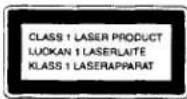
This Compact Disc player is classified as a CLASS 1 LASER product. The CLASS 1 LASER PRODUCT label is located on the bottom exterior.
For the customers in Canada
This apparatus complies with the Class B limits for radio noise emissions set out in Radio Interference Regulations.
For the customers in Australia
The supply cord of the AC power adaptor cannot be replaced; if the cord is damaged, the AC power adaptor should be discarded.
Playing a CD right away!
If you want to play a CD right now, choose to use your Discman on house current. Other choices are the following three: rechargeable battery, dry batteries (see "Power Sources" on the reverse side) and car battery.
1 Connect

text_image
Headphones AC power adaptor to a wall outlet PHONES DC IN 4.5 VFor models supplied with the AC plug adaptor
If the AC power adaptor does not fit the wall outlet, use the AC plug adaptor
Note
The type of the headphones shown may not be the same as your headphones.
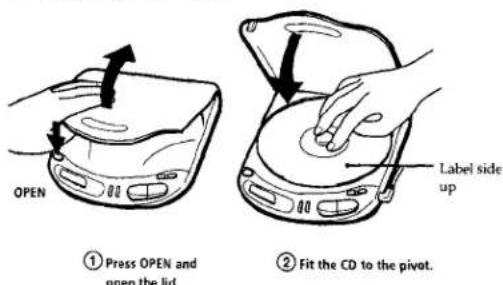
2 Place a CD
text_image
OPEN ① Press OPEN and open the lid. Label side up ② Fit the CD to the pivot.3 Play
text_image
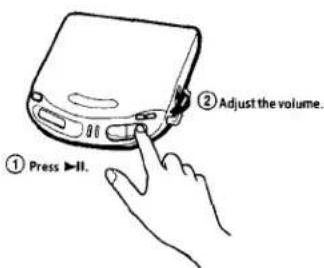
① Press ▶II. ② Adjust the volume.To stop play, press ■.
To protect your hearing (AVLS)
The AVLS (Automatic Volume Limiter
System) function keeps down the maximum volume to protect your ears.
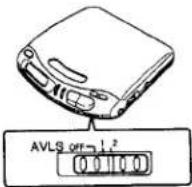
Set AVLS to 1 (middle) or 2 (max).
Note
- If the sound is distorted when you listen to the bass-boosted sound with the AVLS function, turn down the volume.
Connecting to other stereo equipment
You can listen to the CD through other stereo equipment or record a CD on a cassette tape. Refer to the instruction manual of other equipment for details. Before making connections, turn off each equipment.
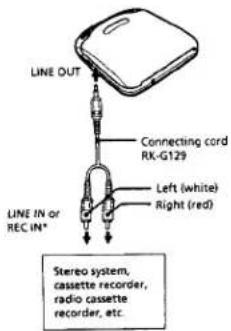
text_image
LINE OUT Connecting cord RK-G129 Left (white) Right (red) LINE IN or REC IN* Stereo system, cassette recorder, radio cassette recorder, etc.*To connect an equipment without LINE IN nor REC IN jack, use the RK-G134 connecting cord and connect to MIC jack.
Note
- Before you play the CD, turn down the volume of the connected equipment so as not to damage the connected speakers.
Playing a CD in a car
You can use your Discman in a car as illustrated below.
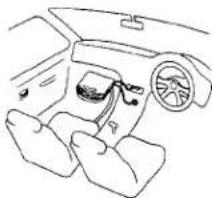
natural_image
Line drawing of a car interior showing dashboard, steering wheel, and seatbelt (no text or symbols)To connect your Discman to a car cassette deck, you need the following accessories:
• Mount arm (Plate arm)
• Plate arm CFM-300A
• Mount plate CPM-300P
• Car connecting pack CPA-4, CPA-8,
or
• Mount kit CPM-300CK (includes CPA-300A,
CPM-300P, and a car connecting pack)
or, to place your Discman on a console box,
- Mount kit CPM-300PC (includes CPM-300P)
and a car connecting pack)
Refer to the instruction manual of each accessory for details.
When you use the CPM-300P mount plate
Attach the car mount adapter supplied to the CPM-300P before installing the Discman.
Notes
• Do not put the Discman on a dashboard.
• Do not leave the Discman in a car parked in
sunlight
- Use a Sony car connecting puck for reducing
noise
Switched ignition function
With this feature, your Discman stops automatically when you turn off the engine of the car. (This function is not available with some cars depending on the model).
▶Power Sources
Using rechargeable battery (BP-DM10)
Charge the rechargeable battery before using it for the first time.
1 Open the lid of the battery compartment.
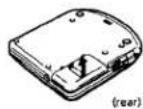
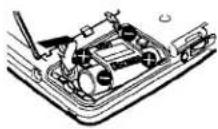
2 Insert the rechargeable battery so that the word "Discman" is facing the same direction as in the illustration below, and close the lid.
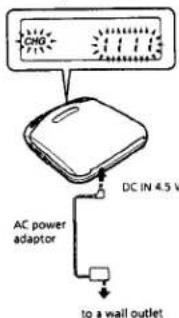
3 Connect the AC power adaptor and charge for about 3 hours. The indication "CHG" lights up and the number "1" shifts position in succession until the battery is fully charged.
text_image
CHG DC IN 4.5 V AC power adaptor to a wall outlet4 When fully charged, disconnect the AC power adaptor.
When to charge the battery
When the battery is used up, indication appears in the display. Charge the rechargeable battery.
Battery life
When you use the Discman on a flat and stable place, approx. 3 hours of continuous play is possible.
Notes
- Charging time varies depending on how the rechargeable battery is used. - If the battery is new or has not been used for long time, it may not be charged completely until you charge and discharge it several times. - If the battery life reduces by about half, replace it with Sony BP-DM10 rechargeable battery. It is not use any other rechargeable battery.
Using dry batteries
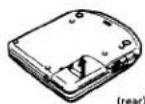
1 Open the lid of the battery compartment.
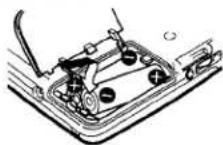
2 Insert two LR6 (size AA) alkaline batteries by matching the ⊕ and ⊖ to the diagram inside the battery compartment and close the lid.
When to replace the dry batteries When the battery is used up, indication appears in the display. Replace all the batteries with new ones.
Alkaline battery life
When you use the Discman on a flat and stable place, approx. 8 hours of continuous play is possible.
Notes
• Do not charge the dry batteries
- Do not mix new batteries with old ones
- Do not use different types of batteries together.
| To | Press |
| Pause | ▶II |
| Resume play after pause | ▶II |
| Find the beginning of the current track (AMS*) | ▶◀ once** |
| Find the beginning of previous tracks (AMS) | ▶◀ repeatedly** |
| Find the beginning of the next track (AMS) | ▶◀ once** |
| Find the beginning of succeeding tracks (AMS) | ▶◀ repeatedly** |
| Go forward quickly | Hold down ▶◀ ** |
| Go backwards quickly | Hold down ▶◀ ** |
*AMS = Automatic Music Sensor **These operations are possible during both play and pause.
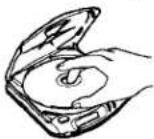
To remove the CD
Remove the CD while pressing the pivot.
Notes on display
- When you press ▶II, the total number of the tracks in the CD and the total playing time appear for 2 seconds.
- During play, the track number and the elapsed playing time of the current track appear.
- During pause, the elapsed playing time flashes in the display.
- Between the tracks, the time to the beginning of the next track will appear with the “—” indication.
Notes on handling CDs
• To keep the CD clean, handle it by its edge. Do not touch the surface.
• Do not stick paper or tape onto the CD.
- Do not expose the CD to direct sunlight or heat sources such as hot air ducts. Do not leave the CD in a car parked in direct sunlight.
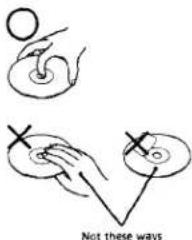
text_image
Not these ways▶Other Operations
Playing tracks repeatedly (Repeat Play)
You can play tracks repeatedly in normal, INTRO, shuffle or RMS (Random Music Sensor) play modes. Repeat all the tracks or only one track.
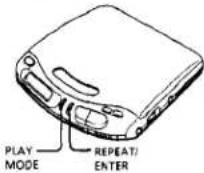
To repeat all the tracks
Press REPEAT/ENTER during play. The "C" indication appears.
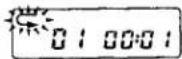
To cancel repeat play, press REPEAT/ENTER again.
To repeat a single track
1 Press REPEAT/ENTER while the track you want to repeat is playing. The "≤" indication appears.
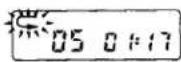
2 Press PLAY MODE repeatedly until "1" appears.
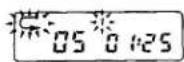
To repeat another track, press ◀◀ or ▶◀
To cancel repeat play, press REPEAT/ENTER again.
Playing the first ten seconds of all the tracks (INTRO Play)
You can play the first ten seconds of all the tracks in a CD.
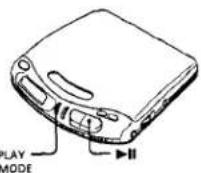
1 During play, press PLAY MODE repeatedly until "INTRO" flashes.
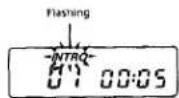

Press ▶
"INTRO" stops flashing and the Discman plays the first 10 seconds of each track.
To listen to a track to the end during INTRO play, press ▶ again at the desired track.
To cancel INTRO play, press PLAY MODE repeatedly until no play mode is indicated in the display.
Playing tracks in random order (Shuffle Play)
You can play the tracks in a CD in random order.
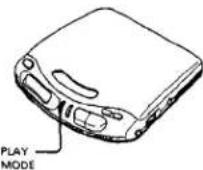
During play, press PLAY MODE repeatedly until "SHUF" appears. The tracks play in random order.
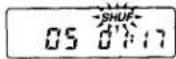
To cancel shuffle play, press PLAY MODE repeatedly until no play mode is indicated in the display.
Note
- During shuffle play, you cannot return to previous tracks by pressing 🖼️.
Playing tracks in the order you want (RMS play)
You can program up to 22 tracks to play in any order you choose.
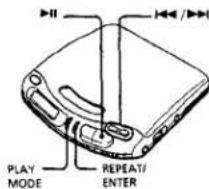
text_image
PLAY MODE REPEAT/ENTER1 During play, press PLAY MODE repeatedly until "RMS" flashes.
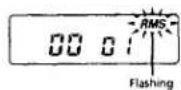

Press ◀◀ or ▶▶ to choose a track. The track number and the playing order appear.
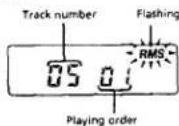
3 Press REPEAT/ENTER to program the track.
4 Repeat steps 2 and 3 to program the remaining tracks.
5 Press▶H
"RMS" stops flashing and the tracks you chose play in the order you specified.
To cancel RMS play, press PLAY MODE until "RMS" disappears.
To check the program
To check during programming, press REPEAT/ENTER before step 5 above. To check during RMS play, press PLAY MODE repeatedly until "RMS" flashes, then press REPEAT/ENTER. Each time you press the button, the track numbers appear in the order you specified.
Note
- If you program another track after the 22nd track, the first track programmed is cleared and the new track is programmed instead.
Using other functions
To enjoy more powerful bass sound You can enjoy a powerful bass-boosted sound.
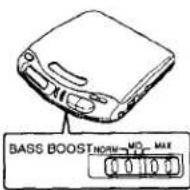
Set BASS BOOST to the desired position.
Note
- If the sound is distorted when emphasizing bass, turn down the volume.
To lock the buttons
You can lock your Discman against any accidental operations.
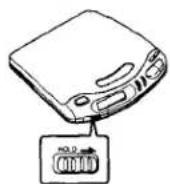
Slide HOLD in the direction of the arrow. When you press any button, "Hot d" appears in the display.
To unlock, slide HOLD back.
▶Additional Information
Precautions
On safety
- As the laser beam emitted from the lens of this unit is harmful to the eyes, do not attempt to disassemble the casing. Refer servicing to qualified personnel only.
- Should any solid objects or liquid fall into the unit, unplug it and have it checked by qualified personnel before operating it any further. - Do not put any foreign objects in the DC IN 4.5 V (external power input) jack.
On power sources
- When you are not using the unit for a long time, disconnect all power sources from the unit.
- The nameplate indicating operating voltage, power consumption, etc. is located at the back of the AC power adaptor (for Middle East only.)
On the AC power adaptor
- Use only the supplied (not supplied with D-140) or recommended AC power adaptor. Do not use any other AC power adaptor.
Polarity of the plug

• To unplug the AC power adaptor from the wall outlet, grasp the adaptor itself, do not pull its cord.
On dry and rechargeable batteries
- Do not throw the batteries into fire. - Do not carry the rechargeable battery with coins or other metallic objects. It can generate heat if the positive and negative terminals of the battery are accidentally contacted by a metallic object.
On the unit
- Keep the lens on the unit clean and do not touch it. If you do so, the lens may be damaged and the unit will not operate properly.
- Do not put any heavy object on top of the unit. The unit and the CD may be damaged. - Do not leave the unit in a location near heat sources, or in a place subject to direct sunlight, excessive dust or sand, moisture, rain, mechanical shock, unleveled surface, or in a car with its windows closed.
- If the unit causes interference to the radio or television reception, turn off the unit or move it away from the radio or television.
- Do not wrap the unit in a cloth or blanket during use as it may cause malfunction or serious accidents.
On headphones
Road safety
Do not use headphones while driving, cycling, or operating any motorized vehicle. It may create a traffic hazard and is illegal in some areas. It can also be potentially dangerous to play your headsets at high volume while walking, especially at pedestrian crossings. You should exercise extreme caution or discontinue use in potentially hazardous situations.
Preventing hearing damage
Avoid using headphones at high volume. Hearing experts advise against continuous, loud and extended play. If you experience a ringing in your ears, reduce volume or discontinue use.
Caring for others
Keep the volume at a moderate level. This will allow you to hear outside sounds and to be considerate to the people around you.
Maintenance
To clean the lens
Clean the lens with a lens cleaning kit KK-DM1.
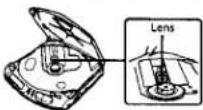
To clean the casing
Use a soft cloth slightly moistened in water or a mild detergent solution. Do not use alcohol, benzine or thinner.
Troubleshooting
Should any problem persist after you have made these checks, consult your nearest Sony dealer.
The CD does not play or "no dl SC" appears in the display though a CD is placed in the unit.
The CD is dirty or defective.
- Insert the CD with the label side up - Moisture condensation has occurred. Leave the unit aside for several hours until the moisture evaporates.
→ The lens is dirty.
When the 12 cm CD which contains many tracks is replaced with a disc with a few tracks (such as CD single or CDV, etc.) it may take more than 10 seconds before play starts.
No sound, or noise is heard.
- Plugs are not connected firmly.
→ Connect the headphones to PHONES
→ Plugs are dirty. Clean the plugs with a dry soft cloth periodically.
“HI dc I n” appears in the display.
→ The connected AC power adaptor is not the correct one.
"Hol d" appears in the display when
you press a button.
→ The buttons are locked. Slide HOLD back
The battery life is short.
Manganese batteries are used. Use alkaline batteries.
- Replace the batteries with new ones.
The volume is limited to a certain
level even if you attempt to turn it
→ AVLS selector is set to 1 or 2. Set it to OFF.
Specifications
System
Compact disc digital audio system
Laser diode propertie
Material: CAATAS
Wavelength: = 780 m
Emission duration: Continuous
Laser output: Less than 48.6 μW (measured at
200 mm away from the objective lens surface)
Error correction
Sony Super Strategy Cross Interleave Reed
Solomon Code
D-A conversion
1-bit quartz time-axis control
Frequency response
20 - 20,000 Hz 3dB (measured by EIAJ CP-
307)
Output (at 4.5 V input level)
Headphones (stereo minijack)
15 mW + 15 mW at 16 ohms
Line output (stereo minijack)
Output level 0.7 V rms at 50 kilohms
Recommended load impedance over 10
kilohms
General
Power requirements
• Rechargeable battery: 2.4 V DC
• Two LR6 (size AA) batteries: 3 V DC
• AC power adaptor (DC IN 4.5 V jack):
220 - 230 V, 50 Hz (European and Asian
(model)
120 V, 60 Hz (USA, Canadian, Central and
South American model)
110 - 240 V, 50/60 Hz (Middle Eastern
model)
240 V, 50 Hz (U.K. and Australian model)
100 - 240 V, 50/60 Hz (Model for other
countries)
- Sony CPM-300P mount plate and CPM-
300PK mount arm for use on car battery
Dimensions (w/h/d) (without projecting parts
and controls)
Approx. 130 × 30.5 × 142 mm
(5 4×1 4×5% in)
Mass (without rechargeable battery)
Approx. 270 g (9.6 oz)
Operating temperature
5C-30℃(41°F-95°F)
Supplied accessories
D-140
Stereo headphones (1)
AC power adaptor* (1)
Connecting cord* (Phone plug = 2 ↔ stereo)
miniplug) (1)
*For Canadian model only
D-141
AC power adaptor (1)
Connecting cord (Phone plug ×2 ↔ stereo
miniplug) (1)
Stereo headphones (1)
D-141CK
AC power adaptor (1)
Stereo headphones (1)
Mount plate (1)
Car battery cord (1)
Car connecting pack (1)
Spiral tube (1)
Velcro tapes (2)
Soare fuse (1)
Original cap (1)
Carrying pouch (1)
D-142CX
AC power adaptor (1)
Connecting cord* (Phono plug × 2 ↔ stereo
miniplug)(1)
Mount plate (1)
Car mount adaptor (1)
Car battery cord (1)
Car connecting pack (1)
Spiral tube (1
Spare fuse (1)
Velcro tapes (2)
*Southeast Asian, Central and South
American, and Australian model only
D-1425C
AC power adaptor (1)
Stereo headphones (1)
Mount plate (1)
Car battery cord (1)
Car connecting pack (1)
Spiral tube (1)
Velicto tapes (2
Spare fuse (1)
Original cap (1)
0-143
AC power adaptor (1)
Connecting cord (Phone plug × 2 ↔ stereo
mini plug) (1)
Stereo headphones (1)
Rechargeable battery (1)
Design and specifications are subject to change without notice.
Recommended accessories
Plate arm CPM-300A
Mount plate CPM-300P
Mount arm CPM-300PK
Mount kit CPM-300PC
Mount kit CPM-300CK
Car connecting pack CPA-4. CPA-8
Car battery cord DCC-E245HG
Active speaker system SRS-A50
Rechargeable battery BP-DM10
Connecting cord RK-G129
AC power adaptor AC-E45HC
Stereo headphones MDR-25, MDR-E747
Your dealer may not handle some of the above
listed accessories. Please ask the dealer for
detailed information about the accessories in
yuan country
[Non-Text]
[Non-Text]
[Non-Text]
[Non-Text]
[Non-Text]
[Non-Text]
[Non-Text]
[Non-Text]
[Non-Text]
[Non-Text]
[Non-Text]
[Non-Text]
[Non-Text]
[Non-Text]
[Non-Text]
[Non-Text]
[Non-Text]
[Non-Text]
[Non-Text]
[Non-Text]
[Non-Text]
[Non-Text]
[Non-Text]
[Non-Text]
[Non-Text]
[Non-Text]
[Non-Text]
[Non-Text]
[Non-Text]
[Non-Text]
[Non-Text]
[Non-Text]
[Non-Text]
[Non-Text]
[Non-Text]
[Non-Text]
[Non-Text]
[Non-Text]
[Non-Text]
[Non-Text]
[Non-Text]
[Non-Text]
[Non-Text]
[Non-Text]
[Non-Text]
[Non-Text]
[Non-Text]
[Non-Text]
[Non-Text]
[Non-Text]
[Non-Text]
[Non-Text]
[Non-Text]
[Non-Text]
[Non-Text]
[Non-Text]
[Non-Text]
[Non-Text]
[Non-Text]
[Non-Text]
[Non-Text]
[Non-Text]
[Non-Text]
[Non-Text]
[Non-Text]
[Non-Text]
[Non-Text]
[Non-Text]
[Non-Text]
[Non-Text]
[Non-Text]
[Non-Text]
[Non-Text]
[Non-Text]
[Non-Text]
[Non-Text]
[Non-Text]
[Non-Text]
[Non-Text]
[Non-Text]
[Non-Text]
[Non-Text]