
Discman D-223 - CD-afspiller SONY - Gratis brugsanvisning og manual
Find enhedens vejledning gratis Discman D-223 SONY i PDF-format.


Brugerspørgsmål om Discman D-223 SONY
0 spørgsmål om dette apparat. Besvar dem du kender, eller stil dit eget.
Stil et nyt spørgsmål om dette apparat
Download vejledningen til din CD-afspiller i PDF-format gratis! Find din vejledning Discman D-223 - SONY og tag din elektroniske enhed tilbage i hånden. På denne side er alle dokumenter nødvendige for brugen af din enhed offentliggjort. Discman D-223 af mærket SONY.
BRUGSANVISNING Discman D-223 SONY
Precautions
On safety
- As the laser beam used in this compact disc player is harmful to the eyes, do not attempt to disassemble the casing. Refer servicing to qualified personnel only.
- Do not put any foreign objects in the safety slot inside the disc compartment. If you do so, the laser beam may come out when the lid is opened.
- Do not put any foreign objects in the DC IN 4.5 V (external power input) ack.
- Should any solid objects or liquid fall into the unit, disconnect the power supply and have the unit checked by qualified personnel before operating it any further.
On power sources
- Use the rechargeable battery (supplied), alkaline batteries (not supplied), house current or a car battery.
- For AC operation: Use the AC power adaptor supplied with this unit. Do not use any other AC power adaptor as it may cause malfunction.
- For car battery operation. Use the car mount arm CPM-300PK (not supplied) or mount plate CPM-300P (not supplied) and car connecting pack CPA-3/CPA-4 (not supplied) or CPA-5RM (not supplied).
- If the unit is not going to be used for a long period of time, be sure to disconnect the power supply (AC power adaptor, rechargeable battery, alkaline batteries, or mount plate) from the unit. To remove the AC power adaptor from the wall outlet, grasp the adaptor itself; never pull it by the cord.
- The nameplate indicating operating voltage, power consumption, etc. is located on the bottom exterior. (AC power adaptor for Middle East only.)
On operation
- Since the CD system offers a wide dynamic range, the peaks of the high level inputs are recorded with high fidelity, and the noise level is very low. Do not turn up the volume while listening to a part of disc with no audio signals or very low level inputs. If you do so, the speakers may be damaged when the peak level of the sound is played. - The lens on the disc table should be kept clean. Do not touch the lens or poke at it. If you do so, the lens may be damaged and the unit will not operate property.
On installation
- Never install the unit where it would be subject to:
- heat sources such as radiators or products
- direct sunlight.
- excessive dust.
- moisture of rain
- mechanical vibration or shock.
- unieveled surface
- Do not put the unit on a dashboard nor leave it in a car parked in sunlight since the temperature may rise excessively.
- When the unit is used with the AC power adaptor, do not wrap the unit in a cloth, blanket, etc. If you do so, the temperature inside and outside the unit may rise considerably, resulting in malfunctioning of the unit or serious accidents.
• Do not put any heavy object on top of the unit. The unit and disc may be damaged. - If the unit is brought directly from a cold to a warm location, or is placed in a very damp room, moisture may condense on the lens inside the unit. Should this occur, the unit will not operate. In this case, remove the disc and leave the unit in a warm place for several hours until the moisture evaporates.
- For the unit to operate at its best, it should not be subjected to temperatures below 5°C (41°F) or above 35°C (95°F).
Notes on headphones
- Road safety
Do not use headphones while driving, cycling, or operating any motorized vehicle. It may create a traffic hazard and is illegal in some areas. It can also be potentially dangerous to play your headsets at high volume while walking, especially at pedestrian crossings. You should exercise extreme caution or discontinue use in potentially hazardous situations.
• Preventing hearing damage
Avoid using headphones at high volume. Hearing experts advise against continuous, loud and extended play. If you experience a ringing in your ears, reduce volume or discontinue use.
• Caring for others
Keep the volume at a moderate level. This will allow you to hear outside sounds and to be considerate to the people around you.
If you have any questions or problems concerning your unit, please consult your nearest Sony dealer.
SONY.
3-757-211-21(1)
Compact Disc Compact Player

D-223
Operating Instructions
Before operating the unit, please read this manual thoroughly and retain it for future reference.
Sony Corporation © 1993 Printed in Japan
Discman
Owner's Record
The model number and the serial number are located at the bottom. Record the serial number in the space provided below. Refer to those numbers whenever you call upon your Sony dealer regarding this product.
Model No. D-223 Serial No.
WARNING
To prevent fire or shock hazard, do not expose the unit to rain or moisture.
To avoid electrical shock, do not open the cabinet. Refer servicing to qualified personnel only.
CAUTION
The use of optical instruments with this product will increase eye hazard.

This equipment has been tested and found to comply with the limits for a Class B digital device, pursuant to Part 15 of the FCC Rules. These limits are designed to provide reasonable protection against harmful interference in a residential installation. This equipment generates, uses, and can radiate radio frequency energy and, if not installed and used in accordance with the instructions, may cause harmful interference to radio communications. However, there is no guarantee that interference will not occur in a particular installation. If this equipment does cause harmful interference to radio or television reception, which can be determined by turning the equipment off and on, the user is encouraged to try to correct the interference by one or more of the following measures:
- Reagent or relocate the receiving antenna.
- Increase the separation between the equipment and receiver.
- Connect the equipment into an outlet on a circuit different from that to which the receiver is connected.
- Consult the dealer or an experienced radio/TV technician for help.
You are cautioned that any changes or modifications not expressly approved in this manual could void your authority to operate this equipment.
For the Customers in the United Kingdom
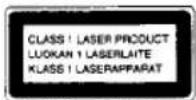
This Compact Disc player is classified as a CLASS 1 LASER product. The CLASS 1 LASER PRODUCT label is located on the bottom extensor.

THIS APPARATUS COMPLIES WITH THE CLASS B LIMITS FOR RADIO NOISE EMISSIONS SET OUT IN RADIO INTERFERENCE REGULATIONS.
Power Sources

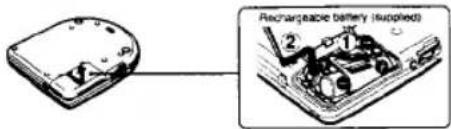
When using the supplied rechargeable battery for the first time, make sure to charge it.
Charging the battery
1 Insert the rechargeable battery with the side marked with "Sony Discman" facing up, as illustrated beside the battery compartment.
text_image
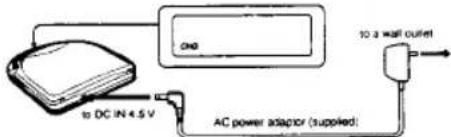
Rechargeable battery (supplied)2 Set the unit to stop mode and connect the supplied AC power adaptor.
text_image
10 A wall outlet AC power adaptor (supplied) to DC IN 4.5 V"CHG" appears in the display window. It will disappear when charging is completed.
3 Disconnect the AC power adaptor.
Rechargeable battery life
(When the unit is used on a flat and stable place.)
Charging time
CD playing
Max. 2 hours*
Approx. 2 hours
* The charging time varies depending on how the rechargeable battery is used.
When to replace the rechargeable battery
If the operating time reduces approximately by half even if you charge it fully, replace it with a new BP-DM10 (not supplied). You cannot use BP-DM1 battery pack.
Notes on the rechargeable battery (Ni-Cd battery)
- Be sure to use the supplied AC power adaptor.
- Remember to recharge the battery after every use. Leaving the rechargeable battery discharged may shorten its life.
- When charging the battery for the first time or after being unused for a long time, playing time may reduce. In this case, charge and discharge it several times.
- Store the battery in a temperature between 5^ (41°F) and 35^ (95°F) to make it work at its best.
- Never throw the battery into fire
- Never short-circuit the battery terminal.
- Do not disassemble the battery. If the electrolyte inside the battery should come into contact with cloth or skin, wash the contaminated objects with water immediately.
On □ indication
The □□ indicator appears in the display window to show that the battery is used up when the unit operates with either the rechargeable battery or the alkaline batteries. The indicator flashes when the battery becomes weak and the operation automatically stops. Then, the indicator stays lit. In this case, charge the rechargeable battery or replace all the alkaline batteries with new ones.
Using with Alkaline Batteries
Insert two size AA (LR6) alkaline batteries according to the and indications in the battery compartment.
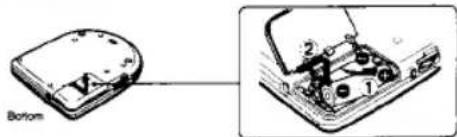
text_image
BottomVarious Ways of Using
Refer to the operating manual of each equipment for more details.

You can listen to the disc through a car cassette deck by using the following equipment (not supplied).
• Mount arm CPM-300PK (CPM-300A + CPM-300P)
• Plate am CPM-300A
• Mount plate CPM-300P
• Car connecting pack CPA-3, CPA-4, CPA-5RM
• Mount kit CPM-300PC (CPM-300P + CPA-4)
• Mount kit CPM-300CK (CPM-300A + CPM-300P + CPA-4)
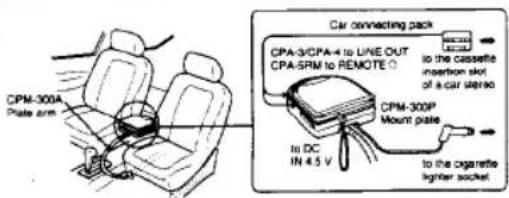
text_image
CPM-300A Plate arm Car connecting pack CPA-3/CPA-4 to LINE OUT CPA-SRM to REMOTE to the cassette insertion slot of a car via pad to DC IN 4.5 V CPM-300P Mount plate to the cigarette lighter socketYour dealer may not handle some of the above listed accessories. Please ask the dealer for detailed information about the accessories in your country.
When you use the mount plate (CPM-300P)
First, attach the car mount adaptor which is supplied with CPM-300P to the mount plate, then install the CD player.
When you turn off the engine
Even when the rechargeable battery or alkaline batteries are inserted in the unit, the unit stops operations when you turn off the engine of the car. (Switched ignition function) This function is not available with every model of the car. If not, press ■ to stop operation.
Note
Any connection other than the Sony's car connecting pack may cause noise.

• for monitoring the sound through speakers
• for recording.
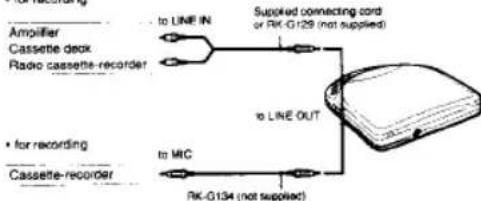
flowchart
graph TD
    A["Amplifier Cassette deck Radio cassette-recorder"] -->|to LINE IN| B["Supplied connecting cord or RK-G129 (not supplied)"]
    C["for recording Cassette-recorder"] -->|to MIC| D["RK-G134 (not supplied)"]
    B --> E["to LINE OUT"]
    D --> E
Notes on connection
• Turn off each equipment before making connections.
- Plug in the white plug to the L (left channel) jack, and the red plug to the R (right channel) jack.
• Do not connect the output from LINE OUT with the PHONO jacks of the amplifier.
- Make sure to insert the plugs of the cable firmly into the jacks. A loose connection may cause a humming noise
- If the unit causes interference to the radio or television reception, turn off the unit or move the unit away from the receiver.
Location and Function of Controls
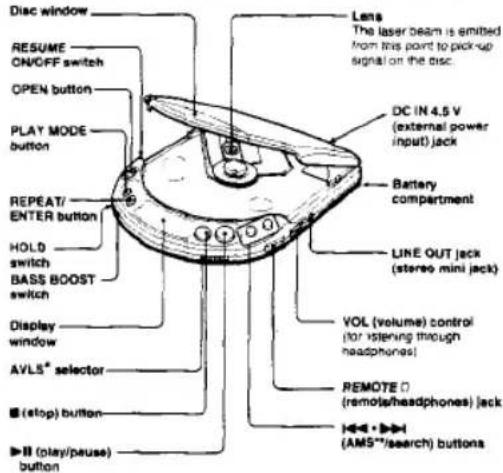
text_image
Disc window RESUME ON/OFF switch OPEN button PLAY MODE button REPEAT/ ENTER button HOLD switch BASS BOOST switch Display window AVLS* selector (stop) button ( play/pause) button Lens The laser beam is emitted from this point to pick-up signal on the disc. DC IN 4.5 V (external power input) jack Battery compartment LINE OUT jack (stereo mini jack) VOL (volume) control (for listening through headphones) REMOTE D (remots/headphones) jack (AMS**/search) buttons* AVLS. Automatic Volume Limber System **AMS. Automatic Music Sensor
Headphones with remote commands
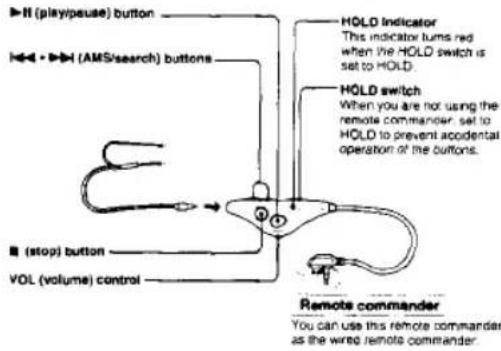
text_image
H (play/pease) button H←→ H (AMS/search) buttons HOLD Indicator This indicator turns red when the HOLD switch is set to HOLD. HOLD switch When you are not using the remote commander, set to HOLD to prevent accidental operation of the buttons. ■ (stop) button VOL (volume) control Remote commander You can use this remote commander as the wired remote commander.Before using
Connect the headphones to the remote commander securely. A loose connection may cause noise during playback.
When you connect the remote commander to the unit Make sure that the player is in the stop mode.
When you do not use the remote commander
Detach the remote commander from the REMOTE: jack to avoid battery consumption caused by accidental operation of the commander.
Is it possible to operate other compact disc compact players with the supplied remote commander?
Basically yes. However, some models are not operative
Controlling the volume with the remote commander
Set the VOL control of the remote commander to MAX
Using the VOL control on the unit, adjust the volume to the level that you want to be the maximum when adjusting with the VOL control on the remote commander.
Headphones with stereo miniplug
You can use optional headphones with stereo miniplug with this unit.
General
Power requirements
Supplie
• DC 2.4 V Rechargeable battery pack
- DC IN 4.5 V jack accepts the Sony AC power adaptor for use on:
| Where purchased | Operating voltage |
| European and Asian countries | 220 – 230 V AC, 50 Hz |
| U.S.A., Canada, Central and South America | 120 V AC, 60 Hz |
| Middle East | 110 – 240 V AC, 50/60 Hz |
| United Kingdom, Australia | 240 V AC, 50 Hz |
| Other countries | 100 – 240 V AC, 50/60 Hz |
Not supplied:
- DC IN 4.5 V accepts the Sony CPM-300P mount plate and
CPM-300PK mount arm for use on car battery.
• DC 3 V two size AA (LRS) alkaline batteries
Approx. 132 x 26.8 x 151 mm (5 % x 1 % x 6 %) /w/h
incl. projecting parts and controls
Approx. 300 g (11 oz.) incl. rechargeable battery pack
AC power adaptor (1)
Rechargeable battery pack (1)
Connecting cord (phono plug × 2 → stereo miniplug) (1)
Headphones with remote commander (1)
Accessories not supplied
Plate arm CPM-300A
Mount plate CPM-300P
Mount arm CPM-300PK
Mount kit CPM-300PC
Mountel CPM-306CK
Car connecting pack CPA-3, CPA-4, CPA-5RM
Car battery cord DCC-E145L
Active speaker system SRS-58
Rechargeable battery pack BP-DM10
Your dealer may not handle some of the above listed accessories. Please ask the dealer for detailed information about the accessories in your country.
Note
This appliance conforms with EEC Directive 87/308/EEC regarding interference suppression.
Dimensions
Mass
Supplied accessories
Design and specifications are subject to change without notice
| Where purchased | Operating voltage |
| European and Asian countries | 220 - 230 V AC, 50 Hz |
| U.S.A., Canada, Central and South America | 120 V AC, 60 Hz |
| Middle East | 110 - 240 V AC, 50/60 Hz |
| United Kingdom, Australia | 240 V AC, 50 Hz |
| Other countries | 100 - 240 V AC, 50/60 Hz |
Not supplied:
- DC IN 4.5 V accepts the Sony CPM-300P mount plate and
CPM-300PK mount arm for use on car battery.
• DC 3 V two size AA (LRS) alkaline batteries
Approx. 132 x 26.8 x 151 mm (5 % x 1 % x 6 %) /w/h
incl. projecting parts and controls
Approx. 300 g (11 oz.) incl. rechargeable battery pack
AC power adaptor (1)
Rechargeable battery pack (1)
Connecting cord (phono plug × 2 ← stereo miniplug) (1)
Headphones with remote commander (1)
Notes on alkaline batteries
- insert batteries with correct polarity.
- Do not use old batteries together with new ones or different types of batteries together.
- If the electrolyte inside the battery should leak, wipe the contaminated parts in the
battery compartment with a cloth and replace the old batteries with new ones.
• Do not charge the batteries.
- When the unit is not to be used for a long period of time, remove the batteries.
Alkaline battery life
When the unit is used on a flat and stable place, approx. 5 hours of continuous play is possible.
When the battery compartment lid comes off
The Id can be removed when it is pulled forcibly. If this happens, attach the Id as illustrated.

Using on House Current
Connect the supplied AC power adaptor in the same way as for charging the rechargeable battery.
When the unit is not to be used, be sure to disconnect the AC power adaptor.
For the customers whose unit is supplied with an AC plug adaptor
Use the AC plug adaptor if the AC power adaptor does not fit the outer.
Note on the AC power adaptor
Use only the supplied AC power adaptor (for DC 4.5 V, united polarity type). If you use any other AC power adaptors, the unit may be damaged. Do not use the AC power adaptor supplied with other "Discman" CD compact players equipped with DC IN 6 V or 9 V jack, nor an optional AC power adaptor for DC 6 V or 8 V.

Disc Playing
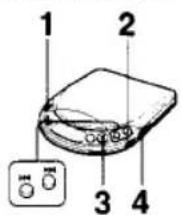
text_image
1 2 3 41 Put the disc.

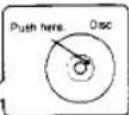
Push the disc gently until it clicks to that the disc fits into the disc, black portion. Close the lid of the unit after setting the disc.
Other operations
| Operation | Press |
| To pause | ▶IIVery short beeps sound until the pause is released. |
| To release pause | ▶IIVery short beep sounds once. |
| To stop | A long beep sounds.Disc playing stops and the power is turned off automatically. |
| To locate the beginning of the current track/previous tracks—AMS | ▶▶ lightlyrepeated.Three short beeps sound. |
| To locate the beginning of the next track/tracks—AMS | ▶▶ lightlyrepeated.Two short beeps sound. |
| To go back at high speed (Search) | Keep ▶▶ depressed. |
| To go ahead at high speed (Search) | Keep ▶▶ depressed. |
- The unit pauses at the beginning of the located track when you press ◀◀ or ▶▶ lightly in the pause mode.
• During the program play, the AMS operates in the programmed order.
If you do not want to hear the beep sounds, see "Troubleshooting Guide"
To remove the disc
Pick up the disc, holding the edge, while pressing the pivot gently as illustrated.
To play an 8 cm (3-inch) disc
You can play it without an adaptor.

Various Playing Modes
text_image
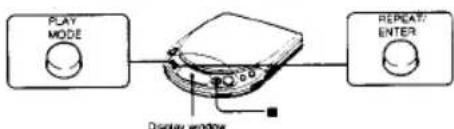
PLAY MODE Display window REPEAT/ ENTERThe unit has INTRO PGM play, one-track play, SHUFFLE play, RMS* (program) play modes. Each mode has normal and repeat play modes.
* AMS: Random Music Sensor
To change the mode
Press PLAY MODE during play. The current mode appears in the display window.
To play repeatedly (REPEAT play)
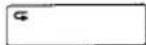
Press REPEAT/ENTER. "G" appears in the display window.
Press again to cancel the repeat play.
To stop the disc
Press ■
Playing the Whole Disc — Normal Play
There is no play mode indication in the display window.
To repeat the whole disc press REPEAT/ENTER.
Playing the Desired Tracks after Listening to the Beginning of All the Tracks — INTRO PGM play
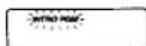
1 Press PLAY MODE during play until "INTRO PGM" flashes slowly in the display window.
2 Press ▶II.
"INTRO PGM" starts flashing last and the unit starts to play the first 15 (approximately) seconds of each track from the first track.
3 During 15 seconds of play, press REPEAT/ENTER if it is your desired track to enter the track in the program.
When it is not your desired track, do not press any button during 15 seconds of play, or press ▶▶▶ to skip the track. Select your desired tracks in this way.
After the beginning of the last track is played, "INTRO PGM" stops flashing and the selected tracks will be played automatically in the order of the track number of the disc.
To finish programming before hearing through the disc, press ▶-ll. The selected tracks are played.
To try the programming again
Press 🖼️ to go back during programming. As the programming of the tracks returned is canceled, select the desired tracks from that point.
To repeat the programmed tracks, press REPEAT/ENTER while they are played.
To repeat the beginning of all the tracks, press REPEAT/ENTER first and then press PLAY MODE until "INTRO PGM" flashes. Then press ▶II, it you did not enter any tracks in the program, the beginning of all the tracks will be repeated.
2 Connect the supplied headphones.
3 Press ▶ II.
4 Adjust the volume.

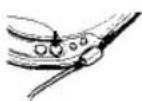

To enjoy more powerful bass sound (When using the headphones) Set BASS BOOST to a desired position. You can then enjoy a powerful bass-boosted sound.
NORM MID MAX BASS BOOST
Notes
- The effect of the BASS BOOST function may be decreased according to the position of the volume control or the recording level of the disc. - Sound may be cracked or distorted if you set the volume too high. In this case, turn down the volume.
To limit the volume at a moderate level
The AVLS (Automatic Volume Limiter System) selector allows you to limit the maximum volume of your unit.
- When the AVLS selector is set to other position 1 or 2, the volume will be kept at a moderate level, even if you attempt to turn up the volume.
- When the AVLS selector is set to either position 1 or 2, the playback sound may be distorted or unstable depending on the music (especially bass-boosted part). If this happens, turn down the volume.
- When the AVLS selector is set to OFF, you will be able to enjoy the full volume capability of your unit.
AVLS OFF 1 2 0 1 2
On display window
When you use the unit on the rechargeable battery or alkaline batteries, the display window is illuminated for about 5 seconds when you press an operating button (except for ■ and OPEN). If you do not want the display window to be illuminated, see "Troubleshooting Guide".
When you use the unit on the AC power adaptor or car battery, the display window is always illuminated. (The illumination goes out when you press ■ or when the disc stops.)
When you press ▶II (When RESUME is set to OFF) The number of tracks in the disc and the total playing time appear for 2 seconds.
During play
The track number and the elapsed playing time of the current track appear
During pause
The elapsed playing time of the current track flashes.
Example
07 56:15 Total number of tracks Total playing time
05 0 p17 1 min. 17 sec has elapsed from the beginning of the 1th back
05:017 Pause made at the point 1 min. 17 sec from the beginning of the fifth track.
To Play from Where You Have Stopped — Resume play function
Set the RESUME switch to ON to activate the resume play function. You can resume the disc play from the point where you last pressed ■.
RESUME ON OFF
Notes
- If you open the lid after pressing ■, the memory of the position where you pressed ■ is canceled. The play starts from the first track. - If you remove the rechargeable battery, alkaline batteries or disconnect the external power source, resume play may start at a point approximately 30 seconds behind or ahead of the position where you pressed ■
Locking the Buttons
Side the HOLD switch in the direction of the arrow to avoid accidental pressing of the buttons on the unit. "Hold" appears in the display window if you press a button on the unit when the HOLD switch on the main unit is set to HOLD.
HOLD → HOLD switch on the unit
Notes
- When operating the unit with the remote commander set the HOLD switch on the unit to HOLD to prevent accidental operation of the buttons on the unit. - The HOLD switch on the remote commander works independently of each other. You can operate the buttons even when the other HOLD switch is set to HOLD.
Hold

HOLD switch on the remote command
Playing Only One Track
Press PLAY MODE during play until "1" appears in the display window.
The unit plays only one track and stops at the end of the track.
To play only one track repeatedly, press REPEAT/ENTER.
Playing the Tracks in a Random Order — Shuffle Play
Press PLAY MODE during play until "SHUFFLE" appears in the display window.
Play starts from the next track.
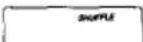
To play the tracks in a random order repeatedly, press REPEAT/ENTER. After all the tracks have been played in a random order, they will be reshuffled and played repeatedly in a different order each time.
During shuffle play
To locate the beginning of the forthcoming tracks, press ▶repeatedly.
To locate the beginning of the current track, press ◆. Even if you continue to press ◆, the player will not go back to the previous track. The play starts from the beginning of the current track.
Playing the Tracks in the Desired Order—RMS (Program) Play.
1 Press PLAY MODE during play until "RMS" flashes in the display window.
2 Press or to select the desired track. You can program the tracks in the desired order regardless of their track numbers.
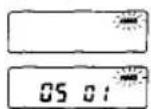
Dosited track number The first track
3 Press REPEAT/ENTER.
00 02 The 2nd (next) track
4 Repeat steps 2 and 3 (up to 22 tracks).
- if another track is memorized after 22 tracks have been memorized, the first track will be cleared and the new one will be memorized in its place.
- If you keep pressing PEPEAT/ENTER for about 1 second, the total number and the total playing time of the programmed tracks are displayed while you are pressing PEPEAT/ENTER. If you enter the 32nd or later track in the disc or if the total playing time becomes more than 100 minutes, “= - - - -” is displayed instead of the total playing time. However, you can keep programming.
5 Press ▶
"RMS" stops flashing and play stars.
To resume normal play, press PLAY MODE again
To repeat program play, press REPEAT/ENTER.
To check the contents of the program during programming
Press REPEAT/ENTER lightly during programing before pressing ▶II. Each time you press REPEAT/ENTER, the track number and the playing order appear in the display window in the programmed order.
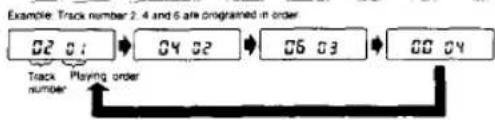
flowchart
graph LR
    A["02 01"] --> B["04 02"]
    B --> C["06 03"]
    C --> D["06 04"]
    E["Track number"] --> F["Playing order"]