HPX-600 - Ukategoriseret AMX - Gratis brugsanvisning og manual
Find enhedens vejledning gratis HPX-600 AMX i PDF-format.


Brugerspørgsmål om HPX-600 AMX
0 spørgsmål om dette apparat. Besvar dem du kender, eller stil dit eget.
Stil et nyt spørgsmål om dette apparat
Download vejledningen til din Ukategoriseret i PDF-format gratis! Find din vejledning HPX-600 - AMX og tag din elektroniske enhed tilbage i hånden. På denne side er alle dokumenter nødvendige for brugen af din enhed offentliggjort. HPX-600 af mærket AMX.
BRUGSANVISNING HPX-600 AMX
5) Install the System Into The Mounting Surface
- Install the unit into the cutout in the mounting surface.
- Make sure that all cables from the backside terminations pass through the cutout.
- For terminations for which the far end of the cable is not accessible (either because the cable has been run under carpet, in a conduit or structure, or is otherwise fixed), the cable must be placed through the cutout in the table prior to installation, as indicated in FIG. 5.
- Open the door and rotate the four mounting screws located inside and at each end of the HPX base assembly in order to rotate the retaining tabs out under the mounting surface. Note: Make sure that the retaining tabs are down and folded out of the way prior to installing the unit in the mounting surface.
- Continue to tighten the mounting screws until the mounting tabs contact the backside of the mounting surface to retain the HPX Assembly (FIG. 6).
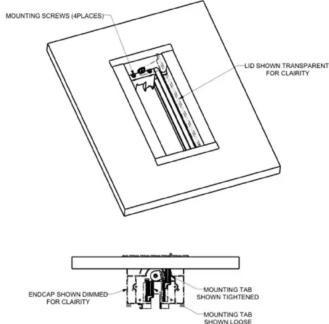
FIG. 6 Mounting Screws & Mounting Tabs Note: For surfaces less than 34 " (19mm) thick, use the supplied plastic spacers by fixing them to each end of the cutout using the supplied double sided tape (FIG. 7).
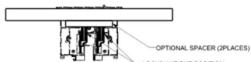
FIG. 7 Optional spacer and mounting tabs deployed

For full warranty information, refer to the AMX Instruction Manual(s) associated with your Product(s).
4/12
©2012 AMX. All rights reserved. AMX and the AMX logo are registered trademarks of AMX.
3000 RESEARCH DRIVE, RICHARDSON, TX 75082 • 800.222.0193 • fax 469.624.7153 • technical support 800.932.6993 • www.amx.com

6) Install the System Into the Mounting Surface
- Terminate the backside connections as required for each cable exiting the HPX system.
- Secure these cables and the power cable to either of the end caps using the supplied wire ties (FIG. 8).
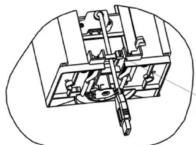
—SECURE CABLE USING WIRE TIE
FIG. 8 Bottom view with cables exiting and secured
- Secure the cables in at least one additional location after they have been secured to the system so as to prevent undue stress on the system if the cables are inadvertently kicked, snagged or pulled.
Note: The socket-outlet (Connection to Mains Power branch circuit) shall be installed near the equipment and shall be easily accessible.
Additional Documentation
For more detailed installation instructions with additional drawings, please refer to the HPX-600/900/1200 Installation Guide, available to view or download from www.amx.com.

Installation Guide
HPX-600/900/1200 6, 9 and 12 Module Connection Ports
Overview
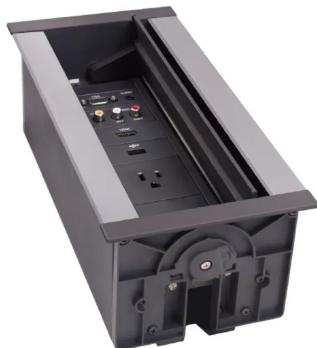
The HPX-600/900/1200 family of HydraPort Connection Ports (FG560-xx-cc) are built to accommodate the diverse connection needs of conference and meeting room visitors.
The HPX-600/900/1200 is designed to be mounted into a horizontal surface such as a conference room table or lectern in order to provide connectivity for power, networking, Audio/Video and control.
Specific connectivity is accomplished by populating the HPX Base Assembly with various modules.
natural_image
Exterior view of a black rectangular electronic device with internal components and ventilation slots (no text or symbols visible)FIG. 1 HPX-600/900/1200 Hydraport Base Assembly
AMX offers 6 versions of the HPX-600/900/1200 Hydraport Base Assemblies with a variety of compatible modules:
HPX-600/900/1200 Hydraport Base Assemblies
| HPX-600-BL FG | 560-01-BL Hydraq | ort Base Assembly, 6M Capacity, Black Trim |
| HPX-600-SL FG | 560-01-SL Hydraq | ort Base Assembly, 6M Capacity, Silver Trim |
| HPX-900-BL FG | 560-02-BL Hydraq | ort Base Assembly, 9M Capacity, Black Trim |
| HPX-900-SL FG | 560-02-SL Hydraq | ort Base Assembly, 9M Capacity, Silver Trim |
| HPX-1200-BL FG | 550-03-BL Hydraq | ort Base Assembly, 12M Capacity, Black Trim |
| HPX-1200-SL FG | 550-03-SL Hydraq | ort Base Assembly, 12M Capacity, Silver Trim |
ATTENTION: Only a professional, AMX-qualified installer should perform this installation. Installation must conform to all local codes. This product may not be installed by the end-user.
Product Specifications
| HPX-600/900/1200 Specifications | |
| Number of Modules Supported: | Module sizes are provided in "HydraPort units". Modules range in size from 1/2 to 4 1/2 HydraPort units• HPX-600 - six (6 1/2 space modules• HPX-900 - nine (9) single-space modules• HPX-1200 - twelve (12) single-space modules |
| Enclosure • Black anodized metal frame with matte black plastic end caps (HPX-600/900/1200-BL - FG560-xx-BL).• Clear anodized metal frame with matte black plastic end caps (HPX-600/900/1200-SL - FG560-xx-SL).• Matte black module face plates on all I/O modules. | |
| Optional Accessories: Compatible HPX Modules and Panels (see below) | |
| Dimensions (HWD): | |
| Max above mounting surface: | • 0.31" (7mm) with lid open• 0.13" (3mm) with lid closed |
| Max below mounting surface: | 6.94" (175 mm) |
| Mounting surface footprint: | • HPX-600 - 8.19" x 5.44" (208mm x 138mm)• HPX-900 - 11.16" x 5.44" (263mm x 138mm)• HPX-1200 - 14.09" x 5.44" (358mm x 138mm) |
| Min. mounting surface thickness: | • Min: 0.75" (19mm)• Max: 2.0" (51 mm) |
| Table Cutout Dimensions: | • HPX-600 - 7.64" x 4.84" (194mm x 123mm)• HPX-900 - 10.59" x 4.84" (269mm x 123mm)• HPX-1200 - 13.54" x 4.84" (344mm x 123mm) |
| Weight: | |
| Base Assembly only: | HPX-600 - 1.8lbs (0.82kg)• HPX-900 - 2.4lbs (1.1kg)• HPX-1200 - 2.8lbs (1.3kg) |
| Typical Installation: • HPX-600 = 2.6lbs (1.2kg)• HPX-900 = 3.3lbs (1.5kg)• HPX-1200 = 4lbs (1.8kg) | |
| Certifications: | UL 962A |
Compatible HPX Modules and Panels
HPX-600/900/1200 Hydraport Base Assemblies are compatible with the following HPX Modules and Panels:
| HPX-AV101-HDMI FQ552-24 Single HDMI Module with Integrated Cable | ||
| HPX-AV101-DVI Single DVI Module with Integrated Cable | ||
| HPX-AV101-DVI+A FQ552-22 DVI with Stereo Module with Integrated Cables | ||
| HPX-AV101-RGB+A FQ552-21 RGB with Stereo Module with Integrated Cables | ||
| HPX-C5400-CS+A FQ6552-50-BLK Composite with Stereo UPX Cat5 Kit with HPX Carrier Module | ||
| HPX-C5400-VGA+A FQ6552-51-BLK RQ8VH with Stereo UPX Cat5 Kit with HPX Carrier Module | ||
| HPX-C5400-CN+A FQ6552-52-BLK Component with Stereo UPX Cat5 Kit with HPX Carrier Module | ||
| HPX-N100-RJ45 FQ6553-01 Single RJ-45 Module | ||
| HPX-N102-RJ45 FQ6553-02 Dual RJ-45 Module | ||
| HPX-N100-USB FQ6553-11 Single USB Module | ||
| HPX-CPT200-W FQ6562-41 Hydra Port Cable Pass-Thru Module | ||
| HPX-U200-MOD FQ6554-81 Modem Connection Module | ||
| HPX-P200-PC-US FQ6561-01 Power Outlet (US) Module | ||
| HPX-P255-PC-UK FQ6561-11 Power Outlet (UK) Module | ||
| HPX-P200-PC-EU FQ6561-21 Power Outlet (EU) Module | ||
| HPX-P200-PC-AU FQ6561-31 Power Outlet (AU) Module with Cord | ||
| HPX-P255-PC-IN FQ6561-41 Power Outlet (IN) Module | ||
| HPX-B050 FQ6558-01 1/2 M Blank Panel | ||
| HPX-B100 FQ6558-02 1 M Blank Panel | ||
| HPX-B200 FQ6558-03 2 M Blank Panel | ||
| HPX-B050-L FQ6558-11 1/2 M Custom Label Panel | ||
| HPX-B100-L FQ6558-12 1 M Custom Label Panel |
page 1 of 4
Installation of the HPX Base Assembly
The following sections describe the preparation, installation and setup of the HPX-600/900/1200 Hydraport Base Assembly. A typical installation will include several various HPX modules (see Compatible HPX Modules and Panels above).
Each HPX module has specific instructions for terminating their connections. Refer to each HPX Module's Installation Guide during the installation of the Hydraport system.
Note: Read these instructions in their entirety before beginning the installation. The installation requires specific steps to be performed in specific order.
CAUTION: This installation requires specific woodworking skills. This installation should be performed by an experienced person, comfortable with these types of woodworking operations. Improper installation may result in damage to the mounting surface. AMX is not responsible for damage caused by improper installation.
1) Select a Suitable Location for the HPX Base Assembly The following figures indicate the space requirements for installing the HPX Base Assembly:
FIG. 2 indicates the dimensions above the table:
![5.43 [138,0] "B" See table below for the length of "B" for each HPK model](/content/2026/05/867584/images/5576964b476f8f1240129d7115438a1be94a0196a533bade1745abffc88e3095.jpg)
FIG. 2 Dimensions of the HPX Base Assembly (above the table)
| Model Length of “B” | |
| HPX-1200 (Holds up to 12 HPX Modules) | 14.09" (358 mm) |
| HPX-900 (Holds up to 9 HPX Modules) | 11.14" (283 mm) |
| HPX-600 (Holds up to 6 HPX Modules) | 8.19" (208 mm) |
FIG. 3 indicates the dimensions above the table:
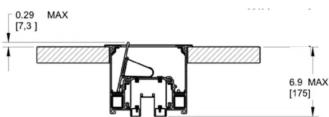
FIG. 3 Dimensions of the HPX Base Assembly (below the table)
- The Hydraport system requires a mounting surface from 0.5" (13mm) to 2" (51mm) thick.
- The Hydraport system requires at least 6 15/16" (175 mm) below the mounting surface.
Note: Care should also be taken to ensure that the Hydraport system does not interfere with the normal use of the work space. For example, on a table or work surface, ensure that the system does not interfere with the user's legs when they are seated at the table.
2) Cut the Hole In the Mounting Surface
FIG. 4 provides the Hole cutout dimensions for the HPX Base Assembly:
![4.84 [123.0] "A" See table below for the length of "A" for each HPX model FOR TABLE THICKNESS 0.75 [19] - 2.0 [51]](/content/2026/05/867584/images/dc2c33d5d1ab9d5aa34911ab8db83a214808b2d81dc6e4cfd0a2bff03b0b8178.jpg)
FIG. 4 HPX Base Assembly - Hole cutout dimensions
| Model Length of “A” | |
| HPX-1200 (Holds up to 12 HPX Modules) | 13.54 (344 mm) |
| HPX-900 (Holds up to 9 HPX Modules) | 10.59 (269 mm) |
| HPX-600 (Holds up to 6 HPX Modules) | 7.64 (194 mm) |
-
Carefully measure the tabletop or other mounting surface to locate the desired position of the HPX Base Assembly.
-
Use the cutout template supplied with the HPX Base Assembly to mark the edges of the cutout.
Note that very little clearance exists between the HPX Base Assembly and the hole cutout in the mounting surface.
• Take care to align the cutout carefully with the edges or other appropriate features in the table or mounting surface.
- If the cutout is misaligned, the installed unit will be misaligned.
• Take care to ensure that the top surface of the mounting surface is not damaged beyond the width of the trim bezel as the cutout is made.
- Use an appropriate drill and drill bit to make a starting hole within the boundary of the cutout. Use an appropriate saw, such as a jigsaw to finish the cutout.
- Make sure cutting tool used is appropriate for the material to be cut and will not tear or chip the top surface.
- Note that the process of making the cutout will create substantial dust and prepare the environment appropriately.
3) Prepare the Terminations
Some modules that are included in the final system require some type of backside termination.
Note: Refer to the installation guide for each module to determine the required backside termination.
- The backside termination for each module can and should be
completed before the module is installed into HPX Base Assembly.
- For terminations for which the far end of the cable is not accessible (either because the cable has been run under carpet, in a conduit or structure, or is otherwise fixed), the cable must be placed through the cutout in the table prior to installation, as indicated in FIG. 5.
4) Insert the HPX Modules
Note the orientation of each HPX Module - a small tab exists on one side of the faceplate of each module. Ensure all tabs are facing the same direction (see FIG. 5).
-
Remove one end cap of the HPX Base Assembly by removing the six sheet metal screws and one pivot screw and pivot pawl assembly.
-
Slide the pre-terminate modules one at a time into the HPX Base Assembly.
-
Rout the cables from each module out the bottom of the HPX Base Assembly.
-
Use cable ties and one or more of the sliding clips to secure the cables as needed to the HPX Base Assembly.
-
Reinstall the end cap of the HPX Base Assembly by installing the six sheet metal screws and one pivot screw and pivot pawl assembly. Note: Do not over-tighten the pivot pawl screw (i.e., do not use a high-powered drill to tighten this screw).
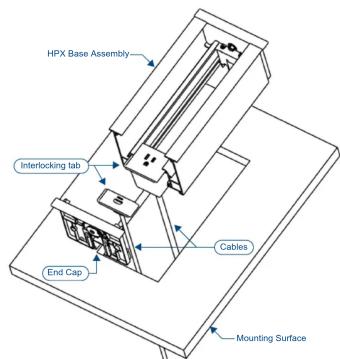
FIG. 5 Inserting the Modules into the Assembly