Kingstown 1075 - Ur Gant - Gratis brugsanvisning og manual
Find enhedens vejledning gratis Kingstown 1075 Gant i PDF-format.


Brugerspørgsmål om Kingstown 1075 Gant
0 spørgsmål om dette apparat. Besvar dem du kender, eller stil dit eget.
Stil et nyt spørgsmål om dette apparat
Download vejledningen til din Ur i PDF-format gratis! Find din vejledning Kingstown 1075 - Gant og tag din elektroniske enhed tilbage i hånden. På denne side er alle dokumenter nødvendige for brugen af din enhed offentliggjort. Kingstown 1075 af mærket Gant.
BRUGSANVISNING Kingstown 1075 Gant
GANT
TIME
KINGSTOWN
USER INSTRUCTIONS
SPECIFICATIONS
GANT ID NO: 1075
MOVEMENT NO: VX15
BATTERY: SR716SW
DISPLAY
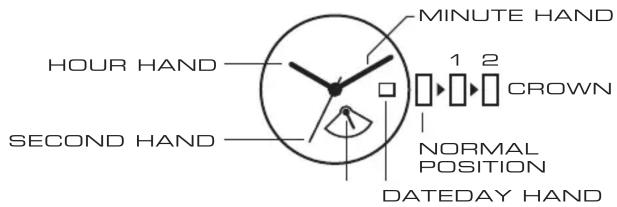
SETTING THE TIME
- Pull the crown out to position2 when the second hand is at the 12 o'clock position.
- Turn the crown to set hour and minute hands.*
* When setting the minute hand, advance it 4 to 5 minutes ahead of the desired time and then turn it back to the exact time. - When the crown is pushed back to the normal position, second hand begins to run.
SETTING THE DATE & DAY
- Pull the crown out to position1.
- Turn the crown counter-clockwise to set the date.*
- Turn the crown clockwise to set the day.*
- After the date and day has been set, push the crown back to the normal position.
* Do not set the day and date between 9:00 p.m. and 1:00 a.m. Otherwise, it may not turn properly. After the day hand reaches the last day of the week, turn the crown clockwise and the hand will return to the first day of the week.