Vermont 7040 - Ur Gant - Gratis brugsanvisning og manual
Find enhedens vejledning gratis Vermont 7040 Gant i PDF-format.


Brugerspørgsmål om Vermont 7040 Gant
0 spørgsmål om dette apparat. Besvar dem du kender, eller stil dit eget.
Stil et nyt spørgsmål om dette apparat
Download vejledningen til din Ur i PDF-format gratis! Find din vejledning Vermont 7040 - Gant og tag din elektroniske enhed tilbage i hånden. På denne side er alle dokumenter nødvendige for brugen af din enhed offentliggjort. Vermont 7040 af mærket Gant.
BRUGSANVISNING Vermont 7040 Gant
GANT
TIME
VERMONT
USER INSTRUCTIONS
SPECIFICATIONS
GANT ID NO: 7040
MOVEMENT NO: VD57
BATTERY: SR920SW
DISPLAYS AND BUTTONS
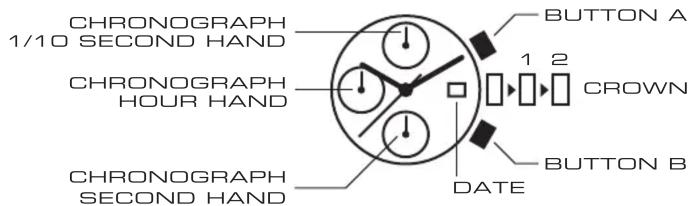
SETTING THE TIME
- Pull the crown out to position 2.
- Turn the crown to set hour and minute hands.
- When the crown is pushed back to the normal position, small second hand begins to run.
SETTING THE DATE
- Pull the crown out to position 1.
- Turn the crown clockwise to set the date.*
USING THE CHRONOGRAPH
This chronograph is able to measure and display time in 1/10 second units up to a maximum of 60 minutes.
MEASURING TIME WITH THE CHRONOGRAPH
- The chronograph can be started and stopped each time button A is pressed.
- Pressing button B while the chronograph hands are moving will stop the hands to display a split time while continuing to measure the time. Pressing button B again will release the hands.
- Pressing button B after stopping the chronograph hands using button A resets the chronograph hands to zero.
ADJUSTING THE CHRONOGRAPH HANDS
This procedure should be performed when the chronograph hands do not return to zero position after the chronograph has been reset, and including after the battery has been replaced.
- Pull the crown out to position2.
- Press button A to set the chronograph 1/10 second hand to the zero position. Press button B to set the chronograph second and minute hand to the zero position.
- Once the hands have been zeroed, return the crown to the normal position.