
RDF400 - Termostat SIEMENS - Gratis brugsanvisning og manual
Find enhedens vejledning gratis RDF400 SIEMENS i PDF-format.


Brugerspørgsmål om RDF400 SIEMENS
0 spørgsmål om dette apparat. Besvar dem du kender, eller stil dit eget.
Stil et nyt spørgsmål om dette apparat
Download vejledningen til din Termostat i PDF-format gratis! Find din vejledning RDF400 - SIEMENS og tag din elektroniske enhed tilbage i hånden. På denne side er alle dokumenter nødvendige for brugen af din enhed offentliggjort. RDF400 af mærket SIEMENS.
BRUGSANVISNING RDF400 SIEMENS
SIEMENS

Operating Instructions
RDF400...
RDF400... – the room thermostat that allows you to set the ideal room temperature.
The thermostat provides Comfort, Energy Saving, and Protection mode and can operate in Auto timer mode using 8 programmable time schedules.
The fan operates either in Auto mode or at a speed selected in Manual mode.
You can either take advantage of the thermostat's factory settings or adjust it as needed.

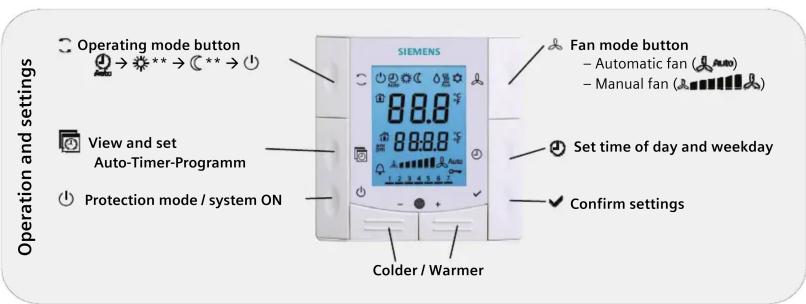
* Needs to be configured by your HVAC installer
** Needs to be enabled via parameter P02
Change room temperature
| +/- | Press + or - to increase or decrease the current room temperature setpoint for Comfort mode. The thermostat changes to Comfort ⚙.The setting range is 5...40 °C, unless limited by parameters P09 and P10. |
Adjust fan speed / fan mode
| Press the button until you reach the desired fan mode. | |
| In Auto mode, the thermostat automatically selects the fan speed based on set-point and actual room temperature. The fan continues to run at low speed (factory setting) after the room temperature reaches the setpoint . | |
| In manual mode, the fan always runs at the speed that you select:Low fan speedMedium fan speedHigh fan speed | |
| For a single-speed fan, you can change the mode between and |
Change thermostat operating
| Press operating mode button to change the operating mode display.In protection mode, the plant stops operating. However, if the room temperature drops below 8 °C, heating is switched on to protect the room against frost.Your HVAC installer can change the frost protection limit and set a heat protection limit as needed:Changes made by installer: √ Frost protection: ...... °CHeat protection: ...... °C | |
| In Comfort mode, the thermostat maintains the room temperature on the set-point which can be readjusted using the + and - buttons. | |
| In Energy Saving mode, the room temperature is maintained at a lower or higher setpoint, thus saving energy and money.Adjust parameters P11 and P12 to change the preselected setpoints.The thermostat can be set to Energy Saving mode either by pressing the operating mode button if enabled (P02 = 2), or via an external signal (switch) such as window contact, keycard or presence detector. | |
| In Auto timer mode, the thermostat automatically switches between Comfort and Energy Saving mode according to the time schedule. |
Change from heating to cooling mode
| Changeover between cooling and heating is either automatic using a heating / cooling changeover sensor or a remote changeover switch, or manual by pressing the operating mode button No changeover is possible if the thermostat is configured for cooling only or heating only, (see parameter P01). | |
| Display for automatic changeover or heating only / cooling only: Heating valve is open Cooling valve is open | |
| Display for manual changeover: Thermostat is in heating mode Thermostat is in cooling mode |
Setting time of day and weekday
| ∅+ -24h → 12 h | 1. Keep the 🔒 button pressed until the time digits start to flash.Press + or - to set the time of day.If the current time is in 24-hour format and you wish to change to the 12-hour format, press + passing 23:59 or press - passing 00:00.Back to 24-hour format: same procedure with 11.59 PM. |
| √ | 2. Confirm the time of day by pressing √ and the weekday indicator starts to flash. |
| +-√ | 3. Press + or - to set the current weekday. |
| 4. Confirm the current weekday by pressing √. |
Set time schedules
| To adjust the time schedule, keep the button pressed for 3 seconds to go to the timer setting mode. | |
| Ax | This mode is indicated by displaying Ax (x= auto timer 1...8) and the time flashing. For each timer, proceed as follows: |
| +- | The symbols are displayed. Press + or - to adjust the comfort mode start time and confirm by pressing √. |
| +- | The symbols are displayed. Press + or - to adjust the comfort mode end time / energy saving start time and confirm by pressing √. |
| 1 | Symbol , will flash. Press + or - to select or deselect each day and advance to the next day. |
| +- | Press √ to confirm the settings for the actual timer and advance to the next timer. The thermostat will leave the timer setting mode if no button is pressed within 20 seconds. All changes made after the last press of the button will not be saved. |
View the timer settings
| Press the button to sequentially review the 8 auto timers. |
Reload default timer settings
| 1. Set the thermostat to protection mode 1. + - I 2. Press + and - simultaneously for 3 seconds. Release and, within 2 seconds, press 2 times | |
| Default settings | Days Thermostat is in Comfort mode |
| Mo (1) - Fr (5) 6:30 - 8:30 (A1) 17:30 - 22:30 (A2) | |
| Sa (6) 8:00 - 23:00 (A3) | |
| Su (7) 8:00 - 22:30 (A4) | |
| - In the remaining time thermostat is in energy saving mode.- Timers A5...A8 are free, no default settings. | |
Button lock
| Press operating mode button for 5 seconds to lock or unlock the buttons if manual button lock is configured (parameter P14 = 2).The thermostat automatically locks the buttons 30 seconds after the last adjustment if "Auto lock" is configured (P14 = 1).The key symbol indicates locked buttons. |
Reminder to clean filters and for external faults
| FIL * | This message reminds you to clean your HVAC equipment filters.It is displayed after "fan operating hours" and disappears when the thermostat is set to Protection ( ○ ). |
* Needs to be configured by your HVAC installer
Note: Energy saving mode
| C | The energy saving setpoints are factory-set to 15 °C for heating and 30 °C for cooling.Use parameters P11 and P12 to adjust the values. |
| ⚠️ | Important: You can set these setpoints to OFF; the thermostat then is inactive, i.e. no protective heating or cooling function.→ Risk of frost! |
Commissioning
You can adjust a number of control parameters to adapt the thermostat to your system and optimize control performance. You can do this during operation via the buttons on the thermostat.
Control parameters
Proceed as follows to change the most important control parameters:
(Your HVAC installer can set additional parameters)
| +I- | 1. Press the – and + buttons simultaneously at least 3 seconds. Release, and within 2 seconds, press + again for 3 seconds. "P01" is displayed. |
| 2. Repeatedly press the + or – button to select the required parameter. | |
| 3. Press + and – simultaneously. The current value of the selected parameter begins to flash, allowing you to change the value by repeatedly pressing + or –. | |
| 4. The next parameter is displayed when you press + and – again simultaneously. | |
| 5. Repeat steps 2 to 4 to display and change additional parameters. | |
| 6. Press + or – until "End" is displayed, and then press + and – simultaneously to save the change and exit parameter entry mode. | |
| 10 seconds after the last display or setting, all changes are saved and the thermostat will leave parameter setting mode. |
| Para-meter | Description | Factory setting | Setting range | Adj |
| P01 | Control sequence | 2-pipe...: [0...3]1 (Cooling only)4-pipe:. [2...4]4 (Heating & cooling) | 0 = Heating only1 = Cooling only2 = Manual heating or cooling3 = Auto changeover4 = Heating & cooling | |
| P02 | Mode selection by user via operating mode button | 1 (Comfort, Protection) | 1 = Comfort, Protection2 = Comfort, Energy Saving, Protection | |
| P04 | Selection of °C or °F | °C | 0 = °C1 = °F | |
| P05 | Sensor calibration | 0.0 °C | -3 ... +3 °C | |
| P06 | Standard temperature display | 0 (Room temp.) | 0 = Room temperature1 = Setpoint | |
| P08 | Comfort basic setpoint | 21 °C | 5 ... 40 °C | |
| P09 | Minimum setpoint limitation in Comfort (Wmincomf) | 5 °C | 5 ... 40 °C | |
| P10 | Maximum setpoint limitation in Comfort (Wmaxcomf) | 35 °C | 5 ... 40 °C | |
| P11 | Setpoint of heating in Energy Saving (Whealeco) | 15 °C | OFF, 5 °C...Wcooleco | |
| P12 | Setpoint of cooling in Energy Saving (Wcooleco) | 30 °C | OFF, Wheateco...40°C | |
| P13 *** | Electrical heater in cooling mode | ON | OFF = disabledON = enabled | |
| P14 | Button lock(Press operating mode button for 7 seconds to lock or unlock the buttons) | 0 (Disabled) | 0 = Disabled1 = Auto lock2 = Manual lock |
*** Parameter P13 is only displayed for application "2-pipe with el heater".
All temperature settings in increments of 0.5 °C.
Please record all changes you make!
Mærke : SIEMENS
Model : RDF400
Kategori : Termostat