
RWC2.1R - Termostat SIEMENS - Gratis brugsanvisning og manual
Find enhedens vejledning gratis RWC2.1R SIEMENS i PDF-format.


Brugerspørgsmål om RWC2.1R SIEMENS
0 spørgsmål om dette apparat. Besvar dem du kender, eller stil dit eget.
Stil et nyt spørgsmål om dette apparat
Download vejledningen til din Termostat i PDF-format gratis! Find din vejledning RWC2.1R - SIEMENS og tag din elektroniske enhed tilbage i hånden. På denne side er alle dokumenter nødvendige for brugen af din enhed offentliggjort. RWC2.1R af mærket SIEMENS.
BRUGSANVISNING RWC2.1R SIEMENS
Do not throw away!
Room Temperature Controller RWC2.1r/2238 Instruction manual
The heating controller which you have chosen will ensure that you have comfortable warmth with uniform room temperature. During the night and when you are away, it automatically lowers the room temperature or switches off the heating completely, depending on the mode of operation which you have selected.
The unit has several adjusting elements, but do not let this confuse you. After the unit has been adjusted for the first time, you will not need to manipulate more than 2 of these switches. Before setting the unit for the first time, switch off the main switch for the heating, so that you will be able to try out all switching positions of the unit without the boiler having to switch on and off!
text_image
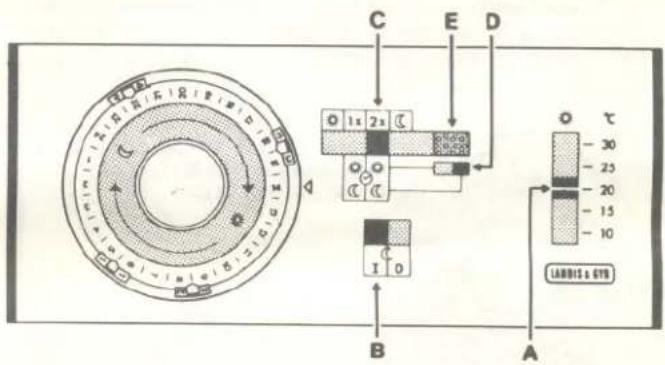
C E D 1x 2x C B A LADBE & GTN - 30 - 25 - 20 - 15 - 10Memorize the following well:

The sun symbol stands for all settings which provide a comfortable temperature; your heating system then operates in the comfort heating mode.

The moon symbol stands for the level of heating during the night and during your absence. This can be a low level heating or «heating off» mode. And now for the actual settings:
Slider A
text_image
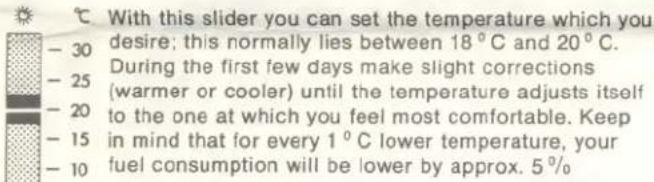
With this slider you can set the temperature which you desire; this normally lies between 18°C and 20°C. During the first few days make slight corrections (warmer or cooler) until the temperature adjusts itself to the one at which you feel most comfortable. Keep in mind that for every 1°C lower temperature, your fuel consumption will be lower by approx. 5%Comparing temperatures shown on the setting scale with those indicated on a commercially available room thermometer does not give valuating criteria because of technical and physical reasons. You should therefore be guided only by your own feeling of comfort.
Switch B
With this switch you can choose the way in which your heating system should react when you do not require the comfort of heating, that is, during the night and when you are away for several hours or several days.

In switch position «I», the heating system operates in the saving low level heating mode, which results in a (approx.) 4°C lower room temperature. This ensures that your apartment will not cool down too much during the night or during your absence, because about
^1/_2 to 1 hour after the comfort heating mode begins, the desired comfortable room temperature is again reached. Switch to “low level heating” only if there is danger of frost (or if a member of the household is ill).

In switch position «O» the heating is shut off completely during the night or during your absence; that is, "heating off". This mode (switch position «O») should be used in Autumn and Spring, because when the outside temperature is mild, the apartment will not cool
down excessively, even without heating, during the night or during an absence of several hours or even several days.
The time switch
The time switch, with a 24-hour scale disc, switches the comfort heating mode automatically on and off during a definite period. During the remaining time there is low level heating or the heating is shut off completely, depending on the position of switch B. The time at which comfort heating operation begins and ends can be selected with the «riders» on the time switch:
- the grey rider switches the comfort heating on, - the black rider switches it off again.
The procedure can take place once or twice during any 24-hour period. The «double programme» is used when there is no one at home during the working day, and it would be a waste to continue the comfort heating operation.
When making the adjustments you should keep in mind the fact that the heating system requires about a 12 hour to one hour to bring the room temperature back to its comfortable level after it has sunk to the night level (or the level reached during the time of your absence). For this, the comfort heating operation may end during the evening or even half an hour to one hour before you go to bed or before you leave the house for work, because when this comfort heating operation ends, the room temperature falls slowly, and not suddenly, especially if your house is well insulated and has double-glazed windows.
To adjust the rider, hold the round knob of the time switch firmly with one hand and with the index finger of the other hand lightly press the metallic arrow of the rider. This allows the rider to be shifted easily. As soon as you release your index finger the rider locks in again at each number, each scale graduation mark or also between a number and a graduation mark, i.e. in 14 -hour intervals. It is somewhat more difficult to shift the rider when it is near to the triangular time mark; in this case, turn the time disc scale a step further in the clockwise direction until the rider is out of this zone. Check once again that all riders are locked in their correct positions.
The clock setting is made only after all riders have been set at the desired times (= switching times). To set the clock, turn the 24-hour time scale disc in the clockwise direction until the correct time of day is exactly at the triangular time mark. No other operation is necessary.
Examples of adjustments

Setting the time switch for 1 daily programme
e.g. in the case where the wife or other family member is at home during the day
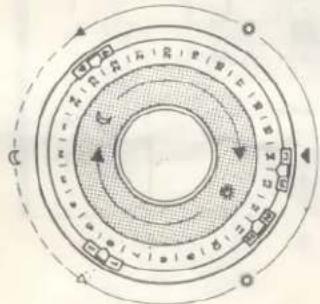
- Grey rider «I» set to 6: Comfort heating begins at 06.00 hrs, so that the apartment is comfortably warm by 07.00 hrs.
- Black rider «4» (!) set on the graduation mark between 22 and 23: Comfort heating ends at 22.30 hrs, after which there is low level heating or «no heating» (depending on how switch B has been switched). Riders «2» and «3» can be placed at any position!
text_image
Diagram of a circular mechanical or electrical component with labeled sections and directional arrows indicating rotation or movement.In order to switch on this programme, the heating programme selector switch C must be switched to "1x".
Setting the time switch for 2 daily programmes
e.g. for households where all members of the family are away from home during the day
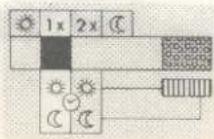
— Grey rider set on the graduation mark between 5 and 6:
Comfort heating begins at 05.30 hrs to allow for a comfortable breakfast at about 06.30 hrs.
- Black rider «2» set on the graduation mark between 8 and 9: Comfort heating ends at 08.00 hrs since shortly after 09.00 hrs all family members will leave the house.
- Grey rider «3» set on the graduation mark between 15 and 16: Comfort heating begins again at 15.30 hrs to allow the apartment to become comfortably warm by 16.30 hrs.
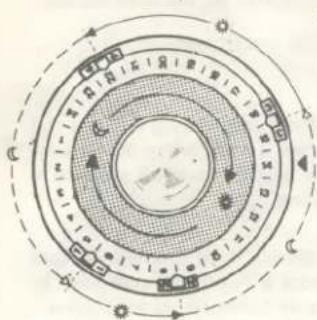
- Black rider «4» set at 22: Comfort heating ends at 22.00 hrs, since it is assumed that normally all family members would retire for the night at 22.00 hrs.
text_image
Diagram of a circular mechanical or electrical component with labeled components and directional arrows indicating motion or flow.in order to switch on this «double programme», the heating programme selector switch C must be switched to «2x».
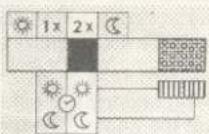
On work-free weekends, this switch must be switched over to «1x» so that there is comfortable warmth during these two days, i.e. according to this example, from 06.30 hrs to 22.00 hrs. It is then changed back to «2x» on Sunday evening.
Switch D
The position of this small switch indicates which mode of heating operation the time switch has actuated:
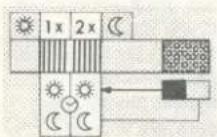
If the switch is to the left, i.e. it tends towards the sun symbol, the comfort heating operation is switched on, insolar as switch C is at «1x» or «2x».
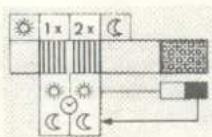
If the switch is to the right, i.e. if it tends towards the moon symbol, the comfort heating operation is switched off, and the position of switch B dictates the heating operation mode.
With switch D you could, however, also reverse the switching programme of the time switch: if, for example, you wish to stay up later at night and still have comfortable heating, and the time switch has already switched off the comfort heating operation, so that the switch D is at the right hand position, shift it — if necessary by pressing lightly — towards the «sun» symbol and the comfort heating will switch on again! In the same way, by reversing the direction, you can stop the comfort heating operation at any time, for example, if you suddenly decide to leave the house for several hours on a Sunday. If you once forget to reset this switch, it is not critical because the time switch will do this automatically during the next programme change. Turn the clock disc a few times and observe what happens; this will help you get accustomed to the programmes. But do not forget:
The type of programme indicated by switch D is only valid if the heating programme selector switch is on «1x» or «2x». If switch C is at position «sun» or «moon» however, the switching functions of the time switch and the switch D are invalidated. These switching positions are necessary for:
Special programmes
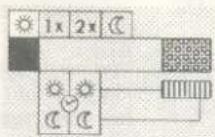
1. Uninterrupted comfort heating operation
For example, in cases of sickness or festivities which last until the early morning.
Position the switch C at the sun symbol. Do not change any other settings.
2. Continuous low level heating
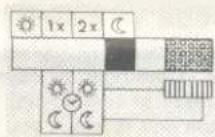
For example, in the case of several days of absence in winter (danger of frost!)
Shift switch C to the moon symbol and switch B to «I». Set the room temperature to about 12°C; this suffices as a protection against frost.

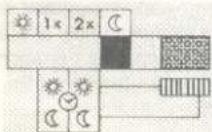
3. No heating
Shift the switch C to the moon symbol and the switch B to "O". In summer, also shift this slider A completely downwards.

Now select with switches B and C the heating programme which you will require in the near future, set the appropriate time at the triangular time marker (note: 24-hour round-the-clock time) and then switch on the heating system with the main switch.
Signal lamp E
The signal lamp remains lighted as long as the controller controls the room temperature, whether in comfort heating operation or in low level heating operation. If it does not light, either the heating is not switched on (switch B at «O») or there is no power supply. Check the fuse! After the fault has been corrected, immediately set the time switch correctly or your heating programme will lag behind the actual time.
If, on occasion, “something is the matter” with the room temperature, do not call your heating installer straight away, but rather check first whether fuel and power supply are available and then check all settings on the time switch and the controller! When doing this, do not forget the 24-hour time; the 6 on the clock is 06.00 hrs and not 18.00 hrs, etc.; old habits can cause errors to be repeated ... and the service man will have to be paid even if his visit was quite unnecessary!