
RDU50 - Termostat SIEMENS - Gratis brugsanvisning og manual
Find enhedens vejledning gratis RDU50 SIEMENS i PDF-format.


Brugerspørgsmål om RDU50 SIEMENS
0 spørgsmål om dette apparat. Besvar dem du kender, eller stil dit eget.
Stil et nyt spørgsmål om dette apparat
Download vejledningen til din Termostat i PDF-format gratis! Find din vejledning RDU50 - SIEMENS og tag din elektroniske enhed tilbage i hånden. På denne side er alle dokumenter nødvendige for brugen af din enhed offentliggjort. RDU50 af mærket SIEMENS.
BRUGSANVISNING RDU50 SIEMENS
SIEMENS

Operating Instructions RDU...
RDU... – the temperature controller that allows you to easily set the room temperature you want. You have 2 choices. You can either rely on the factory settings or make adjustments that suit your individual needs.
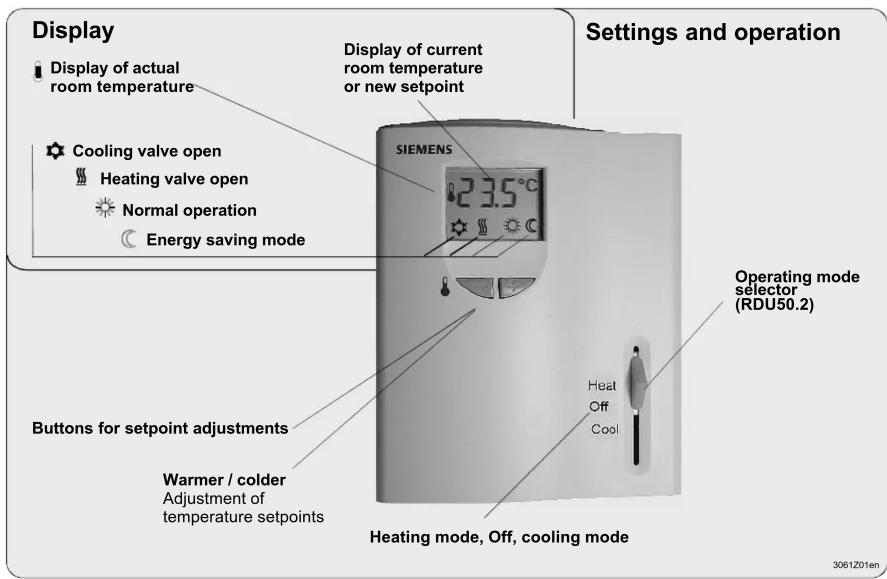
Are your rooms too warm or too cold?

Normal operation
The + / - buttons allow you to increase or decrease the current room temperature setpoint in steps of 0.5 °C. To do this, proceed as follows:
- Press - or once
→ The setpoint display starts flashing - Press the buttons again to change the room temperature setpoint
10 seconds after the last press, the new temperature setpoint will automatically be stored. The display stops flashing.
Changing from heating to cooling mode

Automatic changeover
With the RDU50.2, manual changeover modes selector
from heating mode. Off to cooling mode.
Off = out of operation

Display shows that the heating output is active
Display shows that the cooling output is active
Changing from normal operation to energy saving mode

Changeover from norm
takes place automatically via an external contact
(window switch / remote operation switch, etc.).
(Exception with type RDU50.2 in Off mode)

Display shows normal operation.
Display shows energy saving mode.
Energy saving mode

If you want to change the factory-set temperature setpoints (16 °C for heating and 28 °C for cooling), follow the procedure given below (“Changing the control parameters”).
Important:
The setpoint of energy saving mode can be set to Off.
This means that the controller is not active in energy saving mode and the parameter display shows Off.

Risk of frost!
Commissioning (by qualified HVAC staff)
| Parameter | Controller's parameter factory settings: | Setting range(all settings can be made in increments of 0.5 K) | RDU20 R | RDU50 RDU50.2 | |
| P01 | Setpoint of heating in energy saving mode (operating mode changeover switch activated) | 16 °C | 0: corresponds to Off (display Off) 5...18 °C | ||
| P02 | Setpoint of cooling in energy saving mode (operating mode changeover switch activated) | 28 °C | 0: corresponds to Off (display Off) 24...35 °C | ||
| P03 Minimum setpoint limitation in normal mode | 5 °C 5...20 °C | ||||
| P04 Maximum setpoint limitation in normal mode | 35 °C 21...35 °C | ||||
| P05 Heat-cool changeover switching point cooling | 16 °C 10...25 °C | ||||
| P06 Heat-cool changeover switching point heating | 28 °C 27...40 °C | ||||
| P07 Sensor calibration | 0 K | -3...+3 | |||
| P08 P-band in heating mode | 2 K | 0.5...+4 K | |||
| P09 P-band in cooling mode | 1 K | 0.5...+4 K | |||
| P10 Integral action time X | 5 min. 1... | 10 min. (increments of 1 min.) | |||
| X | |||||
| P11 Minimum output limitation in cooling mode (normal operation) | 0 % | 0...100 % (increments of 10 %) | X | ||
| P12 Active temperature sensor (no setting, display only) | - | 1: room temperature sensor active2: return air temperature sensor active | |||
| P13 Value of current room temperature reading (no setting, display only) | - | 0...49 °C = current temperature value | |||
| P14 Value of current heat-cool changeover temperature reading including indication of current mode (no setting, display only) | - | 100 = input open (no sensor connected, heating mode (###))0...49 °C = current temp. value00 = input bridged, cooling mode (###) | |||
| P15 Test mode for checking the actuator direction (note that this parameter can be quit only if the setting is back at “---” and by pressing buttons + and - simultaneously) | --- | “---” = no signal on outputs Y1 and Y2OPE = output Y1 forced openCLO = output Y2 forced open | X | ||
Changing the control parameters
(To optimize the control performance, a number of control parameters can be adjusted. This can also be made during operation without opening the controller.
Do you want to change the control parameters of the heating and / or cooling setpoints in the normal or energy saving mode? Or do you want to increase / decrease the switching differential in heating and cooling mode?
Then, proceed as follows:
(For factory settings, see above under "Commissioning")
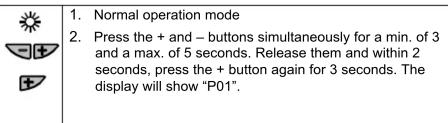


- Select the required parameter by repeatedly pressing the + or - button:

- Press the + and – buttons simultaneously, the current value of the selected parameter appears, which can be changed by repeatedly pressing the + or – button.
- By pressing buttons + and - simultaneously again or 5 seconds after the last press of a button, the last parameter will be displayed again.
- If you wish to display and change additional parameters, repeat steps 3 through 5.
- 10 seconds after the last display or setting, all changes will be stored.
If the room temperature displayed by the controller does not agree with the temperature effectively measured, the temperature sensor can be recalibrated. For that purpose, parameter P07 must be changed

Proceed as described under "Changing the control parameters" and follow steps 1 through 3 to select parameter P07.
With step 4, the room temperature displayed can now be matched to the temperature effectively measured. Each push of the + or - button changes the temperature by + or - 0.5°C up to a maximum of + / - 3°C . With step 7, the recalibration is automatically stored 10 seconds after the last readjustment.
Legend to table
| Adjustable:please record all changes you make | |
| Not adjustable / display only | |
| X | Not adjustable / no display |
Mærke : SIEMENS
Model : RDU50
Kategori : Termostat