
Versatis 150 - Telefon ALCATEL - Gratis brugsanvisning og manual
Find enhedens vejledning gratis Versatis 150 ALCATEL i PDF-format.


Brugerspørgsmål om Versatis 150 ALCATEL
0 spørgsmål om dette apparat. Besvar dem du kender, eller stil dit eget.
Stil et nyt spørgsmål om dette apparat
Download vejledningen til din Telefon i PDF-format gratis! Find din vejledning Versatis 150 - ALCATEL og tag din elektroniske enhed tilbage i hånden. På denne side er alle dokumenter nødvendige for brugen af din enhed offentliggjort. Versatis 150 af mærket ALCATEL.
BRUGSANVISNING Versatis 150 ALCATEL
ALCATEL
Versats €100 / Versats €100 Duo / Trio Versats €150 / Versats €150 Duo / Trio

USER'S GUIDE
Aflunks
ATLINK5 Europe, 22 quai Galleni 92150 Sunesnes – France Alcatel Logo and Alcatel name are trademarks of Alcatel and used under license by Atlink
Happishness
Unpacking your phone
In the box you will find: - the cordless handset (two handsets with a Twin system, and three with a Twin system)
Triple system 1. the base unit
• two rechargeable battery cells for each handset
- a battery compartment cover for each handset
- a telephone line cable for the base unit - a mains power lead and adapter for the
- charger pods, each with an attached mains power lead and adapter, for
multihandset system
Before you start to use your telephone make sure that all batteries are fully
charged for 15 hours.
Important note: This telephone is not designed for Emergency calls when the mains power fails
For Emergency calls you should have a basic phone that operates without
mains power; power failure
Phone Function Keys
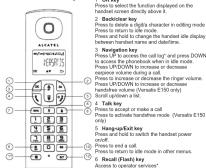
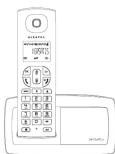
Star key Press to access the Retail list. Press and hold to lock/unlock keypad.
Press and hold to toggle between the external and internal calls when both are set up. 1D Hash key
Press and hold to insert a pause of Press and hold to turn the finger of
11 Mute key
Press to inside / unminate the handset inotropic 12: Call transfer/Intercom key
Press to initiate an internal call. Press to hold the line and page
Press and hold to initiate a conference call.
Base station
[Non-Text]
(1) 2017年1月1日
HANDSET LOCATOR BISCH Press to page handsets.
What's on the display?
A-
your selection. C Indicates that more options are available.
Use the UP / DOWN keys to scroll updown. D Displays when in menu mode.
Select BACK to return to the previous menu level. Select BACK to delete the last digit
What the icons mean?
Indicates battery is fully charged. Indicates battery is fully discharged
Indicates that an external call is connected or held. Icon blinks when receiving an incoming call.
∞ Indicates you have a new Voice Mail message
Indicates you have never missed calls*, or the call log is being viewed.
Displays when the phonebook is accessible. Displays when the alarm clock is activated.
Displays when hand-free is activated (Versatia E150 only).
Displays when ringer volume is turned off.
Indicates that the handset is registered and within range of the base station. Icon blinks when the handset is out of range or is searching for a base.
OK Displays when in menu mode to confirm your selection
▲▼ Indicates that more options are available. Use the UP / DOWN keys to scroll up/down
Displays when in menu mode. Select BACK to return to the previous menu level.
Read First Before Use
Choosing a site for the base unit and charger pod Many have a Broadband line.
If you have a broadband line. If you connect your telephone to a line with a broadband connection, you will need to insert a microfilter between the telephone and the telephone line, otherwise you may get interference between the telephone and the broadband, which could cause problems.
Battery safety - CAUTION
ONLY use the rechargeable batteries supplied with the handset. DO NOT use non-rechargeable batteries, then may operate and serve
DO NOT USE NOT RECHARGE DELINATE - THEY MAY EXPOSE AND CASA damage to your telephone.
7.1.2014年1月1日(星期二)下午1:30
Only use rechargeable badened with exactly the same specificator as those supplied with the product.
Using non-rechargeable or non-conforming batteries can damage the product and could pass a health hazard issue Chapter 9 Technical
product and could pose a heart hazard (see Chapter 5 - Technical Specifications).
Failure to comply with this recommendation will invalidate the manufacturer's
Warranty: Batteries can split or leak if incorrectly inserted, opened or exposed to heat.
Never dispose of batteries in a fire: they could explode.
The Ground Truth image displays a single, solid horizontal line. According to Rule 2 (UNDERSCORE & LINE RULES), if the GT contains lines used for stylistic emphasis or as background elements (like ruled paper), the OCR result must ignore them. The provided OCR content is "____", which consists of four underscores. This is incorrect because underscores are not equivalent to a solid line and are not permitted under the “Stylistic/Background Lines (Ignore)” rule. Outputting underscores for a stylistic line violates the rule and constitutes an error. Therefore, the OCR result is inconsistent with the Ground Truth.
[Non-Text]
[Non-Text]
Installation and Set-up
Precautions
The signal quality will depend on the location and environment of the base and handset. Position your Versatis E100 / Versatis E150 away from sources of excessive heat (radiators, direct sunlight, etc.) and protect it from vibrations and dust. Never allow your telephone to come into contact with water or other liquids or with aerosols. To reduce the risk of interference and optimize reception, take particular care not to install the base in the immediate vicinity of windows, large metal objects, reinforced concrete, televisions, music centres, VCR or DVD players, halogen lamps or heating devices, fluorescent lighting, burglar alarms, microwave ovens, compulens, etc.
This telephone requires an electrical power supply in order to function.
To clean your Versatis E100 / Versatis E150, use an anti-static cloth lightly moistened with water.
NB: Your Versatis E100 / Versatus E150 is a DECT ^™ standard appliance
designed to receive and transmit telephone calls. It is designed for
connection to the public telecommunications network
1) Install the AAA batteries (Brand name: CORUN
400mAh, or Brand name: SANIK, Capacity: Ni-MH 1.2V/400mAh) into ha
in accordance with the polarity marked in the battery compartment.
2) Close the battery compartment cover, sliding it into pace and pressing army to make sure it is secure.

Connecting AC (electrical) power
- Plug the base adaptor cord into the power jack on rear panel of the base
and the other end into a 100-240 Vac 50-60Hz electrical outlet. 2. Connect telephone line cord into the phone jack on rear panel of the base
-
Survival is applied to cure and the prime just in four parts of the class and the other end into a main socket.
-
In case of twin or triple system, plug the charger power adaptor cord into
the power jack on rear panel of charger and the other end into a 100-240
Vac 50-60Hz electrical outlet. Before you use the cordless headset for the first time, it's important to
Before you use the cordless handset for the first time, it's important to charge the batteries fully.
Leave the handset on the charging cradle for 15 hours.
CAUTION: Use only the power supply that came with this unit. Using other
power supplies may damage the unit.
Base and charger power adaptor : S0035/060150 100-24TV 16V 500mA ou iA5080 100-240V 16V/500mA
5003V069015 100-240V 16V 150mA ou IA5060 100-240V 16V 500mA
[Non-Text]
Your Telephone Operations
Switching on/off
Less and hold the HAND-Off/LEAM key for more than 2 seconds to switch on/off the handset in idle mode.
Notes: When the handset is OFF, it cannot be used for making calls including
emergency calls. There will be no ringing during an incoming call. To answer
a call, you will need to switch it back on. It may to re-establish a radio link with the base unit
To lock/unlock the keypad
Press and hold the STAR key for 1 second to lock/unlock the keypad
in idle mode. Note: browning calls now still be answered even if the loved use lasts
Note: Incoming calls can still be attempted when if the keypass class is valid.
Set time and date
Note: If you subscribe to the Caller Display service, the time and date will be
set automatically when you receive a call, but you may still need to set the correct year.
-
Press MENU key to enter menu selection
-
Press NAVIGATION key to select CLOCK&ALARM and then press OK key
to select.
- Press OK key to select DATE/TIME. The last stored date is displayed.
Enter the current bake (11-Mill
Change your handset's name
-
Press MENU key to enter menu selection.
-
Press NAVIGATION key to select PERSONAL SET and then press OK key to select.
-
Press NAVIGATION key to select HANDSET NAME :
key to select. The current handset name is displayed
- Press BACK/CLEAR key to delete the characters one by one.
Enter the new name (maximum 10 characters) and press OK key to confirm. A confirmation beep is played.
Change the display language
-
Press MENU key to enter my
-
Press NAVIGATION key to select PERSONAL SET and then press OK
key to select
- Press NAVIGATION key to select LANGUAGE and then press OK key
to select.
- Press NAVIGATION key to your desired language and press OK key to
confirm. A confirmation beep is prayed. Note: Once the display language is set
1458: Once the display language is seen, the openness of the language will switch to display in the selected language immediately.
SALON TO display in the following:
Make and answer calls
Make a callPredating TIDual the number (maximum 24 digits) and then press TALK key
Direct drilling
Press TALK key to take the line and then dial the number
(maximum 24 digits).
Call from redial list
Press REDIAL key in idle mode
Press NAVIGATION key to select an entry in the redial list and then
press TALK ke
Call from the call log
Press in idle mode.
press NAVIGATION key to select an entry in the call list and then opens TALK key.
pros HA26
Note: You need to subscribe to Caller Line Identification service to be able
to see the caller's number or name in the call log.
Call from the phonebook
Press ↓ in idle mode
Press NAVIGATION key to select an entry in the phonebook and the
press TALK key.
Answer and end a call 1. When the phone rings press TALK key. You can also use handsfree mode
Thank to a long press on TALK key (only on Versatis E150)
- To end a conversation, press HANG-UP!EXIT key.
IMPORTANT NOTE: You can simply place the handset back on its base
station or charger pod to end the call.
Use handsfree (only for Versatis E150)
Press and hold the TALK key at any moment to talk in handif
To deactivate the handstree mode, press again the TALK key
Adjust the earpiece volume
During a call, press NAVIGATION key to select from VOLUME 1 to VOLUME 3.
Mute/unmute microphone
When the microphone is muted, the handset displays MUTE ON, and your caller
cannot hear you.
Looking a call, press the MOE key to turn off on the microphone.
Paging
The paging feature enables you to locate a missing handset in the handset is
in range and contains charged baselines.
Press PARSO, P. LOCTOR A key located at the back of the table station. All the registered handsets start to ring
Once retrieved press any key on the handset of
LOCATOR key again to end the paging.
Call waiting
If you have subscribed to Gall Waiting service, the earpiece will emit a beep.
to be informed you that there is a second incoming call. The number or name
of the second caller will also be displayed on your phone if you have
subscribed to Caller Line Identification service (CLI). Please contact you
network provider for more information on this service
Using your phonebook
Your phone can store up
How to enter characters?
'When you select a field in which you can enter text, you can enter the letters
that are printed on the keys by pressing the relevant key once or several times
For example, press ☐ once to insert the letter 'A', press ☐ twice to insert
the letter B, and so on... Spaces and other symbols can be entered using 1
of D.
Store a contact in the phonebook
-
Press MENU key to enter menu selection
-
Press NAVIGATION key to select PHONEBOOK and then press OK key
to select,
-
Press OK key again to enter NEW ENTRY
-
Enter the name of the contact (maximum 12 characters).
To edit, print BACK/CLEAR key to delete the last character. Press OK how to confirm the name entry:
Press OK key to confirm the name entry. 5. Enter the number of the contact /maxim
- Enter the number of the domain (subdomain 24 days) and with please do key to confirm. A confirmation been is played
by, is certain. Reformization step is possible
[Non-Text]
Access phonebook
- Press in idle mode to browse the phonebook entries. Alternative
can press MENU key, to display PHONEBOOK and then press OK.
- Press NAVIGATION key to select LIST and then press OK key to confirm.
The phonebook entries will be listed in alphabetical order, and you can press
NAVIGATION key to scroll through the stored entries.
- Press OR key to view the details of the selected entry.
Note : Instead of pressing NAVIGATION key to browse the phonebook entries
you can press the numeric key corresponding to the first letter of the entry you.
wish to locate.
Modify a phonebook entry
-
Press MENU key to enter menu selection.
-
Press NAVIGATION key to select PHONEBOOK and then press OK key
to select.
- Press NAVIGATION key to select EDIT ENTRY and then press OK key
to select.
- Press NAVIGATION key to select an entry to edit and then press OK key. The current name is disclosed.
The current name is displayed. Exit the same and free areas
-
Edit the number and then press OK key to com
-
Let the number are then proof on key to commit. A continuation of best is played.
•
Delete a phonebook entry
-
Press MENU key to enter menu selection.
-
Press NAVIGATION key to select PHONEBOOK and then press OK key
to select.
-
Press NAVIGATION key to select DELETE and then press OK key to select.
-
Press NAVIGATION key to select an entry to delete and then press OK key.
-
Press OR key again to commit. A confirmation beep is played
Delete all entries from the phonebook list
-
Press MENU key to enter menu selection.
-
Press NAVIGATION key to select PHONEBOOK and then press OK key
to select.
- Pless Navigation key to select DELETE ALL and then press OK key
to select. 4. Pass OK key again to
- Press OR key again to commit: A confirmason deep is played
Direct access memory
There are 2 direct access memories (Keys 1 & 2) in addition to the phonebook.
memory. A long press on the keys in idle mode will automatically dial the
stored phone number
Add/edit direct access memory
-
Press MENU key to enter menu selection.
-
Press NAVIGATION key to select PHONEBOOK and then press OK key to
select.
- Press NAVIGATION key to select DIRECT MEM. and then press OR key to
select. 4. Passes N/VISITION key to select KEY 1 or KEY 2 and then press OK key
- Press NANOATION KEY to SELECT KEY 1 AND then The stored name is displayed, or NO NUMBER IF IT is empty.
If there is no number stored for the selected key or if you want to change the
name or number currently stored, press MENU key to enter direct memory
menu to add/edit the name or number.
- Press NAVIGATION key to select EDIT NUMBER and then press OK key
to select. The display shows the currently stored name, or ENTER NAME if
there is no number stored. Edit or enter the name you want and then press
OK key. The display shows the currently stored number, or ENTER NUMBER
if there is no number stored. Edit or enter the number you want and then press
OK key to confirm. A confirmation beep is playe
Delete direct access memory
-
Press MENU key to enter menu selection.
-
Press NAVIGATION key to select PHONEBOOK and then press OK key
to select.
- Press NAVIGATION key to select DIRECT MEM. and then press OR Key
to select,
-
Press NAVIGATION key to select KEY 1 or KEY 2 and then press O The stored name is disloaded (or NO NUMBER if it is already empty)
-
Press MENU key to enter direct memory menu
-
Press Navigation key to select DELETE and then press OK key to select
Press OK key again to confirm. A confirmation beep is played.
Under the best fit
Using the social list The social list stores
THE RECIPIAT STORES THE LAST 5 HOMBERS CHAPES.
Access redial
- Press REDIAL key in idle mode and press NAVIGATION key to browse the
redial list. The last number dated will appear first in the redial list.
- Press OR, key to view the details of the selected entry
Save a redial number into the phonebook
-
Press REDUAL key in idle mode to go to the
-
Press NAVIGATION key to select an entry.
-
Press MENU key to display SAVE NUMBER, then press OK key to display
ENTER NAME: Enter the name of the contact (maximum 12 characters) and
then press OK key to save the entry, and return the display to the postal list.
[Non-Text]
Select BACK to return to the previous menu level.
一
[Non-Text]
[Non-Text]
[Non-Text]
[Non-Text]
[Non-Text]
[Non-Text]
[Non-Text]
[Non-Text]
[Non-Text]
[Non-Text]
[Non-Text]
[Non-Text]
[Non-Text]
[Non-Text]
[Non-Text]
[Non-Text]
[Non-Text]
[Non-Text]
[Non-Text]
[Non-Text]
[Non-Text]
[Non-Text]
[Non-Text]
[Non-Text]
[Non-Text]
[Non-Text]
[Non-Text]
[Non-Text]
[Non-Text]
[Non-Text]
[Non-Text]
[Non-Text]
| Using the call log:1. If you may need to contact your telephone service provider, and they will inform you as any of any charges for it. Call Log ID lets you see the phone number of your callers on the handset display, before answering and confirming the call. If you can call your letters on the handset display, whether or not answer the call, so you can call them back later.Only the most recent call is scared if there are repeats calls from the same number of calls. The call log is also a more complete question about the call. Will you add to the next call. Will you add to the next call. Will you add to the next call. Will you add to the next call. Will you add to the next call. Will you add to the next call. Will you add to the next call. Will you add to the next call. Will you add to the next call. Will you add to the next call. Will you add to the next call. Will you add to the next call. Will you add to the next call. Willyou add to the next call. Will you add to the next call. Will you add to the next call. Will you add to the next call. Will you add to the next call. Will you add to the next call. Will you add to the next call. Will you add to the next call. Will you add to the next call. Will you add to the next call. Will you add to the next call. Will you add to the next call. Will you add to the second call. Will you add to the second call. Will you add to the second call. Will you add to the second call. Will you add to the second call. Will you add to the second call. Will you add to the second call. Will you add to the second call. Will you add to the second call. Will you add to the second call. Will you add to the second call. Will you add to the second call. Will you add to the second call. Willyou add to the second call. Will you add to the second call. Will you add to the second call. Will you add to the second call. Will you add to the second call. Will you add to the second call. Will you add to the second call. Will you add to the second call. Will you add to the second call. Will you add to the second call. Will you add to the second call. Will you add to the second call. Will you add to the Second call. Will you add to the Second call. Will you add to the Second call. Will you add to the Second call. Will you add to the Second call. Will you add to the Second call. Will you add to the Second call. Will you add to the Second call. Will you add to the Second call. Will you add to the Second call. Will you add to the Second call. Will you add to the Second call. Will you add to the Second call. Willyou add to the Second call. Will you add to the Second call. Will you add to the Second call. Will you add to the Second call. Will you add to the Second call. Will you add to the Second call. Will you add to the Second call. Will you add to the Second call. Will you add to the Second call. Will you add to the Second call. Will you add to the Second call. Will you add to the Second call. Will you add to the second call. Will you add to the second call. Will you add to the second call. Will you add to the second call. Will you add to the second call. Will you add to the second call. Will you add to the second call. Will you add to the second call. Will you add to the second call. Will you add to the second call. Will you add to the second call. Will you add to the second call. Will your add to the second call. Will you add to the second call. Will you add to the second call. Will you add to the second call. Will you add to the second call. Will you add to the second call. Will you add to the second call. Will you add to the second call. Will you add to the second call. Will you add to the second call. Will you add to the second call. Will you add to the second call. Will you add to the secondary call. Will you add to the secondary call. Will you add to the secondary call. Will you add to the secondary call. Will you add to the secondary call. Will you add to the secondary call. Will you add to the secondary call. Will you add to the secondary call. Will you add to the secondary call. Will you add to the secondary call. Will you add to the secondary call. Will you add to the secondary call. Will you add to the secondary call. Will your add to the secondary call. Will you add to the secondary call. Will you add to the secondary call. Will you add to the secondary call. Will you add to the secondary call. Will you add to the secondary call. Will you add to the secondary call. Will you add to the secondary call. Will you add to the secondary call. Will you add to the secondary call. Will you add to the secondary call. Will you add to the secondary call. Will you add to thesecondary call. Will you add to the secondary call. Will you add to the secondary call. Will you add to the secondary call. Will you add to the secondary call. Will you add to the secondary call. Will you add to the secondary call. Will you add to the secondary call. Will you add to the secondary call. Will you add to the secondary call. Will you add to the secondary call. Will you add to the secondary call. Will you add to the secondary call. Willyou add to the secondary call. Will you add to the secondary call. Will you add to the secondary call. Will you add to the secondary call. Will you add to the secondary call. Will you add to the secondary call. Will you add to the secondary call. Will you add to the secondary call. Will you add to the secondary call. Will you add to the secondary call. Will you add to the secondary call. Will you add to the secondary call. Will you add to the Secondary call. Will you add to the secondary call. Will you add to the secondary call. Will you add to the secondary call. Will you add to the secondary call. Will you add to the secondary call. Will you add to the secondary call. Will you add to the secondary call. Will you add to the secondary call. Will you add to the secondary call. Will you add to the secondary call. Will you add to the secondary call. Will you add to the secondary call. Will You add to the secondary call. Will you add to the secondary call. Will you add to the secondary call. Will you add to the secondary call. Will you add to the secondary call. Will you add to the secondary call. Will you add to the secondary call. Will you add to the secondary call. Will you add to the secondary call. Will you add to the secondary call. Will you add to the secondary call. Will you add to the secondary call. Will you add to theSecondary call. Will you add to the secondary call. Will you add to the secondary call. Will you add to the secondary call. Will you add to the secondary call. Will you add to the secondary call. Will you add to the secondary call. Will you add to the secondary call. Will you add to the secondary call. Will you add to the secondary call. Will you add to the secondary call. Will you add to the secondary call. Will you add to the secondary call. WillYou add to the secondary call. Will you add to the secondary call. Will you add to the secondary call. Will you add to the secondary call. Will you add to the secondary call. Will you add to the secondary call. Will you add to the secondary call. Will you add to the secondary call. Will you add to the secondary call. Will you add to the secondary call. Will you add to the secondary call. Will you add to the secondary call. Will you add to the auxiliary call. Will you add to the secondary call. Will you add to the secondary call. Will you add to the secondary call. Will you add to the secondary call. Will you add to the secondary call. Will you add to the secondary call. Will you add to the secondary call. Will you add to the secondary call. Will you add to the secondary call. Will you add to the secondary call. Will you add to the secondary call. Will you add to the secondary call. Will young an additional call. Will young an additional call. Will young an additional call. Will young an additional call. Will young an additional call. Will young an additional call. Will young an additional call. Will young an additional call. Will young an additional call. Will young an additional call. Will young an additional call. Will young an additional call. Will young an additional call. Will young an additional call. Will young an additional call. Will young an additional call. Will young an additional call. Will very an additional call. Will very an additional call. Will very an additional call. Will very an additional call. Will very an additional call. Will very an additional call. Will very an additional call. Will very an additional call. Will very an additional call. Will very an additional call. Will very an additional call. Will very an additional call. Will very an additional call. Will very an additional call. Will very an additional call. Will very an additional call. Will very an additional call, Will very an additional call. Will very an additional call. Will very an additional call. Will very an additional call. Will very an additional call. Will very an additional call. Will very an additional call. Will very an additional call. Will very an additional call. Will very an additional call. Will very an additional call. Will very an additional call. Will very an additional call. Will very an additional call. Will very an additional call. Will very an additional call. Will very anadditional call. Will very an additional call. Will very an additional call. Will very an additional call. Will very an additional call. Will very an additional call. Will very an additional call. Will very an additional call. Will very an additional call. Will very an additional call. Will very an additional call. Will very an additional call. Will very an additional call. Will very an additional call. Will very an additional call. Will very an additional call. Will very an additional call. Willvery an additional call. Will very an additional call. Will very an additional call. Will very an additional call. Will very an additional call. Will very an additional call. Will very an additional call. Will very an additional call. Will very an additional call. Will very an additional call. Will very an additional call. Will very an additional call. Will very an additional call. Will very an additional call. Will very an additional call. Will very an additional call. Will very an additional call. Will you add to the second call in the second call. Will you add to the second call in the second call. Will you add to the second call in the second call. Will you add to the second call in the second call. Will you add to the second call in the second call. Will you add to the second call in the second call. Will you add to the second call in the second call. Will you add to the second call in the second call. Will you add to the second call in the second call. Will your add to the secondary call. Will your add to the secondary call. Will your add to the secondary call. Will your add to the secondary call. Will your add to the secondary call. Will your add to the secondary call. Will your add to the secondary call. Will your add to the secondary call. Will your add to the secondary call. Will your add to the secondary call. Will your add to the secondary call. Will your add to the secondary call. Will your add to the secondary call. Will you add to the secondary call. Will your add to the secondary call. Will your add to the secondary call. Will your add to the secondary call. Will your add to the secondary call. Will your add to the secondary call. Will your add to the secondary call. Will your add to the secondary call. Will your add to the secondary call. Will your add to the secondary call. Will your add to the secondary call. Will your add to the secondary call. Will your add to thesecondary call. Will your add to the secondary call. Will your add to the secondary call. Will your add to the secondary call. Will your add to the secondary call. Will your add to the secondary call. Will your add to the secondary call. Will your add to the secondary call. Will your add to the secondary call. Will your add to the secondary call. Will your add to the secondary call. Will your add to the secondary call. Will your add to the secondary call. Will my add to the secondary call. Will my add to the secondary call. Will my add to the secondary call. Will my add to the secondary call. Will my add to the secondary call. Will my add to the secondary call. Will my add to the secondary call. Will my add to the secondary call. Will my add to the secondary call. Will my add to the secondary call. Will my add to the secondary call. Will my add to the secondary call. Will my add to thesecondary call. Will my add to the secondary call. Will my add to the secondary call. Will my add to the secondary call. Will my add to the secondary call. Will my add to the secondary call. Will my add to the secondary call. Will my add to the secondary call. Will my add to the secondary call. Will my add to the secondary call. Will my add to the secondary call. Will my add to the secondary call. Will my add to the secondary call. Will your add to the secondary call. Will your add to the secondary call. Will your add to the secondary call. Will your add to the secondary call. Will your add to the secondary call. Will your add to the secondary call. Will your add to the secondary call. Will your add to the secondary call. Will your add to the secondary call. Will your add to the secondary call. Will your add to the secondary call. Will your add to the Secondary call. Will your add to the secondary call. Will your add to the secondary call. Will your add to the secondary call. Will your add to the secondary call. Will your add to the secondary call. Will your add to the secondary call. Will your add to the secondary call. Will your add to the secondary call. Will your add to the secondary call. Will your add to the secondary call. Will your add to the secondary call. Will your add to the secondary call. Will你的 add to the secondary call. Will your add to the secondary call. Will your add to the secondary call. Will your add to the secondary call. Will your add to the secondary call. Will your add to the secondary call. Will your add to the secondary call. Will your add to the secondary call. Will your add to the secondary call. Will your add to the secondary call. Will your add to the secondary call. Will your add to the secondary call. Will your add to theSecondary call. Will your add to the secondary call. Will your add to the secondary call. Will your add to the secondary call. Will your add to the secondary call. Will your add to the secondary call. Will your add to the secondary call. Will your add to the secondary call. Will your add to the secondary call. Will your add to the secondary call. Will your add to the secondary call. Will your add to the secondary call. Will your add to the secondary call. Willyour add to the secondary call. Will your add to the secondary call. Will your add to the secondary call. Will your add to the secondary call. Will your add to the secondary call. Will your add to the secondary call. Will your add to the secondary call. Will your add to the secondary call. Will your add to the secondary call. Will your add to the secondary call. Will your add to the secondary call. Will your add to the secondary call. Will your add to the extraordinary call. Will your add to the extraordinary call. Will your add to the extraordinary call. Will your add to the extraordinary call. Will your add to the extraordinary call. Will your add to the extraordinary call. Will your add to the extraordinary call. Will your add to the extraordinary call. Will your add to the extraordinary call. Will your add to the extraordinary call. Will your add to the extraordinary call. Will your add to the extraordinary call. Will your add to the extraordinary call. Will you add to the extraordinary call. Will your add to the extraordinary call. Will your add to the extraordinary call. Will your add to the extraordinary call. Will your add to the extraordinary call. Will your add to the extraordinary call. Will your add to the extraordinary call. Will your add to the extraordinary call. Will your add to the extraordinary call. Will your add to the extraordinary call. Will your add to the extraordinary call. Will your add to the extraordinary call. Will your add to the exceptional call. Will your add to the extraordinary call. Will your add to the extraordinary call. Will your add to the extraordinary call. Will your add to the extraordinary call. Will your add to the extraordinary call. Will your add to the extraordinary call. Will your add to the extraordinary call. Will your add to the extraordinary call. Will your add to the extraordinary call. Will your add to the extraordinary call. Will your add to the extraordinary call. Will your add to the extraordinary call. Will你的 add to the extraordinary call. Will your add to the extraordinary call. Will your add to the extraordinary call. Will your add to the extraordinary call. Will your add to the extraordinary call. Will your add to the extraordinary call. Will your add to the extraordinary call. Will your add to the extraordinary call. Will your add to the extraordinary call. Will your add to the extraordinary call. Will your add to the extraordinary call. Will your add to the extraordinary call. Will your add to the ordinary call. Will your add to the ordinary call. Will your add to the ordinary call. Will your add to the ordinary call. Will your add to the ordinary call. Will your add to the ordinary call. Will your add to the ordinary call. Will your add to the ordinary call. Will your add to the ordinary call. Will your add to the ordinary call. Will your add to the ordinary call. Will your add to the ordinary call. Will your add to the ordinary call. Will you add to the extraordinary call. Will your add to the extraordinary call. Will your add to the extraordinary call. Will your add to the extraordinary call. Will your add to the extraordinary call. Will your add to the extraordinary call. Will your add to the extraordinary call. Will your add to the extraordinary call. Will your add to the extraordinary call. Will your add to the extraordinary call. Will your add to the extraordinary call. Will your add to the extraordinary call. Will you add to the ordinary call. Will your add to the ordinary call. Will your add to the ordinary call. Will your add to the ordinary call. Will your add to the ordinary call. Will your add to the ordinary call. Will your add to the ordinary call. Will your add to the ordinary call. Will your add to the ordinary call. Will your add to the ordinary call. Will your add to the ordinary call. Will your add to the ordinary call. Will your add to the extraordinary call. Will your add to the extraordinary call. Will your add to the extraordinary call. Will your add to the extraordinary call. Will your add to the extraordinary call. Will your add to the extraordinary call. Will your add to the extraordinary call. Will your add to the extraordinary call. Will your add to the extraordinary call. Will your add to the extraordinary call. Will your add to the extraordinary call. Will your add to the extraordinary call. Will yvll your add to the extraordinary call. Will your add to the extraordinary call. Will your add to the extraordinary call. Will your add to the extraordinary call. Will your add to the extraordinary call. Will your add to the extraordinary call. Will your add to the extraordinary call. Will your add to the extraordinary call. Will your add to the extraordinary call. Will your add to the extraordinary call. Will your add to the extraordinary call. Will your add to the extraordinary call. Will your add tothe extraordinary call. Will your add to the extraordinary call. Will your add to the extraordinary call. Will your add to the extraordinary call. Will your add to the extraordinary call. Will your add to the extraordinary call. Will your add to the extraordinary call. Will your add to the extraordinary call. Will your add to the extraordinary call. Will your add to the extraordinary call. Will your add to the extraordinary call. Will your add to the extraordinary call. Will your add to the extraordinary call. Wil your add to the extraordinary call. Will your add to the extraordinary call. Will your add to the extraordinary call. Will your add to the extraordinary call. Will your add to the extraordinary call. Will your add to the extraordinary call. Will your add to the extraordinary call. Will your add to the extraordinary call. Will your add to the extraordinary call. Will your add to the extraordinary call. Will your add to the extraordinary call. Will your add to the extraordinary call. Will your add to 10000 will you add to 10000 will you add to 10000 will you add to 10000 will you add to 10000 will you add to 10000 will you add to 10000 will you add to 10000 will you add to 10000 will you add to 10000 will you Add to the extraordinary call. Will your add to the extraordinary call. Will your add to the extraordinary call. Will your add to the extraordinary call. Will your add to the extraordinary call. Will your add to the extraordinary call. Will your add to the extraordinary call. Will your add to the extraordinary call. Will your add to the extraordinary call. Will your add to the extraordinary call. Will your add to the extraordinary call. Will your add to the extraordinary call. Will your add to the extraordinary cell. Will your add to the extraordinary cell. Will your add to the extraordinary cell. Will your add to the extraordinary cell. Will your add to the extraordinary cell. Will your add to the extraordinary cell. Will your add to the extraordinary cell. Will your add to the extraordinary cell. Will your add to the extraordinary cell. Will your add to the extraordinary cell. Will your add to the extraordinary cell. Will your add to the extraordinary cell. Will your add to the extraordinary cell. Will your + 10000 will you add to 10000 will you add to 10000 will you add to 10000 will you add to 10000 will you add to 10000 will you add to 10000 will you add to 10000 will you add to 10000 will you add to10000 will you add to 10000 will you add to 10000 will you add to 10000 will you add to 10000 will you add to 10000 will you add to 10000 will you add to 10000 will you add to 10000 will you add to 20000 will you add to 20000 will you add to 20000 will you add to 20000 will you add to 20000 will you add to 20000 will you add to 20000 will you add to 20000 will you add to 20000 will you add to 25000 will you add to 25000 will you add to 25000 will you add to 25000 will you add to 25000 will you add to 25000 will you add to 25000 will you add to 25000 will you add to 25000 will you add to 25,000 will you add to 25,000 will you add to 25,000 will you add to 25,000 will you add to 25,000 will you add to 25,000 will you add to 25,000 will you add to 25,000 will you add to 25,000<|txt_contd_src|> Will you add to 25,000 will you add to 25,000 will you add to 25,000 will you add to 25,000 will you add to 25,000 will you add to 25,000 will you add to 25,000 will you add to 25,000 will you add to25,000 will you add to 25,000 will you add to 25,000 will you add to 25,000 will you add to 25,000 will you add to 25,000 will you add to 25,000 will you add to 25,000 will you add to 25, 000 will you add to 25,000 will you add to 25,000 will you add to 25,000 will you add to 25,000 will you add to 25,000 will you add to 25,000 will you add to 25,000 will you add to 25,000 |
| Delete a Call Log entry |
| 1. Press 1 in idle mode go to the call list. |
| 2. Press NAVIGATION KEY to select an entry and then press MENU key. |
| 3. Press NAVIGATION KEY to select DELETE and then press OK key to select. |
| (Press OK key again to confirm. A confirmation beep is played.) |
| Delete all entries in the Call Log |
| 1. Press 1 in idle mode go to the call list. |
| 2. Press MENU key. |
| 3. Press NAVIGATION Key to select DELETE ALL and then press OK key to select. |
| (Press OK key again to confirm. A confirmation beep is played.) |
| Using the intercom |
| Intercom, call transfer and conference are only possible with at least 2 handset registered to the same base station. It allows you to make free internal calls, transfer external calls from one handset to another, and set up a 3-way conference with two handsets and an external call. If you to make a call while another handset is already on an external call, then return home for a few seconds before the display return to date. |
| Intercom, assistful handset. |
| Intercom: I rent key handsels. Press INT key is idle mode. |
| Intercom is established immediately if there are only 2 registered handsets. |
| If there are more than 2 registered handsets, the handset numbers which are available for intercor. and a "will be displayed. Press the specific handset number you wish to call, or press to ring all handsets, to start intercom. |
| Transfer an external call to another handset |
| Press the call, press INT key to put the external call on hold |
| The caller can no longer hear you). |
| Intercor is established immediately if there are only 2 registered handsets. |
| If there are more than 2 registered handsets, the handset numbers which are available for intercor. and a "will be displayed. Press the specific handset number you wish to call, or press to ring all handsets, to start intercom. |
| Press TALK key on the called handset to answer the internal call, where both internal callers can talk. Intercom is established. |
| Press HANG-UP/EXIT key on the first handset to transfer the external call to the called handset. The external call is transferred. |
| Note: If there is no answer from the called handset, press INT key to resume the external call. |
| Answer an external call during intercom |
| During intercom, a new call tone is omitted when there is an incoming external call. |
| Press TALK key to answer the external call and end the intercom. |
| Connection with the external call is established. |
| Note: To put the internal call on hold and answer the incoming external call, press INT key. |
| Switch between an internal and external call |
| *During the call, press | ke###to switch between an internal or external |
| call. |
| Establish a three-party conference call |
| The conference call features one external call to be shared with two |
| Handsets (in intercom). The three parties can share the conversation and no |
| additional network subscription is required. |
| sharing an external call, press INT key to put the external call on hold(the caller can no longer hear you) |
| (see text) that the image is too blurry. |
| If there are more than 2 registered handsets, the handset numbers which are available for intercom will be displayed. Press the specific handset number |
| you wish to call to start intercom. |
| Press TALK key on the called handset to answer the internal call, where |
| both internal callers can talk. Intercom is established. |
| eases and hold INT key for 2 seconds on the first handset to start the |
| (3) | Less than half 14% by 2 seconds on the first handset to scan the three-party conference. |
| CONFERENCE will be displayed on the screen once the conference |
| Car to Enlace. |
| Handset Tone |
| Set the ring volume |
| There are 5 finger volume options (DEF, LEVEL 1, LEVEL 2, LEVEL 3 and |
| More than 5 major teams/ options (or 1, LEVEL 1, LEVEL 2, LEVEL 3 and LEVEL 4). The default level is LEVEL 2. |
| 1. Press MENU key to enter menu select |
| 2. Press NAVIGATION key to select PERSONAL SET and then press OK |
| Key to select. |
| 3. Page NAVIGATION key in select HANDSET TONE and then assess OK. |
| 3. Press NAVIGATION key to select RANDSET TONE and then press OK key to select and show RING VOLUME. Press the OK key again to select |
| 4. Press NAVIGATION key to your desired volume level and then press OK. |
| key to confirm. A confirmation beep is played. |
| Set the ring melody |
| There are 10 ring melodies available on your handset. |
| 1. Press MENU key to enter menu selection. |
| 2. Press NAVIGATION key to select PERSONAL SET and then press OR key to select. |
| 3. Press NAVIGATION key to select HANDSET TONE and then press OK key |
| to select. |
| 4. Press NAVIGATION key to select RING TONES and then press OK to select |
| 5. Press NAVIGATION key to your desired melody and then press OK key to |
| 2.1.1.2.2.3.4.5.6.7.8.9.10.11.12.13.14.15.16.17.18.19.20.21.22.23.24.25.26.27.28.29.30.31.32.33.34.35.36.37.38.39.40.41.42.43.44.45.46.47.48.49.50.51.52.53.54.55.56.57.58.59.60.61.62.63.64.65.66.67.68.69.70.71.72.73.74.75.76.77.78.79.80.81.82.83.84.85.86.87.88.89.90.91.92.93.94.95.96.97.98.99.100. |
| S&P500 EQUITY RESEARCH S&Ps |
| Activate/deactivate key tone |
| A single tone is emitted when a key is pressed. You can enable or disable the |
| key tone. By default, the key tone is ON. |
| 1. Press MENU key to enter menu selection. |
| 2. Press NAVIGATION key to select PERSONAL SET and then press OK key. |
| 2) Press 12 Performance key to select Environmental Dept and other press on list to select. |
| 3. Press NAVIGATION key to select HANDSET TONE and then press OK key |
| to select. |
| 4. Press NAVIGATION key to select KEY BEEP and then press OK to select. |
| 5. Press NAVIGATION key to select ON or OFF and then press OK key to confirm. A confirmation beep is played. |
| Activate/deactivate auto hang-upThis function enables you to end a call automatically by simply placing the handset on the base station. By default, the Auto Hang up feature is ON. |
| 1. Press MENU key to enter menu selection. |
| 2. Press NAVIGATION key to select PERSONAL SET and then press OK key to select. |
| 3. Press NAVIGATION key to select AUTO HANG-UP and then press OK key to select. |
| 4. Press NAVIGATION key to select ON or OFF and then press OK key to confirm. A confirmation beep is played. |
| Set date/time format |
| You can set your preferred date/time format for your phone. The default format is DD/MM and 24 HOURS |
| TOMATO DE CHINAM |
| Set time format |
| 1. Press MENU key to enter menu selection. |
| 2. Press NAVIGATION key to select CLOCK&ALARM and then press OR key to select. |
| 3. Press NAVIGATION key to select SET FORMAT and then press OK key |
| to select. |
| 4. Press OK key to enter TIME FORMAT. The current setting is displayed. |
| 5. Press Navigation key to select 12 HOURS or 24 HOURS and then press OK key to confirm. A confirmation been is played |
| Product Category |
| Set date format |
| 1. Press MENU key to enter menu selection. |
| 2. Press Navigation key to select CLOCK&ALARM and then press OK key to select |
| 3. Press NAVIGATION key to select SET FORMAT and then press OK key to |
| select. |
| 4. Press NAVIGATION key to select DATE FORMAT and then press OK key |
| to select. The current setting is displayed. |
| 5. Press Navigation key to select D&MM or MM/DD and then press OK (see it) confirm a configuration based in plain |
| Key to commit: A |
| Set alarm |
| The handset has an alarm clock feature, and when the alarm is set, the 🔒 is |
| shown on the handset display. |
| When the alarm time is reached, the display flashes --ALARM-- and the alarm |
| Melody is played for 1 minute or until any handset key is pressed. |
| If theSIMM is set for OHI DAB.) and theSIMM will save again on the next day. |
| If the alarm is set for ON DAC1 and the alarm will sound again on the next day. |
| If the alarm was set for ON DACE, it will be turned off. |
| 1. Press MENU key to enter menu selection |
| 2. Press Navigation key to select CLOCK&ALARM and then press OK key |
| to select. |
| 3. Press NAVIGATION key to select ALARM and then press OK key to select. |
| 4. Press NAVIGATION key to select OFF, ON ONCE or ON DAILY and then |
| press OK key to confirm. |
| If you select ON ONCE or ON DAILY, enter the time (HH-MM) for the alarm |
| and press the UP/DOWN key to select AM or PM if the time is in 12 HOURS |
| Format. |
| S. P. (1) |
| 5. Press OK key to confirm. A confirmation beep is played. |
| Set alarm tone |
| 1. Press MENU key to enter menu selection. |
| 2. Press NAVIGATION key to select CLOCK&ALARM and then press OK key |
| to select. |
| 3. Press NAVIGATION key to select ALARM TONE and then press OK key to select |
| 4. Press NAVIGATION key to print MEL ODX 4, MEL ODX 2 or MEL ODX 3 |
| 4. Press INFORMATION key to select MELODY 1, MELODY 2 of ME |
| and then were PK key to confirm. A confirmation bean is invited. |
| and will press OR key to confirm. A confirmation sleep is played. |
| Advanced use of your telephone |
| Change Master PIN |
| The Master PIN was the first position of the second position. The first position is |
| Master PIN number is 0000. The maximum length of the Master PIN is 6 digits.Note: If you forget your PIN code, you can reset it to its default 0000 using a handset Reset (see section Reset Unit). |
| 1. Press MENU key to enter menu selection. |
| 2. Press NAVIGATION key to select ADVANCED SET and then press OK key to select. |
| 3. Press NAVIGATION key to select CHANGE PIN and then press OK key to select. |
| Enter the current Master PIN when prompted and then press OK key to confirmAs you enter the PIN it will be shown as asterisks (*) on the screen.(Enter the new PIN and then press OK key to confirm. A confirmation beep is played.) |
| Register your handset |
| IMPORTANT: When you purchase a telephone, all handsets are already registered to the base, so you do not need to register them. Handset will be required to use the handset to have you already registered the handset has become feasible. The handset described below is for Venetai E10 or Venetai E10. They may different if you want to register another handset model, in which case you should refer to its user guide. |
| Additional handsets must be registered to the base unit before you can access your handset to the handset. The Master PIN is required before you to register or unregister handsets by default, the Master PIN no 0000. |
| On the base station, please call you to the handset. The Master PIN is required before you to register or unregister handsets by default, the Master PIN no 0000. |
| Press NAVIGATION key to select ADVANCED SET and then press OK key to select. |
| 3. Press NAVIGATION key to select REGISTRATION and then press OK key to select. |
| Note: If no action is taken on the handset within 10 seconds, the registration procedure will be aborted. If (...) if happens, the first sleep is expected, the second step will be added to the handset. The handset will also indicate successful registration, and the handset will return to idle mode, with its handset number displayed. |
| Please note that the handset will be a certain period. NO BASE will be displayed with an error time to indicate failure regarding and the handset return to idle mode, and you will need to repeat the registration sequence. |
| Unregister your handset |
| 1. Pass MENU key to enter menu selection |
| 1. Press MELNO key to other hand selection. |
| 2. Pass NAVIGATION key to select ADVANCED SET and then press OK. |
| 2. Prior to current key to select ADVANCED ETF and complex trading strategy to select |
| 3. Press NAVIGATION key to select UNREGISTER and then press OK key |
| to select. |
| 4. Enter the Master PIN when prompted and then press OK key to confirm. |
| (the default master PIN is 0000) |
| 5. Press NAVIGATION key to select the handset number to unregister and |
| then press OK key to confirm. |
| A confirmation beep is played to indicate successful unregistration. |
| Note: If no action is taken on the handset within 15 seconds, the |
| unregistration procedure will be aborted and the handset returns to idle |
| mode. |
| You must use another hard tool to complete hard slots from the base. |
| You must use another handset to unregister handsets from the base. |
| Change recall time |
| You may need the R button to send a Recall signal (also called Flash or |
| Timed Break Recall) if you are connected to a PBX. You should normally |
| leave the Recall Time at its default setting of Short (100ms), as this is the |
| standard recall required in the telephone network, but it can be changed to |
| Medium (270ms) or Long (600ms) if your telephone is connected to a PBX |
| that requires a different recall time. |
| 1. Press MENU live to vote many solutions |
| 1. Press MEAD key to small third section |
| 2. Press NAVIGATION key to select ADVAN |
| 2. Please Navigation key to select ADVANCED SLY and then press OK key to select. |
| 3. Press NAVIGATION key to select RECALL TIME and then press OK key to select. |
| 4. Press NAVIGATION key to select SHORT, MEDIUM or LONG and then press OK key to confirm. A confirmation beep is played. |
| Reset unit |
| You can reset your phone to its default settings with this feature. |
| Note: Upon reset, all your personal settings, call log and redial list entries will be deleted and the phone will return to its default settings. However, your phonebook will remain unchanged after reset. |
| 1. Press MENU key to enter menu selection. |
| 2. Press NAVIGATION key to select ADVANCED SET and then press OK key to select. |
| 3. Press NAVIGATION key to select RESET and then press OK key to select. |
| 4. Press OK key again to confirm. A confirmation beep is played and the unit reset to default settings. |
| Stock price at 12/03/2019 |
| Technical details |
| Free field range up to 300 meters* | |
| Indoor range (Up to 50 meters)* | |
| - Haushed battery life (minutes) or 1 hour of hands | 7 hours (lacktime): |
| 100 hours (standby): | |
| Incorrection mode Yes | Yes |
| Three-way comfort (1 outside corresponding 2 terminal components) | Yes |
| Electrical connection /Base motor electrode / Charger | Basic: 80/93/90/90/60 or IA/90/60Charger: 80/93/90/90/60 or IA/90/60High: 100/240/0/0 - 50/80 toOriginal: 100/240/0/0 - 50/80 toDCD: 100/DCD (shorter) : (900m for IA/90/60)Distant: 100/DCD (shorter) with the telephoneSingle-phase AC, excluding T1 digitations defined by red and white 6000 standard. Current the network voltage is classified as a hazard for the criteria of this standard. |
| Telephone connection | Appliance designed for connection to a TVN3 class: precommunization network voltage analogsTelephone line as defined by the EN 6300 Standard. |
| Batteries | Coun: Sand : AAA – 12% - IVV with 900 MHz. |
| Coun: Sand : 12% - IVV with the telephone. Using any other type of battery presents a risk of infection. | |
| Used batteries must be disposed of in compliance with the power of non-technical protection regulations. | |
| Operating Temperature From 56.45°C | |
| ( ) |
| * Value may vary according to environment |
| ** Depending on initial battery charge. |
| T. S. H. A. B. C. D. E. F. G. H. I. J. K. L. M. N. O. P. Q. R. S. T. U. V. W. X. Y. Z. A. B. C. D. E. F. G. H. I. J. K. L. M. N. O. P. Q. R. S. T. U. V. W. X. Y. Z. A. B. C. D. E. F. G. H. I. J. K. L. M. N. O. P. Q. R. S. T. U. V. W. Y. Z. A. B. C. D. E. F. G. H. I. J. K. L. M. N. O. P. Q. R. S. T. U. V. W. X. Y. Z. A. B. C. D. E. F. G. H. I. J. K. L. M. N. O. P. Q. R. S. T. U.V. X. Y. Z. A. B. C. D. E. F. G. H. I. J. K. L. M. N. O. P. Q. R. S. T. U. V. W. X. Y. Z. A. B. C. D. E. F. G. H. I. J. K. L. M. N. O. P. Q. R. S. T.U. V. W. X. Y. Z. A. B. C. D. E. F. G. H. I. J. K. L. M. N. O. P. Q. R. S. T. U. V. W. X. Y. Z. A. B. C. D. E. F. G. H. I. J. K. L. M. N. O. P. Q. R.S. T. U. V. W. X. Y. Z. A. B. C. D. E. F. G. H. I. J. K. L. M. N. O. P. Q. R. S. T. U. V. W. X. Y. Z. A. B. C. D. E. F. G. H. I. J. K. L. M. N. O. P.Q. R. S. T. U. V. W. X. Y. Z. A. B. C. D. E. F. G. H. I. J. K. L. M. N. O. P. Q. R. S. T. U. V. W. X. Y. Z. A. B. C. D. E. F. G. H. I. J. K. L. M. N.O. P. Q. R. S. T. U. V. W. X. Y. Z. A. B. C. D. E. F. G. H. I. J. K. L. M. N. O. P. Q. R. S. T. U. V. W. X. Y. Z. A. B. C. D. E. F. G. H. I. J. K. L. N. O. P. Q. R. S. T. U. V. W. X. Y. Z. A. B. C. D. E. F. G. H. I. J. K. L. M. N. O. P. Q. R. S. T. U. V. W. X. Y. Z. A. B. C. D. E. F. G. H. I. J.K. L. M. N. O. P. Q. R. S. T. U. V. W. X. Y. Z. A. B. C. D. E. F. G. H. I. J. K. L. M. N. O. P. Q. R. S. T. U. V. W. X. Y. Z. A. B. C. D. E. F. G. H.10.1012 |
| Troubleshooting |
| If you have a new project, please be to be answered list of options. |
| If you have difficulty with your phone, please try the suggestions listed below. |
| As a general rule, To a problem occur, remove the batteries from all the |
| As a general rule, if a problem occurs, remove the bases from all the handsets in your installation for about 1 minute, then disconnect and reconnes |
| the power supply to the base and reinstall the handset batteries. |
| 2017 | 2016 | |
| Cost of sales | 3.4 | 3.5 |
| Gross margin | 1.9% | 1.8% |
| ALWAYS check first that: | You have followed all the steps listed in the user |
| manual to install and set up your telephone. | |
| All connectors are firmly inserted in their sockets. |
| Mains power to the base unit is switched on at the |
| socket. | |
| The handset's batteries are correctly and securely. |
| installed and are not run down. |
| Example 1 | |
| “ I command make an answer call” | If the battery's display is blank, it may have been checked. The battery is normally open and has a high level of power input switch to switch on. Check the battery's screen with the main power input amplifier in power input is switched on. Check the battery's screen with the main power input normal switch is switched off. “ Just not for charging the batteries.” |
| When the battery is normally open and it is also supplied with your telephone. Other telephone lines are normally open and it is normally closed. Check the battery level on top of the board. If it is normally open, it is normally closed. This is normally open. Only one handed on the base unit can be checked. If you need to switch for the battery, then will be a short line and then switch back on. This may require more than 50 hours. | |
| “ I command make a call” | If the broadcast display shows KEVS (Choudez) and the battery you need to use the phone. If you need to use the radio, then use the radio. Only one handed on the base unit can be checked. If you need to use the phone, then will be a short line and then switch back on. This may require more than 50 hours. |
| When I guesses on the keys, nothing happens? Make sure the batteries are filled out by your onboard. If you need to use the phone, you need your onboard on the cables to play. | |
| “ When I guesses is a number, I guesses is a number, I guesses is a number, I guesses is a number, I guesses is a number, I guesses is a number, I guesses is a number, I guesses is a number, I guesses is a number, I guesses is a number, I guesses is a number, I guesses is a number, I guesses is a number, I guesses is a number, I guesses is a number, I Guesses on the base unit can be checked. If you need to use the battery, then will be a short line and then switch back on. This may require more than 50 hours. | |
| “ When I guesses on the keys, please check the battery is normally open and it is normally open. I guesses is a number, I guesses is a number, I guesses is a number, I guesses is a number, I guesses is a number, I guesses is a number, I guesses is a number, I guesses is a number, I guesses is a number, I guesses is a number, I guesses is a number, I guesses is a number, I guesses is a number, I guesses is a number, I discuss you to use the battery, then I guesses is a number, I guesses is a number, I guesses is a number, I guesses is a number, I guesses is a number, I guesses is a number, I guesses is a number, I guesses is a number, I discuss you to use the battery, then I guesses is a number, I guesses is a number, I guesses is a number, I guesses is a number, I discuss you to use the battery, then I guesses is a number, I guesses is a number, I guesses is a number, I discuss you to use the battery, then I guesses is a number, I guesses is a number, I discuss you to use the battery, then I guesses is a number, I discuss you to use the battery, then I guesses is a number, I discuss you to use the battery, then I guesses is a number, I discuss you to use the battery, then I guesses is a number, I discuss you to use the battery, then I guesses is a number, I discuss you to use the battery, then I guesses is a number, I discuss you to use the battery, then I guessesis a number, I guesses is a number, I guesses is a number, I guesses is a number, I guesses is a number, I guesses is a number, I guesses is a number, I guesses is a number, I guesses is a number, I guesses is a number, I guesses is a number, I guesses is a number, I guesses is a number, I guesses is a number, I guesses is a Number, I guesses is a number, I guesses is a number, I guesses is a number, I guesses is a number, I guesses is a number, I guesses is a number, I guesses is a number, I guesses is a number, I guesses is a number, I guesses is a number, I guesses is a number, I guesses is a number, I guesses is a number, I guesses is a Number, II guesses is a number, I guesses is a number, I guesses is a number, I guesses is a number, I guesses is a number, I guesses is a number, I guesses is a number, I guesses is a number, I guesses is a number, I guesses is a number, I guesses is a number, I guesses is a Number, II guesses is a number, I guesses is a number, I guessies a number, I guesses is a number, I guesses is a number, I guesses is a number, I guesses is a number, I guesses is a number, I guesses is a number, I guesses is a number, I guesses is a number, I guesses is a Number, II guesses is a number, I guesses is a number, I guesses is a number, I guesses is a number, I guesses is a Number, II guesses is a number, I guesses is a number, I guesses is a Number, I guesses is a Number, I guesses is a Number, I guesses is a Number, I guesses is a Number, I guesses is a Number, I guesses is a Number, I guesses is a Number, I guesses is a Number, I guesses is a Number, I guesses is a Number, I guesses is a Number, I guesses is a Number, I guesses is a Number, I guesses is a Number, and I guesses is a number, I guesses is a number, I guesses is a number, I guesses is a number, I guesses is a number, I guesses is a number, I guesses is a number, I guesses is a number, I guesses is a number, I guesses is a number, I guesses is a Number, II guesses is a number, I guesses is a number, I guesses is a number, I graphes a number, I graphes is a number, I graphes is a number, I graphes is a number, I graphes is a number, I graphes is a number, I graphes is a number, I graphes is a number, I graphes is a number, I graphes is a Number, II graphes is a number, I graphes is a number, I graphes is a number, I graphes is a number, I graphes is a number, I graphes is a number, I graphes is a Number, II graphes is a number, I graphes is a number, I graphes is a number, I graphes is a number, I graphes is a Number, II graphes is a number, I graphes is a number, I graphes is a number, I graphes is a Number, I graphes is a number, I graphes is a Number, I graphes is a Number, I graphes is a Number, I graphes is a Number, I graphes is a Number, I graphes is a Number, I graphes is a Number, I graphes is a Number, I graphes is a Number, I graphes is a Number, I graphes is a Number, I graphes is a Number, I graphes is a Number, I graphes is a Number, I graphes is a Number, and I graphes is a number, I graphes is a number, I graphes is a number, I graphes is a number, I graphes is a number, I graphes is a number, I graphes is a number, I graphes is a number, I graphes is a number, I graphes is a Number, II graphes is a number, I graphes is a number, I graphes is a number, I graphes is a number, I graphes is a Number, I graphes is a number, I graphes is a Number, I graphes is a Number, I graphes is a Number, I graphes is a Number, I graphes is a Number, I graphes is a Number, I graphes is a Number, I graphes is a Number, I graphes is a Number, I graphues a number, I graphes is a number, I graphes is a number, I graphes is a number, I graphes is a number, I graphes is a number, I graphes is a number, I graphes is a number, I graphes is a number, I graphes is a Number, I graphes is a number, I graphes is a number, I graphes is a number, I graphes is a number, I graphes is a number, I graphes is a Number, I graphes is a number, I graphes is a number, I graphes is a number, I graphes is a Number, I graphes is a number, I graphes is a Number, I graphes is a Number, I graphes is a Number, I graphes is a Number, I graphes is a Number, I graphes is a Number, I graphes is a Number, I graphes is a Number, I graphes is a Number, and I graphes is a number, I graphes is a number, I graphes is a number, I graphes is a number, I graphes is a number. | |
| The store where you bought your telephone can also provide you with information and after-sales support. |
| SAFETY |
| In the event of an electrical hazard, the mains adopter sets as 230V power isolating device. It should be used to identify the main devices in the circuit. |
| therefore, as a precaution, be installed nose to the appliance and be adding accessories. To illustrate the device from the primary power source, the mains adapter must be removed from the 230V AC/80 Hz socket |
| If our maina adapter bars, it must an implacida by an terminal system. |
| If out connected to the voice power or if there is a voice power failure, telephones that use cordless |
| 100 million in total value of pension for1,000 to $1,500 power taxes; discontinued cash and dividend dividends will not work. |
| You are there a choice for make or receive calls in the event of an intergroup. |
| This is why we recommend that you also keep a conventional telephone – one that doesn't require a power |
| supply – as a loan-up. |
| I Do not use your telephone to notify a gas leak when standing in the vicinity of the leak. |
| It is recommended that you avoid using this device during electrical storms. |
| Do not attempt to open the batteries, as they contain-chemical substances. In the event of leakage |
| avoid contact with the skin, eyes, nose and mouth. In the event of contact, rise the affected part for above twenty minutes with or near water and seek upset medical attention. Clean the product with asterbest |
| Item | Description |
| 1 | Recovery releases with a ring filter and two large circular filters. Local and product with additional paper or a dry cloth and contact your reseller for replacement batteries. |
| 2 | 471 BOPS battery collectors that the following modules provide in the essential requirements and other |
| A) Here-to-theory obligations that the following scope conform to the essential requirements and other applicable provisions of European directive 1909/5/EC. |
| Versatia E160 / Versatia E158 Duo / The Versatia E150 / Versatia E158 Duo / Trio |
| CONFORMITY |
| The following rules of the following rules are: 190/SEC/ SEQ Radio frequency and telecommunication equipment and the mutual acceptance of continuity.The EUG press above. |
| FAIR |
| ENVIRONMENT |
| A person who met your own electronic appliance issue be collected separately and not mixed with the household weeks The European Union has implemented a specific, collection and recycling system for which production is necessary. |
| This appliance has been designed and manufactured with high quality materials and low quality materials that are used to maintain their use in order to contain parts that are necessary in order for the system to work properly; but which can become a health environment that is not considered or disposed of in this proper way. Consequently, please do not miss out for your inspiration appliance with the household weeks. |
| A person can use the owner of the appliance, you must deposit it at the appropriate local collected point or leave it with the vendor when buying a new appliance. |
| A person does not use the appliance, you may use the other products. |
| If the appliance is limited to you in such form, you please contact your service provider.Kan to preserve the environment, ALTRMS has acquired this appliance with switching power to the home, and will not use any other appliance to the level of electricity consumption, but also a more compact format than the conventional power supply. |
| The used batteries from your telephone (If the batteries) must be disposed of in compliance with current environmental protection regulations. Complys with your local electricity consumption rights. |
| Return your batteries to your reader or dispose of them at their approved recycling centre, and return your customers to your customers. |


Mærke : ALCATEL
Model : Versatis 150
Kategori : Telefon