AXBUCH-T36V - Ukategoriseret AXESS - Gratis brugsanvisning og manual
Find enhedens vejledning gratis AXBUCH-T36V AXESS i PDF-format.


Brugerspørgsmål om AXBUCH-T36V AXESS
0 spørgsmål om dette apparat. Besvar dem du kender, eller stil dit eget.
Stil et nyt spørgsmål om dette apparat
Download vejledningen til din Ukategoriseret i PDF-format gratis! Find din vejledning AXBUCH-T36V - AXESS og tag din elektroniske enhed tilbage i hånden. På denne side er alle dokumenter nødvendige for brugen af din enhed offentliggjort. AXBUCH-T36V af mærket AXESS.
BRUGSANVISNING AXBUCH-T36V AXESS
AXBUCH-T36V
Toyota Backup Camera Retain/Add-On 2013-2016
INTERFACE FEATURES
- Retains the factory backup camera to an aftermarket radio
- Allows an aftermarket camera to be added to the factory screen*
- Includes the AXCSD-6V 12-volt to 6-volt converter
* Display and navigation model radios only
INTERFACE COMPONENTS
- AXBUCH-T36V harness • AXCSD-6V 12-volt to 6-volt converter
APPLICATIONS
| SCION | Avalon | 2015-2016 | Rav-4 (after build date Nov. 2013) | 2014 | |
| FR-S | 2016 | Camry | 2014-2016 | ||
| iM | 2016 | Corolla | 2014-2016 | Sienna | 2015 |
| tC | 2016 | Highlander | 2014-2016 | Sequoia | 2014-2016 |
| Prius C 2015 | Tacoma | 2014-2016 | |||
| TOYOTA | Prius V 2015 | Tundra | 2014-2016 | ||
| 4-Runner | 2014-2016 | Rav-4 | 2015-2016 | Venza | 2015-2016 |
| 4-Runner (without NAV) | 2013 | ||||
TOOLS REQUIRED
- Cutting tool • Tape • Crimping tool
- Connectors (example: butt connectors, bell caps, etc.)
CAUTION! All accessories, switches, climate controls panels, and especially air bag indicator lights must be connected before cycling the ignition. Also, do not remove the factory radio with the key in the on position, or while the vehicle is running.
Connections to be made
The AXBUCH-T36V can be connected two different ways
To retain the factory backup camera to an aftermarket radio:
- Connect the Black wire to chassis ground and also to the Black wire of the AXCSD-6V.
- Connect the Yellow wire to the Blue/Red wire of the AXCSD-6V.
- Connect the reverse wire from the aftermarket radio, to the reverse signal in the vehicle, and also to the Blue/White wire of the AXCSD-6V.
- Connect the male Yellow RCA jack to the rear camera input of the aftermarket radio.
- Disregard the loose Green/Purple wire, it will not be used in this application.
To allow an aftermarket camera to be added to the OEM screen:
- Connect the Black wire to the ground wire of the aftermarket camera.
- Connect the power wire of the aftermarket camera to accessory power.
- Tape off and disregard the Yellow wire, it will not be used in this application.
- Connect the female Yellow RCA jack to the aftermarket camera.
- The AXCSD-6V 12-volt to 6-volt converter will not be used in this application.
The following (2) steps are only required if a wire is not present in the factory harness.
- If a wire is not present in pin-2 of the 28-pin connector of the factory radio, unplug the connector, then insert the metal pin of the loose Green/Purple wire into it. Connect the harness back into the radio.
- Connect the other end of the loose Green/Purple wire to the reverse wire of the vehicle.
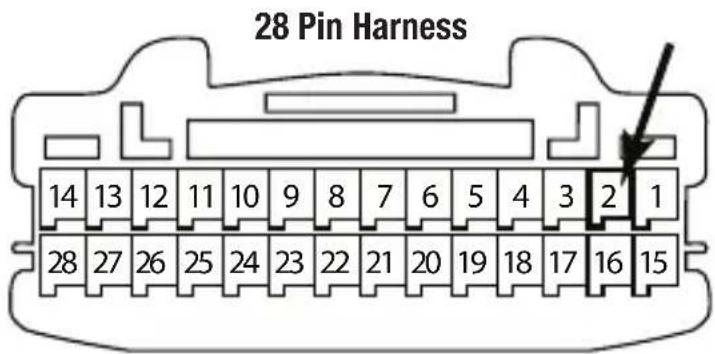
This is the wire view of the connector in the vehicle

KNOWLEDGE IS POWER
Enhance your installation and fabrication skills by enrolling in the most recognized and respected mobile electronics school in our industry. Log onto www.installerinstitute.com or call 800-354-6782 for more information and take steps toward a better tomorrow.

Metra recommends MECP certified technicians
AXXESS Axxess Integrate axxessinterfaces.com • metraonline.com
REV. 1/28/20
© COPYRIGHT 2020 METRA ELECTRONICS CORPORATION
AXBUCH-T36V Retener/Añadir cámara de reversa de Toyota 2013-2016
CARACTERÍSTICAS DE LA INTERFASE
- Retiene la cámara de reversa de fábrica para un radio de mercado secundario
- Permite que se añada una cámara de mercado secundario a la pantalla de fábrica*
- Incluye el AXCSD-6V de 12 voltios al convertidor de 6 voltios
* Sólo Pantalla y modelo de navegación radios
COMPONENTES DE LA INTERFASE
- Arnés AXBUCH-T36V • AXCSD-6V de 12 voltios al convertidor de 6 voltios
APLICACIONES
| SCION | Avalon | 2015-2016 | Rav-4 (después la fecha de construcción Nov 2013) | 2014 | |
| FR-S | 2016 | Camry | 2014-2016 | ||
| iM | 2016 | Corolla | 2014-2016 | Sienna | 2015 |
| tC | 2016 | Highlander | 2014-2016 | Sequoia | 2014-2016 |
| Prius C 2015 | Tacoma | 2014-2016 | |||
| TOYOTA | Prius V 2015 | Tundra | 2014-2016 | ||
| 4-Runner | 2014-2016 | Rav-4 | 2015-2016 | Venza | 2015-2016 |
| 4-Runner (sin NAV) | 2013 | ||||
HERRAMIENTAS REQUERIDAS
- Herramienta de corte • Cinta • Ponchadora
- Conectores (ejemplo: conectores de extremo, de campana, etc.)
¡PRECAUCIÓN! Todos los accesorios, interruptores, paneles de controles de clima y especialmente las luces del indicador de las bolsas de aire deben estar conectados antes ciclar la ignición. Además, no quite el radio de fábrica con la llave en la posición o de encendido ni con el vehículo funcionando.
Conexiones que se deben hacer
El AXBUCH-T36V puede conectarse de dos maneras distintas
Para retener la cámara de reversa de fábrica para un radio de mercado secundario:
- Conecte el cable negro a la tierra del chasís y también para el alambre negro del AXCSD-6V.
- Conecte el cable amarillo al cable azul/rojo del AXCSD-6V.
- Conectar el cable de marcha atrás de la radio no original, a la señal de marcha atrás en el vehículo, y también a la cable azul/blanco del AXCSD-6V.
- Conectar el conector RCA amarillo macho a la entrada de la cámara trasera de la radio no original.
- Ignore el cable suelto verde/púrpura, no se utilizará en esta aplicación
Para permitir que se añada una cámara de mercado secundario a la pantalla de equipo original:
- Conecte el cable negro al cable de tierra de la cámara de mercado secundario.
- Conecte el cable de alimentación de la cámara del mercado de accesorios de alimentación accesorio.
- Cinta de apagado y no tener en cuenta el cable amarillo, no se usa en esta solicitud.
- Conecte el conector RCA hembra amarillo a la cámara de mercado secundario.
- El AXCSD-6V 12 voltios al convertidor de 6 voltios no se utilizará en esta solicitud.
Los siguientes (2) pasos sólo son necesarios si el cable no está presente en el arnés de la fábrica.
- Si un cable no está presente en pin-2 del conector de 28 pines del radio de fábrica, desenchufe el conector, luego inserte el pasador metálico del cable verde/púrpura suelta en ella. Conecte el arnés de nuevo en la radio.
- Conecte el otro extremo del cable suelto verde/púrpura al cable inversa del vehículo.

EL CONOCIMIENTO ES PODER
Mejore sus habilidades de instalación y fabricación inscribiéndose en la escuela de dispositivos electrónicos móviles más reconocida y respetada de nuestra industria. Regístrese en www.installerinstitute.com o llame al 800-354-6782 para obtener más información y avance hacia un futuro mejor.
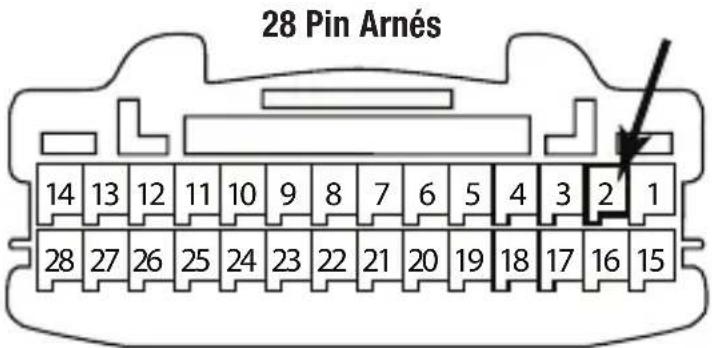
Esta es la vista de cable del conector en el vehículo

Metra recomienda técnicos con certificación del Programa de Certificación en Electrónica Móvil (Mobile Electronics Certification Program, MECP).
Axxess Axxess Integrate axxessinterfaces.com • metraonline.com
REV. 1/28/20
© COPYRIGHT 2020 METRA ELECTRONICS CORPORATION