
F210 - Mobiltelefon INFOCUS - Gratis brugsanvisning og manual
Find enhedens vejledning gratis F210 INFOCUS i PDF-format.


Pick your language and provide your email: we'll send you a specifically translated version.
Brugerspørgsmål om F210 INFOCUS
0 spørgsmål om dette apparat. Besvar dem du kender, eller stil dit eget.
Stil et nyt spørgsmål om dette apparat
Ingen spørgsmål endnu. Vær den første til at stille et.
Download vejledningen til din Mobiltelefon i PDF-format gratis! Find din vejledning F210 - INFOCUS og tag din elektroniske enhed tilbage i hånden. På denne side er alle dokumenter nødvendige for brugen af din enhed offentliggjort. F210 af mærket INFOCUS.
BRUGSANVISNING F210 INFOCUS
| InFocusF210User Manual | IntroductionI thank you for choosing InFocus F210 mobile phone:We strongly recommend you to carefully read and understand the Quick Start Guide before using your phone in order to keep it fund and test conditions for your effective usage and almost satisfaction.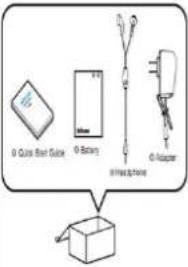 | Keys and parts Installing SIM Card(s)and Memory Card1. Please your phone face down on a flat surface.2. Locate the small gap on the lower left corner of the back cover, gently pull up to release the batteries and slowly removed the oven!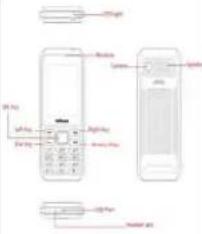 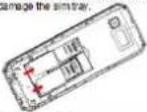 | 4. Installing memory cardTo release the memory card holder, gently put the locking clips of the memory card holders, and open it insert the memory card into the slot with good surface leasing down.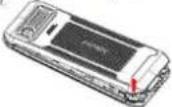 3. Remove the batteries Insert the SIM card(s) into the slot(s) as illustrated.NOTE:I am remove the SIM card push the SIM card firmly into the slot first to eject it, then pull it out.When using the card adapter on not use excessive force to remove the SIM card as this can 5 3. Remove the batteries Insert the SIM card(s) into the slot(s) as illustrated.NOTE:I am remove the SIM card push the SIM card firmly into the slot first to eject it, then pull it out.When using the card adapter on not use excessive force to remove the SIM card as this can 5 | 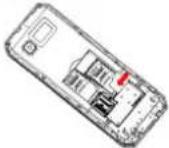 5. Replace the back cover and press along the edge until the batteries are fully sealed. 5. Replace the back cover and press along the edge until the batteries are fully sealed.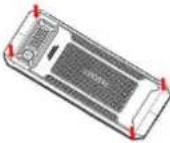 | Charging the BatteryBefore using the phone, it is recommended to fully charge the battery first.1. Connect the smaller and of the USB cable to the USB port of the device.2. Plug the AC adapter to a electrical outlet to start charging source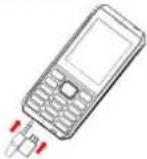 Warning• Charge only motions and in dry environments.• If photo is responsive after you press the power button press and hold the power button for 8 seconds to force shutdown,If you hold the power button for 2 seconds more,it will restart. Warning• Charge only motions and in dry environments.• If photo is responsive after you press the power button press and hold the power button for 8 seconds to force shutdown,If you hold the power button for 2 seconds more,it will restart. |
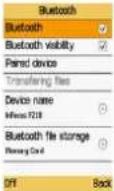
| Initial start upAfter installing the SIM cards) and charging the battery, the device is ready to be usedHome ScreenFrom the Home screen, you can quickly access common features and view notifications of missed calls, received messages, check battery and connection status (As picture 1)Call functionMake a call1. Enter the phone number on the keeppad.2. Press right soft key to correct any number select and handle out the entire number.3. Press Dia Key to Maine call if asked said which SIM to use (As pictures 2).4. To send the call, press End keyNOTE: If you have instantaneous SIM cards, select the desired SIM network. | 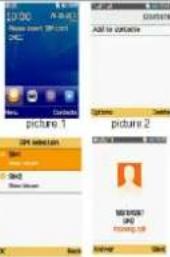 [IMAGE]picture 3 [IMAGE]picture 4[IMAGE]picture 5 [IMAGE]picture 3 [IMAGE]picture 4[IMAGE]picture 5 | To receive a callTo answer a call, select Dial key. (As pictures 8)ContactsAdding contactsInput telephone number (As picture 6).2. Select Option then select (As picture 7).3. Entert the contact information such as name, phone number etc.4. Select Save.NOTE:You can also from the Home screen, select main menu, enter the contact screen, press the full key and select "Create" panel to add new contact view contact and still contact etc.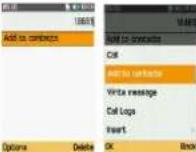 picture 8 [IMAGE]picture 9 picture 8 [IMAGE]picture 9 | Sent messages1. From the Home screen, select main menu (As picture 8).2. Select messages.3. Press the Write message (As picture 8).4. Select contact from phone phone track or enter the receiver phone number.4. Enter the message contact.5. Select Options then Select "Send" to send message successfully.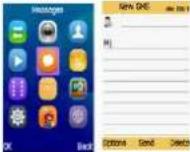 picture 8 [IMAGE]picture 9 picture 8 [IMAGE]picture 9 | Using BrowserTo open a split page1. From the Home screen, select Services.2. Select Internet.3. Select Search or input URL (As picture 16)[IMAGE] Using Bluetooth1. From the Home screen, select main menu.2. In tools, select Bluetooth and turn it to on (As picture 1).3. Select Paired device. Search new device, available devices are listed.4. Select a defective device.5. To start coming, enter the PIN then select OK.NOTE:The PIN of the device must be the same PIN on the other Bluetooth device.6. The portion bluetooth device name is displayed. Using Bluetooth1. From the Home screen, select main menu.2. In tools, select Bluetooth and turn it to on (As picture 1).3. Select Paired device. Search new device, available devices are listed.4. Select a defective device.5. To start coming, enter the PIN then select OK.NOTE:The PIN of the device must be the same PIN on the other Bluetooth device.6. The portion bluetooth device name is displayed. | |
 |  |  | Setting an alarm1. Front home screen select main menu.2. Go to Toute sub menu and select Alarm.3. Select Edit to adjust the alarm claims4. Select OK to turn ON this alarm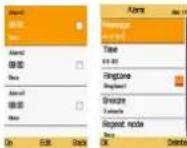 | • DO NOT pass the device on an unknown or unstable surface.• DO NOT insert any foreign objects into the device.• DO NOT expose the device to strong magnetic or electrical field.• DO NOT use or store this equipment in a place where it will be exposed to high temperatures, such as shear an open flame or heat-coming equipment.• DO NOT use it or store it where fluids such as water can splash onto IL (Reletrous, water spray, juice, coffee, steam, or other Spore of liquids will also contain instructions).• Using this device for long periods of time may cause the device to get warm, if you for the device is too warm, avoid sustained contact with exposed soon otherwise this might cause discomfort, or evenably a turn• Refer to the rating label on the device to be sure that the user adapter comulates with the rating. Only use accessories specified by the manufacturer.• Disconnect the device from an electrical load and power off before cleaning the device.• NEVER attempt to connect or disconnect the power adaptor with west hands.• Clear the touch screen with a soft cloth. If needed, dampen the don't slightly before cleaning. Never use abrasions or cleaning | Solutions• DO N certified• Please retailer product• For US  [SB6C]• Phone [SB6C]• Phone  [XKG][6CK3K]• Do not• The device [XHB][CBXD]• The device [XKG][6CK3K]• Do not• The device [XHB][CBXD]• The device   • The device [M2K5][WHX][KWK]• While the device is not a single device, where the video de [WBWK][CSXD]• Wherever [BHAY][KABO]down if • The device [M2K5][WHX][KWK]• While the device is not a single device, where the video de [WBWK][CSXD]• Wherever [BHAY][KABO]down if  |
| Taking Photos and VideosThis device is equipped with rear corners to take photos and videos.1. From main menu select camera.2. Aim the device as the subject (As picture 12).3. Select Olay key to take the shot. | | | Setting an alarm1. Front home screen select main menu.2. Go to Toute sub menu and select Alarm.3. Select Edit to adjust the alarm claims4. Select OK to turn ON this alarm | • DO NOT pass the device on an unknown or unstable surface.• DO NOT insert any foreign objects into the device.• DO NOT expose the device to strong magnetic or electrical field.• DO NO use or store this equipment in a place where it will be exposed to high temperatures, such as shear an open flame or heat-coming equipment.• DO NO use it or store it where fluids such as water can splash onto IL (Reletrous, water spray, juice, coffee, steam, or other Spore of liquids will also contain instructions).• Using this device for long periods of time may cause the device to get warm, if you for the device is too warm, avoid sustained contact with exposed soon otherwise this might cause discomfort, or evenably a turn• Refer to the rating label on the device to be sure that the user adapter comes with the rating. Only use accessories specified by the manufacturer.• Disconnect the device from an electrical load and power off before cleaning the device.• NEVER attempt to connect or disconnect the power adaptor with west hands.• Clear the touch screen with a soft cloth. If needed, dampen the don't slightly before cleaning. Never use abrasions or cleaning |   |
| Manufacturer's mobile handset booklet shall contain the following safety precautions:• Use a wireless hands free system (Headphone, Headset)with a low power Bluetooth meter.• Make sure the cell phone has a few SAR.• Keep your calls short or send a seed message (SMS) instead. This advice supplies especially to children, teenagers and pregnant women.• Use cell phones when the signal quality is good.• People having active medical implants should preferably keep the cell phone at least 15 cm away from the implant.Safety Precautions for Battery Use• Keep the battery dry and away from any liquid since this may cause a short circuit.• Keep the battery away from motor objects since this may cause a short circuit.• Do not use damage or deformations batteries• If the battery omits a foot odor, discontinuous use.• Keep the battery away from babies and small dinners.• If the battery leaks.• Do not allow the leaking fluid to come in | | | Setting an alarm1. Front home screen select main menu.2. Go to Toute sub menu and select Alarm.3. Select Edit to adjust the alarm claims4. Select OK to turn ON this alarm | • DO NOT pass the device on an unknown or unstable surface.• DO NOT insert any foreign objects into the device.• DO NOT expose the device to strong magnetic or electrical field.• DO TO use or store this equipment in a place where it will be exposed to high temperatures, such as shear an open flame or heat-coming equipment.• DO NOT use it or store it where fluids such as water can splash onto IL (Reletrous, water spray, juice, coffee, steam, or other Spore of liquids will also contain instructions).• Using this device for long periods of time may cause the device to get warm, if you for the device is too warm, avoid sustained contract with exposed soon otherwise this might cause discomfort, or evenably a turn• Refer to the rating label on the device to be sure that the user adapter comes with the rating. Only use accessories specified by the manufacturer.• Disconnect the device from an electrical load and power off before cleaning the device.• NEVER attempt to connect or disconnect the power adaptor with west hands.• Clear the touch screen with a soft cloth. If needed, dampen the don't slightly before cleaning. Never use abrasions or cleaning | • Do not wear a closed airbag, but I will be exposed to high temperature, such as shear an open flame or heat-coming equipment.• Do not use a closed airbag, but I will be exposed to high temperature, such as shear an open flame or heat-coming equipment.• Do not use a closed airbag, but I will be exposed to high temperature, such as shear an open flame or heat-coming equipment.• Do not use a closed airbag, but I will be exposed to high temperature, such as shear an open flame or heat-coming equipment.• Do not use a closed airbag, but I will be exposed to high temperatures.• Do not use a closed airbag, but I will be exposed to high temperatures.• Do not use a closed airbag, but I will be exposed to high temperatures.• Do not use a closed airbag, but I will be exposed to high temperatures.• Do not use a closed airbag, but I will be exposed to high temperatures.• Do not use a closed airbag, but I will be exposed to high temperatures.• Do not use a closed airbag, but I will be exposed in the device.• Do not use a closed airbag, but I will be exposed in the device.• Do not use a closed airbag, but I will be exposed in the device.• Do not use a closed airbag, but I will be exposed in the device.• Do not use a closed airbag, but I will be exposed in the device.• Do not use a closed airbag, but I will be exposed in the device.• Do not use a closed airbag, but I will be exposedin the device.• Do not use a closed airbag, but I will be exposed in the device.• Do not use a closed airbag, but I will be exposed in the device.• Do not use a closed airbag, but I will be exposed in the device.• Do not use a closed airbag, but I will be exposed in the device.• Do not use a closed airbag, but I will be exposed in the device.• Do not use a closed airbag, but I willbe exposed in the device.• Do not use a closed airbag, but I will be exposed in the device.• Do not use a closed airbag, but I will be exposed in the device.• Do not use a closed airbag, but I will be exposed in the device.• Do not use a closed airbag, but I will be exposed in the device.• Do not use a closed airbag, but I will be exposed in the device.• Do not use a closed airbag, butI will be exposed in the device.• Do not use a closed airbag, but I will be exposed in the device.• Do not use a closed airbag, but I will be exposed in the device.• Do not use a closed airbag, but I will be exposed in the device.• Do not use a closed airbag, but I will be exposed in the device.• Do not use a closed airbag, but I will be exposed in the device.• Do not use a closed airbag,but I will be exposed in the device.• Do not use a closed airbag, but I will be exposed in the device.• Do not use a closed airbag, but I will be exposed in the device.• Do not use a closed airbag, but I will be exposed in the device.• Do not use a closed airbag, but I will be exposed in the device.• Do not use a closed airbag, but I will be exposed in the device.• Do not use a closed air bag, but I will be exposed in the device.• Do not use a closed air bag, but I will be exposed in the device.• Do not use a closed air bag, but I will be exposed in the device.• Do not use a closed air bag, but I will be exposed in the device.• Do not use a closed air bag, but I will be exposed in the device.• Do not use a closed air bag, but I will be exposed in the device.• Do not use a solid airbag, but I will be exposed in the device.• Do not use a closed airbag, but I will be exposed in the device.• Do not use a closed airbag, but I will be exposed in the device.• Do not use a closed airbag, but I will be exposed in the device.• Do not use a closed airbag, but I will be exposed in the device.• Do not use a closed airbag, but I will be exposed in the device.• Do notuse a closed airbag, but I will be exposed in the device.• Do not use a closed airbag, but I will be exposed in the device.• Do not use a closed airbag, but I will be exposed in the device.• Do not use a closed airbag, but I will be exposed in the device.• Do not use a closed airbag, but I will be exposed in the device.• Do not use a closed airbag, but I will be exposed in the device.•Do not use a closed airbag, but I will be exposed in the device.• Do not use a closed airbag, but I will be exposed in the device.• Do not use a closed airbag, but I will be exposed in the device.• Do not use a closed airbag, but I will be exposed in the device.• Do not use a closed airbag, but I will be exposed in the device.• Do not use a closed airbag, but I will be exposed in the vehicle.• Do not use a closed airbag, but I will be exposed in the vehicle.• Do not use a closed airbag, but I will be exposed in the vehicle.• Do not use a closed airbag, but I will be exposed in the vehicle.• Do not use a closed airbag, but I will be exposed in the vehicle.• Do not use a closed airbag, but I will be exposed in the vehicle.• Do not use a closed airbag, but I will be exposedin the device.• Do not use a closed airbag, but I will be exposed in the vehicle.• Do not use a closed airbag, but I will be exposed in the vehicle.• Do not use a closed airbag, but I will be exposed in the vehicle.• Do not use a closed airbag, but I will be exposed in the vehicle.• Do not use a closed airbag, but I will be exposed in the vehicle.• Do not use a closed airbag, but I willbe exposed in the device.• Do not use a closed airbag, but I will be exposed in the vehicle.• Do not use a closed airbag, but I will be exposed in the vehicle.• Do not use a closed airbag, but I will be exposed in the vehicle.• Do not use a closed airbag, but I will be exposed in the vehicle.• Do not use a closed airbag, but I will be exposed in the vehicle.• Do not use a closed airbag, butI will be exposed in the vehicle.• Do not use a closed airbag, but I will be exposed in the vehicle.• Do not use a closed airbag, but I will be exposed in the vehicle.• Do not use a closed airbag, but I will be exposed in the vehicle.• Do not use a closed airbag, but I will be exposed in the vehicle.• Do not use a closed airbag, but I will be exposed in the vehicle.• Do not use a closed airbag,- but I will be exposed in the vehicle.• Do not use a closed airbag,- but I will be exposed in the vehicle.• Do not use a closed airbag,- but I will be exposed in the vehicle.• Do not use a closed airbag,- but I will be exposed in the vehicle.• Do not use a closed airbag,- but I will be exposed in the vehicle.• Do not use a closed airbag,-but I will be exposed in the vehicle.• Do not use a closed airbag,-but I will be exposed in the vehicle.• Do not use a closed airbag,-but I will be exposed in the vehicle.• Do not use a closed airbag,-but I will be exposed in the vehicle.• Do not use a closed airbag,-but I will be exposed in the vehicle.• Do not use a closed airbag,-but I will be exposed in the vehicle.• Do not use a closed air bag,-but I will be exposed in the vehicle.• Do not use a closed air bag,-but I will be exposed in the vehicle.• Do not use a closed air bag,-but I will be exposed in the vehicle.• Do not use a closed air bag,-but I will be exposed in the vehicle.• Do not use a closed air bag,-but I will be exposed in the vehicle.• Do not use a closed air bag,-but I will be exposed in the vehicle.• Do not use a clear airbag,-but I will be exposed in the vehicle.• Do not use a clear airbag,-but I will be exposed in the vehicle.• Do not use a clear airbag,-but I will be exposed in the vehicle.• Do not use a clear airbag,-but I will be exposed in the vehicle.• Do not use a clear airbag,-but I will be exposed in the vehicle.• Do not use a clear airbag,-but I will be exposed in the vehicle.• Do not use a closed airbag,-but I will be exposed in the vehicle.• Do not use a closed airbag,-but I will be exposed in the vehicle.• Do not use a closed airbag,-but I will be exposed in the vehicle.• Do not use a closed airbag,-but I will be exposed in the vehicle.• Do not use a closed airbag,-but I will be exposed in the vehicle.• Do notuse a closed airbag,-but I will be exposed in the vehicle.• Do not use a closed airbag,-but I will be exposed in the vehicle.• Do not use a closed airbag,-but I will be exposed in the vehicle.• Do not use a closed airbag,-but I will be exposed in the vehicle.• Do not use a closed airbag,-but I will be exposed in the vehicle.• Do not use a closed airbag,-but I will be exposed in the vehicle.•Do not use a closed airbag,-but I will be exposed in the vehicle.• Do not use a closed airbag,-but I will be exposed in the vehicle.• Do not use a closed airbag,-but I will be exposed in the vehicle.• Do not use a closed airbag,-but I will be exposed in the vehicle.• Do not use a closed airbag,-but I will be exposed in the vehicle.• Do not use a closed airbag,-but I will be exposed in the car.• Do not use a closed airbag,-but I will be exposed in the vehicle.• Do not use a closed airbag,-but I will be exposed in the vehicle.• Do not use a closed airbag,-but I will be exposed in the vehicle.• Do not use a closed airbag,-but I will be exposed in the vehicle.• Do not use a closed airbag,-but I will be exposed in the vehicle.• Do not use a closed airbag,-but I will be exposedin the device.• Do not use a closed airbag,-but I will be exposed in the vehicle.• Do not use a closed airbag,-but I will be exposed in the vehicle.• Do not use a closed airbag,-but I will be exposed in the vehicle.• Do not use a closed airbag,-but I will be exposed in the vehicle.• Do not use a closed airbag,-but I will be exposed in the vehicle.• Do not use a closed airbag,-but I will be exposed. |
Taking Photos and Videos
Manufacturer's mobile
handset booklet shall contain the following safety.
precautions:
Safety Precautions for Battery
Use
According to the Local Regulation. Road and Environments
Road and Environmental Safety
Safety in Aircraft
Copyright Information
SAR Information
WEEE Notice
RoHS Compliance
amendments
Warranty Statement
Limited warranty
Non-Warranty
| (S) Deterioration of the product due to normal wear and tear. Products installed or integrated with software or applications which are not made or authorized by InFocus. Be sure to back up data and remove any confidential, proprietary or personal information from the product when asking service. InFocus is not responsible for the damage to or loss of any programs, data, or removable storage media inside or sent with the products. As to Non-warranty product, Infocus will check if a report is economical/available and provides a chargeable service to customer's consideration.IN NO EVENT SHALL. Infocus BE LIABLE UNDER THIS LIMITED WARRANTY FOR LOSS OF PROFIT, LOSS OF ANTICIPATED SAVINGS, LOSS OF DATA OR INDIRECT LOSS, LOSS OF THE PRODUCT OR ANY ASSOCIATED EQUIPMENT, INCIDENTAL OR CONSEQUENTIAL LOSSES OR DAMAGES OF ANY NATURE WHATSOEVER TO THE FULLEST EXTENT THAT THOSE LOSSES OR DAMAGES CAN BE DISCLAIMED BY LAW. |



Indholdsfortegnelse
Klik på en titel for at få adgang til den
- Taking Photos and Videos
- Manufacturer's mobile
- handset booklet shall contain the following safety.
- precautions:
- Safety Precautions for Battery
- Use
- According to the Local Regulation. Road and Environments
- Road and Environmental Safety
- Safety in Aircraft
- Copyright Information
- SAR Information
- WEEE Notice
- RoHS Compliance
- amendments
- Warranty Statement
- Limited warranty
- Non-Warranty
Vejledningsassistent
Drevet af Anthropic
Venter på din besked
Produktinformation
Mærke : INFOCUS
Model : F210
Kategori : Mobiltelefon