DXL-RX-4K60 - Extension AV AMX - Gratis brugsanvisning og manual
Find enhedens vejledning gratis DXL-RX-4K60 AMX i PDF-format.


Brugerspørgsmål om DXL-RX-4K60 AMX
0 spørgsmål om dette apparat. Besvar dem du kender, eller stil dit eget.
Stil et nyt spørgsmål om dette apparat
Download vejledningen til din Extension AV i PDF-format gratis! Find din vejledning DXL-RX-4K60 - AMX og tag din elektroniske enhed tilbage i hånden. På denne side er alle dokumenter nødvendige for brugen af din enhed offentliggjort. DXL-RX-4K60 af mærket AMX.
BRUGSANVISNING DXL-RX-4K60 AMX
Overview
This guide applies to DXL-RX-4K60 DXLite 4K60 4:4:4 Receivers (FG1010-505). The purpose of this document is to illustrate how to set up a device in its simplest configuration by a trained technician.

FIG. 1 DXL-RX-4K60 (FRONT PANEL)
What's in the Box?
The following items are included with the DXL-RX-4K60:
• (1) IEC Power Cord
• (1) Desktop Power Supply
• (4) rubber feet
Power
The DXLite Receiver can receive power through one of the following means:
- Via Power over DXLink from an Incite Presentation System, DVX Presentation Switcher, DGX Media Switcher, or dual-power injector.
• Via an external 12VDC power supply.
Environmental Requirements
The environmental requirements for the DXL-RX-4K60 are as follows:
- Operating Temperature: 32^ F (0°C) to 104^ F (40°C)
• Storage Temperature: 4^ F (-15°C) to 140^ F (60°C)
• Operating Humidity: 5% to 85% RH
Configuration
All items in this section require accessing the rear panel of the DXL-RX-4K60. The DXLite 4K Receiver is designed to work with AMX Incite Digital Video Presentation Switchers. The DXLite Receiver receives audio, video, power, and control from the DXLite (RJ-45) output on the Incite Switcher and connects to the output display, projector, or other output device via HDMI.
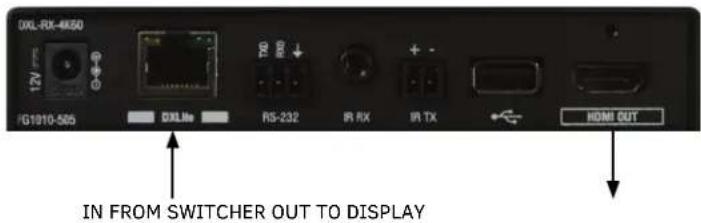
FIG. 1 DXL-RX-4K60 (REAR PANEL)
Receiver Mounting Options (Rack Trays and Mounting Brackets)
For details on the four versatile mounting kit options for V Style modules (rack tray, rack tray with fill plates, surface mount, and pole mount), see www.amx.com.
IMPORTANT: When mounting under a surface, the module should be mounted upright and lowered in the mounting bracket slots to provide an airflow gap between the surface and the vent holes. If not using V Style brackets, be sure to leave a gap between the top of the unit and the surface for heat to escape.
Additional Documentation
Additional documentation for this device is available at www.amx.com. Refer to the DXLite 4K Digital Receiver Instruction Manual for additional details on installing and wiring your device.


© 2018 Harman. All rights reserved. AMX, AV FOR AN IT WORLD, and HARMAN, and their respective logos are registered trademarks of HARMAN. Oracle, Java and any other company or brand name referenced may be trademarks/registered trademarks of their respective companies. AMX does not assume responsibility for errors or omissions. AMX also reserves the right to alter specifications without prior notice at any time. The AMX Warranty and Return Policy and related documents can be viewed/downloaded at www.amx.com.
3000 RESEARCH DRIVE, RICHARDSON, TX 75082 AMX.com | 800.222.0193 | 469.624.8000 | +1.469.624.7400 | fax 469.624.7153 AMX (UK) LTD. AMX by HARMAN - Unit C, Auster Road, Clifton Moor, York. YO30 4GD United Kingdom • +44 1904-343-100 • www.amx.com/eu/