RD-850 - Kassettspelare ROTEL - Gratis bruksanvisning och manual
Hitta enhetens manual gratis RD-850 ROTEL i PDF-format.


Användarfrågor om RD-850 ROTEL
0 fråga om denna apparat. Svara på dem du kan eller ställ din egen.
Ställ en ny fråga om denna apparat
Ladda ner instruktionerna för din Kassettspelare i PDF-format gratis! Hitta din manual RD-850 - ROTEL och ta tillbaka ditt elektroniska enhet i hand. På denna sida publiceras alla dokument som behövs för att använda din enhet. RD-850 av märket ROTEL.
BRUKSANVISNING RD-850 ROTEL
owner's manual
text_image
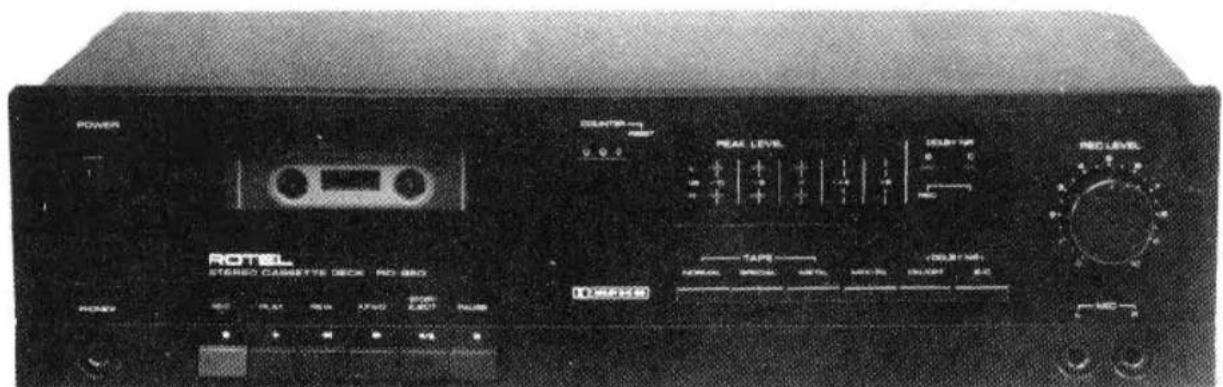
POWER ROTEL STEREO CASSETTE DECK RD-880 10 MHz DUNION 0.0 PEAK LEVEL 100kV 50Hz TAPK 100kHz 50Hz RIO 100MHz 100kHz 100kHz 100kHz 100kHz 100kHz 100kHz 100kHz 100kHz 100kHz 100kHz 100kHz 100kHz 100kHz 100kHz 100kHz 100kHz 100kHz 100kHz 100kHz 100kHz 100MHz 100MHz 100MHz 100MHz 100MHz 100MHz 100MHz 100MHz 100MHz 100MHz 100MHz 100MHz 100MHz 100MHz 100MHz 100MHz 100MHz 100MHz 100MHz 100MHz 100kHzPHOTO: RD-850
Quality Uncompromised
ROTEL®
RD-85O _s
STEREO CASSETTE TAPE DECK
ENGLISH 1
DEUTSCH....4
FRANÇAIS....7
WARNING
TO PREVENT FIRE OR SHOCK HAZARD, DO NOT EXPOSE THIS APPLIANCE TO RAIN OR MOISTURE
Write your SERIAL NUMBER here.
The number is located near the name plate on the rear panel.
INTRODUCTION
We at Rotel want to thank you for purchasing our audio product.
Rotel audio products are designed to use the latest electronic technology, and they incorporate our long experience as a specialist manufacturer of audio equipment. We are confident that you will find satisfaction in the high quality sound and top performance, and that you will find pleasure in the functional beauty achieved through human-engineering concept. Before starting operation, please read this instruction manual thoroughly and acquaint yourself with the proper mode of using the unit and all its connections.
We hope you will enjoy top-notch performance for many years to come.
INSTALLATION
Be sure to place the unit in a level and flat place where it is free from humidity, vibration, high temperature and not exposed to direct sunlight. Be careful not to place the unit in a highly enclosed place such as near a wall or on a bookshelf. A poor ventilation will cause undesirable effects to the unit.
POWER SUPPLY CONNECTION
For power the unit requires the normal house electrical current (AC). You may simply plug the unit into a wall outlet, or into your amplifier's (or receiver's) convenience AC outlet.
CAUTION: Do not apply power without first making sure the proper connections are completed. If you live in U.K. and your unit comes with 2-core cord without a plug, be sure to read the exclusive caution for U.K.
EXCLUSIVE NOTE FOR U.K.
If your unit comes with a 2-core cable without a plug, make certain live and neutral leads are connected to the proper terminals. Check that the terminals are screwed down firmly and no loose strands of wire are present.
IMPORTANT: The wires in this mains lead are coloured in accordance with the following code:
BLUE: NEUTRAL
BROWN: LIVE
As the colours of the wires in the mains lead of this apparatus may not correspond with the coloured markings identifying the terminals in your plug proceed as follows. The wire which is coloured BLUE must be connected to the terminal which is marked with the letter N or coloured BLUE or BLACK. The wire which is coloured BROWN must be connected to the terminal which is marked with the letter L or coloured BROWN or RED.
CONNECTION TO INTEGRATED AMPLIFIER OR RECEIVER
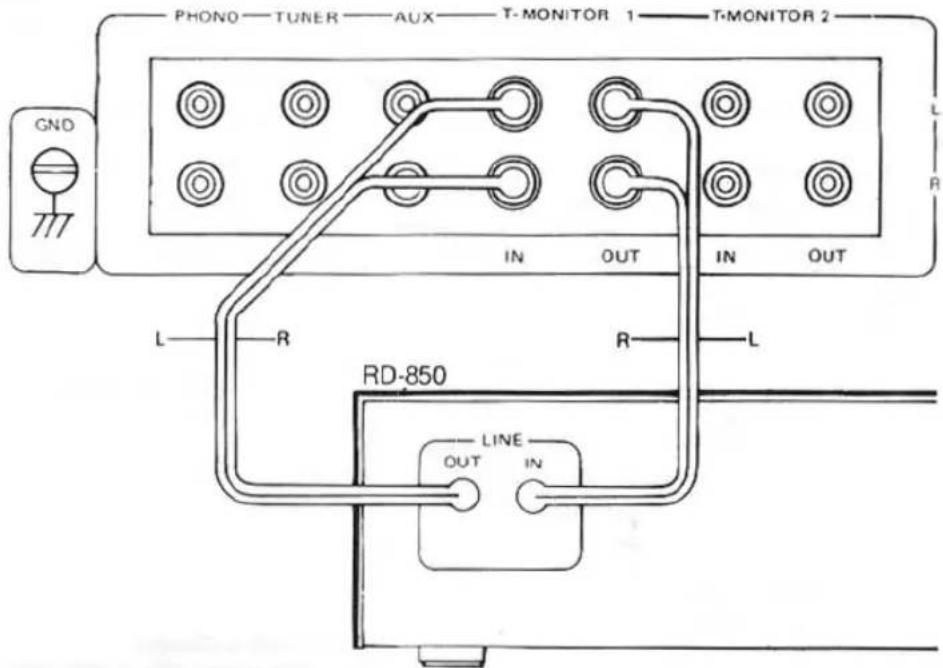
Two pairs of RCA cords for LINE IN/OUT extend out from the rear panel of the cassette deck. The cord from the LINE IN terminals of the deck should be plugged into the TAPE MONITOR OUT terminal of the amplifier or receiver, and the cord from LINE OUT terminal to the TAPE MONITOR IN terminal. RCA cords with white plugs are for left channel (L) connection, and cords with red plugs are for right channel (R).
AUTOMATIC SHUTOFF SYSTEM
When either end of tape is reached in play, record, fast-forward, or rewind mode, the motor and transport mechanism will automatically shut off, disengaging the present mode. Note, however, that it is still necessary to turn off the entire unit by pressing the power switch to off.
AMPLIFIER OR RECEIVER
text_image
PHONO—TUNER—AUX—T-MONITOR 1—T-MONITOR 2 GND IN OUT IN OUT L—R RD-850 LINE OUT IN L RCASSETTE TAPES
- To prevent possible trouble with the transport mechanism, use of large size cassette tapes, such as C-120, is not recommended.
- Handle cassette tapes with care. Keep them away from heat, circulating dust, or a magnetic field (e.g. on the TV set).
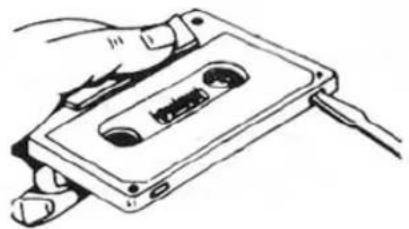
- Each cassette tape has safety tabs on its back edge to prevent accidental re-recording. The tabs are provided for both sides of cassette tape. You cannot record on the side whose tab has been removed. The tab can be removed with a screwdriver, etc. If you wish to record on the side with no tab, place a piece of adhesive tape, etc. over the opening where the tab has been, then you can record.
natural_image
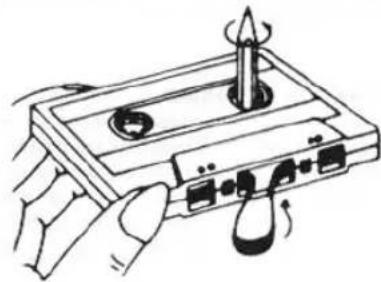
Line drawing of a hand using a tool to press or install a cassette tape (no text or symbols present)- A loosened tape may cause trouble in playback or recording. Check the tape before loading it into the deck. If it is slack, insert a pencil or the like into either of cassette's hubs, and rotate it carefully until the slack is taken up.
natural_image
Illustration of hands operating a cassette tape with a pen and scroll (no text or symbols)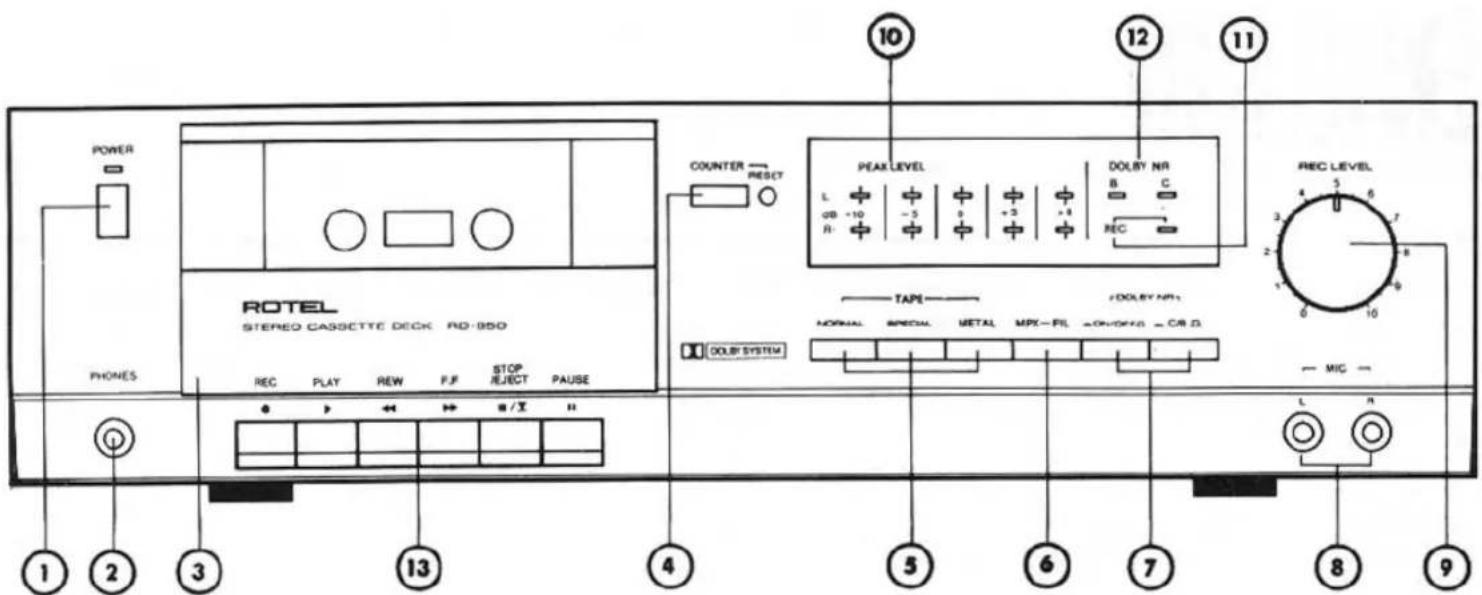
text_image
POWER PHONES ROTEL STEREO CASSCTTE DECK RD-950 REC PLAY REW F/F STOP REJECT PAUSE PO → ↔ ↔ ×/× ↑↓ 1 2 3 13 4 5 6 7 8 9 COUNTER RESET PEAK LEVEL L GB -10 -5 +3 +4 DOLBY NR B C REC TAPE /DOLEY NR: NORMAL SPECIAL METAL MPX-FL ON/OFFO - CR D DOLBY SYSTEM REC LEVEL L N 10 12 11 4 5 6 7 8 9SWITCHES AND CONTROLS
(1) Power Button
This button turns on the unit. The LED indicator above it will glow when the power is on. Press the button a second time to turn off the power.
(2) Headphone Jack
For headphone listening from the deck, the headset is plugged into this jack. Before beginning, make sure the volume control of your amplifier is set to minimum.
(3) Cassette Compartment Door
To open the door, press STOP/EJECT button. When the unit is not in use, be sure to close the door to prevent dust from entering.
The door can be detached by pulling it upward.
(4) Tape Counter and Reset Button
The three-digit tape counter indicates the amount of tape travel. Push the reset button to set the counter to "000". This counter is convenient in finding the beginning of a specific section of the tape or checking the amount of the remaining tape on the cassette.
(5) Tape Selector
Used to select the appropriate recording bias and playback equalization, according to type of cassette tape used. Use the METAL button for metal particle tape, the SPECIAL button for chromium dioxide tape, and the NORMAL button for normal tape. See TAPE SELECTOR SETTING GUIDE for details of different brands of cassette tapes and their proper setting positions.
(6) MPX Filter Button
Depress this button when recording stereo FM broadcasts. FM stereo broadcasting system uses a 19 KHz pilot signal which may adversely affect the sound quality in some case. When the MPX filter is activated to eliminate the 19 KHz pilot signal, and clean stereo FM recording is achieved.
(7) Dolby NR Button and Dolby B-C Type NR Selector
Depress the Dolby NR button when you wish to record or play back through the built-in Dolby noise reduction circuit.
Immediately above this button is a switch for selecting Dolby B-type or C-type noise reduction. Select B-type by setting switch in released position, and C-type by setting switch in depressed position.
(8) Microphone Jacks
When making live recording with stereo microphones, insert the microphone plugs into these jacks. Make sure the right-hand microphone is connected to the right channel jack, and the left-hand microphone to the left channel jack. Be sure to unplug the microphones when recording from other sources.
(9) Recording Level Control
Used to adjust the recording level of incoming signals from line source or microphones.
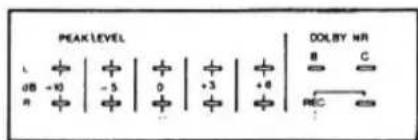
(10) Peak Level Indicators
Give instantaneous display of recording or playback level for both left and right channels respectively. Each bank of 5 LEDs directly shows levels from -10dB to +6dB.
(11) REC Indicator
Glows when the unit is in recording mode.
(12) Dolby NR C/B Indicator
Either of these indicators will light up when Dolby NR switch is activated on and in accordance with whether Dolby type switch is set at Dolby B or Dolby C.
(13) Cassette Controls
REC Button (•)
To record, press this button. The unit is now in the recording mode, and the tape should be winding.
PLAY Button (▶)
Press this button to start the cassette for playback of recorded tape.
Rewind Button (◀)
For rapid tape rewind, press this button.
Fast-Forward Button (▶)
Press this button to advance the tape rapidly forward.
STOP/EJECT BUTTON (■/▲)
Press this button to stop the tape in any mode; Record, Playback, Rewind or fast-forward and press this button a second time to open the door of cassette compartment.
Just press this button once then open the door of cassette compartment when Tape in Stop mode or compartment is empty.
To close the door, gently push it back.
PAUSE Button (II)
This button is used to stop the tape temporarily during recording or playback. Pressing the button a second time will restart the tape in the interrupted mode.
OPERATION
- Be certain that power connection and connection with amplifier are properly made.
- When recording, be sure the safety tabs on the cassette tape are not removed.
- Be sure to unplug the microphones from the deck when recording from other sources.
- When recording with microphones, the microphone plugs must be inserted properly into the left and right microphone jacks.
- When recording from line sources, choose the desired program (tuner, turntable, etc.) on your amplifier.
Recording
- When you wish to record through Dolby B- or C-type NR circuit, depress the Dolby NR button, and then set the B-C type selector button to the desired position.
-
Set the Tape Selector according to the type of tape used.
-
Turn on the deck Power switch.
- Press PAUSE button, then simultaneously press REC and PLAY buttons.
- Adjust the recording level for left and right channels with Recording Level control so that the level indicator readings do not exceed 0dB position frequently, and when they do, only very briefly.
text_image
PEAK LEVEL L + - | + | + | + | + | B C dB -10 | -3 | 0 | +3 | +4 R +1 DOLBY NR REC- After adjusting recording level, press the PAUSE button again to put the unit into recording mode and to start the tape.
- Carefully watch the meter indication during recording as well. PAUSE button may be used to temporarily halt recording.
- Press STOP/EJECT button when recording is finished. When the end of the tape is reached, the recording mode will automatically disengage and tape stops.
Playback
- Set the Dolby NR button in depressed position when you play back a tape recorded with Dolby NR.
Release the button when you play back a tape not recorded with Dolby NR.
When you play back a tape recorded with Dolby NR, also set the Dolby B-C type selector button according to whether Dolby NR, B or C, is used. - Set the tape selector to match the type of tape used.
- Turn on the power switch on your amplifier, keeping its volume control set to minimum. When using headphones connected to the deck, the amplifier is not necessary.
- Turn on the Power switch on the deck.
- Press PLAY button and playback will begin. Raise the volume to the desired level.
- To momentarily halt playback, press the PAUSE button. When you wish to end playback, press the STOP/EJECT button. When the stape comes to an end, it stops automatically and playback mode is disengaged.
HEAD CLEANING
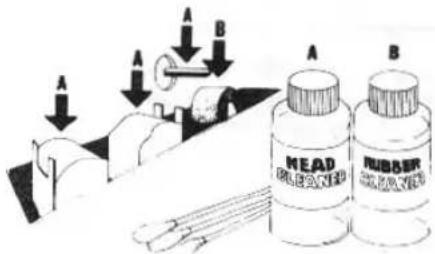
The most frequent cause of failure to record in one or both channels, or of weak, distorted sound, is dirty tape heads and capstan. So, be sure to clean the heads, capstan, pinch roller and tape guides as often as possible using a "Q" tip dipped in ordinary rubbing alcohol or commercial liquid tape head cleaner. Thoroughly wipe the surface of the heads, capstan, roller and tape guide.
text_image
A B HEAD DRAGON RUBBER DRAGONHEAD DEMAGNETIZING
The tape heads, capstan and tape guides gradually become magnetized with use, which will eventually affect the sound quality of your tapes. Demagnetizing should follow cleaning, but need not take place as often as cleaning, once after every 20 to 30 hours of use should suffice.
A demagnetizer may be purchased at a moderate cost from any dealer carrying tape recording accessories. Follow the instruction supplied with the demagnetizer.
Caution: Be sure to turn off the unit before you attempt demagnetizing.
VOLTAGE SELECTION
Not available for U.K., Canada and Scandinavia
The unit is a variable voltage equipment that can run on 120V, 220V or 240V power supply. Your unit should already be preset at the proper voltage for use in your area. However, if you move to an area where the power supply voltage is different, consult your dealer.
SPECIFICATIONS
| Heads: Rec/Play.... Sendust Guard | |
| Erase.... Ferrite core | |
| Track.... 4-track/2-channel | |
| Tape Speed.... 4.8cm/sec. | |
| Motor.... Electronic DC Governor | |
| Wow and Flutter.... 0.2% (DIN) | |
| 0.08% (WRMS) | |
| Distortion (REC/PB, 400 Hz)..... 1.0% (METAL) | |
| Frequency Response (-20 dB)..... Normal, LH 30 to 17,000 Hz ± 3 dB | |
| SPECIAL 30 to 17,000 Hz ± 3 dB | |
| Metal 30 to 18,000 Hz ± 3 dB | |
Signal-to-Noise Ratio (WTD.
| 0 dB=580 mV, Chromium)....Dolby NR in: 64 dB (B type)72 dB (C type) | ||
| Dolby NR out: 55 dB | ||
| Input Sensitivity/Impedance.... | MIC | 0.3 mV/10 kohms |
| LINE | 58 mV/33 kohms | |
| Output Level/Impedance: | ||
| LINE.... | 580 mV/1 kohm | |
| Fast Wind Time (C-60).... | 90 seconds | |
| Tape Selector | BIAS | EQUALIZER |
| Normal, LH.... | 100% | 120 μs |
| Special.... | 150% | 70 μs |
| Metal.... | 220% | 70 μs |
MISCELLANEOUS
| Power Requirement | 120V/60 Hz, 220V/50 Hz, 240V/50 Hz,or 120, 220, 240V/50-60 Hz(depending on destinations) |
| Power Consumption | 22 watts |
| Dimensions (Overall) | 430 (W) x 117 (H) x 270 (D) mm16-15/16" x 4-5/8" x 10-5/8" |
| Weight (net) | 3.9 kg/8.58 lbs. |
- Specifications and design subject to possible modification without notice.
- Dolby and the double-D symbol are trade marks of Dolby Laboratories Licensing Corporation. Noise reduction system manufactured under license from Dolby Laboratories Licensing Corporation.
TAPE SELECTOR SETTING GUIDE BANDSORTENEINSTELLUNG GUIDE DE REGLAGE DE SELECTEUR DE BANDE
TDK....D,OD,AD....NORMAL
FUJI FILM....ER, DR, FR-I.....NORMAL
SONY....AHF, BHF, CHF....NORMAL
MAXELL.....UL, UD, XL-1, NEW-XLI NORMAL
SCOTCH BX, CX, XS-1 NORMAL
BASF....LH-X,PRO-I.....NORMAL
TDK....MA, MA-R.... METAL
FUJI FILM....FR.... METAL
SONY METALLIC METAL
MAXELL....NEW-MX.... METAL
SCOTCH....METAFINE.... METAL
BASF....PRO-IV.... METAL
TDK....SA, SA-X.... SPECIAL
FUJI FILM....FR-II....SPECIAL
SONY....JHF,UCX,UCX-S....SPECIAL
MAXELL.....XLII-S.....SPECIAL
SCOTCH XS-II SPECIAL
BASF....PRO-II....SPECIAL