Insight Content Filtering - Okategoriserad NETGEAR - Gratis bruksanvisning och manual
Hitta enhetens manual gratis Insight Content Filtering NETGEAR i PDF-format.


Användarfrågor om Insight Content Filtering NETGEAR
0 fråga om denna apparat. Svara på dem du kan eller ställ din egen.
Ställ en ny fråga om denna apparat
Ladda ner instruktionerna för din Okategoriserad i PDF-format gratis! Hitta din manual Insight Content Filtering - NETGEAR och ta tillbaka ditt elektroniska enhet i hand. På denna sida publiceras alla dokument som behövs för att använda din enhet. Insight Content Filtering av märket NETGEAR.
BRUKSANVISNING Insight Content Filtering NETGEAR

natural_image
Person typing on a laptop with floating digital icons representing security, shopping, and cloud services (no text or symbols)Secure Your Business with Insight Content Filtering
With over 1 billion websites live all around the world, SMBs are forced to face increasing threats from the Internet. SMBs have higher potential to experience loss of business-critical information and employee productivity caused by malicious websites, spyware, online retail sites, etc.
Eliminate the risk of losing business-critical data with Insight Content Filtering on Orbi Pro, Orbi Pro WiFi 6 and Orbi Pro WiFi 6 Mini ^1 .
NETGEAR Insight Content Filtering, powered by RaGaPa, includes the capability to block access to undesirable and malicious websites that may decrease work efficiency and be a threat to wired and wireless networks.
Content filtering further includes predefined categories and flexible filtering policy configuration.
Not only SMBs benefit from Content Filtering; work-from-home and home users can also protect their home network from any threats as well as restrict unfavorable content from family members and children.
Highlights
• DNS based web content filtering: Block IP addresses to deny access to certain websites that may be a threat to your wired or wireless network
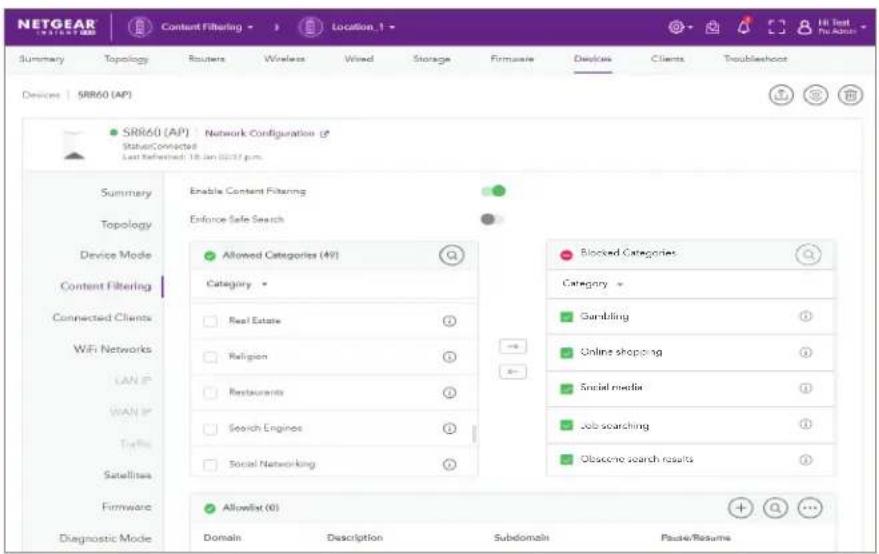
- 50+ predefined categories: Select predefined categories of websites to restrict access to improve employee productivity or even regulate website access in your home. Some examples include gambling, online shopping, social media, and job search websites
- Flexible router level policy configuration: Enable customizable block-list and allow-list to easily create and manage your own policy to protect your users
- Block access to malware: Protect your employees, guests and customers from malware or malicious software while on your network
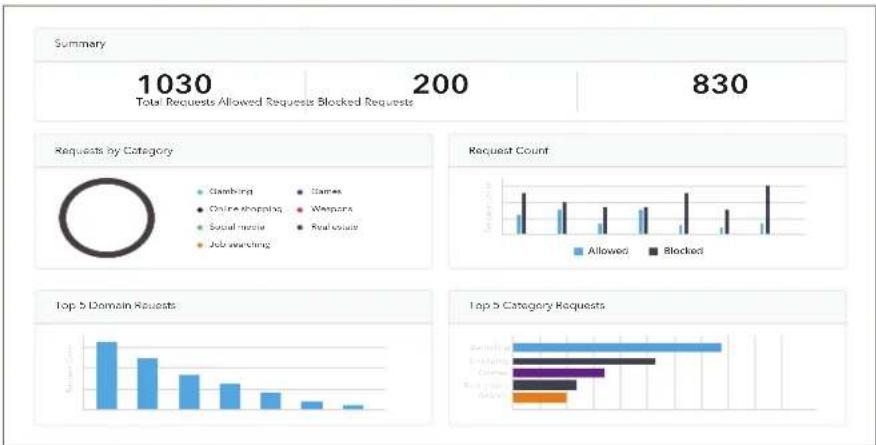
• Data monitoring and reporting: Receive reports on the visited domains, network traffic overtime, and more. Use the widget or full dashboard to analyze real time and historical updates from the last 30 days
• Flexible inspection limit options: Manage your usage based on your needs
• Affordable pricing tailored for SMB: Web content filtering is extracted out of the traditionally pricey security solution so SMBs do not need to pay for the whole suite of solutions
bar
| Category | Allowed | Blocked | | :--- | :--- | :--- | | Total Requests Allowed Requests Blocked Requests | 1030 | 200 | | Requests by Category | Gambling | Games | | Requests by Category | Online shopping | Weapons | | Requests by Category | Social music | Real estate | | Requests by Category | Job awarding | | | Request Count | [Bar chart with 'Allowed' and 'Blocked'] | [Bar chart with 'Allowed'] | | Top 5 Domain Requests | [Bar chart with 'Allowed'] | [Bar chart with 'Blocked'] | | Top 5 Category Requests | [Bar chart with 'Allowed'] | [Bar chart with 'Blocked'] |Ordering Information
Insight Content Filtering digital inventory (with SKU) can be found in the following table:
Ordering Information
CFL1Y-10000S Content Filtering Service Subscription
CFL1Y99-10000S Content Filtering Top-up Inspection Limit Pack
Content Filtering one policy annual subscription base pack (200K daily ^2 DNS request) ^3
Content Filtering one policy annual subscription add-on top-up inspection limit pack (Additional 200K daily DNS request)
^1 Content Filtering available on SRK60, SRR60, SXK80, SXR80, SXK30, SXR30
^2 A single device sends about 5K DNS requests a day
^3 A DNS request is a demand for information, usually the IP address associated with a domain name, sent from a user's computer (DNS client) to a DNS server
NETGEAR, the NETGEAR Logo, and NETGEAR Insight are trademarks of NETGEAR, Inc. in the United States and/or other countries. Other brand names mentioned herein are for identification purposes only and may be trademarks of their respective holder(s). Information is subject to change without notice. ©NETGEAR, Inc. All Rights reserved.
NETGEAR, Inc. 350 E. Plumeria Drive, San Jose, CA 95134-1911 USA, 1-888-NETGEAR (638-4327), E-mail: info@NETGEAR.com, www.NETGEAR.com