CA-HM-KIA.001DG - Kit d'installation auto PIONEER - Manual de utilizare gratuit
Găsiți gratuit manualul dispozitivului CA-HM-KIA.001DG PIONEER în format PDF.


Întrebările utilizatorilor despre CA-HM-KIA.001DG PIONEER
0 întrebare despre acest aparat. Răspundeți la cele pe care le cunoașteți sau puneți-vă propria.
Pune o întrebare nouă despre acest aparat
Descărcați instrucțiunile pentru Kit d'installation auto în format PDF gratuit! Găsiți manualul dvs. CA-HM-KIA.001DG - PIONEER și luați din nou în mână dispozitivul dvs. electronic. Pe această pagină sunt publicate toate documentele necesare pentru utilizarea dispozitivului dvs. CA-HM-KIA.001DG mărcii PIONEER.
MANUAL DE UTILIZARE CA-HM-KIA.001DG PIONEER
natural_image
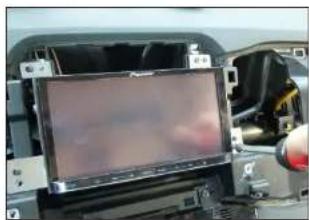
Close-up of a computer monitor with a hand holding the screen, showing internal components (no visible text or symbols)- Connect all required circuit points Fix Pioneer Navigation on dashboard
natural_image
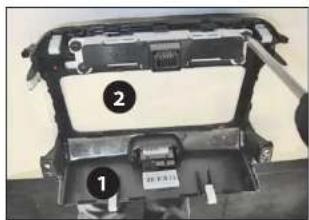
Interior view of a vehicle chassis frame with labeled components (no readable text or symbols)- Remove hazard light switch (1) from OEM head unit - attach it to double DIN facia plate
Remove upper instrumental panel (2) - attach it to double DIN facia plate
natural_image
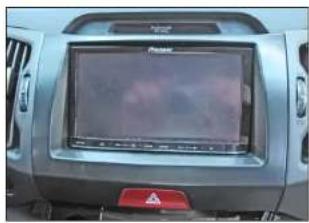
Front view of a car dashboard with a mounted screen and warning sign (no readable text or symbols)Fix clips to double DIN facia plate
Place double DIN facia plate
Reinstall everything in reverse
order to finish installation
© 09/2010 ALL RIGHTS RESERVED. Technical changes possible. No liability for misprints.
Pioneer
Installation Manual Double DIN Kit
dark-grey: CA-HM-KIA 001 DG
light-grey: CA-HM-KIA 001 LG
Kia Sportage III 2010->
Compatible with these Pioneer double DIN devices
Pioneer Navigation
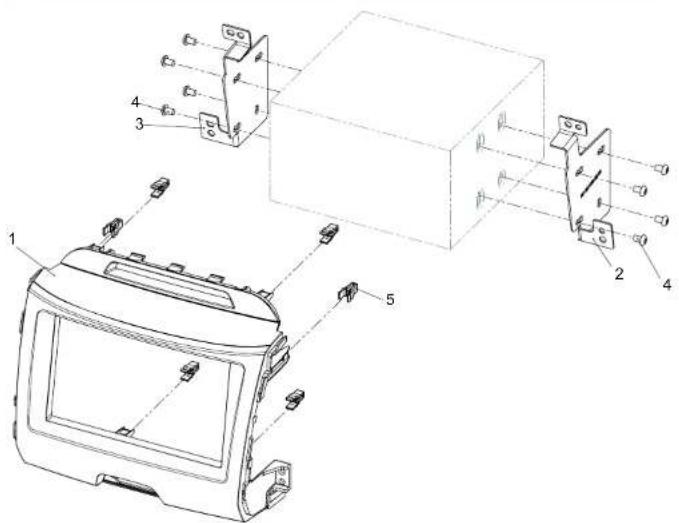
(1) Double DIN Facia Plate
(2) Mounting bracket (right)
(3) Mounting bracket (left)
(4) Fixing screws
(5) Clips
natural_image
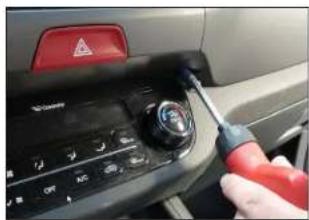
Close-up of a car dashboard with a hand using a screwdriver to adjust the control panel (no visible text or symbols)- Remove screws of OEM head unit (left and right)
natural_image
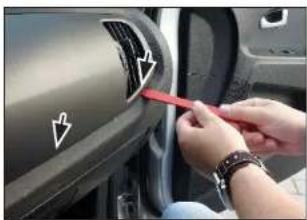
Close-up of hands installing a car door panel with directional arrows (no text or symbols visible)- Unclip right side panel
natural_image
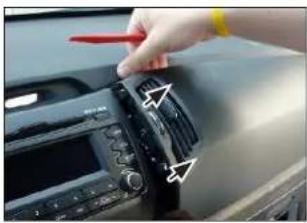
Close-up of a hand using a red tool to adjust or install a CD-ROM drive (no visible text or symbols)- Remove right side panel by pulling it towards your direction
natural_image
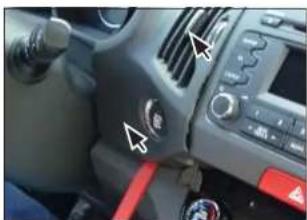
Interior view of a car dashboard with steering wheel, dashboard buttons, and red belt (no visible text or symbols)- Unclip left side panel
natural_image
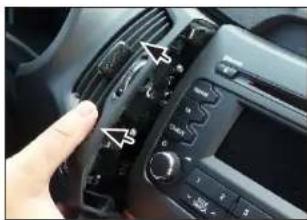
Close-up of a car dashboard with a hand adjusting the left panel (no visible text or symbols)- Remove left side panel by pulling it towards your direction
natural_image
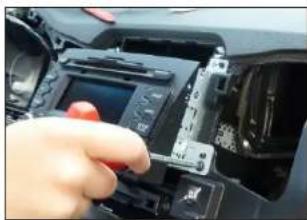
Close-up of a hand inserting a camera module into a car's dashboard (no visible text or symbols)- Remove screws of OEM head unit Remove OEM head unit
natural_image
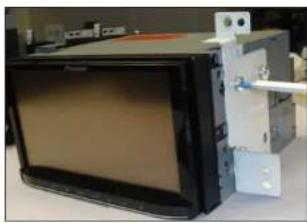
Exterior view of a black electronic device with a mounted panel and wiring (no visible text or symbols)- Attach metal mounting brackets to Pioneer Navigation
natural_image
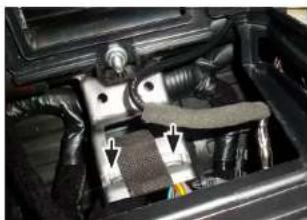
Close-up of a car engine bay with visible structural components and mounting brackets (no text or symbols)- Bend down metal bar (see arrows) in order to clear space for double DIN head unit
