
VTC2940NB - Odkurzacz LG - Bezpłatna instrukcja obsługi
Znajdź bezpłatnie instrukcję urządzenia VTC2940NB LG w formacie PDF.


| Typ produktu | Odkurzacz |
| Marka | LG |
| Model | VTC2940NB |
| Rodzaj zasilania | Sieciowe (przewodowe) |
| Rodzaj worka | Papierowy lub materiałowy (w zależności od modelu) |
| Wskaźnik zapełnienia worka | Tak (czerwone okienko) |
| Regulacja mocy ssania | Płynna do MAX (za pomocą pokrętła na obudowie) |
| Regulator ręczny na uchwycie | Tak (do chwilowego zmniejszenia ssania) |
| Rura | Teleskopowa (plastikowa lub metalowa w zależności od modelu) |
| Głowica czyszcząca | 2-stopniowa (z pedałem) lub automatyczna (bez pedału) |
| Akcesoria w zestawie | Dysza szczelinowa, dysza do tapicery, szczotka do kurzu |
| Automatyczne nawijanie przewodu | Tak (przycisk) |
| Filtr silnikowy | Tak (wymagane okresowe czyszczenie) |
| Filtr wydechowy | Tak (wymagane okresowe czyszczenie) |
| Zabezpieczenie przed brakiem worka | Pokrywa nie zamyka się, jeśli worek nie jest prawidłowo zamontowany |
| Przechowywanie | Klips do przechowywania na obudowie |
| Bezpieczeństwo | Nie odkurzać płynów, gorących popiołów ani ostrych przedmiotów |
| Długość przewodu (szacunkowa) | 7 m |
| Waga (szacunkowa) | 5 kg |
Często zadawane pytania - VTC2940NB LG
Pytania użytkowników dotyczące VTC2940NB LG
0 pytanie dotyczące tego urządzenia. Odpowiedz na te, które znasz, lub zadaj własne.
Zadaj nowe pytanie dotyczące tego urządzenia
Pobierz instrukcję dla swojego Odkurzacz w formacie PDF za darmo! Znajdź swoją instrukcję VTC2940NB - LG i weź swoje urządzenie elektroniczne z powrotem w ręce. Na tej stronie opublikowane są wszystkie dokumenty niezbędne do korzystania z urządzenia. VTC2940NB marki LG.
INSTRUKCJA OBSŁUGI VTC2940NB LG

LG

V-C2940NB/ND
V-C2940RB/RD/RT
V-C2950RDB/RDR








Informacje dotyczące bezpieczeństwa
Prosimy o przeczytanie wszystkich poniższych informacji, które zawierają ważne instrukcje dotyczące bezpieczeństwa, użytkowania i konserwacji urządzenia.
To urządzenie jest zgodne z następującymi dyrektywami WE: -73/23/EWG, 93/68/EWG - Dyrektywa niskonapięciowa - 89/336/EWG - Dyrektywa EMC.
♦ Nigdy nie pozwalaj dzieciom korzystać z urządzenia bez nadzoru. Nie używaj urządzenia, jeśli przewód zasilający jest uszkodzony lub wadliwy. Jeśli przewód zasilający jest uszkodzony, musi zostać wymieniony przez autoryzowany serwis LG Electronics, aby uniknąć zagrożenia.
◆ Zawsze wyłączaj odkurzacz przed:
- wymianą worka na kurz
- wymianą lub czyszczeniem filtrów.
Jeśli worek na kurz nie jest włożony, pokrywa nie może być zamknięta. Prosimy nie używać siły!
Nie odkurzaj substancji łatwopalnych lub wybuchowych (cieczy lub gazów).
Nie odkurzaj gorącego popiołu, żaru itp. ani ostrych przedmiotów.
♦ Nie odkurzaj wody ani innych płynów.
Podczas odkurzania za pomocą ssawki wyposażonej w obracającą się szczotkę:
- nie wkładaj rąk do pracującej szczotki.
OSTRZEŻENIE! Jeżeli konieczna będzie wymiana wbudowanej wtyczki, zniszcz starą wtyczkę, aby uniknąć ryzyka porażenia prądem, które mogłoby wystąpić, gdyby taka wtyczka została podłączona do gniazdka 13 A w innym miejscu domu.
Sposób użycia
Podłączanie węża elastycznego
Wciśnij końcówkę (1) węża elastycznego (2) do punktu podłączenia w odkurzaczu.
Aby odłączyć wąż elastyczny od odkurzacza, naciśnij przycisk (3) umieszczony na końcówce, a następnie pociągnij do góry.
Montaż rur
(w zależności od modelu)
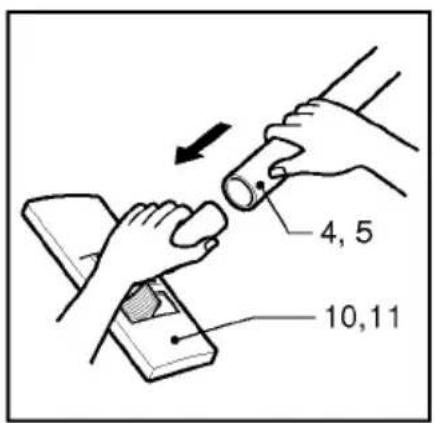
- Rura plastikowa (4) lub metalowa (5).
- Połącz obie rury, lekko je skręcając.
• Rura teleskopowa (6)
- Przesuń zatrzask sprężynowy (7) do przodu.
- Wysuń rurę na wymaganą długość.
- Zwolnij zatrzask sprężynowy, aby zablokować.
• Rura teleskopowa (8)
- Zwolnić pokrętło blokujące (9) (obrócić zgodnie z ruchem wskazówek zegara).
- Wyciągnąć rurę na wymaganą długość.
- Obrócić pokrętło blokujące w kierunku przeciwnym do ruchu wskazówek zegara, aż do oporu.
Używając szczotki głównej i dysz dodatkowych (w zależności od modelu) Nałożyć dużą szczotkę główną na koniec rury.
- Szczotka z dwoma pozycjami (10) wyposażona jest w pedał (11), który umożliwia zmianę jej położenia w zależności od rodzaju czyszczonej podłogi. Pozycja do twardych podłóg (płytki, parkiet...). Nacisnąć pedał, aby opuścić szczotkę. Pozycja do dywanów lub chodników. Nacisnąć pedał, aby podnieść szczotkę.
- Jeśli urządzenie wyposażone jest w automatyczną szczotkę główną (12) bez pedału, automatycznie dostosowuje się ona do rodzaju czyszczonej podłogi.
Przegródka na akcesoria zawiera akcesorium (13).
- Dysza szczelinowa (14)
Do odkurzania miejsc normalnie niedostępnych, np. sięganie po pajęczyny lub z boku sofy!
• Dysza do tapicerki (15)
Do odkurzania tapicerki, materacy itp. Zbieracze nitek pomagają zbierać nitki i kłaczki. (opcja)
• Szczotka do kurzu (16)
Do odkurzania ram obrazów, krawędzi mebli, książek i innych nierównych przedmiotów. (opcja)
Jak podłączyć i używać
Wyciągnij przewód zasilający na żądaną długość i podłącz do gniazdka.
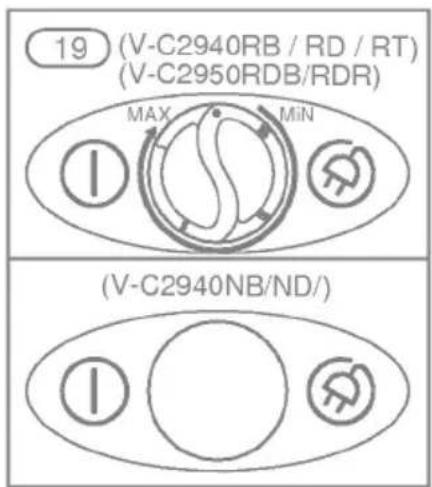
Naciśnij przycisk (17), aby włączyć odkurzacz. Aby go zatrzymać, naciśnij przycisk (17) ponownie.
Regulacja poziomu mocy
(w zależności od modelu)
- Wydajność ssania wzrasta płynnie do maksimum (19).
- Uchwyt węża elastycznego (20) ma ręczny regulator przepływu powietrza (21), który pozwala na krótkie zmniejszenie poziomu ssania.
Przenoszenie i przechowywanie
Po wyłączeniu i odłączeniu urządzenia od zasilania, naciśnij przycisk (18), aby automatycznie zwinąć przewód.
- Użyj klipsa do przechowywania zgodnie z rysunkiem podczas przechowywania odkurzacza (22).
Wymiana worka na kurz
Worek na kurz należy wymienić, gdy odkurzacz jest ustawiony na maksymalną moc, a końcówka ssąca znajduje się nad podłogą, ale okienko wskaźnika "worek pełny" (23) jest całkowicie czerwone.
Nawet jeśli worek na kurz nie wydaje się pełny na tym etapie, należy go wymienić.
Możliwe, że duża ilość bardzo drobnego kurzu zatkała pory worka na kurz.
- Wyłącz urządzenie i odłącz je od zasilania.
- Wyjmij wąż.
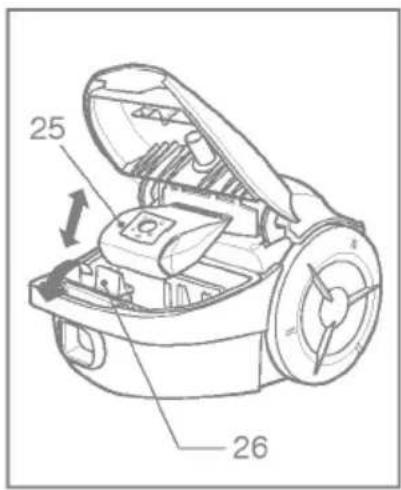
- Otwórz pokrywę (24)
Twoje urządzenie jest wyposażone w papierowy worek na kurz lub materiałowy worek na kurz (25) (w zależności od modelu)
- Popchnij dźwignię do przodu w kierunku strzałki (26) i pociągnij pełny papierowy filtr workowy do tyłu. Wyjmij worek i wyrzuć go.
- Włóż nowy papierowy filtr workowy do urządzenia, kierując strzałkę w dół (27).
Jeśli Twoje urządzenie jest wyposażone w materiałowy worek na kurz, postępuj zgodnie z tymi samymi instrukcjami, co powyżej.
Opróżnij go i użyj ponownie (28). Myj go okresowo. Uwaga: ponieważ urządzenie jest wyposażone w zabezpieczenie, które sprawdza, czy worek jest na miejscu, nie można zamknąć pokrywy, jeśli worek nie jest prawidłowo zamontowany.
Czyszczenie filtra silnika
Filtr silnika znajduje się wewnątrz urządzenia, między workiem na kurz a silnikiem. Za każdym razem, gdy wymieniasz filtr wylotowy powietrza, zalecamy wyjęcie filtra silnika (29) i wyczyszczenie go przez opukiwanie w celu usunięcia brudu, a następnie umieszczenie go z powrotem w odkurzaczu.
Czyszczenie filtra wylotowego (30)
- Sprawdzaj filtr wylotowy od czasu do czasu i czyść go, gdy jest brudny. • Odłącz przewód od gniazdka.
- Otwórz pokrywę wylotu i wyjmij filtr wylotowy, jak pokazano.
- Kolejne czynności są takie same jak w przypadku filtra zabezpieczającego silnik.
Co zrobić, jeśli urządzenie nie działa
Sprawdź, czy urządzenie jest prawidłowo podłączone do prądu i czy gniazdko elektryczne działa.
Co zrobić, gdy wydajność ssania spada?
- Zatrzymaj urządzenie i odłącz je od zasilania.
- Sprawdź, czy rury, wąż elastyczny i końcówka czyszcząca nie są zatkane.
- Sprawdź, czy worek na kurz nie jest pełny. W razie potrzeby wymień go.

LG Electronics Inc.


- INFORMACJE DOTYCZĄCE BEZPIECZEŃSTWA
- SPOSÓB UŻYCIA
- PODŁĄCZANIE WĘŻA ELASTYCZNEGO
- MONTAŻ RUR
- UŻYWAJĄC SZCZOTKI GŁÓWNEJ I DYSZ DODATKOWYCH (W ZALEŻNOŚCI OD MODELU) NAŁOŻYĆ DUŻĄ SZCZOTKĘ GŁÓWNĄ NA KONIEC RURY
- JAK PODŁĄCZYĆ I UŻYWAĆ
- REGULACJA POZIOMU MOCY
- PRZENOSZENIE I PRZECHOWYWANIE
- WYMIANA WORKA NA KURZ
- CZYSZCZENIE FILTRA SILNIKA
- CZYSZCZENIE FILTRA WYLOTOWEGO (30)
- CO ZROBIĆ, JEŚLI URZĄDZENIE NIE DZIAŁA
- CO ZROBIĆ, GDY WYDAJNOŚĆ SSANIA SPADA
- LG ELECTRONICS INC
Marka : LG
Model : VTC2940NB
Kategoria : Odkurzacz