SB-2100g - NAS Edimax - Bezpłatna instrukcja obsługi
Znajdź bezpłatnie instrukcję urządzenia SB-2100g Edimax w formacie PDF.


Pytania użytkowników dotyczące SB-2100g Edimax
0 pytanie dotyczące tego urządzenia. Odpowiedz na te, które znasz, lub zadaj własne.
Zadaj nowe pytanie dotyczące tego urządzenia
Pobierz instrukcję dla swojego NAS w formacie PDF za darmo! Znajdź swoją instrukcję SB-2100g - Edimax i weź swoje urządzenie elektroniczne z powrotem w ręce. Na tej stronie opublikowane są wszystkie dokumenty niezbędne do korzystania z urządzenia. SB-2100g marki Edimax.
INSTRUKCJA OBSŁUGI SB-2100g Edimax
EDIMAX NETWORKING PEOPLE TOGETHER
text_image
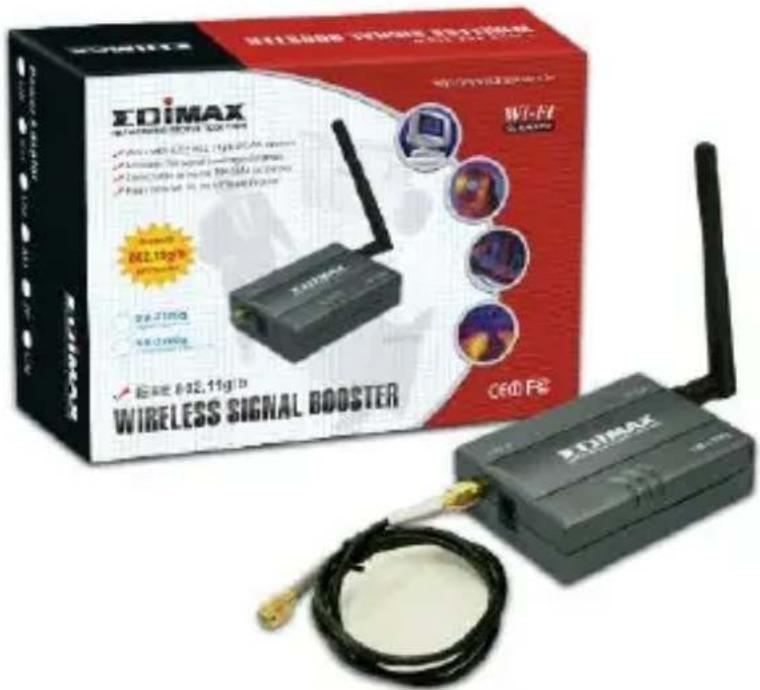
EDIMAX Wireless Signal Booster EDIMAX Wireless Signal Booster EDIMAX Wireless Signal Booster EDIMAX Wireless Signal Booster EDIMAX Wireless Signal Booster EDIMAX Wireless Signal Booster EDIMAX Wireless Signal Booster EDIMAX Wireless Signal Booster EDIMAX Wireless Signal Booster EDIMAX Wireless Signal Booster EDIMAX Wireless Signal Booster EDIMAX Wireless Signal Booster ENIEMAX ENIEMAX ENIEMAX ENIEMAX ENIEMAX ENIEMAX ENIEMAX ENIEMAX ENIEMAX ENIEMAX ENIEMAX ENIEMAX ENIEMAX ENIEMAX ENIEMAX ENIEMAX ENIEMAX ENIEMAX ENIEMAX ENIEMAX ENIEMAC ENIEMAC ENIEMAC ENIEMAC ENIEMAC ENIEMAC ENIEMAC ENIEMAC ENIEMAC ENIEMAC ENIEMAC ENIEMAC ENIEMAC ENIEMAC ENIEMAC ENIEMAC ENIEMAC ENIEMAC ENIEMAC ENIEMAC ENIEMCWireless Signal Booster
User's Manual
ENGLISH
Warning Statement
Federal Communication Commission Interference Statement Federal Communications Commission (FCC) Requirements, Part 15
- Reorient or relocate the receiving antenna.
- Increase the separation between the equipment and receiver.
- Connect the equipment into an outlet on a circuit different from that to which the receiver is connected.
- Consult the dealer or an experienced radio/TV technician for help.
This device complies with Part 15 of the FCC Rules. Operation is subject to the following two conditions:
- This device may not cause harmful interference.
- This device must accept any interference received, including interference that may cause undesired operation.
FCC Caution:
This Transmitter must not be co-located or operating in conjunction with any other antenna or transmitter. This equipment complies with FCC RF radiation exposure limits set forth for an uncontrolled environment. This equipment should be installed and operated with a minimum distance of 20 centimeters between the radiator and your body. Unauthorized antenna, modification, or attachments could damage the transmitter and may violate FCC regulations.
Regulator y informa tion / Disclaimers:
Any changes or modifications (including the antennas) made to this device that are not expressly approved by the manufacturer may void the user's authority to operate the equipment.
Step1. What you will need to get started
- Wireless 802.11b or 802.11g network
- Wireless device to attach to this Booster
Step2. Check your Signal Booster package.
- Booster device / Wireless Antenna × 1
- Booster Connector Cable × 1
- Power Adapter × 1
Hardware description:
Front Side:
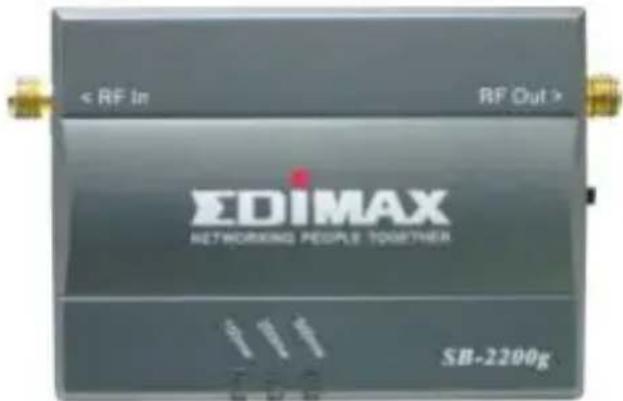
text_image
< RF In RF Out > EDIMAX NETWORKING PEOPLE TOGETHER SB-2200gStatus LED: Display the selected output power status
- SB-2200g : 100mw / 200mw / 500mw
• SB-2100g : Low / Mid / High
(by ETSI regulations, t he output power ar e "Low" = 100mW)
Input Connector:
Connect to Wireless LAN devices

natural_image
Close-up of a black electronic device with a gold connector and a central black square labeled 'Power' (no other text or symbols visible)Power Adapter DC Plug in
Output Power Swit ch
(for SB-2200g onl y)
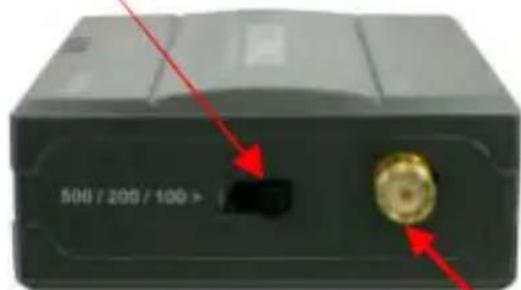
natural_image
Close-up of a black electronic device with a gold connector and red arrows pointing to its ports (no readable text or symbols)Antenna Connector
Hardware installation:
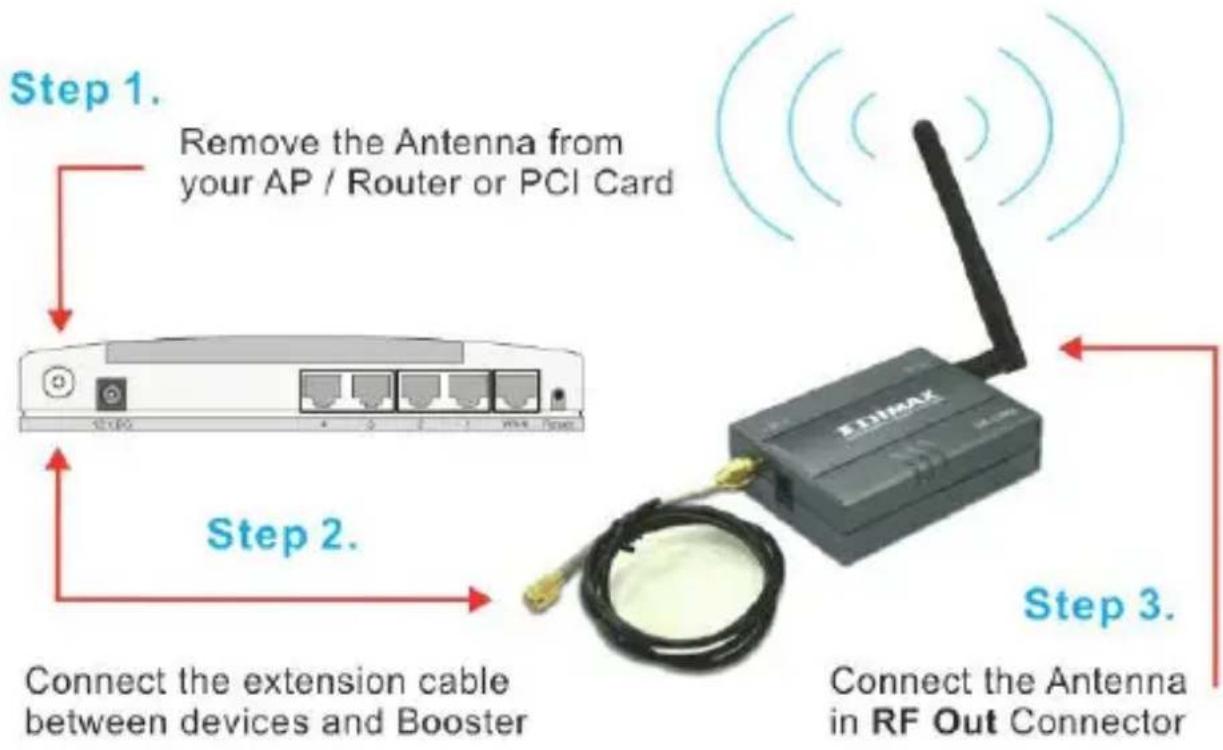
flowchart
graph TD
    A["AP / PCI Card"] -->|Remove the Antenna from your AP / Router or PCI Card| B["RF Out Connector"]
    B -->|Connect the Extension Cable between devices and Booster| C["Device 1"]
    C -->|Step 1. Remove the Antenna from your AP / Router or PCI Card| D["Device 2"]
    D -->|Step 2. Connect the Extension Cable between devices and Booster| E["Device 3"]
    E -->|Step 3. Connect the Antenna in RF Out Connector| F["Device 4"]
Product specification:
- Network / Operating Range: IEEE 802.11g / 802.11g WLAN Standard, 2400\~2500 MHz
- Frequenc y Res ponse : +/- 1 dB
• Output Power : Max: 27dBm (for SB-2200g only) - Input Power: 8\~18 dBm Max.
- Receiver Gain: 10-13 dBm, 12 dBm Typical, Noise Figure: 3.5 dB typical
- Connectors: Input / Antenna: Reverse SMA J ac k
- Connector Cables : RP-SMA
- Power : External Switching Power Adapter, DC Surge Protection: Available
- Cable Length: 75 ~cm
System Requirements:
- 802.11b or 802.11g Wireless Network k
- Certified 802.11b/g Wireless AP / Router / PCI Network Adapter with a Removable Antenna.
Ethernet
A networking standard using cables (Category 5) to create a network.
Network Adapter - Also known as a NIC (Network Int erfac e Card). Used to provide PC's or laptops with an Ethernet port or wireless access to the network.
Broadband Modem - A device that allows broadband connection to the internet. Broadband connections include speeds faster than 56k (dial up modem speed). The two most common types of Broadband connections are DSL and Cable. Cable modem relies on the bandwidth of cable television lines while DSL modems rely on the telephone lines operating at DSL speeds.
Router - A device used to share internet access from one user to multiple users. By taking one IP address (Addresses used by ISP's to assign broadband services to your computer) the R outer distributes the services of your broadband access among multiple users and IP's.
Wireless
Wireless Device – Any Wi-Fi device (802.11b/g) that communicates wirelessly using the IEEE802.11 wireless standard. These devices can range from wireless access points to wireless routers to wireless PCI client cards.
IEEE 802.11 – Wireless Network Specifications
- 802.11 - applies to wireless LANs (Networks) and provides 1 or 2 Mbps transmission in the 2.4 GHz band using either frequency hopping spread spectrum (FHSS) or direct sequence spread spectrum (DSSS).
- 802.11b (also referred to as 802.11 High Rate or Wi-Fi) - an extension to 802.11 t hat applies to wireless LANs and provides 11 Mbps transmission (with a fallback k to 5.5, 2 and 1 Mbps) in the 2.4 GHz band. 802.11b uses only DSSS. 802.11b was a 1999 ratification to the original 802.11 standard, allowing wireless functionality comparable to Ethernet.
- 802.11g - applies to wireless LANs and provides 54 Mbps in the 2.4 GHz band. Bac kwards compatibl e with IEEE 802.11b products.
Hi-Gain Wi-Fi Antenna
High powered antenna to increase the distance of your Wi-Fi device.
SMA Connector – The standard antenna connector for Wi-Fi devices. This is the most popular connector and comes standard with all Edi max Technologies equipment.
TNC Connector – A type of ant enna c onnec tor us ed by few wireless network king equipment manufacturers.
dBi (decibel) - A unit of measurement used to determine the gain level of wireless antennas.
mW (MilliWatt) - A unit of measurement used to determine the power level of wireless devices.