
SRX120EM - Grzejnik elektryczny DIMPLEX - Bezpłatna instrukcja obsługi
Znajdź bezpłatnie instrukcję urządzenia SRX120EM DIMPLEX w formacie PDF.


| Typ produktu | Grzejnik elektryczny SmartRad |
| Model | SRX120EM |
| Marka | Dimplex |
| Wymiary (sz. x wys. x gł.) | 600 x 100 x 400 mm (szacunkowe) |
| Masa | ~5 kg (szacunkowa) |
| Zasilanie | 230 V AC, 50 Hz |
| Moc grzewcza | ~1200 W (szacunkowa) |
| Tryby pracy | Komfort ciągły, Auto, Obniżenie ciągłe, Ochrona przeciwzamarzaniowa, Wyłączony |
| Sterowanie | Przełącznik trybów na urządzeniu oraz kompatybilność z kontrolerem RXPW4 |
| Strefy grzewcze | Do 4 stref z indywidualnymi programami dziennymi |
| Montaż | Naścienny (szacunkowy) |
| Klasa ochrony | IP24 (szacunkowa dla łazienek) |
| Zabezpieczenia | Przed przegrzaniem (szacunkowe) |
| Czyszczenie i konserwacja | Odłączyć od zasilania, przecierać suchą szmatką |
| Części zamienne | Standardowe elementy dostępne u autoryzowanych dealerów Dimplex |
| Serwis | Skontaktować się z autoryzowanym serwisem Dimplex |
Często zadawane pytania - SRX120EM DIMPLEX
Pytania użytkowników dotyczące SRX120EM DIMPLEX
0 pytanie dotyczące tego urządzenia. Odpowiedz na te, które znasz, lub zadaj własne.
Zadaj nowe pytanie dotyczące tego urządzenia
Pobierz instrukcję dla swojego Grzejnik elektryczny w formacie PDF za darmo! Znajdź swoją instrukcję SRX120EM - DIMPLEX i weź swoje urządzenie elektroniczne z powrotem w ręce. Na tej stronie opublikowane są wszystkie dokumenty niezbędne do korzystania z urządzenia. SRX120EM marki DIMPLEX.
INSTRUKCJA OBSŁUGI SRX120EM DIMPLEX
SmartRad

natural_image
Row of eight identical rectangular blocks with no text or symbolsMode Selector Switch

Symbol Function
| Continuous comfort (all zones) |
| AUTO Auto mode (heating runs to the set program for each zone) |
| Continuous set back (all zones) |
| Continuous frost protection (all zones) |
| Set the time |
| PROG Set the daily programs |
| Off (no heat output) |
| Configures communication and heater modes |
Heater operation when connected to RXPW4 controller
When connected to an RXPW4 controller, the heater will operate in accordance with the controller program/setting. The program can only be over ridden at the controller.
The heater will provide the following functionality in each of the controller modes:
| Mode Bars on | Display | Heater Function |
| Comfort / On 4 Thermostat setting | ||
| Background 1* 5°C below thermostat setting | ||
| Off 1* Heater does not operate | ||
| Frost Protection n/a | Heater operates when temperature drops below 5°C | |
* Note the controller can be configured so that the AUTO program operates either as Background or Off modes. Please see RXPW4 installation /operating instructions for further details.
RXPW4 4-zone central controller
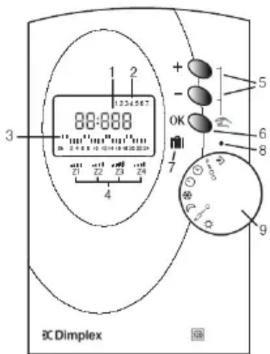
1 - Time
2 - Day of the week
3 - Current mode
4 - Zone status reference
5 - Controller setup/override buttons
6 - Validation button
7 - Holiday mode
8 - Selector switch index mark
9 - Mode selector switch
Typical system
Zone 1, e.g. living area
Zone 2, e.g. bedroom

flowchart
graph TD
    A["Power Source"] --> B["Switch"]
    B --> C["Component 1"]
    C --> D["Component 2"]
    D --> E["Output"]
    C --> F["Ground"]

Zone 4, e.g. water Zone 3, e.g. bathroc
The RXPW4 controller allows control of multiple Dimplex heaters from a single point.
Heaters can be grouped together in "zones" and each zone configured with a different time program for each day of the week. Up to 4 zones are available.
Your system has installed with the following rooms in each zone:
Zone 1: ____
Zone 2: ____
Zone 3: ____
Zone 4: ____
Setting up the controller
Set the time
Before the controller can be used, the correct time and day must be set.
Do this by turning the dial to the ⏻ position and using the "+" and "-" buttons to set the current time and day.
Set the daily programs for each zone
An individual time program can be set for each zone for each day of the week by turning the dial to the PROG position.
Please refer to the installation and operating instructions for details of how to set the program.
Everyday operation
AUTO mode
Turn the dial to AUTO mode for the heating to operate in accordance with the program for each zone.
Over ride
The program for each can be temporarily over ridden from the controller. Please refer to the installation and operating instructions for details of how this can be done.


Marka : DIMPLEX
Model : SRX120EM
Kategoria : Grzejnik elektryczny