
SRS-Z750 - Głośnik SONY - Bezpłatna instrukcja obsługi
Znajdź bezpłatnie instrukcję urządzenia SRS-Z750 SONY w formacie PDF.


| Typ produktu | Głośnik aktywny |
| Model | SRS-Z750 |
| Marka | Sony |
| Wymiary (szer. x wys. x gł.) | ok. 250 x 150 x 200 mm |
| Waga | ok. 2,5 kg |
| Zasilanie | 230 V AC, 50 Hz |
| Moc wyjściowa | 20 W RMS |
| Pasmo przenoszenia | 50 Hz – 20 kHz |
| Impedancja | 8 Ω |
| Wejścia audio | 3,5 mm stereo |
| Regulacja głośności | Tak, pokrętło |
| Wyłącznik zasilania | Tak |
| Materiał obudowy | Tworzywo sztuczne |
| Kolor | Czarny |
| Kompatybilność | Telewizory, komputery, odtwarzacze audio |
| Zastosowanie | Domowe użytkowanie, biuro |
| Części zamienne | Dostępne w serwisie Sony |
| Instrukcja obsługi | Dostępna w formacie PDF |
Często zadawane pytania - SRS-Z750 SONY
Pytania użytkowników dotyczące SRS-Z750 SONY
0 pytanie dotyczące tego urządzenia. Odpowiedz na te, które znasz, lub zadaj własne.
Zadaj nowe pytanie dotyczące tego urządzenia
Pobierz instrukcję dla swojego Głośnik w formacie PDF za darmo! Znajdź swoją instrukcję SRS-Z750 - SONY i weź swoje urządzenie elektroniczne z powrotem w ręce. Na tej stronie opublikowane są wszystkie dokumenty niezbędne do korzystania z urządzenia. SRS-Z750 marki SONY.
INSTRUKCJA OBSŁUGI SRS-Z750 SONY
Stereo Active Speaker System
Operating Instructions
Manual de instrucciones
SRS-Z750/Z750PC
Sony Corporation © 1998 Printed in Philippines
Before operating the unit, please read this manual thoroughly and retain it for future reference.
About this manual
The instructions in this manual are for the SRS-Z750 and SRS-Z750PC. Before you start reading, check your model number. The SRS-Z750PC is the model used for illustration purpose.
WARNING
To prevent fire or shock hazard, do not expose the unit to rain or moisture.
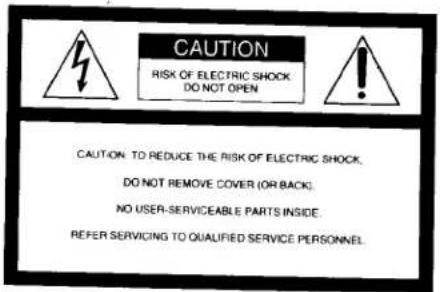
To avoid electrical shock, do not open the cabinet. Refer servicing to qualified personnel only.
This symbol is intended to alert the user to the presence of uninsulated "dangerous voltage" within the product's enclosure that may be of sufficient magnitude to constitute a risk of electric shock to persons.

This symbol is intended to alert the user to the presence of important operating and maintenance (servicing) instructions in the literature accompanying the appliance.
Owner's Record
The model number and the serial number are located on the bottom of the unit. Record the serial number in the space provided below. Refer to them whenever you call upon your Sony dealer regarding this product.
Model No.SRS-Z750/Z750PC
Serial No.
Features
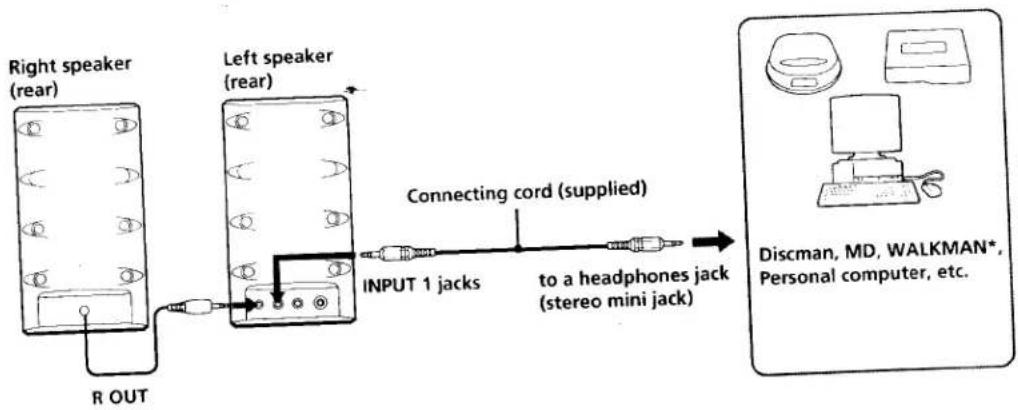
The Sony SRS-Z750/Z750PC is a compact-size speaker system with a built-in power amplifier. This system can be connected to a Discman, WALKMAN* headphone stereo, MD station, etc.
- Newly developed -type magnetic circuit reproduces powerful bass that you cannot imagine from its appearance.
• Power output of 7.5 W + 7.5 W - MEGA BASS and IBB (Intelligent Bass Boost) circuit enables you to obtain powerful bass regardless of the sound volume.
* WALKMAN is a registered trademark of Sony Corporation.
A
flowchart
graph LR
    A["Right speaker (rear)"] -->|R OUT| B["Left speaker (rear)"]
    B --> C["Connecting cord (supplied)"]
    C --> D["to a headphones jack (stereo mini jack)"]
    D --> E["Personal computer"]
    style A fill:#f9f,stroke:#333
    style B fill:#f9f,stroke:#333
    style C fill:#ccf,stroke:#333
    style D fill:#cfc,stroke:#333
    style E fill:#fcc,stroke:#333
B
flowchart
graph LR
    A["Device 1"] -->|Connecting cord (supplied)| B["MD station"]
    C["Device 2"] -->|INPUT 1| B
    B -->|ACTIVE SPEAKER OUT| D["MD station"]
C
SRS-Z750PC only
D
E
English
Precautions
- Use only the supplied AC power adaptor. Do not use any other AC power adaptor.
• After operating the system with the AC power adaptor, disconnect the AC power adaptor from the wall outlet if the system is not to be used for an extended period of time. The POWER switch on the left speaker does not turn the AC power adaptor off. - Do not open the cabinet. Refer servicing to qualified personnel only.
- Do not leave the system in a location near heat sources, or in a place subject to direct sunlight, excessive dust, moisture, rain or mechanical shock.
- Should any solid object or liquid fall into either speaker, disconnect the AC power adaptor and have the speaker checked by qualified personnel before operating it any further.
- Do not use alcohol, benzine, or thinner to clean the cabinet.
- Although this system is magnetically shielded, do not leave recorded tapes, watches, personal credit cards or floppy disks using magnetic coding in front of the system for an extended period of time.
- The nameplate indicating operating voltage, power consumption, etc., is located on the side of the plug of the AC power adaptor.
• Install the system on a flat, level surface to prevent it from falling over or dropping. Do not place valuables near it.
If the TV picture or monitor display is magnetically distorted
Although this system is magnetically shielded, there may be cases that the picture on some TV sets/personal computer sets may become magnetically distorted. In such a case, turn off the power of the TV set/personal computer set once, and after 15 to 30 minutes turn it on again. For the personal computer set, take the appropriate measures such as data storage before turning it off.
When there seems to be no improvement, locate the system further away from the TV set/personal computer set. Furthermore, be sure not to place objects in which magnets are attached or used near the TV set/personal computer set, such as audio racks, TV stands, toys etc. These may cause magnetic distortion to the picture due to their interaction with the system.
If you have any questions or problems concerning your system that are not covered in this manual, please consult your nearest Sony dealer.
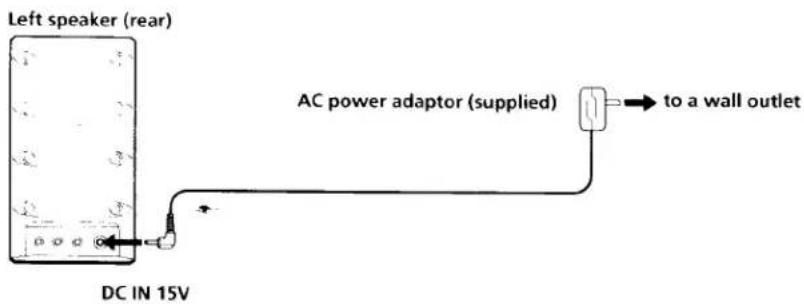
Power Source (See fig. D)
The mains power source is required when the system is used.
Note
Do not plug the AC power adaptor to the DC IN 15V jack with the cord side facing downward. Doing so may damage the plug and the unit become unstable.
Note on the AC power adaptor
Use only the supplied AC power adaptor. Do not use any other AC power adaptor.

Polarity of the plug
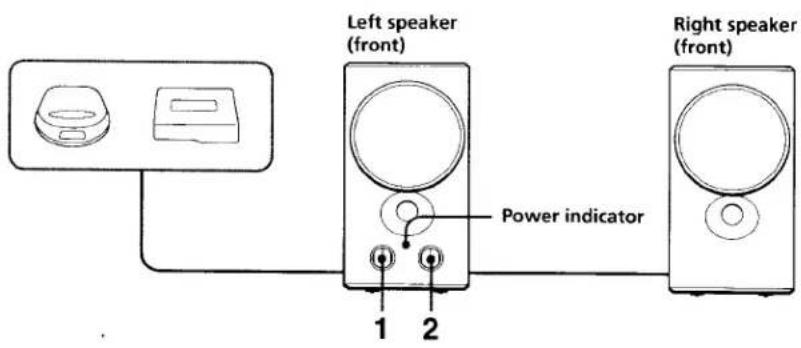
How to Use (See fig. E)
1 Turn the POWER switch to turn on the system.
The POWER indicator lights up.
2 Adjust the volume with the VOLUME control.
Note
- Turn off the MEGA BASS (Walkman) or BASS BOOST (Discman, etc.) function as it may cause sound distortion.
- When you connect two audio equipment to the unit and play them at the same time, both sound will be mixed and come from the speakers. Therefore, be sure to turn off either of the equipment that you do not use. (SRS-Z750PC only)
After listening, turn the POWER switch to turn off the system. The POWER indicator goes out.
Specifications
Amplifier section
| Power output | 7.5W + 7.5W, -1(0, 1 HLD),500 Hz, -1 kHz, Solums |
| Input impedance | 4.7 kilohms (at 1 kHz) |
| Input | Stereo mim pack (INPUT)(SRS /Z50)Stereo mim pack x 2 (INPUT 1, 2)(SRS /Z50IPC) |
Speaker section
| System | Full-range, bass reflex type |
| Speaker unit | Magnetically shielded 065 mm (2^5/_x inch) |
| Nominal Impedance | 8 ohms |
| Rated input power | 7.5 W |
General
| Power requirement | DC IN 15 V jack accepts the supplied Sony AC power adaptor (left speaker only) |
| Dimensions | Approx. 90 × 165 × 155 mm( 3^5/x . 6^1/_2 × 6^1/_8in ) (w/h/d) incl. projecting parts and controls |
| Mass | Left speaker: Approx. 850 g |
| Right speaker: Approx. 750 g | |
| Supplied accessories | AC power adaptor (1) Connecting cord (stereo miniplug stereo miniplug) (1) |
| Optional accessories | Plug adaptor PC-236HG Connecting cord RK-G138HG |
Design and specifications are subject to change without notice.
The CE mark on the unit is valid only for products marketed in the European Union.
A
flowchart
graph LR
    A["Altavoz derecho (trasero)"] -->|R OUT| B["Altavoz izquierdo (trasero)"]
    B --> C["Cable conector (suministrado)"]
    C --> D["Tomas INPUT 1"]
    D --> E["a la toma para auriculares (minitoma estéreo)"]
    E --> F["Discman, reproductor de minidiscos, WALKMAN*, Ordenador personal, etc."]
B
C
SRS-Z750PC solamente
flowchart
graph LR
    A["Input 1"] --> B["INPUT 2"]
    B --> C["RK-G129HG (no suministrado)"]
    C --> D["Television"]
    B --> E["a los terminales de salida de audio (tomas de salida de nivel de línea)"]
D
E
Español
Antes de utilizar la unidad, lea este manual detenidamente y conservelo para futuras referencias.
Acerca de este manual
Las instrucciones de este manual son para el SRS-2750 y el SRS-2750PC.
Antes de comenzar a leerlo, compruebe el número de su modelo.
E1 SRS-Z750PC es el utilizado para fines de ilustración.
ADVERTENCIA
Para evitar incendios o el riesgo de electrocución, no exponga la unidad a la lluvia ni a la humedad.
Para evitar descargas eléctricas, no abra la unidad. En caso de avería, solicite los servicios de personal cualificado.
Características
El SRS-Z750/Z750PC es un sistema de altavoces compacto, tamaño bolsillo, con un amplificador de potencia incorporado. El sistema podrá conectarse a un Discman, un WALKMAN* con auriculares estéreo, una estación de minidiscos, etc.
- Circuito magnético de tipo Σ, recientemente desarrollado, que reproduce graves potentes inimaginables por su aspecto.
- Salida de potencia de 7,5 W + 7,5 W
- El circuito MEGA BASS e IBB (refuerzo de graves inteligente) le permite obtener graves potentes independientemente del volumen del sonido.
* WALKMAN es marca registrada de Sony Corporation.
Precauciones
- Utilice solamente el adaptador de alimentación de CA suministrado. No use ningún otro adaptador de alimentación de CA.
- Después de haber alimentado el sistema con el adaptador de alimentación de CA, desconecte éste de la toma de la red cuando no vaya a utilizar el sistema durante mucho tiempo. El interruptor POWER del altavoz izquierdo no desconectará el adaptador de alimentación de CA.
- No abra las cajas acústicas. En caso de avería solicite los servicios de personal cualificado.
- No deje el sistema cerca de fuentes térmicas, ni en lugares sometidos a la luz directa, polvo excesivo, humedad, lluvia, ni choques.
- Si dentro del sistema cae algún objeto sólido o líquido, desconecte el adaptador de alimentación de CA y haga que sea revisado por personal-cualificado.
- No emplee alcohol, bencina, ni diluidor de pintura para limpiar las cajas acústicas.
- Aunque este sistema está magnéticamente apantallado, no deje sus cintas grabadas, relojes, posejas de crédito, ni discos floppy, porque poseen codificación magnética, delante del sistema durante largos períodos de tiempo.
- La placa de características en la que se indica la tensión de alimentación, el consumo, etc., se encuentra debajo del enchufe del adaptador de alimentación de CA.
- Instale el sistema sobre una superficie plana y nivelada para evitar que se caiga. No coloque objetos de valor cerca del sistema
Si la imagen del televisor o del monitor aparece distorsionada debido al magnetismo
Aunque este sistema tiene está magnéticamente apantallado, a veces las imágenes de algunos televisores/monitores de ordenadores personales pueden verse distorsionadas por el magnetismo. En estos casos, desconecte una vez el televisor/ordenador personal y vuelva a conectarla después de 15 a 30 minutos. En el caso de un ordenador personal, tome las precauciones del caso, para no perder datos importantes.
Si esto no parece solucionar el problema, instale el sistema alejado del televisor/ordenador personal. No acerque objetos que contengan imanes cerca del televisor/ordenador personal, un mueble de audio o mesa de TV, juguetes, etc. La distorsión de las imágenes puede deberse a la combinación de estos imanes con el efecto del sistema.
Si tiene alguna pregunta o problema en relación con su sistema que no pueda resolver este manual, póngase en contacto con su proveedor Sony.
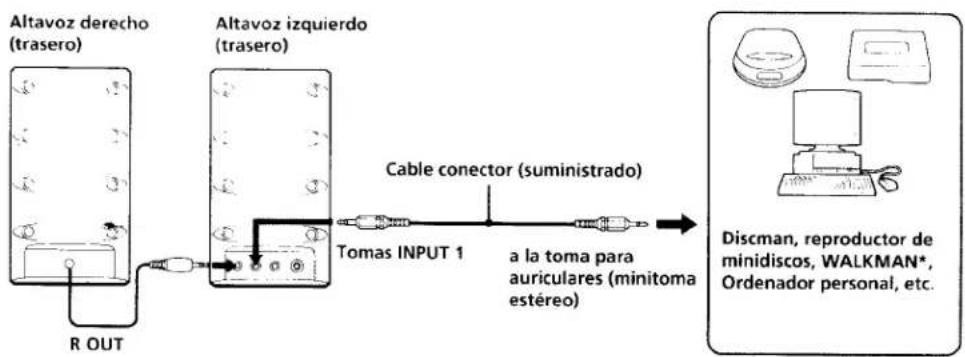
Conexión (Consulte la fig. A)
Conecte el altavoz izquierdo al equipo fuente.
Cuando conecte el sistema a una toma mononural de una radio, etc... es posible que el sonido salga solamente a través del altavoz izquierdo. En tal caso, utilice un adaptador de clavija PC-236HG Sony opcional. El sonido saldrá a través de ambos altavoces.
Conexión a una toma para auriculares telefónica estéreo
Emplee un cable conector RK-G138HC opcional.
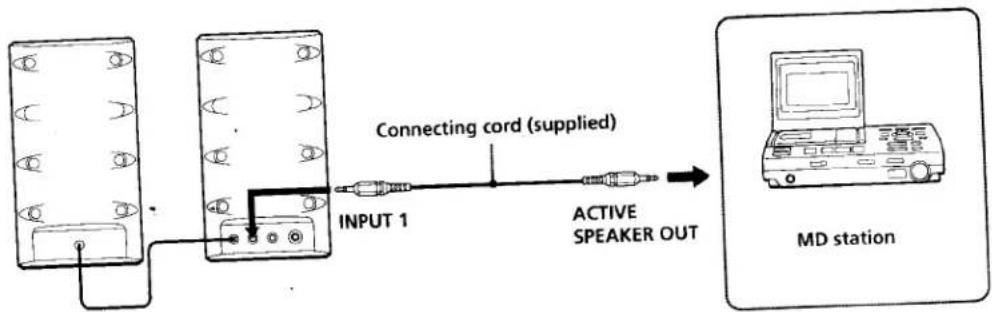
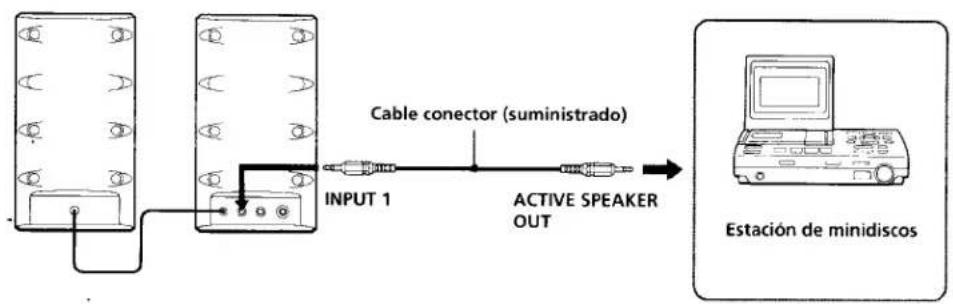
Conexión a una estación de minidiscos (consulte la fig. B)
Para realizar la conexión a una estación de minidiscos, utilice la toma INPUT 1 (INPUT para el SRS-Z750) del altavoz izquierdo.
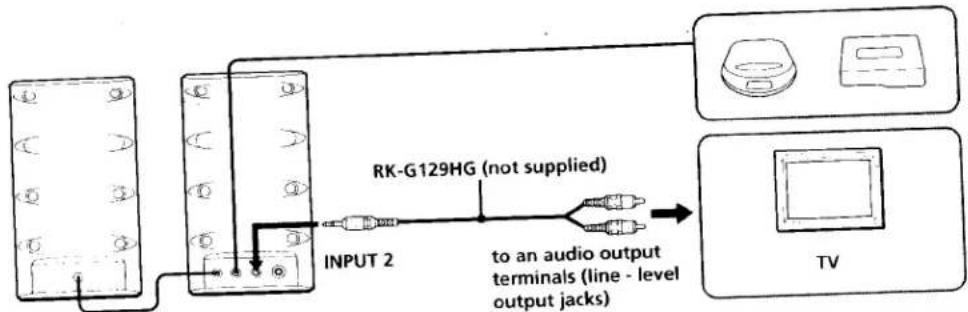
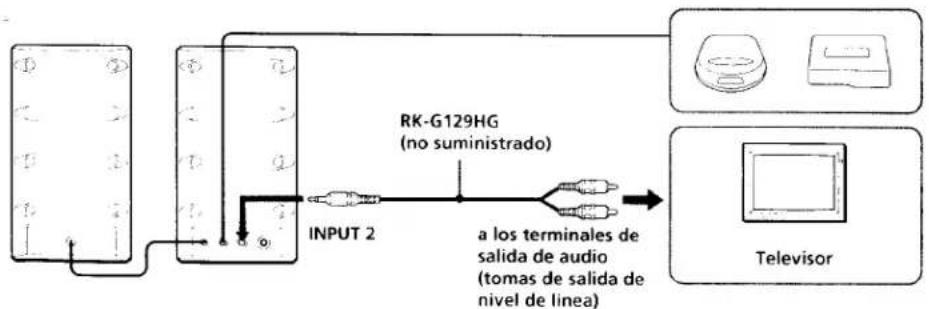
Conexión a un segundo equipo (SRS-Z750PC solamente) (Consulte la fig. ©)
Para la conexión a otro equipo fuente, utilice la toma INPUT 2 del altavoz izquierdo.
Nota
El SRS-Z750 no dispone de toma INPUT 2.
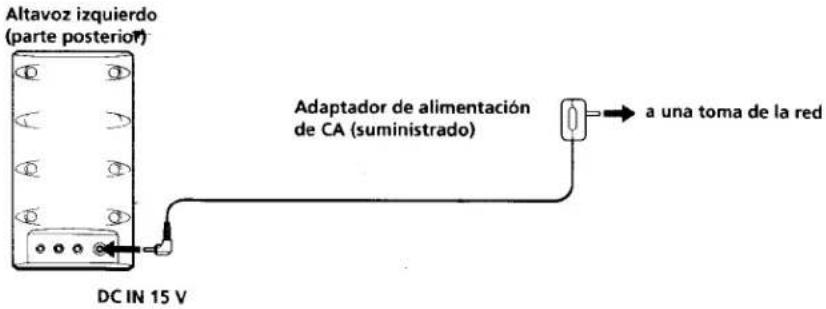
Alimentación (Consulte la fig. D)
Para utilizar el sistema tendrá que usar la corriente de la red.
Nota
No enchufe el adaptador de alimentación de CA a la toma DC IN 15V con el cable encarado hacia arriba. Si lo hiciese, podría dañar la clavija y la unidad quedaría inestable.
Nota sobre el adaptador de alimentación de CA
Utilice solamente el adaptador de alimentación de CA suministrado. No utilice ningún otro tipo de adaptador de alimentación de CA.
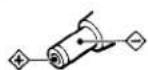
Polaridad de la clavija
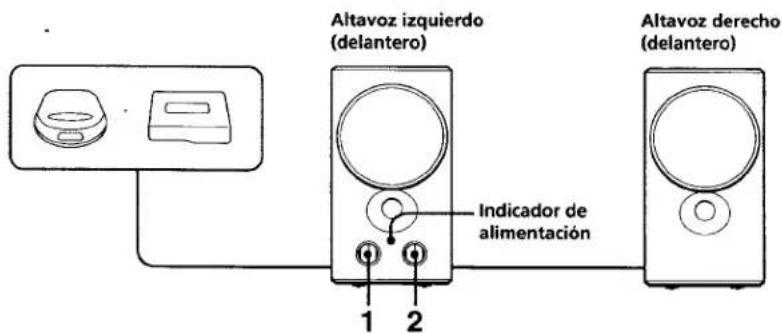
Forma de empleo (Consulte la fig. E)
1 Gire el interruptor POWER para conectar la alimentación del sistema. Se encenderá el indicador POWER.
2 Ajuste el volumen con el control VOLUME.
Notas
- Desactive la función MEGA BASS (Walkman) o BASS BOOST (Discman, etc.), ya que podría distorsionar el sorido.
- Cuando conecte dos equipos de audio a la unidad y los ponga en reproducción al mismo tiempo, los sonidos de ambos se mezclarán y saldrán a través de los altavoces. Por lo tanto, cerciórese de desconectar la alimentación de cualquiera de los equipos que no vaya a utilizar. (SRS-Z750 1°C, solamente)
Después de la escucha, gire el interruptor POWER para desconectar la alimentación del sítema. El indicador POWER se apagará
Especificaciones
Sección del amplificador
Salida de potencia 7.5 W + 7.5 W, distorsión armonica total del 10°, 500 Hz - 1 kHz. 8 ohmios
Impedancia de entrada
4,7 kiloohmios (a 1 kHz) Minitoma estereo (INPUT) (SRS-Z750) Minitoma estereo (INPUT 1, 2) (SRS-Z750PC)
Sección de los altavoces
Sistema Gama completa, tipo reflector de graves Altavoces Magnéticamente apantallados. ø 65 mm Impedancia nominal 8 ohmios Potencia nominal de entrada 7,5 W
Generales
Alimentación: 15 V CC con el adaptador de alimentación de CA Sony suministrado (altavoz izquierdo solamente) Dimensiones Aprox. 90 × 165 × 155 mm (an/al/prf) incluyendo partes y controles salientes Masa Altavoz izquierdo: Aprox. 850 g Altavoz derecho: Aprox. 750 g
Accesorios suministrados Adaptador de alimentación de CA (1) Cable conector (miniclavija estéreo ↔ miniclavija estéreo) (1)
Accesorios opcionales Adaptador de clavija PC-236HG Cable conector RK-G138HG
Diseño y especificaciones sujetos a cambio sin previo aviso.
La marca CE de la unidad solamente será válida para productos vendidos en la Unión Europea.


- Stereo Active Speaker System
- About this manual
- WARNING
- Owner's Record
- Features
- English
- Precautions
- If the TV picture or monitor display is magnetically distorted
- Power Source (See fig. D)
- Note
- Note on the AC power adaptor
- How to Use (See fig. E)
- Specifications
- D
- E
- Español
- Acerca de este manual
- ADVERTENCIA
- Características
- Precauciones
- Si la imagen del televisor o del monitor aparece distorsionada debido al magnetismo
- Conexión (Consulte la fig. A)
- Conexión a una toma para auriculares telefónica estéreo
- Conexión a una estación de minidiscos (consulte la fig. B)
- Conexión a un segundo equipo (SRS-Z750PC solamente) (Consulte la fig. ©)
- Nota
- Alimentación (Consulte la fig. D)
- Nota sobre el adaptador de alimentación de CA
- Forma de empleo (Consulte la fig. E)
- Notas
- Especificaciones
- Sección del amplificador
- Sección de los altavoces
- Generales
Marka : SONY
Model : SRS-Z750
Kategoria : Głośnik