
PMD-B100P-BLACKBIRD - Accessoire électronique ALPINE - Notice d'utilisation et mode d'emploi gratuit
Retrouvez gratuitement la notice de l'appareil PMD-B100P-BLACKBIRD ALPINE au format PDF.


| Type de produit | Station d'accueil pour navigateur portable Blackbird |
| Marque | Alpine |
| Modèle | PMD-DOK1 (compatible avec PMD-B100P-BLACKBIRD) |
| Dimensions (L x H x P) | 118 x 118 x 40 mm |
| Poids | 360 g (0,8 lb) |
| Alimentation | 12 V CC, masse négative (véhicule) |
| Fonctions principales | Affichage de la navigation sur l'écran de l'autoradio Alpine, commande tactile, guidage vocal, sortie audio stéréo MP3/WMA, entrée signal de vitesse, entrée feux de stationnement, entrée frein de stationnement |
| Connectique | 1 x Display, 1 x Antenne FM (option), 1 x Audio (jack/RCA), 1 x Alimentation 10 broches, 1 x Antenne GPS externe |
| Accessoires fournis | Station d'accueil, cache transparent, câble d'alimentation 10 broches (5 m), câble vidéo RGB 13 broches (5 m), antenne GPS externe (5 m), câble jack vers RCA (31 cm), vis de montage (4), vis de verrouillage (2), manuel d'installation, carte d'enregistrement |
| Entretien et nettoyage | Nettoyer avec un chiffon doux et sec. Ne pas utiliser de produits chimiques ou de solvants. Éviter l'humidité et la poussière. |
| Sécurité | Ne pas démonter, utiliser uniquement sur véhicule 12 V négatif, ne pas couper les câbles, installation par un professionnel, éviter les emplacements gênant la conduite, maintenir les câbles éloignés des pièces mobiles |
| Pièces détachées et réparabilité | Contacter un centre de service agréé Alpine. Ne pas utiliser de pièces non spécifiées. |
| Garantie | 1 an pour le premier acheteur (États-Unis, Porto Rico, Canada) |
| Informations générales | Conçu pour les systèmes audio/vidéo Alpine, compatible avec les stations d'accueil PMD-DOK1. Nécessite l'installation par un professionnel. |
FOIRE AUX QUESTIONS - PMD-B100P-BLACKBIRD ALPINE
Questions des utilisateurs sur PMD-B100P-BLACKBIRD ALPINE
0 question sur cet appareil. Repondez a celles que vous connaissez ou posez la votre.
Poser une nouvelle question sur cet appareil
Téléchargez la notice de votre Accessoire électronique au format PDF gratuitement ! Retrouvez votre notice PMD-B100P-BLACKBIRD - ALPINE et reprennez votre appareil électronique en main. Sur cette page sont publiés tous les documents nécessaires à l'utilisation de votre appareil PMD-B100P-BLACKBIRD de la marque ALPINE.
MODE D'EMPLOI PMD-B100P-BLACKBIRD ALPINE
Docking Station
PMD-DOK1
• INSTALLATION/OWNER'S MANUAL Please read this manual to maximize your enjoyment of the outstanding performance and feature capabilities of the equipment, then retain the manual for future reference.
IMPORTANT
Please record the serial number of your unit in the space provided below and keep it as a permanent record. The serial number plate is located on the bottom of the unit.
SERIAL NUMBER:
INSTALLATION DATE:
INSTALLATION TECHNICIAN:
PLACE OF PURCHASE:
ALPINE ELECTRONICS MARKETING, INC.
-1-8 Nishi Gotanda
Shinagawa-
Tokyo 141-0031, Japan
Phone 03-5496-8231
ALPINE ELECTRONICS OF AMERICA,
INC.
19145 Gramercy Place
Torrance, California 90501 U.S.A
Phone 1-800-ALPINE-1 (1-800-257-4631)
ALPINE ELECTRONICS OF CANADA.
INC
777 Supertest Road
Toronto, Ontario M3J 2M9 Canada
Phone 1-800-ALPINE-1 (1-800-257-4631)
ALPINE ELECTRONICS OF AUSTRALIA
PTY, LTD.
161-165 Princess Highway, Hallam
Victoria 3803, Australia
Phone 03-8787-1200
(1) 2017年1月1日至2018年1月1日(含)的公司股票交易均价为4.56元/股,与前一交易日收盘价相比,涨幅为-0.97%。
ALPINE ELECTRONICS GmbH
Frankfurter Ring 117, 80807 München,
Germany
Phone 089-32 42 640
ALPINE ELECTRONICS OF U.K., LTD.
ALPINE House
Fletchamstead Highway, Coventry CCV4
9TW, U.K
Phone 0870-33 33 763
ALPINE ELECTRONICS (BENELUX) GmbH
Leuvensesteenweg 510-B6,
30 Zaventem, Belgium
Tel.: 02-725 1315
ALPINE ELECTRONICS FRANCE S.A.R.L.
(RCS PONTOISE B 338 101 280)
98, Rue de la Belle Etoile, Z.I. paris Nord II, B.P. 50016, 05045, Reisey Charles de Gaulle
3945 Roissy Cha Codex, France
Cedex, France Phone 01-48638989
, hons of 1000000
ALPINE ITALIA S.p.A
Viale C. Colombo 8, 20090 Trezzano
Sul Naviglio (MI), Italy
Phone 02-484781
ALPINE ELECTRONICS DE ESPAÑA, S.A.
Portal de Gamarra 36, Pabellón, 32
01013 Vitoria (Alava)-APDO 133, Spain
Phone 945-283588
Points to Observe for Safe Usage
- Read this manual carefully before starting operation and use this system safely. We cannot be responsible for problems resulting from failure to observe the instructions in this manual.
- This manual uses various pictorial displays to show how to use this product safely and to avoid harm to yourself and others and damage to your property. Here is what these pictorial displays mean. Understanding them is important for reading this manual.
• Meaning of displays
| Warning | This label is intended to alert the user to the presence of important operating instructions.Failure to heed the instructions will result in severe injury or death. |
| Caution | This label is intended to alert the user to the presence of important operating instructions.Failure to heed the instructions can result in injury or material damage. |

Warning
DO NOT DISASSEMBLE OR ALTER.
Doing so may result in an accident, fire or electric shock.
USE ONLY IN CARS WITH A 12 VOLT NEGATIVE GROUND.
(Check with your dealer if you are not sure.) Failure to do so may result in fire, etc.
DO NOT SPLICE INTO ELECTRICAL CABLES.
Never cut away cable insulation to supply power to other equipment. Doing so will exceed the current carrying capacity of the wire and result in fire or electric shock.
DO NOT INSTALL IN LOCATIONS WHICH MIGHT HINDER VEHICLE OPERATION, SUCH AS THE STEERING WHEEL OR GEARSHIFT.
Doing so may obstruct forward vision or hamper movement etc. and result in serious accident.
DO NOT ALLOW CABLES TO BECOME
ENTANGLED IN SURROUNDING OBJECTS.
Arrange wiring and cables in compliance with the manual to prevent obstructions when driving. Cables or wiring that obstruct or hang up on places such as the steering wheel, gear lever, brake pedals, etc. can be extremely hazardous.
MAKE THE CORRECT CONNECTIONS.
Failure to make the proper connections may result in fire or product damage.

Caution
USE SPECIFIED ACCESSORY PARTS AND INSTALL THEM SECURELY.
Be sure to use only the specified accessory parts. Use of other than designated parts may damage this unit internally or may not securely install the unit in place. This may cause parts to become loose resulting in hazards or product failure.
DO NOT INSTALL IN LOCATIONS WITH HIGH MOISTURE OR DUST.
Avoid installing the unit in locations with high incidence of moisture or dust. Moisture or dust that penetrates into this unit may result in product failure.
HAVE THE WIRING AND INSTALLATION DONE BY EXPERTS.
The wiring and installation of this unit requires special technical skill and experience. To ensure safety, always contact the dealer where you purchased this product to have the work done.
ARRANGE THE WIRING SO IT IS NOT CRIMPED OR PINCHED BY A SHARP METAL EDGE.
Route the cables and wiring away from moving parts (like the seat rails) or sharp or pointed edges. This will prevent crimping and damage to the wiring. If wiring passes through a hole in metal, use a rubber grommet to prevent the wire's insulation from being cut by the metal edge of the hole.
LIMITED WARRANTY
ALPINE ELECTRONICS OF AMERICA, INC. AND ALPINE OF CANADA INC. ("Alpine"), are dedicated to quality craftsmanship and are please to offer this Warranty. We suggest that you read it thoroughly. Should you have any questions, please contact your Dealer or Alpine at one of the telephone numbers listed below.
●PRODUCTS COVERED:
This Warranty covers Car Audio/Visual Products and Related Accessories (“the product”). Products purchased in the Canada are covered only in Canada. Products purchased in the U.S.A. are covered only in the U.S.A.
●LENGTH OF WARRANTY:
This Warranty is in effect for one year from the date of the first consumer purchase.
●WHO IS COVERED:
This Warranty only covers the original purchaser of the product, who must reside in the United States, Puerto Rico or Canada.
●WHAT IS COVERED:
This Warranty covers defects in materials or workmanship (parts and labor) in the product.
●WHAT IS NOT COVERED:
This Warranty does not cover the following:
① Damage occurring during shipment of the product to Alpine for repair (claims must be presented to the carrier).
② Damage caused by accident, abuse, negligence, misuse, improper connections, improper operation or failure to follow instructions contained in the Owner's Manual.
③ Damage caused by act of God, including without limitation, earthquake, fire, flood, storms or other acts of nature.
④ Any cost or expense related to the removal or reinstallation of the product.
⑤ Service performed by an unauthorized person, company or association.
⑥ Any product which has the serial number defaced, altered or removed.
⑦ Any product which has been adjusted, altered or modified without Alpine's consent.
⑧ Any product not distributed by Alpine within the United States, Puerto Rico or Canada.
⑨ Any product not purchased from an Authorized Alpine Dealer.
⑩ Any product that has been determined to contain an excessive amount of dust or dirt and any product that contains other contaminants including liquid or foreign objects.
●HOW TO OBTAIN WARRANTY SERVICE:
① You are responsible for delivery of the product to an Authorized Alpine Service Center or Alpine for repair and for payment of any initial shipping charges. Alpine will, at its option, repair or replace the product with a new or reconditioned product without charge. If the repairs are covered by the warranty, and if the product was shipped to an Authorized Alpine Service Center or Alpine, Alpine will pay the return shipping charges.
② You should provide a detailed description of the problem(s) for which service is required.
③ You must supply proof of your purchase of the product.
④ You must package the product securely to avoid damage during shipment.
●HOW WE LIMIT IMPLIED WARRANTIES:
ANY IMPLIED WARRANTIES INCLUDING FITNESS FOR USE AND MERCHANTABILITY ARE LIMITED IN DURATION TO THE PERIOD OF THE EXPRESS WARRANTY SET FORTH ABOVE AND NO PERSON IS AUTHOORIZED TO ASSUME FOR ALPINE ANY OTHER LIABILITY IN CONNECTION WITH THE SALE OF THE PRODUCT.
●HOW WE EXCLUDE CERTAIN DAMAGES:
ALPINE EXPRESSLY DISCLAIMS LIABILITY FOR INCIDENTAL AND CONSEQUENTIAL DAMAGES CAUSED BY THE PRODUCT. THE TERM “INCIDENTAL DAMAGES” REFERS TO, BUT IS NOT LIMITED TO, EXPENSES OF TRANSPORTING THE PRODUCT TO THE ALPINE SERVICE CENTER, LOSS OF THE ORIGINAL PURCHASER’S TIME, LOSS OF THE USE OF THE PRODUCT, BUS FARES, CAR RENTALS OR OTHERS COSTS RELATING TO THE CARE AND CUSTODY OF THE PRODUCT. THE TERM “CONSEQUENTIAL DAMAGES” REFERS TO, BUT IS NOT LIMITED TO, THE COST OF REPAIRING OR REPLACING OTHER PROPERTY WHICH IS DAMAGED WHEN THIS PRODUCT DOES NOT WORK PROPERLY. THE REMEDIES PROVIDED UNDER THIS WARRANTY ARE EXCLUSIVE AND IN LIEU OF ALL OTHERS.
●HOW STATE/PROVINCIAL LAW RELATES TO THE WARRANTY:
This Warranty gives you specific legal rights, and you may also have other rights which vary from state to state and province to province. In addition, some states/provinces do not allow limitations on how long an implied warranty lasts, and some do not allow the exclusion or limitation of incidental or consequential damages. Accordingly, limitations as to these matters contained herein may not apply to you.
●IN CANADA ONLY:
This Warranty is not valid unless your Alpine car audio product has been installed in your vehicle by an Authorized Installation Center, and this warranty stamped upon installation by the installation center.
●HOW TO CONTACT CUSTOMER SERVICE:
Should the product require service, please call the following number for your nearest Authorized Alpine Service Center.
U.S.A. 1-888-NAV-HELP (1-888-628-4357) CANADA 1-888-NAV-HELP (1-888-628-4357)
Alpine Electronics of America, Inc.,
19145 Gramercy Place, Torrance, California 90501, U.S.A.
Alpine Electronics of Canada, Inc.,
777 Supertest Road, Toronto, Ontario, M3J 2M9, Canada
FCC STATEMENT
THIS DEVICE COMPLIES WITH PART 15 OF THE FCC RULES. OPERATION IS SUBJECT TO THE FOLLOWING TWO CONDITIONS :
(1) THIS DEVICE MAY NOT CAUSE HARMFUL INTERFERENCE.
(2) THIS DEVICE MUST ACCEPT ANY INTERFERENCE RECEIVED INCLUDING
INTERFERENCE THAT MAY CAUSE UNDESIRED OPERATION.
natural_image
Line drawing of a device casing with multiple ports and connectors (no text or symbols)Connections
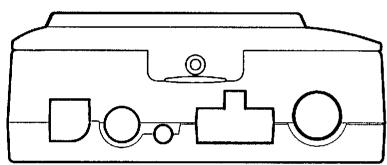
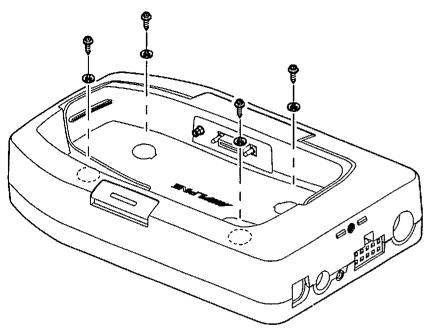
- Select a location where the PMD-DOK1 Docking Station will be level once installed.
- Do not install the Docking Station in a position where the Blackbird main unit will be inserted upside down.
- To protect against vehicle noise, leave a space of 10 to 20 cm between the vehicle wiring and wiring for the Docking Station when installing.
- The Docking Station should be mounted in a convenient location using the mounting screws provided.
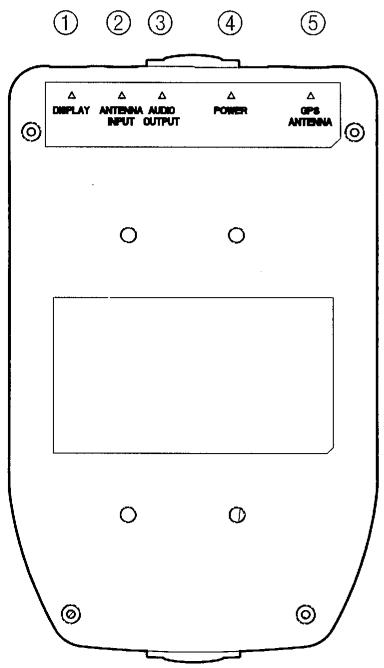
1. DISPLAY
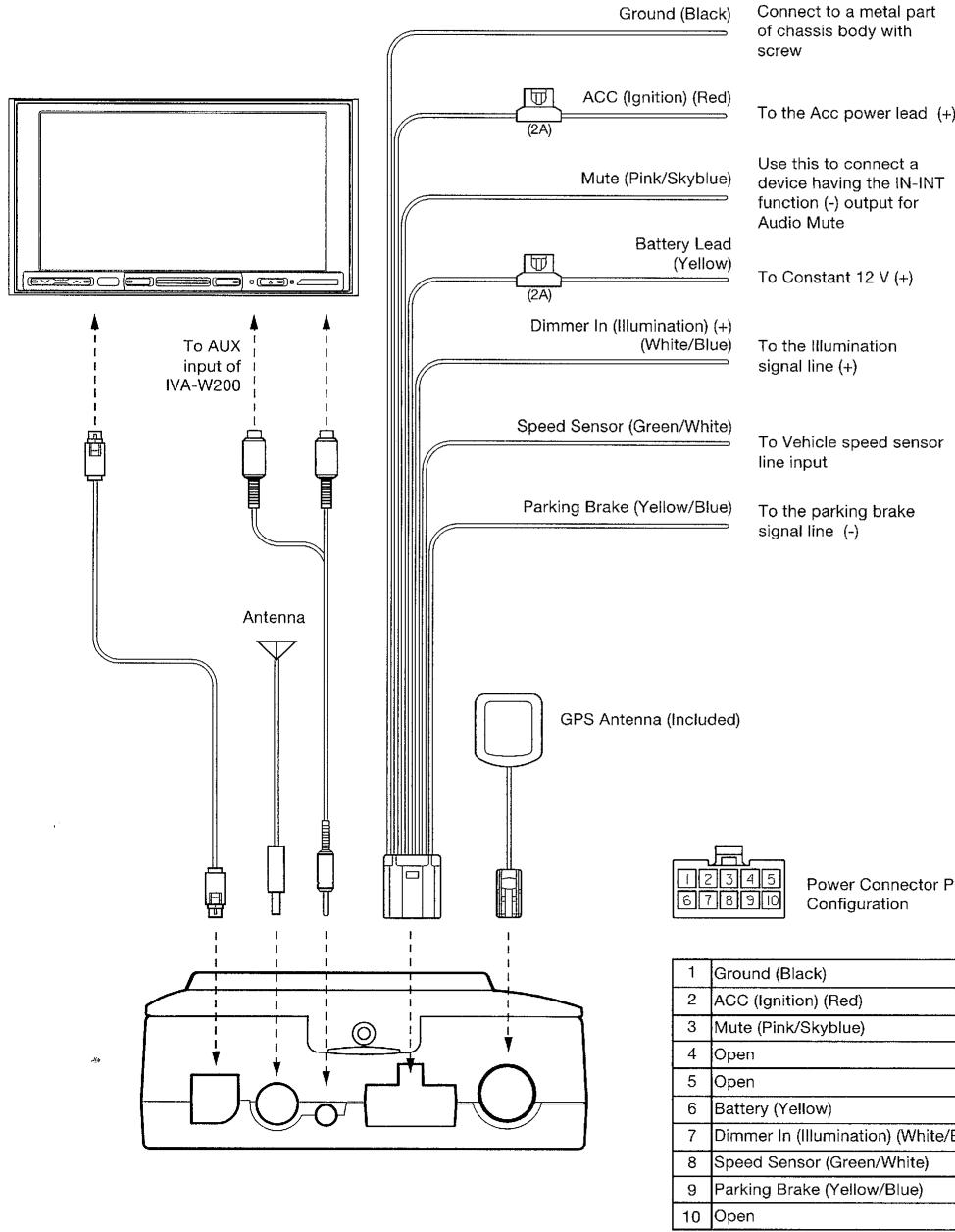
Connects to the display connector of Alpine A/V Head Unit.
2. ANTENNA INPUT (OPTIONAL)
FM antenna input (RDS-TMC traffic tuner reception). Optional film antenna (KAE-350FM) available. See your dealer for details.
3. AUDIO OUTPUT
Connects to aux input of Alpine A/V Head Unit (using the provided adapter).
4. Power
Connects 10 pin power input.
5. GPS Antenna
External GPS antenna (included) Input
flowchart
graph TD
    A["Device"] --> B["Ground (Black)"]
    A --> C["ACC (Ignition) (Red)"]
    A --> D["Mute (Pink/Skyblue)"]
    A --> E["Battery Lead (Yellow)"]
    A --> F["Dimmer In (Illumination) (+)(White/Blue)"]
    A --> G["Speed Sensor (Green/White)"]
    A --> H["Parking Brake (Yellow/Blue)"]
    A --> I["GPS Antenna (Included)"]
    B --> J["To Power Connector P Configuration"]
    C --> K["To Power Connector P Configuration"]
    D --> L["To Power Connector P Configuration"]
    E --> M["To Power Connector P Configuration"]
    F --> N["To Power Connector P Configuration"]
    G --> O["To Power Connector P Configuration"]
    H --> P["To Power Connector P Configuration"]
    I --> Q["Power Connector P Configuration"]
    style A fill:#f9f,stroke:#333
    style B fill:#ccf,stroke:#333
    style C fill:#ccf,stroke:#333
    style D fill:#ccf,stroke:#333
    style E fill:#ccf,stroke:#333
    style F fill:#ccf,stroke:#333
    style G fill:#ccf,stroke:#333
    style H fill:#ccf,stroke:#333
    style I fill:#ccf,stroke:#333
    style J fill:#fff,stroke:#333
    style K fill:#fff,stroke:#333
    style L fill:#fff,stroke:#333
    style M fill:#fff,stroke:#333
    style N fill:#fff,stroke:#333
    style O fill:#fff,stroke:#333
    style P fill:#fff,stroke:#333
    style Q fill:#fff,stroke:#333
    style R fill:#fff,stroke:#333
    style S fill:#fff,stroke:#333
    style T fill:#fff,stroke:#333
    style U fill:#fff,stroke:#333
    style V fill:#fff,stroke:#333
    style W fill:#fff,stroke:#333
    style X fill:#fff,stroke:#333
    style Y fill:#fff,stroke:#333
    style Z fill:#fff,stroke:#333
Operating Blackbird from the A/V Head Unit (using IVA-W200 as an example)
- Press and hold the power button for 2 seconds to power on Blackbird.
- Place Blackbird into the Docking station.
- Power on the A/V Head Unit and select Navigation as Source.
To Listen to Music from Blackbird
-
Press SOURCE and select AUX as input.
-
Press V.SEL and select Navigation as video source.
- Using V.SEL, you can still use function of the A/V Head Unit while Blackbird is on the screen.
- Blackbird's music feature is also available from the Navi menu. See Blackbird Owner's Manual for more details.
Specifications
- External dimensions....118 (W) × 118 (H) × 40 (D) mm
• Weight 0.8 Lb (360 g) - Included in the box:
PMD-DOK1 Docking Station ....1
Transparent Dock Cover 1
10 pin Power cable (5 m/ 16.4 ft)....1
13 pin RGB Video cable (5 m/ 16.4 ft) ....1
External GPS antenna (5 m/ 16.4 ft) .....1
Mini jack to RCA (female) cable
(31 cm/ 1 ft)....1
Mounting screws 4
Cover lock screws....2
Installation/Owner's Manual 1
Registration card .... 1
- Product specifications and appearance are subject to change without notice for the purpose of improvement.
Features
- Navigation map display output to A/V Head Unit
• Full Touch Control with compatible A/V Head Unit
• Vehicle speed sensor input
• Voice guidance output - Stereo MP3/WMA audio output
Confirming Proper Installation
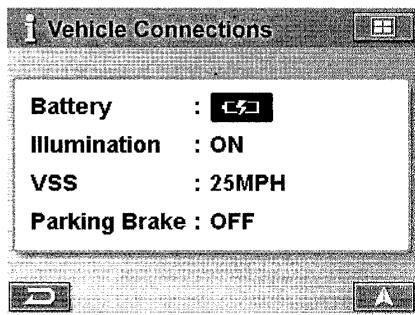
The vehicle connections screen allows you to ensure proper installation of the PMD-DOK1.
-
Touch NAVI. The A/V Head Unit will display the Blackbird screen.
-
Touch MAIN MENU
-
Touch INFORMATION 1 Information
-
Select VEHICLE CONNECTIONS. The connection status will appear on the screen.
Illumination - Toggle the parking lamp switch on and off to confirm this connection. This will allow the navigation display to change between night and day mode.
VSS - When connected to the vehicle speed sensor wire, this number will change to reflect current speed.
Parking Brake - Toggle the parking brake on and off to confirm this connection. This will allow access to the Edit and Setup menu while the vehicle is parked.
Additional On-Screen Buttons
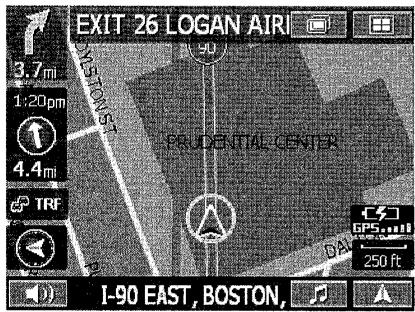
When Blackbird is docked, two additional on-screen buttons allow you to conveniently access system features.

Touching this button will give you access to the A/V Head Unit's display control.
Note; If left idle for more than 5 seconds, the system will automatically return to the Blackbird navigation screen.

Touching this button will display Blackbird's music screen. Refer to the Blackbird Owner's Manual for help using the music functions.
- Docking Station
- PMD-DOK1
- IMPORTANT
- INC.
- INC
- PTY, LTD.
- Points to Observe for Safe Usage
- Warning
- DO NOT DISASSEMBLE OR ALTER.
- USE ONLY IN CARS WITH A 12 VOLT NEGATIVE GROUND.
- DO NOT SPLICE INTO ELECTRICAL CABLES.
- DO NOT INSTALL IN LOCATIONS WHICH MIGHT HINDER VEHICLE OPERATION, SUCH AS THE STEERING WHEEL OR GEARSHIFT.
- DO NOT ALLOW CABLES TO BECOME
- ENTANGLED IN SURROUNDING OBJECTS.
- MAKE THE CORRECT CONNECTIONS.
- Caution
- USE SPECIFIED ACCESSORY PARTS AND INSTALL THEM SECURELY.
- DO NOT INSTALL IN LOCATIONS WITH HIGH MOISTURE OR DUST.
- HAVE THE WIRING AND INSTALLATION DONE BY EXPERTS.
- ARRANGE THE WIRING SO IT IS NOT CRIMPED OR PINCHED BY A SHARP METAL EDGE.
- LIMITED WARRANTY
- ●PRODUCTS COVERED:
- ●LENGTH OF WARRANTY:
- ●WHO IS COVERED:
- ●WHAT IS COVERED:
- ●WHAT IS NOT COVERED:
- ●HOW TO OBTAIN WARRANTY SERVICE:
- ●HOW WE LIMIT IMPLIED WARRANTIES:
- ●HOW WE EXCLUDE CERTAIN DAMAGES:
- ●HOW STATE/PROVINCIAL LAW RELATES TO THE WARRANTY:
- ●IN CANADA ONLY:
- ●HOW TO CONTACT CUSTOMER SERVICE:
- FCC STATEMENT
- DISPLAY
- ANTENNA INPUT (OPTIONAL)
- AUDIO OUTPUT
- Power
- GPS Antenna
- Operating Blackbird from the A/V Head Unit (using IVA-W200 as an example)
- To Listen to Music from Blackbird
- Specifications
- Features
- Confirming Proper Installation
- Additional On-Screen Buttons
Marque : ALPINE
Modèle : PMD-B100P-BLACKBIRD
Catégorie : Accessoire électronique