
RUE-4191 - Télécommande universelle ALPINE - Notice d'utilisation et mode d'emploi gratuit
Retrouvez gratuitement la notice de l'appareil RUE-4191 ALPINE au format PDF.

| Type de produit | Télécommande universelle pour autoradio et navigation Alpine |
| Marque | ALPINE |
| Modèle | RUE-4191 |
| Dimensions (L × H × P) | 56 × 142,5 × 37 mm |
| Poids (sans pile) | 72 g |
| Alimentation | 2 piles AAA (LR03) de 1,5 V |
| Fonctions principales | Commande du lecteur CD/MP3, tuner radio, changeur CD/DVD, lecteur DVD, système de navigation, écran TV |
| Modes de fonctionnement | Head Unit (AUDIO), Navigation (NAV), AV Head Unit, TV/Monitor, DVD Player/Changer (EXT DVD) |
| Portée infrarouge | Angle de 30° environ (pointage direct vers l'appareil) |
| Accessoires inclus | Support de télécommande, bande adhésive double face, 2 vis, 2 piles AAA |
| Entretien et nettoyage | Chiffon doux non pelucheux légèrement humidifié avec un détergent doux. Ne pas utiliser de solvants ni d'abrasifs. |
| Sécurité d'utilisation | Ne pas démonter, ne pas exposer à l'eau, ne pas utiliser en conduisant de manière distrayante. Stocker hors de portée des enfants (risque d'ingestion des piles). |
| Remplacement des piles | Ouvrir le couvercle en poussant, insérer les piles en respectant la polarité, refermer jusqu'au clic. |
| Température de fonctionnement | 0 à 40 °C (estimation) |
| Pays de fabrication | Chine |
FOIRE AUX QUESTIONS - RUE-4191 ALPINE
Questions des utilisateurs sur RUE-4191 ALPINE
0 question sur cet appareil. Repondez a celles que vous connaissez ou posez la votre.
Poser une nouvelle question sur cet appareil
Téléchargez la notice de votre Télécommande universelle au format PDF gratuitement ! Retrouvez votre notice RUE-4191 - ALPINE et reprennez votre appareil électronique en main. Sur cette page sont publiés tous les documents nécessaires à l'utilisation de votre appareil RUE-4191 de la marque ALPINE.
MODE D'EMPLOI RUE-4191 ALPINE
RUE-4191
Universal Remote Controller
Owner's Manual

WARNING
This symbol means important instructions. Failure to heed them can result in serious injury or death.
DO NOT DISASSEMBLE OR ALTER
Doing so may result in an accident, fire or electric shock.
KEEP SMALL OBJECTS SUCH AS BATTERIES OUT OF THE REACH OF CHILDREN.
Swallowing them may result in serious injury. If swallowed, consult a physician immediately.
DO NOT OPERATE ANY FUNCTION THAT TAKES YOUR ATTENTION AWAY FROM SAFELY DRIVING YOUR VEHICLE.
Any function that requires your prolonged attention should only be performed after coming to a complete stop. Always stop the vehicle in a safe location before performing these functions. Failure to do so may result in an accident.
KEEP THE VOLUME AT A LEVEL WHERE YOU CAN STILL HEAR OUTSIDE NOISE WHILE DRIVING.
Failure to do so may result in an accident.

CAUTION
This symbol means important instructions. Failure to heed them can result in injury or material property damage.
DO NOT MIX NEW BATTERIES WITH OLD BATTERIES. INSERT WITH THE CORRECT BATTERY POLARITY.
When inserting the batteries, be sure to observe proper polarity (+ and -) as instructed. Rupture or chemical leakage from the battery may cause fire or personal injury.
Handling Precautions
Do not drop or apply shock to the unit. It may get permanently damaged.
Keep the unit away from water and moisture, direct sun and heat, and excessive dust. Never use scouring pads, steel wool, abrasive powders or harsh chemical agents, such as lye solution, for cleaning.
Clean with a soft, lint-free cloth or cotton swab slightly dampened with a mild solution of detergent and water.
Do not operate this unit in a manner that could distract you from driving safely.
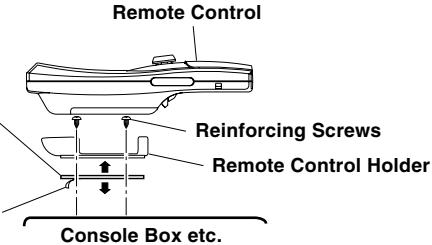
Installation of Remote Control Holder
- Do not leave the remote control mounted on the holder, if it is direct sunlight.
Remove the remote control from the holder and put it in the glove compartment. - If double-sided adhesive tape cannot install the holder securely, use screws.
Double-Sided
Adhesive Tape
(Before attaching
the tape, make sure
the mounting
locations are free
from dust or dirt)
Protective Paper
Battery Replacement
Applicable battery: Use two "AAA" sized dry batteries or equivalent.

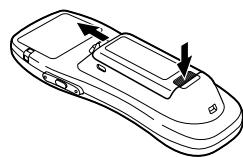
Opening the battery cover.
Push on the cover and slide it as indicated by the arrows then the cover will be removed.

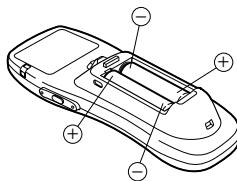
Replacing the batteries.
Remove the old batteries. Insert new ones matching the (+) and (-) polarities as shown in the diagram inside the remote control.

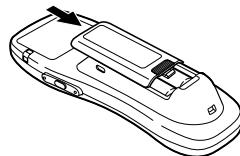
Closing the cover.
Push the cover in the arrow direction until a click is heard.
In Case of Difficulty:
| Problem | Cause | Solution |
| Remote Control Inoperative. | Reverse placement of battery. | Place the battery correctly into its cradle in the compartment. |
| Dead battery. | Replace the battery with a new one. | |
| Remote Control not pointed toward the head unit or monitor. | Point the remote control directly toward your head unit or monitor. |
Specifications
Battery Type AAA size batteries Battery Quantity 2
Dimensions (W× H× D) 56x142.5x37mm (2-1/4" x 5-5/8" x 1-7/16")
Weight (without battery) 72 gr (2.6 oz)
Accessories
Battery (AAA) 2
Remote Control Holder 1 set
Double-Sided Adhesive Tape 1 set
Screw 2
ALPINE
ALPINE ELECTRONICS, INC.
Tokyo office: 1-1-8 Nishi Gotanda,
Shinagawa-ku, Tokyo 141-8501, Japa
Tel.: (03) 3494-1101
ALPINE ELECTRONICS OF AMERICA, INC
19145 Gramercy Place, Torrance,
California 90501, U.S.A.
Tel.: 1-800-ALPINE-1 (1-800-257-4631)
ALPINE ELECTRONICS OF CANADA, INC.
7300 Warden Ave., Suite 203, Markham.
Ontario L3R 9Z6, Canada
Tel.: 1-800-ALPINE-1 (1-800-257-4631)
ALPINE ELECTRONICS OF AUSTRALIA PTY. LTD.
6-8 Fiveways Boulevard Keysborough,
Victoria 3173, Australia
Tel.: (03) 9769-0000
ALPINE ELECTRONICS GmbH
Kreuzerkamp 7, 40878 Ratingen, Germany
Tel.: 02102-4550
ALPINE ITALIA S.p.A.
Viale C. Colombo 8, 20090 Trezzano Sul
Naviglio (MI), Italy
Tel.: 02-48 47 81
ALPINE ELECTRONICS FRANCE S.A.R.L.
98, Rue de la Belle Etoile, Z.I. Paris Nord II,
B.P. 50016 95945 Roissy
Charles de Gaulle Cedex, France
Tel.: 01-48 63 89 89
ALPINE ELECTRONICS OF U.K., LTD.
13 Tanners Drive, Blakelands,
Milton Keynes MK14 5BU, U.K.
Tel.: 01908-61 15 56
ALPINE ELECTRONICS DE ESPANA, S.A.
Portal de Gamarra 36, Pabellon 32
01013 Vitoria (Alava)-APDO 133, Spain
Tel.: 945-283588
68P20877Y89-O
Printed in China (Y)
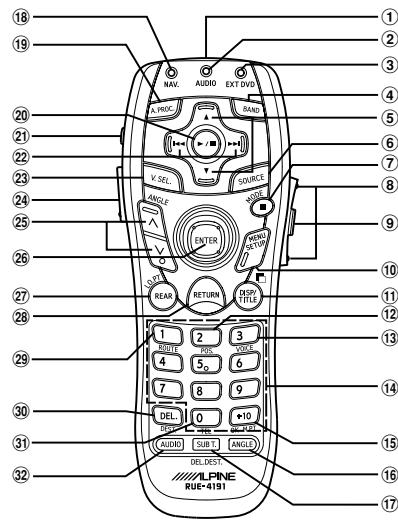
Head Unit Control Mode
When operating the Head Unit, set the EXT DVD/
AUDIO/NAV. Switch to the "AUDIO" side.
① Remote Control Transmitter
② Status indicator for AUDIO mode
③ 一
④ BAND button
⑤ Radio mode: Preset Selection
Changer mode:Disc Selection
MP3 mode: Folder Select
Tape mode:Programme Sensor
(6) SOURCE button
(7)
8 VOLUME UP/DOWN button
9 MUTE button
10
4
1
(12)
12
13
(14)
15
⑥
16
(17)
18
A PROC button
A. A.H.O.O. button
B. PLAY/PAUSE button
21 Power ON/OFF button
2 Radio mode: SEEK UP/DOWN
CD/MD/Changer mode: Music Sensor
BW/FF (press and hold)
Tape mode: REW/FF
23
20
LIGHT Button for Remote Controller
② Display Angle UP/DOWN button
(26)
27
27
28
29
20
30
(31)
22
32
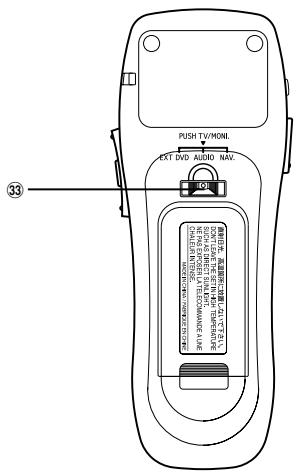
33 EXT DVD/AUDIO/NAV. Switch
V/MONI. button (Push)
Note: Depending on the unit, some operations cannot
be performed. For details, see the Owner's
Manual for the unit.
Map/Arrow type Navigation Control Mode
When operating the navigation, set the EXT DVD/
AUDIO/NAV. Switch to the "NAV." side.
① Remote Control Transmitter
② —
②
③
(4) —
5
②
(6) —
⑦ MODE button
8 VOLUME UP/DOWN button
(When connected with the Ai-NET Head Unit)
MUTE button
(When connected with the Ai-NET Head Unit)
10.MENI按钮
MNO button (MAP Type only)
POS. button
13 VOICE button
VOICE button ④ Numoric Keypad
14 NumcRKeypa 15 OK/MTP button
⑤ OK/M:PT button
16 一
DEL. DEST. button
18 Status indicator for NAV. mode
19
(2)
20 一
(21) Power ON/OFF button
2 一
23
LIGHT button for Remote Controller
Zoom (Wide/Detail) button (Map Type only)
26 Joystick/ENTER button
- I O PT button
28 RETIRBN button
B ROUTINE button
2 ROUTE button DEL/DELT
30 DEL./DEST. button
③1 TEL. button (Map Type only)
32
33EXT DVD/ALDIO/NAV Switch
TV/MONI. button (Push)
Notes:
- Depending on the unit, some operations cannot be performed. For details, see the Owner's Manual for the unit.
After pressing the MODE button, press the following buttons while the status indicator is blinking:
Numeric Keypad (0 to 9). DEL. button, OK button
AV Head Unit Control Mode
When operating the AV Head Unit, set the EXT
DVD/AUDIO/NAV. Switch to the "AUDIO" side.
① Remote Control Transmitter
② Status indicator for AUDIO mode
③ —
BAND button
(5) Radio mode: Preset Selection
Changer mode:Disc Selection
(6) SOURCE button
7
VOLUMEUPDOWNAudioAdjustbutter
VOLUME UP/DOWN, Audio Adjust button MUTE button
MOTE button
10 一
⑪
① ②
② 一
13
14 Function button (1 to 7)
15
16
6 一
17
18 一
19 A.PROC. button
20 Audio mode Selection (VOL /BASS/TBE/BAI)
EAD)
Press and hold for 2 seconds to LOUD ON/OFF
(2)Power ON/OFF button
(2) Radio mode: SEEK UP/DOWN
CD/MD/Changer mode: Music Sensor
BW/FF (press and hold)
(23) V.SEL. button
(24) LIGHT button for Remote Controller
25 Display Angle UP/DOWN button
26
(27)
21 一
28 一
29 一
20
30 一
31
32 一
33 EXT DVD/AUDIO/NAV. Switch
TV/MONI. button (Push)
Note: Depending on the unit, some operations cannot
be performed. For details, see the Owner
Manual for the unit.
TV/Monitor Control Mode
When controlling the Monitor, press the EXT DVD/
AUDIO/NAV. Switch to activate the TV/MONI. mode
Check which TV Tuner or Monitor functions corre
sponds to which buttons on the remote control and attach the appropriate seal (supplied).
Note: Depending on the unit, some operations cannot
be performed. For details, see the Owner's
Manual for the unit.
DVD Player/DVD Changer
Control Mode
When operating the External DVD Player/DVD
Changer, set the EXT DVD/AUDIO/NAV. Switch to
the "EXT DVD" side.
① Remote Control Transmitter
②
(3) Status indicator for EXT DVD mode
④
D
DVD CD/CD/DVD Mode:Disc Selection
⑥ Audio SOURCE button
(When connected with the Ai-NET Head Unit)
(7) (STOP) button
(8) VOLUME UP/DOWN
(When connected with the Ai-NET Head Unit)
- MLITE button (When connected with the
③ MOVE Button (When connected with the Ai-NET Head Unit).
AFNET Head Unit 10 MENLI button
MENOBuTio
Press and hold for 2 seconds to display the setup menu.
(1) Searching by Title/Chapter/elapsed time
Press and hold for 2 seconds to display the DVD
menu/Title menu.
12
13
⑩ 14 N
14 Numemic Keypad
15
16 ANGLE button
17 SUB T. (Subtitle) button
Press and hold this for 2 seconds to turn the
subtitles ON and OFF.
18
10
(3) A:1 HOC: button (When corresponds
(When connected with the Digital Audio Processor)
20 P
Press and hold for 2 seconds to playback the slow motion.
21 Power ON/OFF button
2 Chapters and tracks skip
Press and hold for 2 seconds to BW/FF.
23
24 11
LIGHT button for Remote Controller Click single HP/DOWN button
② Display angle UP/DOWN button (When connected with the Ai-NE
26 Jovstick/ENTER button
27
20
RETURN button
29 一
30
21
3) 一
③ AUDIO button
3EXT DVD/AUDIO/NAV.Switch
TV/MONI. button (Push)
Note: Depending on the unit, some operations cannot
be performed. For details, see the Owner's
Manual for the unit.
- RUE-4191
- UNIVERSAL REMOTE CONTROLLER
- OWNER'S MANUAL
- WARNING
- DO NOT DISASSEMBLE OR ALTER
- KEEP SMALL OBJECTS SUCH AS BATTERIES OUT OF THE REACH OF CHILDREN
- DO NOT OPERATE ANY FUNCTION THAT TAKES YOUR ATTENTION AWAY FROM SAFELY DRIVING YOUR VEHICLE
- KEEP THE VOLUME AT A LEVEL WHERE YOU CAN STILL HEAR OUTSIDE NOISE WHILE DRIVING
- CAUTION
- DO NOT MIX NEW BATTERIES WITH OLD BATTERIES. INSERT WITH THE CORRECT BATTERY POLARITY
- HANDLING PRECAUTIONS
- INSTALLATION OF REMOTE CONTROL HOLDER
- BATTERY REPLACEMENT
- IN CASE OF DIFFICULTY
- SPECIFICATIONS
- ACCESSORIES
- ALPINE
- ALPINE ELECTRONICS, INC
- ALPINE ELECTRONICS OF AMERICA, INC
- ALPINE ELECTRONICS OF CANADA, INC
- ALPINE ELECTRONICS OF AUSTRALIA PTY. LTD
- ALPINE ELECTRONICS GMBH
- ALPINE ITALIA S.P.A
- ALPINE ELECTRONICS FRANCE S.A.R.L
- ALPINE ELECTRONICS OF U.K., LTD
- ALPINE ELECTRONICS DE ESPANA, S.A
- HEAD UNIT CONTROL MODE
- MAP/ARROW TYPE NAVIGATION CONTROL MODE
- NOTES
- AV HEAD UNIT CONTROL MODE
- TV/MONITOR CONTROL MODE
- DVD PLAYER/DVD CHANGER
- CONTROL MODE
Marque : ALPINE
Modèle : RUE-4191
Catégorie : Télécommande universelle