LP 17 - Imprimante à jet d'encre grand format CANON - Notice d'utilisation et mode d'emploi gratuit
Retrouvez gratuitement la notice de l'appareil LP 17 CANON au format PDF.

| Type de produit | Imprimante à jet d'encre grand format |
| Marque | CANON |
| Modèle | LP 17 |
| Technologie d'impression | Bubble-jet à la demande |
| Résolution maximale | 2 400 x 1 200 dpi |
| Taille de goutte | 4 pl |
| Nombre de couleurs | 5 (MBK x2, BK, C, M, Y) |
| Impression sans marges | Oui, sur plusieurs formats |
| Vitesse d'impression (A2) | 20 secondes (brouillon, papier ordinaire) |
| Mémoire standard | 192 Mo |
| Écran LCD | 16 colonnes x 2 lignes |
| Interfaces | USB 2.0 Hi-Speed, Ethernet 10/100 Base-TX, option IEEE1394 |
| Types de supports | Papier rouleau, feuilles (bac et alimentation manuelle) |
| Formats de papier (rouleau) | A3, A2, B4, 17 pouces, 300 mm, etc. |
| Alimentation | AC 220-240 V, 50/60 Hz |
| Consommation électrique (max) | 100 W |
| Dimensions (sans support) | 819 x 733 x 317 mm |
| Poids (sans support) | environ 39 kg |
| Dimensions (avec support) | 819 x 981 x 989 mm |
| Poids (avec support) | environ 58 kg |
| Niveau sonore (fonctionnement) | 52 dB(A) ou moins |
| Conditions d'utilisation | Température : 15-30°C, humidité : 10-80% |
| Logiciel inclus | Canon PosterArtist 2007 |
| Consommables | Cartouches d'encre PFI-102 (130 ml), tête d'impression PF-03, kit de maintenance |
FOIRE AUX QUESTIONS - LP 17 CANON
Questions des utilisateurs sur LP 17 CANON
0 question sur cet appareil. Repondez a celles que vous connaissez ou posez la votre.
Poser une nouvelle question sur cet appareil
Téléchargez la notice de votre Imprimante à jet d'encre grand format au format PDF gratuitement ! Retrouvez votre notice LP 17 - CANON et reprennez votre appareil électronique en main. Sur cette page sont publiés tous les documents nécessaires à l'utilisation de votre appareil LP 17 de la marque CANON.
MODE D'EMPLOI LP 17 CANON
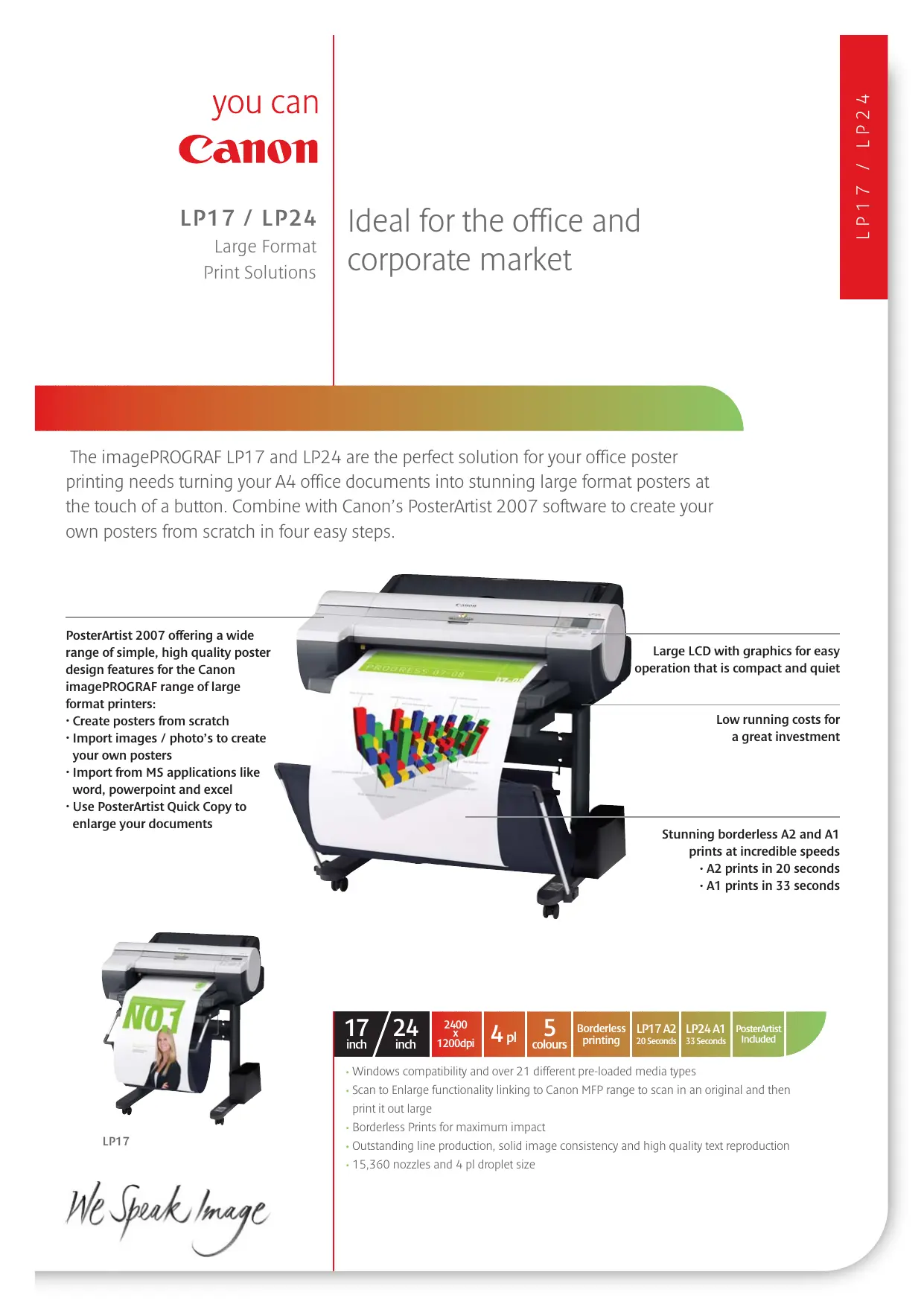
The imagePROGRAF LP17 and LP24 are the perfect solution for your office poster printing needs turning your A4 office documents into stunning large format posters at the touch of a button. Combine with Canon's PosterArtist 2007 software to create your own posters from scratch in four easy steps.
PosterArtist 2007 offering a wide range of simple, high quality poster design features for the Canon imagePROGRAF range of large format printers:
- Create posters from scratch
- Import images / photo's to create your own posters
- Import from MS applications like word, powerpoint and excel
- Use PosterArtist Quick Copy to enlarge your documents

Large LCD with graphics for easy operation that is compact and quiet
Low running costs for a great investment
Stunning borderless A2 and A1 prints at incredible speeds
• A2 prints in 20 seconds
• A1 prints in 33 seconds

LP17
We Speak Image
17 / 24 inch
2400 x 1200dpi
4 pl
5 colours
Borderless printing
LP17A2 20 Seconds
LP24 A1 33 Seconds
PosterArtist Included
- Windows compatibility and over 21 different pre-loaded media types
- Scan to Enlarge functionality linking to Canon MFP range to scan in an original and then print it out large
• Borderless Prints for maximum impact - Outstanding line production, solid image consistency and high quality text reproduction
• 15,360 nozzles and 4 pl droplet size
| Class | LP17: 17-inch, LP24: 24-inch |
| Ink Type | Pigment and Dye reactive ink, 5 colors (MBK x 2, BK, C, M, Y) |
| Maximum Print Resolution | 2,400 x 1,200 dpi |
| Printing Speed(LP17- A2 Roll, LP24- A1 Roll) | |
| Plain paper | LP17: 0:20 (Draft), LP24: 0:33 (Draft) |
| Coated Paper | LP17: 0:55 (Standard), LP24: 1:19 (Standard) |
| Photo Glossy Paper | LP17: 1:38 (Standard), LP24: 2:44 (Standard) |
| Dimensions, Weight (Net) | LP17: Main unit 819 (W) x 733 (D) x 317 (H) mm; |
| W x D x H (mm), (kg) | Weight: approx. 39 kg |
| LP24: Main Unit, 997 (W) x 810 (D) x 344 (H) mm; | |
| Weight: approx. 51 kg | |
| LP17: Main unit with Stand 819 (W) x 981 (D) x 989 (H) mm; | |
| Weight: approx. 58 kg | |
| LP24: Main unit with Stand 997 (W) x 991 (D) x 989 (H) mm; | |
| Weight: approx. 68 kg | |
| Dimensions, Weight(Packaged) | |
| W x D x H (mm), (kg) | LP17: Main unit with Palette, 960 (W) x 874 (D) x 638 (H) mm; |
| Weight: approx. 57 kg | |
| LP24: Main unit with Palette, 1,138 (W) x 914 (D) x 675 (H) mm; | |
| Weight: approx. 74 kg | |
| Power Supply | AC 220 - 240 V (50/60 Hz) |
| Input power | 100 W or less |
| Power consumption | |
| Standby power consumption(At the low power mode) | |
| 220 V - 240 V | LP17: 6 W or less (when IEEE1394 is mounted, 11 W or less) |
| LP24: 6 W or less (when IEEE1394 is mounted, 11 W or less) | |
| 1 W or less (In compliance with Executive Order of the President ofthe United States of America) | |
| Temperature: 15 - 30°C, Humidity: 10 - 80% (Condensation free) | |
| Power off (standby) | |
| Operational Environment | Operation: 52 dB (A) or less, Standby: 35 dB (A) or less |
| Acoustic Noise | Operation: LP17: 6.6 Bels or less, LP24: 6.6 Bels or less |
| Acoustic pressure | 0.02mm (Theoretical value) |
| Acoustic power | ±0.1% or less (User adjustments necessary. Printing environment |
| Minimal Line Width | media must match that used for the adjustments. CAD paper |
| Line Accuracy | required: Plain paper, CAD tracing paper, coated paper, CADtranslucent matte film only.) |
| Operation Panel | |
| Display | Large LCD: LP17: 16 columns x 2 lines, Key x 11, LED x 5, |
| Displayable Language on LCD | LP24: 160 x 128 dots, Key x 12, LED x 5 |
| LP17: US-English, French, German, Italian, Spanish | |
| LP24: US-English, French, German, Italian, Spanish, Korean, Russian | |
| Interface | |
| USB2.0 Hi-Speed | |
| Type | Built-in |
| Mode | Full Speed (12 Mbit/sec), High Speed (480 Mbit/sec), Bulk transfer |
| Connector type | LP17: Series B (4 pins), LP24: Series B (4 pins) |
| Ethernet | Built-in |
| Type | IEEE 802.3 10base-T |
| Standard | IEEE 802.3u 100base-TX / Auto-Negotiation |
| IEEE 802.3x Full Duplex | |
| Protocol | LP17: IPX/SPX (Netware 4.2 (J), 5.1 (J), 6.0 (J), SNMP (Canon-MIB),HTTP, TCP/IP, AppleTalk |
| LP24: IPX/SPX (Netware 4.2 (J), 5.0 (J), 6.0 (J), SNMP (Canon-MIB),HTTP, TCP/IP, AppleTalk | |
| IEEE1394 (Option) | |
| Type | Slot card type (option) |
| Standard | IEEE1394 - 1995, P1394a, Half duplex, Data/Strb differential serial |
| Data-transfer time | 100 / 200 / 400 Mbit/sec. |
| Connector type | In compliance with IEEE1394 - 1995, 6 pins, No power supply |
| Operating Systems supported | Windows 2000, XP, Server 2003, Vista (32) |
| Regulations | CE Mark, CB Certification, TUV (GS), Gost R |
| MEMORY | |
| Standard Memory | LP17: 192Mb, LP24: 256Mb |
| PRINT HEAD | |
| Model | PF-03 |
| Type | Bubble-jet on demand |
| Head configuration | 6 colours integrated type (6 chips per print head) |
| Nozzle pitch | 1,200 dpi x 2 |
| Nozzle per chip | MBK : 5,120 nozzles, Other Colours : 2,560 nozzles each |
| Droplet size | 4 pl per colour |
| INK TANK | |
| Model | Model - PFI - 102 (130ml), MBK, BK,C, M , Y |
| MEDIA HANDLING | |
| Roll paper | One Roll, Front-loading, Front Output |
| Cut sheet | Cassette: Front loading, Front output, Manual Feed: top Feeding,Front output |
| Media typeRoll paper | LP17/24: Standard Paper 80gsm/90gsm, Matt Coated Paper 90gsm/120gsm/140gsm, Extra Matt Coated Paper 180gsm, Opaque Paper 120gsm, High Resolution Graphic Paper - Self Adhesive 140gsm, High Resolution Barrier Paper 180gsm, Glossy Photo Paper 190gsm/240gsm, Satin Photo Paper 190gsm/240gsm, Inst Dry Paper Glossy 200gsm, Inst Dry Paper Satin 200gsm, Photo Paper High Gloss 255gsm, Photo Paper Semi Matt 255gsm, Photo Paper Pearl 260gsm, Photo Realistic Paper 210gsm, Heavy Weight Glossy Photo Paper 300gsm, Heavy Weight Satin Photo Paper 300gsm |
| Media SizeRoll paper (width) | ISO: A3, A2, A1 (LP24 only), JIS: B4, B2 (LP24 only), ARCH: D (24" = 609.6mm) (LP24 only)Others: 8", 10", 14", 16", 17", 300mm, A3+ (329mm) |
| Cut sheet | ISO: A4, A3, A3+, A2, A1 (LP24 only), B4, B3, B2 (LP24 only), DIN: C4, C3, C2 (LP24 only), JIS: B4, B3, B2 (LP24 only), ANSI: Letter (8.5 x 11"), Legal (8.5. X 14"), 11 x 17", 13 x 19", 17 x 22", 22 x 34" (LP24 only), ARCH: 9 x 12", 12 x 18", 18 x 24" (LP24 only), 24 x 36" (LP24 only), Photo: 20 x 24" (LP24 only), 18 x 22" (LP24 only), 14 x 17", 12 x 16", 10 x 12", 10 x 15", 16 x 20" (US photo size), Poster: 20 x 30" (LP24 only), 300 x 900mm, Others: 13 x 22", 17 x 24" (LP24 only) |
| Media Thickness | Roll paper - 0.07 - 0.8mmCut sheet: Cassette - 0.08 - 0.3mm, Manual feed (top) - 0.07 - 0.8, Manual Feed (front) - 0.5 - 1.5mm |
| Maximum Outside Diameter of Roll Paper | 150.0 mm |
| Media Core Size Media Width | Internal diameter of roll core: 2" / 3"LP17: Roll Paper - 203 - 432mmLP24: Roll Paper - 203 - 610mmLP17: Cut Sheet: Cassette Feed - 203 - 432mmLP17: Cut Sheet: Manual Feed (top) - 203 - 432mmLP17: Cut Sheet: Manual Feed (Front) - 203 - 432mmLP24: Cut Sheet: Cassette Feed - 203 - 432mmLP24: Cut Sheet: Manual Feed (top) - 203 - 610mmLP24: Cut Sheet: Manual Feed (Front) - 203 - 610mm |
| Minimal Printable Paper Length | LP17: Roll Paper - 203mm, Cut Sheet - Cassette: 279mm, Manual Feed (Top): 279mm, Manual Feed (Front): 520mmLP24: Roll Paper - 203mm, Cut Sheet - Cassette: 279mm, Manual Feed (Top): 279mm, Manual Feed (Front): 520mm |
| Maximum Printable Paper Length | LP17: Roll Paper - 18m (varies according to the OS and application), Cut Sheet - Cassette: 594mm, Manual Feed (Top): 610mm, Manual Feed (Front): 914mmLP24: Roll Paper - 18m (varies according to the OS and application), Cut Sheet - Cassette: 594mm, Manual Feed (Top): 1.6m, Manual Feed (Front): 914mm |
| Margins(Top, Bottom, Sides)Recommended area | Roll paper: Top: 20mm, Bottom: 5mm, Side: 5mmCut Sheet: Cassette/Manual Feed (Top) - Top: 20mm,Bottom: 27mm, Side: 5mmManual Feed (Front) - Top: 20mm, Bottom: 23mm, Side: 5mm |
| Printable area | Roll paper (borderless printing): Top: 3mm (0mm),Bottom: 3mm (0mm), Side: 3mm (0mm)Cassette: Top: 3mm (0mm), Bottom: 3mm (0mm),Side: 3mm (0mm)Manul Feed (Top): Top: 3mm, Bottom: 3mm, Side: 3mmManual Feed (Front): Top: 3mm, Bottom: 23mm, Side: 3mm |
| Media width for borderless printing | 10" (254mm), B4 (257mm), A3+ (329mm), 14" (356mm), 16" (407mm), A2 (420mm), A2+/17" (432mm), B2 (515mm)(LP24 only), A1 (594mm) (LP24 only), 24" (610mm) (LP24 only) |
| OPTIONPrinter StandAuto Roll Feed Unit(including RH2-11)BasketRoll Holder SetIEEE1394 Expansion Board | LP17: ST:11, LP24: ST-24LP17: RU-02LP17: BU-02LP17: RH2-11, LP24: RH2-24 (2-inch core spindle with 3-inch media tube attachment and borderless printing space)EB-05 |
| CONSUMABLESInk TankPrint HeadMaintenance Cartridge | PFI-102 (130 ml) ; MBK, BK, C, M, YPF-03LP17: MC-05, LP24: MC-16 |
| Some images are simulated for clarity of reproduction. All data is based on Canon's standard testing methods.This leaflet and the specifications of the product have been developed prior to the date of product launch.Final specifications are subject to change without notice." and ®: All company and/or product names are trademarks and/or registered trademarks of their respective manufacturers in their markets and/or countries.Canon recommends you use Canon Media for the best results. Please check media (paper) compatibility list to see which variety of paper/media is recommended. | |