
KIR-SE1S - Chauffe-mains électrique rechargeable SANYO - Notice d'utilisation et mode d'emploi gratuit
Retrouvez gratuitement la notice de l'appareil KIR-SE1S SANYO au format PDF.


| Type de produit | Chauffe-mains électrique rechargeable |
| Marque | SANYO |
| Modèle | KIR-SE1S |
| Dimensions (L x l x h) | 84 x 61 x 19 mm |
| Poids (appareil seul) | Environ 80 g |
| Alimentation | Batterie lithium-ion 3,7 V (1800 mAh) + adaptateur secteur AC 100-240 V |
| Temps de charge | Environ 3 heures |
| Autonomie (mode Bas à 10°C) | Environ 180 à 240 minutes |
| Autonomie (mode Haut à 10°C) | Environ 150 à 210 minutes |
| Réglages de température | 2 niveaux : Bas (max 45°C, moy. 39°C) et Haut (max 50°C, moy. 43°C) |
| Plage de température de charge | 0 à 40°C |
| Plage de température de fonctionnement | -10 à 40°C |
| Indicateurs lumineux | Vert (charge), Orange (mode Bas), Rouge (mode Haut), clignotements pour batterie faible |
| Entretien et nettoyage | Nettoyer avec un chiffon sec. Ne pas utiliser d'alcool, diluant, benzène ou détergent. |
| Sécurité | Protection contre la surchauffe, ne pas utiliser en dormant, ne pas exposer aux liquides. |
| Accessoires fournis | Adaptateur secteur (modèle KIR-AD01U) |
| Garantie | Limitée – contacter le service client (États-Unis 1-800-421-5013, Canada 1-800-263-2244) |
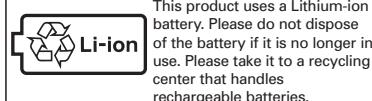
| Type de batterie | Lithium-ion intégrée (non remplaçable mais recyclable – voir notice pour retrait) |
| Utilisation recommandée | À placer dans une poche ou un étui pour réchauffer les mains |
FOIRE AUX QUESTIONS - KIR-SE1S SANYO
Questions des utilisateurs sur KIR-SE1S SANYO
0 question sur cet appareil. Repondez a celles que vous connaissez ou posez la votre.
Poser une nouvelle question sur cet appareil
Téléchargez la notice de votre Chauffe-mains électrique rechargeable au format PDF gratuitement ! Retrouvez votre notice KIR-SE1S - SANYO et reprennez votre appareil électronique en main. Sur cette page sont publiés tous les documents nécessaires à l'utilisation de votre appareil KIR-SE1S de la marque SANYO.
MODE D'EMPLOI KIR-SE1S SANYO
When you believe that a breakdown has occurred
If you cannot solve your problem by applying the methods as described in the following "How to deal with it" section, stop using it and consult our customer service at 1-800-263-2244.
| Phenomenon | The Cause | How to deal with it |
| Even when the temperature switch is turned on, it does not become warm. | The battery in Kairo has been used up. | Charge Kairo. |
| Charging is going on. | Even if the temperature switch is turned on, Kairo does not become warm during charging.Please stop charging Kairo when you use it. | |
| The time of usage of Kairo is short. | The charging time is too short. | Please use Kairo after charging it. |
| The product has entered its replacement phase. | When the time of usage of Kairo becomes extremely short even after charging it, the battery life has been reached. (*1) | |
| Persistent switching of temperature on/off function light | When persistent switching of temperature on/off function is seen, please charge Kairo as soon as possible. | |
| The charging time is long (compared to normal charging time). | The temperature is inappropriate where the charging is performed. | Charge Kairo at a temperature between 0/40°C (32/104 °F). |
| Charging cannot be done.(The green light does not light up) | The DC connector has not been inserted properly. | Insert it into the DC input jack of Kairo securely. |
| The AC plug has not been inserted properly. | Insert it into the outlet securely. | |
| The red light is blinking fast. (at around every 0.5 second) | Abnormalities such as temperature protection. | Insert the AC adaptor again and charge it at a temperature between 0/40°C (32/104 °F). |
*1. The period of replacement of this product might differ according to the condition of usage.
Specifications
| Rechargeable Kairo | AC adaptor | |
| Model | KIR-SE1 | KIR-AD01U |
| Input | DC5V 1A | AC100V-240V 50-60HZ 12-17VA |
| Dimensions | 84x61x19mm (3.3x2.4x0.75") | 66x43x23mm (2.6 x1.7 x0.9") |
| Weight | About 80g | About 65g |
| Range of Charging Temperature | 0/40°C (32/104 °F) | |
| Range of Working Temperature | -10 - 40°C (14 - 104 °F) | |
| Rechargeable typeKairo Details of specifications | |
| Built-in battery | Lithium ion battery 3.7V 1800mAh |
| Charging time | About 3 hours |
| Thermal Section Temperature(*2) | ||
| Temperature switch | Maximum temperature(*2) | Average temperature(*1) |
| Low | 45°C (113 °F) | 39°C (102 °F) |
| High | 50°C (122 °F) | 43°C (109 °F) |
| *1.Above thermal section temperature are under room temperature around 20°C (68 °F)*2.Maximum temperature which refers to switch is ON, the highest temperature it can reach within short period of time | ||
| Time of continuous usage (*3, 4) | ||
| Temperature switch | Ambient temperature | |
| 10°C (50 °F) | 0°C (32 °F) | |
| Low | About 180 ~ 240 min. | About 120 ~ 200 min. |
| High | About 150 ~ 210 min. | About 100 ~ 180 min. |
| *3.Continuous using (time), refers to placing the Kairo into the case / bag provided and place it among the cloths for warming purpose. Temperature will change along with the variation of environmental temperature.*4.Persistent switching of temperature on/off function would consume electricity quickly and shorten the using time of Kairo. | ||
Collection and Recycle of Lithium-ion battery (battery cannot be replaced)


How to remove the battery
Before removing the Lithium-ion battery pack, switch on the Temperature switch. Make sure that the Luminescent Display indicates Low Battery Level and Kairo does not become warm, then remove the battery according to the following steps:
- Use a toothpick, etc. to remove the round sticker on the thermal section.
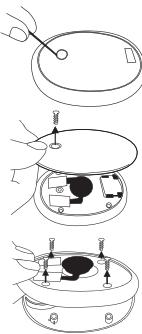
- Use a Phillips screwdriver to remove the screw from the cover of the thermal section and take off the cover.
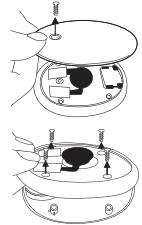
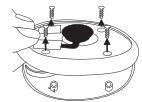
- Use the Phillips screwdriver to remove the 4 screws from the Kairo case and open the case.
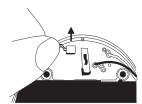
- Remove the connector attached to the circuit board by pulling it upward.
- Remove the battery from the Kairo case. If the battery is difficult to remove because of the lead wire running above the top of the battery, first remove the smaller circuit board from the case, then remove the battery.
To avoid a short circuit in the removed Lithium-ion battery, cover the connector part of the battery with an insulation tape and place the battery in the rechargeable battery recycling box at a recycle center. For recycling locations collecting rechargeable batteries, please visit www.rbrc.org.
Regarding low-temperature burning
Low-temperature burning is a burning that causes symptoms such as erythema or water blisters when our bodies are exposed to a heating element which is of a higher-temperature than the body temperature for a long period. Please take note that there are low-temperature burnings that do not cause subjective symptoms.
Precautions in preventing low-temperature burning
This product is designed to prevent an increase in heating which is a main cause of low-temperature burning. However, depending on individual differences or the way of using it, the possibility of you suffering from low-temperature burning might differ. Therefore, please take note of the following points when you use it.
- Do not expose your skin by putting Kairo in the special case for a long period.
- Confirm your skin condition every one hour. If you find some abnormalities on you skin, stop using it immediately.
- Stop using it when you feel too hot.
- Do not use it when you sleep because you are prone to suffer from low-temperature burning while sleeping.
• Take note of low-temperature burning especially for those whose skins are sensitive, or for infants or handicapped people. - Take note when you use it on thin clothing such as underwear.
- Do not use it near heating equipment or a stove because it is very hot.
Do not use it if you have blood circulation problems such as having diabetes since you might suffer from low-temperature burning.
IMPORTANT SAFTY INSTRUCTIONS – SAVE THESE INSTRUCTIONS.
DANGER-TO REDUCE THE RISK OF FIRE OR ELECTRIC SHOCK, CAREFULLY FOLLOW THESE INSTRUCTIONS."
SANYO Kairo
Limited Warranty
OBLIGATIONS
In order to obtain warranty service, the product must be delivered to and picked up from an authorized Sanyo factory service center at the user's expense, unless specifically stated otherwise in this warranty. The names and addresses of Authorized Sanyo Fisher Service Centers may be obtained by calling the toll-free number listed below.
For product operation, authorized service center referral or service assistance, call
CUSTOMER INFORMATION: (USA 1-800-421-5013) (MEXICO 0001-800-726-9975)
(Canada 1-800-263-2244 - Weekdays 8:30 A.M. - 5:00 P.M. Eastern Time)
THIS WARRANTY IS VALID ONLY ON SANYO PRODUCTS PURCHASED OR RENTED AND USED IN CANADA OR IN MEXICO OR IN THE UNITED STATES OF AMERICA, EXCLUDING ALL U.S. TERRITORIES AND PROTECTORATES. THIS WARRANTY APPLIES TO THE ORIGINAL RETAIL USER AND DOES NOT APPLY TO PRODUCTS USED FOR ANY INDUSTRIAL, PROFESSIONAL OR COMMERCIAL PURPOSE. THE ORIGINAL DATED BILL OF SALE, SALES SLIP OR RENTAL AGREEMENT MUST BE SUBMITTED TO THE AUTHORIZED SANYO SERVICE CENTER AT THE TIME WARRANTY SERVICE IS REQUESTED. Subject to the OBLIGATIONS above and EXCLUSIONS below, SANYO FISHER COMPANY (SFC) warrants this SANYO product against defects in material and workmanship for the periods of LABOR and PARTS specified below. SFC will repair or replace (at its option) the product and any of its parts which fail to conform to this warranty. The warranty period commences on the date the product was first purchased or rented at retail.
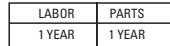
For Product Purchased in Canada: Please visit ca.sanyo.com for up-to-date-Warranty details.
EXCLUSIONS
This warranty does not cover (A) the adjustment of customer-operated controls as explained in the appropriate model's instructions manual, or (B) the repair of any product whose serial number has been altered, defaced or removed.
Rechargeable Hand Warmer
kairo KIR-SE1S
Instruction Manual
Thank you very much for purchasing this product. Before you start using it, please read and follow this instruction manual carefully. This leaflet also includes a limited warranty. Please keep it in a safe place.
Features
• The built-in lithium ion battery can be recharged hundreds of times.
• Worldwide voltages (AC 100-240 V)
• 2 temperature settings
This product is a rechargeable Kairo that comes with a built-in lithium ion battery. Be sure to charge it before you use it for the first time or when you have not used it for a long time. In addition, please take precaution to avoid low temperature burns while using it.
ca.sanyo.com
Please unfold the manual
Safety Precaution (Before you use this product, please read and follow this "Safety Precaution" carefully. In addition, please keep it at a convenient place so that it can be found anytime by other persons who use it after you have read it.
- The precautions stated here are meant for users to use this product safely and properly and to prevent safety hazards or damages from being incurred to you or other users in advance. In addition, in order to show the level of magnitude or urgency of the safety hazard or damage, the situations where mishandling is likely to occur are classified into three sections, namely "Danger", "Warning" and "Caution" for these precautions. Be sure to follow these precautions since they are important for your safety.
Regarding the display



Examples of displayed symbols
This symbol shows certain situation that draws warning or caution. In the drawing, the specific content of the caution is described. (example ⚠ a caution in electric shock)
This symbol shows that certain action should be restricted. In the drawing or at its nearby, the specific content of the restriction is described. (example Ⓞ a split restriction)
This symbol compels or instructs certain action. In the drawing, the specific content of the instruction is described. (example 1: a power plug is to be pulled out from an outlet)
Danger
Please do not use it for purposes other than heating Please do not use it or leave it in places of high temperature Please do not split it up or remodel it

Please do not expose to liquids Please do not short-circuit the jack or plug

Please do not throw it into fire Please take precaution of liquid leakage

Caution
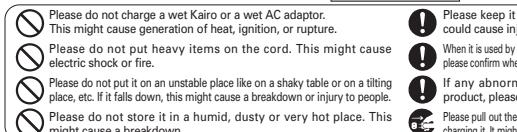
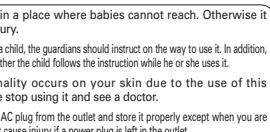
Warning
Please do not use it when abnormalities such as odor, generation of heat, change in color, deformation etc. occur while it is in use or when it is stored. This might cause leakage of liquid, ignition, generation of heat and rupture.
When the liquid in this product adheres to your skin or clothing, please rinse it immediately with clean water. This might cause damage to your skin.
Please stop the charging if it is not finished even after a prescribed time has passed. If it is not stopped, it might cause leakage of liquid, ignition, generation of heat and rupture.
Please do not use it in a humid place such as in the bathroom. This might cause generation of heat, electric shock and breakdown.
Do not damage a cord by stamping on it or lay it under the equipment. Please do not use a cord that has been damaged as this might cause electric shock, generation of heat and fire.
Please do not put it in a heating device such as a microwave oven or a high-pressure container. This might cause generation of heat, emission of smoke, ignition or breakdown of circuit components.
Please do not give it a strong bang or throw it. This might cause a breakdown or fire.
Please charge it in a stable place. In addition, do not cover or wrap it with a cloth. This might cause an explosion or fire due to the heat generated.
Please do not use it in places where there is a risk of ignition or explosion. This might cause an explosion or fire.
For connection to a supply not in the U.S.A., use an attachment plug adapter of The proper configuration for the power outlet.
Each Part name & Use
Each Part name

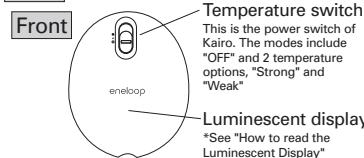

Warm part
This part will become warm when the Temperature switch is turned on
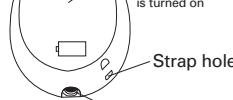
^DC input jack
The power supply unit intended correctly orientated in a vertical or floor, mount, position.
Charging Kairo
-
Please switch off the Temperature switch.
-
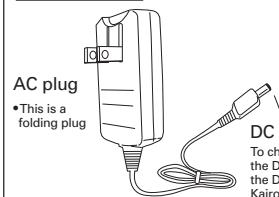
Plug the DC connector of the AC adaptor into the DC input jack of Kairo. • Make sure that the DC connector is plugged in all the way.
-
Unfold the AC plug of the AC adaptor in the direction of the arrow and insert it into an electrical outlet (see the illustration below). The Luminescent Display lights up in green, indicating that the charging has started.
- Make sure that the AC adaptor is plugged into an AC outlet.
Charging time: About 3 hours
-
When the charging is complete, the green light on the Luminescent Display disappears.
-
After Kairo is charged, pull out the AC plug of the AC adaptor from the outlet and fold it. Then pull out the DC connector from Kairo
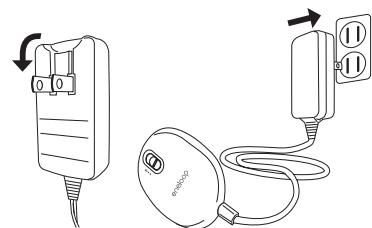
Connections for charging Kairo
Operating Kairo
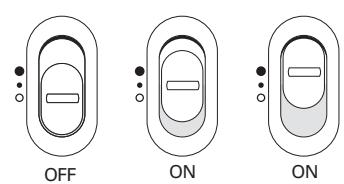
- Please switch on the Temperature switch.
- Confirm that the luminescent display blinks slowly in either red or orange.
- When the luminescent display blinks in red (at around every 0.5 second), there is either a temperature protection or abnormality in the equipment. This should be dealt with by Troubleshooting. Please see "When you believe that a breakdown has occurred" on page 11 and follow the instructions.
. When you want to stop using Kairo, please switch off the Temperature switch.
- Persistent switching of temperture on/off function will consume electricity quickly and shorten usage time. In such a case, please charge Kairo as soon as possible.
*Even if the temperature switch is turned on during charging, Kairo does not become warm. Please stop charging Kairo before you start using it.
Temperature switch
[Non-Text]
How to read the Display
| Content of display | Meaning of display |
| Orange (it blinks slowly at around every 3 seconds) | Kairo (Low) is operating. |
| Red (it blinks slowly at around every 2 seconds) | Kairo (High) is operating. |
| Green (light on) | It is charging. |
| Green (light on and disappear) | Charging has completed. |
Switching the Temperature switch from ON to OFF will
display the battery level for about 3 seconds.
| Display content | Meaning of display |
| Green (light up) | Operate (don't need to charge) |
| Green (it blinks slowly at around every 1 second) | Operate |
| Green (it blinks fast at around every 0.5 second) | The residual power of the battery is low. |
Please take note of the followings during charging and use
- When the external temperature is low, there might be cases where this product does not warm up fully. In this case, use a special case or cloth to warp up Kairo so that it is not exposed to external air.
- Charging should be carried out at a temperature between 0/40°C (32/104 °F). - Only the metal parts at the thermal section of this product will become warm.
- Even if the AC adaptor becomes warm while charging, is not a malfunction. - When there is noise coming from a radio or TV while charging, place this product far away from the radio or TV.
How to maintain it
They damage plastic
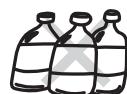
The maintenance shall be carried out with a dry cloth. When a wet cloth is used instead, it might cause a breakdown. In addition, when alcohol, thinner, benzene or a detergent is used for cleaning, the printing might be faded or the color might appear faint.
- WHEN YOU BELIEVE THAT A BREAKDOWN HAS OCCURRED
- SPECIFICATIONS
- COLLECTION AND RECYCLE OF LITHIUM-ION BATTERY (BATTERY CANNOT BE REPLACED)
- HOW TO REMOVE THE BATTERY
- REGARDING LOW-TEMPERATURE BURNING
- PRECAUTIONS IN PREVENTING LOW-TEMPERATURE BURNING
- IMPORTANT SAFTY INSTRUCTIONS – SAVE THESE INSTRUCTIONS
- SANYO KAIRO
- OBLIGATIONS
- CUSTOMER INFORMATION: (USA 1-800-421-5013) (MEXICO 0001-800-726-9975)
- EXCLUSIONS
- RECHARGEABLE HAND WARMER
- KAIRO KIR-SE1S
- INSTRUCTION MANUAL
- FEATURES
- SAFETY PRECAUTION (BEFORE YOU USE THIS PRODUCT, PLEASE READ AND FOLLOW THIS "SAFETY PRECAUTION" CAREFULLY. IN ADDITION, PLEASE KEEP IT AT A CONVENIENT PLACE SO THAT IT CAN BE FOUND ANYTIME BY OTHER PERSONS WHO USE IT AFTER YOU HAVE READ IT
- REGARDING THE DISPLAY
- EXAMPLES OF DISPLAYED SYMBOLS
- DANGER
- PLEASE DO NOT USE IT FOR PURPOSES OTHER THAN HEATING PLEASE DO NOT USE IT OR LEAVE IT IN PLACES OF HIGH TEMPERATURE PLEASE DO NOT SPLIT IT UP OR REMODEL IT
- PLEASE DO NOT EXPOSE TO LIQUIDS PLEASE DO NOT SHORT-CIRCUIT THE JACK OR PLUG
- PLEASE DO NOT THROW IT INTO FIRE PLEASE TAKE PRECAUTION OF LIQUID LEAKAGE
- CAUTION
- WARNING
- EACH PART NAME & USE
- EACH PART NAME
- CHARGING KAIRO
- OPERATING KAIRO
- HOW TO READ THE DISPLAY
- PLEASE TAKE NOTE OF THE FOLLOWINGS DURING CHARGING AND USE
- HOW TO MAINTAIN IT
Marque : SANYO
Modèle : KIR-SE1S
Catégorie : Chauffe-mains électrique rechargeable