
C47D42S0GB - Four vapeur NEFF - Notice d'utilisation et mode d'emploi gratuit
Retrouvez gratuitement la notice de l'appareil C47D42S0GB NEFF au format PDF.

| Type de produit | Four vapeur encastrable |
| Marque | NEFF |
| Modèle | C47D42S0GB |
| Alimentation | 220-240 V, 50/60 Hz, ~2 kW |
| Dimensions (H x L x P) | Environ 45 x 60 x 55 cm |
| Poids | Environ 30 kg |
| Capacité | 4 niveaux de grille, volume estimé 40 L |
| Matériau de la cavité | Acier inoxydable |
| Fonctions principales | Cuisson vapeur (35-100 °C), réchauffage, levée de pâte, décongélation, programmes automatiques (40 programmes), mémoire (6 emplacements) |
| Accessoires fournis | Récipient plein GN 2/3, récipient perforé GN 2/3, grille métallique, éponge de nettoyage |
| Entretien et nettoyage | EasyClean (nettoyage vapeur), détartrage automatique, nettoyage manuel recommandé |
| Sécurité | Verrouillage enfant (temporaire et permanent), arrêt automatique, indicateur de chaleur résiduelle, sécurité coupure |
| Pièces détachées et réparabilité | Ampoule (25 W, E14), joint de porte, réservoir d'eau, accessoires disponibles via SAV |
| Informations générales | Notice en format PDF, 64 pages, disponible en téléchargement |
FOIRE AUX QUESTIONS - C47D42S0GB NEFF
Questions des utilisateurs sur C47D42S0GB NEFF
0 question sur cet appareil. Repondez a celles que vous connaissez ou posez la votre.
Poser une nouvelle question sur cet appareil
Téléchargez la notice de votre Four vapeur au format PDF gratuitement ! Retrouvez votre notice C47D42S0GB - NEFF et reprennez votre appareil électronique en main. Sur cette page sont publiés tous les documents nécessaires à l'utilisation de votre appareil C47D42S0GB de la marque NEFF.
MODE D'EMPLOI C47D42S0GB NEFF
Dear customer,
Congratulations on the purchase of your new Neff steam oven. We would like to thank you for your confidence in us and we hope that you will have many years of enjoyment and cooking pleasure with your new appliance at the heart of your kitchen.
To enable you to take full advantage of all the technical features of your steam oven, please read these instructions for use.
The detailed table of contents will guide you quickly to all the important information:
You will be informed of important safety information.
- You will then be familiarised with the individual parts of your new steam oven.
And we will show you how to make the settings step by step.
- The tables list the settings and shelf positions for many well-known dishes, tried and tested by us.
In the unlikely event of a malfunction, this is where you will find information on how to rectify minor faults yourself.
Have fun cooking!
Instruction manual
C47D42.0.
en
9000350270
Table of contents
Safety information 5
Causes of damage 6
Energy and environment tips 7
Saving energy 7
Environmentally-friendly disposal 7
Your new appliance 8
Control panel 8
Operating modes 9
Cooking compartment and accessories 10
Water tank 11
Automatic calibration 13
Before using for the first time 13
Setting the language 13
Set clock 14
Setting the water hardness 15
Cleaning 15
Operating the appliance 16
Switching on the appliance 16
Switching off the appliance 18
After every operation 19
Changing the basic settings 19
Electronic clock 21
Clock display 21
Minute minder 22
Cooking time 23
Preselection mode 24
Table of contents
Setting the clock 25
Checking, correcting or deleting settings 25
Childproof lock 26
Lock 26
Permanent lock 27
Automatic programmes 28
Setting the programme 28
Notes about the programmes 31
Programme tables 31
Memory 38
Saving to the Memory function 38
Starting the memory function 38
Deleting a memory setting 39
Care and cleaning 40
Cleaning agents 41
EasyClean 42
Dscaling 43
Removing and fitting the appliance door 46
Cleaning the rails 47
Cleaning the door panels 48
Troubleshooting 49
Replacing the cooking compartment bulb 51
Changing the door seal 52
After-sales service 53
E number and production number 53
Table of contents
Tables and tips 53
Vegetables 54
Side dishes and pulses 56
Meat, poultry, fish 57
Soup ingredients 59
Desserts, compute 59
Reheating food 60
Defrost 60
Dough proving 62
Juicing 62
Preserving 63
Frozen products 64
Safety information
Please read this instruction manual carefully.
This appliance is intended only for domestic use. This appliance must only be used for food preparation.
Neither adults nor children should operate the appliance without supervision:
if they are physically or mentally incapable of doing so or
- if they lack the knowledge and experience to operate it correctly and safety.
Never let children play with the appliance.
Hot cooking compartment
Risk of burning.
Never touch the hot surfaces of heating and cooking appliances or the hot surfaces in the cooking compartment. Open the cooking compartment door carefully. Hot steam will escape. Small children must be kept at a safe distance from the appliance at all times.
Risk of fire.
Never store combustible items in the cooking compartment.
Risk of short-circuiting.
Never trap connecting cables of electrical appliances in the hot appliance door. The cable insulation could melt.
Risk of burning.
Never prepare food containing large quantities of drinks with a high alcohol content. Alcoholic vapours can catch fire in the cooking compartment. Only use small quantities of drinks with a high alcohol content and open the appliance door carefully.
Hot accessories
Risk of burning.
Always use an oven cloth or oven gloves to remove hot accessories from the appliance.
Hot water
Risk of scalding.
Do not clean the appliance immediately after switching it off. The water in the evaporator dish is still hot. Wait until the appliance has cooled down.
Incorrect repairs
Danger of electric shock.
Incorrect repairs are dangerous. Repairs may only be carried out by one of our trained after-sales engineers.
If the appliance is faulty, switch off the circuit breaker in the fuse box or disconnect the appliance at the mains. Contact the after-sales service.
Causes of damage
Keep the cooking compartment floor clear
Do not place anything on the cooking compartment floor. Do not cover it with aluminium foil. A build-up of heat could damage the appliance.
The cooking compartment floor and the evaporator dish must always be kept clear. Always place ovenware on the wire rack or in the perforated cooking container.
Aluminium foil
Aluminium foil in the cooking compartment must not come into contact with the door panel. This could cause permanent discolouration of the door panel.
Ovenware
Ovenware must be heat and steam resistant.
Steaming with a perforated cooking container
Do not use ovenware that shows signs of rust. Even the smallest spots of rust can lead to corrosion in the cooking compartment.
When steaming in the perforated cooking container, always insert the solid cooking container underneath. Dripping liquid is caught.
Moist food
Do not store moist food in the closed cooking compartment for long periods. It can lead to corrosion in the cooking compartment.
Very dirty door seal
If the door seal is very dirty, the appliance door will no longer close properly during operation. The fronts of adjacent units could be damaged. Always keep the door seal clean and replace when necessary.
Weight on the appliance door
Do not place anything on the open appliance door. The appliance could be damaged.
Transporting the appliance
Do not carry or hold the appliance by the door handle. The door handle could break.
Care and cleaning
The cooking compartment in your appliance is made of high grade stainless steel. Improper care can lead to corrosion in the cooking compartment. Refer to the care and cleaning instructions in the instruction manual. Remove dirt from the cooking compartment as soon as the appliance has cooled.
Energy and environment tips
Here you will be given tips on saving energy and disposing of your appliance properly.
Saving energy
Only preheat the appliance if this is specified in the recipe or in the operating instructions table.
Open the appliance door as infrequently as possible while the food is cooking.
When steaming, you can cook on several levels at the same time. When preparing foods with different cooking times, those with the longest cooking time should be placed in the oven first.
Environmentally-friendly disposal

Dispose of packaging in an environmentally-friendly manner.
This appliance is labelled in accordance with European Directive 2002/96/EU on Waste Electrical and Electronic Equipment - WEEE.
The directive gives a framework for the collection and recycling of old appliances, which is valid across the EU.
Your new appliance
In this section, you will find information on
the control panel
the operating modes
the cooking compartment and accessories
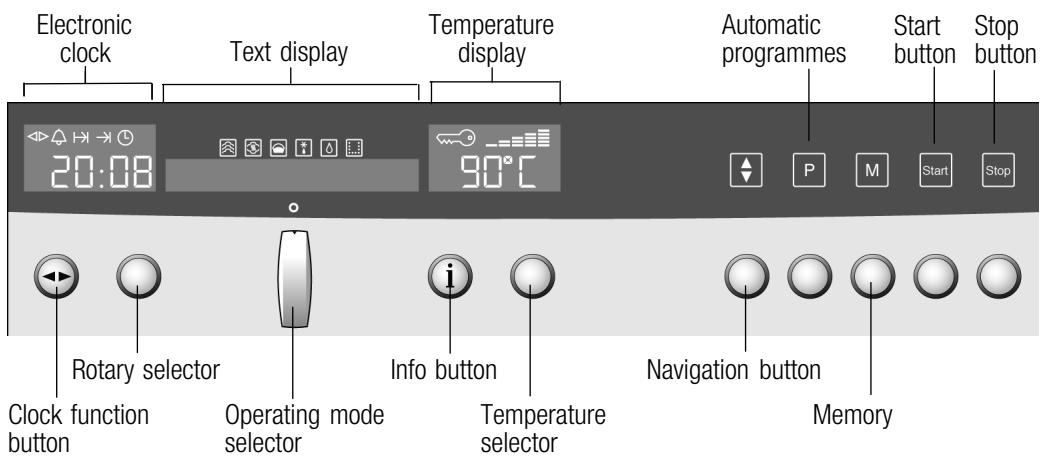
Control panel
| Control | Use | |
| <|> | Clock function button | Selects the clock function (see section: Electronic clock) |
| Rotary selector | Make settings within a clock function (see section: Electronic clock) | |
| Operating mode selector | Selects the operating mode | |
| i | Info button | Appliance switched on: checks the current information Appliance switched off: selects the basic settings (see section: Basic settings) |
| Temperature selector | Appliance switched on: checks the current information Appliance switched off: selects the basic settings (see section: Basic settings) | |
| + | Navigation button | Switches between the different lines of the text display. Changes are saved. |
| P | Automatic programmes | Selects preset programmes (see section: Automatic Programmes) |
| M | Memory | Saves and accesses Memory (see section: Memory) |
| start | Start button | Starts operation |
| stop | Stop button | press briefly: Stops (pauses) an operation long press: Ends operation |
Pop-out control knobs
The rotary, temperature and operating mode selectors can all be popped out. To pop the knob in and out, push the appropriate operating knob.
Operating modes
Using the operating mode selector, you can select the following operating modes:
| Operating mode | Used for |
| Steam cooking | For vegetables, fish, side dishes, for juicing fruit and for blanching. |
| Reheat | For plated meals and baked items. Cooked food is gently reheated. The steam ensures that the food does not dry out. |
| Dough proving | For yeast dough and sour dough. Dough will prove considerably more quickly than at room temperature. The surface of the dough does not dry out. |
| Defrost | for vegetables, meat, fish and fruit. The moisture gently transfers the heat to the food. The food does not dry out or lose shape. |
| EasyClean® | Makes cleaning the cooking compartment easier. |
| Descale | For descaling the water system and the evaporator dish. |
Cooking compartment and accessories
The cooking compartment has four shelf positions. The shelf positions are counted from the bottom up.
Caution
The evaporator dish must not be covered. Do not place any dishes on the cooking compartment floor.
- Do not slide any accessories between the shelf positions, or they may tip.
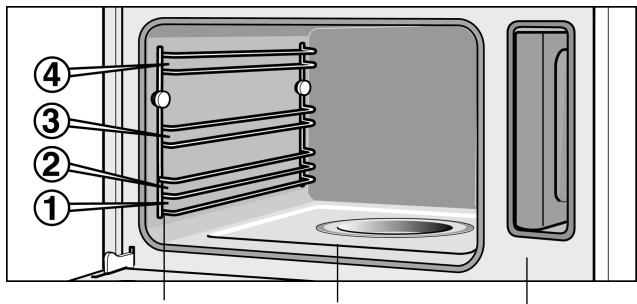
Rails for the accessories
Evaporator dish
Water tank
Accessories
Use only the accessories supplied with the product or available from the after-sales service. They are specially designed for your appliance.
Your appliance is equipped with the following accessories:
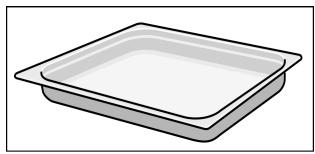
Cooking container, solid, GN 2 / 3 40 mm deep
for catching dripping liquid when steaming and for cooking rice, pulses and cereals
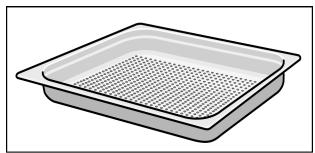
Cooking container, perforated, GN2 / 3 40 mm deep for the steaming of whole fish or large quantities of vegetables, for juicing berries, etc.
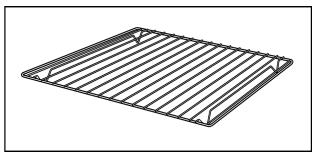
Wire rack
for dishes including preserving jars, baking and pudding moulds
You can obtain further accessories from specialist retailers:
| Accessories | Order no. |
| Cooking container, solid, GN 2/3, 40 mm deep | Z1683X0 |
| Cooking container, perforated, GN 2/3, 40 mm deep | Z1682X0 |
| Cooking container, solid, GN 2/3, 28 mm deep (baking tray) | Z1673X0 |
| Cooking container, solid, GN 1/3, 40 mm deep | Z1663X0 |
| Cooking container, perforated, GN 1/3, 40 mm deep | Z1662X0 |
| Wire rack | Z1664X0 |
| Cleaning sponge | 643 254 |
| Descaler | 311 138 |
| Honeycomb microfibre cloth | 460 770 |
Water tank
When you open the appliance door, you will see the water tank on the right-hand side.
Only fill the water tank with fresh tap water or with still bottled water.
If your water is very hard, we recommend that you use softened water.
If your tap water contains a high percentage of chlorides (>40mg / l) , use still mineral water low in chlorides. You can obtain information on your tap water from your water supply company.
Before using for the first time, moisten the tank cover seal with a little water.
Caution.
Do not fill the water tank with distilled water or any other liquids. You may damage the appliance.
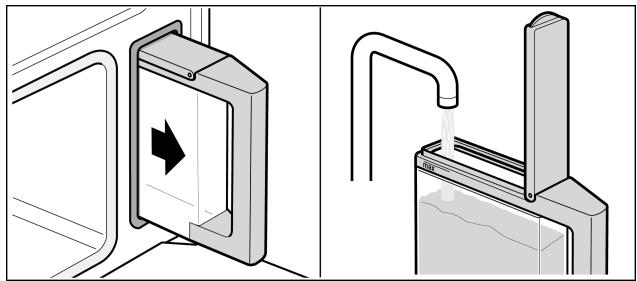
Fill the water tank before each use
- Fill the water tank with cold water up to the "max." mark.
- Close the tank cover until you feel it engage.
- Slide in the water tank until it engages.
After every operation
Empty the water tank after each use.
- Pull the water tank out of the appliance slowly, keeping it horizontal, so that no remaining water can drip out of the valve.
- Empty out the water.
- Thoroughly dry the water tank in the appliance and the seal in the tank cover.
"Fill water tank" message
If the water tank is empty, a signal sounds. "Fill water tank" appears in the display. Operation is stopped.
- Open the appliance door carefully. Steam will escape.
- Take out the water tank, fill to the mark and reinsert.
- Press the Start button.
"Fill water tank?" message
This message appears if you set an operating mode and the water tank is only half full.
If you think that the water in the water tank is sufficient for the cooking procedure, you can restart the appliance.
If not, fill the water tank to "max.", slide it back in and start the appliance.
Automatic calibration
The boiling temperature of water depends on the air pressure. During calibration, the appliance is set to the pressure ratios at the place of installation. This occurs automatically when steaming for the first time at 100°C . This causes more steam to develop than usual.
After moving house
So that the appliance automatically adjusts itself to the new location, you must reset the appliance to the factory settings (see Section: Basic settings).
Before using for the first time
In this section you will find out,
How to set the clock after connecting up your appliance
How to change the display language
How to change the water hardness range
How to clean your appliance before using it for the first time
Setting the language
Once the electrical connections have been made, you must set the language for the text display.
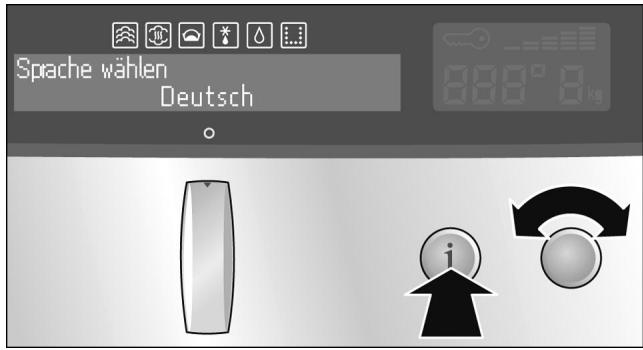
Changing the language
- Turn the temperature selector until the language you require appears on the text display.
- Press and hold the info button for 3 seconds. Your setting is adopted.
If the appliance is locked, you first need to unlock the controls (see section: Childproof lock)
- Turn the operating mode selector to the o position.
- Press and hold the Info button until "Sprach wahren" (Select language) is shown in the text display.
- Use the temperature selector to set the required language.
- Press and hold the info button for 3 seconds. The change is stored.
Set clock
0:00 flashes in the clock display.
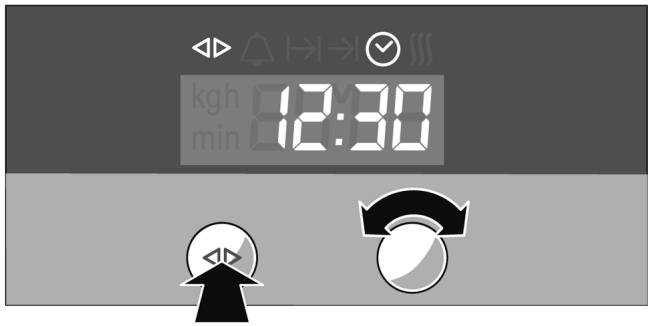
- Press the clock function button. The and symbols light up. 12:00 appears in the clock display.
- Set the current time using the rotary selector. The setting is automatically accepted after 3 seconds.
Changing the time
To subsequently change the time, press the clock function button repeatedly until the and symbols are lit.
Change the time with the rotary selector.
Setting the water hardness
Checking the water hardness
Softened water
Changing the water hardness
Cleaning
Heating up the appliance
Descale your appliances at regular intervals. This is the only way to prevent damage.
Your appliance automatically displays when it needs.
descaling. It is preset to water hardness II. Change the
value if your water is softer or harder..
You can check the water hardness with the test strips supplied or ask your water supplier.
You can only dispense with descending completely if you exclusively use softened water. If this is the case, change the water hardness to "softened".
You can change the water hardness in the basic settings.
- Turn the operating mode selector to the o position.
- Press and hold the Info button until "Select language" is shown in the text display.
- Press the info button repeatedly until "Water hardness 2-medium" is displayed.
- Use the temperature selector to change the water hardness. Possible values:
| softened | |
| 1-soft | I |
| 2-medium | II |
| 3-hard | III |
| 4-very hard | IV |
- Press and hold the info button for 3 seconds.
The change is stored.
For more information, see section: Basic settings.
Heat up the appliance empty before first use and clean the accessories.
- Fill the water tank and insert it.
- Turn the operating mode selector to the Steam cooking operating mode.
- Press the Start button. The appliance automatically heats up to 100° C and switches itself off after 20 minutes. A signal sounds.
Cleaning the accessories
- Press the stop button and turn the operating mode selector back to the o position.
- Press the clock function button to exit the clock function.
Leave the appliance door ajar until the appliance has cooled down.
Clean the accessories thoroughly before first use with a cloth and soapy water.
Operating the appliance
In this section you will find out,
how to switch the appliance on and off
what to note after each use
Switching on the appliance
Press the depressed operating mode selector so that it pops out. This switches on the appliance. "Appliance is ready for use" appears in the text display.
- Turn the operating mode selector until the desired operating mode appears on the text display.
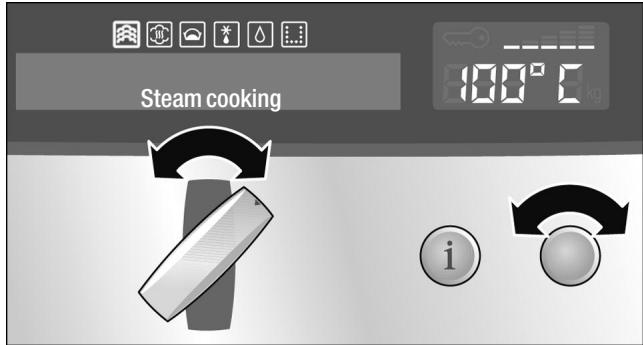
A default temperature appears on the temperature display.
2. Turn the temperature selector to change the default temperature.
A default cooking time is displayed on the electronic clock. The and (cooking time) symbols light up.
- Turn the rotary selector to change the default cooking time.
The new cooking time is stored automatically after 3 seconds.
- Press the Start button.
If you do not press the Start button, a signal sounds and "Press Start button" appears in the display.
In the Steam cooking operating mode, the cooking time does not start until the heating up time has elapsed.
| Operating mode | Defaulttemperature in °C | Temperature range °C |
| Steam cooking | 100 | 35 - 100 |
| Reheat | 100 | 80 - 100 |
| Dough proving | 40 | 35 - 50 |
| Defrost | 45 | 35 - 60 |
| EasyClean® | For information on operation, see section: EasyClean® | |
| Descale | For information on operation, see section: Descaling | |
Current temperature
Press the info button. The current temperature is displayed for 3 seconds.
The heating indicator displays the rising temperature in the cooking compartment.
Displaying and changing the cooking time
Press the clock function button until the and I→ I symbols light up. The current cooking time is displayed. Turn the rotary selector to change the cooking time. The change is stored automatically.
Changing the temperature
The temperature can be changed at any time. To change the temperature, turn the temperature selector until the required temperature is displayed.
| Switching off the apppliance | Risk of scalding Hot steam can escape when the appliance door is opened. Open the door of the cooking compartment very carefully after cooking. | |
| Cooking time has elapsed | Once the cooking time has elapsed, the appliance switches off automatically. A signal sounds. Press the clock function button to turn off the signal. | |
| Press the Stop button or carefully open the appliance door. | ||
| Turn the operating mode selector back to the o position. | ||
| Pause | Press the Stop button briefly. The Start button flashes. The cooling fan may continue running. Press the Start button to start. | |
| If you open the appliance door during an operation, the operation is stopped. Close the appliance door and press the Start button to restart. | ||
| If you have activated Auto start, you do not need to restart (see section: Changing the basic settings). | ||
| Switching off manually | Press the Stop button and carefully open the apppliance door, or press and hold the Stop button. | |
| Turn the operating mode selector back to the o position. | ||
| The cooling fan may continue running when you open the appliance door. | ||
| Residual heat indicator | You can see in the temperature display whether there is high or low residual heat in the cooking compartment. | |
| Temperature display | Text display | |
| H | Residual heat high | |
| h | Residual heat low | |
After every operation
Emptying the water tank
Empty the water tank. Thoroughly dry the seal in the tank cover and the tank shaft in the appliance.
Do not dry the water tank in the hot cooking compartment. This will damage the water tank.
Drying the cooking compartment
Leave the appliance door ajar until the appliance has cooled down.

Risk of scalding
The water in the evaporator dish may still be hot.
Allow it to cool before wiping.
Wipe the cooking compartment and the evaporator dish with the enclosed sponge and dry well with a soft cloth.
Wipe units and handles dry where condensation has built up.
Changing the basic settings
Your appliance has various basic settings that have been preset by the manufacturer. You can, however, change these basic settings as required.
The appliance must be switched off and controls must not be locked.
- Turn the operating mode selector to the o position.
- Press and hold the info button for 3 seconds to go to the basic settings menu.
The text display shows "Select language". If the appliance controls are locked, you must unlock them first.
- Press the info button briefly and repeatedly until the current basic setting for the relevant submenu is displayed on the text display (e.g. "Audible signal off").
- Using the temperature selector, set the required basic setting within a submenu (e.g. "Audible signal duration 2 minutes").
- Press and hold the info button for 3 seconds. Your basic setting is saved.
Basic settings menu
| Submenu | Basic setting | Setting symbol (temperature display) |
| Select language | Additional languages are possible | |
| Childproof lock | Lock is not activated | c 10 |
| Lock is activated | c 11 | |
| Permanent lock is activated | c 21 | |
| Cooking time audible signal | Audible signal off | c 30 |
| Audible signal duration 30 seconds | c 31 | |
| Audible signal duration 2 minutes | c 32 | |
| Audible signal duration 10 minutes | c 33 | |
| Auto start | off | c 40 |
| on | c 41 | |
| Adjust individually | - □□□■□□□+ | c 5... |
| Water hardness | Softened | c 60 |
| 1 - Soft | c 61 | |
| 2 - Medium | c 62 | |
| 3 - Hard | c 63 | |
| 4 - Very hard | c 64 | |
| Steam heating up signal | off | c 70 |
| on | c 71 | |
| Restore factory settings | Do not restore | c 80 |
| Restore | c 81 |
Electronic clock
In this section you can learn
how to set the timer
how to switch off your appliance automatically
how to switch your appliance on and off automatically (preselected operation)
how to set the time
Clock display
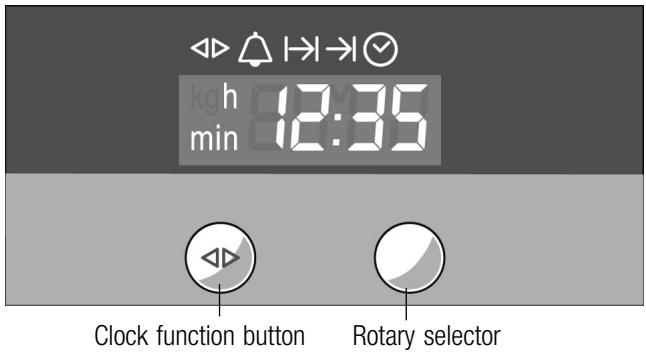
| Clock function | Use |
| Minute minder | You can use the minute minder as an egg timer or a kitchen timer. The appliance does not switch on or off automatically. |
| I→I Cooking time | The appliance switches off automatically after a set cooking time (e.g. 1:30 hours). |
| →I Preselection mode | The appliance switches on and off automatically. |
| © Clock | Setting the clock |
Notes:
If you select a clock function, the time interval is increased if you set higher values (e.g. Cooking time up to 1:00h can be set to the nearest minute, above 1:00h to the nearest 5 minutes).
- Between 22:00 and 5:59, the clock display is darkened if you do not alter any settings during this time or if no clock function is activated.
For the clock functions (except the clock itself), a signal sounds when the setting has elapsed and the Δ or → (end) symbol flashes. To cancel the audible signal before it ends, press the clock function button.
Switching the clock display on and off
- Press and hold the clock function button for 7 seconds.
The clock display switches off. If a clock function is active, the associated symbol remains lit.
- Press the clock function button briefly.
The clock display switches on.
Minute minder
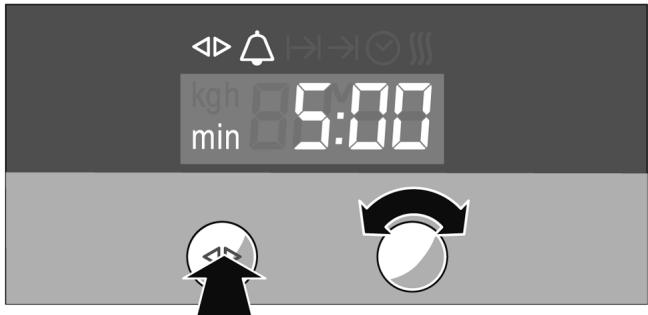
- Press the clock function button repeatedly until the and symbols light up.
- Set the cooking time using the rotary selector (e.g. 5:00 minutes).
The setting is accepted automatically. Then the time is displayed again and the minute minder starts counting down.
Cooking time
Automatic switch off after a set cooking time.
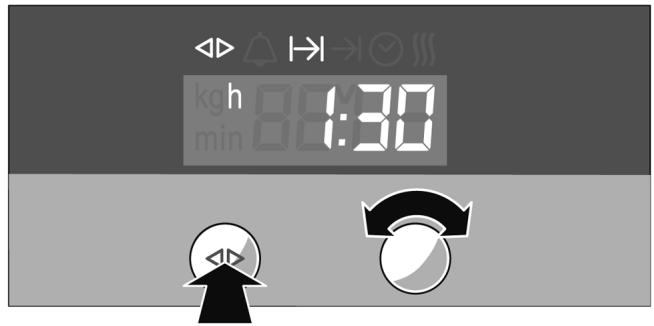
- Set the operating mode and temperature.
Press the Start button.
The appliance heats up.
- Press the clock function button repeatedly until
the and symbols light up.
- Set the cooking time with the rotary selector
(e.g. 1:30 hours).
The setting is accepted automatically and the time
is then displayed again.
In the Steam cooking operating mode, the cooking
time does not start until the heating up time has
elapsed.
Once the cooking time has elapsed, the appliance
switches off automatically.
- Turn the operating mode selector back to the o position.
- Press the clock function button to exit the clock
function.
Preselection mode
The appliance switches on automatically, and switches off automatically at the time preselected for the end of operation.
Bear in mind that food which spoils easily must not stay in the cooking compartment for too long.
Preselection mode is not possible with some programmes.
When using steam, the heating-up time must be added to the operating time. The end of operation set may therefore be delayed by the heating-up time.
- Set the operating mode and temperature.
Press the Start button.
The appliance heats up.
- Press the clock function button until the and I→ I symbols light up.
- Set the cooking time with the rotary selector (e.g. 1:30 hours).
- Press the clock function button until the and → symbols light up.
- Set the end of operation using the rotary selector (e.g. 12:30).
The appliance switches off and waits until the correct time to switch on (in the example, 1:00).
The appliance switches off automatically at the end of operation time set (12.30). A signal sounds and the → symbol flashes.
- Turn the operating mode selector back to the o position.
- Press the clock function button to end preselection mode.
Setting the clock
You can only change the clock when no other clock functions are active.
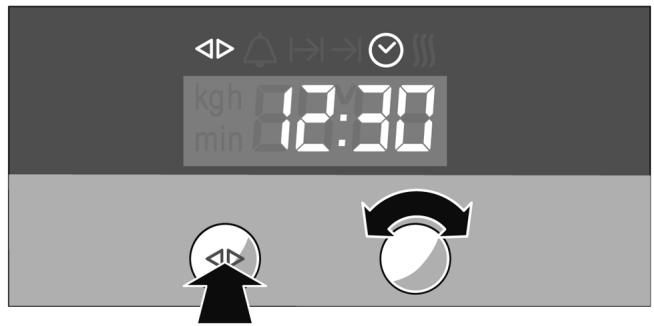
- Press the clock function button until the and symbols light up.
- Set the clock using the rotary selector. The setting is accepted automatically.
Checking, correcting or deleting settings
- To check your settings, press the clock function button until the corresponding symbol lights up.
- If necessary, you can correct your setting using the rotary selector.
- If you wish to cancel your setting, turn the rotary selector anti-clockwise to zero.
Childproof lock
In this section you can learn
how to lock your appliance
how to lock your appliancepermanently
Lock
The locked appliance cannot be switched on accidentally or by unauthorised users (e.g. playing children).
Locking the appliance
To switch the appliance on again, you must unlock it. After appliance operation, the appliance is not automatically locked. Lock it again if necessary or activate the permanent lock.
- Switch off the appliance.
- Press and hold the info button for 3 seconds to display the basic settings menu.
- Briefly press the info button repeatedly until c is shown in the temperature display.
- Turn the temperature selector until c appears in the temperature display.
- Press and hold the info button until the ⇔ symbol appears in the temperature display.
Note:
If you try to switch on the locked appliance, -5- appears on the temperature display and "controls locked" on the text display.
UnlockING the appliance
- Press and hold the info button until c appears in the temperature display.
- Turn the temperature selector until c appears in the temperature display.
- Press and hold the info button until the ⇔ symbol goes out.
Permanent lock
The permanently locked appliance cannot be switched on accidentally or by unauthorised users (e.g. playing children).
To switch the appliance on, you must interrupt the permanent lock briefly. After you have switched your appliance off, it locks again automatically.
Locking the appliance permanently
- Switch off the appliance.
- Press and hold the info button for 3 seconds to display the basic settings menu.
- Briefly press the info button repeatedly until c = 10 is shown in the temperature display.
- Turn the temperature selector until c ≥ 1 appears in the temperature display.
- Press and hold the info button for 3 seconds. Your appliance will be locked after 30 seconds. The ⇔ symbol appears in the temperature display.
Note:
If you try to switch on the locked appliance, -5P- appears on the temperature display and "appliance permanent lock" on the text display.
Overriding a permanent lock
- Press and hold the info button until c appears in the temperature display.
- Turn the temperature selector until c ≥ 0 appears in the temperature display.
3 Press and hold the info button until the ⇔ symbol goes out. The permanent lock is interrupted. - Switch the appliance on within 30 seconds.
After switching off, the permanent lock is activated again after 30 seconds.
UnlockING the appliance permanently
- Press and hold the info button until c appears in the temperature display.
- Turn the temperature selector until c ≥ 0 appears in the temperature display.
3 Press and hold the info button until the ⇔ symbol goes out. - Within 30 seconds, press the Info button again for 3 seconds to display the basic settings menu.
- Briefly press the info button repeatedly until c = 2 is shown in the temperature display.
- Turn the temperature selector until c iO appears in the temperature display.
- Press and hold the info button for 3 seconds. The appliance is permanently unlocked.
Automatic programmes
In this section, you will find out:
- how to set a programme from the automatic programming selection
notes and tips on the programmes
which programmes you can set (programme tables).
The automatic programmes enable you to prepare food very easily. There are 9 programme groups with a total of 40 programmes.
Setting the programme
Follow the instructions for the programmes. Select the correct programme from the programme tables.
Example in fig.: You want to steam 500g fresh chicken breast.
"Meat, poultry" programme group
"Chicken breast, fresh, steamed" programme
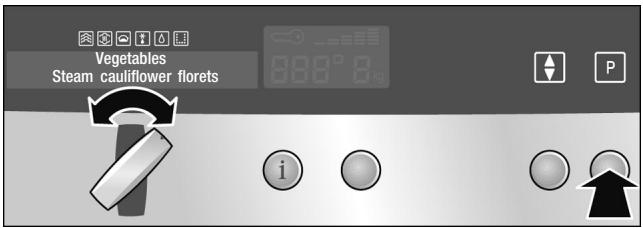
- Turn the operating mode selector to the o position.
- Press the button.
The first programme group is shown on the text display.
- Turn the operating mode selector until the appropriate programme group appears on the text display.
Selecting the programme
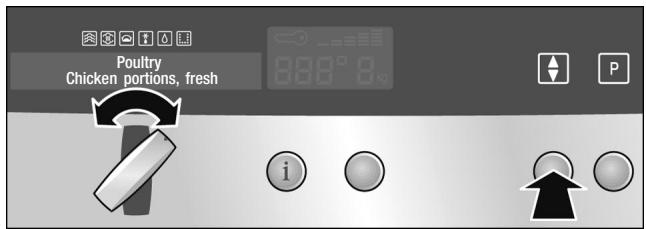
- Press the button.
The first programme in the programme group is shown on the text display.
- Turn the operating mode selector until the appropriate programme is displayed.
Adjusting the cooking result to suit individual tastes
If the cooking result of a programme does not meet with your expectations, you can adjust it individually.
- Press the button.
The scale for individually adjusting the cooking result appears on the text display.
- +
- Turn the operating mode selector to change the setting on the scale:
Anti-clockwise = Cooking result lower
Clockwise = Cooking result more intensive
You can also modify the cooking result for all programmes at the same time
(see section: Basic settings).
Setting the weight
For programmes which require the weight of the food, a default weight appears on the temperature display.
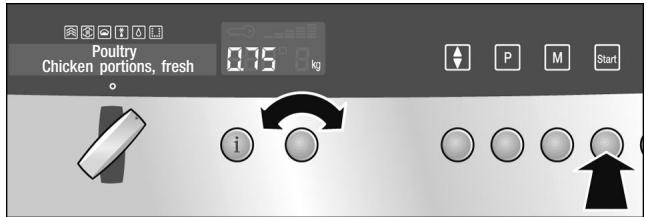
- Turn the temperature selector to set the weight.
Press the Info button to request information on the accessories. The information is displayed for a few seconds.
- Press the Start button.
No preheating indicator appears.
Checking the cooking time
Press the clock function button repeatedly until the and I→ I symbols light up.
Programme with preselected operation
For some programmes, you can set a preselected operation. The programme will be started later, to finish at the desired time (see section: Electronic clock)
End of programme
A signal sounds. The appliance switches off. Press the Stop button.

Risk of scalding
When opening the appliance door, hot steam can escape. Take care when opening the appliance door.
Cancelling the programme
Press the Stop button.
| Notes about the programmes | All programmes are designed for cooking on one level. The cooking result can vary according to the size and quality of the food. | ||
| Ovenware | Use the suggested ovenware. All meals have been tested using this ovenware. The cooking result may change if you use different ovenware. When cooking in the perforated cooking container, also insert the solid cooking tray at level 1. Dripping liquid is caught. | ||
| Amount / weight | Do not fill the food more than 4 cm high in the accessories. The automatic programmes require the weight of the food. With individual pieces always use the weight of the largest. The total weight must be within the specified weight range. | ||
| Cooking time | After the programme is started the cooking time is displayed. It may change during the first 10 minutes, as the heating-up time depends among other things on the temperature of the food and the water. | ||
| Programme tables | In this section you will find all the programme groups and the programmes they contain. Read the instructions before preparing food using a programme. | ||
| Vegetables | Do not season vegetables until after cooking. | ||
| Programme | Notes | Ovenware / accessories | Levels |
| Steam cauliflower / In florets* | florets of equal size | perforated | 3 |
| + solid cooking container | 1 | ||
| Steam cauliflower / Whole cauliflower* | - | perforated | 3 |
| + solid cooking container | 1 | ||
| Steam broccoli florets* | florets of equal size | perforated | 3 |
| + solid cooking container | 1 | ||
| * You can set a preselection mode for this programme | |||
| Programme | Notes | Ovenware / accessories | Levels |
| Steam green beans* | - | perforated | 3 |
| + solid cooking container | 1 | ||
| Sliced carrots, steam* | slices, approx. 3 mm thick | perforated | 3 |
| + solid cooking container | 1 | ||
| Sliced kohlabi, steam* | slices, approx. 3 mm thick | perforated | 3 |
| + solid cooking container | 1 | ||
| Steam Brussels sprouts* | - | perforated | 3 |
| + solid cooking container | 1 | ||
| Steam asparagus / White asparagus* | - | perforated | 3 |
| + solid cooking container | 1 | ||
| Steam asparagus / Green asparagus* | - | perforated | 3 |
| + solid cooking container | 1 | ||
| Mixed vegetables, frozen, steam | perforated | 3 | |
| + solid cooking container | 1 | ||
- You can set a preselection mode for this programme
Potatoes
Do not season potatoes until after cooking.
| Programme | Notes | Ovenware / accessories | Levels |
| Boiled potatoes* | medium-sized, quartered, individual weight 30 - 40 g | perforated | 3 |
| + solid cooking container | 1 | ||
| Unpeeled boiled potatoes* | medium-sized, dia. 4 - 5 cm | perforated | 3 |
| + solid cooking container | 1 |
- You can set a preselection mode for this programme
Cereal products
Weigh the food and add the correct ratio of water:
| Rice | 1:1.5 |
| Couscous | 1:1 |
| Millet | 1:3 |
| Lentils | 1:2 |
Enter the weight excluding liquid.
Stir cereal products after cooking. The remaining water is then quickly absorbed.
Preparing risotto
Add water to the risotto in the ratio 1:2. Enter the total weight including water. The message "Stir" appears after approx. 15 minutes. Stir the risotto and press the start button.
| Programme | Notes | Ovenware / accessories | Levels |
| Rice / Long grain rice | max. 0.75 kg | solid cooking container | 2 |
| Rice / Basmati rice | max. 0.75 kg | solid cooking container | 2 |
| Rice / Brown rice | max. 0.75 kg | solid cooking container | 2 |
| Couscous | max. 0.75 kg | solid cooking container | 2 |
| Millet | max. 0.55 kg | solid cooking container | 2 |
| Risotto | max. 2 kg | solid cooking container | 2 |
| Lentils | max. 0.55 kg | solid cooking container | 2 |
Meat, poultry
Do not place meat or poultry on top of one another in the ovenware.
The chicken breasts can be marinated beforehand.
| Programme | Notes | Ovenware / accessories | Levels |
| Chicken breast, fresh, steamed | total weight | perforated | 3 + |
| 0.2 - 1.5 kg | + solid cooking container | 1 | |
| Smoked pork, fresh, sliced* | - | perforated | 3 + |
| + solid cooking container | 1 | ||
| Boiled sausages* | - | perforated | 3 + |
| + solid cooking container | 1 |
- You can set a preselection mode for this programme
Fish
When preparing fish, grease the perforated cooking container.
Do not place whole fish or fish fillets on top of each other. Enter the weight of the heaviest fish and choose pieces as similar in size as possible.
| Programme | Notes | Ovenware / accessories | Levels |
| Steam whole, fresh fish | 0.3 - 2 kg | perforated | 3 |
| + solid cooking container | 1 | ||
| Fish fillet, steam / | max. 2.5 cm thick | perforated | 3 |
| Fish fillet, fresh | + solid cooking container | 1 | |
| Fish fillet, steam / | max. 2.5 cm thick | perforated | 3 |
| Fish, frozen | + solid cooking container | 1 | |
| Blue mussels | - | perforated | 3 |
| + solid cooking container | 1 |
Pastries, dessert
Preparing fruit compote
The Fruit compote programme is only suitable for fruits with stones and pips. Weigh the fruit and add approximately 1 1/3 the amount in water, and add sugar and spices according to taste.
Preparing rice pudding
Weigh the rice and add 2.5 times as much milk. Do not fill the rice and milk more than 2.5 cm high in the accessories. Stir after cooking. The remaining milk is quickly absorbed.
Making yogurt
Heat the milk to 90°C on the hob. Then leave to cool to 40°C . If you are using UHT milk, you do not need to heat it.
Stir in one to two teaspoons of natural yogurt per 100 ml milk or the corresponding amount of yogurt culture. Pour the mixture into clean jars and seal them.
After preparation, leave the glasses to cool in the refrigerator.
| Programme | Notes | Ovenware / accessories | Levels |
| Fruit compote* | - | solid cooking container | 2 |
| Rice pudding | - | solid cooking container | 2 |
| Yogurt in glass jars | - | glass jars + perforated cooking container | 2 |
- You can set a preselection mode for this programme
Reheat
| Programme | Notes | Ovenware / accessories | Levels |
| Side dishes, cooked* | - | solid cooking container | 2 |
| Cooked vegetables* | - | solid cooking container | 2 |
- You can set a preselection mode for this programme
Defrost
If possible, freeze the food flat and in portion-sized pieces at -18°C . Do not freeze excessively large quantities.
All defrost programmes apply to raw food.

Health risk.
When defrosting food from animal sources, you must remove the liquid that escapes during defrosting. It must never come into contact with other food. Bacteria could be transferred.
After defrosting, operate the steam oven with hot air for 15 minutes at 100°C .
Defrosting fish fillet
Do not place the fish fillets on top of one another.
Defrosting whole poultry
Remove the packaging before defrosting.
Leave the poultry to stand after defrosting. With large poultry (e.g. small turkeys), you can remove the giblets after approximately 30 minutes standing time.
Defrosting meat
With this programme you can defrost individual cuts of meat.
Thawing fruit a little
If you only want to thaw the fruit a little, adjust the cooking result individually.
| Programme | Notes | Ovenware / accessories | Levels |
| Fish / Whole fish | max. 2.5 cm thick | perforated | 3 |
| + solid cooking container | 1 | ||
| Fish / Fish fillet | max. 2.5 cm thick | perforated | 3 |
| + solid cooking container | 1 | ||
| Whole poultry | max. 1.5 kg | perforated | 3 |
| + solid cooking container | 1 | ||
| Meat | max. weight 1.5 kg per piece | perforated | 3 |
| + solid cooking container | 1 | ||
| Berries | - | perforated | 3 |
| + solid cooking container | 1 |
Special
Sterilising bottles
Always clean the bottles immediately after drinking with a bottle brush. Then clean them in the dishwasher.
Place the bottles in the perforated cooking container so that they do not touch one another.
Dry the bottles with a clean cloth after sterilising. The process corresponds to normal sterilisation by boiling.
Preserving
The programme is suitable for fruits with stones and pips and for vegetables (except beans).
Blanch pumpkin before preserving.
The programme is designed for 1-litre glass jars.
For larger or smaller jars, you must adjust the cooking result individually.
After the end of the programme, open the cooking compartment door to prevent cooking from continuing. Leave the jars to cool down for a few minutes in the cooking compartment.
The programme is designed for firm fruit. If the fruit being used is no longer firm, adjust the cooking results individually.
Cooking eggs
Pierce the eggs before cooking. Do not place eggs on top of each other. Size M corresponds to a unit weight of approx. 50 g.
| Programme | Notes | Ovenware / accessories | Levels |
| Sterilise bottles* | - | perforated cooking container | 2 |
| Preserve | in 1 litre jars | perforated + solid cooking container | 3 |
| 1 | |||
| Eggs / Hard-boiled eggs* | eggs, size M, max. 1.8 kg | perforated + solid cooking container | 3 |
| 1 | |||
| Eggs / Soft-boiled eggs* | eggs, size M, max. 1 kg | perforated + solid cooking container | 3 |
| 1 |
- You can set a preselection mode for this programme
Memory
You can use the Memory function to store up to 6 of your own settings and recall them for use at any time. The Memory function is particularly useful for dishes that you make on a regular basis. You can also store a meal from the automatic programmes.
Saving to the Memory function
- Select the operating mode, temperature and cooking time, or select a programme from the automatic programmes (do not press the Start button).
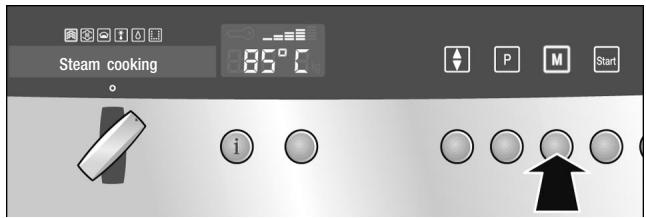
Cancelling the Memoryfunction
- Press the M button to call the Memory menu.
- Turn the operating mode selector to choose one of the 6 memory spaces.
- Press and hold the M button until a signal sounds. "Memory saved" is shown in the text display.
Press the button briefly to exit the Memory menu without saving.
Starting the memory function
- Turn the operating mode selector to the o position.
- Place the meal in the cooking compartment.
- Press the M button to call the Memory menu.
- Turn the operating mode selector to select the memory space.
- Press the Start button.
After pressing Start, you can change the temperature and the cooking time (does not apply for automatic programmes).
The cooking time does not start until the heating up time has elapsed.
Pause
Press the Stop button briefly. The Start button flashes. The cooling fan may continue to run. Press the Start button to start.
Cancelling
Press the Stop button and hold.
Deleting a memory setting
You can delete or replace a memory setting.
- Turn the operating mode selector to the o position.
- Press the button to call up the Memory menu.
- Turn the operating mode selector to select the memory space.
- Press the button. "Cancel: No" appears in the display.
- Use the operating mode selector to choose "Cancel: Yes".
- Press the + button to delete the memory setting.
- Press the button briefly to exit the Memory menu.
Care and cleaning
In this section, you will find information on
Care and cleaning of your appliance
Cleaning agents and aids
The EasyClean® operating mode
The Descale operating mode

Risk of short-circuiting.
Do not use high-pressure cleaners or steam jet cleaners to clean your appliance.
Caution
Risk of damaging the surface. Do not use
harsh or abrasive cleaning agents,
oven cleaners,
corrosive or aggressive detergents, or those containing chlorine.
If an abrasive substance comes into contact with the frontage, wash it off immediately with water.
Remove food residues from the cooking compartment as soon as the appliance has cooled. Burnt-on remains will be much harder to remove later.
For heavy soiling use the cleaning aid (see section: EasyClean®).
Salts are very abrasive and can cause rust. Remove residues of salted food and acidic sauces (ketchup, mustard) from the cooking compartment immediately after cooling.
Cleaning sponge
The enclosed cleaning sponge is very absorbent. Use the cleaning sponge only for cleaning the cooking compartment and for removing residual water from the evaporator dish.
Wash the cleaning sponge thoroughly before using for the first time. You can wash the cleaning sponge in the washing machine (hot wash).
Cleaning agents
| Appliance exterior with aluminium front | Use soapy water and dry with a soft cloth Mild window cleaning agent - wipe the surfaces horizontally and without applying pressure with a soft window cloth or a lint-free microfibre cloth |
| with stainless steel front | Use soapy water and dry with a soft cloth. Always remove any flecks of limescale, grease, starch and egg white immediately Special stainless steel cleaning agents can be obtained from the after-sales service or from specialist shops |
| Cooking compartment interior | Hot soapy water or a vinegar solution Use the enclosed sponge or a soft dish brush. Do not use steel scourers or scouring sponges! The cooking compartment could rust |
| Evaporator dish | Hot soapy water or a vinegar solution |
| Seal around the outside of the cooking compartment | Hot soapy water |
| Water tank | Soapy water, do not clean in the dishwasher |
| Tank shaft | Rub dry after every use |
| Seal in the lid | Thoroughly dry after every use |
| Rails | Use hot, soapy water, or clean in the dishwasher |
| Door panel | Glass cleaner |
| Accessories | Soak in hot soapy water. Clean with a brush or sponge or in the dishwasher Clean stains caused by starchy food (e.g. rice) with a vinegar solution |
EasyClean®
The EasyClean® operating mode is a cleaning aid for your appliance. Dirt in the cooking compartment is loosened by steam. It can then be removed easily.
EasyClean® takes approx. 30 minutes.
Note:
If EasyClean® is cancelled, the appliance cannot be operated. Only after the 1st and 2nd rinse can the appliance be used again, thereby ensuring that no detergent remains in the appliance.
Preparation
Allow the cooking compartment to cool down and remove the accessories. Clean the evaporator dish with the enclosed cleaning sponge.
Fill the water tank with water up to the "max" mark. Put a drop of washing-up liquid into the evaporator dish on the cooking compartment floor.
Starting EasyClean®
- Turn the operating mode selector to EasyClean®.
- Press the Start button. EasyClean® starts. The light in the cooking compartment remains switched off. ECS appears in the temperature display.
1st rinse
A signal sounds after approximately 30 minutes. "Wipe out appliance" appears in the text display.
- Take the shelves out of the cooking compartment and clean them (see section: Cleaning the shelves).
- Wipe out all loosened dirt from the cooking compartment and the evaporator dish using a soft washing-up brush and the cleaning sponge.
- If required, fill the water tank with water and reinsert it.
- Press the Start button. The appliance starts rinsing. "1st rinse" appears in the text display.
2nd rinse
After a short time, "Empty evaporator dish" appears in the display.
Removing the remaining water
- Thoroughly rinse out the cleaning sponge.
- Remove the remaining water from the evaporator dish using the cleaning sponge.
- Press the Start button.
The appliance starts rinsing.
"2nd rinse" appears in the text display.
After the 2nd rinse, "End" and "Empty evaporator dish" appear in the text display.
4. Turn the operating mode selector back to the o position.
Remove the remaining water from the evaporator dish using the cleaning sponge. Wipe out the cooking compartment using the cleaning sponge and then dry with a soft cloth.
Cancelling EasyClean®
- Press and hold the Stop button.
EasyClean® is cancelled.
To ensure that no washing-up liquid remains in the appliance, it must be rinsed twice after a cancellation. - Press the Start button.
"Wipe out appliance" appears in the display.
Proceed as described in the "1st rinse" section.
Dscaling
The appliance must be descaled at regular intervals in order for it to continue operating correctly. The "Descale appliance" display reminds you to do this.
Descaling takes approx. 30 minutes.
You can only dispense with descending completely if you exclusively use softened water.
Note:
If the descale operation is cancelled, the appliance cannot be operated. Only after the 1st and 2nd rinse can the appliance be used again, thereby ensuring that no descending solution remains in the appliance.
| Descaler | Only use the liquid descaler recommended by the after-sales service for descending (part no. 311138, also available online from the eShop). Other descalers may damage the appliance. 1. Prepare a descending solution by mixing 300 ml water and 60 ml liquid descaler. 2. Empty the water tank and fill with descending solution. Caution. Do not spill descending solution on the control panel or other sensitive surfaces. If you do, remove the solution immediately with water. |
| Starting descending | The cooking compartment must have cooled down completely. 1. Set the operating mode selector to Dim Descale. 2. Press the Start button. Descaling starts. The light in the cooking compartment remains switched off. |
| 1st rinse | A signal sounds after approximately 30 minutes. “Empty evaporator dish and refill water tank” appears in the text display. 1. Remove the descaler from the evaporator dish using the enclosed cleaning sponge. 2. Rinse the water tank thoroughly, fill with water and reinsert. “Appliance ready to rinse” and “1st rinse” appear in the text display. 3. Press the Start button. The appliance starts rinsing. “1st rinse” appears in the text display. |
| 2nd rinse | After a short time, “Empty evaporator dish” appears in the display. 1. Thoroughly rinse out the cleaning sponge. 2. Remove the remaining water from the evaporator dish using the cleaning sponge. |
- Press the Start button.
The appliance starts rinsing.
"2nd rinse" appears in the text display.
After the 2nd rinse, "End" and "Empty evaporator dish" appear.
- Turn the operating mode selector back to the o position.
Removing the remaining water
Remove the remaining water from the evaporator dish using the cleaning sponge. Wipe out the cooking compartment using the cleaning sponge and then dry with a soft cloth.
Cancelling descaling
- Press and hold the Stop button.
Dscaling is cancelled.
To ensure that no descending solution remains in the appliance, it must be rinsed twice after a cancellation.
- Press the Start button.
"Empty evaporator dish and refill water tank" appears in the display.
Proceed as described in the "1st rinse" section.
Descaling the evaporator dish only
You can also use the Descale operating mode if you do not wish to descale the whole appliance, but only the evaporator dish in the cooking compartment.
Only difference:
- Prepare descending solution by mixing 100 ml water and 20 ml liquid descaler.
- Completely fill the evaporator dish with descending solution.
- Only fill the water tank with water.
- Start the Descale operating mode as described.
You can also descale the evaporator dish manually, without using the operating mode.
Removing and fitting the appliance door
You can remove the appliance door for easier cleaning.
Risk of injury.
- The hinges of the appliance door may snap shut with a lot of force. Always turn the two locking levers for fitting and removing the appliance door to their limit stops.
If the appliance door has been removed without turning both locking levers to their limit stops, the hinge may snap shut. Do not reach into the hinge. Call the after-sales service.
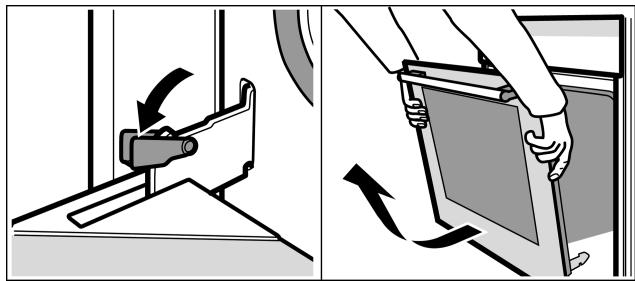
- Fully open the appliance door.
- Move the two locking levers on the left and right.
- Place the appliance door in a diagonal position. With both hands, grip the top of the door on the left and right-hand sides. Close the appliance door a little more and pull it out.
Fitting the appliance door
Refit the appliance door after cleaning.
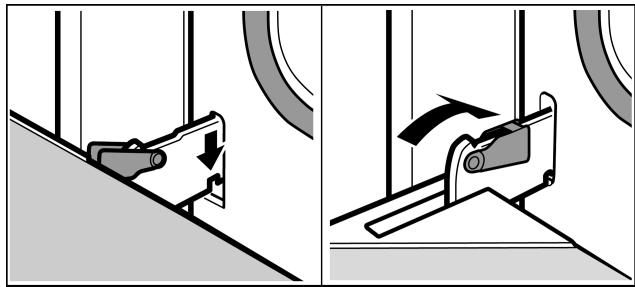
- Place the door hinges straight into the opening to the left and right of the cooking compartment. The notch on the hinge must engage on both sides.
- Fully open the appliance door and move the locking levers upwards.
- Close the appliance door.
Cleaning the rails
The rails can be removed for cleaning.
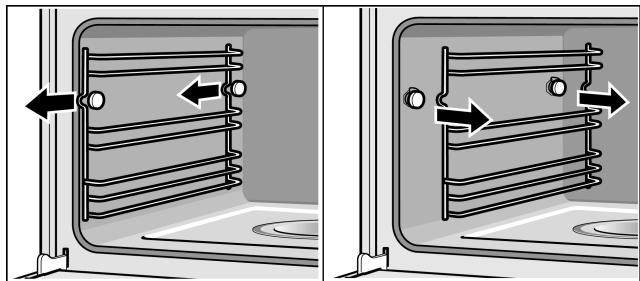
To do this, pull the rails forward and unhook them.
Clean the rails using either detergent and a sponge or a brush. You can also clean the rails in the dishwasher.
Refitting the rails
Hook the rails in at the back and at the front and slide them back until they engage.
Each set of rails only fits on one side.
Cleaning the door panels
The inner glass panel on the appliance door can be removed for easier cleaning.
Caution.
The appliance must not be used again until the panels and appliance door have been correctly installed.
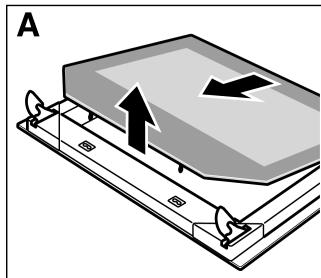
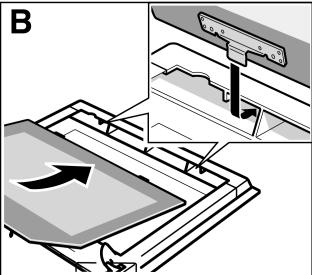
- Remove the appliance door and place it on a cloth with the handle facing downwards.
- Using both hands next to the hinges, gently lift the glass panel and pull it out towards the hinges. (Fig. A).
Clean the door panel with glass cleaner and a soft cloth.
Fitting the door panels
- Replace the door panel (Fig. B) and press downwards at the front next to the hinges until it clicks into place.
- Refit the appliance door.
Troubleshooting
Malfunctions often have simple explanations. Please read the following instructions before calling the after-sales service.
Repairs may only be carried out by fully trained after-sales service technicians. Incorrect repairs to the appliance may present considerable risks for the user.
| Problem | Possible cause | Notes/remedy |
| The appliance does not work | The plug is not plugged into the mains | Connect the appliance to the electricity supply |
| Power cut | Check whether other kitchen appliances are working | |
| Faulty fuse | Check in the fuse box to make sure that the fuse for the appliance is OK | |
| Faulty operation | Switch the appliance off using the fuse in the fuse box. Wait approximately 10 seconds and then switch it back on | |
| The appliance cannot be started | The appliance door is not fully closed | Close the appliance door |
| The appliance can not be started. “Clean” or “Descale” appears on the display | EasyClean® or Descale was cancelled | Rinse the appliance 2x (see section “Cancelling EasyClean®” or “Cancelling Descale”) |
| 0:00 flashes on the clock display | There was a power cut | Reset the clock (see section: Electronic clock) |
| The appliance is not in operation. A cooking time is shown in the display | The Start button was not pressed after the setting had been made | Press the Start button or delete the setting with the Stop button |
| “Safety cut-out” appears in the text display and 0:00 flashes in the temperature display | Automatic Safety cut-out is active | Turn the operating mode selector back to the o position |
| “Fill water tank” appears even though the water tank is full | The water tank has not been pushed in properly | Slide in the water tank until it engages |
| The detection system is not working | Call the after-sales service | |
| “Fill water tank” appears, although the water tank is not yet empty, or the water tank is empty but “Fill water tank” does not appear | The water tank is dirty. The moving water level indicators are jammed | Shake and clean the water tank. If the parts cannot be released, obtain a new water tank from the after-sales service |
| The water tank empties for no discernible reason. The evaporator dish overflows | The water tank was not closed properly | Close the lid until you feel it engage |
| The tank lid seal is dirty | Clean the seal | |
| The seal in the tank cover is defective | Obtain a new water tank from the after-sales service. | |
| The evaporator dish has boiled empty even though the water tank is full | The water tank has not been pushed in properly | Slide in the water tank until it engages |
| The feed line is blocked | Descale the appliance. Check whether the water hardness range is set correctly | |
| “Empty/Clean tank?” appears in the display | The appliance has not been used for at least 2 days and the water tank is full | Empty and clean the water tank. Always empty the water tank after cooking |
| There is a “pop” noise during cooking | Cold/warm effect from frozen food, caused by the steam | This is normal |
| When you cook with steam, a lot of steam is created | The appliance is being automatically calibrated | This is normal |
| When cooking with steam, a lot of steam is created again | The appliance is unable to calibrate itself automatically if cooking times are too short | Restore appliance to factory settings (see section: Basic settings). Then start the Steam cooking operating mode for 20 minutes at 100 °C |
| Steam escapes from the ventilation slots during cooking | This is normal | |
| The appliance is not producing steam properly | Limescale has formed in the appliance | Start the descaling programme. |
| An error message “E...” appears in the temperature display | Technical fault | Press the clock function button to delete the error message. Reset the clock if required. If the error message appears again, call the after-sales service |
| Error message “E011” appears in the temperature display | A button was pressed for too long or is jammed | Press the clock function button to delete the error message. Press all of the buttons individually and check if they are clean |
| The appliance is not heating. The colon is flashing in the clock display. For example, 100o appears in the temperature display | A button combination was actuated | Switch off the appliance, press and hold the info button for 3 seconds, then press and hold the clock function button for 4 seconds before pressing and holding the info button again for a further 3 seconds |
Replacing the cooking compartment bulb

Heat-resistant 25 W, 220/240 V bulbs, lamp base E14 and the seals are available from the after-sales service. Please specify the E number and FD number of your appliance.
Risk of burns.
Allow the cooking compartment and cooking compartment light to cool before changing the bulb.
- Switch off the fuse in the fuse box or unplug at the mains.
- Turn the cover anti-clockwise to remove.
- Unscrew the bulb anti-clockwise and replace with a bulb of the same type.
- Slide the new seals and the clamping ring onto the glass cover in the right order.
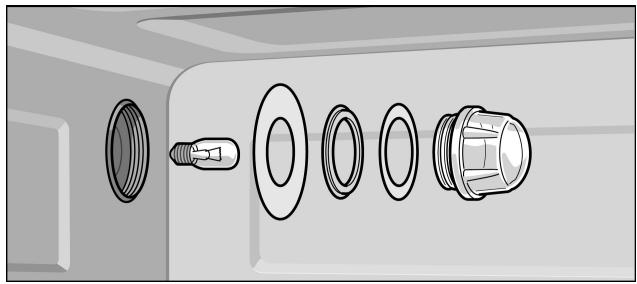
Replacing the glass cover or seals
Changing the door seal
- Screw the glass cover with the seals back on again.
- Connect the appliance to the mains and reset the clock.
Never operate the appliance without the glass cover and seals.
Any damaged glass cover or seals must be replaced. Please provide the after-sales service with your E number and FD number of your appliance.
If the seal around the outside of the cooking compartment is faulty, it must be replaced. Replacement seals for your appliance are available from our after-sales service. Please specify the E number and FD number of your appliance.
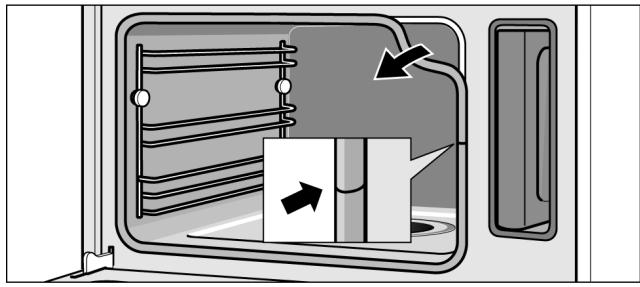
- Open the appliance door.
- Pull off the old seal.
- Push in the new door seal at one point and pull it in all the way round. The joint must be at the side.
- Check again that the seal is correctly fitted in the corners.
After-sales service
Our after-sales service is there for you if your appliance should need to be repaired. You will find the address and telephone number of your nearest after-sales service centre in the phone book. The after-sales service centres listed will also be happy to advise you of a service point in your local area.
E number and production number
When contacting the after-sales service, always specify the product number (E no.) and the production number (FD no.) of your appliance. The rating plate bearing these numbers can be found at the bottom on the right-hand side by opening the appliance door. Make a note of these numbers in the space below to save time in the event of your appliance malfunctioning.
E-Nr.
FD
After-sales service
Tables and tips
Steaming is a particularly gentle way of cooking food. The steam surrounds the dish thereby preventing a loss of nutrients from the food. Cooking takes place without overpressure. As a result, the shape, colour and typical aroma of the dishes are retained.
The tables contain a selection of dishes which are particularly suitable for your steam oven. You can find out which operating mode, accessories and cooking time to select.
Unless otherwise stated, the information given applies to inserting accessories when the appliance is cold.
| Accessories | Use the accessories provided. |
| When steaming in the perforated cooking container, always insert the solid cooking container underneath. Dripping liquid is caught. | |
| Ovenware | When using ovenware, always place it in the middle of the perforated cooking container. |
| Ovenware must be heat and steam resistant. cooking times are increased when thick-walled ovenware is used. | |
| Food which would normally be prepared in a bain-marie should always be covered with foil (e.g. melting chocolate). | |
| Cooking time and quantity | The cooking times when steaming depend on the item size, but do not depend on the total quantity. The appliance can steam food to a maximum of 2 kg. |
| Follow the unit sizes given in the tables. The cooking time is reduced for smaller pieces and increased for larger ones. Cooking time is also influenced by the quality and ripeness of the food. The values quoted can therefore only serve as a guideline. | |
| Distribute food evenly | Always distribute the food evenly in the ovenware. It will not cook evenly if the layers are of different depths. |
| Pressure-sensitive food | When layering delicate foods in the cooking container, do not pile them too high. It is better to use two containers. |
| Cooking a menu | With steam, you can cook a whole menu at once, without the different flavours mixing. Place the food with the longest cooking time in the appliance first and delay the rest until the appropriate time. This means that all the food will be ready at the same time. |
| The overall cooking time is extended with menu cooking, as a little steam escapes each time the appliance door is opened and has to be reheated. | |
| Vegetables | Place the vegetables in the perforated cooking container and insert at level 3. Always insert the solid cooking container underneath at level 1. Dripping liquid is caught. |
| Food | Size | Accessories | Operating mode | Tempera-ture in °C | Duration in min. |
| Artichokes | Whole | Perforated + solid | Steam cooking | 100 | 30 - 35 |
| Cauliflower | Whole | Perforated + solid | Steam cooking | 100 | 30 - 40 |
| Cauliflower | Florets | Perforated + solid | Steam cooking | 100 | 10 - 15 |
| Broccoli | Florets | Perforated + solid | Steam cooking | 100 | 8 - 10 |
| Peas | - | Perforated + solid | Steam cooking | 100 | 5 - 10 |
| Fennel | Slices | Perforated + solid | Steam cooking | 100 | 10 - 14 |
| Vegetable flan | - | 1.5 l bain-marie dish + perforated cooking container at level 2 | Steam cooking | 100 | 50- 70 |
| Green beans | - | Perforated + solid | Steam cooking | 100 | 20 - 25 |
| Carrots | Slices | Perforated + solid | Steam cooking | 100 | 10 - 20 |
| Kohlrabi | Slices | Perforated + solid | Steam cooking | 100 | 15 - 20 |
| Leeks | Slices | Perforated + solid | Steam cooking | 100 | 4 - 6 |
| Swiss chard* | Shredded | Perforated + solid | Steam cooking | 100 | 8 - 10 |
| Green asparagus* | Whole | Perforated + solid | Steam cooking | 100 | 7 - 12 |
| White asparagus* | Whole | Perforated + solid | Steam cooking | 100 | 10 - 15 |
| Spinach* | - | Perforated + solid | Steam cooking | 100 | 2 - 3 |
| Romanesco | Florets | Perforated + solid | Steam cooking | 100 | 8 - 10 |
| Brussels sprouts | Florets | Perforated + solid | Steam cooking | 100 | 20 - 30 |
| Beetroot | Whole | Perforated + solid | Steam cooking | 100 | 40 - 50 |
| Red cabbage | Shredded | Perforated + solid | Steam cooking | 100 | 30 - 35 |
| White cabbage | Shredded | Perforated + solid | Steam cooking | 100 | 25 - 35 |
| Courgettes | Slices | Perforated + solid | Steam cooking | 100 | 2 - 3 |
| Mangetout | - | Perforated + solid | Steam cooking | 100 | 8- 12 |
- Preheat the appliance
Side dishes and pulses
Add water or liquid in the proportion specified.
Example: 1: 1.5 = add 150 ml liquid for every 100 g rice.
You may select any shelf position you wish for the solid cooking container.
| Food | Ratio/ information | Accessories/level | Operating mode | Tempera-ture in °C | Duration in min. |
| Unpeeled boiled potatoes | Medium size | Perforated (level 3) + solid (level 1) | Steam cooking | 100 | 35 - 45 |
| Boiled potatoes | Quartered | Perforated (level 3) + solid (level 1) | Steam cooking | 100 | 20 - 25 |
| Brown rice | 1 : 1.5 | Solid | Steam cooking | 100 | 30 - 40 |
| Long grain rice | 1 : 1.5 | Solid | Steam cooking | 100 | 20 - 30 |
| Basmati rice | 1 : 1.5 | Solid | Steam cooking | 100 | 20 - 30 |
| Parboiled rice | 1 : 1.5 | Solid | Steam cooking | 100 | 15 - 20 |
| Lentils | 1 : 2 | Solid | Steam cooking | 100 | 30 - 45 |
| Haricot beans, pre-softened | 1 : 2 | Solid | Steam cooking | 100 | 65 - 75 |
| Couscous | 1 : 1 | Solid | Steam cooking | 100 | 6 - 10 |
| Unripe spelt grain, coarse ground | 1 : 2.5 | Solid | Steam cooking | 100 | 15 - 20 |
| Millet, whole | 1 : 2.5 | Solid | Steam cooking | 100 | 25 - 35 |
| Wheat, whole | 1 : 1 | Solid | Steam cooking | 100 | 60 - 70 |
| Dumplings | - | Perforated (level 3) + solid (level 1) | Steam cooking | 95 | 20 - 25 |
Meat, poultry, fish
Slide perforated cooking container in at level 3 and solid cooking container at level 1.
When the roast is cooked, switch off the steam oven and allow the roast to stand in it for a further 10 minutes with the door closed. This will keep the meat juicy.
Poultry
Beef
| Food | Amount/weight | Accessories | Level | Operating mode | Tempera-ture in °C | Duration in min. |
| Chicken breast | per 0.15 kg | Solid | 2 | Steam cooking | 100 | 15 - 25 |
| Duck breast* | per 0.35 kg | Solid | 2 | Steam cooking | 100 | 12 - 18 |
| * Sear first and wrap in foil | ||||||
Pork
| Food | Amount/weight | Accessories | Level | Operating mode | Temperature in °C | Duration in min. |
| Thin slice of sirloin, medium* | 1 kg | Solid | 2 | Steam cooking | 100 | 25 - 35 |
| Thick piece of sirloin, medium* | 1 kg | Solid | 2 | Steam cooking | 100 | 30 - 40 |
| * Sear first and wrap in foil | ||||||
| Food | Amount/weight | Accessories | Level | Operating mode | Temperature in °C | Duration in min. |
| Pork fillet* | 0.5 kg | Solid | 2 | Steam cooking | 100 | 10 - 12 |
| Pork medallions* | approx.3 cm thick | Solid | 2 | Steam cooking | 100 | 10 - 12 |
| Smoked pork ribs | Sliced | Solid | 2 | Steam cooking | 100 | 15 - 20 |
| * Sear first and wrap in foil | ||||||
Sausages
Fish
| Food | Amount/weight | Accessories | Level | Operating mode | Temperature in °C | Duration in min. |
| Wiener sausage | - | Perforated + solid | 3 | Steam cooking | 80 - 85 | 12 - 18 |
| 1 | ||||||
| Veal sausages | - | Perforated + solid | 3 | Steam cooking | 80 - 85 | 15 - 20 |
| 1 |
| Food | Amount/weight | Accessories | Level | Operating mode | Tempera-ture in °C | Duration in min. |
| Sea bream, whole | per 0.3 kg | Perforated + solid | 3 | Steam cooking | 80 - 90 | 15 - 25 |
| 1 | ||||||
| Sea bream fillet | per 0.15 kg | Perforated + solid | 3 | Steam cooking | 80 - 90 | 10 - 20 |
| 1 | ||||||
| Fish terrine | Bain-marie dish 1.5 l | Solid | 2 | Steam cooking | 70 - 80 | 40 - 80 |
| Trout, whole | per 0.2 kg | Perforated + solid | 3 | Steam cooking | 80 - 90 | 12 - 15 |
| 1 | ||||||
| Cod fillet | per 0.15 kg | Perforated + solid | 3 | Steam cooking | 80 - 90 | 10 - 14 |
| 1 | ||||||
| Salmon fillet | per 0.15 kg | Perforated + solid | 3 | Steam cooking | 100 | 8 - 10 |
| 1 | ||||||
| Mussels | 1.5 kg | Solid | 2 | Steam cooking | 100 | 10 - 15 |
| Rose fish | per 0.15 kg | Perforated + solid | 3 | Steam cooking | 80 - 90 | 10 - 20 |
| 1 | ||||||
| Stuffed sole rolls | Perforated + solid | 3 | Steam cooking | 80 - 90 | 10 - 20 | |
| 1 |
Soup ingredients
| Food | Accessories | Level | Operating mode | Tempera-ture in °C | Duration in min. |
| Royale | Solid | 2 | Steam cooking | 90 | 15 - 20 |
| Semolina dumplings | Perforated + solid | 3 | Steam cooking | 90 - 95 | 7 - 10 |
| 1 |
Desserts, compote
Compute
Weigh the fruit and add approximately 1/3 of the amount of water and sugar and spices according to taste.
Rice pudding
Weigh the rice and add 2.5 times the amount of milk. Do not fill the rice and milk more than 2.5 cm high in the accessories. Stir after cooking. The remaining milk is quickly absorbed.
Yoghurt
Heat the milk to 90° C on the hob. Then leave to cool to 40° C . If you are using UHT milk, you do not need to heat it.
Stir in one to two teaspoons of natural yoghurt per 100 ml milk or the corresponding amount of yoghurt culture. Pour the mixture into clean jars and seal them.
After preparation, leave the glasses to cool in the refrigerator.
| Food | Accessories | Operating mode | Tempera-ture in °C | Duration in min. |
| Yeast dumplings | Solid cooking container | Steam cooking | 100 | 20 - 25 |
| Crème caramel | Mould + perforated cooking container | Steam cooking | 90 - 95 | 15 - 20 |
| Rice pudding* | Solid cooking container | Steam cooking | 100 | 25 - 35 |
- You can also use the appropriate programme (see section: Automatic Programmes).
| Food | Accessories | Operating mode | Tempera-ture in °C | Duration in min. |
| Yoghurt* | Portion-sized glasses + perforated cooking container | Steam cooking | 40 | 300 - 360 |
| Apple compote | Solid cooking container | Steam cooking | 100 | 10 - 15 |
| Pear compote | Solid cooking container | Steam cooking | 100 | 10 - 15 |
| Cherry compote | Solid cooking container | Steam cooking | 100 | 10 - 15 |
| Rhubarb compote | Solid cooking container | Steam cooking | 100 | 10 - 15 |
| Plum compote | Solid cooking container | Steam cooking | 100 | 15 - 20 |
- You can also use the appropriate programme (see section: Automatic Programmes).
Using Reheat, dishes can be gently reheated, They taste and look like they have been freshly prepared.
Reheating food
| Food | Accessories | Level | Mode of operation | Tempera-ture in °C | Duration in min. |
| Vegetables | Solid cooking container | 3 | Reheat | 100 | 12 - 15 |
| Noodles, potatoes, rice | Solid cooking container | 3 | Reheat | 100 | 5 - 10 |
Defrost
If possible, freeze the food flat and in portions at -18°C . Do not freeze excessively large quantities. Once defrosted, food will not keep for as long and spoils more quickly than fresh food.
Leave the food to defrost in the freezer bag, on a plate or on the perforated cooking container. Always insert the solid cooking container underneath. The food is then not left lying in the defrost water and the cooking compartment remains clean.
Use the Defrost operating mode.
If necessary, the meal can occasionally be split apart or pieces which have already defrosted can be removed from the appliance.
After defrosting, allow the food to stand for a further 5 - 15 minutes to come up to room temperature.

Health risk.
When defrosting food from animal sources, you must remove the liquid that escapes during defrosting. It must never come into contact with other food.
Bacteria could be transferred.
After defrosting, operate the steam oven with hot air for 15 minutes at 100° C using the Steam cooking operating mode.
Defrost meat
allow pieces of meat which are to bebreadcrumbed to defrost to the point where seasoning and breadcrumbs adhere to the meat.
Defrost poultryremove from packaging before defrosting. You must tip the defrost liquid away.
| Food | Amount/weight | Accessories | Level | Temperature in °C | Duration in min. |
| Chicken | 1 kg | Perforated + solid | 3 | 45 - 50 | 60 - 70 |
| 1 | |||||
| Chicken drumsticks | 0.4 kg | Perforated + solid | 3 | 45 - 50 | 30 - 35 |
| 1 | |||||
| Block-frozen vegetables (e.g. spinach) | 0.4 kg | Perforated + solid | 3 | 45 - 50 | 20 - 30 |
| 1 | |||||
| Berries | 0.3 kg | Perforated + solid | 3 | 45 - 50 | 5 - 8 |
| 1 | |||||
| Fish fillet | 0.4 kg | Perforated + solid | 3 | 45 - 50 | 15 - 20 |
| 1 | |||||
| Goulash | Perforated + solid | 3 | 45 - 50 | 40 - 50 | |
| 1 | |||||
| Roast beef | Perforated + solid | 3 | 45 - 50 | 70 - 80 | |
| 1 |
Dough proving
Using the dough proving operating mode, dough rises considerably quicker than at room temperature.
You may select any shelf position you wish for the wire rack or place the wire rack carefully on the cooking compartment floor.
Caution: Do not scratch the cooking compartment floor.
Stand the dough bowl on the wire rack. Do not cover the dough.
| Food | Amount | Cookware | Temperature in °C | Duration in min. |
| Yeast dough | 1 kg | Bowl + wire rack | 40 | 20 - 30 |
| Sourdough | 1 kg | Bowl + wire rack | 40 | 20 - 30 |
Juicing
Before juicing, place the berries in a bowl and sprinkle with sugar. Leave to stand for at least one hour to draw out the juice.
Pour the berries into the perforated cooking container and insert at level 3. Insert the solid cooking container at level 1 to catch the juice.
Finally, place the berries in a cloth and squeeze out the rest of the juice.
| Food | Accessories | Level | Operating mode | Temperature in °C | Duration in min. |
| Raspberries | Perforated + solid | 3 | Steam cooking | 100 | 30 - 45 |
| 1 | |||||
| Redcurrants | Perforated + solid | 3 | Steam cooking | 100 | 40 - 50 |
| 1 |
Preserving
Preserve food which is as fresh as possible. When foods are stored for a relatively long period, their vitamin content is reduced and they cook more readily.
Only use fruit and vegetables which are in perfect condition.
Check preserving jars, rubber rings, clips and springs.
Clean rubber rings and jars thoroughly with hot water. The "Sterilise bottles" programme is also suitable for cleaning glasses.
Place the jars in the perforated cooking container. They must not be in contact with each other.
After the specified cooking time, open the cooking compartment door.
Do not remove the preserving jars from the appliance until they have completely cooled down.
| Food | Accessories | Level | Operating mode | Temperature in °C | Duration in min. |
| Vegetables | 1-litre preserving jars | 2 | Steam cooking | 100 | 30 - 120 |
| Stone fruits | 1-litre preserving jars | 2 | Steam cooking | 100 | 25 - 30 |
| Pip fruits | 1-litre preserving jars | 2 | Steam cooking | 100 | 25 - 30 |
Frozen products
Observe the manufacturer's instructions on the packaging.
The cooking times indicated apply to dishes placed in a cold cooking compartment.
| Food | Accessories | Level | Operating mode | Tempera-ture in °C | Duration in min. |
| Pasta, fresh, refrigerated* | solid cooking container | 2 | Steam cooking | 100 | 5 - 10 |
| Trout | perforated + solid cooking container | 3 + 1 | Steam cooking | 80 - 100 | 20 - 25 |
| Salmon fillet | perforated + solid cooking container | 3 + 1 | Steam cooking | 80 - 100 | 20 - 25 |
| Broccoli | perforated + solid cooking container | 3 + 1 | Steam cooking | 100 | 4 - 6 |
| Cauliflower | perforated + solid cooking container | 3 + 1 | Steam cooking | 100 | 5 - 8 |
| Beans | perforated + solid cooking container | 3 + 1 | Steam cooking | 100 | 4 - 6 |
| Peas | perforated + solid cooking container | 3 + 1 | Steam cooking | 100 | 4 - 6 |
| Carrots | perforated + solid cooking container | 3 + 1 | Steam cooking | 100 | 3 - 5 |
| Mixed vegetables | perforated + solid cooking container | 3 + 1 | Steam cooking | 100 | 4 - 8 |
| Brussels sprouts | perforated + solid cooking container | 3 + 1 | Steam cooking | 100 | 5 - 10 |
| * Add a little liquid | |||||

- INSTRUCTION MANUAL
- TABLE OF CONTENTS
- TABLES AND TIPS 53
- SAFETY INFORMATION
- HOT COOKING COMPARTMENT
- HOT ACCESSORIES
- CAUSES OF DAMAGE
- TRANSPORTING THE APPLIANCE
- CARE AND CLEANING
- ENERGY AND ENVIRONMENT TIPS
- SAVING ENERGY
- ENVIRONMENTALLY-FRIENDLY DISPOSAL
- YOUR NEW APPLIANCE
- POP-OUT CONTROL KNOBS
- OPERATING MODES
- COOKING COMPARTMENT AND ACCESSORIES
- CAUTION
- ACCESSORIES
- WIRE RACK
- WATER TANK
- AFTER EVERY OPERATION
- FILL WATER TANK" MESSAGE
- FILL WATER TANK?" MESSAGE
- AUTOMATIC CALIBRATION
- BEFORE USING FOR THE FIRST TIME
- SETTING THE LANGUAGE
- CHANGING THE LANGUAGE
- SET CLOCK
- CHANGING THE TIME
- SETTING THE WATER HARDNESS
- CLEANING
- CLEANING THE ACCESSORIES
- OPERATING THE APPLIANCE
- SWITCHING ON THE APPLIANCE
- CURRENT TEMPERATURE
- DISPLAYING AND CHANGING THE COOKING TIME
- CHANGING THE TEMPERATURE
- CHANGING THE BASIC SETTINGS
- ELECTRONIC CLOCK
- CLOCK DISPLAY
- NOTES
- SWITCHING THE CLOCK DISPLAY ON AND OFF
- MINUTE MINDER
- COOKING TIME
- PRESELECTION MODE
- SETTING THE CLOCK
- CHECKING, CORRECTING OR DELETING SETTINGS
- CHILDPROOF LOCK
- LOCK
- LOCKING THE APPLIANCE
- NOTE
- UNLOCKING THE APPLIANCE
- PERMANENT LOCK
- LOCKING THE APPLIANCE PERMANENTLY
- OVERRIDING A PERMANENT LOCK
- UNLOCKING THE APPLIANCE PERMANENTLY
- AUTOMATIC PROGRAMMES
- SETTING THE PROGRAMME
- SELECTING THE PROGRAMME
- ADJUSTING THE COOKING RESULT TO SUIT INDIVIDUAL TASTES
- SETTING THE WEIGHT
- CHECKING THE COOKING TIME
- PROGRAMME WITH PRESELECTED OPERATION
- END OF PROGRAMME
- CANCELLING THE PROGRAMME
- PREPARING RISOTTO
- MEAT, POULTRY
- FISH
- PASTRIES, DESSERT
- PREPARING FRUIT COMPOTE
- PREPARING RICE PUDDING
- MAKING YOGURT
- DEFROST
- DEFROSTING FISH FILLET
- DEFROSTING WHOLE POULTRY
- DEFROSTING MEAT
- THAWING FRUIT A LITTLE
- SPECIAL
- STERILISING BOTTLES
- PRESERVING
- COOKING EGGS
- MEMORY
- SAVING TO THE MEMORY FUNCTION
- CANCELLING THE MEMORYFUNCTION
- STARTING THE MEMORY FUNCTION
- PAUSE
- CANCELLING
- DELETING A MEMORY SETTING
- CLEANING SPONGE
- EASYCLEAN®
- PREPARATION
- STARTING EASYCLEAN®
- 1ST RINSE
- 2ND RINSE
- REMOVING THE REMAINING WATER
- CANCELLING EASYCLEAN®
- DSCALING
- CANCELLING DESCALING
- DESCALING THE EVAPORATOR DISH ONLY
- REMOVING AND FITTING THE APPLIANCE DOOR
- CLEANING THE RAILS
- REFITTING THE RAILS
- CLEANING THE DOOR PANELS
- FITTING THE DOOR PANELS
- TROUBLESHOOTING
- REPLACING THE COOKING COMPARTMENT BULB
- CHANGING THE DOOR SEAL
- AFTER-SALES SERVICE
- E NUMBER AND PRODUCTION NUMBER
- TABLES AND TIPS
- SIDE DISHES AND PULSES
- MEAT, POULTRY, FISH
- SOUP INGREDIENTS
- DESSERTS, COMPOTE
- COMPUTE
- RICE PUDDING
- YOGHURT
- DEFROST MEAT
- DOUGH PROVING
- JUICING
- FROZEN PRODUCTS
Marque : NEFF
Modèle : C47D42S0GB
Catégorie : Four vapeur