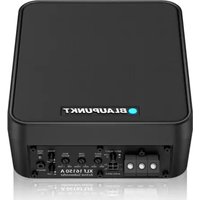
XLf 16150 A - Enceinte audio BLAUPUNKT - Notice d'utilisation et mode d'emploi gratuit
Retrouvez gratuitement la notice de l'appareil XLf 16150 A BLAUPUNKT au format PDF.


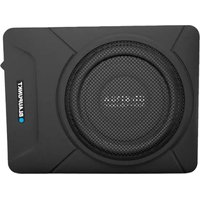
| Type de produit | Caisson de basses actif |
| Marque | Blaupunkt |
| Modèle | XLf 16150 A |
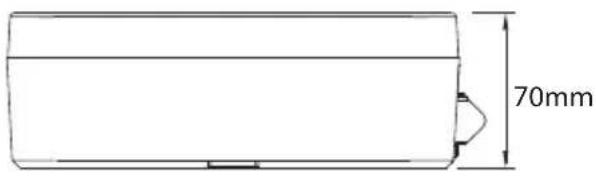
| Dimensions du boîtier (LxPxH) | 205 x 170 x 70 mm |
| Poids net | 4,5 kg |
| Technologie d'amplification | Classe D |
| Puissance nominale (RMS) | 150 W |
| Puissance maximale | 300 W |
| Impédance | 0,4 ohms |
| Réponse en fréquence | 25 Hz - 150 Hz |
| Filtre passe-bas | 40 Hz - 160 Hz |
| Phase | 0° / 180° |
| Sensibilité (en voiture/1W) | >95 dB |
| Rapport signal/bruit | >95 dB |
| Tension d'alimentation | 14,4 V (10 V - 16 V) |
| Allumage automatique | Entrée haut niveau uniquement |
| Matériau du cône | Aluminium |
| Type d'aimant | Ferrite |
| Matériau du boîtier | Aluminium moulé sous pression |
| Taille du haut-parleur | 6,5" (165 mm) |
| Entrée audio | RCA et haut niveau (4 broches) |
| Fusible intégré | Oui, protection contre les surintensités |
| Accessoires fournis | Supports de montage (x2), câble d'entrée haut niveau (4 broches), télécommande filaire (4,5 m) |
FOIRE AUX QUESTIONS - XLf 16150 A BLAUPUNKT
Questions des utilisateurs sur XLf 16150 A BLAUPUNKT
0 question sur cet appareil. Repondez a celles que vous connaissez ou posez la votre.
Poser une nouvelle question sur cet appareil
Téléchargez la notice de votre Enceinte audio au format PDF gratuitement ! Retrouvez votre notice XLf 16150 A - BLAUPUNKT et reprennez votre appareil électronique en main. Sur cette page sont publiés tous les documents nécessaires à l'utilisation de votre appareil XLf 16150 A de la marque BLAUPUNKT.
MODE D'EMPLOI XLf 16150 A BLAUPUNKT

BLAUPUNKT

ACTIVE SUBWOOFER XLf 16150 A

natural_image
Black rectangular electronic device labeled 'BLAUPUNKT' with control buttons at the bottom (no readable text beyond label)Enjoy it.
CAUTIONS
Proper system planning is vital in order to maximize the device's performance and road safety. Plan your installation carefully to avoid compromising performance reliability of the system. Consult an authorized Blaupunkt dealer for installation or preparation. Read the manual carefully before operating the device for the first time.
Safety Notes
Ensure to follow below safety notes during installation and wiring connection: -
- Disconnect the negative terminal of the battery. Refer to the safety notes of the vehicle manufacturer.
- Ensure positions of the holes are nowhere near the vehicle component to avoid any damage during drilling.
- Ensure cross section of the cable is no less than 2.5mm^2 if the positive and negative cables are too long.
- Incorrect installation may result in malfunction of the device or the car sound system.
Installation and Connection Instructions
- Select a dry and well-ventilated location to install the device.
- The device must not be installed in overly exposed location such on the rear shelf, rear seat etc.
- The installation location must be suitable for screw holes and have stable ground support.
Integrated Fuse
- The integrated fuse in the device protects the output voltage and the entire electrical system in case of malfunction. Do not replace damaged fuse with higher current.
Switching On/Off
- This device will automatically turn on if audio signal is detected. The device will also automatically turn off if audio signal is received.
Disclaimer
In no event shall Blaupunkt be liable for any direct, indirect, punitive, incidental, special consequential damages to property or life and whatsoever arising out of or connected with the use or misuse of our products.
USA & CANADA: This product is not intended for sale in the United States and Canada. If purchased in the U.S. or Canada, this product is purchased on as-is basis. No warranty, whether expressed or implied is provided in the U.S. or Canada.
Disposal Notes
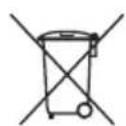
Do not dispose of your old unit in the household trash! Use the return and collection systems available to dispose of the old device.
This manual may be updated from time to time without any notice. Visit www.blaupunkt.com for more info.
TROUBLESHOOTING
If any of the following problem occur, please resort to Troubleshooting for the possible solutions. Consult Blaupunkt authorized dealer if problem persist.
| Problem | Solution |
| Amplifier power up failure | Examine if the ground connection is intact. |
| Examine if remote input has at least 5V DC. | |
| Examine if battery power is connected correctly to the + terminal. | |
| Ensure supplied voltage is minimum 12V. | |
| Examine if fuse is broken and replace if necessary. | |
| Restart the device if protection LED light is on. | |
| Protection LED lights on when turn on | Examine if speaker wire had short-circuit. |
| Turn volume down from head unit to prevent overdriving the device. | |
| Device might need service or repair, if protection LED light is still on after resetting the device. | |
| No sound output | Examine fuses and replace if necessary. |
| Examine if ground connection is intact. | |
| Examine if remote input has at least 5V DC. | |
| Examine if RCA audio cables are connected to the right inputs. | |
| Examine if speaker wiring is intact. | |
| Low sound output | Reset Level Control |
| Examine the Crossover Control setting. | |
| Buzzing noise | Observe if the device is still producing noise after turning on and off the amplifier. If yes, examine if the cables are correctly connected and if the cables and radio are in good condition. Repair or replace if the cables or the radio are not in good condition. |
| Squealing noise interference | Ensure RCA connections are properly connected. |
| Distorted sound output | Ensure input level of the device matches the signal level of the head unit. |
| Always set the input level to the lowest. | |
| Examine if crossover frequency is set correctly. | |
| Examine if speaker wire had short-circuit. | |
| Amplifier temperature increased | Examine if the minimum speaker impedance for the amp models is correct. |
| Ensure good air ventilation around the device. Add external cooling fan if necessary. | |
| Engine noise (static sound) interference | Usually caused by poor RCA cable quality, which release noise. Use only the best quality cables, and route them away from power cables. |
| Engine noise (alternator whine) interference | Examine if RCA cable are nowhere near or attached to the vehicle chassis. |
| Examine if head unit is properly connected to the wires. |
FUNCTIONS CONTROLLING DIAGRAM

- Power Input Terminal
- Input Select (LOW/HI)
- Phase ( 0^ \~180°)
- Power LED
-
Audio Input
-
Input Gain (MIN \~ MAX)
- Low Pass (40Hz \~ 160Hz)
- Bass Boost (0 \~ +12dB)
- Auto Turn ON Method (DC/REM)
- Remote Control Input
WIRING DIAGRAM


INSTALLATION POSITION
Up Firing Position

natural_image
Line drawing of a rectangular electronic device with three vertical lines extending from its top, no text or symbols present.Side Firing Position

natural_image
Line drawing of a portable electronic device with three vertical axes (no text or symbols)
Subwoofer
- Speaker Size : 6.5" (165mm)
- Cone Composition: Aluminum
- Magnet Type : Ferrite
• Enclosure Housing Material : Die-cast Aluminum
• Enclosure Dimension (LxWxH) : 205x170x70mm
• Enclosure Net Weight : 4.5kg
Amplifier
• Amplifier Technology : Class D
• Normal Output Power (RMS) : 150W
• Max. Power Output : 300W
• Sensitivity (In Car/1W) : >95dB
• Signal / Noise Ratio (dB) : >95dB
• Impedance: 0.4 ohms
• Frequency Response : 25Hz-150Hz
- Low Pass Filter: 40Hz-160Hz
• Voltage: 14.4V (10V-16V)
• Phase Switch : 0 deg / 180 deg
• Automatic On/Off: High Level Input Only
- Audio in Sensitivity : Speaker Input (140mV-5.4V)/RCA Input (280mV-10.8V)
Accessories


1 x 4 Pin High Level Input Cable

natural_image
Line drawing of a black Sony electrical connector with coiled cable (no text or symbols)1 x 4.5m Remote Controller

Blaupunkt Car Entertainment - Asia Pacific Competence Centre
RO
1 113 25 039 02 01



Marque : BLAUPUNKT
Modèle : XLf 16150 A
Catégorie : Enceinte audio