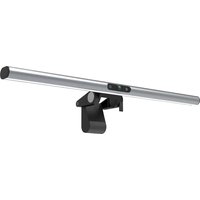
LightBar Pro - Autres accessoires pour appareil photo 4smarts - Notice d'utilisation et mode d'emploi gratuit
Retrouvez gratuitement la notice de l'appareil LightBar Pro 4smarts au format PDF.


| Type de produit | Barre lumineuse avec caméra HD |
| Marque | 4smarts |
| Modèle | LightBar Pro |
| Référence | 4S4S6486 |
| Matériau | Alliage d'aluminium et ABS |
| Dimensions (approx.) | 260 x 40 x 25 mm |
| Poids | 200 g |
| Alimentation | USB 5V / 5W (câble Type-C inclus) |
| Type d'éclairage | LED |
| Températures de couleur | 2800K (chaud), 4500K (neutre), 5500K (froid) avec variation continue |
| Indice de rendu des couleurs (CRI) | >90 |
| Résolution caméra | HD 1080p (1920x1080) |
| Mise au point | Fixe |
| Microphone intégré | Oui |
| Systèmes compatibles | Windows 2000/XP/Vista/7/8/10, macOS, Android TV |
| Logiciels compatibles | Zoom, Skype, Teams, QQ, WeChat, DingTalk, LINE, etc. |
| Fixation | Pince à gravité pour écran jusqu'à 45 mm d'épaisseur |
| Angle du faisceau | 45° asymétrique |
| Température de fonctionnement | -10°C à 40°C |
| Entretien | Nettoyer avec un chiffon doux et sec. |
| Sécurité | Utiliser uniquement avec une source USB 5V. Ne pas exposer à l'humidité. |
| Contenu de l'emballage | Barre lumineuse, câble USB Type-C, notice d'utilisation |
FOIRE AUX QUESTIONS - LightBar Pro 4smarts
Questions des utilisateurs sur LightBar Pro 4smarts
0 question sur cet appareil. Repondez a celles que vous connaissez ou posez la votre.
Poser une nouvelle question sur cet appareil
Téléchargez la notice de votre Autres accessoires pour appareil photo au format PDF gratuitement ! Retrouvez votre notice LightBar Pro - 4smarts et reprennez votre appareil électronique en main. Sur cette page sont publiés tous les documents nécessaires à l'utilisation de votre appareil LightBar Pro de la marque 4smarts.
MODE D'EMPLOI LightBar Pro 4smarts
M1说明书
4smarts
User Guide
2in1LightBarPro

natural_image
Modern flat-screen monitor displaying a white flower against a blue sky background (no text or symbols visible)Thank You

for choosing a quality product from 4smarts
Electric and electronic devices as well as batteries must not be disposed of with household waste. Consumers are obliged by low to return electric and electronic devices as well as batteries at the end of their service lives to the public collecting points set up for this purpose or point of sale.
Elektrische und elektronische Geräte sowie Baberten dürfen nicht mit dem Hausmüll entsorgt werden. Der Verbraucher ist gesetzlich verpflichtet, elektrische und elektronische Geräte sowie Butterken am Ende ihrer Lebensdauer an den dafür eingerichteten, öffentlichen Sammelstellen oder an die Verkaufsstelle zurückzugeben.
C
Asurats GmbH, Bautlach 122306
86013 Augsburg.
mail info@4smarts.com
web: www.4smarts.com/contact
技术参数
型号:4S4S6486
材料:铝合金+ABS
额定电压:5V 功率: 5W (最大值)
灯:LED 色调:2800h 4500h 5500h
包重2800K-4500K-3500K
圆指:>90
分辨率:HD 1080P (1920*1080)
镜头:固定焦距
工作温度: -10℃ -40℃
工作温度:10%-90%
兼容系统
兼容系统:Windows 2000/XP/win7/win8/win10/Vista32bit/MAC/Android电视
系统免驱兼容:WIN XP,7.8.10,iOS2
软件兼容:微信、QQ、SKYPE、钉钉、LINE、ZOOM、netmeeting、MSN等等
提示性说明

1.电源开/关。亮度调节单击按钮可打开/关闭电源
长按按钮调整亮度2.灯光色温调节 单击按钮可更改灯光颜色有三种模式:冷、暖、中白长按按钮无极调节色温
3.摄像头
HD 10B0P 6.LED灯
4.麦克风 7.TYPE-C输入口
5.重力突

支持的显示展厚度
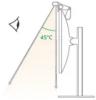
45℃非对称光束
注意
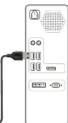
为了确定运行,请将Type-c数据线
连接到计算机主机后部的USB端口
-
m = 311
1
m = 311
m = 311
m = 311
m = 311
m = 311
-
45℃非时称光束

中文
Product Parameters
Mode: 45456486
Material: Aluminum alloy + ABS
Rated voltage: SV, Power: SW (maximum
Lighting: LED Color temperature: 2800h, 4500h, 5500h
Color temperature: 2800-4500
Compatible System
System compatible: Windows 2000/XP/win7/win8/win 10/Vista 32bit/MAC/Android TV
System free drive compatible: WIN XP, 7, 8, 10, iOS2
Software compat
Instructions

-
Fumors HD 10569
-
Camera No 1080F
-
Microrphone
-
Gravity clamp
6.LED light
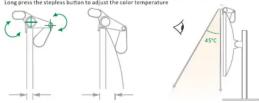
There are three modes: Cold, warm, medium white
[Non-Text]
45°Casymmetrical beam
We are a
warning
For stable operation, please connect the type-c data cable to the USB port on the back of the host computer.
The quick brown fox jumps over the lazy dog.
(No text)
m = 311
-
1
m = 311
The quick brown fox jumps over the lazy dog.
m = 311
m = 311
m = 311
-
m = 311
The Ground Truth image displays a single, solid horizontal line. According to Rule 2 (UNDERSCORE & LINE RULES), this is a stylistic or background line, not a placeholder underscore. Therefore, the OCR result must ignore it and output nothing or only meaningful text. The provided OCR content is "____", which consists of four underscores. This is an incorrect interpretation of the line as a placeholder, violating the rule that stylistic lines must be ignored. The OCR has hallucinated underscores where none should exist based on the GT's visual context. Hence, the OCR result is inconsistent with the Ground Truth.
[Non-Text]
[Non-Text]
[Non-Text]
[Non-Text]
[Non-Text]
[Non-Text]
(No text)
广力云智慧零售收银系统
[Non-Text]
[Non-Text]
of A. mi ni mi ni
기술 파라미터
사명:45456486
재질:주말루덴+AB
성과 전압: SV Basketball: SW(최대치)
서울: LED 새우도: 2800k-4500k-5500k
전공: 2008-4998-0998
오환 시스템
호환 시스템: Windows 2000/XP/win7/win8/win 10/Vista 32bit/MAC/Android 텔레비션
여러 바니오 의의 이들 WIN XP, 7, 8, 10, IOSZ를 소환한다. 여플 화황: SKYRE LINE ZOOM netmeeting MSN 등
- 口品: 3417E, ENER, 200M, Connecting, MON B
조작성면
上48

2、审议通过《关于公司
- 外에라 HD 10808
4.바이프 5.방진대
- LED
7.TYPE-C输入
[Non-Text]
![4smarts LightBar Pro - [Non-Text] - 1](/content/2026/04/741496/images/321ce09561668dad7d47060e5717677fdc7951f11e6b27dc125ef71e73e02fc1.jpg)
서포링하는 배경막 두께
주의사항
안정한 운행을 위해 Type-c 데이터 케이플을 호스트 힌
퓨터 뒤에 있는 usa포트에 연결하세요.
(1)


45℃ 비대칭 빛감
12.3 中国证券
부의사양
안정안준생을 위해 typea데이터 게이들을 오르료 잡포단지에 익는 upe포트에 연결하세요.
류다 위에 올
[Non-Text]


EN
-
[Non-Text]
[Non-Text]
[Non-Text]
[Non-Text]
[Non-Text]
[Non-Text]
[Non-Text]
[Non-Text]
[Non-Text]
[Non-Text]
[Non-Text]
[Non-Text]
[Non-Text]
[Non-Text]
[Non-Text]
(1)
(
m = 311
5
m = 311
m = 311
m = 311
>
[Non-Text]
[Non-Text]
[Non-Text]
[Non-Text]
[Non-Text]
[Non-Text]
[Non-Text]
□
1
|
1
|
1
1
止
[Non-Text]
[Non-Text]
sm
[Non-Text]
[Non-Text]
[Non-Text]
[Non-Text]
[Non-Text]
[Non-Text]
[Non-Text]
[Non-Text]
[Non-Text]
[Non-Text]
[Non-Text]
[Non-Text]
[Non-Text]
[Non-Text]
The Ground Truth image displays a single, solid horizontal line, which is a stylistic or background element (like a rule line on paper). According to Rule 2, such lines must be ignored by the OCR result. The provided OCR content is "\_\_\_\_", which consists of underscores. Underscores are not equivalent to a solid line and are not permitted under the “Stylistic/Background Lines (Ignore)” rule. Outputting underscores for a stylistic line is incorrect because it misinterprets the line as a placeholder fill-in-the-blank area. Since the OCR output incorrectly rendered a stylistic line as underscores (which should be ignored), this violates the rule. Therefore, the OCR result is inconsistent with the Ground Truth.
广力云智慧零售收银系统
[Non-Text]
[Non-Text]
[Non-Text]
[Non-Text]
[Non-Text]
-
리어, 고부
4.1 6.2
m = 311
[Non-Text]
[Non-Text]
[Non-Text]
0
[Non-Text]
[Non-Text]
[Non-Text]
[Non-Text]
i kon.
广力云智慧零售收银系统
[Non-Text]
[Non-Text]
[Non-Text]
[Non-Text]
[Non-Text]
(
(
m = 311
4
The image is too blurry to recognize any text content.
m = 311
m = 311
-
[Non-Text]
[Non-Text]
[Non-Text]
[Non-Text]
[Non-Text]
[Non-Text]
[Non-Text]
广力云智慧零售收银系统
广力云智慧零售收银系统
广力云智慧零售收银系统
-
广力云智慧零售收银系统
广力云智慧零售收银系统
-
广力云智慧零售收银系统
-
[Non-Text]
[Non-Text]
[Non-Text]
[Non-Text]
[Non-Text]
[Non-Text]
[Non-Text]
[Non-Text]
[Non-Text]
[Non-Text]
[Non-Text]
[Non-Text]
[Non-Text]
[Non-Text]
[Non-Text]
[Non-Text]
The Ground Truth image displays a single, solid horizontal line. According to Rule 2 (UNDERSCORE & LINE RULES), this is a stylistic or background line, not a placeholder underscore. Therefore, the OCR result must ignore it and output nothing or only meaningful text. The provided OCR content is "\_\_\_\_", which consists of four underscores. This is an incorrect interpretation of the line as a placeholder, violating the rule that stylistic lines must be ignored. The OCR has hallucinated underscores where none should exist based on the GT's visual context. Hence, the OCR result is inconsistent with the Ground Truth.
[Non-Text]
[Non-Text]
[Non-Text]
[Non-Text]
[Non-Text]
[Non-Text]
[Non-Text]
[Non-Text]
[Non-Text]
广力云
[Non-Text]
[Non-Text]
[Non-Text]
[Non-Text]
[Non-Text]
[Non-Text]
[Non-Text]
[Non-Text]
[Non-Text]
[Non-Text]
[Non-Text]
[Non-Text]
[Non-Text]
[Non-Text]
[Non-Text]
[Non-Text]
[Non-Text]
[Non-Text]
[Non-Text]
[Non-Text]
[Non-Text]
[Non-Text]
[Non-Text]
[Non-Text]
[Non-Text]
[Non-Text]
[Non-Text]
[Non-Text]
[Non-Text]
[Non-Text]
[Non-Text]
[Non-Text]
[Non-Text]
[Non-Text]
[Non-Text]
[Non-Text]
- M1说明书
- 4smarts
- User Guide
- 技术参数
- 兼容系统
- 提示性说明
- 注意
- 中文
- Product Parameters
- Software compat
- Instructions
- We are a
- of A. mi ni mi ni
- 조작성면
- 上48
- [Non-Text]
- (1)
- EN
- -
- (
- m = 311
- 5
- >
- □
- 1
- |
- 止
- sm
- The Ground Truth image displays a single, solid horizontal line, which is a stylistic or background element (like a rule line on paper). According to Rule 2, such lines must be ignored by the OCR result. The provided OCR content is "\_\_\_\_", which consists of underscores. Underscores are not equivalent to a solid line and are not permitted under the “Stylistic/Background Lines (Ignore)” rule. Outputting underscores for a stylistic line is incorrect because it misinterprets the line as a placeholder fill-in-the-blank area. Since the OCR output incorrectly rendered a stylistic line as underscores (which should be ignored), this violates the rule. Therefore, the OCR result is inconsistent with the Ground Truth.
- 广力云智慧零售收银系统
- 리어, 고부
- 6.2
- 0
- i kon.
- 4
- The image is too blurry to recognize any text content.
- The Ground Truth image displays a single, solid horizontal line. According to Rule 2 (UNDERSCORE & LINE RULES), this is a stylistic or background line, not a placeholder underscore. Therefore, the OCR result must ignore it and output nothing or only meaningful text. The provided OCR content is "\_\_\_\_", which consists of four underscores. This is an incorrect interpretation of the line as a placeholder, violating the rule that stylistic lines must be ignored. The OCR has hallucinated underscores where none should exist based on the GT's visual context. Hence, the OCR result is inconsistent with the Ground Truth.
- 广力云
Marque : 4smarts
Modèle : LightBar Pro
Catégorie : Autres accessoires pour appareil photo