CDG-1020 PRO - Lecteur CD Vocopro - Notice d'utilisation et mode d'emploi gratuit
Retrouvez gratuitement la notice de l'appareil CDG-1020 PRO Vocopro au format PDF.


| Type de produit | Lecteur CD/CD+G professionnel |
| Marque | Vocopro |
| Modèle | CDG-1020 PRO |
| Dimensions (L x H x P) | 8,5" x 4,1" x 9,2" (≈ 21,6 x 10,4 x 23,4 cm) |
| Poids | 4 lbs (≈ 1,8 kg) |
| Alimentation | 110-240 V AC, 50-60 Hz, 10 W |
| Type de support | CD et CD+G (Karaoké) |
| Fonctions principales | Lecture, contrôle de hauteur (Pitch +/-16%), boucle (Loop), programmation 20 plages, recherche image par image, jog dial, lecture continue/simple, répétition, cue, auto cue, ajustement BPM, scan avant/arrière |
| Connectivités | Sorties audio RCA (L/R), sortie vidéo RCA composite, sélecteur NTSC/PAL |
| Réponse en fréquence | 20 Hz - 20 kHz |
| Distorsion harmonique | ≤ 0,1% |
| Rapport signal/bruit | ≥ 80 dB |
| Plage dynamique | ≥ 80 dB |
| Diaphonie (Cross talk) | ≥ 60 dB |
| Niveau de sortie audio | 2 V |
| Impédance de charge | > 47 kΩ |
| Écran | Afficheur numérique (temps, plage, images) |
| Entretien et nettoyage | Utiliser un chiffon sec, ne pas utiliser de solvants liquides ou aérosols |
| Sécurité | Ne pas exposer à l'eau, débrancher avant nettoyage, ne pas ouvrir le boîtier, confier la réparation à un personnel qualifié |
| Pièces détachées et réparabilité | Aucune pièce réparable par l'utilisateur. Pour réparation, contacter un centre agréé VocoPro. Garantie : voir www.vocopro.com |
| Informations générales | Fabriqué en Chine, marque VocoPro, usage professionnel et particulier |
FOIRE AUX QUESTIONS - CDG-1020 PRO Vocopro
Questions des utilisateurs sur CDG-1020 PRO Vocopro
0 question sur cet appareil. Repondez a celles que vous connaissez ou posez la votre.
Poser une nouvelle question sur cet appareil
Téléchargez la notice de votre Lecteur CD au format PDF gratuitement ! Retrouvez votre notice CDG-1020 PRO - Vocopro et reprennez votre appareil électronique en main. Sur cette page sont publiés tous les documents nécessaires à l'utilisation de votre appareil CDG-1020 PRO de la marque Vocopro.
MODE D'EMPLOI CDG-1020 PRO Vocopro
VocoPro
THE SINGER'S ULTIMATE CHOICE
text_image
CDG-1020PRO TIME REPEAT/ SINGLE PREVIOUS NEXT IO+ PROG CUE PLAY/PULSE OPEN/CLOSE LOGPROCAT TRACK PROD O/C A PROFESSIONAL CO/CO+C PLAYER PITCH + PITCH - PITCI +16 0 +16 VOCO PROCDG-1020PRO
Professional CD/CD+G Player
Table of Contents
Safety Instructions 3
FCC Information 4
Listening for a Lifetime 5
Welcome 6
Features & Specifications 7
Features
Technical Specifications
Getting Started 8
Getting Started
Returns and Warranty
Getting Connected 9
Connecting to an Audio System
Connecting to a TV or Monitor
Controls & Functions 10
Top Panel
Front Panel
Back Panel
Display
Operations 14
Opening and Closing the Disc Tray
Loading Discs
Starting Playback
Stopping Playback
Cueing
Frame Search
Matching the Beats Per Minute
Program Play
Loop Play
Troubleshooting 17
Safety Instructions
CAUTION
RISK OF SHOCK

CAUTION: To reduce the risk of electric shock, do not remove cover (or back). No user-serviceable parts inside. Only refer servicing to qualified service personnel.
Explanation of Graphical Symbols
The lightning flash & arrowhead symbol, within an equilateral triangle, is intended to alert you to the presence of danger.

The exclamation point within an equilateral triangle is intended to alert you to the presence of important operating and servicing instructions.
WARNING
To reduce the risk of fire or electric shock, do not expose this unit to rain or moisture.
- Read Instructions - All the safety and operating instructions should be read before the appliance is operated.
- Retain Instructions - The safety and operating instructions should be retained for future reference.
- Heed Warnings - All warnings on the appliance and in the operating instructions should be adhered to.
- Follow Instructions - All operating and use instructions should be followed.
- Attachments - Do not use attachments not recommended by the product manufacturer as they may cause hazards.
- Water and Moisture - Do not use this unit near water. For example, near a bathtub or in a wet basement and the like.
- Carts and Stands - The appliance should be used only with a cart or stand that is recommended by the manufacturer.
7 A. An appliance and cart combination should be moved with care. Quick stops, excessive force, and uneven surfaces may cause an overturn.

- Ventilation - The appliance should be situated so its location does not interfere with its proper ventilation. For example, the appliance should not be situated on a bed, sofa, rug, or similar surface that may block the ventilation slots.
- Heat - The appliance should be situated away from heat sources such as radiators, heat registers, stoves, or other appliances (including amplifiers) that produce heat.
- Power Sources - The appliance should be connected to a power supply only of the type described in the operating instructions or as marked on the appliance.
- Grounding or Polarization - Precautions should be taken so that the grounding or polarization means of an appliance is not defeated.
- Power-Cord Protection - Power-supply cords should be routed so that they are not likely to be walked on or pinched by items placed upon or against them, paying particular attention to cords at plugs, convenience receptacles, and the point where they exit from the appliance.
- Cleaning - Unplug this unit from the wall outlet before cleaning. Do not use liquid cleaners or aerosol cleaners. Use a damp cloth for cleaning.
- Power lines - An outdoor antenna should be located away from power lines.
- Nonuse Periods - The power cord of the appliance should be unplugged from the outlet when left unused for a long period of time.
- Object and Liquid Entry - Care should be taken so that objects do not fall and liquids are not spilled into the enclosure through openings.
- Damage Requiring Service - The appliance should be serviced by qualified service personnel when:
A. The power supply cord or plug has been damaged; or
B. Objects have fallen into the appliance; or
C. The appliance has been exposed to rain; or
D. The appliance does not appear to operate normally or exhibits a marked change in performance; or
E. The appliance has been dropped, or the enclosure damaged. - Servicing - The user should not attempt to service the appliance beyond that described in the operating instructions. All other servicing should be referred to qualified service personnel.
Note:
To CATV system installer's (U.S.A.): This reminder is provided to call the CATV system installer's attention to Article 820-40 of the NEC that provides guidelines for proper grounding and, in particular, specifies that the cable ground shall be connected as close to the point of cable entry as practical.
FCC Information (U.S.A)
1. IMPORTANT NOTICE: DO NOT MODIFY THIS
UNIT!: This product, when installed as indicated in the instructions contained in this manual, meets FCC requirements. Modifications not expressly approved by Vocopro may void your authority, granted by the FCC, to use this product.
-
IMPORTANT: When connecting this product to accessories and/or another product use only high quality shielded cables. Cable(s) supplied with this product MUST be used. Follow all installation instructions. Failure to follow instructions could void your FCC authorization to use this product in the U.S.A.
-
NOTE: This product has been tested and found to comply with the requirements listed in FCC Regulations, Part 15 for Class "B" digital devices. Compliance with these requirements provides a reasonable level of assurances that your use of this product in a residential environment will not result in harmful interference with other electronic devices. This equipment generates/uses radio frequencies and, if not installed and used according to the instructions found in the owner's manual, may cause interference harmful to the operation of other electronic devices. Compliance with FCC regulations does not guarantee that interference will not occur in all installations. If this product is found to be the source of interference, which can be determined by turning the unit "Off" and "On", please try to eliminate the problem by using one of the following measures:
Relocate either this product or the device that is being affected by the interference.
Use power outlets that are on different branch (circuit breaker or fuse) circuits or install AC line filter(s).
In the case of radio or TV interference, relocate/reorient the antenna. If the antenna lead-in is 300-ohm ribbon lead, change the lead-in to coaxial type cable.
If these corrective measures do not produce satisfactory results, please contact your local retailer authorized to distribute Vocopro products. If you can not locate the appropriate retailer, please contact Vocopro, 1728 Curtiss Court, La Verne, CA 91750.
CAUTION
The apparatus is not disconnected from the AC power source so long as it is connected to the wall outlet, even if the apparatus itself is turned off. To fully insure that the apparatus is indeed fully void if residual power, leave unit disconnected from the AC outlet for at least fifteen seconds.
CAUTION:
READ THIS BEFORE OPERATING YOUR UNIT
- To ensure the finest performance, please read this manual carefully. Keep it in a safe place for future reference.
- Install your unit in a cool, dry, clean place - away from windows, heat sources, and too much vibration, dust, moisture or cold. Avoid sources of hum (transformers, v motors). To prevent fire or electrical shock, do not expose to rain and water.
- Do not operate the unit upside-down.
- Never open the cabinet. If a foreign object drops into the set, contact your dealer.
- Place the unit in a location with adequate air circulation. Do not interfere with its proper ventilation; this will cause the internal temperature to rise and may result in a failure.
- Do not use force on switches, knobs or cords. When moving the unit, first turn the unit off. Then gently disconnect the power plug and the cords connecting to other equipment. Never pull the cord itself.
- Do not attempt to clean the unit with chemical solvents: this might damage the finish. Use a clean, dry cloth.
- Be sure to read the "Troubleshooting" section on common operating errors before concluding that your unit is faulty.
- This unit consumes a fair amount of power even when the power switch is turned off. We recommend that you unplug the power cord from the wall outlet if the unit is not going to be used for a long time. This will save electricity and help prevent fire hazards. To disconnect the cord, pull it out by grasping the plug. Never pull the cord itself.
- To prevent lightning damage, pull out the power cord and remove the antenna cable during an electrical storm.
- The general digital signals may interfere with other equipment such as tuners or receivers. Move the system farther away from such equipment if interference is observed.
NOTE:
Please check the copyright laws in your country before recording from records, compact discs, radio, etc. Recording of copyrighted material may infringe copyright laws.
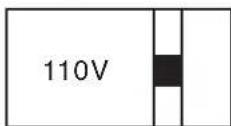
Voltage Selector (General Model Only)
Be sure to position the voltage selector to match the voltage of your local power lines before installing the unit.
Listening for a Lifetime
Selecting fine audio equipment such as the unit you've just purchased is only the start of your musical enjoyment. Now it's time to consider how you can maximize the fun and excitement your equipment offers. VocoPro and the Electronic Industries Association's Consumer Elec Group want you to get the most out of your equipment by playing it at a safe level. One that lets the sound come through loud and clear without annoying blaring or distortion importantly, without affecting your sensitive hearing.
Sound can be deceiving. Over time your hearing “comfort level” adapts to a sound. So what sounds “normal” can actually be loud and harmful to your he against this by setting your equipment at a safe level BEFORE your hearing adapts.
To establish a safe level:
- Start your volume control at a low setting.
- Slowly increase the sound until you can hear it comfortably and clearly, and without distortion.
Once you have established a comfortable sound level:
- Set the dial and leave it there.
- Pay attention to the different levels in various recordings.
Taking a minute to do this now will help to prevent hearing damage or loss in the future. After all, we want you listening for a lifetime.
Used wisely, your new sound equipment will provide a lifetime of fun and enjoy hearing damage from loud noise is often undetectable until it is too late, this manufacturer and the Electronic Industries Association's Consumer Electronics Group recommend you avoid prolonged exposure to excessive noise. This list of sound levels is included for your protection.
Some common decibel ranges:
| Level | Example |
| 30 | Quiet library, Soft whispers |
| 40 | Living room, Refrigerator, Bedroom away from traffic |
| 50 | Light traffic, Normal Conversation |
| 60 | Air Conditioner at 20 ft., Sewing machine |
| 70 | Vacuum cleaner, Hair dryer, Noisy Restaurant |
| 80 | Average city traffic, Garbage disposals, Alarm clock at 2 ft. |
The following noises can be dangerous under constant exposure:
| Level | Example |
| 90 | Subway, Motorcycle, Truck traffic, Lawn Mower |
| 100 | Garbage truck, Chainsaw, Pneumatics drill |
| 120 | Rock band concert in front of speakers |
| 140 | Gunshot blast, Jet plane |
| 180 | Rocket launching pad |
-Information courtesy of the Deafness Research Foundation
Welcome
Thank you for purchasing the CDG-1020PRO from VocoPro, the singer's ultimate choice. With years of experience in the music entertainment business, VocoPro is a leading manufacturer of Karaoke equipment, and has been providing patrons of bars, churches, schools, clubs and individual consumers the opportunity to sound like a star with full-scale club models, in-home systems and mobile units. All our products offer solid performance and sound reliability, and to further strengthen our commitment to customer satisfaction, we have customer service and technical support professionals ready to assist you with your needs. We have provided some contact information for you below.
VocoPro
1728 Curtiss Court
La Verne, CA 91750
Toll Free: 800-678-5348
TEL: 909-593-8893
FAX: 909-593-8890
VocoPro Company E-mail Directory
Customer Service & General Information
info@vocopro.com
Tech Support
techsupport@vocopro.com
Remember Our Website
Be sure to visit the VocoPro website www.vocopro.com for the latest information on new products, packages and promos. And while you're then don't forget to check out our Club VocoPro for Karaoke news and events, chat rooms, club directories and even a Service directory!
We look forward to hearing you sound like a PRO, with VocoPro, the singer's ultimate choice.
FOR YOUR RECORDS
Please record the model number and serial number below, for easy reference, in case of loss or theft. These numbers are located on the rear panel of the unit. Space is also provided for other relevant information.
Model Number
Serial Number
Date of Purchase
Place of Purchase
Features & Specifications
Features
• Hybrid System - Plays CDs and Karaoke CD+G Discs
• Control the Pitch with Speed Control Slider
- Easily Create Loops
• Program Up to 20 Tracks
- Oversized Jog Dial for Quick Frame Search
Technical Specifications
Linear Quantification N N24 Bits
Sampling Frequency N N44.1 KHz
Oversampling N N8X
D/A Converter N N24 bits
Frequency response N20Hz - 20KHz
Harmonic distortion N NO.1%
S/N Ratio N N N80 dB
Dynamic N N N80 dB
Cross Talk N N N60 dB
Output Level N N N2 V
Load impedance N N> 47K Ohms
Pitch N N N+/- 16%
Power Supply N N110/240 60 - 50 Hz AC 10 W
Dimensions N N N8.5" x 4.1" x 9.2" (W x H x D)
Weight N N N4 lbs.
Getting Started
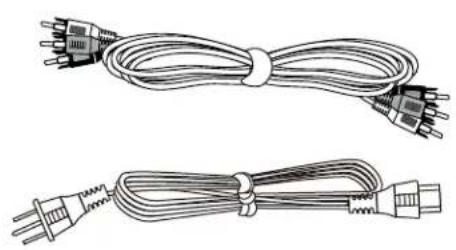
Thank you for purchasing the CDG-1020PRO. Take a few moments to look through this manual. Before setting up, please make sure the following accessories are included.
• CDG-1020PRO CD/CD+G Player [1]
- RCA Cable
- Power Cable
natural_image
Two types of electrical plugs tied with a coiled cable, shown from different angles (no text or symbols present)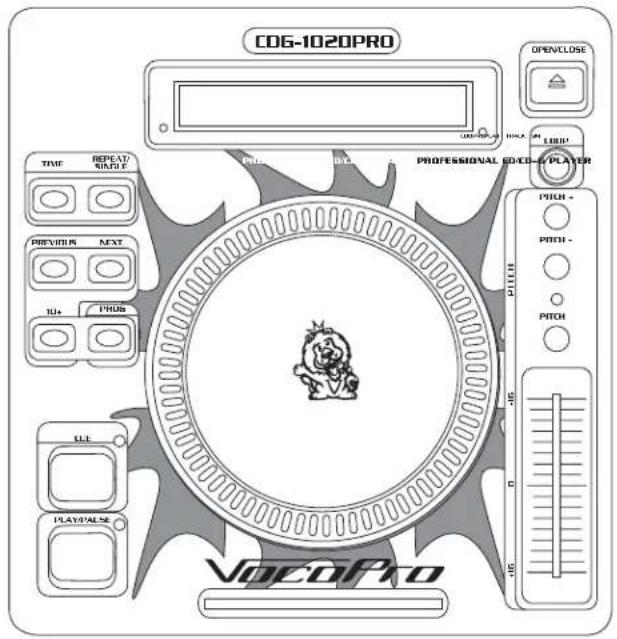
text_image
CO6-1020PRO TIME REPEAT/SIMPLE PROB BLT PROFESSIONAL VOOCO-PLATER PREVIOUS NEXT 10+ PROB LEE PLAY/PULSE VOCOPro OPENCLOSE LPG PITCH - PITCH - PITCH - 45 45 45 45 45 45 45 45 45 45 45 45 45 45 45 45 45 45 45 45 45 45 45 45 45 45 45 45 45 45 45 45 45 45 VOCOProReturns and Warranty
In the unlikely event that the CDG-1020PRO would need to be shipped for repair, it is recommended that you keep all the product packaging and receipt. For detailed warranty information, please visit www.vocopro.com/warranty_extended.html. To find a VocoPro Authorized Service Center near you, please visit www.vocopro.com/servicecenter.html
Getting Connected
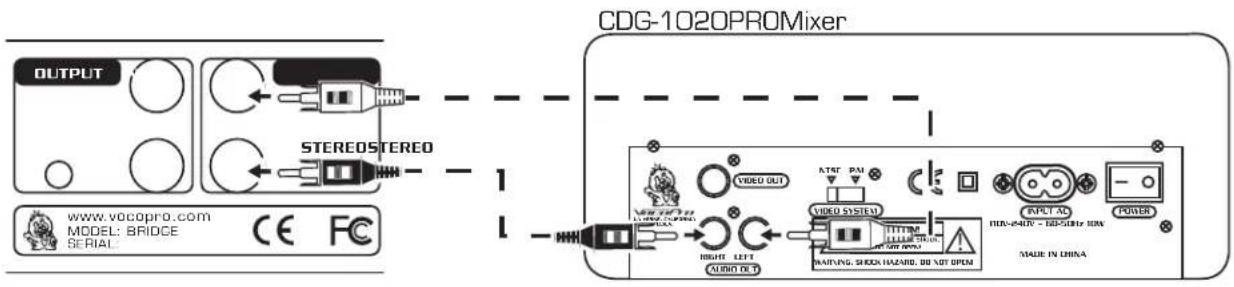
Connecting to an Audio System (Mixer, Amp, etc.)
What you will need:
N• RCA cable (included)
N• A Mixer and/or Amp with RCA Audio input
- Using L/R RCA cables, connect the AUDIO OUT on the rear panel of the CDG-1020PRO deck to the AUDIO IN on a mixer or amp.
flowchart
graph LR
    A["OUTPUT"] --> B["STEREOSTEREO"]
    B --> C["CDG-1020PROMixer"]
    C --> D["OUTPUT"]
    D --> E["VIDEO OUT"]
    E --> F["VIDEO SYSTEM"]
    F --> G["INPUT AD"]
    G --> H["POWER"]
    H --> I["MALE IN CHINA"]
    J["WWW.VOCOPRO.COM MODEL: BRIDGE SERIAL"] --> K["CE FC"]
    L["1"] --> M["1"]
    N["1"] --> O["1"]
    P["1"] --> Q["1"]
    R["1"] --> S["1"]
    T["1"] --> U["1"]
    V["AUDIO OUT"] --> W["1"]
    X["AIRFANG SHOCK HAZARD, 80 NUT OPM"] --> Y["1"]
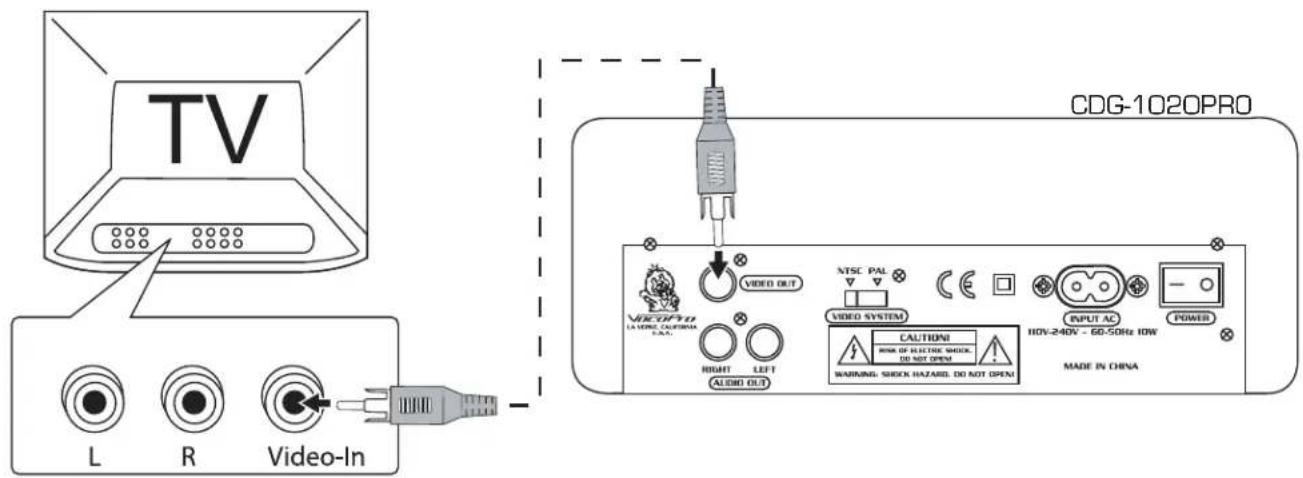
Connecting to a TV or Monitor
What you will need:
N• RCA cable (included)
N• A TV and/or Monitor with RCA Video input
- Using an RCA cable (yellow), connect the VIDEO OUT on the rear panel of the CDG-1020PRO deck to the VIDEO IN on a TV or monitor.
NOTE: If your TV or monitor has only one video input, you may need a video switching device or a mixer with video switching.
text_image
TV L R Video-In CDG-1020PRO VIDEO OUT NTSC PAL VIDEO SYSTEM CAUTIONS RISK OF ELECTRIC SHOCK, DO NOT OPEN WARNING SHOCK HAZARD. DO NOT OPEN INPUT AC POWER HIV-240V - 60-50Hz IOW MADE IN CHINAControls & Functions
TOP Panel
-
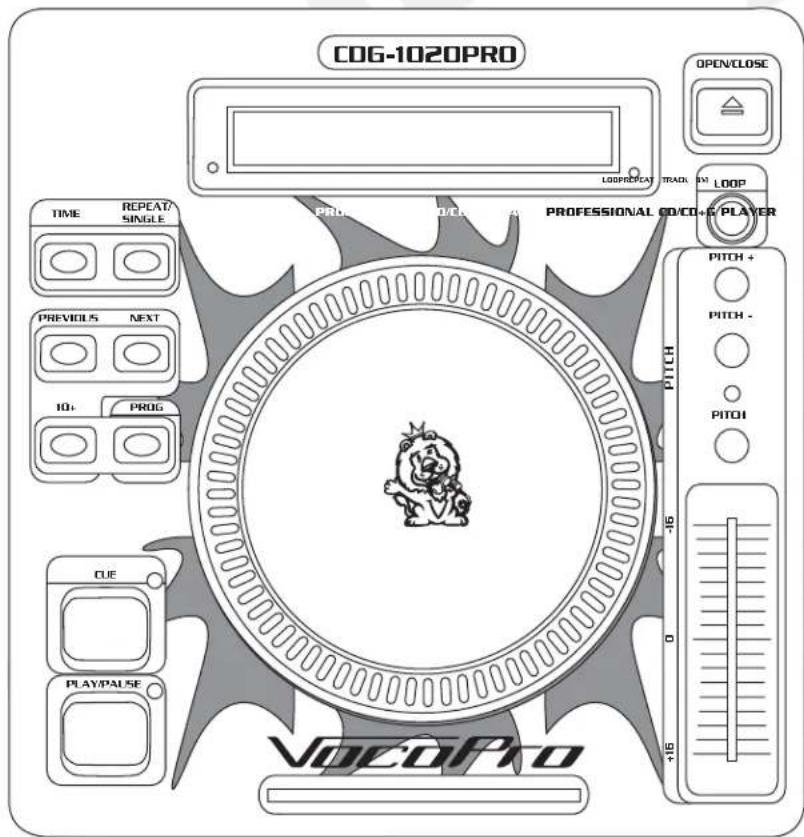
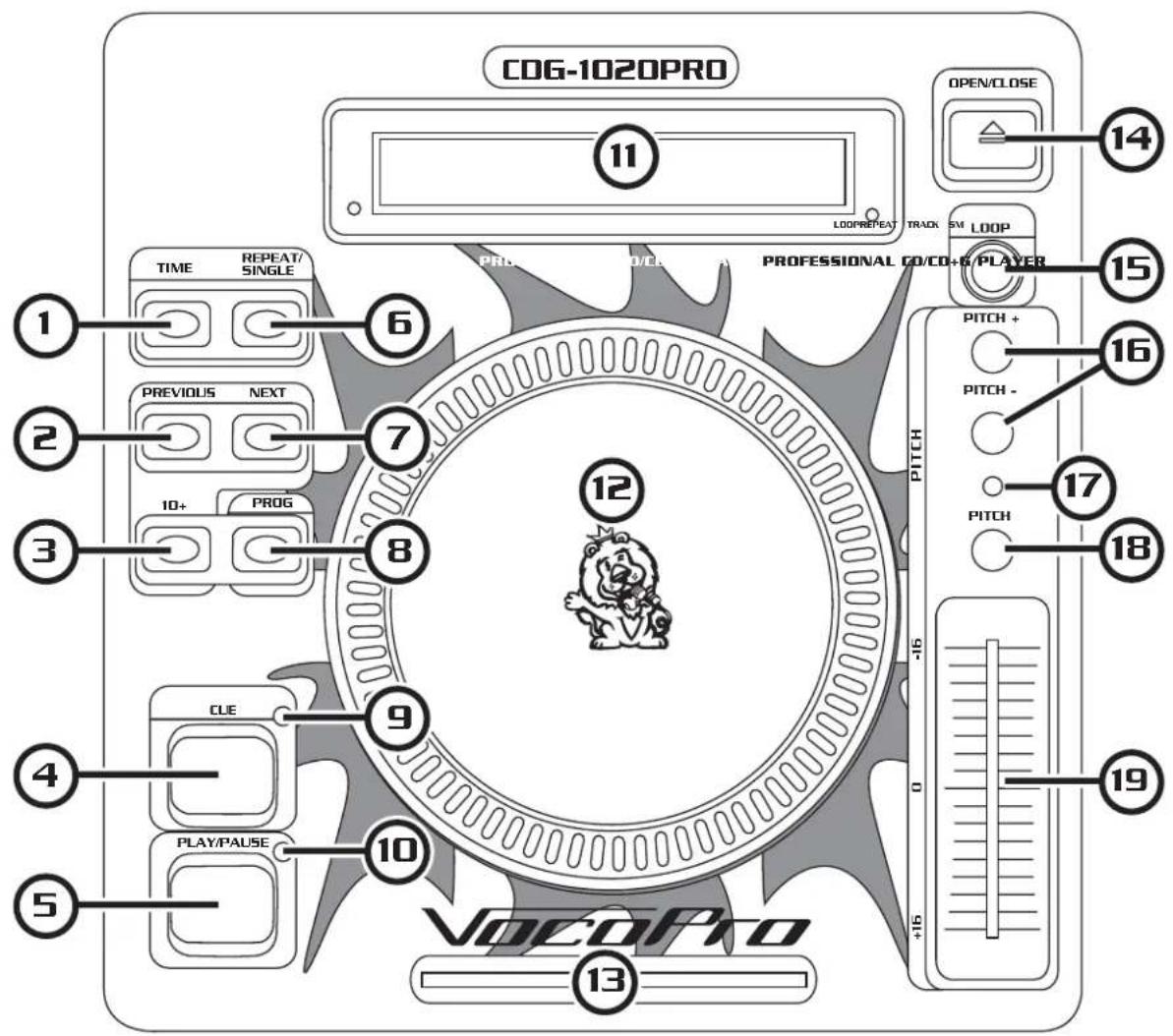
TIME - Switches between three settings:
N N- Elapsed playing time
N N- Remaining time in the current song
N N- Total remaining time of the disc -
PREVIOUS - Use this button to jump back to a previous track.
-
10+ - Automatically skips ahead 10 tracks.
-
CUE - Press the CUE button to enable CUE MODE.
-
PLAY/PAUSE - Use this button to start playback. Press once to start playback, once again to set the pause mode, and once more to resume playback.
-
REPEAT/SINGLE – Press once to repeat one track and again to repeat all tracks of disc.
-
NEXT - Use this button to skip to the next track.
-
PROGRAM - Press this button to enable PROGRAM mode and set your own playlist.
-
CUE INDICATOR - This LED will indicate if the CUE function is enabled.
-
PLAY INDICATOR - This LED will be lit to indicate when the PLAY mode is enabled.
-
DISPLAY - Displays graphical information about playback settings and disc/song time.
-
FRAME DIAL - When the dial is turned while the CD is paused, the point at which the sound is paused moves by a number of frames corresponding to the number of clicks. Clockwise moves the point forward and counterclockwise moves the point backward.
-
DISC INDICATOR - This LED will be lit to indicate when a disc is in the player and blink when a disc is not in the player.
-
OPEN/CLOSE - Opens and closes the CD disc tray. The tray cannot be opened during playback to prevent accidental interruption.
-
LOOP - Press the LOOP button to set the loop start point, press the LOOP button again to set the loop end point. Press a third time to cancel loop mode and resume normal playback.
-
PITCH BEND [+/- 16%] - The CD speeds up, increasing the pitch while the [ + ] button is pressed. Release the button to return to the original BPM. The CD slows down, decreasing the pitch while the [- ] button is pressed. Release the button to return to the original BPM.
-
PITCH INDICATOR - This LED will be lit to indicate when PITCH mode is enabled.
-
PITCH ENABLE - Turns the PITCH SLIDER on and off. The PITCH INDICATOR above it indicates whether it is on or off.
-
PITCH SLIDER - Use the slider to adjust the CD pitch. Slide up to decrease the pitch or down to increase the pitch.
Controls & Functions cont.
text_image
CDG-1020PRO 11 OPEN/CLOSE 14 TIME REPEAT/ SINGLE PROG 0/CE PROFESSIONAL CO/CO+O PLAYER 15 PREVIOUS NEXT 7 3 10+ PROG 8 12 PITCH + 16 PITCH - 17 PITCH 18 CUE 9 4 PLAY/PAUSE 10 VOCOPRO 13 -16 0 +16 19Controls & Functions cont.
FRONT Panel
natural_image
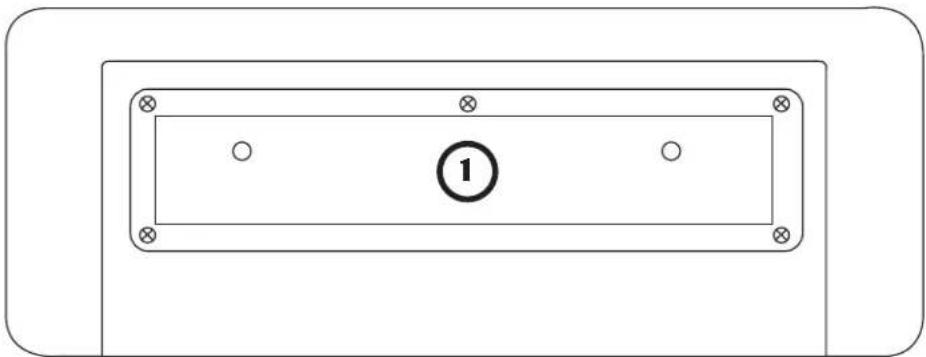
Simple diagram of a rectangular panel with four corner holes and a central circle labeled '1' (no text or symbols beyond the number)- DISC TRAY - Insert discs here and press the OPEN/CLOSE button to open and close the disc tray.
BACK Panel
text_image
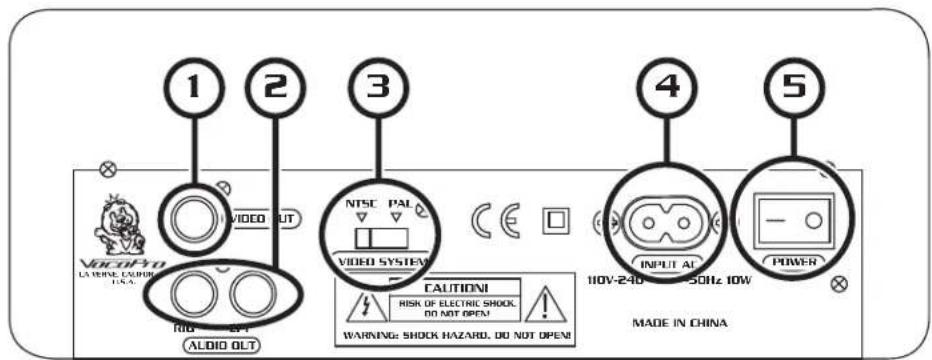
1 2 3 4 5 VACOPO LA VONE, CUPPER U.S.A. VIDEO OUT NTSC PAL VIDEO SYSTEM CAUTIONI RISK OF ELECTRIC SHOCK, DO NOT OPEN! WARNING: SHOCK HAZARD, DO NOT OPEN! INPUT AL 110V-240 50Hz 10W POWER MADE IN CHINA AUDIO OLT- VIDEO OUTPUT - This jack outputs the CD+G video signal to display graphics on your TV or monitor using RCA video cable.
- AUDIO OUTPUT – The audio signal is output from these jacks using RCA left and right cables.
- VIDEO SYSTEM SELECTOR – Switch between the video modes NTSC and PAL. Use NTSC for North American TV systems and PAL for European systems.
- POWER INPUT - Connect the power cord (included) here.
- POWER BUTTON - When the POWER button is pressed, the power turns on. Pressing the POWER button while the unit is on will turn the unit off.
Controls & Functions cont.
DISPLAY
text_image
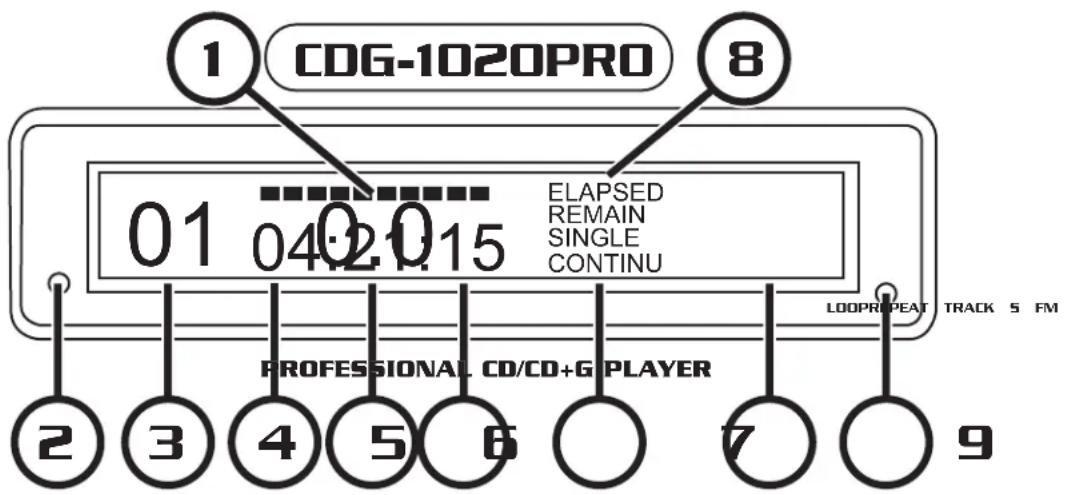
1 CDG-1020PRO 8 01 04:21:15 ELAPSED REMAIN SINGLE CONTINU PROFESSIONAL CD/CD+G PLAYER LOOP REPAT TRACK 5 FM 2 3 4 5 6 7 9- BAR INDICATOR - The ten indicator bars provide a visual display of the approximate position of the pickup within the current track.
- REPEAT INDICATOR - The light flashes to indicate one track repeat, it remains lit to indicate repeat of all tracks.
- TRACK DISPLAY - This indicates the track number of the CD or CD+G.
- MINUTE DISPLAY - This indicates the current track or disc time in minutes.
- SECOND DISPLAY - This indicates the current track or disc time in seconds.
- FRAME DISPLAY - This indicates the current frame of the CD or CD+G.
- SINGLE MODE INDICATOR - This indicates if the CD is set to play in single mode ( playback stops after each track ends).
- CONTINUOUS PLAY INDICATOR - This indicates if the CD is set to play in continuous mode ( playback continues after each track ends).
- ELAPSED INDICATOR - This indicates if the time is being displayed in ELAPSED MODE.
- REMAIN INDICATOR - This indicates if the time being displayed is TRACK TIME REMAINING MODE or DISC TIME REMAINING MODE.
- PITCH DISPLAY - This indicates the BPM level of the pitch controlled by the PITCH SLIDER.
- LOOP INDICATOR - This LED will be lit to indicate when LOOP mode is enabled.
Operations
Opening and Closing the Disc Tray
- Turn the unit power on. Press the OPEN/CLOSE button to open the disc tray.
- The disc tray cannot be opened during playback in order to prevent playback from being interrupted if the OPEN/CLOSE button is pressed accidentally. Stop the playback first, then press the OPEN/CLOSE button.
Loading discs
- Hold the disc by the edges and place it in the disc tray, then press the OPEN/CLOSE button again to close the disc tray.
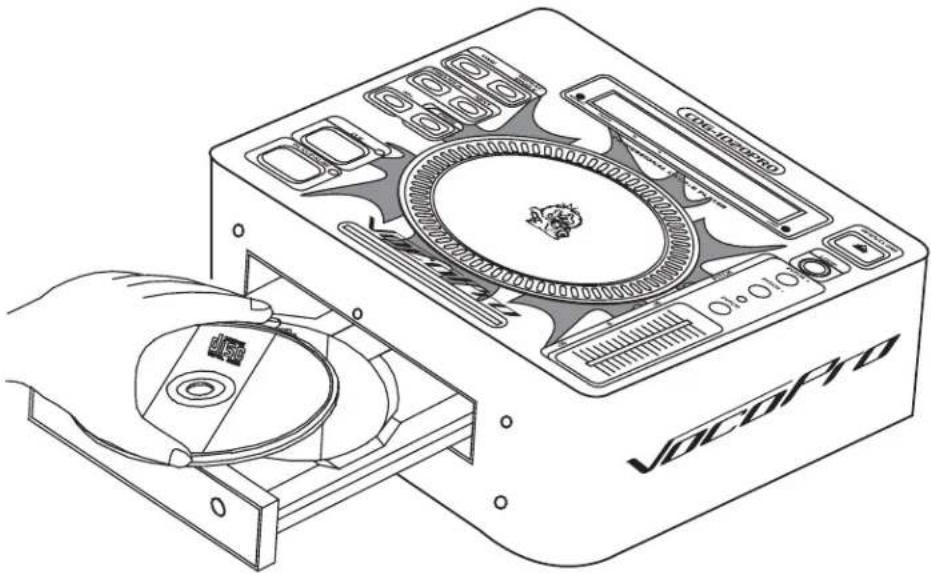
natural_image
Line drawing of a CD-ROM drive with open disc and internal components (no text or symbols)CAUTION:
- Do not place any foreign objects in the disc tray, and do not place more than one disc in the disc tray at a time.
- Do not push the disc tray in manually when the power is off, as this may result in malfunction and damage to the player.
Operations cont.
Starting Playback
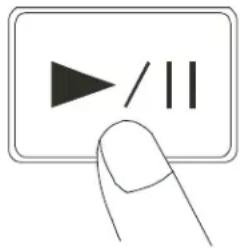
- Press the PLAY/PAUSE button during the pause or cue condition to start playback, the PLAY indicator lights up.
- The point at which playback starts is automatically stored in the memory as the cue point. The disc then returns to the cue point when the CUE button is pressed. (Back Cue)
text_image
Hand-drawn icon of a finger pressing a button with play triangle and double vertical lines, commonly used for media playback controls.Stopping Playback
There are two ways to stop playback:
- Press the PLAY/PAUSE button during playback to pause at that point.
- Press the CUE button during playback to return to the cue point. This will cause the music to pause.
Cueing
- Cue point setting: When play starts from pause or skip to a new track by using skip button, new cue point will be set. When a new cue point is set, the cue indicator lights by flashing for about one second.
- Press CUE button and the player will enter cue mode, the playback returns to cue point and pauses, the cue indicator lights up. When PLAY/PAUSE button is pressed, play starts from the cue point.
- When the track search operation is completed after pressing the SKIP buttons, the player automatically finds the position at which the sound starts and will cue at that position (Auto Cue). Playback must be set to SINGLE MODE for Auto Cue to function.
- If the CUE button is pressed after the search operation or the scanning operation, the playback returns to cue point and enters and becomes paused.
NOTE: During cue mode, if the CUE button is pressed and held, playback will start from the cue point. When the button is released, the player will return to the cue mode automatically, it allows you to check the cue point.
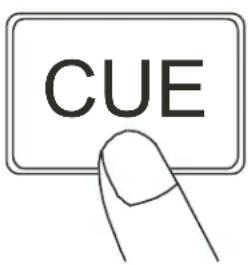
text_image
CUEOperations cont.
Frame Search
- While the disc is paused, turn the FRAME DIAL to skip ahead or backwards one frame at a time. The LCD display will show the time on the track.
- Press the PLAY/PAUSE button to start playing at the selected time.
- Clockwise skips ahead and counter-clockwise skips backwards.
Scanning (Fast forward/Fast backward)
- Turn the shuttle dial clockwise to scan in the forward direction or counterclockwise to scan in the reverse direction.
Matching the Beats Per Minute (BPM)
There are three methods available for matching the BPM of the two CDs:
- Use the pitch slider to adjust the BPM.
- Use the PITCH BEND buttons to change the BPM temporarily.
Program Play
- Press the PROGRAM button, the player will enter the program mode and the CD will stop rotating.
- Select the desired track by pressing the SKIP button, then press the PROGRAM button again. The selected track will be added to the program sequence.
- Repeat step 2. A maximum of 20 tracks can be programmed at one time.
- Press the PLAY/PAUSE button to start the program play from the first selection.
- Press the program button again during program play to stop play.
- Press and hold the program button more than 2 seconds to cancel the program mode and erase all the current program contents.
Loop Play
- Press the LOOP button to set the loop start point A, the LOOP indicator will flash on the LCD.
- Press the LOOP button again to set the loop end point B, after the B point is set, the playback will enter the loop play from A to B repeatedly.
- Press the LOOP button again, the loop play function is cancelled, the LOOP indicator goes out.
Troubleshooting
1. There is No Power
N• Make sure the power cord is firmly connected to the power outlet
N• If using a power strip/surge-protector, make sure that it is plugged in and switched on.
2. There is No Sound
N• Make sure everything is connected firmly and properly
N• Make sure there are no defective cables
N• Make sure all of your components are turned on
N• Make sure all of the components (amp, mixer, TV, etc.) are set to the proper inputs
3. No Picture
N• Make sure everything is connected firmly and properly
N• Make sure there are no defective cables
N• Make sure all of your components are turned on
N• Make sure all of the components (amp, mixer, TV, etc.) are set to the proper inputs
N• Make sure the TV or monitor is working correctly
4. The Disc Does Not Play
N• Make sure the disc is inserted correctly (label-side up)
N• Make sure the disc is clean and not scratched
N• If using a CD-R/RW, try using a different brand as some brands might not be compatible
N• Clean the CD lens using a CD lens cleaner
5. The Picture is Unclear
N• Make sure the disc is not dirty or damaged
N• Make sure that the TV TYPE is set correctly:
N NTSC: In North America, Japan and many other Asian countries
N PAL: In Europe
N• Try restarting the CDG-1020PRO
Notes
Notes
VocoPro
ULTIMATE CHOICE OF KARAOKE ENTERTAINMENT