Studio Pro C - Ecouteur OneOdio - Notice d'utilisation et mode d'emploi gratuit
Retrouvez gratuitement la notice de l'appareil Studio Pro C OneOdio au format PDF.


Choisissez votre langue et indiquez votre email : nous vous enverrons une version traduite specifiquement.
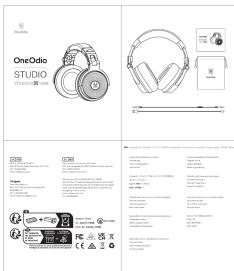
| Type de produit | Casque audio Bluetooth filaire et sans-fil |
| Marque | OneOdio |
| Modèle | Studio Pro C |
| Couleurs disponibles | Noir |
| Type de coussinets | Similicuir à mémoire de forme |
| Impédance | 32 ohms |
| Sensibilité | 110 dB |
| Réponse en fréquence | 20 Hz – 20 kHz |
| Connectivité sans-fil | Bluetooth 5.0 |
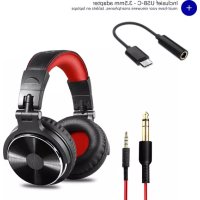
| Connectivité filaire | Jack 3.5 mm et jack 6.35 mm (adaptateur inclus) |
| Autonomie | Environ 40 heures |
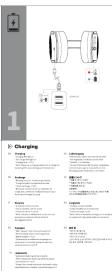
| Temps de charge | Environ 2 heures |
| Poids | Environ 250 g |
| Dimensions (pliées) | 18 × 15 × 5 cm |
| Fonctions principales | Écoute musicale, monitoring studio, appel mains-libres, réduction de bruit passive |
| Entretien et nettoyage | Nettoyer avec un chiffon doux et sec. Ne pas utiliser de produits chimiques. |
| Sécurité | Ne pas exposer à l'humidité. Éviter une écoute prolongée à volume élevé. |
| Pièces détachées et réparabilité | Câbles amovibles, coussinets remplaçables. Batterie intégrée non remplaçable. |
| Informations générales | Casque circum-auriculaire pliable, idéal pour studio et usage quotidien. |
FOIRE AUX QUESTIONS - Studio Pro C OneOdio
Comment allumer et éteindre le casque OneOdio Studio Pro C ?
Maintenez le bouton multifonction enfoncé pendant 2 secondes pour allumer, et 5 secondes pour éteindre. Un voyant bleu clignote indique la mise sous tension.
Comment appairer le casque en Bluetooth ?
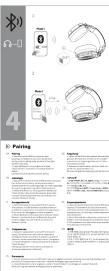
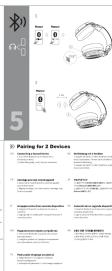
Après avoir allumé le casque, activez le Bluetooth sur votre appareil. Sélectionnez "OneOdio Studio Pro C" dans la liste. Un bip sonore confirme l'appairage.
Puis-je utiliser le casque avec un câble si la batterie est vide ?
Oui, branchez le câble jack 3.5 mm fourni sur le casque et votre source. Le casque fonctionne en mode filaire même sans batterie.
Comment recharger le casque ?
Utilisez le câble USB-C fourni et branchez-le sur un chargeur 5V / 1A. La charge complète prend environ 2 heures. Un voyant rouge s'éteint une fois chargé.
Combien de temps dure la batterie ?
L'autonomie est d'environ 40 heures en lecture Bluetooth à volume modéré. En mode filaire, la batterie n'est pas sollicitée.
Le casque est-il pliable pour le transport ?
Oui, les oreillettes pivotent et l'arceau se plie pour un rangement compact. Une housse de transport est incluse.
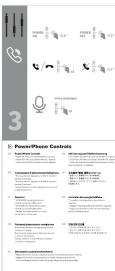
Puis-je passer des appels avec ce casque ?
Oui, grâce au microphone intégré. Appuyez une fois sur le bouton multifonction pour décrocher ou raccrocher.
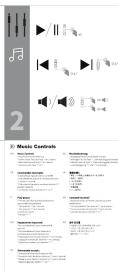
Comment régler le volume ?
Utilisez les touches + et – sur l'oreillette. Maintenez-les enfoncées pour changer de piste (suivant / précédent).
Que faire si le son est déformé ou faible ?
Vérifiez que la source est à volume suffisant et que le casque est chargé. Réinitialisez l'appairage en oubliant l'appareil et en le reconnectant.
Comment nettoyer les coussinets ?
Essuyez avec un chiffon humide (eau claire) et laissez sécher à l'air libre. Ne pas immerger. Remplacez-les si usés.
Questions des utilisateurs sur Studio Pro C OneOdio
0 question sur cet appareil. Repondez a celles que vous connaissez ou posez la votre.
Poser une nouvelle question sur cet appareil
Aucune question pour l'instant. Soyez le premier à en poser une.
Téléchargez la notice de votre Ecouteur au format PDF gratuitement ! Retrouvez votre notice Studio Pro C - OneOdio et reprennez votre appareil électronique en main. Sur cette page sont publiés tous les documents nécessaires à l'utilisation de votre appareil Studio Pro C de la marque OneOdio.
MODE D'EMPLOI Studio Pro C OneOdio