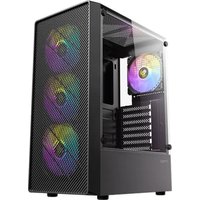
AX26 RGB Elite - Boîtier d'ordinateur ANTEC - Notice d'utilisation et mode d'emploi gratuit
Retrouvez gratuitement la notice de l'appareil AX26 RGB Elite ANTEC au format PDF.
| Type de produit | Boîtier d'ordinateur |
| Marque | Antec |
| Modèle | AX26 RGB Elite |
| Facteur de forme | Moyen tour (Mid-Tower) |
| Cartes mères compatibles | ATX, Micro-ATX, Mini-ITX |
| Emplacements de stockage 3,5" | 2 internes |
| Emplacements de stockage 2,5" | 2 internes |
| Ventilateurs inclus | 1 x 120 mm RGB (arrière) |
| Emplacements ventilateurs avant | 2 x 120 mm ou 2 x 140 mm |
| Emplacements ventilateurs haut | 2 x 120 mm ou 2 x 140 mm |
| Emplacements ventilateurs arrière | 1 x 120 mm |
| Radiateurs compatibles avant | 240 mm ou 280 mm |
| Radiateurs compatibles haut | 240 mm |
| Radiateurs compatibles arrière | 120 mm |
| Connecteurs façade | 2 x USB 3.0, 2 x USB 2.0, prise audio |
| Alimentation | ATX (non incluse) |
| Longueur max carte graphique | 350 mm |
| Hauteur max dissipateur CPU | 160 mm |
| Dimensions (L x H x P) | 220 x 480 x 420 mm |
| Poids net | 6,5 kg |
| Matériaux | Acier, plastique, verre trempé (panneau latéral) |
| Rétroéclairage RGB | Oui, compatible avec contrôleur ou carte mère |
| Entretien | Nettoyer avec un chiffon doux et sec. Éviter les liquides. |
| Consignes de sécurité | Utiliser sur une surface stable, ne pas obstruer les ouïes de ventilation. |
| Garantie | 2 ans |
FOIRE AUX QUESTIONS - AX26 RGB Elite ANTEC
Questions des utilisateurs sur AX26 RGB Elite ANTEC
0 question sur cet appareil. Repondez a celles que vous connaissez ou posez la votre.
Poser une nouvelle question sur cet appareil
Téléchargez la notice de votre Boîtier d'ordinateur au format PDF gratuitement ! Retrouvez votre notice AX26 RGB Elite - ANTEC et reprennez votre appareil électronique en main. Sur cette page sont publiés tous les documents nécessaires à l'utilisation de votre appareil AX26 RGB Elite de la marque ANTEC.
MODE D'EMPLOI AX26 RGB Elite ANTEC
Antec.

natural_image
Line drawing of a desktop computer tower case with visible fan and drive slots (no text or symbols)AX26 RGB Elite

natural_image
Technical line drawing of a computer chassis panel with no visible text or symbols
natural_image
Technical drawing of a mechanical component with concentric circular patterns and hatched shading (no text or symbols)
natural_image
Technical line drawing of a computer tower or rack unit with no visible text, numbers, or symbols.
natural_image
Technical diagram of a server rack with internal components and ventilation slots (no text or labels)1 REMOVE SIDE PANEL
EXTRACCION DEL PANEL LATERAL
SEITENWAND ENTFERNEN
RETIRER LE PANNEAU LATERAL
시비드 패털 준리
サイドパネルを取り外します
拆卜侧面板
0

natural_image
Technical line drawing of an open computer rack cabinet with ventilation grilles and mounting holes (no text or labels)2 MOTHERBOARD INSTALLATION
INSTALACIÓN DE LA PLACA BASE
INSTALLATION DES MOTHERBOARDS
INSTALLATION DE LA CARTE MERE
제한도는 84
マサーホートの設置
安装主板

text_image
Technical diagram of a computer tower with labeled components including T1, T2, and T33 VGA/PCI-EXPRESS CARD INSTALLATION
INSTALACIÓN EXPRES DE LA TARJETA VGA/PCI
VGA / PCI-EXPRESS KARTENINSTALLATION
INSTALLATION DE LA CARTE VGA/PCI-EXPRESS
VGA/PCI-E 카드 상작
VGA/PCI-EO設置
安装VGA/PCI-E卡

text_image
Technical diagram of a computer tower with labeled components and fan airflow indicators4 POWER SUPPLY INSTALLATION
INSTALACIÓN DE LA FUENTE DE ALIMENTACIÓN INSTALLATION DES NETZTEILS
INSTALLATION DU BLOC D'ALIMENTATION
파워서프라이 장착
電源の設置
安装电源组件

natural_image
Technical line drawing of a server rack cabinet with an external chassis (no text or symbols)5 HARD DISK INSTALLATION
INSTALACIÓN DEL DISCO DURO FESTPLATTENINSTALLATION
INSTALLATION DES DISQUES DURS
드라이브 장착
ドライブの設置
安装驱动器
A. INSTALLING A 3.5" HARD DISK DRIVE
INSTALAR UNA RANURA DE DISCO DURO DE 3.5" INSTALLATION EINES 3.5 "FESTPLATTENLAUFWERKS INSTALLER UN DISQUE DUR 3.5"
3.5° HDD장착
3.5"ドライブの設置
3.5寸硬盘安装

text_image
Technical diagram showing two views of a HDD drive assembly with numbered components and labeled parts.B. INSTALLING A 2.5" SOLID STATE DRIVE
INSTALAR UNA RANURA SOLID STATE DE 2.5"
INSTALLATION EINER 2.5 ZOLL SSD
INSTALLER UN DISQUE DUR 2.5*
2.5" SSD장작
2.5"ドライブの設置
2.5寸硬盘安装

text_image
RIGHT SIDE SSD SSD LEFT SIDE6 FAN INSTALLATION
INSTALAR VENTILADO
LÜFTERINSTALLATION
INSTALLATION DU VENTILATEUR
펜 장착
ケースファンの設置
风扇安装

text_image
Technical diagram of a server rack with fan components and ventilation system annotations7 INSTALLING LIQUID COOLING RADIATOR
INSTALAR EL RADIADOR DE REFRIGERACIÓN LÍQUIDA INSTALLATION EINES FLÜSSIGKEITSKÜHLERS
INSTALLATION D'UN KIT DE REFROIDISSEMENT LIQUIDE
주명굴러 장작
水冷の設置
水冷安装

text_image
Technical diagram of a computer tower case with labeled fan components and ventilation slotsAntec®
www.Antec.com
All rights reserved. Specifications are subject to change without prior notice. Actual products and accessories may differ from illustrations. Omissions and printing errors excepted. Content of delivery might differ in different countries or areas. Some trademarks may be claimed as the property of others.
V2.2
^© 1986 – 2025 Antec, Inc. All rights reserved.