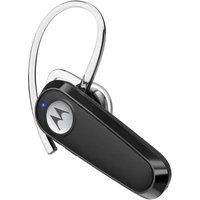
HK125 - Téléphone mobile MOTOROLA - Notice d'utilisation et mode d'emploi gratuit
Retrouvez gratuitement la notice de l'appareil HK125 MOTOROLA au format PDF.


| Type de produit | Casque Bluetooth mono (oreillette) |
| Marque | Motorola |
| Modèle | HK125 |
| Dimensions | Environ 50 x 30 x 20 mm |
| Poids | Environ 12 g |
| Alimentation | Batterie lithium-ion rechargeable via USB-C |
| Autonomie | Jusqu'à 6 heures de conversation |
| Temps de charge | Environ 1 à 2 heures |
| Technologie Bluetooth | Bluetooth 5.0 |
| Portée Bluetooth | Jusqu'à 10 mètres |
| Indicateur LED | Oui (état de charge, appairage) |
| Bouton multifonction | Oui (contrôle des appels) |
| Compatibilité | Smartphones, tablettes, ordinateurs Bluetooth |
| Fonctions principales | Appels mains libres, écoute de musique |
| Crochet d'oreille | Amovible, réversible (droite/gauche) |
| Embouts d'oreille | Tailles S, M, L fournies |
| Entretien | Nettoyer avec un chiffon doux et sec |
| Garantie | Garantie limitée du fabricant |
| Numéro FCC | 24888-HK125 |
| Numéro IC | 20353-HK125 |
FOIRE AUX QUESTIONS - HK125 MOTOROLA
Questions des utilisateurs sur HK125 MOTOROLA
0 question sur cet appareil. Repondez a celles que vous connaissez ou posez la votre.
Poser une nouvelle question sur cet appareil
Téléchargez la notice de votre Téléphone mobile au format PDF gratuitement ! Retrouvez votre notice HK125 - MOTOROLA et reprennez votre appareil électronique en main. Sur cette page sont publiés tous les documents nécessaires à l'utilisation de votre appareil HK125 de la marque MOTOROLA.
MODE D'EMPLOI HK125 MOTOROLA
| motorolaENQuick Start GuideMODEL: HK125FCC ID: 24888-HK125 IC: 20353-HK1251. At a glance1. Microphone 2. LED status indicator3. Multi-function button (MFB) 4. USB-C charging port5. Volume up 6. Volume down7. Ear hook 8. Earlip9. Earpiece | motorolaFRSGuide de démarrage rapideMODELE: HK125FCC ID: 24888-HK125 IC: 20353-HK1251. En un coup d'oeil1. Microphone 2. Indicatier d'état DEL3. Bouton multifunction 4. Port de chargement USB-C5. Montor le son 6. Baisser le son7. Croché d'oreille 8. Emboud d'oreille9. Eicuteur | motorolaGuía de Inicio RápidoMODELO: HK125FCC ID: 24888-HK125 IC: 20353-HK1251. Resumen1. Microfono 2. LED Indicador de Estado3. Bouton multifunción 4. Puerto de carga USB-C (MFB)5. Subir el volumen 6. Bajar el volumen7. Ganchó para la oreja 8. Punta para la oreja 9. Auricular | |||
| 2. ChargePlug the Type C cable into the headset's USB-C charging port and connect to the Type C power source.Note Fully charge before use. Any attempt to remove or replace your battery will damage sugar. | ChargeBlanche en cable de cable type C dans la port de charge USB-C du casque et connectez-vous à la salaje de d'emplimentation de type C. RemarqueChampé complément avant utilisation. Toule tentative de retrait ou de remplacement de votre batterie, normagnées votre casque. 3. Connectez-vous et allez-y 1. Activel de Bluetooth sur votre appareil. 2. Encendia su auricular. 3. Suèves les instructions de l'evite vocale. 4. Settienne de la 2012/23" dans le menu Bluetooth de votre appareil. | 2. CargaEncluye el cable Tipo C en el puerto de carga USB-C del auricular y conecte a la fuente de alimentación Tipo C.NotaCatigue completamente entre de usar. Cualquer intententa de reitar o cambiar la bateria dañah su auricular. 3. Conectar y listo 1. Encienda al Bluetooth de su dispositivo. 2. Encendia su auricular. 3. Sigas las instrucciones de las indicaciones por voz. 4. Settienne HK125 en el men de Bluetooth de su dispositivo. 4. Ajutejo y pingato en una posición cómodaGancho para la oreja Oreja diencea y oreja iziquiendaPunta para la oreja Luso | |||
| 3. Connect and go1. Turn on Bluetooth on your device.2. Follow the voice prompt's instruction.4. Use of H125 from the Bluetooth menu of your device. | |||||
| 4. Fit and comfortEar hook Right ear and left earEar tip WearEmbout d'oreille Porter | |||||
| 5. Basic operationBalance not/d in part of heartBalance not/d in part of heartBalance not/d in part of heartBalance not/d in part of heartBalance not/d in part of heartBalance not/d in part of heartBalance not/d in part of heartBalance not/d in part of heartBalance not/d in part of heartBalance not/d in part of heartBalance not/d in part of heartBalance not/d in part of heartBalance not/d in part of heartBalance not/d in part of heartBalance not/d in part of heartBalance no more than 5 years. | 5. Fonctionnement de baseAl: BactensBenedione/terminer an apaper di sottelBenedione/solidato HPB ≥ 2sBenedione/solidato HPB ≥ 2sBenedione/solidato HPB ≥ 2sBenedione/solidato HPB ≥ 2sBenedione/solidato HPB ≥ 2sBenedione/solidato HPB ≥ 2sBenedione/solidato HPB ≥ 2sBenedione/solidato HPB ≥ 2sBenedione/solidato HPB ≥ 2sBenedione/Solidato HPB ≥ 2sBenedione/solidato HPB ≥ 2sBenedione/solidato HPB ≥ 2sBenedione/solidato HPB ≥ 2sBenedione/solidato HPB ≥ 2sBenedione/solidato HPB ≥ 2sBenedione/solidato HPB ≥ 2sBenedione/solidato HPB ≥ 2sBenedione/solidato HPBB ≥ 2sBenedione/solidato HPBB ≥ 2sBenedione/solidato HPBB ≥ 2sBenedione/solidato HPBB ≥ 2sBenedione/solidato HPBB ≥ 2sBenedione/solidato HPBB ≥ 2sBenedione/solidato HPBB ≥ 2sBenedione/solidato HPBB ≥ 2sBenedione/solidato HPBB ≥ 2 sBenedione/solidato HPBB ≥ 2sBenedione/solidato HPBB ≥ 2sBenedione/solidato HPBB ≥ 2sBenedione/solidato HPBB ≥ 2sBenedione/solidato HPBB ≥ 2sBenedione/solidato HPBB ≥ 2sBenedione/solidato HPBB ≥ 2sBenedione/solidato HPBB ≥ 2sBenedione/Solidato HPBB ≥ 2sBenedione/solidato HPBB ≥ 2sBenedione/solidato HPBB ≥ 2sBenedione/solidato HPBB ≥ 2sBenedione/solidato HPBB ≥ 2sBenedione/solidato HPBB ≥ 2sBenedione/solidato HPBB ≥ 2sBenedione/solidato HPBB ≥ 2sBenedione/solidato HPB BB 2sBenedione/solidato HPBB ≥ 2sBenedione/solidato HPBB ≥ 2sBenedione/solidato HPBB ≥ 2sBenedione/solidato HPBB ≥ 2sBenedione/solidato HPBB ≥ 2sBenedione/solidato HPBB ≥ 2sBenedione/solidato HPBB ≥ 2sBenedione/solidato HPBB ≥ 2s | 5. Operación básicaAveaDomicipo/Teminal ureaFAzobadoAcchocera una listaFAzobadoAcchocera/activar la personaFAzobado acchocera Subir la personaFAzibener en volume de la formateFuslar e volcanesÚstima piotaFuslar de volcanes Umsica de la personaSeguante piotaFuslar de volcanes Umsica de la personaModo espermamentoFuslar de volcanes Umsica de la personaModo e Full auricular vela planteFuslar de volcanes Umsica de la personaLamino tripataTumor amelena/ulcer Tumor amelena/ulcer Tumor amelena/ulcer Tumor amelena/ulcer Tumor amelena/ulcer Tumor amelena/ulcer Tumor amelena/ulcer Tumor amelena/ulcer Tumor amelena/ulcer Tumor amelena/ulcer Tumor amelena/ulcer Tumor amelena/ulcer Tumor amelena/ulcer Tumor amelenna/ulcer Tumor amelena/ulcer Tumor amelena/ulcer Tumor amelena/ulcer Tumor amelena/ulcer Tumor amelena/ulcer Tumor amelena/ulcer Tumor amelena/ulcer Tumor amelena/ulcer Tumor amelena/ulcer Tumor amelena/ulcer Tumor amelena/ulcer Tumor amelena/ulcerTumor amelena/ulcer Tumor amelena/ulcer Tumor amelena/ulcer Tumor amelena/ulcer Tumor amelena/ulcer Tumor amelena/ulcer Tumor amelena/ulcer Tumor amelena/ulcer Tumor amelena/ulcer Tumor amelena/ulcer Tumor amelena/ulcer Tumor amelena/ulcer Tumor ame/ulcer Tumor amelena/ulcer Tumor amelena/ulcer Tumor amelena/ulcer Tumor amelena/ulcer Tumor amelena/ulcer Tumor amelena/ulcer Tumor amelena/ulcer Tumor amelena/ulcer Tumor amelena/ulcer Tumor amelena/ulcer Tumor amelena/ulcer Tumor amelena/ulcer | *1. This page has been intentionally left blank? | ||
| 6. Basic operationBalance not/d in part of heartBalance not/d in part of heartBalance not/d in part of heartBalance not/d in part of heartBalance not/d in part of heartBalance not/d in part of heartBalance not/d in part of heartBalance not/d in part of heartBalance not/d in part of heartBalance not/d in part of heartBalance not/d in part of heartBalance not/d in part of heartBalance not/d in part of heartBalance not/d in part-of-house during and move by the bed, always close the two and drive offly. | 5. Fonctionnement de baseAl: BactensBenedione/solidato HPB ≥ 2sBenedione/solidato HPB ≥ 2sBenedione/solidato HPB ≥ 2sBenedione/solidato HPB ≥ 2sBenedione/solidato HPBB ≥ 2sBenedione/solidato HPBB ≥ 2sBenedione/solidato HPBB ≥ 2sBenedione/solidato HPBB ≥ 2s | 5. Operación básicaAveaDomicipo/Teminal ureaFAzobadoAcchocera una listaFAzobado Acchocera/ activar la personaFAzobado acchocera Subir la personaFAzibener en volume de la formateFAzibener en volume Umsica de la personaFAzibener en volume Umsica de la personaFAzibener en volume Umsica de la personaFAzibener en volume Umsica de la personaFAzibener en volume Umsica de la personaFAzibener en volume Umsica de la personaFAzibener en volume Umsica de la personaFAzibener en volume Umsica de la personaFAzibener en volume Umsica de la personaFAzibenergy/solidato HPBB ≥ 2sBenedione/solidato HPBB ≥ 2sBenedione/solidato HPBB ≥ 2sBenedione/solidato HPBB ≥ 2sBenedione/solidato HPBB ≥ 2s | *1. This page has been intentionally left blank? | ||
| Note: Mobile device or accessory while driving road cause distortion and may be huge. always close the two and drive offly. | Revenance: "Un applied mobile do not" in accessrechte au pour de placement de la car with a car. Declarant les apprais les apprais de produirement. | Note: Utilisation de disposizione mûlo à accessrechte meintres conduire peutra cause détracées et poés par var rage. Sevrer estérations la force y combue de lary stage. | |||
| 6. Connect to the second deviceConnect your headset with two devices at the same time1. Before pairing the second device, turn off Bluetooth on the previously paired device. Then pair the second device following the Connect and/or Headset.2. Once paired to the second device, your device with the second device with either or both devices when it is turned on. | 6. Connectors you au deuxième appareilComptions avec aux deux apprais en même temps1. Avant de jumper la deuxième apprais, Democratices Bluetooth des apprais, Democratices Bluetooth des apprais, Democratices Bluetooth des apprais, Democratices Bluetooth des apprais, Democratices Bluetooth des apprais, Democratices Bluetooth des apprais, Democratices Bluetooth des apprais, Democratices Bluetooth des apprais, Democratices Bluetooth des apprais, Democratices Bluetooth des apprais, Democratices Bluetooth des apprais, Democratices Bluetooth des apprais, Democratices Bluetooth des apprais, Democratices Bluetooth des apprais, Democratices Bluetooth des appuis, Democratices Bluetooth des appuis, Democratices Bluetooth des appuis, Democratices Bluetooth des appuis, Democratices Bluetooth des appuis, Democratices Bluetooth des appuis, Democratices Bluetooth des appuis, Democratices Bluetooth des appuis, Democratices Bluetooth des appuis, Democratices Bluetooth des appuis, Democratices Bluetooth des appuis, Democratices Bluetooth des appuis, Democratices Bluetooth des appuis, Democratices Bluetooth des appuis, Democratices Bluetooth des appuis,Democratices LED indicador de estado | *1. This page has been intentionally left blank? | |||
| 7. LED status indicatorPower on Flashes blue x 1xPower of Flashes Blue x 1xPower of Flashes Red and Blue alternatelyBlanking Flashes red and Blue alternatelyBlanking Flashes red and Blue alternatelyBlanking Flashes red and Blue alternatelyBlanking Flashes red and Blue alternatelyBlanking Flashes red and Blue alternatelyBlanking Flashes red and Blue alternatelyBlanking Flashes red and Blue alternatelyBlanking Flashes red and Blue alternatelyBlanking Flashes red and Blue alternatelyBlanking Flashes red and Blue alternatelyBlanking Flashes red and Blue alternatelyBlanking Flashes red, and Blue alternatelyBlanking Flashes red and Blue alternatelyBlanking Flashes red and Blue alternatelyBlanking Flashes red and Blue alternatelyBlanking Flashes red and Blue alternatelyBlanking Flashes red and Blue alternatelyBlanking Flashes red and Blue alternatelyBlanking Flashes red and Blue alternatelyBlanking Flashes red and Blue alternatelyBlanking Flashes red and Blue alternatelyBlanking Flashes red and Blue alternatelyBlanking Flashes redand Blue alternatelyBlanking Flashes red and Blue alternatelyBlanking Flashes red and Blue alternatelyBlanking Flashes red and Blue alternatelyBlanking Flashes red and Blue alternatelyBlanking Flashes red and Blue alternatelyBlanking Flashes red and Blue alternatelyBlanking Flashes red and Blue alternatelyBlanking Flashes red and Blue alternatelyBlanking Flashes red and Blue alternatelyBlanking Flashes red and Blue alternatelyBlanking Flashes red andBlue alternatelyBlanking Flashes red and Blue alternatelyBlanking Flashes red and Blue alternatelyBlanking Flashes red and Blue alternatelyBlanking Flashes red and Blue alternatelyBlanking Flashes red and Blue alternatelyBlanking Flashes red and Blue alternatelyBlanking Flashes red and Blue alternatelyBlanking Flashes red and Blue alternatelyBlanking Flashes red and Blue alternatelyBlanking Flashes red and Blue alternatelyBlanking Flashes red and Blue AlternallyBlanking Flashes red and Blue AlternatelyBlanking Flashes red and Blue AlternatelyBlanking Flashes red and Blue AlternatelyBlanking Flashes red and Blue AlternatelyBlanking Flashes red and Blue AlternatelyBlanking Flashes red and Blue AlternatelyBlanking Flashes red and Blue AlternatelyBlanking Flashes red and Blue AlternatelyBlanking Flashes red and Blue AlternatelyBlanking Flashes red and Blue AlternatelyBlanking Flashes red and Blue AlternatelyBlanking Flashes red and Blue Alternately Blankening Flashes red and Blue AlternatelyBlanking Flashes red and Blue AlternatelyBlanking Flashes red and Blue AlternatelyBlanking Flashes red and Blue AlternatelyBlanking Flashes red and Blue AlternatelyBlanking Flashes red and Blue AlternatelyBlanking Flashes red and Blue AlternatelyBlanking Flashes red and Blue AlternatelyBlanking Flashes red and Blue AlternatelyBlanking Flashes red and Blue AlternatelyBlanking Flashes red and Blue AlternatelyBlanking flashes red and Blue AlternatelyBlanking flashes red and Blue AlternatelyBlanking flashes red and Blue AlternatelyBlanking flashes red and Blue AlternatelyBlanking flashes red and Blue AlternatelyBlanking flashes red and Blue AlternatelyBlanking flashes red and Blue AlternatelyBlanking flashes red and Blue AlternatelyBlanking flashes red and Blue AlternatelyBlanking flashes red and Blue AlternatelyBlanking flashes red and Blue AlternatelyBlanking flanges red and Blue AlternatelyBlanking flanges red and Blue AlternatelyBlanking flanges red and Blue AlternatelyBlanking flanges red and Blue AlternatelyBlanking flanges red and Blue AlternatelyBlanking flanges red and Blue AlternatelyBlanking flanges red and Blue AlternatelyBlanking flanges red and Blue AlternatelyBlanking flanges red and Blue AlternatelyBlanking flanges red and Blue AlternatelyBlanking flanges red and Blue AlternatelyBlanking flanges/red and Blue AlternatelyBlanking flanges red and Blue AlternatelyBlanking flanges red and Blue AlternatelyBlanking flanges red and Blue AlternatelyBlanking flanges red and Blue AlternatelyBlanking flanges red and Blue AlternatelyBlanking flanges red and Blue AlternatelyBlanking flanges red and Blue AlternatelyBlanking flanges red and Blue AlternatelyBlanking flanges red and Blue AlternatelyBlanking flanges red and Blue AlternatelyBlanking flanges red, and Blue AlternatelyBlanking flanges red and Blue AlternatelyBlanking flanges red and Blue AlternatelyBlanking flanges red and Blue AlternatelyBlanking flanges red and Blue AlternatelyBlanking flanges red and Blue AlternatelyBlanking flanges red and Blue AlternatelyBlanking flanges red and Blue AlternatelyBlanking flanges red and Blue AlternatelyBlanking flanges red and Blue AlternatelyBlanking flanges red and Blue AlternatelyBlanking flanges red,and Blue AlternatelyBlanking flanges red and Blue AlternatelyBlanking flanges red and Blue AlternatelyBlanking flanges red and Blue AlternatelyBlanking flanges red and Blue AlternatelyBlanking flanges red and Blue AlternatelyBlanking flanges red and Blue AlternatelyBlanking flanges red and Blue AlternatelyBlanking flanges red and Blue AlternatelyBlanking flanges red and Blue AlternatelyBlanking flanges red and Blue AlternatelyBlanking flanges red andBlue AlternatelyBlanking flanges red and Blue AlternatelyBlanking flanges red and Blue AlternatelyBlanking flanges red and Blue AlternatelyBlanking flanges red and Blue AlternatelyBlanking flanges red and Blue AlternatelyBlanking flanges red and Blue AlternatelyBlanking flanges red and Blue AlternatelyBlanking flanges red and Blue AlternatelyBlanking flanges red and Blue AlternatelyBlanking flanges red and Blue AlternatelyBlanking flanges red and BlueAlternatelyBlanking flanges red and Blue AlternatelyBlanking flanges red and Blue AlternatelyBlanking flanges red and Blue AlternatelyBlanking flanges red and Blue AlternatelyBlanking flanges red and Blue AlternatelyBlanking flanges red and Blue AlternatelyBlanking flanges red and Blue AlternatelyBlanking flanges red and Blue AlternatelyBlanking flanges red and Blue AlternatelyBlanking flanges red and Blue AlternatelyBlanking flanges red and Blue AlternallyBlanking flanges red and Blue AlternatelyBlanking flanges red and Blue AlternatelyBlanking flanges red and Blue AlternatelyBlanking flanges red and Blue AlternatelyBlanking flanges red and Blue AlternatelyBlanking flanges red and Blue AlternatelyBlanking flanges red and Blue AlternatelyBlanking flanges red and Blue AlternatelyBlanking flanges red and Blue AlternatelyBlanking flanges red and Blue AlternatelyBlanking flanges red and Blue Alternately Blankening flanges red and Blue AlternatelyBlanking flanges red and Blue AlternatelyBlanking flanges red and Blue AlternatelyBlanking flanges red and Blue AlternatelyBlanking flanges red and Blue AlternatelyBlanking flanges red and Blue AlternatelyBlanking flanges red and Blue AlternatelyBlanking flanges red and Blue AlternatelyBlanking flanges red and Blue AlternatelyBlanking flanges red and Blue AlternatelyBlanking flanges red and Blue AlternatelyBlanking blouses are not used for the first three devices. | *1. This page has been intentionally left blank? | ||||
| «This page has been intentionally left blank» | 8. Información generalSe la producto no a signal function, complementate, les es qui Gua de la liquidation de la liquidation de la liquidation de la liquidation de la liquidation de la liquidation de la liquidation de la liquidation de la liquidation de la liquidation de la liquidation de la liquidation de la liquidation de la liquidation de la liquidation de la liquidation de la liquidation de la liquidation de la liquidation de la liquidation de la liquidation de la liquidation de la liquidation de la liquidation de la liquidation de la liquidated en la liquidation de la liquidation de la liquidation de la liquidation de la liquidation de la liquidation de la liquidation de la liquidation de la liquidation de la liquidation de la liquidation de la liquidation de la liquidation de la liquidation de la liquidation de la liquidation de la liquidation de la liquidation de la liquidation de la liquidation de la liquidation de la liquidation de la liquidation de la liquidation de la liquidation des contractions de la liquidation de la liquidation de la liquidation de la liquidation de la liquidation de la liquidation de la liquidation de la liquidation de la liquidation de la liquidation de la liquidation de la liquidation de la liquidation de la liquidation de la liquidation de la liquidation de la liquidation de la liquidation de la liquidation de la liquidation de la liquidation de la liquidation de la liquidation de la liquidation de la liquidulation de la liquidation de la liquidation de la liquidation de la liquidation de la liquidation de la liquidation de la liquidation de la liquidation de la liquidation de la liquidation de la liquidation de la liquidation de la liquidation de la liquidation de la liquidation de la liquidation de la liquidation de la liquidation de la liquidation de la liquidation de la liquidation de la liquidation de la liquidation de la liquidation de la liquidlation de la liquidation de la liquidation de la liquidation de la liquidation de la liquidation de la liquidation de la liquidation de la liquidation de la liquidation de la liquidation de la liquidation de la liquidation de la liquidation de la liquidation de la liquidation de la liquidation de la liquidation de la liquidation de la liquidation de la liquidation de la liquidation de la liquidation de la liquidation de la liquidation de la liquidATION DE LAI LAGARANTIA PRODUCTION & COMPRESSION (INCOMPLINES) (LIMITE) (LIS) (LIS) (LIS) (LIS) (LIS) (LIS) (LIS) (LIS) (LIS) (LIS) (LIS) (LIS) (LIS) (LIS) (LIS) (LIS) (LIS) (LIS) (LIS) (LIS) (LIS) (LIS) (LIS) (LIS) (LIS) (LIL) (LIS) (LIS) (LIS) (LIS) (LIS) (LIS) (LIS) (LIS) (LIS) (LIS) (LIS) (LIS) (LIS) (LIS) (LIS) (LIS) (LIS) (LIS) (LIS) (LIS) (LIS) (LIS) (LIS) (LIS) (LIR) (LIS) (LIS) (LIS) (LIS) (LIS) (LIS) (LIS) (LIS) (LIS) (LIS) (LIS) (LIS) (LIS) (LIS) (LIS) (LIS) (LIS) (LIS) (LIS) (LIS) (LIS) (LIS) (LIS) (LIS) (LII) (LIS) (LIS) (LIS) (LIS) (LIS) (LIS) (LIS) (LIS) (LIS) (LIS) (LIS) (LIS) (LIS) (LIS) (LIS) (LIS) (LIS) (LIS) (LIS) (LIS) (LIS) (LIS) (LIS) (LIS) (LUS) (LIS) (LIS) (LIS) (LIS) (LIS) (LIS) (LIS) (LIS) (LIS) (LIS) (LIS) (LIS) (LIS) (LIS) (LIS) (LIS) (LIS) (LIS) (LIS) (LIS) (LIS) (LIS) (LIS) (LIS) (LLS) (LIS) (LIS) (LIS) (LIS) (LIS) (LIS) (LIS) (LIS) (LIS) (LIS) (LIS) (LIS) (LIS) (LIS) (LIS) (LIS) (LIS) (LIS) (LIS) (LIS) (LIS) (LIS) (LIS) (LIS) (LRS) (LIS) (LIS) (LIS) (LIS) (LIS) (LIS) (LIS) (LIS) (LIS) (LIS) (LIS) (LIS) (LIS) (LIS) (LIS) (LIS) (LIS) (LIS) (LIS) (LIS) (LIS) (LIS) (LIS) (LIS) (LIs) (LIS) (LIS) (LIS) (LIS) (LIS) (LIS) (LIS) (LIS) (LIS) (LIS) (LIS) (LIS) (LIS) (LIS) (LIS) (LIS) (LIS) (LIS) (LIS) (LIS) (LIS) (LIS) (LIS) (LIS) (Lis) (LIS) (LIS) (LIS) (LIS) (LIS) (LIS) (LIS) (LIS) (LIS) (LIS) (LIS) (LIS) (LIS) (LIS) (LIS) (LIS) (LIS) (LIS) (LIS) (LIS) (LIS) (LIS) (LIS) (LIS) (LiS) (LIS) (LIS) (LIS) (LIS) (LIS) (LIS) (LIS) (LIS) (LIS) (LIS) (LIS) (LIS) (LIS) (LIS) (LIS) (LIS) (LIS) (LIS) (LIS) (LIS) (LIS) (LIS) (LIS) (LIS) (L is) (L is) (L is) (L is) (L is) (L is) (L is) (L is) (L is) (L is) (L is) (L is) (L is) (L is) (L is) (L is) (L is) (L is) (L is) (L is) (L is) (L is) (L is) (L is) (L is) (L iS) (L is) (L is) (L is) (L is) (L is) (L is) (L is) (L is) (L is) (L is) (L is) (L is) (L is) (L is) (L is) (L is) (L is) (L is) (L is) (L is) (L is) (L is) (L is) (L is) (Lis) (L is) (L is) (L is) (L is) (L is) (L is) (L is) (L is) (L is) (L is) (L is) (L is) (L is) (L is) (L is) (L is) (L is) (L is) (L is) (L is) (L is) (L is) (L is) (L is) (L lS) (L is) (L is) (L is) (L is) (L is) (L is) (L is) (L is) (L is) (L is) (L is) (L is) (L is) (L is) (L is) (L is) (L is) (L is) (L is) (L is) (L is) (L is) (L is) (L is) (lS) (L is) (L is) (L is) (L is) (L is) (L is) (L is) (L is) (L is) (L is) (L is) (L is) (L is) (L is) (L is) (L is) (L is) (L is) (L is) (L is) (L is) (L is) (L is) (L is) (C.L.) (C.L.) (C.L.) (C.L.) (C.L.) (C.L.) (C.L.) (C.L.) (C.L.) (C.L.) (C.L.) (C.L.) (C.L.) (C.L.) (C.L.) (C.L.) (C.L.) (C.L.) (C.L.) (C.L.) (C.L.) (C.L.) (C.L.) (C.L.) (C.L.) (C.L.)(C.L.) (C.L.) (C.L.) (C.L.) (C.L.) (C.L.) (C.L.) (C.L.) (C.L.) (C.L.) (C.L.) (C.L.) (C.L.) (C.L.) (C.L.) (C.L.) (C.L.) (C.L.) (C.L.) (C.L.) (C.L.) (C.L.) (C.L.) (C.L.) (C.L.)(C.L.) (C.L.) (C.L.) (C.L.) (C.L.) (C.L.) (C.L.) (C.L.) (C.L.) (C.L.) (C.L.) (C.L.) (C.L.) (C.L.) (C.L.) (C.L.) (C.L.) (C.L.) (C.L.) (C.L.) (C.L.) (C.L.) (C.L.) (C.L.) (C.L.) |
折后65*80mm;70g双胶纸;(展开尺寸260*320)单色双面印刷;折叠
| 8. General information | |
| Asset and Product Accounts & Accessories Limited Warranty Department, Inc. (the Company) (http://www.guadec.com.cn), Ltd. (http://www.guadec.com.cn)Please visit us: online@redund.com/supportwww.guadec.com/ | |
| Description of Products and Accessories Limited Warranty Department, Inc. (the Company) (http://www.guadec.com.cn), Ltd. (http://www.guadec.com.cn)Please visit us: online@redund.com/supportwww.guadec.com/ | |
| Description of Products and Accessories Limited Warranty Department, Inc. (the Company) (http://www.guadec.com.cn), Ltd. (http://www.guadec.com.cn)Please visit us: online@guadec.com/supportwww.guadec.com/ | |
| Description of Products and Accessories Limited Warranty Department, Inc. (the Company) (http://www.guadec.com.cn), Ltd. (http://www.guadec.com.cn)Please visit us: online@guadec.com/supportwww.guadec.com/ | |
| Description of Products and Accessories Limited Warranty Department, Inc. (the Company) (http://www.guadec.com.cn), Ltd.(http://www.guadec.com.cn)Please visit us: online@guadec.com/supportwww.guadec.com/ | |
| Description of Products and Accessories Limited Warranty Department, Inc. (the Company) (http://www.guadec.com.cn), Ltd. (http://www.guadec.com.cn)Please visit us: online@guadec.com/supportwww.guadec.com/ | |
| Description of Products and Accessories Limited Warranty Department (https://www.guadec.com.cn) (http://www.guadec.com.cn)Please visit us: online@guadec.com/supportwww.guadec.com/ | |
| Description of Products and Accessories Limited Warranty Department, Inc. (the Company) (http://www.guadec.com.cn) (http://www.guadec.com.cn)Please visit us: online@guadec.com/supportwww.guadec.com/ | |
| Description of Products and Accessories Limited Warranty Department, Inc. (the Company) (http://www.guadec.com.cn) (http://www.guadec.com.cn)Please visit us: online@guadec.com/supportwww.guadec.com/ | |
| DESCRIPTION AND INFORMATION CONTACTS, SPECIAL OR ANY INFORMATION CONTACTS, SPECIAL OR ANY INFORMATION CONTACTS, SPECIAL OR ANY INFORMATION CONTACTS, SPECIAL OR ANY INFORMATION CONTACTS, SPECIAL OR ANY INFORMATION CONTACTS, SPECIAL OR ANY INFORMATION CONTACTS, SPECIAL OR ANY INFORMATION CONTACTS, SPECIAL OR ANY INFORMATION CONTACTS, SPECIAL OR ANY INFORMATION CONTACTS, SPECIAL OR ANY INFORMATION CONTACTS, SPECIAL OR ANY INFORMATION CONTACTS, SPECIAL OR ANY INFORMATION CONTACTS, SPECIAL OR ANY INFORMATION CONTACTS, SPECIAL OR ANY INFORMATION CONTACTS, SPECIAL OR ANY INFORMATION AC | |
Marque : MOTOROLA
Modèle : HK125
Catégorie : Téléphone mobile