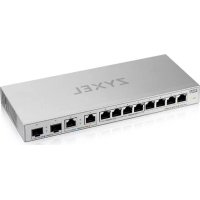
XGS101012 - Commutateur ZYXEL - Notice d'utilisation et mode d'emploi gratuit
Retrouvez gratuitement la notice de l'appareil XGS101012 ZYXEL au format PDF.


| Caractéristiques | Détails |
|---|---|
| Type de produit | Commutateur réseau |
| Nombre de ports | 10 ports 10G SFP+ |
| Norme Ethernet | IEEE 802.3, IEEE 802.3u, IEEE 802.3ab, IEEE 802.3ae |
| Vitesse de transmission | 10 Gbps par port |
| Type d'alimentation | Alimentation externe |
| Dimensions | 440 x 220 x 44 mm |
| Poids | 3.5 kg |
| Température de fonctionnement | 0 à 50 °C |
| Garantie | 2 ans |
| Utilisation recommandée | Idéal pour les réseaux d'entreprise et les environnements à forte demande de bande passante |
| Maintenance | Vérification régulière des mises à jour du firmware |
| Sécurité | Support des VLANs et des listes de contrôle d'accès (ACL) |
| Informations supplémentaires | Installation en rack possible |
FOIRE AUX QUESTIONS - XGS101012 ZYXEL
Questions des utilisateurs sur XGS101012 ZYXEL
0 question sur cet appareil. Repondez a celles que vous connaissez ou posez la votre.
Poser une nouvelle question sur cet appareil
Téléchargez la notice de votre Commutateur au format PDF gratuitement ! Retrouvez votre notice XGS101012 - ZYXEL et reprennez votre appareil électronique en main. Sur cette page sont publiés tous les documents nécessaires à l'utilisation de votre appareil XGS101012 de la marque ZYXEL.
MODE D'EMPLOI XGS101012 ZYXEL
ZYXEL
XGS1010-12
8-Port Gigabit Unmanaged Switch with 2-Port 2.5G/2-Port SFP+
Quick Start Guide
ENGLISH | DEUTSCH | FRANÇAIS | ITALIANO NORSK | ESPAÑOL | SUOMI | ČEŠTINA | POLSKI
1 Hardware Installation
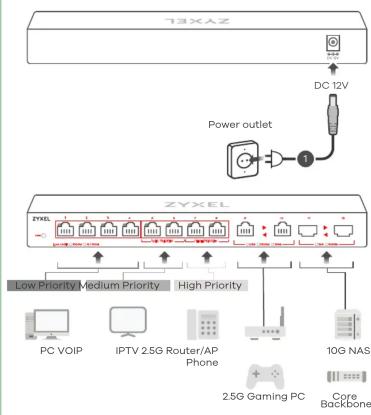
flowchart
graph TD
    A["T3XEL"] --> B["Power outlet"]
    B --> C["ZYXEL"]
    C --> D["Low Priority"]
    C --> E["Medium Priority"]
    C --> F["High Priority"]
    D --> G["PC VOIP"]
    E --> H["IPTV 2.5G Router/AP Phone"]
    F --> I["10G NAS"]
    I --> J["2.5G Gaming PC"]
    J --> K["Core Backbone"]
LEDs
| PWR | Green | On - Switch ReadyBlinking - Switch StartingOff - Switch Off |
| Ports 1-8LINK/ACT | Green | On - 1000 Mbps connection readyBlinking - Data transmitting |
| Amber | On - 10/100 Mbps connection readyBlinking - Data transmittingOff - No Connection | |
| Ports 9-10(Left LED)(Right LED) | Blue | On - 2.5 Gbps connection readyBlinking - Data transmitting |
| Green | On - 1000 Mbps connection readyBlinking - Data transmitting | |
| Amber | On - 100 Mbps connection readyBlinking - Data transmittingOff - No Connection | |
| Ports 11-12(Left LED)(Right LED) | Blue | On - 10 Gbps connection readyBlinking - Data transmitting |
| Green | On - 1000 Mbps connection readyBlinking - Data transmittingOff - No Connection |
ZYXEL
Your Networking Ally

Warranty Card
Thank you for purchasing a Zyxel product. Zyxel has a reputation for delivering high quality, high performance products and services to our customers. We recommend that you now visit the Zyxel website and register your product online. This will mean you can receive the latest firmware, drivers and product related information. If you still have further questions or enquiries related to the product, please contact our subsidiaries worldwide. Please note that warranty terms may vary by region. Full detailed information is available on our website, here: http://www.zyxel.com/support/warranty_information.shtml
Purchase Information
Zyxel Product Name:
Hardware Serial Number:
Date of Purchase:
(In certain countries, the warranty will be validated with seller's signature and stamp):
Package Contents

XGS1010-12

International Power Adapter

QSG

Declaration of Conformity Safety Warnings
EN Connect to an appropriate power source. The PWR light initially blinks. Wait for the PWR light to turn steady on, indicating the Switch is ready for use. Connect to a modem or router that has internet access.
DE An eine geeignete Stromquelle anschließen.
Warten Sie, bis das PWR-Licht dauerhaft leuchtet. Wenn die PWR-Anzeige nicht blinkt, ist das Gerät betriebsbereit.
FR Connectez-vous à une source d'alimentation appropriée. Le voyant PWR se met tout d'abord à clignoter. Attendre que le voyant PWR s'allume en continu, indiquant que le commutateur est prêt à être utilisé.
IT Collegare ad una fonte di alimentazione appropriata. La luce di accensione all'inizio lampeggia. Attendi che sia fissa, che significa che lo Switch è pronto all'uso.
NO Koble til en hensiktsmessig strømkilde.
PWR-lampen blinker til å begynne med. Vent til
PWR-lampen lyser kontinuerlig. Det angir at bryteren er
klar for bruk.
SE Anslut till en lämplig strömkälla.
Vänta till PWR-lampan lyser med ett fast sken. När PWR-lampan inte längre blinkar är enheten redo att användas.
FI Liitä laite yhteensopivaan virtalähteeseen.
Odota kunnes PWR-valo palaa tasaisesti. Kun PWR-valo ei vilku, laite on käyttövalmis.
CZ Přípojte do odpovídajícího zdroje energie.
Počkejte, dokud kontrolka PWR nezačne trvale svítit.
Pokud kontrolka PWR nebliká, zařízení je připraveno k provozu.
PL Podłącz do odpowiedniego źródła zasilania.
Poczekaj, aż lampka PWR zaświeci się stale. Gdy lampka PWR nie miga, urządzenie jest gotowe do użycia.
Support Information
USA
EU, Turkey and Russia
+1800 255 4101 support@zyxel.com
https://support.zyxel.eu
Thailand Taiwan + 66 2831 5315 support@zyxel.co.th
+ 886 2 2739 9889 retail@zyxel.com.tw
EU Importer Zyxel Communications A/S Gladsaxevej 378, 2. th. 2860 Søborg, Denmark http://www.zyxel.dk
US Importer Zyxel Communications, Inc 1130 North Miller Street Anaheim, CA 92806-2001 http://www.us.zyxel.com
Copyright © 2019 Zyxel Communications Corp. All Rights Reserved.
ZYXEL
XGS1010-12
8-Port Gigabit Unmanaged Switch with 2-Port 2.5G/2-Port SFP+
Quick Start Guide
MAGYAR | ROMÂNĂ | SLOVENČINA | SLOVENŠČINA
Hardware Installation
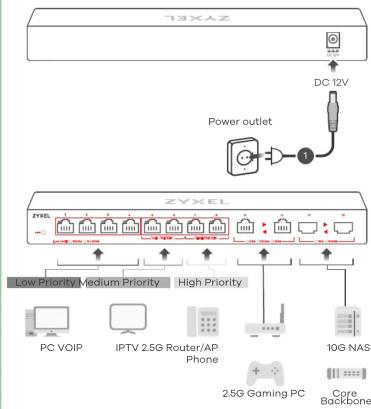
flowchart
graph TD
    A["T3XANZ"] --> B["DC 12V"]
    B --> C["Power outlet"]
    C --> D["ZYXEL"]
    D --> E["Low Priority Medium Priority"]
    D --> F["High Priority"]
    E --> G["PC VOIP"]
    F --> H["IPTV 2.5G Router/AP Phone"]
    G --> I["2.5G Gaming PC"]
    H --> I
    I --> J["Core Backbone"]
    J --> K["10G NAS"]
LEDs
| PWR | Green | On - Switch ReadyBlinking - Switch StartingOff - Switch Off |
| Ports 1-8LINK/ACT | GreenAmber | On - 1000 Mbps connection readyBlinking - Data transmittingOn - 10/100 Mbps connection readyBlinking - Data transmittingOff - No Connection |
| Ports 9-10(Left LED)(Right LED) | BlueGreenAmber | On - 2.5 Gbps connection readyBlinking - Data transmittingOn - 1000 Mbps connection readyBlinking - Data transmittingOn - 100 Mbps connection readyBlinking - Data transmittingOff - No Connection |
| Ports 11-12(Left LED)(Right LED) | BlueGreen | On - 10 Gbps connection readyBlinking - Data transmittingOn - 1000 Mbps connection readyBlinking - Data transmittingOff - No Connection |
ZYXEL
Your Networking Ally

Warranty Card
Thank you for purchasing a Zyxel product. Zyxel has a reputation for delivering high quality, high performance products and services to our customers. We recommend that you now visit the Zyxel website and register your product online. This will mean you can receive the latest firmware, drivers and product related information. If you still have further questions or enquiries related to the product, please contact our subsidiaries worldwide. Please note that warranty terms may vary by region. Full detailed information is available on our website, here: http://www.zyxel.com/support/warranty_information.shtml
Purchase Information
Zyxel Product Name:
Hardware Serial Number
Date of Purchase:
(In certain countries, the warranty will be validated with seller's signature and stamp):
Package Contents

XGS1010-12

International Power Adapter

QSG

Declaration of Conformity Safety Warnings
HU Csatlakoztasson egy megfelelő áramforrást. Várja meg a PWR fényét, hogy az működésbe bekapcsoljon. Ha a PWR jelzőfény nem villog, a készülék használatra kész.
RO Conectați la o sursă de alimentare corespunzătoare. Așteptați până se aprinde indicatorul luminos PWR pentru a porni constant. Atunci când lumina PWR nu clipește, dispozitivul este gata de utilizare.
SK Pripojte k vhodnému zdroju napájania. Počkajte na rozsvietenie kontrolky PWR. Ak kontrolka PWR nebliká, zariadenie je pripravené na použitie.
SL Priključite v ustrezno električno vtičnico. Lučka PWR v začetku utripa. Počakajte, da lučka PWR zasveti in tako pokaže, da je stikalo pripravljeno za uporabo.
BG
TR Uygun bir güç kaynağına bağlayın. Sabit şekilde AÇMAK için PWR ışığını bekleyin. PWR ışığı yanıp sönmediğinde, cihaz kullanıma hazırldır.
RU Подключите кабель питания Первоначально индикатор PWR моргает, как только он перестанет моргать, коммутатор готов к использованию.
TH เชื่อมต่อไปยังแหล่งจ่ายไฟที่เหมาะสม รองนไฟสถานะ PWR หยุดกะพริบ อุปกรณ์จะพร้อมหางานเมื่อไฟ สถานะ PWR ติดนิ่งแล้ว
-
Support Information
USA
EU, Turkey and Russia
+1800 255 4101 support@zyxel.com
https://support.zyxel.eu
Thailand Taiwan + 66 2831 5315 support@zyxel.co.th
+ 886 2 2739 9889 retail@zyxel.com.tw
EU Importer Zyxel Communications A/S Gladsaxevej 378, 2. th. 2860 Søborg, Denmark http://www.zyxel.dk
US Importer Zyxel Communications, Inc 1130 North Miller Street Anaheim, CA 92806-2001 http://www.us.zyxel.com
Copyright © 2019 Zyxel Communications Corp. All Rights Reserved.
