IB111StU3Wh - Station d'acceuil Icy Box - Notice d'utilisation et mode d'emploi gratuit
Retrouvez gratuitement la notice de l'appareil IB111StU3Wh Icy Box au format PDF.


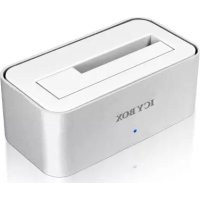
| Type de produit | Station d'accueil pour disques durs SATA |
| Marque | Icy Box |
| Modèle | IB111StU3Wh |
| Matériau du boîtier | Aluminium premium |
| Disques durs compatibles | 2,5" et 3,5" SATA, capacité illimitée |
| Interface hôte | USB 3.0 (rétrocompatible USB 2.0) |
| Débit maximal | 5 Gbit/s |
| Indicateurs LED | Alimentation et accès au disque |
| Fonctionnalités | Plug & Play, Hot Swap (remplacement à chaud) |
| Systèmes d'exploitation supportés | Windows 98/ME/2000/XP/Vista/7, Mac OS > 9.1 |
| Alimentation | Adaptateur secteur fourni |
| Contenu du colis | Station d'accueil, adaptateur secteur, câble USB 3.0, manuel |
| Couleur | Argent et blanc |
| Dimensions (estimées) | Environ 130 x 80 x 60 mm |
| Poids (estimé) | Environ 300 g |
| Entretien | Nettoyer avec un chiffon doux et sec |
| Sécurité | Débrancher l'alimentation avant de changer le disque dur |
| Pièces détachées | Adaptateur secteur et câble USB disponibles séparément |
| Réparabilité | Pièces détachées disponibles, réparation possible par un technicien |
FOIRE AUX QUESTIONS - IB111StU3Wh Icy Box
Questions des utilisateurs sur IB111StU3Wh Icy Box
0 question sur cet appareil. Repondez a celles que vous connaissez ou posez la votre.
Poser une nouvelle question sur cet appareil
Téléchargez la notice de votre Station d'acceuil au format PDF gratuitement ! Retrouvez votre notice IB111StU3Wh - Icy Box et reprennez votre appareil électronique en main. Sur cette page sont publiés tous les documents nécessaires à l'utilisation de votre appareil IB111StU3Wh de la marque Icy Box.
MODE D'EMPLOI IB111StU3Wh Icy Box
ICY BOX®
http://www.icybox.de

© Copyright 2018 by RaidSonic Technology GmbH. All Rights Reserved The information contained in this manual is believed to be accurate and reliable. RaidSonic Technology GmbH assumes no responsibility for any errors contained in this manual. RaidSonic Technology GmbH reserves the right to leave changes in the specifications and/or design of the above mentioned product without prior notice. The diagrams contained in this manual may also not fully represent the product that you are using and are there for illustration purposes only. RaidSonic Technology GmbH assumes no responsibility for any differences between the product mentioned in this manual and the product you may have.
http://www.icybox.de
ICY BOX®
- Model - Twardy dysk (HDD) - Interface - Kolor
| Model Twardy dysk (HDD) Interface Kolor | |
| IB-111StU3-Wh SATA 2,5"/3,5" USB 3.0 | Snebrey/Blaty |
- Zawartość opakowania
Stacja dokująca, zasilacz, kabel USB 3.0, instrukcja
- Cechy kluczowe
- Aluminiowa obudowa - Obukuca 2 S" i 3 S" SATA HDD, nieorganizzone motliwości
• USB 3.0 Host Interface, a2 do 5 Gb/s
• Diody LED wskazuje zasilanie oraz pracę HDD
• Wspiera USB 2.0: PC & Mac (Windows 98/ME/2000/XP/Vista/7, OS> 9.1)
• Wapiera USB 3.0: Windows XP/Vista/7
- Aplikacja
• • •
4.1 Software sterowników 4.1.1 USB 3.0 Interface
Win 2000/XP/Vista/7 (oraz Mac OS>9.1) posłada intęprosamy stęrowmik interfisbu
USB 2.0. Podczas podłączania urządzenia system operacyjny zaktualizuje sterownik
i podłączy urządzenie USB 2.0 automatycznie. Po zakończeniu instalacji, można
przyłączyć nowe urządzenie. W starszych systemach operacyjnych (np. Win 98)
trzeba zainstałowac najpierw sterownik USB 2.0, proszbę kierować się na stronę
www.kpbox.ac
4.1.2 USB 3.0 Interface
Korzystanie z USB 3.0 Interface wymaga zainstalowania kontrolera USB 3.0 w
systemie.
4.2 Uruchomienie
Aby uruchomic stację dokującą podłącz zasilacz. Możesz skontaktować się IB-
111stu3-WH de Osb 2.0 T Osb 3.0 za pořidnostním kála Osb 3.0.
4.3 Instalacja HDD
Nowy dysk HDD musi zostać najpierw zainicjowany, podzielony na partycje i sfor-
matowany przez system operacyjny, aby mógł być wyświetlony w systemie.
4.4 Zmiana HDD
IB-111StU3 wspiera funkcję Hot Plug (zmiana HDD przy włączonym komputerze),
jodnak zalecamy wyłączenie zasilania stacji dokującej przed zmianą HDD.
DL
(PL)
Podrozniki
Podręcznik
obstugl
[Non-Text]
A
struts
[Non-Text]
m = 311
(No text)
oTflatz
(2)
[Non-Text]
[Non-Text]
[Non-Text]
[Non-Text]
[Non-Text]
[Non-Text]
[Non-Text]
OS>9.1}
[Non-Text]
[Non-Text]
[Non-Text]
[Non-Text]
[Non-Text]
[Non-Text]
[Non-Text]
wnik interfejsiu
alzuje sterownko dasti, mo2pa
(пр. Win 98)
le na strone
[Non-Text]
[Non-Text]
USB 3.0w
USB 3.0 W
[Non-Text]
[Non-Text]
B. 2017
vac siq 1B-
0.
[Non-Text]
[Non-Text]
partycje i sfor-
systemie.
[Non-Text]
[Non-Text]
komputerze),
HDD.
[Non-Text]
[Non-Text]
[Non-Text]
[Non-Text]
[Non-Text]
[Non-Text]
[Non-Text]
[Non-Text]
[Non-Text]
[Non-Text]
[Non-Text]
[Non-Text]
[Non-Text]
[Non-Text]
[Non-Text]
[Non-Text]
[Non-Text]
[Non-Text]
[Non-Text]
[Non-Text]
[Non-Text]
[Non-Text]
[Non-Text]
[Non-Text]
[Non-Text]
[Non-Text]
[Non-Text]
[Non-Text]
[Non-Text]
[Non-Text]
[Non-Text]
[Non-Text]
[Non-Text]
[Non-Text]
[Non-Text]
[Non-Text]
[Non-Text]
[Non-Text]
[Non-Text]
[Non-Text]
[Non-Text]
[Non-Text]
[Non-Text]
[Non-Text]
[Non-Text]
[Non-Text]
[Non-Text]
[Non-Text]
[Non-Text]
[Non-Text]
[Non-Text]
[Non-Text]
[Non-Text]
[Non-Text]
[Non-Text]
[Non-Text]
[Non-Text]
[Non-Text]
[Non-Text]
[Non-Text]
[Non-Text]
[Non-Text]
[Non-Text]
[Non-Text]
[Non-Text]
[Non-Text]
[Non-Text]
[Non-Text]
[Non-Text]
[Non-Text]
[Non-Text]
[Non-Text]
[Non-Text]
[Non-Text]
[Non-Text]
[Non-Text]
[Non-Text]
[Non-Text]
[Non-Text]
[Non-Text]
[Non-Text]
[Non-Text]
[Non-Text]
[Non-Text]
[Non-Text]
[Non-Text]
[Non-Text]
[Non-Text]
[Non-Text]
[Non-Text]
[Non-Text]
[Non-Text]
[Non-Text]
[Non-Text]
[Non-Text]
[Non-Text]
[Non-Text]
[Non-Text]
[Non-Text]
[Non-Text]
[Non-Text]
[Non-Text]
[Non-Text]
[Non-Text]
[Non-Text]
[Non-Text]
[Non-Text]
[Non-Text]
[Non-Text]
[Non-Text]
[Non-Text]
[Non-Text]
[Non-Text]
[Non-Text]
[Non-Text]
| [5S5D] | |||||||||||
| Model: HDD Interface - Colour | |||||||||||
| Model: HDD Interface Colour | [Handbuch] | ||||||||||
| IB-111503-UWh SATA 2,7/3,5" USB 3.0 Silver/wash | ICY BOX® | ||||||||||
| 2. Package contents Docking Station, power adapter, USB 3.0 calics, manual | 1. Modell - Plotatite (HDD) - Schittlattite - Farbe | ||||||||||
| Model: HDD Schittlattite Farbe | |||||||||||
| IB-111503-UWh SATA 2,7/3,5" USB 3.0 Silver/wash | |||||||||||
| 3. Key Features Premium aluminium case Support both 2.7" to SATA HDD, capacity unlimited USB 3.0. Host Interface up 5 GHz/6. Display for lower and HDD access Support USB 3.0. Host Windows XP/Vista7 Support USB 2.0 Host: PC & Mac (Windows 98/ME/2000/XP/Vista7, OS> 9.1) Plug & Play and Hot Swap | 2. Verpackungsinhalt Docking Station, Nettoil, USB 3.0 Kabel, Bedienungsverleitung | ||||||||||
| 3. Key Features Premium aluminium case Support both 2.7" to SATA HDD, capacity unlimited USB 3.0. Host Interface up 5 GHz/6. Display for lower and HDD access Support USB 3.0. Host Windows XP/Vista7 Support USB 2.0 Host: PC & Mac (Windows 98/ME/2000/XP/Vista7, OS> 9.1). Plug & Play and Hot Swap | 3. Merknaie Hochwertiges Gehäuse aus Aluminium Competent fort, 2.7" to SASA, capacità limitée USB 3.0 Hautehesuisse bis 2.5 GHz/s LED Display for Lower and HDD access Unterstützung USB 2.0: PC & Mac (Windows 98/ME/2000/XP/Vista7, OS> 9.1). Untertaint USB 3.0: Windows XP/Vista7 Plug & Play and Hot Swap | ||||||||||
| 4. Application | 4. Anwendung | ||||||||||
| 4.1 Driver Software 4.1.1 HDD 2.0 Software | 4.1 Treibers Software 4.1.1 HDD 2.0 Software | ||||||||||
| Bit connecting to a USB 3.0 host interface the IB-111503-will normally be automatically detected. With I/O (IP) data (and Mac OS=9.1) has integrated driver for USB 2.0 interface. By connecting the device the OS will update the driver and connect the USB 2.0 device automatically. After the device installation completed you access to me from the system, please install the USB 2.0 driver for first, please refer to www.icybox.de | Bere Anschütteln wird the IB-111503-Will in der Regel automatisch erkanmt und lat betriebsernt. Wear Anschütteln sind (and Mac OS=9.1) hat integrierte Trober für die USB 2.0-Schittlattite. Bere Anschütteln des Gerätes adeuisigt das Betriebsystem automatisch sowie Trober und erkannt sie neue Gener. All others before do not installir. They may need to install the USB 2.0 driver for first, please refer to www.icybox.de | ||||||||||
| 4.1.2 HDD Interface The use of the USB 3.0 interface requires an installed USB 3.0 controller on your system. Please install the USB 3.0 driver software for the controller. | 4.1.2 HDD 2.0 Software Die Nutzung an einer USB 2.0-Schittlattite sett einen installierten USB 3.0 controller in Driven System versus. Bitte installen Sie die USB 3.0 Trober Software for the controller. | ||||||||||
| 4.2 Starting up You need power supply to enough electricity drive the HDD. With the USB 3.0 data cable you can connect the IB-111503-Will to USB 2.0 or USB 3.0 interface. | 4.2 Inbetriebnahme Um demandeigungen zu vermengen ist das Nettoil auszuhalten. Mit dem beigefügen USB 3.0 Kabitel können Sie des Gerät sowohl an USB 2.0 auch an USB 3.0 schistellen inklarten. | ||||||||||
| 4.3 HDD Initialization Data the IB-111503 supporta Hot Plug function (HDD change while the computer is also) we recommend to shut down the power of the docking station before you change the HDD. | 4.3 Feplatterinstalation Eine neue Feplatterimus zunächst vom Betriebsystem initiatiert, partitioned und formation werden, bevor se im Arbeitsplatz dargestellt wird. | ||||||||||
| 4.4 HDD Change The IB-111503 supporta Hot Plug function (HDD change while the computer is also) we recommend to shut down the power of the docking station before you change the HDD. | 4.4 Feplatternwechsel Das IB-111503 unentabild at the Hot Plug Function (Feplatternwechsel während des Anschüttens an den Laubindem Compuls), air empfehlen allerdings die Docking Station auszuhalten, um die Feplattern zu wechseln. | ||||||||||
ICY BOX®
1. Model - HDD - Interface - Colour
| Model HDD Interface Colour | |
| IB-111StU3-Wh SATA 2.5"/3.5" USB 3.0 | Silver/white |