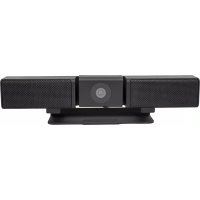
ALFSBUSB2C - Système de vidéo conférence Alfatron - Notice d'utilisation et mode d'emploi gratuit
Retrouvez gratuitement la notice de l'appareil ALFSBUSB2C Alfatron au format PDF.

| Type de produit | Videobar tout-en-un pour conférence |
| Marque | Alfatron |
| Modèle | ALFSBUSB2C |
| Résolution caméra | Full HD 1080p |
| Microphone | Réseau multi-micros intégré |
| Haut-parleur | 4.5 W |
| Connectivité | USB-C (avec câble de conversion fourni) |
| Alimentation | Adaptateur secteur DC (inclus) |
| Montage | Multi-position : horizontal, vertical, au-dessus ou devant l’écran |
| Dimensions approx. | 760 x 70 x 70 mm |
| Poids approx. | 1.5 kg |
| Systèmes d'exploitation compatibles | Windows 7/8/10 |
| Logiciels de visioconférence | GoToMeeting, Skype, Teams, etc. |
| Installation | Plug & Play : brancher l’adaptateur et le câble USB-C à l’ordinateur |
| Entretien | Nettoyage avec un chiffon doux et sec ; ne pas utiliser de produits liquides |
| Sécurité | Utiliser uniquement l’adaptateur fourni ; débrancher en cas d’orage |
| Garantie | 7 ans (limitée, selon conditions) |
| Contenu de l'emballage | Videobar, adaptateur secteur, câble USB-C, manuel |
FOIRE AUX QUESTIONS - ALFSBUSB2C Alfatron
Questions des utilisateurs sur ALFSBUSB2C Alfatron
0 question sur cet appareil. Repondez a celles que vous connaissez ou posez la votre.
Poser une nouvelle question sur cet appareil
Téléchargez la notice de votre Système de vidéo conférence au format PDF gratuitement ! Retrouvez votre notice ALFSBUSB2C - Alfatron et reprennez votre appareil électronique en main. Sur cette page sont publiés tous les documents nécessaires à l'utilisation de votre appareil ALFSBUSB2C de la marque Alfatron.
MODE D'EMPLOI ALFSBUSB2C Alfatron

ALFATRON ELECTRONICS GmbH GERMANY Alfatron ALF-SBUSB2C Videobar
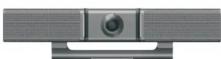
User Manual
Read this instruction carefully before using
www.alfatronelectronics.com
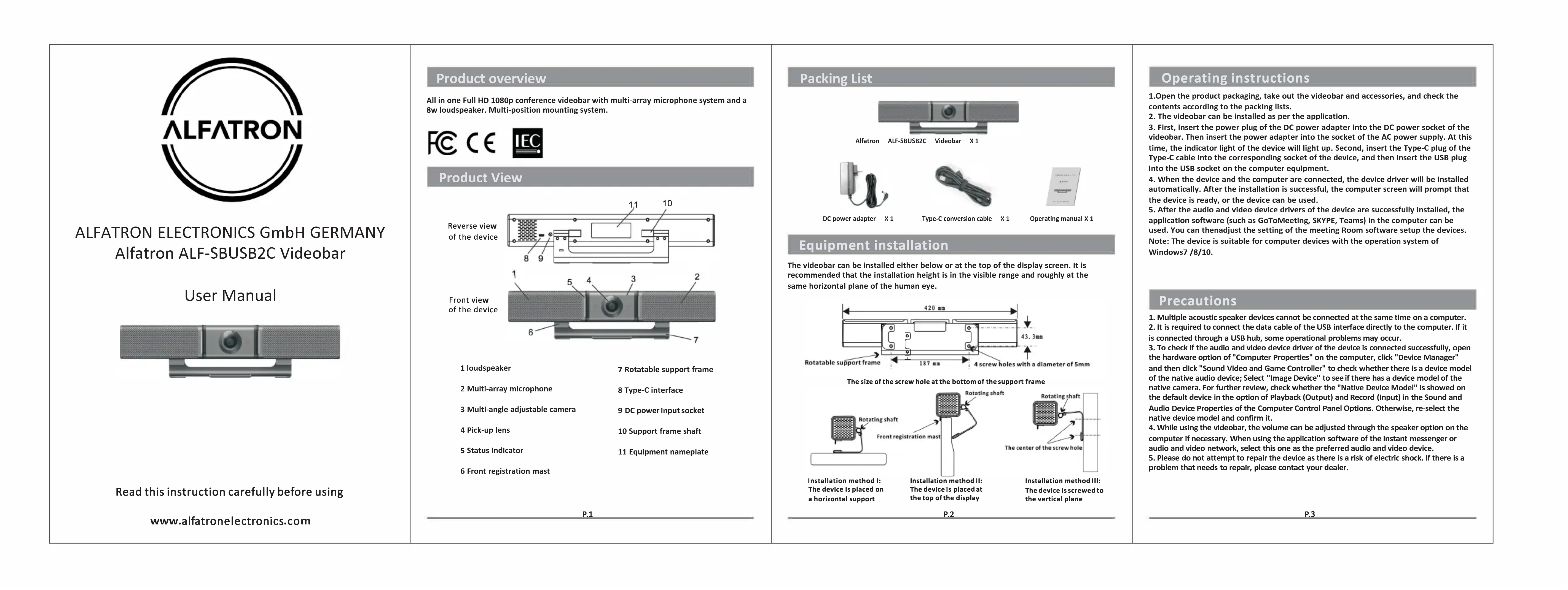
Product overview
All in One Full HD 1080p conference videobar with multi-array microphone system and a 4.5 w loudspeaker. Multi-position mounting system.

Product View
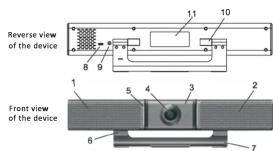
1 loudspeaker
2 Multi-array microphone
3 Multi-angle adjustable camera
4 Pick-up lens
5 Status indicator
6 Front registration mast
7 Rotatable support frame
8 Type-C Interface
9 DC power input socket
10 Support frame shaft
11 Equipment nameplate

Packing List
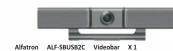

DC power adapter X1

Type-C conversion cable X1

Operating manual X 1
Equipment installation
The videoboard can be installed either before or at the top of the display screen. It is possible to use a video board with a screen that is in the visible range and roughly at the same horizontal plane of the human eye.
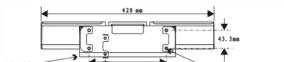
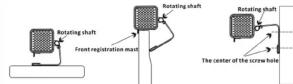
The size of the screw hole at the bottom of the
Installation method I Installation method II Installation method III The use of a horizontal support The top of the display
Installation is recommended to
the vertical plane
P.2
Operating instructions
- Open the product packaging, take out the videobar and accessories, and check the contents according to the packing lists.
- The videobar can be installed as per the application.
- First, insert the power plug of the DC power adapter into the DC power socket of the videoboard. Then insert the power adapter into the socket of the AC power supply. At this time, the indicator light of the device will light up. Second, insert the Type-C plug of the video board to the DC power port of the video device, and then insert the USB plug into the USB socket on the computer equipment.
- When the device and the computer are connected, the device driver will be installed and the device is ready to work. In this case, the computer screen will prompt that the device is ready, or the device can be used.
- After the audio and video device drivers of the device are successfully installed, the application software (such as GoToMeeting, SKYPE, Teams) in the computer can be
used. You can then adjust the setting of the meeting Room software setup the following steps to be suitable for computer devices with the operation system Windows7 / 8/10.
Precautions
- Multiple acoustic speaker devices cannot be connected at the same time on a computer.
- The number of sound levels in the system is limited by the number of the computer. It is connected through a USB hub, some operational problems may occur.
- To check if the audio and video device driver of the device is connected successfully, open the "Audio Driver" window in the "Video Driver" window, select "Audio Driver", and then click "Sound Video and Game Controller" to check whether there is a device model that supports the device.
of the native audio device; Select "image device" to see if there is a device's moderner version. This will be true whether the "native Audio Device Model" is shown on the default device in the option of Playback (Output) and Record [Input] in the Sound and Audio Device Properties of the Computer Control Panel Options. Otherwise, re-select the native device model and confirm it. - While using the videobar, the volume can be adjusted through the speaker option on the computer if necessary. When using the application software of the instant messenger or
audio and video network, select this one as the preferred audio and video device. The next step is to determine whether there is a risk of electric shock in the problem that needs to repair, please contact your dealer.

| 1. Limited warranty in respect of Alfasron Products Only 1.1 This limited warranty covers defects in materials and workmanship in this product. 1.2 Should warranty service be required, proof of purchase must be presented to the Company. The serial number on the product must be clearly visible and not have been tampered with any way possible. This limited warranty does not cover any damage, deterioration or malfunction resulting from any alteration, modification, improper or un reasonable use or maintenance, misuse, abuse, accident, neglect, exposure to excess moisture, fire, improper packing and shipping (such claims must be presented to the carrier), lighting, power surges, or other acts of nature. This limited warranty does not cover any damage, deterioration or malfunction resulting from the installation or removal of this product from any installation, any unauthorized tampering with this product, any repairs attempted by anyone unauthorized by the Company to make such repairs, or any other cause which does not relate directly to a defect in materials and/or workmanship of this product. This limited warranty does not cover equipment enclosures, cables or accessories used in conjunction with this product. This limited warranty does not cover the cost of normal maintenance. Failure of the product due to insufficient or improper maintenance is not covered. 1.4 The Company does not warrant that the product covered hereby, including, without limitation, the technology and/or integrated circuit(s) included in the product, will not become obsolete or that such items are or will remain compatible with any other product or technology with which the product may be used. 1.5 Only the original purchaser of this product is covered under this limited warranty. This limited warranty is not transferable to subsequent purchasers or owners of this product. 1.6 Unless otherwise specified, the goods are warranted in accordance with the manufacturer's product specific warranties against any defect attributable to faulty workmanship or materials, fair value and tear being excluded. 1.7 This limited warranty only covers the cost of faulty goods and does not include the cost of labor and travel to return the goods to the Company's premises. 1.8 In the event of any improper maintenance, repair or service being carried out by any third persons during the warranty period without the Company's written authorization, the limited warranty shall be void. 1.9 A 7 (seven) year limited warranty is given on the afrosaid product where used correctly according to the Company's instructions, and only with the use of the Company's components. 1.10 The Company will, at its sole option, provide one of the following three remedies to whatever extent it shall deem necessary to satisfy a proper claim under this limited warranty: | 1.10.1 Elect to repair or facilitate the repair of any defective parts within a reasonable period of time, free of any charge for the necessary parts and labour to complete the repair and restore this product to its proper operating condition; or 1.10.2 Replace this product with a direct replacement or with a similar product deemed by the Company to perform substantially the same function as the original product; or 1.10.3 Issue a refund of the original purchase price less depreciation to be determined based on the age of the product at the time remedy is sought under this limited warranty. 1.11 The Company is not obligated to provide the Customer with a substitute unit during the limited warranty period; 1.12 If this product is returned to the Company this product must be insured during shipment, with the insurance and shipping charges prepaid by the Customer. If this product is returned uninsured, the Customer assumes all risks of loss or damage during shipment. The Company will not be responsible for any costs related to the removal or re-installation of this product from or into any installation. The Company will not be responsible for any costs related to any setting up this product, any adjustment of user controls or any programming required for a specific installation of this product. 1.13 Please be aware that the Company's products and components have not been tested with competitors' products and therefore the Company cannot warrant products and/or components used in conjunction with competitor's products. 1.14 The appropriateness of the goods for the purpose intended is only warranted to the extent that the goods are used in accordance with the Company's installation, classification and usage instructions. 1.15 Any claim by the Customer which is based on any defect in the quality or condition of the goods or their failure to correspond with specification shall be notified in writing to the Company within 7 days of delivery or (where the defect or failure was not apparent on reasonable inspection by the Customer) within a reasonable time after discovery of the defect or failure, but, in any event, within 6 months of delivery. 1.16 If delivery is not refused, and the Customer does not notify the Company accordingly, the Customer may not reject the Company and the Company shall have no liability and the Customer shall pay the price as if the goods had been delivered in accordance with the Agreement. 1.17 THE MAXIMUM LIABILITY OF THE COMPANY UNDER THIS LIMITED WARRANTY SHALL NOT EXCEED THE ACTUAL PURCHASE PRICE PAID FOR THE PRODUCT. |
| P.5 | P.6 |