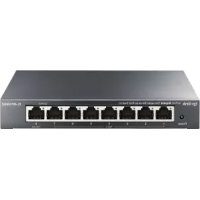
TLRP108GE - Commutateur TP-LINK - Notice d'utilisation et mode d'emploi gratuit
Retrouvez gratuitement la notice de l'appareil TLRP108GE TP-LINK au format PDF.


| Type de produit | Commutateur Gigabit Managed Reverse PoE |
| Marque | TP-Link |
| Modèle | TL-RP108GE |
| Ports | 7 ports Gigabit PoE-in (Passive PoE, 24/48 V), 1 port Gigabit PoE-out, 1 port DC out (5/12 V) |
| Capacité de commutation | 16 Gbit/s |
| Dimensions (L × P × H) | 158 × 99,1 × 25 mm (6,2 × 3,9 × 1,0 po) |
| Poids | Environ 200 g (estimation) |
| Alimentation | Passive PoE sur ports PoE-in (24/48 V CC, mélange non supporté) |
| Consommation électrique | Variable selon l’alimentation PoE reçue |
| Fonctions de gestion | VLAN, IGMP Snooping, QoS, gestion via navigateur Web ou utilitaire |
| Installation | Sur bureau ou mural |
| Température de fonctionnement | 0 °C à 45 °C (32 °F à 113 °F) |
| Température de stockage | -40 °C à 70 °C (-40 °F à 158 °F) |
| Humidité de fonctionnement | 10 % à 90 % HR (sans condensation) |
| Humidité de stockage | 5 % à 90 % HR (sans condensation) |
| Normes PoE | Passive PoE (broches 4/5+ et 7/8-) |
| Entretien et nettoyage | Débrancher l’appareil avant nettoyage. Utiliser un chiffon doux et sec. Ne pas utiliser de produits chimiques. |
| Sécurité | Utiliser uniquement dans un environnement intérieur sec. Ne pas exposer à l’eau ou à une humidité excessive. |
| Informations générales | Commutateur Reverse PoE conçu pour alimenter des dispositifs PoE (CPE, etc.) à partir d’une alimentation PoE entrante. Idéal pour les déploiements où l’alimentation est limitée. |
FOIRE AUX QUESTIONS - TLRP108GE TP-LINK
Questions des utilisateurs sur TLRP108GE TP-LINK
0 question sur cet appareil. Repondez a celles que vous connaissez ou posez la votre.
Poser une nouvelle question sur cet appareil
Téléchargez la notice de votre Commutateur au format PDF gratuitement ! Retrouvez votre notice TLRP108GE - TP-LINK et reprennez votre appareil électronique en main. Sur cette page sont publiés tous les documents nécessaires à l'utilisation de votre appareil TLRP108GE de la marque TP-LINK.
MODE D'EMPLOI TLRP108GE TP-LINK
Simple Way for Long-Range Networking
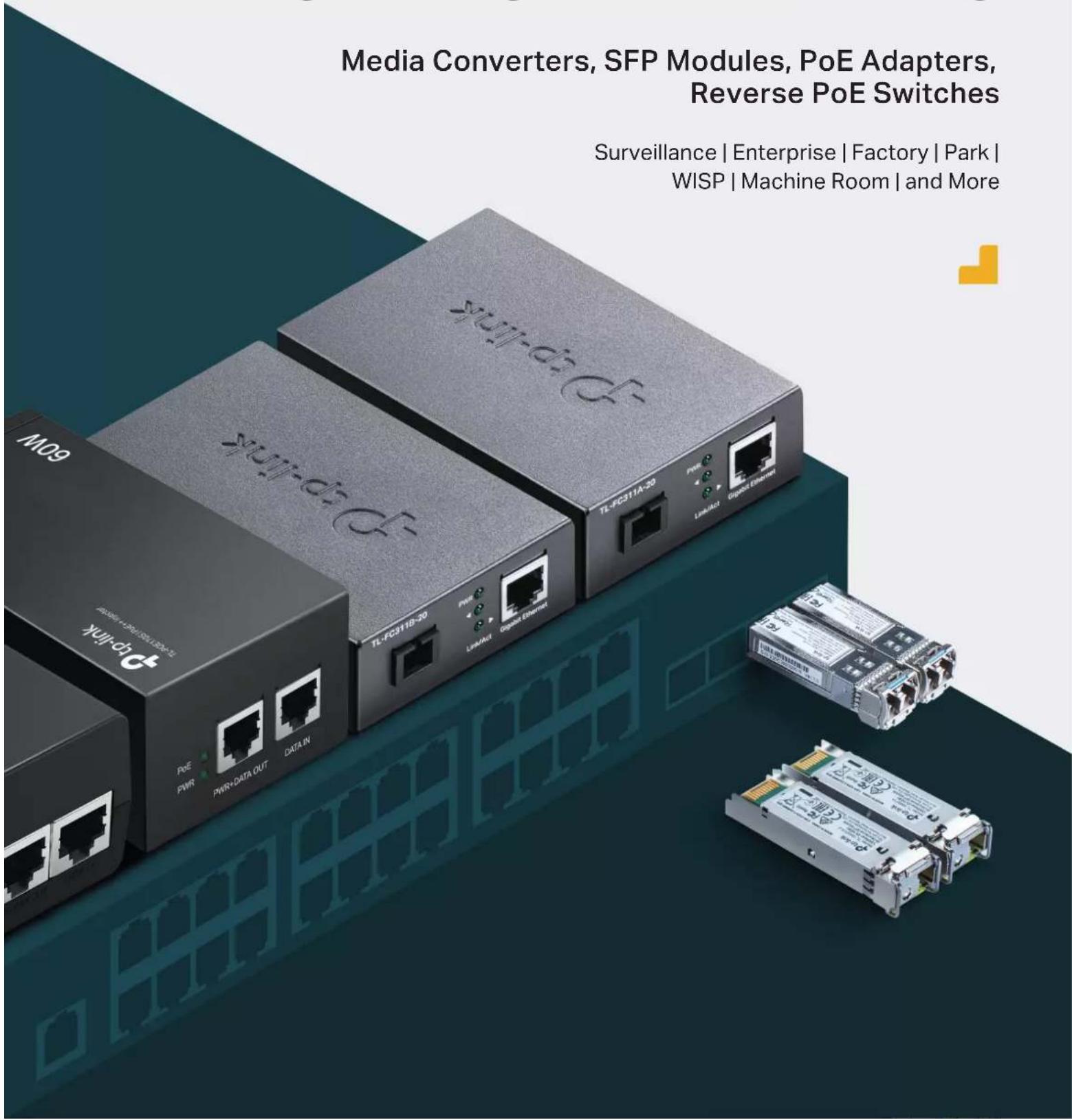
Media Converters, SFP Modules, PoE Adapters, Reverse PoE Switches
Surveillance | Enterprise | Factory | Park | WISP | Machine Room | and More
text_image
Media Converters, SFP Modules, PoE Adapters, Reverse PoE Switches Surveillance | Enterprise | Factory | Park | WISP | Machine Room | and MoreMedia Converters—Simple Way to Overcome the Distance
TP-Link offers 100 Mbps and 1000 Mbps media converters to realize reliable network connections, making the long-distance network deployments of surveillance cameras in businesses, factories, and parks simpler.
- Flexible Selections of Distance and Speed
A wide range of media converters are available, offering different maximum transmission distances of between 2 km to 20 km. Different speeds provide flexible deployment options.
Cost Effective Solution with WDM\*
WDM (Wave Division Multiplexing) Technology enables you to transmit and receive data over one single fiber strand instead of two.
Stable Network Transmission
The stability of fiber transmission guarantees our stable monitoring of sensitive areas and point-to-point connections.
- Innovative Combination of PoE and Fiber\*\*
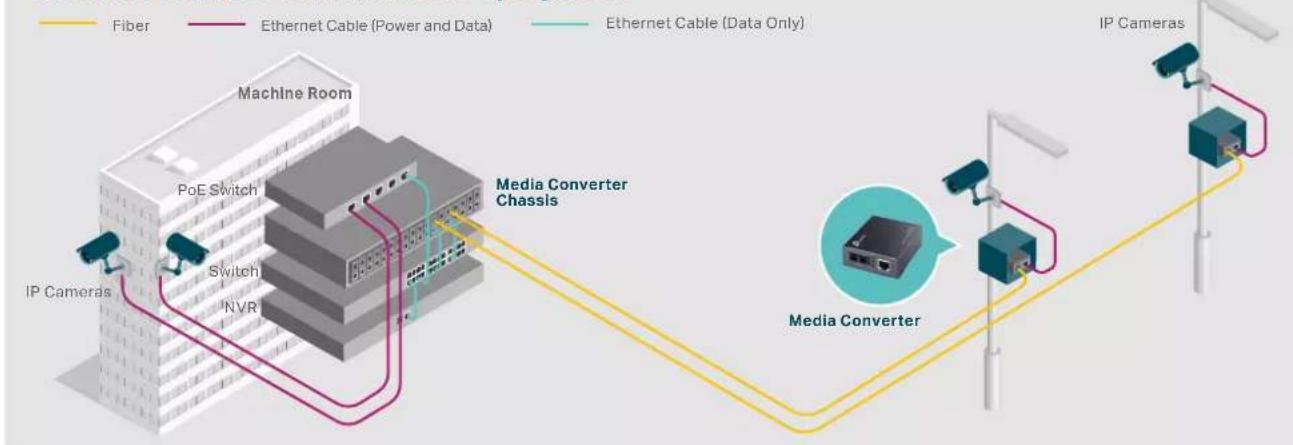
The PoE output port of media converter provides a direct data and power connection to the IP camera, making remote camera deployment easier and more convenient.
100 Mbps Media Converters Benefit Flexible Surveillance
TP-Link Fast Ethernet Media Converters are designed to address the needs of flexible long-range surveillance deployment with optical fibers. It provides an economical path towards extending the distance of an existing network.
Ideal for Flexible Surveillance Deployment
flowchart
graph TD
    A["IP Cameras"] --> B["Media Converter"]
    B --> C["Media Converter Chassis"]
    C --> D["Machine Room"]
    D --> E["IP Cameras"]
    style A fill:#f9f,stroke:#333
    style B fill:#ccf,stroke:#333
    style C fill:#cfc,stroke:#333
    style D fill:#fcc,stroke:#333
    subgraph MediaConverterChassis
        B
        C
    end
    subgraph IPCamers
        B
        C
    end
    D -->|Fiber| E
    D -->|Ethernet Cable (Power and Data)| E
    D -->|Ethernet Cable (Data Only)| E
    style D fill:#fff,stroke:#333,stroke-width:2px
    style B fill:#fff,stroke:#333,stroke-width:2px

text_image
Enterprise Surveillance Park
text_image
Surveillance Campus Surveillance
natural_image
Exterior view of a modern office building with autumn trees in the foreground (no visible signage or text)TP-Link 100 Mbps Media Converters at a Glance
| Product Picture |  |  |  |  |  |  |  |
| Model | MC100CM | MC110CS | MC111CS | MC112CS | TL-FC111A-20 | TL-FC111B-20 | TL-FC111PB-20 |
| Power Input | 9V/0.6A | 5V/0.6A | 4BV/0.5A | ||||
| Fiber Ports 2×100 Mbps SC Fiber Ports | 1×100 Mbps SC Fiber Port | 1×100 Mbps SC Fiber Port | |||||
| Copper Ports | 1×100 Mbps RJ45 Port | 1×100 Mbps RJ45 Port | 1×100 Mbps RJ45 PoE Port | ||||
| Transmission Distance | 2 km | 20 km | 20 km | ||||
| Fiber Type | Multi-Mode | Single-Mode | Single-Mode | ||||
| Fiber Number | Dual Fibers | Single Fiber | Single Fiber | ||||
| Wavelength | 1310 nm | TX: 1550 nmRX: 1310 nm | TX: 1310 nmRX: 1550 nm | TX: 1550 nmRX: 1310 nm | TX: 1310 nmRX: 1550 nm | TX: 1310 nmRX: 1550 nm | |
| Dimensions (W × D × H) | 3.7×2.9×1.1 in (94.5×73.0×27.0 mm) | ||||||
| Operating Temperature | 0-40°C (32-104°F) | 0-50°C (32-122°F) | |||||
| Environment | Storage Temperature: -40-70°C (-40-158°F)Operating Humidity: 10-90% RH Non-Condensing; Storage Humidity: 5-90% RH Non-Condensing | ||||||
Gigabit Media Converters—Long-Range Connections with Fiber
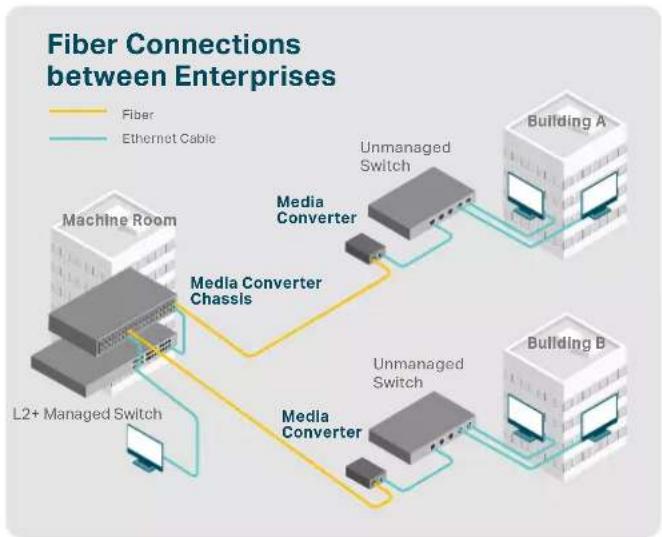
TP-Link Gigabit Media Converters easily extend the distance of an existing gigabit network. Long-range point-to-point connections are easily built with the gigabit fiber converters, making them ideal for connecting the network in another building, remote surveillance system, and automated factory equipment.
flowchart
graph TD
    A["Machine Room"] -->|Media Converter Chassis| B["Unmanaged Switch"]
    A -->|Media Converter Chassis| C["Unmanaged Switch"]
    B --> D["Building A"]
    C --> E["Building B"]
    F["L2+ Managed Switch"] --> A
    G["Fiber"] --> A
    H["Ethernet Cable"] --> B & C
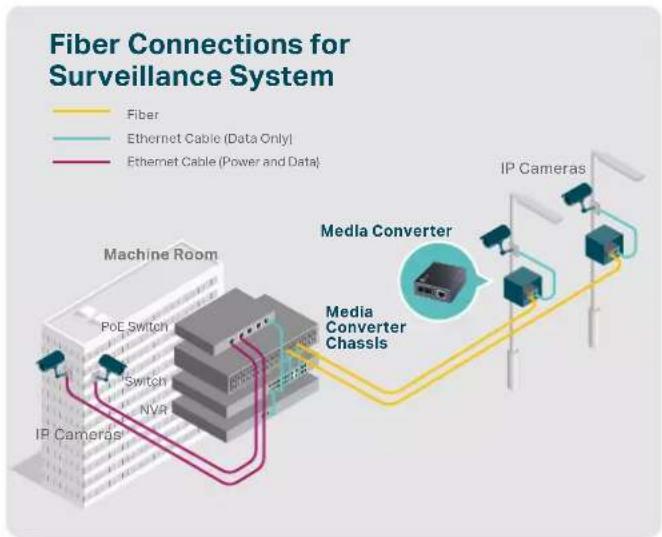
flowchart
graph LR
    A["IP Cameras"] --> B["Media Converter"]
    B --> C["Media Converter Chassis"]
    C --> D["Machine Room"]
    style A fill:#f9f,stroke:#333
    style D fill:#bbf,stroke:#333
    note1["Network Type: Fiber, Ethernet Cable (Data Only), Ethernet Cable (Power and Data)"]
    note2["Network Type: Fiber, Ethernet Cable (Data Only), Ethernet Cable (Power and Data)"]

text_image
Enterprise Networks
text_image
Manufacturing Equipment
text_image
Surveillance NetworksTP-Link Gigabit Media Converters at a Glance
| Product Picture |  |  |  |  |  |  |  |
| Model | MC200CM | MC210CS | MC220L | TL-FC311A-2 | TL-FC311B-2 | TL-FC311A-20 | TL-FC311B-20 |
| Power Input | 9W0.6A | 5W0.6A | |||||
| Fiber Ports 2×1000 Mbps SC Fiber Ports 1×Cigabit SFP Port | 1×1000 Mbps SC Fiber Port | ||||||
| Copper Ports | 1×10/100/1000 Mbps RJ45 Port (Auto Negotiation) | 1×10/100/1000 Mbps RJ45 Port (Auto Negotiation) | |||||
| Transmission Distance | 550 m | 20 km | Depends on the usedSFP module | 2 km | 20 km | ||
| Fiber Type | Multi-Mode | Single-Mode | Single-Mode | ||||
| Fiber Number | Dual Fibers | Single Fiber | |||||
| Wavelength 850 nm | 1310 nm | TX: 1550 nmRX: 1310 nm | TX: 1310 nmRX: 1550 nm | TX: 1550 nmRX: 1310 nm | TX: 1310 nmRX: 1550 nm | ||
| Dimensions (W × D × H) | 3.7×2.9×1.1 in (94.5×73.0×27.0 mm) | ||||||
| Operating Temperature | 0-40°C (32-104°F) | 0-50°C (32-122°F) | |||||
| Environment | Storage Temperature: -40-70°C (-40-158°F)Operating Humidity: 10-90% RH Non-Condensing; Storage Humidity: 5-90% RH Non-Condensing | ||||||
Power Chassis—Ensure the Scalability of Installation
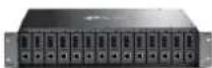
TL-MC1400
• Up to 14 Media Converter Units
• 9 VDC / 0.6 A Power Output
• Redundant Power Supply
- Hot-Swappable
- Mounted Two Cooling Fans for Better Ventilation
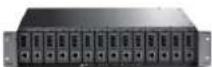
TL-FC1420
• Up to 14 Media Converter Units
- 5 VDC / 0.6 A Power Output
• Redundant Power Supply
- Hot-Swappable
• Fairless
SFP/SFP+ Modules—High-Speed Fiber Connections
TP-Link offers a variety of fiber modules to suit your fiber connectivity applications. Multi-mode and single-mode modules with 1000Base SFP or 10GBase SFP+ ports are available, ideal for linking enterprise fiber networks, campus fiber networks, ISP networks, and more.
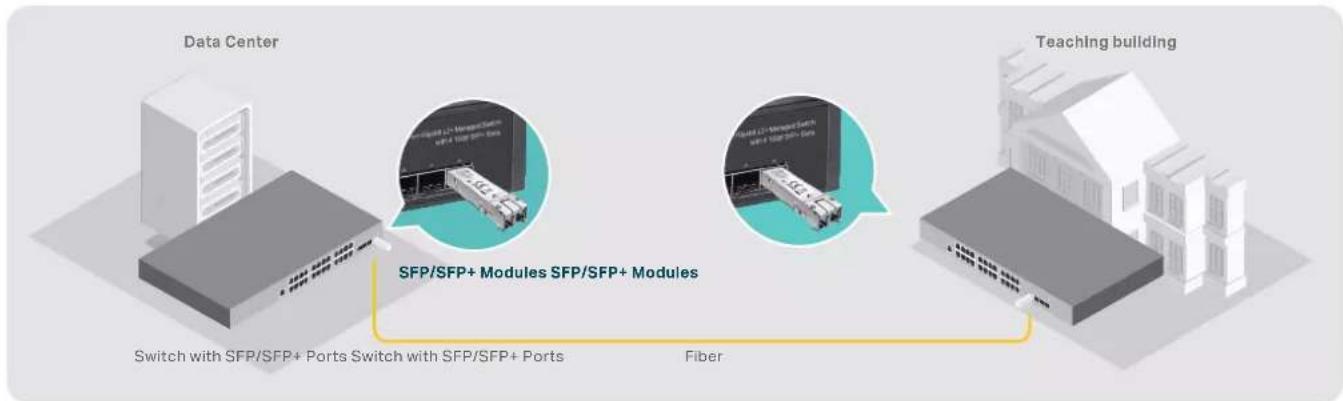
flowchart
graph LR
    A["Data Center"] --> B["Switch with SFP/SFP+ Ports Switch with SFP/SFP+ Ports"]
    B --> C["Fiber"]
    D["Teaching building"] --> E["SFP/SFP+ Modules SFP/SFP+ Modules"]
    E --> F["Switch with SFP/SFP+ Ports Switch with SFP/SFP+ Ports"]
    style A fill:#f9f,stroke:#333
    style D fill:#f9f,stroke:#333
    style E fill:#ccf,stroke:#333

text_image
Campus Networks Enterpr
text_image
e Networks ISP Networks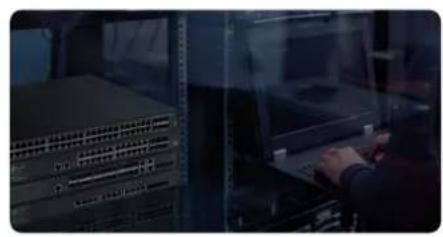
natural_image
Interior view of a server room with rack-mounted server racks and a person interacting with a laptop (no visible text or symbols)TP-Link SFP/SFP+ Modules at a Glance
| Product Picture |  |  |  |  |  |  |  |  |  |  |
| Model TL-SMS11LS TL-SMS21A | TL-SM321BTL-SM321A | TL-SM321BTL-SM321A | SM-PM321A | SM-PM321A | SM-PM321A | TL-SM321A-2 | TL-SM321B-2 | TL-SM3310-T | TL-SM331T | |
| Data Rate 1.25 Gbps | 10 Gbps | 10.31 Gbps | 1.25 Gbps | |||||||
| Fiber Ports | 2× LC/UPC DuplexPorts | 2× LC/UPC DuplexPorts | 1× LC/UPC Simplex Port | - | ||||||
| RJ45 Ports | - | 1× 10 GbpsRJ45 Port | 1× 1000 MbpsRJ45 Port | |||||||
| Transmission Distance | 10 km | 300 m | 550 m | 20 km | 20 km | 2 km | 31 m | 100 m | ||
| Transmission Media Single Single Mode Fiber | Dual Single Mode Fibers | Dual Multi-Mode Fibers | Dual Multi-Mode Fibers | Dual Single-Mode Fibers | Cat6a or aboveEthernet Cable | Cat 5c or aboveEthernet Cable | ||||
| Wavelength | 1310 nm | 850 nm | 850 nm | 1310 nm | TX: 1550 nmRX: 1310 nm | TX: 1310 nmRX: 1550 nm | TX: 1550 nmRX: 1310 nm | TX: 1310 nmRX: 1550 nm | - | - |
| Dimensions (W × D × H) | 2.2*0.5*0.4 in(56.7*13.9*10.35 mm) | 2.4*0.6*0.5 in(61.3*14.5*12.2 mm) | 2.2*0.5*0.5 in(55.4*13.7*12.9 mm) | 2.2*0.6*0.5 in (55.4*14.6*12.9 mm) | 2.7*0.5*0.5 in(67.4*13.75*13.8 mm) | |||||
| Operating Temperature | 0-70°C (32-158°F) | |||||||||
| Environment | Storage Temperature: -40-85°C (-40-185°F);Operating Humidity: 10-90% RH Non-Condensing; Storage Humidity: 5-90% RH Non-Condensing | |||||||||
TP-Link 10G SFP+ Direct Attach Cable at a Glance
| Product Picture |  |  |
| Model TL-SM5220-3MTL-SM5220-1M | ||
| Length | 3 m 1 m | |
| Connector Type | 10G SFP+ connector on both sides | |
| Cable Type | Passive Twinax | |
| Data Rate | 10 Gbps | |
| Environment | Operating Temperature: 0–70 °C (32–158°F); Storage Temperature: -40–80 °C (-40–176°F); Operating Humidity: 10–90% RH Non-Condensing; Storage Humidity: 5–90% RH Non-Condensing | |
PoE Adapters—Easier Network Deployment
PoE Injector and Splitter
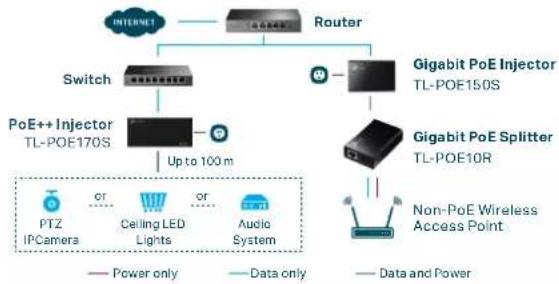
flowchart
graph TD
    A["INTERNET"] --> B["Router"]
    B --> C["Switch"]
    B --> D["Gigabit PoE Injector TL-POE150S"]
    C --> E["PoE++ Injector TL-POE170S"]
    D --> F["Gigabit PoE Splitter TL-POE10R"]
    E --> G["PTZ IPCamera"]
    E --> H["Ceiling LED Lights"]
    E --> I["Audio System"]
    F --> J["Non-PoE Wireless Access Point"]
    style A fill:#f9f,stroke:#333
    style B fill:#ccf,stroke:#333
    style C fill:#cfc,stroke:#333
    style D fill:#fcc,stroke:#333
    style E fill:#cff,stroke:#333
    style F fill:#ffc,stroke:#333
    style G fill:#fff,stroke:#333
    style H fill:#fff,stroke:#333
    style I fill:#fff,stroke:#333
    style J fill:#fff,stroke:#333
Passive PoE Adapter
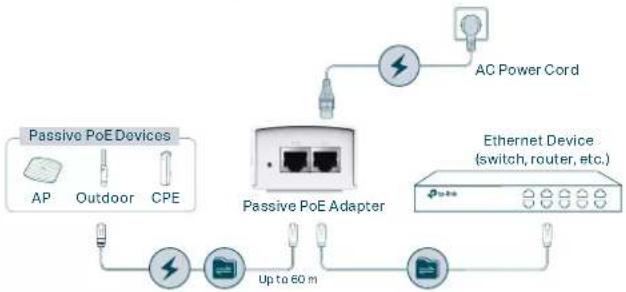
flowchart
graph TD
    A["Passive PoE Devices"] --> B["AP"]
    A --> C["Outdoor"]
    A --> D["CPE"]
    B --> E["Switch"]
    C --> E
    D --> E
    E --> F["AC Power Cord"]
    F --> G["Switch"]
    H["Passive PoE Adapter"] --> I["Switch"]
    J["Ethernet Device (switch, router, etc.)"] --> K["Switch"]
    L["Up to 60 m"] --> M["Switch"]
    M --> N["Switch"]
| Product Picture | ||||||
| Model | TL-POE170S TL-POE160S TL-POE150S TL-POE10R TL-POE2412G TL-POE4824G | |||||
| Product Description | PoE++ Injector PoE+ Injector PoE Injector PoE Splitter 24V Passive PoE Adapter 48V Passive PoE Adapter | |||||
| RJ45 Ports | 1× Gigabit RJ45 LAN Port1× Gigabit RJ45 PoE Port(802.3af/at/bt type3) | 1× Gigabit RJ45 LAN Port1× Gigabit RJ45 PoE Port(802.3af/at) | 1× Gigabit RJ45 LAN Port1× Gigabit RJ45 PoE Port (802.3af) | 1× Gigabit RJ45 LAN Port1× Gigabit RJ45 PoE Port (Passive PoE) | ||
| Power | Input: 100–240 VOutput: Max. 60 W (Auto-Determination) | Input: 100–240 V, 1.0AOutput: Max. 30 W (Auto-Determination) | Input: 48 VDC, 0.5 AOutput: Max. 15.4 W (Auto-Determination) | Input: Max. 15.4 W (Auto-Determination)Output: 5/9/12 VDC | Input: 100–240 V 0.4 AOutput: 24 V 0.5 A | Input: 100–240 V 0.8 AOutput: 48 V 0.5 A |
| Plug and Play | ····· | · | · | |||
| Dimensions (W × D × H) | 6.1×2.8×1.7 in(155×70×42 mm) | 4.9×2.3×1.4 in(125×59.4×36.8 mm) | 3.2×2.1×0.9 in (80.8×54×24 mm) | 3.4×1.7×1.4 in(85.8×43.9×35 mm) | 4.3×2.3×1.5 in(110×57×38.8 mm) | |
| Operating Temperature | 0–45 °C (32–113 °F) | 0–40 °C (32–104 °F) | ||||
| Environment | Storage Temperature: -40–70 °C (-40–158 °F);Operating Humidity: 10–90% RH Non-Condensing;Storage Humidity: 5–90% RH Non-Condensing | |||||
Reverse PoE Switches—Simplify Installation for PoE Devices
The 8-Port Gigabit Managed Reverse PoE Switch TL-RP108GE has seven gigabit PoE input ports that allow it to receive power from user outlets via PoE injectors. Equipped with one PoE output port, the switch can supply power to CPEs and similar devices via Port 8. The DC output port supports both 5 V and 12 V optional output voltage and can be used to power devices like ONTs. Enhanced with basic management features like VLAN and QoS, TL-RP108GE shares the same software functions with TP-Link Easy Smart switches.
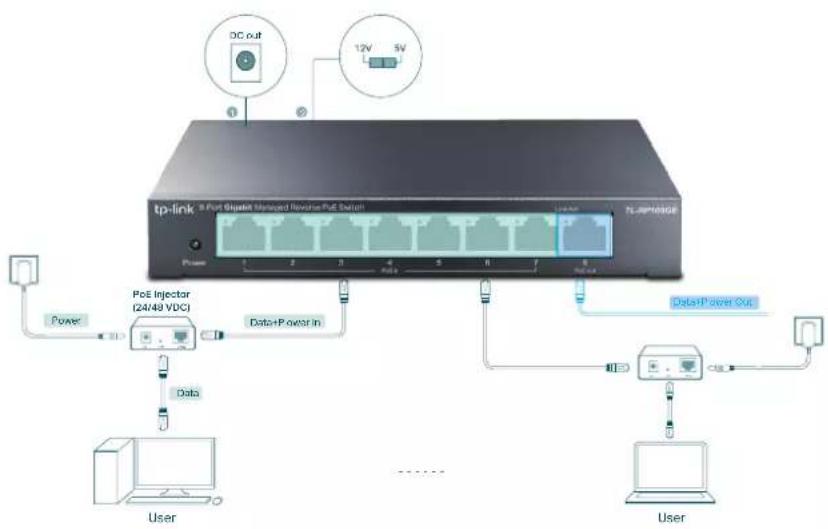
flowchart
graph TD
    A["tp-link 8 Port Gigabit Managed Reverse PoE Switch"] -->|1| B["Power"]
    A -->|2| C["Data+Power In"]
    A -->|3| D["Data+Power Out"]
    A -->|4| E["User"]
    A -->|5| F["User"]
    A -->|6| G["User"]
    A -->|7| H["User"]
    A -->|8| I["User"]
    A -->|9| J["User"]
    A -->|10| K["User"]
    A -->|11| L["User"]
    A -->|12V 5V| M["DC out"]
| Model | TL-RP108GE |
| Port | 7 Gigabit Passive PoE-in RJ45 Ports Voltage: 24/48 V (mixture is not supported)1 Gigabit Passive PoE-out RJ45 Port Voltage: depending on the input voltage of PoE-in ports1 DC Output Port Voltage: 5/12 V |
| Power pin of Ethernet cable | 4/5+ 7/8- |
| PoE Supply | Passive PoE |
| Dimensions | 6.2 × 3.9 × 1.0 in (158 × 99.1 × 25 mm) |
| Installation | Desktop/Wall-Mounting |
| Switching Capacity | 16 Gbps |
| Features | VLANIGMP SnoopingQoSManageable via web browser or Utility |
Reliable and Professional Quality Assurance

Continuous Innovations
Independent research and development.

Vertical Integration
In-house manufacturing maintains the quality of every component.

High-Level Manufacturing
Decades of experience combined with high-tech supporting facilities.

Complete Quality Control
Develops, builds, crafts and sells products from start to finish, running rigorous whole-process quality-control tests.
Powerful Support
In addition to the Pharos solution and high-quality products, TP-Link also provides whole services for complete client satisfaction.
TP-Link Partner Program
https://partner.tp-link.com/
TP-Link's success as a provider of network solutions has been built on its relationship and unrivaled commitment to its partners. For Value-Added Resellers (VARs) and System Integrators (SIs) looking for access to even better deals and tailored support, TP-Link has designed the TP-Link Partner Program to reward loyalty and help grow business.

Deal Registration
Sales Tools
Knowledge Base Training & Certification
Marketing Materials
Promotions
Support
Join TP-Link Partner Program, Earn More Margin
Note: The Partner Program and benefits may vary according to your region. Please contact your local TP-Link representative for more information.
SMB Community
https://community.tp-link.com/en/business/

Technical support and case sharing.
Your direct dialogue with TP-Link.
When it comes to SMB, we know you want to learn more...



Forums Stories Knowledge Base
Excellent Pre- and After-Sales Services
TP-Link provides not only products with outstanding quality but also whole services for complete client satisfaction.

text_image
After-Sales Services • Global Call Center Providing Hotline Support • 24/7 Post-Sales Email Service • Online SMB Community
text_image
Quality of Service • Replacement and Warranty • Constant Firmware Updates from the Cloud Service